Page 213 of 411
4 131
Features of your vehicle
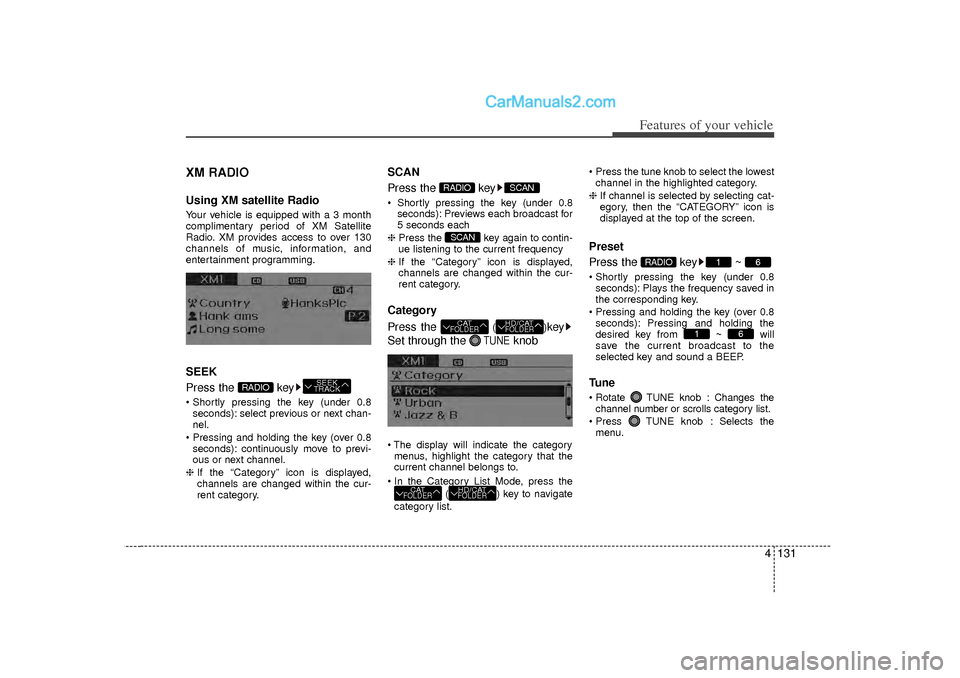
XM RADIOUsing XM satellite RadioYour vehicle is equipped with a 3 month
complimentary period of XM Satellite
Radio. XM provides access to over 130
channels of music, information, and
entertainment programming.SEEK
Press the key Shortly pressing the key (under 0.8seconds): select previous or next chan-
nel.
Pressing and holding the key (over 0.8 seconds): continuously move to previ-
ous or next channel.
❈ If the “Category” icon is displayed,
channels are changed within the cur-
rent category.
SCAN
Press the key Shortly pressing the key (under 0.8
seconds): Previews each broadcast for
5 seconds each
❈ Press the key again to contin-
ue listening to the current frequency
❈ If the “Category” icon is displayed,
channels are changed within the cur-
rent category.Category
Press the
()
key
Set through the
TUNE
knob
The display will indicate the category menus, highlight the category that the
current channel belongs to.
In the Category List Mode, press the ( ) key to navigate
category list. Press the tune knob to select the lowest
channel in the highlighted category.
❈ If channel is selected by selecting cat-
egory, then the “CATEGORY” icon is
displayed at the top of the screen.
Preset
Press the key ~ Shortly pressing the key (under 0.8
seconds): Plays the frequency saved in
the corresponding key.
Pressing and holding the key (over 0.8 seconds): Pressing and holding the
desired key from ~ will
save the current broadcast to the
selected key and sound a BEEP.Tune Rotate TUNE knob : Changes thechannel number or scrolls category list.
Press TUNE knob : Selects the menu.
6
1
6
1
RADIO
HD/CATFOLDER
CATFOLDER
HD/CATFOLDER
CATFOLDERSCAN
SCAN
RADIO
SEEK
TRACK
RADIO
Page 214 of 411
Features of your vehicle132
4MenuSelect category menu through the
TUNE knob Press the key
Select [ Info] through the TUNE
knob or keyInfo (Information)
Displays the Artist/Song info of the cur-
rent song.
1
MENU
Page 215 of 411
4 133
Features of your vehicle
Care of disc If the temperature inside the car is toohigh, open the car windows to ventilate
before using the system.
It is illegal to copy and use MP3/WMA files without permission. Use CDs that
are created only by lawful means.
Do not apply volatile agents, such as benzene and thinner, normal cleaners
and magnetic sprays made for ana-
logue disc onto CDs.
To prevent the disc surface from get- ting damaged, hold CDs by the edges
or the center hole only.
Clean the disc surface with a piece of soft cloth before playback (wipe it from
the center to the outside edge).
Do not damage the disc surface or attach pieces of sticky tape or paper.
Make certain only CDs are inserted into the CD player (Do not insert more
than one CD at a time).
Keep CDs in their cases after use to protect them from scratches or dirt.
Depending on the type of CD-R/CD-RW
CDs, certain CDs may not operate nor-
mally according to manufacturing compa-
nies or making and recording methods. In
such circumstances, continued use may
cause malfunctions to your audio system.
\b \b NOTICE
- Playing an
Incompatible Copy
Protected Audio CD
Some copy protected CDs, which do not
comply with international audio CD
standards (Red Book), may not play on
your car audio. Please note that inabili-
ties to properly play a copy protected
CD may indicate that the CD is defec-
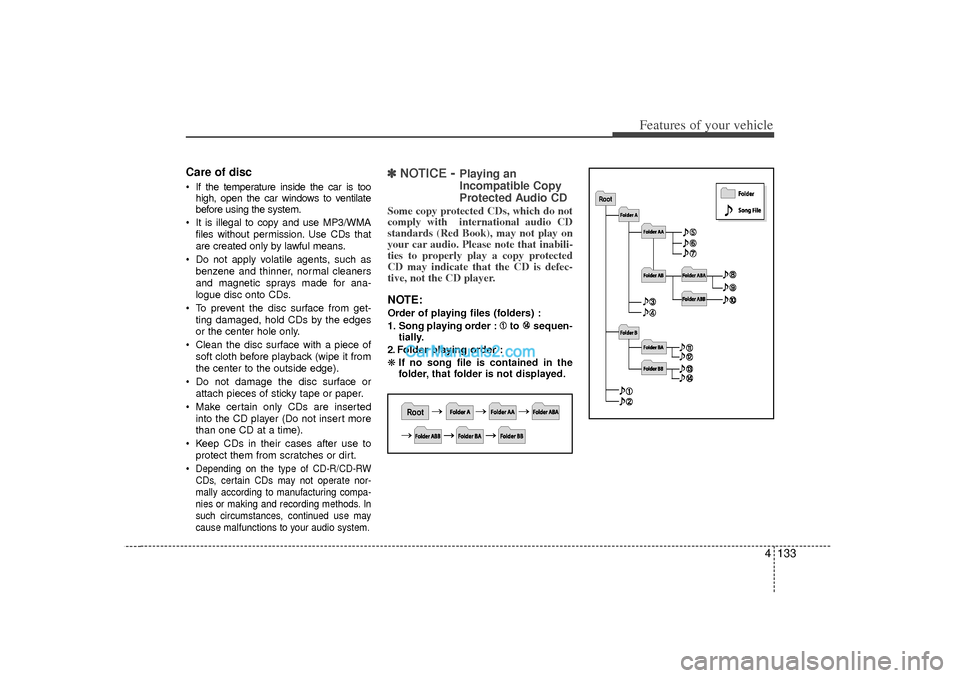
tive, not the CD player.NOTE:Order of playing files (folders) :
1. Song playing order : to sequen-
tially.
2. Folder playing order :
❋ If no song file is contained in the
folder, that folder is not displayed.
Page 220 of 411
Features of your vehicle138
4BASIC METHOD OF USE :
Audio CD / MP3 CD / USB /
iPod / My MusicPress the key to change the mod
mode in order of CD
➟USB(iPod)
➟AUX
➟My Music
➟BT Audio.
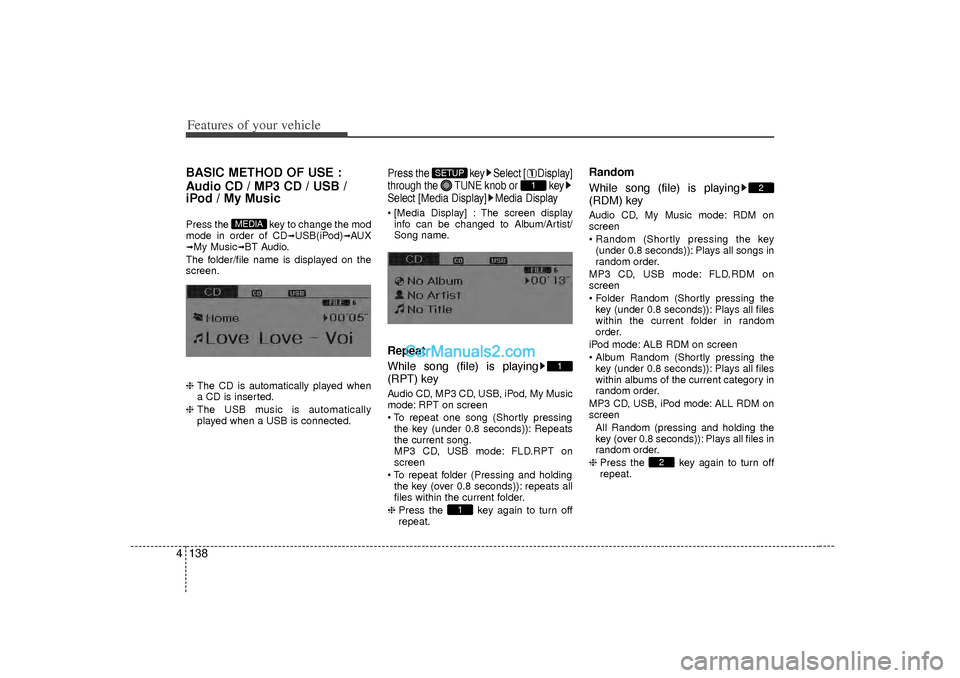
The folder/file name is displayed on the
screen.
❈ The CD is automatically played when
a CD is inserted.
❈ The USB music is automatically
played when a USB is connected.
Press the key Select [ Display]
through the TUNE knob or key
Select [Media Display] Media Display [Media Display] : The screen display
info can be changed to Album/Artist/
Song name.Repeat
While song (file) is playing
(RPT) keyAudio CD, MP3 CD, USB, iPod, My Music
mode: RPT on screen
To repeat one song (Shortly pressingthe key (under 0.8 seconds)): Repeats
the current song.
MP3 CD, USB mode: FLD.RPT on
screen
To repeat folder (Pressing and holding the key (over 0.8 seconds)): repeats all
files within the current folder.
❈ Press the key again to turn off
repeat.
Random
While song (file) is playing
(RDM) keyAudio CD, My Music mode: RDM on
screen
Random (Shortly pressing the key
(under 0.8 seconds)): Plays all songs in
random order.
MP3 CD, USB mode: FLD.RDM on
screen
Folder Random (Shortly pressing the key (under 0.8 seconds)): Plays all files
within the current folder in random
order.
iPod mode: ALB RDM on screen
Album Random (Shortly pressing the key (under 0.8 seconds)): Plays all files
within albums of the current category in
random order.
MP3 CD, USB, iPod mode: ALL RDM on
screen All Random (pressing and holding thekey (over 0.8 seconds)): Plays all files in
random order.
❈ Press the key again to turn off
repeat.
2
2
1
1
1
SETUP
MEDIA
Page 222 of 411
Features of your vehicle140
4MENU : Audio CDPress the CD MP3 mode key to
set the Repeat, Random, Information
features.Repeat
Press the key Set [ RPT]
through the
TUNE
knob or
key to repeat the current song.
❈ Press RPT again to turn off.Random
Press the key Set [ RDM]
through the
TUNE
knob or
key to randomly play songs within
the current folder.
❈ Press RDM again to turn off.
Information
Press the key Set [ Info]
through the
TUNE
knob or
key to display information of the cur-
rent song.
❈ Press the key to turn off info
display.
MENU
3
MENU
2
MENU
1
MENU
MENU
Page 223 of 411
4 141
Features of your vehicle
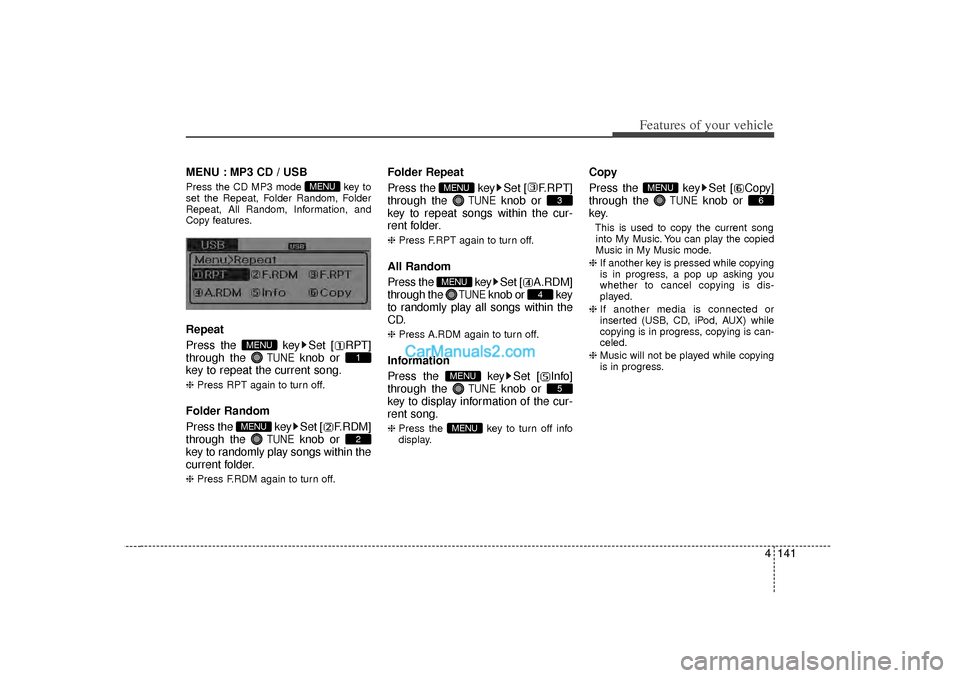
MENU : MP3 CD / USBPress the CD MP3 mode key to
set the Repeat, Folder Random, Folder
Repeat, All Random, Information, and
Copy features.Repeat
Press the key Set [ RPT]
through the
TUNE
knob or
key to repeat the current song.
❈ Press RPT again to turn off.Folder Random
Press the key Set [ F.RDM]
through the
TUNE
knob or
key to randomly play songs within the
current folder.
❈ Press F.RDM again to turn off.
Folder Repeat
Press the key Set [ F.RPT]
through the
TUNE
knob or
key to repeat songs within the cur-
rent folder.
❈ Press F.RPT again to turn off.All Random
Press the key Set [ A.RDM]
through the
TUNE
knob or key
to randomly play all songs within the
CD.
❈ Press A.RDM again to turn off.Information
Press the key Set [ Info]
through the
TUNE
knob or
key to display information of the cur-
rent song.
❈ Press the key to turn off info
display.
Copy
Press the key Set [ Copy]
through the
TUNE
knob or
key.
This is used to copy the current song into My Music. You can play the copied
Music in My Music mode.
❈ If another key is pressed while copying
is in progress, a pop up asking you
whether to cancel copying is dis-
played.
❈ If another media is connected or
inserted (USB, CD, iPod, AUX) while
copying is in progress, copying is can-
celed.
❈ Music will not be played while copying
is in progress.
6
MENU
MENU
5
MENU
4
MENU
3
MENU
2
MENU
1
MENU
MENU
Page 224 of 411
Features of your vehicle142
4MENU : iPodIn iPod mode, press the key to
set the Repeat, Album Random, All
Random, and Information features.Repeat
Press the key Set [ RPT]
through the
TUNE
knob or
key to repeat the current song.
❈ Press RPT again to turn repeat off.Album RandomPress the key Set [ Alb.RDM]
through the TUNEknob or key.Plays albums within the currently playing
category in random order.
❈ Press Alb.RDM again to turn off.
All RandomPress the key Set [ A.RDM]
through the TUNEknob or
key.Plays all songs within the currently play-
ing category in random order.
❈ Press A.RDM again to turn off.Information
Press the key Set [ Info]
through the
TUNE
knob or
key.
Displays information of the current song.
❈ Press the key to turn off info
display.
MENU
4
MENU
3
MENU
2
MENU
1
MENU
MENU
Page 225 of 411
4 143
Features of your vehicle
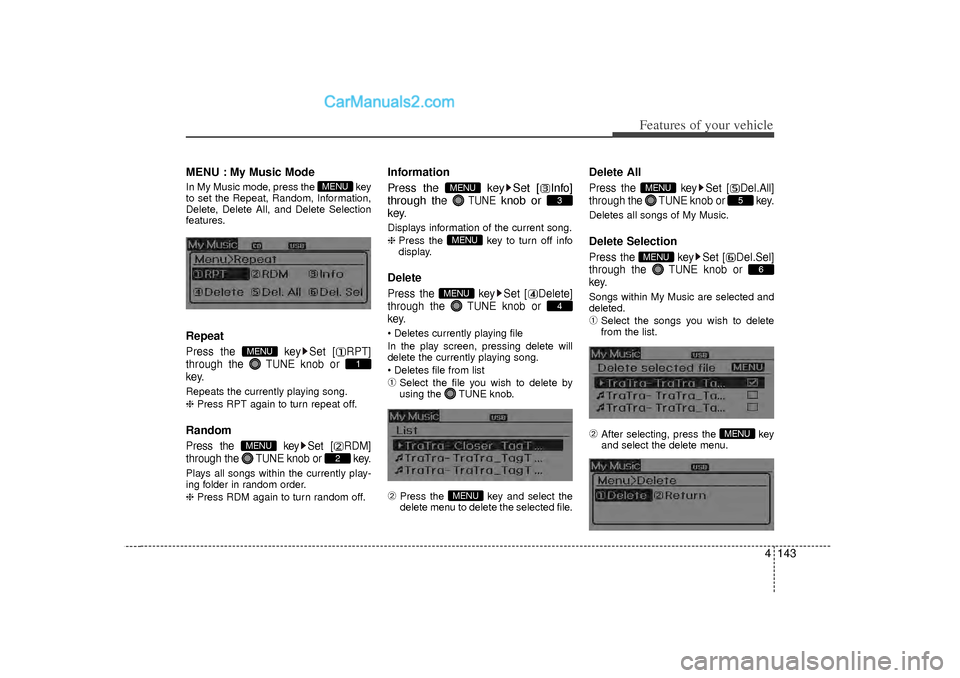
MENU : My Music ModeIn My Music mode, press the key
to set the Repeat, Random, Information,
Delete, Delete All, and Delete Selection
features.RepeatPress the key Set [ RPT]
through the TUNEknob or
key.Repeats the currently playing song.
❈ Press RPT again to turn repeat off.RandomPress the key Set [ RDM]
through the TUNEknob or key.Plays all songs within the currently play-
ing folder in random order.
❈ Press RDM again to turn random off.
Information
Press the key Set [ Info]
through the
TUNE
knob or
key.
Displays information of the current song.
❈ Press the key to turn off info
display.DeletePress the key Set [ Delete]
through the TUNEknob or
key. Deletes currently playing file
In the play screen, pressing delete will
delete the currently playing song.
Deletes file from list➀
Select the file you wish to delete by
using the TUNE knob.
➁
Press the key and select the
delete menu to delete the selected file.
Delete AllPress the key Set [ Del.All]
through the TUNEknob or key.Deletes all songs of My Music.Delete SelectionPress the key Set [ Del.Sel]
through the TUNEknob or
key.Songs within My Music are selected and
deleted.➀
Select the songs you wish to delete
from the list.
➁
After selecting, press the key
and select the delete menu.
MENU
6
MENU
5
MENU
MENU
4
MENUMENU
3
MENU
2
MENU
1
MENU
MENU
![Hyundai Sonata 2012 Owners Manual Features of your vehicle132
4MenuSelect category menu through the
TUNE knob Press the key
Select [ Info] through the TUNE
knob or keyInfo (Information)
Displays the Artist/Song info of the cur-
ren](/manual-img/35/16810/w960_16810-213.png "Hyundai Sonata 2012 Owners Manual Features of your vehicle132
4MenuSelect category menu through the
TUNE knob Press the key
Select [ Info] through the TUNE
knob or keyInfo (Information)
Displays the Artist/Song info of the cur-
ren")
![Hyundai Sonata 2012 Owners Manual Features of your vehicle140
4MENU : Audio CDPress the CD MP3 mode key to
set the Repeat, Random, Information
features.Repeat
Press the key Set [ RPT]
through the
TUNE
knob or
key to repeat the cur](/manual-img/35/16810/w960_16810-221.png "Hyundai Sonata 2012 Owners Manual Features of your vehicle140
4MENU : Audio CDPress the CD MP3 mode key to
set the Repeat, Random, Information
features.Repeat
Press the key Set [ RPT]
through the
TUNE
knob or
key to repeat the cur")
![Hyundai Sonata 2012 Owners Manual Features of your vehicle142
4MENU : iPodIn iPod mode, press the key to
set the Repeat, Album Random, All
Random, and Information features.Repeat
Press the key Set [ RPT]
through the
TUNE
knob or
k](/manual-img/35/16810/w960_16810-223.png "Hyundai Sonata 2012 Owners Manual Features of your vehicle142
4MENU : iPodIn iPod mode, press the key to
set the Repeat, Album Random, All
Random, and Information features.Repeat
Press the key Set [ RPT]
through the
TUNE
knob or
k")