Page 151 of 429
If you turn the ignition switch to
ACCESSORY (I) or LOCK (0)
without turning of f the bed lights,
the lights and the indicator will
remain on, then go of f af ter 20
minutes (see page ).
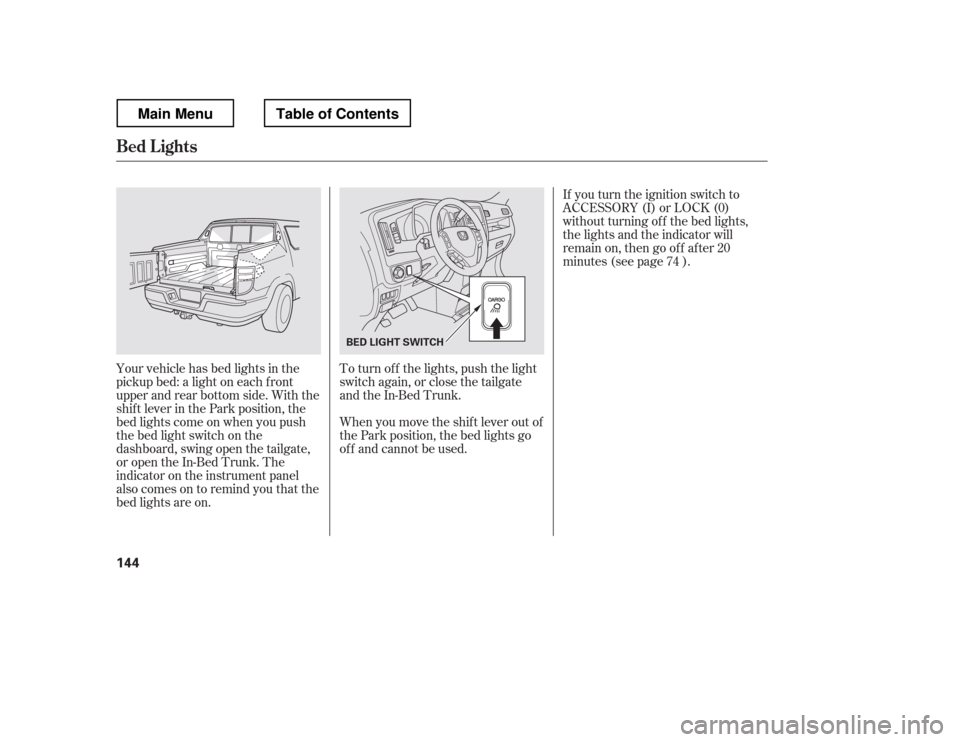
Your vehicle has bed lights in the
pickup bed: a light on each f ront
upper and rear bottom side. With the
shif t lever in the Park position, the
bed lights come on when you push
the bed light switch on the
dashboard, swing open the tailgate,
or open the In-Bed Trunk. The
indicator on the instrument panel
alsocomesontoremindyouthatthe
bed lights are on. To turn of f the lights, push the light
switch again, or close the tailgate
and the In-Bed Trunk.
When you move the shif t lever out of
the Park position, the bed lights go
of f and cannot be used. 74
Bed L ights
144
BED LIGHT SWITCH
Main MenuTable of Contents
Page 168 of 429

�µ
�µ
�µ
�µ�µ
�µ
You can use any of f ive methods to
f ind radio stations on the selected
band: tune, seek, scan, the preset
bars, and auto select.
Use the TUNE bar to tune
the radio to a desired f requency.
Press the side of the bar to tune
to a higher f requency, and press the side to tune to a lower
f requency.
The scan f unction samples
all stations with strong signals on the
selected band. To activate it, press
the SCAN button, then release it.
You will see SCAN in the display.
When the system finds a strong signal, it will stop and play that
station f or about 10 seconds.
The ignition switch must be in the
ACCESSORY (I) or ON (II) position.
Turn the system on by pushing the
PWR button or the AM/FM button.
Adjust the volume by turning the
volume knob.
Pushing the AUDIO button will also
turn on the system (see page ).
The band and f requency that the
radio was last tuned to are displayed.
To change bands, press the AM/FM
button. On the FM band, ST will be
displayed if the station is
broadcasting in stereo. Stereo
reproduction in AM is not available.
On the AM band, AM noise
reduction turns on automatically. The SEEK f unction
searches up and down f rom the
current f requency to f ind a station
with a strong signal. To activate it,
press the or side of the
SEEK/SKIP bar, then release it. If you do nothing, the system will
scan f or the next strong station and
play it f or 10 seconds. When it plays
a station that you want to listen to,
press the SCAN button again.
Each side of the bars (1
6) can store one f requency on AM
and two f requencies on FM.
Usethetune,seek,orscan
function to tune the radio to a
desired station.
Select the desired band, AM or
FM. FM1 and FM2 let you store
six stations each.
Pick a preset number (1 6), then
press and hold it until you hear a
beep.
Repeat steps 1 through 3 to store a
total of six stations on AM and
twelve stations on FM.
1. 2.3. 4.
163
CONT INUED
On models with navigation system
T o Play the A M/FM Radio T o Select a Station
TUNE
SCAN
SEEK
Preset
Playing the AM/FM Radio
Features
161
Main MenuTable of Contents
Page 179 of 429
Depending on where you drive, you
may experience reception problems.
Interf erence can be caused by any of
these conditions:Driving on the north side of a
large commercial truck on an
east/west road.
Driving in tunnels.
Driving on a road beside a vertical
wall, steep clif f , or hill to the south
of you.
Driving on the lower level of a
multi-tiered road.
Driving on a single lane road
alongside dense trees taller than
50 ft. (15 m) to the south of you.
Driving on the north side of an
east/west mountain road.
Large items carried on a roof rack. If your XM Radio service has expired
or you purchased your vehicle f rom
a previous owner, you can listen to a
sampling of the broadcasts
available
on XM Radio. With the ignition
switch in the ACCESSORY (I) or ON
(II) position, push the PWR button to
turn on the audio system and press
the XM button. A variety of music
types and styles will play.
Theremaybeothergeographic
situations that could af f ect XM Radio
reception.
As required by the FCC:
Changes or modif ications not expressly
approved by the party responsible f or compliance could void the user
Page 187 of 429
�µ�´
You can also eject the disc when the
ignition switch is of f .
Press the eject button ( ) to
remove the disc. If you eject the disc,
but do not remove it f rom the slot,
the system will automatically reload
the disc af ter 10 seconds. To begin
playing, press the CD button.
To play the radio when a disc is
playing, press the AM/FM button.
Press the CD button again to switch
back to the CD player. If you turn the system of f while a
disc is playing, either with the PWR
button or by turning of f the ignition
switch, the disc will stay in the drive.
When you turn the system back on,
the disc will begin playing where it
left off.
To select the CD changer, press the
AUX button. The disc and track
numbers will be displayed. To select
a dif f erent disc, use the preset 5
(DISC ) side f or a previous disc or
the preset 6 (DISC ) side to select
the next disc in sequence.
If you select an empty slot in the
magazine, the changer will search
f or the next available CD to load and
play.
For inf ormation on how to handle
and protect compact discs, see page
.
198
To Stop Playing a Disc
Protecting Discs
CD Player
180
Main MenuTable of Contents
Page 195 of 429

To remove the disc currently in play,
press the eject button ( ). When
a disc is removed f rom a slot, the
system automatically begins the load
sequence so you can load another
disc in that position. If you do not
remove the disc f rom the changer
within 10 seconds, the disc will
reload into the slot. Then the system
returns to the previous mode [AM,
FM, or XM (if equipped)].
To remove a different disc from the
changer,firstselectitwiththe
appropriate preset bar. When that
disc begins playing, press the eject
button. Continue pressing the eject
button to remove all the discs from
the changer.
Press the eject button ( ) to
remove the disc. If you eject the disc,
but do not remove it f rom the slot,
the system will automatically reload
the disc af ter 10 seconds. To begin
playing, press the CD or CD/AUX
button.
You can also eject the disc when the
ignition switch is of f .
To play the radio when a disc is
playing, press the AM/FM or XM (if
equipped) button. Press the CD
(CD/AUX on models with XM
satellite radio) button again to switch
back to the CD changer.
If you turn the system of f while a
disc is playing, either with the PWR
button or by turning of f the ignition
switch, the disc will stay in the drive.
When you turn the system back on,
the disc will begin playing where it
left off.
For inf ormation on how to handle
and protect compact discs, see page
.
You can also eject discs when the
ignition switch is on or of f :
To eject one disc, press and release
the eject button.
To eject all discs, press and hold the
eject button until the LOAD
indicator begins to blink.
198
Removing Discs f rom t he In-dashDisc ChangerTo Stop Playing a Disc
Protecting Discs
CD Changer (Models without navigation system)
188
Main MenuTable of Contents
Page 196 of 429
Your audio system has an in-dash
CD changer that holds up to six CDs,
providing several hours of
continuous entertainment. You
operate this CD changer with the
same controls used f or the radio.
To load CDs or operate the CD
changer, the ignition switch must be
in the ACCESSORY (I) or ON (II)
position.
CONT INUED
On RTL and Touring models withnavigation system
CD Changer (Models with navigation system)
To Play a Disc
Features
189
SEEK/SKIP BAR AM/FM BUTTON
SCAN
BUTTON
LOAD INDICATOR
LOAD BUTTON EJECT BUTTON CD SLOT
PRESET BARS
RTL and Touring models with navigation system
DISP BUTTONRPT
BUTTON
RDM BUTTON
Do not use CDs with adhesive labels.
The label can curl up and cause the CD
to jam in the unit.
Main MenuTable of Contents
Page 204 of 429
When you press the eject button
while listening to the radio, or with
the audio system turned of f , the disc
that was last selected is ejected.
Af ter that disc is ejected, pressing
the eject button again will eject the
next disc in numerical order. By
doing this six times, you can remove
all the discs f rom the changer.
To eject one disc, press and release
the eject button.
You can also eject discs when the
ignition switch is on or of f :
To eject all discs, press and hold the
eject button until the LOAD
indicator begins to blink. For inf ormation on how to handle
and protect discs, see page .
198
CD Changer (Models with navigation system)
Protecting Discs
Features
197
Main MenuTable of Contents
Page 220 of 429
The direction and center position
icons come on when you turn the
ignition switch to the ON (II)
position. The system then begins to
check the vehicle direction and
illuminates the appropriate icon(s).The compass can be af f ected by
driving near power lines or stations,
across bridges, through tunnels,
over railroad crossings, past large
vehicles, or driving near large
objects that cause magnetic
interference. It can also be affected
by accessories such as antennas and
roof racks that are mounted by
magnets.
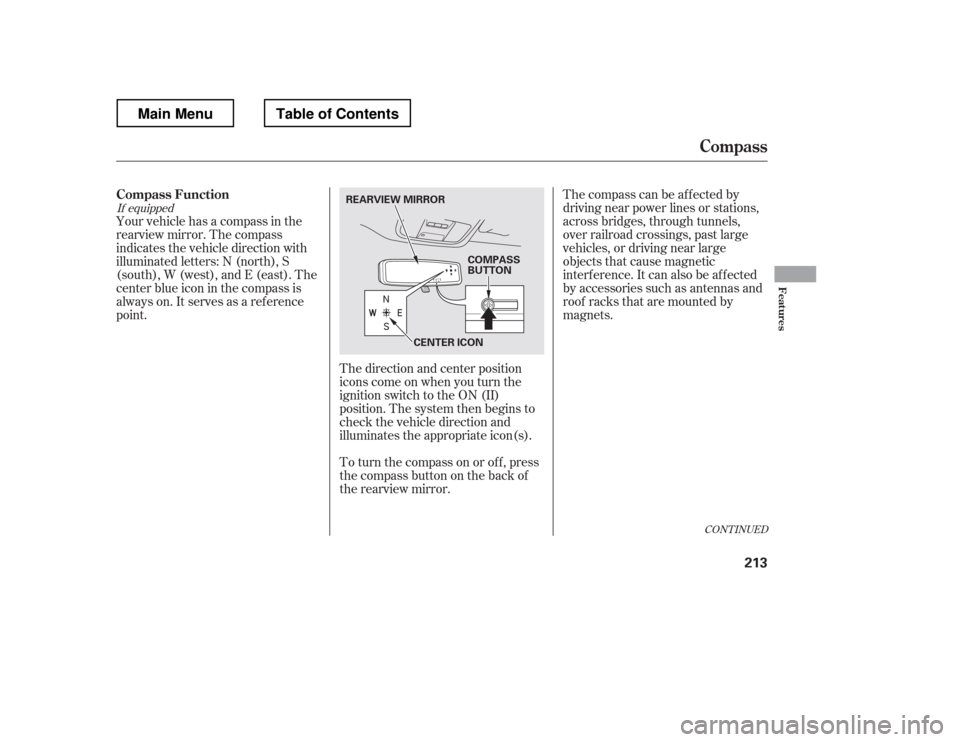
Your vehicle has a compass in the
rearview mirror. The compass
indicates the vehicle direction with
illuminated letters: N (north), S
(south), W (west), and E (east). The
center blue icon in the compass is
always on. It serves as a ref erence
point.
To turn the compass on or of f , press
the compass button on the back of
the rearview mirror.
If equipped
CONT INUED
Compass Function
Compass
Features
213
COMPASS
BUTTON
CENTER ICON
REARVIEW MIRROR
Main MenuTable of Contents