Page 232 of 429
�Ì�Ì�Ì�Ì
CONT INUED
BluetoothHandsFreeL ink
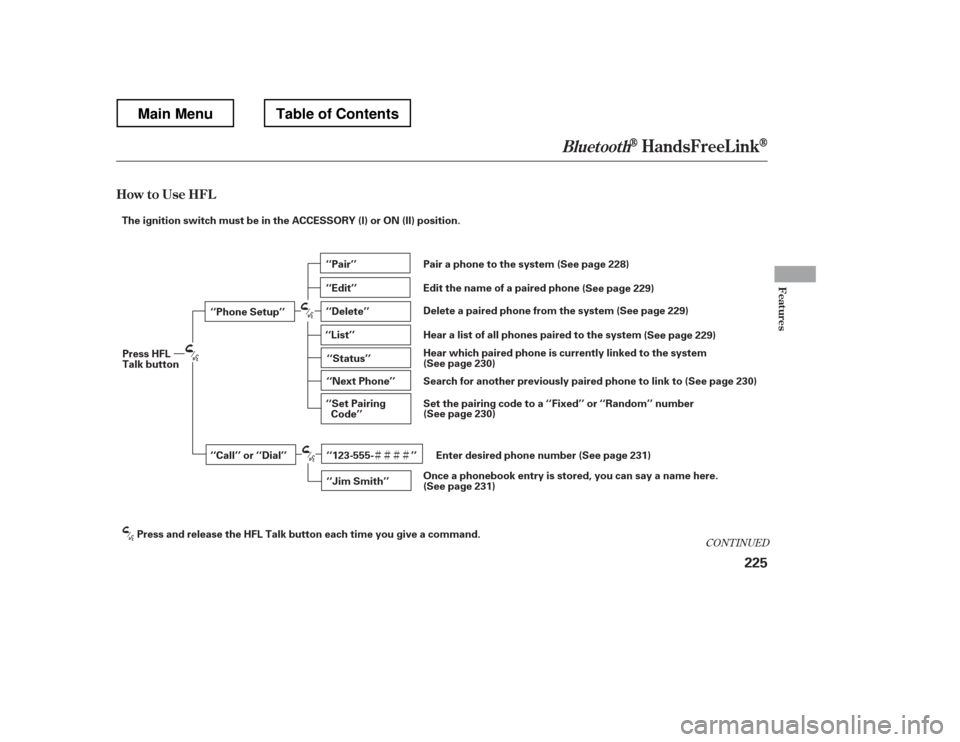
How to Use HFL
Features
225
‘‘Phone Setup’’
‘‘Call’’ or ‘‘Dial’’‘‘Pair’’
‘‘Edit’’
‘‘Delete’’
‘‘Jim Smith’’
‘‘Set Pairing
Code’’
The ignition switch must be in the ACCESSORY (I) or ON (II) position.
‘‘List’’‘‘Status’’
‘‘Next Phone’’
‘‘123-555- ’’
Press HFL
Talk button
Press and release the HFL Talk button each time you give a command. (See page 228)
Pair a phone to the system
(See page 229)
Edit the name of a paired phone
(See page 229)
Delete a paired phone from the system
(See page 229)
Hear a list of all phones paired to the system
Hear which paired phone is currently linked to the system
(See page 230)
(See page 230)
Search for another previously paired phone to link to
(See page 230)
Set the pairing code to a ‘‘Fixed’’ or ‘‘Random’’ number
(See page 231)
Enter desired phone number
(See page 231)
Once a phonebook entry is stored, you can say a name here.
Main MenuTable of Contents
Page 233 of 429
BluetoothHandsFreeL ink
226
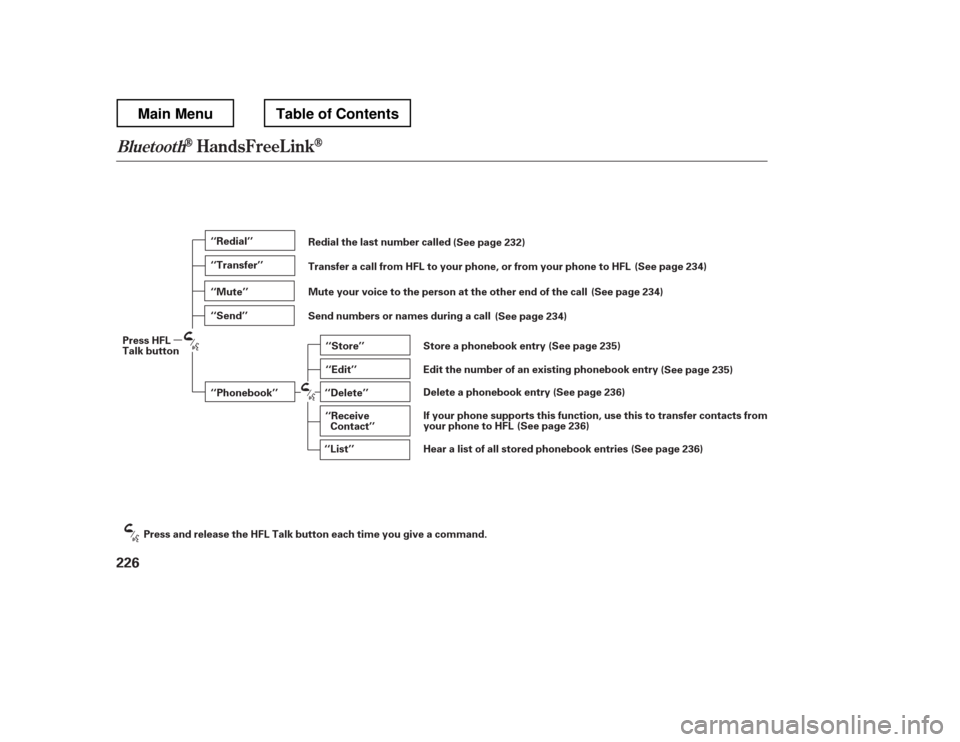
‘‘Redial’’
‘‘Transfer’’
‘‘Mute’’
‘‘Send’’‘‘Phonebook’’ ‘‘Store’’
‘‘Edit’’
‘‘Delete’’
‘‘Receive Contact’’
‘‘List’’
Press HFL
Talk button
Press and release the HFL Talk button each time you give a command. Redial the last number called
Transfer a call from HFL to your phone, or from your phone to HFL
(See page 232)
(See page 234)
Mute your voice to the person at the other end of the call (See page 234)
Send numbers or names during a call (See page 234)
Store a phonebook entry (See page 235)
Edit the number of an existing phonebook entry (See page 235)
Delete a phonebook entry (See page 236)
If your phone supports this function, use this to transfer contacts from
your phone to HFL (See page 236)
Hear a list of all stored phonebook entries (See page 236)
Main MenuTable of Contents
Page 234 of 429
�Î�Î
CONT INUED
BluetoothHandsFreeL ink
Features
227
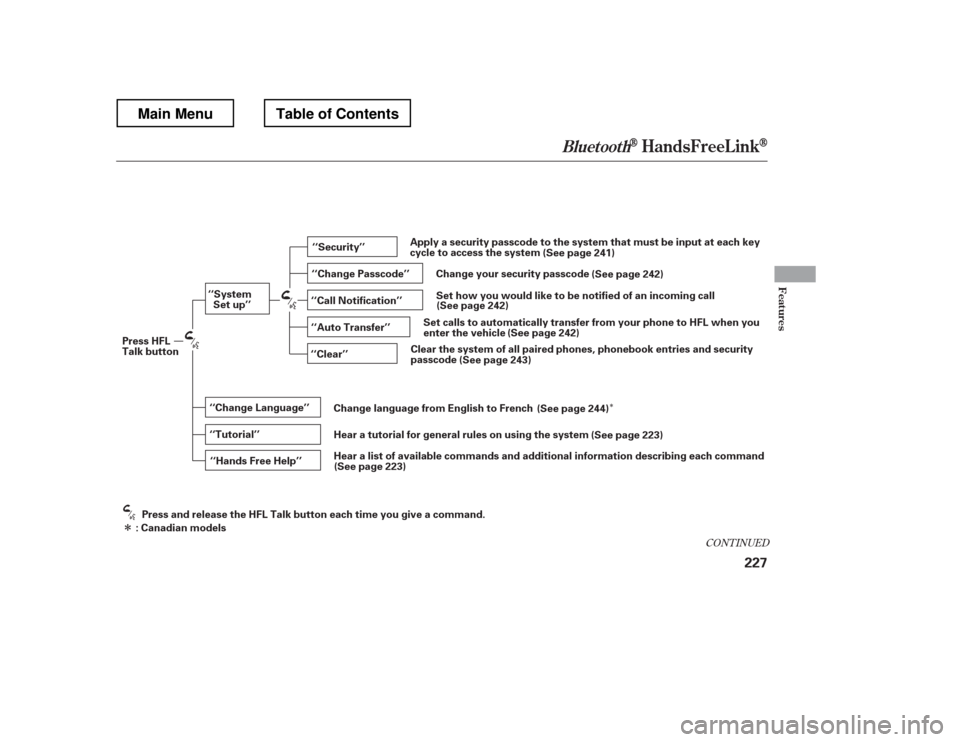
‘‘Change Language’’
‘‘Hands Free Help’’
‘‘System
Set up’’
‘‘Tutorial’’ ‘‘Clear’’
‘‘Auto Transfer’’
‘‘Call Notification’’ ‘‘Security’’
‘‘Change Passcode’’
Press HFL
Talk button
Press and release the HFL Talk button each time you give a command.
: Canadian models Apply a security passcode to the system that must be input at each key
cycle to access the system
(See page 241)
Set how you would like to be notified of an incoming call
Change your security passcode
(See page 242)
(See page 242)
Set calls to automatically transfer from your phone to HFL when you
enter the vehicle (See page 242)
Clear the system of all paired phones, phonebook entries and security
passcode (See page 243)
Change language from English to French (See page 244)
Hear a tutorial for general rules on using the system (See page 223)
Hear a list of available commands and additional information describing each comma nd
(See page 223)
Main MenuTable of Contents
Page 235 of 429
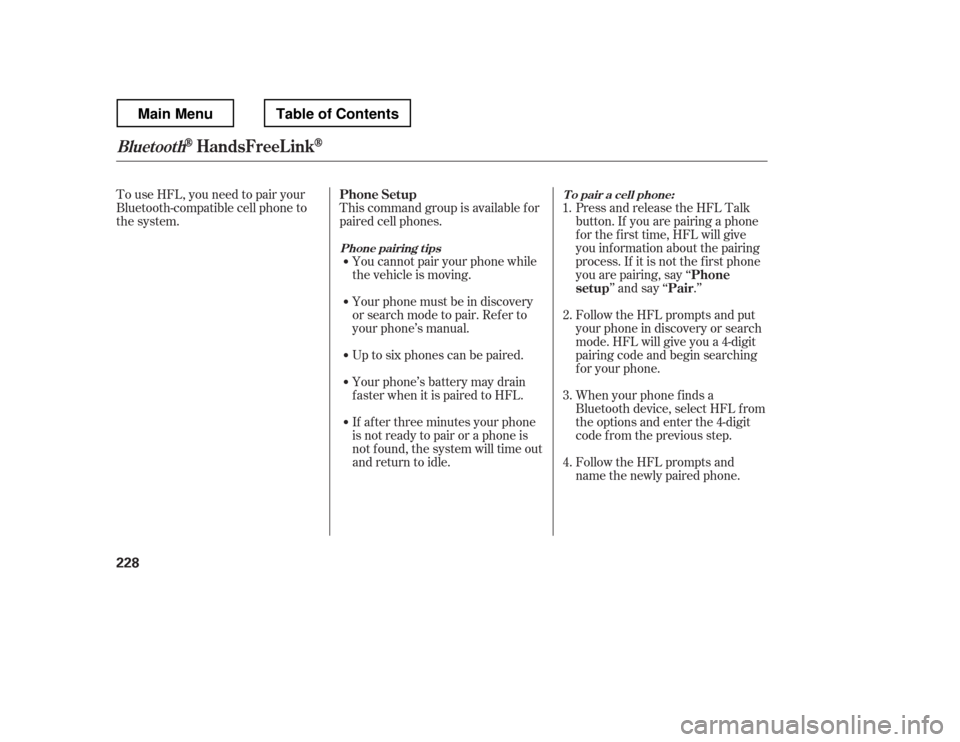
To use HFL, you need to pair your
Bluetooth-compatible cell phone to
the system.This command group is available f or
paired cell phones.
You cannot pair your phone while
the vehicle is moving.
Your phone must be in discovery
or search mode to pair. Ref er to
your phone
Page 238 of 429
CONT INUED
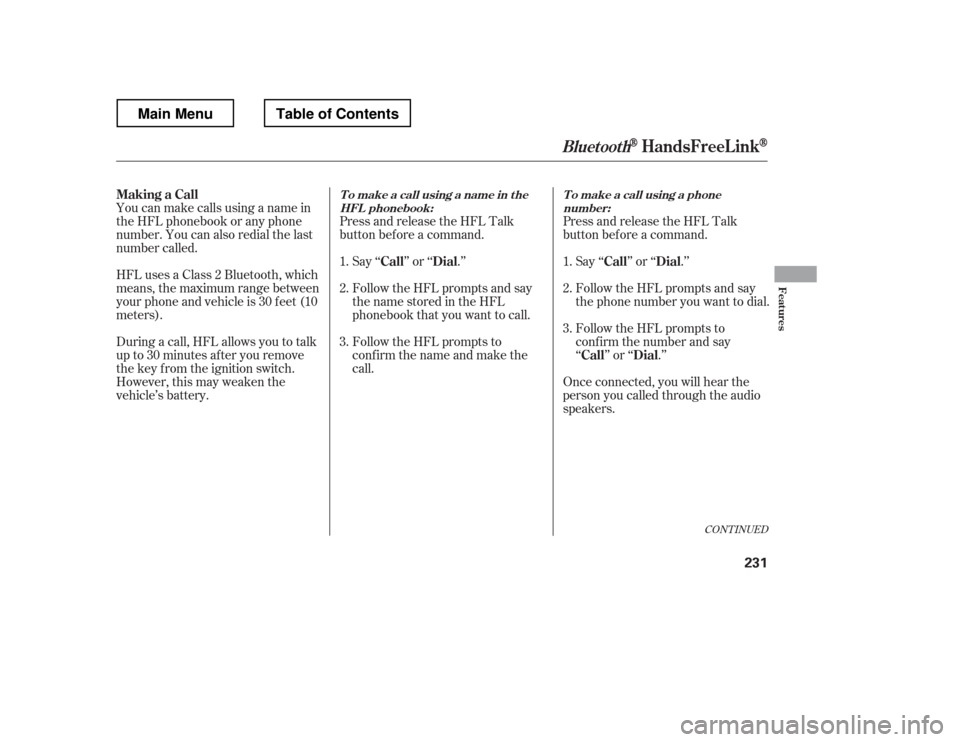
HFLusesaClass2Bluetooth,which
means, the maximum range between
yourphoneandvehicleis30feet(10
meters).
During a call, HFL allows you to talk
up to 30 minutes af ter you remove
the key from the ignition switch.
However, this may weaken the
vehicle
Page 309 of 429
�´
Trailer lights and equipment must
comply with f ederal, state, province/
territory, and local regulations.
Check trailer light requirements f or
the areas where you plan to tow, and
use only equipment designed f or
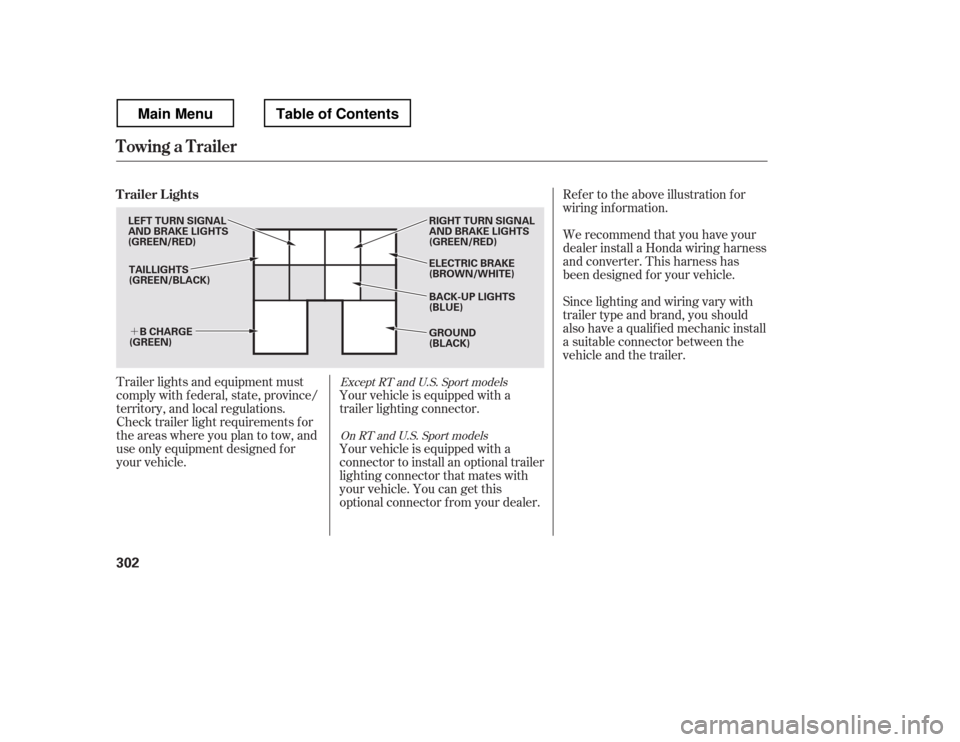
your vehicle.Ref er to the above illustration f or
wiring inf ormation.
We recommend that you have your
dealer install a Honda wiring harness
and converter. This harness has
been designed f or your vehicle.
Your vehicle is equipped with a
trailer lighting connector.
Your vehicle is equipped with a
connector to install an optional trailer
lighting connector that mates with
your vehicle. You can get this
optional connector f rom your dealer. Since lighting and wiring vary with
trailer type and brand, you should
also have a qualif ied mechanic install
a suitable connector between the
vehicle and the trailer.Except RT and U.S. Sport models
On RT and U.S. Sport models
Trailer Lights
Towing a Trailer
302
TAILLIGHTS
(GREEN/BLACK) ELECTRIC BRAKE
(BROWN/WHITE)
RIGHT TURN SIGNAL
AND BRAKE LIGHTS
(GREEN/RED) GROUND
(BLACK)
B CHARGE
(GREEN)
LEFT TURN SIGNAL
AND BRAKE LIGHTS
(GREEN/RED)
BACK-UP LIGHTS
(BLUE)
Main MenuTable of Contents
Page 311 of 429
�´
Ref er to the above illustrations f or
wiring inf ormation.The trailer jumper harness is used to
install the controller f or the electric
trailer brakes. For more inf ormation,
see on page . Insert the trailer brake f use into the
secondary under-hood f use box (see
page ).
300 383
Except RT and U.S. Sport models Except RT and U.S. Sport models
T railer Connect or Socket s T railer Jumper Harness
Trailer BrakesT railer Brake Fuse
Towing a Trailer
304
7-PIN TRAILER SOCKET
SMALL
LIGHT
(GREEN)
BACK LIGHT
(YELLOW)
GROUND
(WHITE) GROUND
(BLACK)
ELECTRIC BRAKE
(BROWN/WHITE)
LEFT
TURN/
STOP
(RED) BRAKE
(20A)
(BLUE)
B
CHARGE
(BLACK)
RIGHT
TURN/
STOP
(BROWN)
ELECTRIC
BRAKE
(BLUE) BRAKE LIGHTS
(SKY BLUE)
Main MenuTable of Contents
Page 334 of 429
�Î
�Î
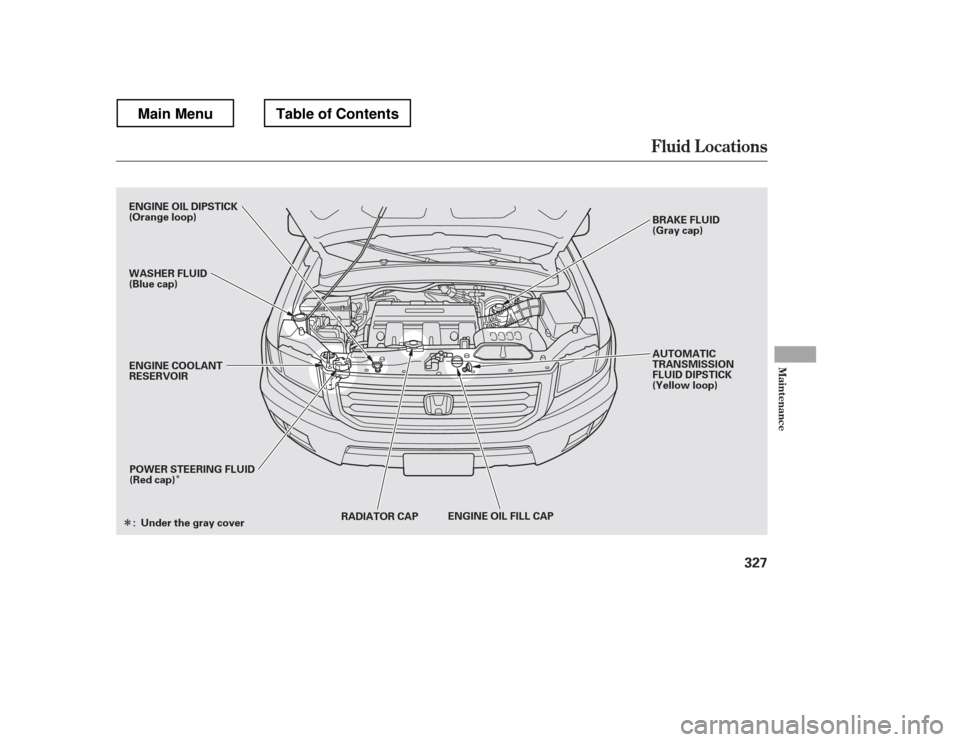
Fluid Locations
Maint enance
327
RADIATOR CAP ENGINE OIL FILL CAP
POWER STEERING FLUID
(Red cap) AUTOMATIC
TRANSMISSION
FLUID DIPSTICK
(Yellow loop)
ENGINE COOLANT
RESERVOIR
ENGINE OIL DIPSTICK
(Orange loop)
WASHER FLUID
(Blue cap)
BRAKE FLUID
(Gray cap)
Under the gray cover
:
Main MenuTable of Contents