Page 394 of 681
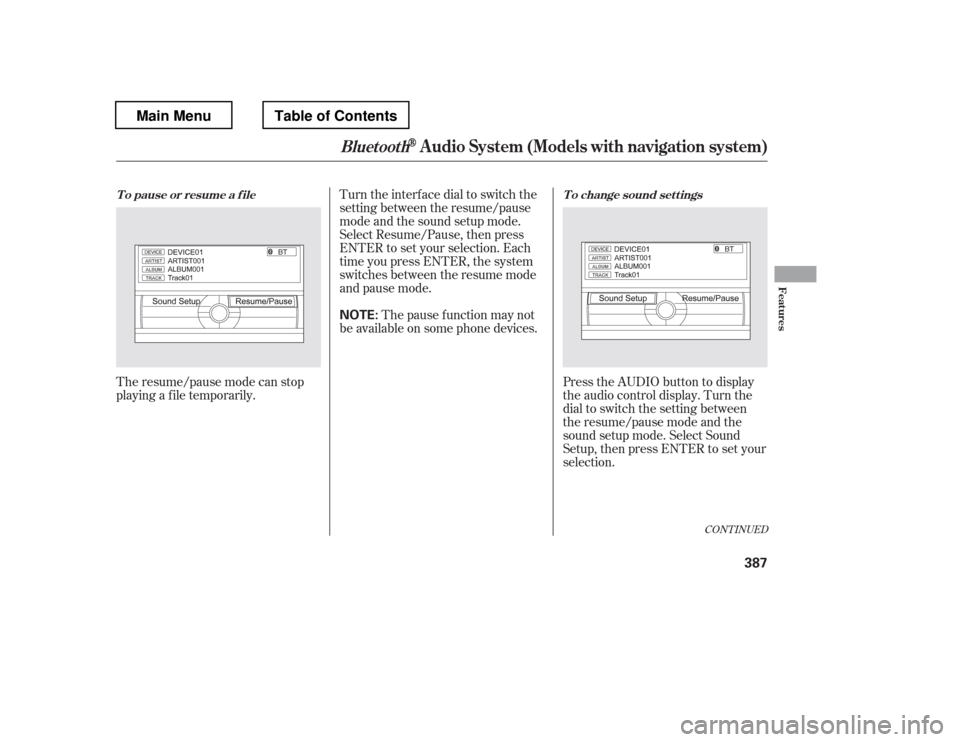
The resume/pause mode can stop
playing a f ile temporarily.Turn the interface dial to switch the
setting between the resume/pause
mode and the sound setup mode.
Select Resume/Pause, then press
ENTER to set your selection. Each
time you press ENTER, the system
switches between the resume mode
and pause mode.
Thepausefunctionmaynot
be available on some phone devices.
Press the AUDIO button to display
the audio control display. Turn the
dial to switch the setting between
theresume/pausemodeandthe
sound setup mode. Select Sound
Setup, then press ENTER to set your
selection.
CONT INUED
T o pause or resume a f ile T o change sound set t ings
BluetoothAudio System (Models with navigation system)
Features
387
NOTE:
Main MenuTable of Contents
Page 399 of 681

�Û�Ý�´
�µ
�´�µ
�´
�µ
Three controls f or the audio system
are mounted in the steering wheel
hub. These let you control basic
f unctions without removing your
hand f rom the wheel.
The VOL button adjusts the volume
up ( ) or down ( ). Press the top
or bottom of the button, hold it until
the desired volume is reached, then
release it. If you are playing a disc, the system
skips to the beginning of the next
track each time you press the top
( ) of the CH button. Press the
bottom ( ) to return to the
beginning of the current track. Press
it again to return to the previous
track. You will see the disc and track
numbers in the upper display.
To search up and down f rom the
current f requency and f ind a station
with a strong signal, press the top
( ) or bottom ( ) of the button for
1 second.
The MODE button changes the
mode.
If you are listening to the radio, use
the CH button to change stations.
Each time you press the top ( ) of
the button, the system goes to the
next preset station on the band you
are listening to. Press the bottom
( ) to go back to the previous
station.
Pressing the MODE button
repeatedly cycles through all present,
connected media sources. Media
sources that are not present or
connected will not appear when
cycling with the MODE button.
Pressing the MODE button
repeatedly cycles through all
possible media sources whether they
are present or not.
On vehicles with navigation system
On vehicles without navigation system
Except U.S. LX models
Remote Audio Controls
392
VOL BUTTON
CH BUTTON
MODE BUTTON
Main MenuTable of Contents
Page 400 of 681

�´�µ �´
�µ
�´
�µ
�´ �µIf youareplayingaDVDvideo,use
the channel button to change
chapters. Each time you press the
top ( ) of the button, the system
goes to the next chapter. Press the
bottom ( ) to return to the
beginning of the current chapter.
Press it again to return to the
previous chapter. If youareplayingaUSBflash
memory device or iPod with the USB
adapter cable, press and release the
top ( ) of the CH button to skip
f orward to the beginning of the next
file. Press the bottom ( ) to skip
backward to the beginning to the
current f ile. Press it twice to return
to the previous file.
If you are listening to XM Radio, use
the CH button to change channels.
Each time you press the top ( ) of
the button, the system goes to the
next preset channel. Press the
bottom( )togobacktothe
previous preset channel.
To go to the next channel of the
category you are listening to, press
the top ( ) of the button for 1
second. Press the bottom ( ) f or 1
second to go back to the previous
channel.
On vehicles with rear entertainment
system Except LX and U.S. EX models
Remote Audio Controls
Features
393
Main MenuTable of Contents
Page 470 of 681
�µ�µ
�µ
�µ To change the volume level of
HFL, use the audio system volume
knob or the steering wheel volume
controls.
Try to reduce all background
noise. If the microphone picks up
voices other than yours,
commands may be misinterpreted.
For help at any time, including a list
of available options, say ‘‘Help.
Page 537 of 681

Constant application of the brakes
when going down a long hill builds
up heat and reduces their ef f ective-
ness. Use the engine to assist the
brakes by taking your f oot of f the
accelerator and downshif ting to a
lower gear.
Check the brakes after driving
through deep water. Apply the
brakes moderately to see if they f eel
normal. If not, apply them gently and
f requently until they do. Be extra
cautious in your driving.
Your vehicle is equipped with disc
brakes at all f our wheels. A power
assist helps reduce the ef f ort needed
on the brake pedal. The emergency
brake assist system increases the
stopping f orce when you depress the
brake pedal hard in an emergency
situation. The anti-lock brake system
(ABS) helps you retain steering
control when braking very hard.
Resting your f oot on the pedal keeps
the brakes applied lightly, builds up
heat, reduces their ef f ectiveness and
reduces brake pad lif e. In addition,
f uel economy can be reduced. It also
keeps your brake lights on all the
time, conf using drivers behind you.As required by the FCC:
This device complies with Part 15 of theFCC rules. Operation is subject to thef ollowing two conditions: (1) This device
may not cause harmf ul interf erence, and(2) this device must accept anyinterf erence received, includinginterf erence that may cause undesiredoperation.
This device complies with IndustryCanada Standard RSS-210.Operation is subject to the f ollowing twoconditions: (1) this device may not causeinterf erence, and (2) this device mustaccept any interf erence that may cause
undesired operation of the device.
Changes or modif ications not expressly
approved by the party responsible f orcompliance could void the user
Page 568 of 681

The maintenance item code or codes
indicate the main and sub items
required at the time of the oil change
(see page ).
You can switch the information
display f rom the engine oil lif e
display to the odometer or the trip
meter. Press and release the select/
reset knob on the instrument panel.
Whentheengineoillifeis15to1
percent, the Maintenance Minder
indicator ( ) comes on every
time you turn the ignition switch to
the ON (II) position, then it goes out
if you switch the inf ormation display.When the remaining engine oil lif e is
0 percent, the engine oil lif e indicator
will blink. The display comes on
everytimeyouturntheignition
switch to the ON (II) position. The
Maintenance Minder indicator
( ) also comes on and remains
on in the instrument panel. When
you see this message, immediately
have the indicated maintenance done
by your dealer. If you do not perf orm the indicated
maintenance, negative distance
traveled is displayed and begins to
blink af ter the vehicle has been
driven 10 miles (10 km) or more.
Negative distance traveled means
your vehicle has passed the
maintenance required point.
Immediately have the indicated
maintenance done by your dealer.
When you see this message, have
the indicated maintenance
perf ormed by your dealer as soon as
possible. 562
CONT INUED
Maintenance Minder
Maint enance
561
U.S. model is shown.
U.S. model is shown.NEGATIVE DISTANCE TRAVELED
TM
Main MenuTable of Contents
Page 572 of 681
You will also see the system
message every time you turn the
ignition switch to the ON (II)
position until you have the indicated
maintenance perf ormed by your
dealer.
The maintenance item code(s)
indicate the main and sub items
required at the time of the oil change
(see page ).The system message indicator on
the instrument panel will also come
on, and a beeper will sound.
When the remaining engine oil lif e is
less than 5 percent, you will see the
above display. The display then
changes to ‘‘SERVICE DUE NOW.
Page 573 of 681
�Û�ÝYou will also see the system
message every time you turn the
ignition switch to the ON (II)
position until you have the indicated
maintenance perf ormed by your
dealer.
To cancel the system message, press
and release the INFO ( / ) button
on the steering wheel. At this time,
the system message indicator will
also be turned of f . Then the display
will change to the engine oil lif e
display. You will see a ‘‘SERVICE