Page 381 of 681

Some versions of MP3, WMA, or
AAC f ormat may not be supported. If
an unsupported f ile is f ound, the
audio unit displays UNSUPPORTED,
then skips to the next file.
Some devices cannot be powered
or charged via the USB adapter. If
this is the case, use the accessory
adapter to supply power to your
device.
You can select the AUX mode by
using the voice control buttons, but
cannot operate the play mode
f unctions. The order of f iles in USB playback
maybedifferentfromtheorderof
f iles displayed in PC or other
devices etc. Files are played in the
orderstoredinUSBflashmemory
device.
Do not keep a USB f lash memory
device in the vehicle. Direct
sunlight and high heat will damage
it.
Depending on the type and
number of f iles, it may take some
time bef ore they begin to play.
Depending on the sof tware the
f iles were made with, it may not be
possibletoplaysomefiles,or
displaysometextdata.
We recommend backing up your
data bef ore playing a USB f lash
memory device.
Depending on the type of
encoding and writing sof tware
used, there may be cases where
character inf ormation does not
display properly.
Voice Cont rol Syst em
Playing a USB Flash Memory Device (Models with navigation syst em)
374
Main MenuTable of Contents
Page 391 of 681
BluetoothAudio System (Models with navigation system)
Wit hout rear ent ert ainment syst em Wit h rear ent ert ainment syst em
384
INTERFACE DIAL
TITLE
BUTTON
SKIP BAR USB/AUX
BUTTON
AUDIO
BUTTON AUDIO SCREEN
INTERFACE DIAL
TITLE
BUTTON
SKIP BAR USB/AUX
BUTTON
AUDIO
BUTTON
Main MenuTable of Contents
Page 395 of 681

Turn the dial to select a sound setup
mode, then press ENTER to set your
selection. See page f or more
sound setting inf ormation.
If you receive a call when the
Audio is playing, press the
PICK-UPbuttononthesteering
wheel. The screen and the center
displayswitchtotheHFLmode(see
page ).
Af ter ending the call, press the
HANG-UP button to go back to the
Audio mode. To take the system out of the
Audio mode, press one of
the other source buttons than the
USB/AUX button. When a
compatible audio unit is connected to
the auxiliary input jack, press the
USB/AUX button to select it.
Switching to another mode pauses
the music playing f rom your phone.
309
463
As required by the FCC: This device complies with Part 15 of theFCC rules. Operation is subject to the
f ollowing two conditions: (1) This device may not cause harmf ul interf erence, and(2) this device must accept any
interf erence received, includinginterf erence that may cause undesiredoperation.
Changes or modif ications not expresslyapproved by the party responsible f or
compliance could void the user
Page 398 of 681
For more inf ormation, see page .
Auxiliary input jacks and headphone
connectors f or the rear
entertainment system are on the
back of the center console
compartment.
The auxiliary input jack is inside the
f ront console compartment. The
system will accept auxiliary input
f rom standard audio accessories.
When a compatible audio unit is
connected to the jack, press the AUX
or CD/AUX button to select it.
428
On vehicles with rear entertainment
system
Auxiliary Input Jack
Features
391
Touring model is shown.
Main MenuTable of Contents
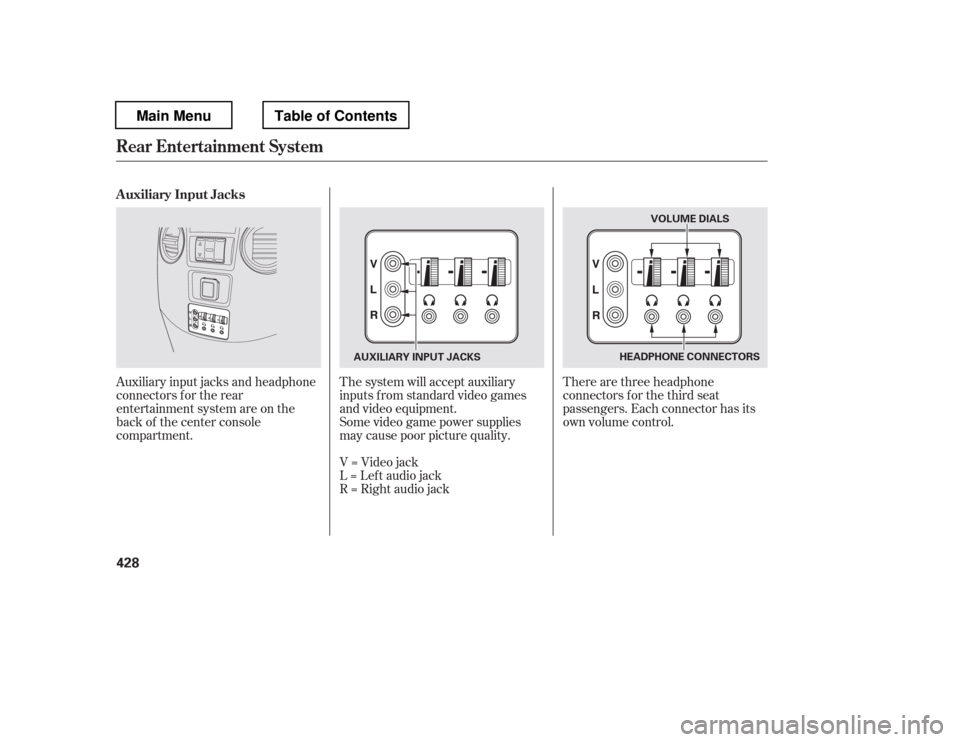
Page 435 of 681
Auxiliary input jacks and headphone
connectors f or the rear
entertainment system are on the
back of the center console
compartment.The system will accept auxiliary
inputs f rom standard video games
and video equipment.
There are three headphone
connectors f or the third seat
passengers. Each connector has its
own volume control.
Some video game power supplies
may cause poor picture quality.
V=Videojack
L = Lef t audio jack
R = Right audio jack
Auxiliary Input Jacks
Rear Entertainment System
428
HEADPHONE CONNECTORS
AUXILIARY INPUT JACKS VOLUME DIALS
Main MenuTable of Contents
Page 670 of 681

CONT INUED
BatteryCharging System
...........................
Indicator . 68, 626
............................
Jump Starting . 621
..............................
Maintenance . 607
............................
Specif ications . 643
..............................
Bef ore Driving . 493 ....................................
Belts,Seat .9,22
.........................
Beverage Holders . 181
...............
HandsFreeLink. 441, 462
..................................
Booster Seats . 57
Brakes
...........
Anti-lock System (ABS) . 531
.............
Break-in, New Linings . 494
............
Bulb Replacement . 589, 591
...........................................
Fluid . 584
.......................................
Parking . 171
.................
System Indicator . 69, 627
........................
Wear Indicators . 531
.............................
Braking System . 530
.................
Break-in, New Vehicle . 494
Brightness Control,
...............................
Instruments . 130
...
Accessories and Modif ications . 504
ACCESSORY (Ignition Key
.....................................
Position) . 136
............
Accessory Power Sockets . 186
...........................
AC Power Outlet . 187
................
Active Head Restraints . 159
....................
Additives, Engine Oil . 577
...........................
Advanced Airbags . 30
.............................
Airbag (SRS) . 11, 26
..........
Airbag System Components . 26
......
Air Conditioning System . 192, 199
.............
Rear A/C Control . 197, 205
.......................
Air Outlets (Vents) . 207
.......................
Air Pressure, Tires . 600
......................................
Antif reeze . 579
Anti-lock Brakes (ABS)
....................
Indicator Light . 70, 532
...................................
Operation . 531
..............
Anti-thef t, Audio System . 394
Anti-thef t Steering Column
............................................
Lock . 136
................................
Audio System . 209
Auto Control Mode, Starting
........................................
Engine . 513 ............................
Auto Door Lock . 114
...
Auto Door Locking/Unlocking . 138
.........................
Auto Door Unlock . 115
..........
Automatic Climate Control . 199
.......................
Automatic Lighting . 126
...
Automatic Seat Belt Tensioners . 24
.............
Automatic Speed Control . 430
..............
Automatic Transmission . 515
..........................
Capacity, Fluid . 642
...............
Checking Fluid Level . 582
.......................................
Shif ting . 515
Shif t Lever Position
...............................
Indicators . 515
................
Shif t Lever Positions . 516
....................
Shif t Lock Release . 518
......................
Auxiliary Input Jack . 391
Bluetooth
Index
A
B
INDEX
I
Main Menu
Page:
< prev 1-8 9-16 17-24