Page 106 of 681
�Û
�Ý
�Û�Ý
�Û�Ý
You can customize some of the
vehicle control settings to your
pref erence. Here are the settings
you can customize:
METER SETUP
LIGHTING SETUP
POSITION SETUP
DOOR/WINDOW SETUP Each time you press the INFO ( /
) button, the screen changes as
shownonthenextpage.Pressthe
INFO( / )buttonuntilyousee
the setup you want to customize,
then press the SEL/RESET button
to enter your selection.
When you want to change the
vehicle control settings, press the
INFO ( / ) button to select CHG
SETTING, then press the SEL/
RESET button.
CONT INUED
Mult i-Inf ormation Display
Customize Settings
Inst rument s and Cont rols
99
Touring model is shown.
Main MenuTable of Contents
Page 107 of 681
Mult i-Inf ormation Display
100
Select
‘‘DEFAULT ALL’’
Select ‘‘EXIT’’
Select ‘‘CANCEL’’
INFO button
SEL/RESET button
Touring model is shown. METER SETUP
(See page 101)
POSITION SETUP
(See page 106)
LIGHTING SETUP
(See page 108) DOOR/WINDOW SETUP
(See page 113)
Main MenuTable of Contents
Page 115 of 681
�Û
�Ý
�Û�Ý
INTERIOR LIGHT
DIMMING TIME
HEADLIGHT AUTO OFF TIMER
AUTO LIGHT SENSITIVITY
While ‘‘LIGHTING SETUP
Page 116 of 681
�Û
�Ý �Û�Ý
CONT INUED
Interior Light Dimming Time
The interior lights f ade out when you
close all doors and tailgate. To
change how long the lights stay on
before they fade out, follow these
instructions:
You can choose this item to
customize f rom ‘‘LIGHTING
SETUP
Page 117 of 681
�Û
�Ý
�Û�Ý
Headlight Auto Of f Timer
You can choose this item to
customize f rom ‘‘LIGHTING
SETUP
Page 118 of 681
�µ�µ
�µ
�µ
�µ �Û
�Ý
CONT INUED
Auto Light Sensitivity
The headlights automatically come
on when the headlight switch is in
the AUTO position and the ambient
light reaches a changeable level. You
can select the auto light sensitivity
f rom the f ollowing f ive levels:
When your selection is successf ully
completed, the display changes as
shown above, and then goes back to
the customize item screen.
If the ‘‘SETTING INCOMPLETE
Page 125 of 681
�Û
�Ý
�Û�Ý
Keyless Lock Acknowledgment
When you push the LOCK button on
the remote transmitter, some
exterior lights f lash, and a beeper
sounds when you push the LOCK
button again within 5 seconds to
verify that the doors and the tailgate
arelockedandthesecuritysystem
has set (see page ). You can
customize the exterior lights not to
f lash and the beeper not to sound.
You can choose this item to
customize f rom ‘‘DOOR/WINDOW
SETUP
Page 129 of 681
�Î
�Î
�Î
�Î �Î
�Î
�Î �Î
�Î
�Î
�Î
�Î
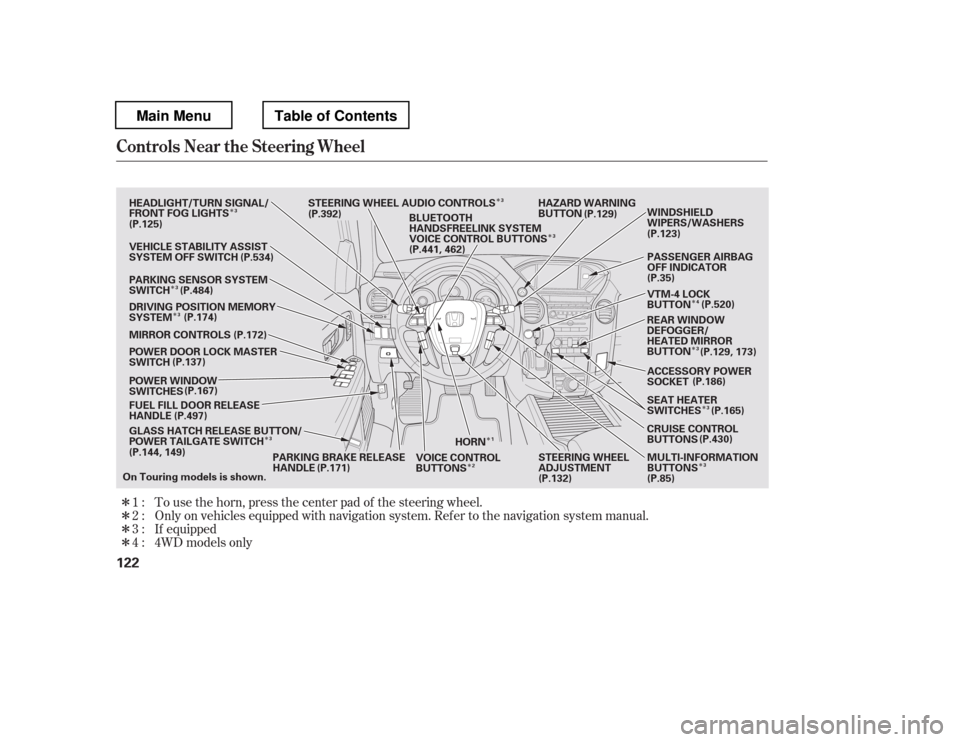
�Î �Î�Î�ÎTo use the horn, press the center pad of the steering wheel.
Only on vehicles equipped with navigation system. Ref er to the navigati
on system manual.
If equipped
1:2: 3:
4 : 4WD models only
Controls Near the Steering Wheel
122
HORN HAZARD WARNING
BUTTON
GLASS HATCH RELEASE BUTTON/
POWER TAILGATE SWITCH
FUEL FILL DOOR RELEASE
HANDLE
POWER WINDOW
SWITCHES
POWER DOOR LOCK MASTER
SWITCH
MIRROR CONTROLS
DRIVING POSITION MEMORY
SYSTEM
VEHICLE STABILITY ASSIST
SYSTEM OFF SWITCH
PARKING SENSOR SYSTEM
SWITCH
HEADLIGHT/TURN SIGNAL/
FRONT FOG LIGHTS
STEERING WHEEL AUDIO CONTROLS
PARKING BRAKE RELEASE
HANDLE STEERING WHEEL
ADJUSTMENT
VOICE CONTROL
BUTTONS PASSENGER AIRBAG
OFF INDICATOR
VTM-4 LOCK
BUTTON
ACCESSORY POWER
SOCKET
SEAT HEATER
SWITCHES
CRUISE CONTROL
BUTTONS MULTI-INFORMATION
BUTTONS (P.186)
BLUETOOTH
HANDSFREELINK SYSTEM
VOICE CONTROL BUTTONS
REAR WINDOW
DEFOGGER/
HEATED MIRROR
BUTTONWINDSHIELD
WIPERS/WASHERS
On Touring models is shown. (P.125)
(P.137)
(P.144, 149) (P.129)
(P.123)
(P.35)
(P.85)
(P.132)
(P.534)
(P.484) (P.174) (P.172)
(P.167)
(P.497)
(P.171) (P.430)
(P.165)
(P.129, 173)
(P.520)
(P.392)
(P.441, 462)
1
3
3
3 3
3
2 4
3
3
3
3
Main MenuTable of Contents


