Page 133 of 441

uuOpening and Closing the Sliding DoorsuOpening/Closing the Power Sliding Doors
*
132Controls
■
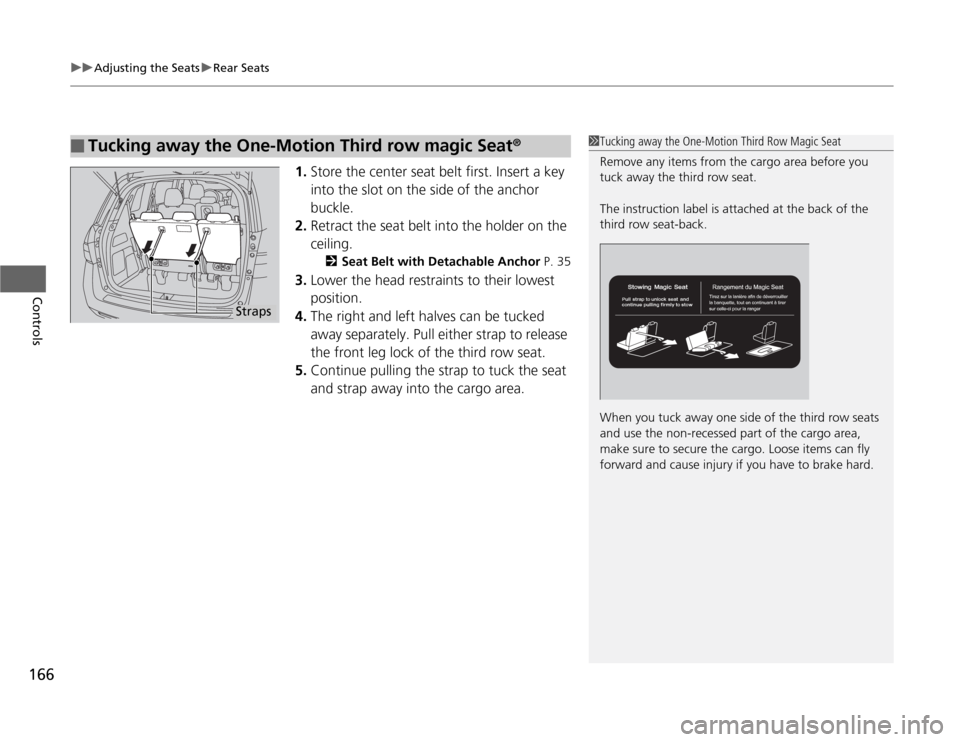
Outer handles
Pull up on the outer handle towards you. The
sliding door starts opening or closing.
■
Inner handles
Pull it rearward to automatically open the
sliding door, and pull it forward to
automatically close the door.
While the power sliding door is in operation, if you pull either handle that
corresponds to that power sliding door, the beeper sounds and the operation stops.
To resume the power sliding door operation, pull the same handle in the same
direction again.
■
Door Handles
1Opening/Closing the Power Sliding Doors
The beeper sounds and the power sliding door does
not open when you pull the inner or outer handle
under the following conditions:•The ignition switch is in ON
(w
•The shift lever is in other than
(P
•The brake pedal is released•The parking brake is released
If you leave the power sliding door half open on a
seep hill with the engine off, the door starts to sliding
down towards the hill bottom after 30 minutes.
While the door is sliding down, the beeper sounds.
Door HandleInner Handle
Close
Open
Page 145 of 441
144
uuOperating the Switches Around the Steering WheeluFog Lights
*
Controls
Fog Lights
*
When the low beam headlights are on, turn
the fog light switch on to use the fog lights.
Daytime Running LightsThe high beam headlights come on slightly dimmer than normal when the following
conditions have been met:
•The ignition switch is in ON
(w
.
•The headlight switch is off.
•The parking brake is released.
The lights remain on even if you set the parking brake. Turning off the ignition
switch will turn off the daytime running lights.
The high beam headlights return to the original brightness once the headlight
switch is turned on.
1Fog Lights
When the fog lights are on, the indicator in the
instrument panel will be on.
2Fog Light Indicator
* P. 80
Fog Light Switch
* Not available on all models
Page 151 of 441

uuOperating the Switches Around the Steering WheeluDriving Position Memory System
*
150Controls
1.Adjust the driver’s seat and the outside
mirrors to the desired position, and turn the
ignition switch to ON
(w
.
2.Press the SET button.
uYou will hear the beeper, and the
memory button indicator light will blink.
3.Press and hold memory button
(1
or
(2
within five seconds of pressing the SET
button.
uOnce the seat and the outside mirrors
position has been memorized, the
indicator light on the button you pressed
stays on.
1.Move the shift lever to
(P
.
2.Apply the parking brake.
3.Press a memory button ((1
or
(2
).
uYou will hear the beeper, and the
indicator light will blink.
The seat and the outside mirrors will
automatically move to the memorized
position. When it has finished moving, you
will hear the beeper, and the indicator light
stays on.
■
Storing a Position in Memory
1Storing a Position in Memory
After you press the SET button, the storing operation
will be canceled when: •You do not press the memory button within five
seconds.•You readjust the seat position before the double-
beep.•You readjust the outside mirrors.•You turn the ignition switch to any position except
ON
(w
.
Memory
Button 1Memory
Button 2SET Button■
Recalling the Stored Position
1Recalling the Stored Position
The seat and the outside mirrors will stop moving if
you: •Press the SET button, or a memory button (
(1
or
(2
).
•Adjust the seat position.•Adjust the outside mirrors.•Shift into any position except
(P
.
Memory
Button 1Memory
Button 2SET Button
Page 167 of 441
uuAdjusting the SeatsuRear Seats
166Controls
1.Store the center seat belt first. Insert a key
into the slot on the side of the anchor
buckle.
2.Retract the seat belt into the holder on the
ceiling.
2Seat Belt with Detachable Anchor P. 35
3.Lower the head restraints to their lowest
position.
4.The right and left halves can be tucked
away separately. Pull either strap to release
the front leg lock of the third row seat.
5.Continue pulling the strap to tuck the seat
and strap away into the cargo area.
■
Tucking away the One-Motion Third row magic Seat
®
1Tucking away the One-Motion Third Row Magic Seat
Remove any items from the cargo area before you
tuck away the third row seat.
The instruction label is attached at the back of the
third row seat-back.
When you tuck away one side of the third row seats
and use the non-recessed part of the cargo area,
make sure to secure the cargo. Loose items can fly
forward and cause injury if you have to brake hard.
Straps
Page 286 of 441

285
Driving
This chapter discusses driving, refueling, and information on items such as accessories.
Before Driving
Driving Preparation .......................... 286
Maximum Load Limit........................ 289
Towing a Trailer
Towing Preparation .......................... 291
Driving Safely with a Trailer .............. 295
Towing Your Vehicle ........................ 296
When Driving
Starting the Engine .......................... 297
Precautions While Driving................. 299
Automatic Transmission ................... 300
Shifting ............................................ 301Cruise Control ................................. 303
VSA
® (Vehicle Stability Assist), aka ESC
(Electronic Stability Control), System ...... 306
TPMS (Tire Pressure Monitoring System) ... 308
Tire Pressure Monitoring System (TPMS) -
Required Federal Explanation ......... 309BSI (Blind Spot Information) System
*.... 312
Braking
Brake System ................................... 314
ABS (Anti-lock Brake System) ........... 316
Brake Assist System.......................... 317
Parking Your Vehicle
When Stopped................................. 318Parking ............................................ 318
Parking Sensor System
*................... 319
Rearview Camera
*............................ 323
Rearview Display Image ................... 324
Refueling
Fuel Information .............................. 325
How to Refuel ................................. 326
Fuel Economy.................................... 328
Improving Fuel Economy .................. 328
Accessories and Modifications
Accessories ...................................... 329
Modifications................................... 329
* Not available on all models
Page 288 of 441
Continued
287
uuBefore DrivinguDriving Preparation
Driving
•Store or secure all items on board properly.
uCarrying too much cargo, or improperly storing it, can affect your vehicle's
handling, stability, stopping distance, and tires, and make it unsafe.
2Maximum Load Limit P. 289
•Do not pile items higher than the seat height.
uThey can block your view and may be thrown forward in the event of sudden
braking.
•Do not place anything in the front seat footwells. Make sure to secure the floor
mat.
uAn object or unsecured floor mat can interfere with your brake and accelerator
pedal operation while driving.
•If you have any animals on board, do not let them move around in the vehicle.
uThey may interfere with driving and a crash could occur.
•Securely close and lock all doors and the tailgate.
2Locking/Unlocking the Doors from the Inside P. 114
•Adjust your seating position properly.
uAdjust the head restraint, too.
2Adjusting the Seats P. 154
2Adjusting the Head Restraints P. 157
•Adjust the mirrors and steering wheel properly for your driving.
uAdjust them while sitting in the proper driving position.
2Adjusting the Mirrors P. 152
2Adjusting the Steering Wheel P. 151
■
Interior Checks
1Interior Checks
The headlight aim is set by the factory, and does not
need to be adjusted. However, if you regularly carry
heavy items in the cargo area or tow a trailer, have
the aiming readjusted at a dealer or by a qualified
technician.
Page 294 of 441
293
uuTowing a TraileruTowing Preparation
Continued
Driving
■
Trailer brakes
Recommended for any trailer with a total weight of 1,000 lbs (450 kg) or more:
There are two common types of trailer brakes: surge and electric. Surge brakes are
common for boat trailers, since the brakes will get wet. If you choose electric brakes,
be sure they are electronically actuated. Do not attempt to attach trailer brakes to
your vehicle's hydraulic system, as it will lower braking effectiveness and create a
potential hazard.
■
Trailer light
Trailer lights and equipment must comply with federal, state, province/territory, and
local regulations. Check with your local trailer sales or rental agency for the
requirements in the area where you plan to tow.
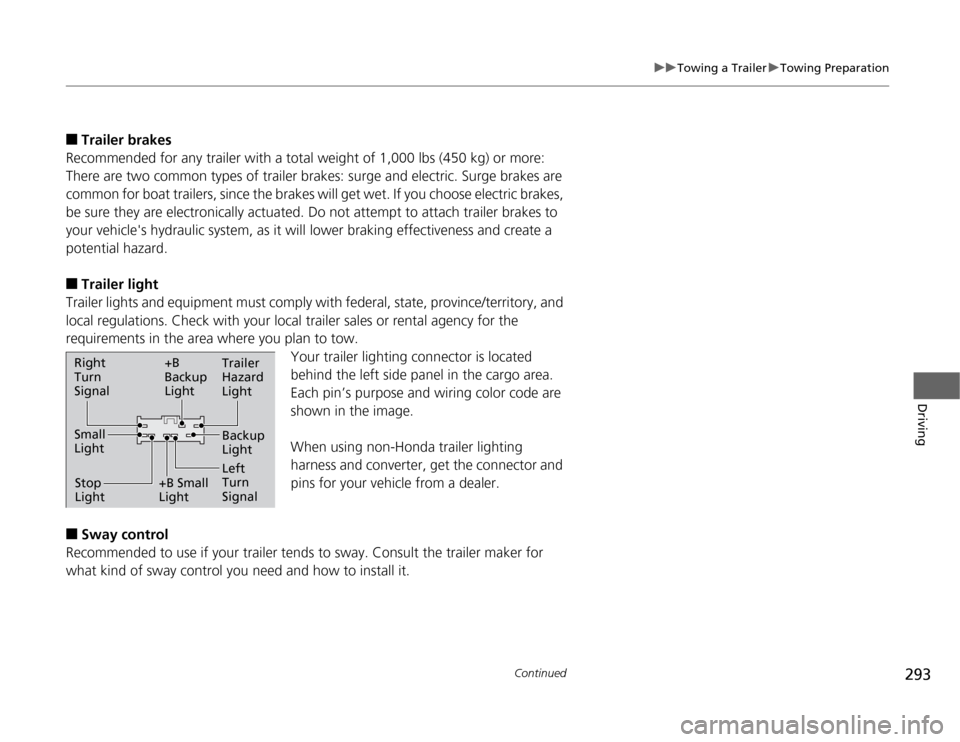
Your trailer lighting connector is located
behind the left side panel in the cargo area.
Each pin’s purpose and wiring color code are
shown in the image.
When using non-Honda trailer lighting
harness and converter, get the connector and
pins for your vehicle from a dealer.
■
Sway control
Recommended to use if your trailer tends to sway. Consult the trailer maker for
what kind of sway control you need and how to install it.Right
Turn
Signal
Small
Light
Stop
Light+B
Backup
Light
+B Small
LightTrailer
Hazard
Light
Left
Turn
SignalBackup
Light
Page 296 of 441

295
uuTowing a TraileruDriving Safely with a Trailer
Continued
Driving
Driving Safely with a Trailer•Have the trailer properly serviced and keep it in good condition.
•Make sure that all the weights and load in the vehicle and trailer are within limits.
2Towing Load Limits P. 291
•Securely attach the hitch, safety chains, and other necessary parts to the trailer.
•Securely store all the items in and on the trailer so that they do not shift while
driving.
•Check if the lights and brakes on the trailer are working properly.
•Check the pressure of the trailer tires, including the spare.
•Drive slower than normal.
•Obey posted speed limits for vehicles with trailer.
•Use the
(D
when towing a trailer on level roads.
•Turn more slowly and with a wider turning arc than normal.
•Allow more time and distance for braking.
•Do not brake or turn suddenly.
■
Things You Need To Know Before Towing a Trailer
■
Towing Speeds and Gears
■
Turning and Braking
1Driving Safely with a Trailer
Parking
In addition to the normal precautions, place wheel
chocks at each of the trailer’s tires.
When towing a trailer, we recommend that you carry
a full-size spare wheel and tire for your vehicle and
trailer. If you use the compact spare tire that came
with your vehicle, it could adversely affect vehicle
handling.
2Specifications P. 421
2Changing a Flat Tire P. 391
Remember to unhitch the trailer before changing a
flat tire. Ask the trailer sales or rental agency where
and how to store the trailer’s spare tire.