2012 HONDA CR-V buttons
[x] Cancel search: buttonsPage 184 of 361

183
uuRear Entertainment System*uOperating the System
Features
■
Playing a CD
Press the DVD button.
The available options appear on the overhead screen are Repeat, Random, and Scan.
These functions are the same as those of the playing a DVD. 2 Playing a DVD P. 177
To scroll your audio data title, press the TITLE button for five seconds.
■ SETUP button on the remote
Press the SETUP button while the CD is
playing to see the available options. Use the
and buttons to highlight the option and
then press ENT.
Disp Adjust:
You can adjust the overhead screen’s Brightness, Contrast , and Black Level . To
return to the default display setting, select Reset.
After you make all the adjustments, the screen goes back to the top SETUP screen,
or press the CANCEL button to return.
Appearance:
You can select the screen color from blue, black, white, brown, and red.
Language:
You can select the display language from English, French , and Spanish .1System Controls and Menus for CD
You can also insert an audio CD compatible with the
system, or recorded in MP3/WMA/AAC formats into
the slot and play.
2 Playable Discs P. 184
Page 190 of 361

189
Features
Audio Remote Controls
Allows you to operate the audio system while driving.SOURCE Button
Cycles through the audio modes as follows:
FM1 FM2 AM XM1*
XM2 *
CD AUX
(+ (- (Volume) Buttons
Press (+ : Increases the volume.
Press (- : Decreases the volume.
Buttons
• When listening to the radio
Press : Selects the next preset radio station.
Press : Selects the previous preset radio station.
• When listening to a CD, iPod ®, USB flash drive, or Bluetooth® Audio
Press : Skips to the next song.
Press : Goes back to the beginning of the current or previous song.
• When listening to Pandora ®*
Press : Skips to the next song.
Press and hold : Selects the previous station.
Press and hold : Selects the next station.
1Audio Remote Controls
The CD mode appears only when a CD is loaded.
When in the AUX mode, the following are operable
from the remote controls:
• iPod ®/USB flash drive connected to the USB
adapter cable
• Bluetooth ® Audio (with some phones only)
Button
SOURCE Button
Button
(+ Button
(- Button
* Not available on all models
Page 195 of 361

194
Features
Bluetooth® HandsFreeLink ®
For models with the navigation system, see Navigation System Manual for how to
operate the Bluetooth® HandsFreeLink ®.
Bluetooth ® HandsFreeLink ® (HFL) allows you to place and receive phone calls using
your vehicle's audio system, without handling your cell phone.
Using HFL
(Pick-up) button: Press to go directly to the Phone screen or to answer an
incoming call.
(Hang-up/back) button: Press to end a call or to cancel a command.
(TALK) button: Press to call a number with a stored voice tag.
PHONE button: Press to go directly to the Phone screen.
Selector knob: Rotate to select an item on the screen, then press .
■HFL Buttons
1Bluetooth® HandsFreeLink ®
To use HFL, you need a Bluetooth-compatible cell
phone. For a list of compatible phones, pairing
procedures, and special feature capabilities:
• U.S.: Visit www.handsfreelink.honda.com , or call
(888) 528-7876.
• Canada: Visit www.handsfreelink.ca , or call (888)
528 -7876.
Voice control tips • Aim the vents away from the ceiling and close the
windows, as noise coming from them may interfere
with the microphone.
• Press and release the button when you want to
call a number using a stored voice tag. Speak
clearly and naturally after a beep.
• If the microphone picks up voices other than yours,
the command may be misinterpreted.
• To change the volume level, use the audio system's
volume knob or the remote audio controls on the
steering wheel.Models with navigation system
Models without navigation system
TALK Button
Volume up
Microphone
Hang-up/Back Button
Pick-up
Button
Volume
downSelector
Knob PHONE
Button
Page 212 of 361
Continued211
uuBluetooth® HandsFreeLink ®uHFL Menus
Features
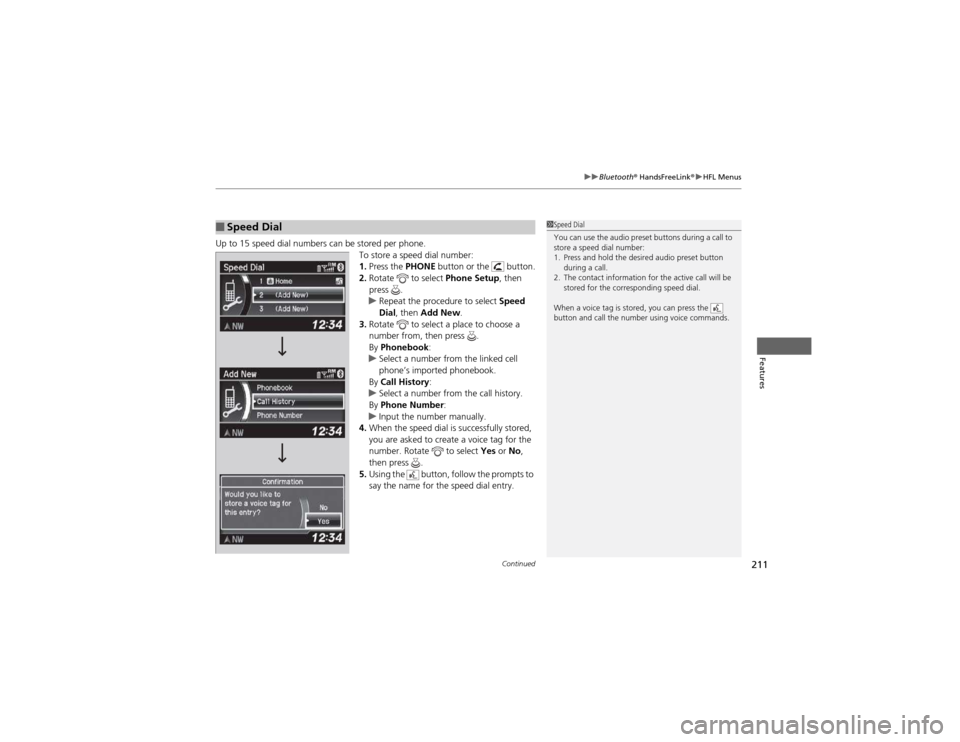
Up to 15 speed dial numbers can be stored per phone.
To store a speed dial number: 1.Press the PHONE button or the button.
2. Rotate to select Phone Setup, then
press .
uRepeat the procedure to select Speed
Dial , then Add New .
3. Rotate to select a place to choose a
number from, then press .
By Phonebook :
uSelect a number from the linked cell
phone’s imported phonebook.
By Call History :
uSelect a number from the call history.
By Phone Number :
uInput the number manually.
4. When the speed dial is successfully stored,
you are asked to create a voice tag for the
number. Rotate to select Yes or No,
then press .
5. Using the button, follow the prompts to
say the name for the speed dial entry.
■Speed Dial1Speed Dial
You can use the audio preset buttons during a call to
store a speed dial number:
1. Press and hold the desired audio preset button
during a call.
2. The contact information for the active call will be stored for the corresponding speed dial.
When a voice tag is stored, you can press the
button and call the number using voice commands.
Page 216 of 361

Continued215
uuBluetooth® HandsFreeLink ®uHFL Menus
Features
■To make a call using redial
1. Press the PHONE button or the button.
2. Rotate to select Redial, then press .
uDialing starts automatically.
■ To make a call using the call history
Call history is stored by Dialed Calls,
Received Calls , and Missed Calls .
1. Press the PHONE button or the button.
2. Rotate to select Call History, then press
.
3. Rotate to select Dialed Calls, Received
Calls , or Missed Calls , then press .
4. Rotate to select a number, then press
.
uDialing starts automatically.
■ To make a call using a speed dial entry
1. Press the PHONE button or the button.
2. Rotate to select Speed Dial, then press
.
3. Rotate to select a number, then press
.
uDialing starts automatically.
1To make a call using the call history
The call history displays the last 20 dialed, received, or
missed calls.
(Appears only when a phone is connected to HFL.)
1To make a call using a speed dial entry
On the Phone screen, the first six speed dials on the
list can be directly selected by pressing the
corresponding audio preset buttons (1-6).
Select More Speed Dial Lists to view another paired
phone’s speed dial list.
When a voice tag is stored, you can press the
button and call the number using voice commands. 2 Speed Dial P. 211
Page 248 of 361
247
uuWhen DrivinguCruise Control
Driving
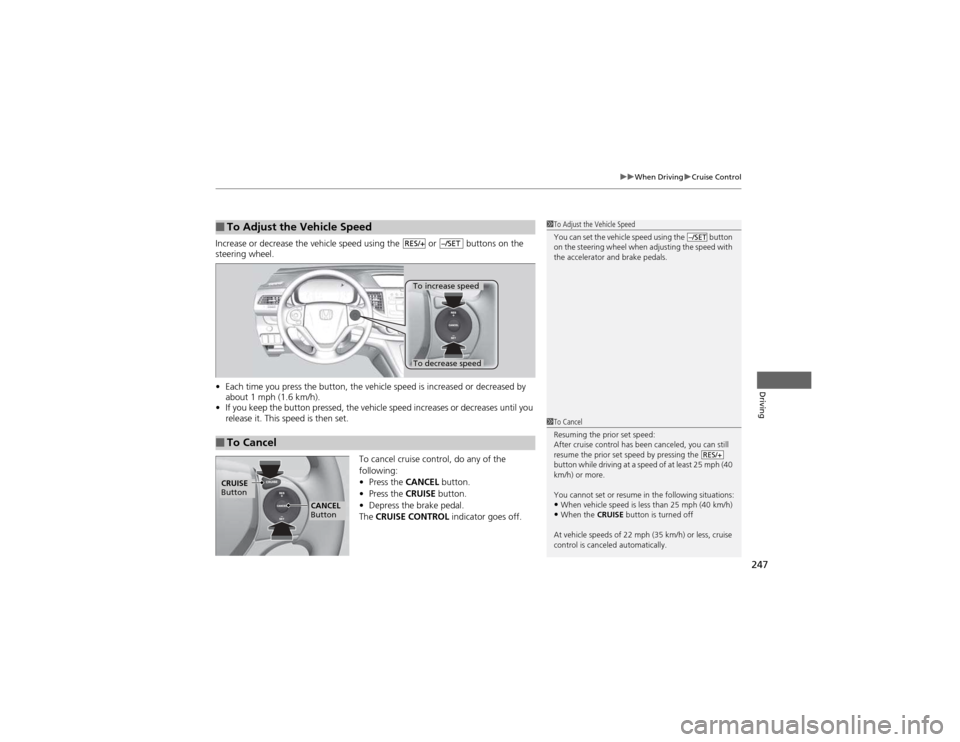
Increase or decrease the vehicle speed using the or buttons on the steering wheel. •Each time you press the button, the vehicle speed is increased or decreased by
about 1 mph (1.6 km/h).
• If you keep the button pressed, the vehicle speed increases or decreases until you
release it. This speed is then set.
To cancel cruise control, do any of the
following: •Press the CANCEL button.
• Press the CRUISE button.
• Depress the brake pedal.
The CRUISE CONTROL indicator goes off.
■To Adjust the Vehicle Speed1To Adjust the Vehicle Speed
You can set the vehicle speed using the button
on the steering wheel when adjusting the speed with
the accelerator and brake pedals.
–/SETRES/+–/SET
■To Cancel
To decrease speed
To increase speed
1To Cancel
Resuming the prior set speed:
After cruise control has been canceled, you can still
resume the prior set speed by pressing the
button while driving at a speed of at least 25 mph (40
km/h) or more.
You cannot set or resume in the following situations:
• When vehicle speed is less than 25 mph (40 km/h)
• When the CRUISE button is turned off
At vehicle speeds of 22 mph (35 km/h) or less, cruise
control is canceled automatically.
RES/+
CRUISE
Button
CANCEL
Button
Page 308 of 361

307
Continued
Maintenance
Remote Control and Wireless Headphone Care *
Replacing the Battery
If it takes several pushes on the remote control buttons to operate the rear
entertainment system
*
.
1.Remove the cover.
2. Make sure to replace the battery with the
correct polarity.
■Remote Control
Models with Rear Entertainment System
1Replacing the Battery
NOTICEAn improperly disposed of battery can damage the
environment. Always confirm local regulations for battery disposal.
Replacement batteries are commercially available or
at a dealer.
Battery type: CR2025
* Not available on all models
Page 355 of 361

354
Index
G
Gasoline (Fuel)Economy ................................................. 262
Gauge ....................................................... 77
Information ............................................. 259
Low Fuel Indicator ..................................... 70
Refueling ................................................. 259
Gauges ......................................................... 77
Gear Shift Lever Positions Automatic Transmission ........................... 243
Glass (care) ................................................ 313
Glove Box .................................................. 133
H
Halogen Bulbs ................................... 285, 286
Handling the Unexpected ........................ 315
HandsFreeLink ® (HFL) ............................... 194
Automatic Import of Cellular Phonebook and Call History ............................................ 210
Automatic Transferring ............................ 208
Caller’s ID Information ............................. 208
HFL Buttons ............................................. 194
HFL Menus .............................................. 196
HFL Status Display.................................... 195
Making a Call .......................................... 213
Options During a Call .............................. 217
Phone Setup ............................................ 201
Receiving a Call ....................................... 216
Speed Dial ............................................... 211
Text Message................................... 206, 218 To Clear the System ................................ 209
To Create a Security PIN .......................... 207
Hazard Warning Button .............................. 2
Head Restraints ........................................ 125
Headlights ................................................. 112
Aiming .................................................... 285
Automatic Operation............................... 113
Dimming ......................................... 112, 114
Operating................................................ 112
Heaters (Seat) ........................................... 139
Heating and Cooling System ................... 142
Cooling ................................................... 144
Defrosting the Windshield and
Windows ............................................... 144
Dust and Pollen Filter............................... 309
Heating ................................................... 143
HFL (HandsFreeLink ®)............................... 194
High Beam Indicator .................................. 74
Hill Start Assist System ............................. 240
I
Identification Numbers ............................ 342
Engine and Transmission ......................... 342
Vehicle Identification .............. ................. 342
Ignition Switch ......................................... 111
Illumination Control ................................. 117
Knob ....................................................... 117
Immobilizer System .................................. 106
Indicator.................................................... 75
Indicators .................................................... 68 ABS (Anti-lock Brake System) .................... 71
AWD System............................................. 71
Charging System............................... 69, 329
CRUISE CONTROL ............................. 76, 246
CRUISE MAIN.................................... 76, 245
Door Open.......................................... 28, 72
ECON Mode ..................................... 75, 119
EPS (Electric Power Steering)
System ............................................ 73, 331
Fog Light .................................................. 74
High Beam ................................................ 74
Immobilizer System ................................... 75
Lights On .................................................. 74
Low Fuel ................................................... 70
Low Oil Pressure ............................... 68, 329
Low Tire Pressure ...................... 73, 250, 251
Maintenance Minder......................... 76, 269
Malfunction Indicator Lamp .............. 69, 330
Parking Brake and Brake System ....... 68, 331
Seat Belt Reminder.............................. 30, 70
Security System Alarm............................... 75
Shift Lever Position.................................... 69
Side Airbag Off ................................... 50, 74
Supplemental Restraint System ........... 48, 71
Tailgate Open ........................................... 72
TPMS ................................................ 73, 252
Transmission ............................................. 70
Turn Signal ............................................... 74 VSA ® (Vehicle Stability Assist) System 72, 248
VSA ® OFF.......................................... 72, 249
Washer Level ............................................ 76