Page 151 of 361

150
Features
Audio System
About Your Audio System
On models with navigation system, see the Navigation System Manual for operation
of the audio system, Bluetooth®HandsFreeLink ®, and voice commands for these
features.
The audio system features AM/FM radio and the XM ® Radio *
service. It can also play
audio CDs, WMA/MP3/AAC files, iPods ®, iPhone ®, USB flash drives, and Bluetooth®
devices.
You can operate the audio system from the buttons and switches on the panel, or
the remote controls on the steering wheel.
1About Your Audio System XM ® Radio is available on a subscription basis only.
For more information on XM ® Radio, contact a
dealer. 2 General Information on the Audio System
P. 190
XM ® Radio is available in the United States and
Canada, except Hawaii, Alaska, and Puerto Rico. XM ® is a registered trademark of Sirius XM Radio, Inc.
Video CDs, DVDs, and 3-inch (8-cm) mini CDs are not
supported.
iPod ® is a registered trademark owned by Apple Inc.
MP3 and AAC are standard audio compression
formats. WMA is an audio compression format
developed by Microsoft Corporation.
Remote Control iPod
®
USB Flash
Drive
* Not available on all models
Page 152 of 361

151
uuAudio SystemuUSB Adapter Cable
Features
USB Adapter Cable1.Unclip the USB connector and loosen the
adapter cable.
2. Install the iPod ® dock connector or the USB
flash drive to the USB connector.
Auxiliary Input Jack *
Use the jack to connect standard audio devices. 1.Open the AUX cover.
2. Connect a standard audio device to the
input jack using a 1/8 inch (3.5 mm) stereo
miniplug.
uThe audio system automatically switches
to the AUX mode.
1USB Adapter Cable
• Do not leave the iPod ® or USB flash drive in the
vehicle. Direct sunlight and high temperatures may damage it.
• Do not use an extension cable with the USB
adapter cable.
• Do not connect the iPod ®
or USB flash drive using a
hub.
• Do not use a device such as a card reader or hard
disk drive, as the device or your files may be damaged.
• We recommend backing up your data before using
the device in your vehicle.
• Displayed messages may vary depending on the
device model and software version.
If the audio system does not recognize the iPod ®, try
reconnecting it a few times or reboot the device. To
reboot, follow the manufacturer's instructions provided with the iPod ® or visit www.apple.com/
ipod .
1Auxiliary Input Jack *
To switch the mode, press any of the audio mode
buttons. You can return to the AUX mode by
pressing the AUX button.
You cannot use the auxiliary input jack if you replace
the audio system.
State or local laws may limit the circumstances in
which you can launch or control your attached audio device.
* Not available on all models
Page 153 of 361
152
uuAudio SystemuAudio Antenna
Features
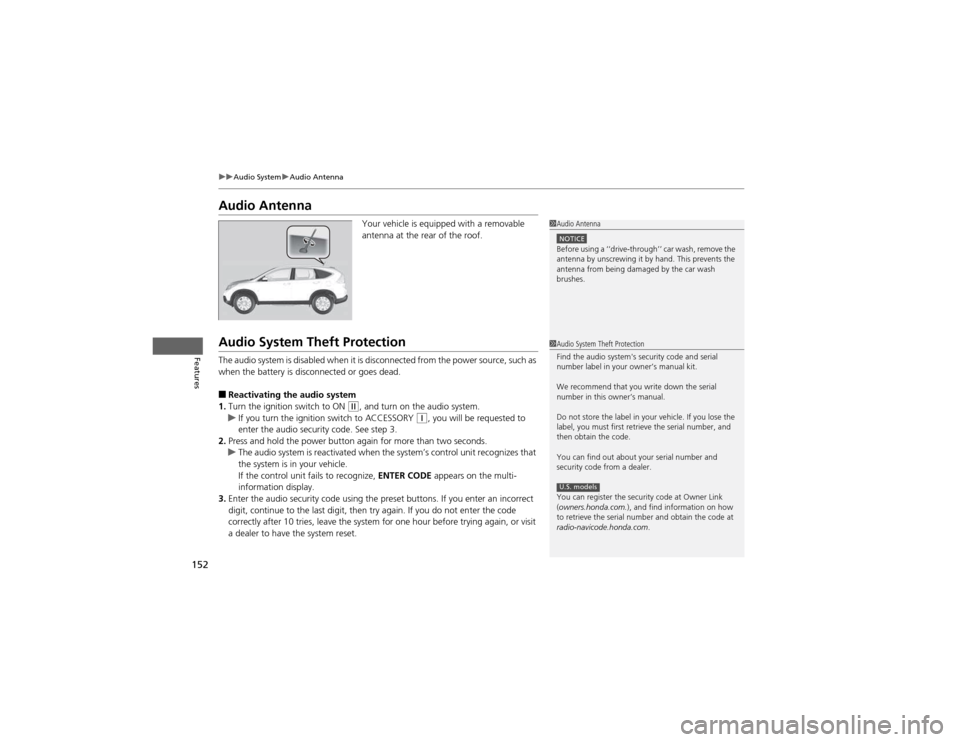
Audio AntennaYour vehicle is equipped with a removable
antenna at the rear of the roof.
Audio System Theft Protection
The audio system is disabled when it is disconnected from the power source, such as
when the battery is disconnected or goes dead. ■Reactivating the audio system
1. Turn the ignition switch to ON
(w , and turn on the audio system.uIf you turn the ignition switch to ACCESSORY (q, you will be requested to
enter the audio security code. See step 3.
2. Press and hold the power button again for more than two seconds.
uThe audio system is reactivated when the system’s control unit recognizes that
the system is in your vehicle.
If the control unit fails to recognize, ENTER CODE appears on the multi-
information display.
3. Enter the audio security code using the preset buttons. If you enter an incorrect
digit, continue to the last digit, then try again. If you do not enter the code
correctly after 10 tries, leave the system for one hour before trying again, or visit
a dealer to have the system reset.
1Audio Antenna
NOTICEBefore using a ‘‘drive-through’’ car wash, remove the
antenna by unscrewing it by hand. This prevents the
antenna from being damaged by the car wash brushes.
1Audio System Theft Protection
Find the audio system's security code and serial
number label in your owner’s manual kit.
We recommend that you write down the serial
number in this owner’s manual.
Do not store the label in your vehicle. If you lose the
label, you must first retrieve the serial number, and
then obtain the code.
You can find out about your serial number and
security code from a dealer.
You can register the security code at Owner Link (owners.honda.com. ), and find information on how
to retrieve the serial number and obtain the code at
radio-navicode.honda.com .
U.S. models
Page 156 of 361
155
uuAudio System Basic OperationuPlaying the AM/FM Radio
Continued
Features
Playing the AM/FM Radio
FM Button / Buttons
Press to display and select an
RDS category.
SCAN Button
Press to sample each of the
strongest stations on the
selected band for 10 seconds.
To turn off scan, press the
button again. (Power) Button
Press to turn the audio
system on and off.Preset Buttons (1-6)
To store a station:
1. Tune to the selected station.
2. Pick a preset button and hold it until you hear a beep.
To listen to a stored station, select a
band, then press the preset button.
SEEK/SKIP Buttons
Press to search up and down
the selected band for a
station with a strong signal. SETUP Button
Press to display menu items.
Selector Knob
Turn to adjust the volume.
Press and turn to tune the radio
frequency.
AM Button
Press to select a band.
FM/AM Button
*
Press to select a band.
* Not available on all models
Page 159 of 361
158
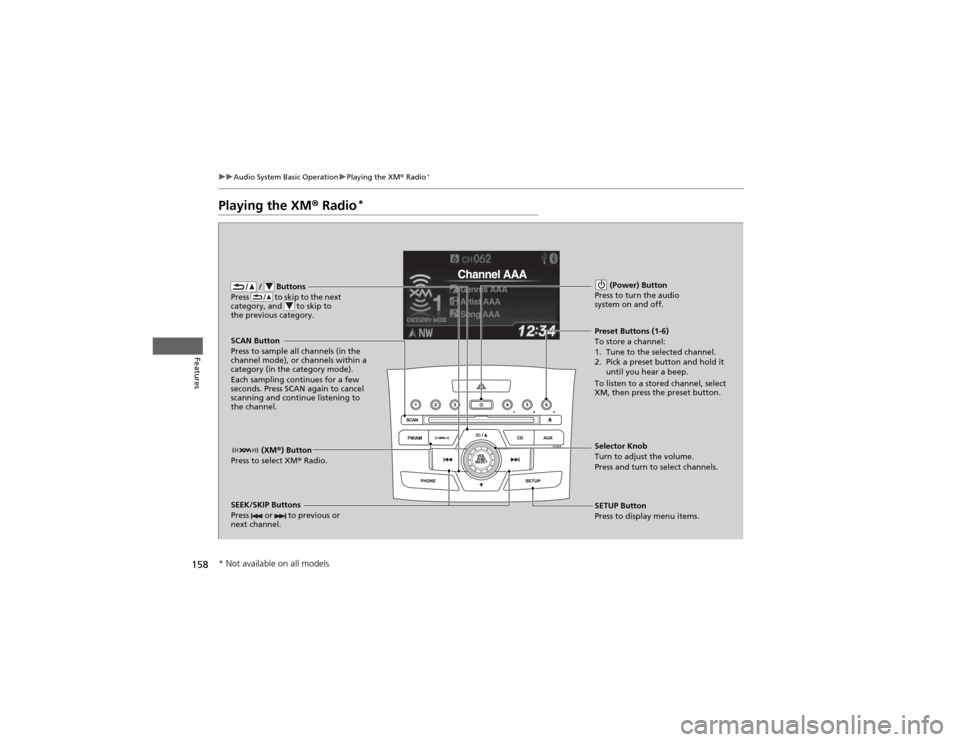
uuAudio System Basic OperationuPlaying the XM® Radio *
Features
Playing the XM
® Radio *
/ Buttons
Press to skip to the next
category, and to skip to
the previous category.
(XM ®) Button
Press to select XM ® Radio.
(Power) Button
Press to turn the audio system on and off.
SEEK/SKIP Buttons
Press or to previous or
next channel.SETUP Button
Press to display menu items.
Selector Knob
Turn to adjust the volume.
Press and turn to select channels.
Preset Buttons (1-6)
To store a channel:
1. Tune to the selected channel.
2. Pick a preset button and hold it
until you hear a beep.
To listen to a stored channel, select
XM, then press the preset button.
SCAN Button
Press to sample all channels (in the
channel mode), or channels within a
category (in the category mode).
Each sampling continues for a few
seconds. Press SCAN again to cancel
scanning and continue listening to the channel.
* Not available on all models
Page 160 of 361
159
uuAudio System Basic OperationuPlaying the XM® Radio *
Features
1.
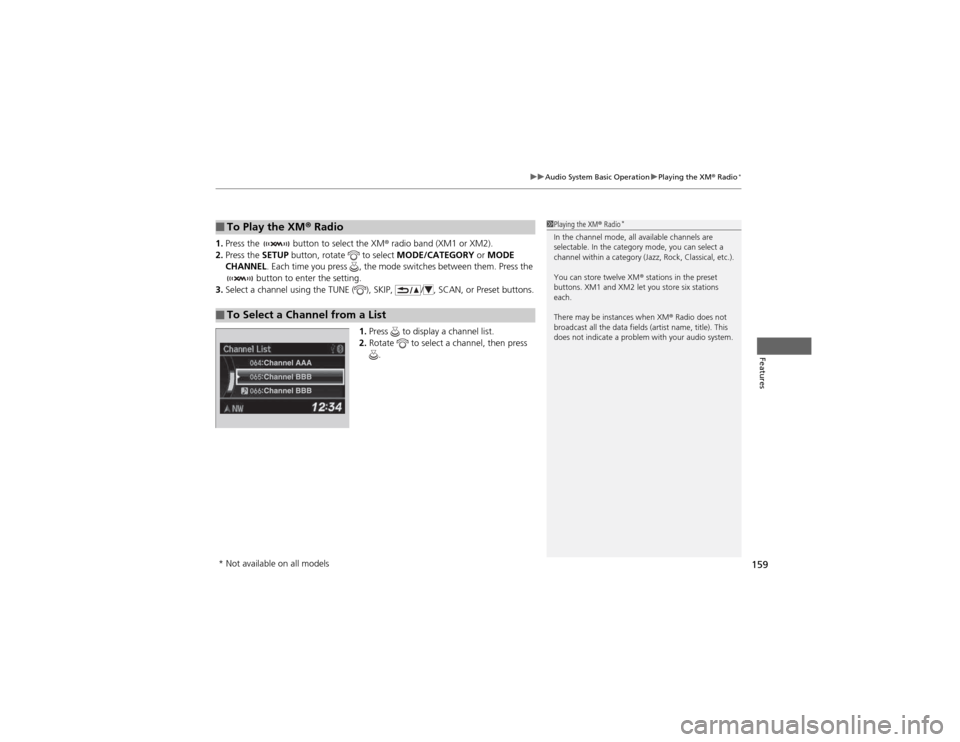
Press the button to select the XM ® radio band (XM1 or XM2).
2. Press the SETUP button, rotate to select MODE/CATEGORY or MODE
CHANNEL . Each time you press , the mode switches between them. Press the
button to enter the setting.
3. Select a channel using the TUNE ( ), SKIP, / , SCAN, or Preset buttons.
1.Press to display a channel list.
2. Rotate to select a channel, then press
.
■To Play the XM ® Radio
■To Select a Channel from a List
1Playing the XM ® Radio *
In the channel mode, all available channels are
selectable. In the category mode, you can select a
channel within a category (Jazz, Rock, Classical, etc.).
You can store twelve XM ® stations in the preset
buttons. XM1 and XM2 let you store six stations
each.
There may be instances when XM ® Radio does not
broadcast all the data fields (artist name, title). This
does not indicate a problem with your audio system.
* Not available on all models
Page 161 of 361
160
uuAudio System Basic OperationuPlaying a CD
Features
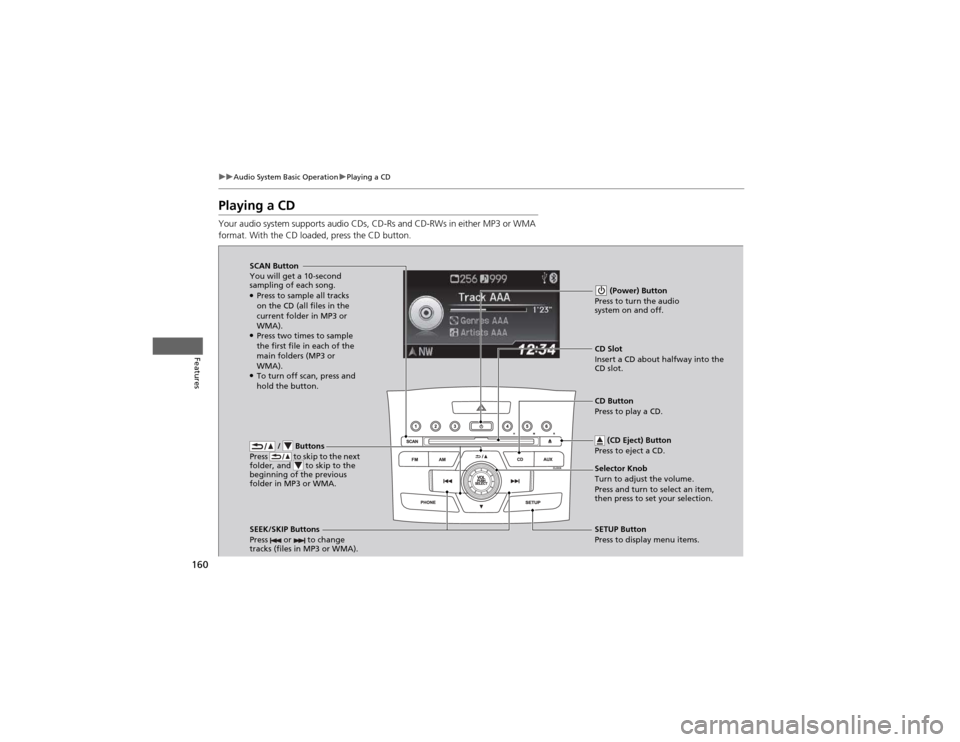
Playing a CD
Your audio system supports audio CDs, CD-Rs and CD-RWs in either MP3 or WMA
format. With the CD loaded, press the CD button.
/ Buttons
Press to skip to the next
folder, and to skip to the
beginning of the previous
folder in MP3 or WMA.
SCAN Button
You will get a 10-second
sampling of each song. ● Press to sample all tracks
on the CD (all files in the
current folder in MP3 or WMA).
● Press two times to sample
the first file in each of the
main folders (MP3 or WMA).
● To turn off scan, press and
hold the button. (Power) Button
Press to turn the audio system on and off.
CD Slot
Insert a CD about halfway into the
CD slot.
SEEK/SKIP Buttons
Press or to change
tracks (files in MP3 or WMA).
SETUP Button
Press to display menu items.
Selector Knob
Turn to adjust the volume.
Press and turn to select an item,
then press to set your selection.
CD Button
Press to play a CD.
(CD Eject) Button
Press to eject a CD.
Page 164 of 361
163
uuAudio System Basic OperationuPlaying an iPod®
Continued
Features
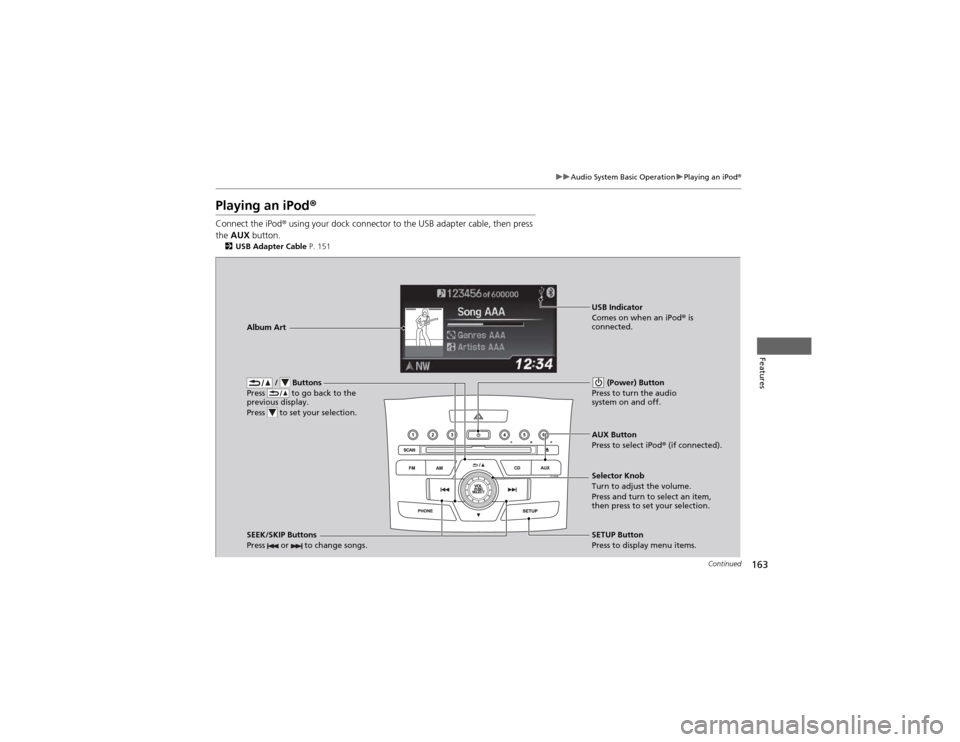
Playing an iPod ®
Connect the iPod ® using your dock connector to the USB adapter cable, then press
the AUX button.
2 USB Adapter Cable P. 151
/ Buttons
Press to go back to the
previous display.
Press to set your selection. (Power) Button
Press to turn the audio system on and off.
SEEK/SKIP Buttons
Press or to change songs.SETUP Button
Press to display menu items.
Selector Knob
Turn to adjust the volume.
Press and turn to select an item,
then press to set your selection.
AUX Button
Press to select iPod
® (if connected).
Album Art
USB Indicator
Comes on when an iPod
® is
connected.