Page 1 of 345

Contents
This owner’s manual should be considered a permanent part of
the vehicle and should remain with the vehicle when it is sold.
This owner’s manual covers all models of the Civic 4-Door. You
may find descriptions of equipment and features that are not on
your particular model.
Images throughout this owner’s manual (including the front
cover) represent features and equipment that are available on
some, but not all, models. Your particular model may not have
some of these features.
This owner’s manual is for vehicles sold in the United States
The information and specifications included in this publication
were in effect at the time of approval for printing. Honda Motor
Co., Ltd. reserves the right, however, to discontinue or change
specifications or design at any time without notice and without
incurring any obligation.
2Safe Driving P.23
For Safe Driving P. 24 Seat Belts P. 28Airbags P. 35
2Instrument Panel P. 65
Indicators P.66 Gauges and Displays P. 78
2Controls P. 97
Setting the Clock P. 98Locking and Unlocking the Doors P. 99
Opening and Closing the Moonroof* P. 116
Adjusting the Seats P. 126
2Features P. 143
Audio System* P. 144 Audio System Basic Operation* P. 147
Bluetooth® HandsFreeLink®* P. 177
2 Driving P. 201
Before Driving P. 202 Towing a Trailer P. 207
Refueling P. 234 Fuel Economy P.237
2Maintenance P. 239
Before Performing Maintenance P. 240Maintenance Minder™ P. 243
Checking and Maintaining Wiper Blades P. 278
Heating and Cooling
* System Maintenance P. 291
2 Handling the Unexpected P. 297
Tools P. 298 If a Tire Goes Flat P.299
Overheating P. 311 Indicator, Coming On/Blinking P.313
2Information P. 323
Specifications P. 324 Identification Numbers P. 328
Emissions Testing P. 331 Warranty Coverages P.333
CIVIC 4D-31TR3600.book 0 ページ 2011年2月14日 月曜日 午後2時51分
QRGQuick Reference Guide
IndexIndex
HomeBook Table of Contents
TOCChapter Table of Contents
Navigation Key
2012 Civic Sedan
* Not available on all models
Home
QRG
Index
and Canada.Online Reference Owner's Manual
Page 4 of 345
3
Quick Reference Guide - 2012 Civic Sedan
❙Headlights/Turn Signals (P 118)
❙Fog Lights* (P 120)
❙Wipers/Washers (P 121)
❙Cruise Control Buttons* (P 220)
❙Km/Mile Change Knob (P 78)
❙CLOCK Knob* (P 98)
❙MENU Button* (P 86)
❙ / / / Buttons* (P 86)+–
❙Navigation System Voice Control Buttons*
() See Navigation System Manual
❙Bluetooth® HandsFreeLink® System
Voice Control Buttons* (P 177)
❙ (SEL/RESET) Knob (P 80)
❙SOURCE Button* (P 86)
❙ (Display/Information) Button* (P 82)
❙Horn (Press an area around .)
❙Brightness Control (P 122)
CIVIC 4D-31TR3600.book 3 ページ 2011年2月14日 月曜日 午後2時51分
Home
QRG
Index
( P 8 2)
* No t avai lable on all m odel s
Page 7 of 345
Visual Index
6
Quick Reference Guide - 2012 Civic Sedan
❙Maintenance Under the Hood (P 251)
❙Windshield Wipers (P 121)
❙Tires (P 280)
❙Fog Lights *(P 120)
❙Door Lock/Unlock Control (P 101)
❙Power Door Mirrors* (P 125)
❙Headlights (P 118)
❙Front Turn Signal/Parking/Side Marker Lights (P 118)
❙How to Refuel (P 235)
❙High-Mount Brake Light* (P 277)
❙Emergency Trunk Release Lever
(P 111)
❙Opening/Closing the Trunk (P 109)
❙Back-Up Lights (P 275)
❙Brake/Taillights (P 275)
❙Rear Turn Signal Lights (P 275)
❙Rear Side Marker Lights (P 275)
CIVIC 4D-31TR3600.book 6 ページ 2011年2月14日 月曜日 午後2時51分
Home
QRG
Index
(P 27 8 )
(P 27 3)
( P 29 9)
( P 27 2)
(
P 268)
* No t avai lable on all m odel s
Page 11 of 345
10
Quick Reference Guide - 2012 Civic SedanControls (P 97)
Turn Signals (P 118)
Turn Signal Control Lever
Right
Left
Lights (P 118)
Light Control Switches
Low Beam High Beam
Flashing
Wipers and Washers
(P 121)
Wiper/Washer Control Lever Adjustment Ring: Long Delay
: Short Delay
MIST
OFF
INT: Low speed with intermittent
LO: Low speed wipe
HI: High speed wipe Pull toward
you to spray
washer fluid.
CIVIC 4D-31TR3600.book 10 ページ 2011年2月14日 月曜日 午後2時51分
Home
QRG
Index
Page 18 of 345
17
Quick Reference Guide - 2012 Civic SedanMaintenance (P 239)
Under the Hood (P 251)
● Check engine oil, engine coolant, and windshield washer
fluid. Add when necessary.
● Check brake fluid and clutch fluid.
● Check the battery regularly.
aPull the hood release handle under the corner of the
dashboard.
bLocate the hood latch lever, pull the lever up, and lift up
the hood.
cWhen finished, close the hood and make sure it is firmly
locked in place.
Lights (P 268)
● Inspect all lights regularly.
Wiper Blades (P 278)
● Replace blades if they leave streaks
across the windshield.
Tires (P 280)
● Inspect tires and wheels regularly.
● Check tire pressures regularly.
● Install snow tires for winter
driving.
CIVIC 4D-31TR3600.book 17 ページ 2011年2月14日 月曜日 午後2時51分
Home
QRG
Index
Page 98 of 345

97
Controls
This chapter explains how to operate the various controls necessary for driving.
Setting the Clock................................ 98
Locking and Unlocking the Doors
Key Types and Functions .................... 99
Locking/Unlocking the Doors from the Outside .......................................... 101
Locking/Unlocking the Doors from the Inside ............................................. 103
Childproof Door Locks ..................... 104
Auto Door Locking/Unlocking
*........ 105
Opening and Closing the Trunk .......109
Security System ................................ 112
Immobilizer System .......................... 112
Security System Alarm
*.................... 112Opening and Closing the Windows .....114
Opening and Closing the Moonroof*...... 116Operating the Switches Around the
Steering Wheel
Ignition Switch ................................. 117
Turn Signals ..................................... 118
Light Switches.................................. 118
Fog Lights
*...................................... 120
Daytime Running Lights ................... 120
Wipers and Washers ........................ 121
Brightness Control ........................... 122
Rear Defogger/Heat ed Door Mirror
*
Button ........................................... 123
ECON Button
*................................. 123
Adjusting the Steering Wheel........... 124Adjusting the Mirrors
.......................125
Interior Rearview Mirror ................... 125
Power Door Mirrors
*....................... 125
Adjusting the Seats ..........................126
Adjusting the Seat Positions ............. 126
Interior Lights/Interior Convenience Items ................................................ 134
Interior Lights .................................. 134
Interior Convenience Items .............. 135
Heating and Cooling
*....................... 140
Using Vents, Heating and A/C*........ 140
* Not available on all models
CIVIC 4D-31TR3600.book 97 ページ 2011年2月14日 月曜日 午後2時51分
Home
QRG
Index 2012 Civic Sedan
Page 122 of 345
121
uuOperating the Switches Around the Steering Wheel uWipers and Washers
Controls
Wipers and Washers
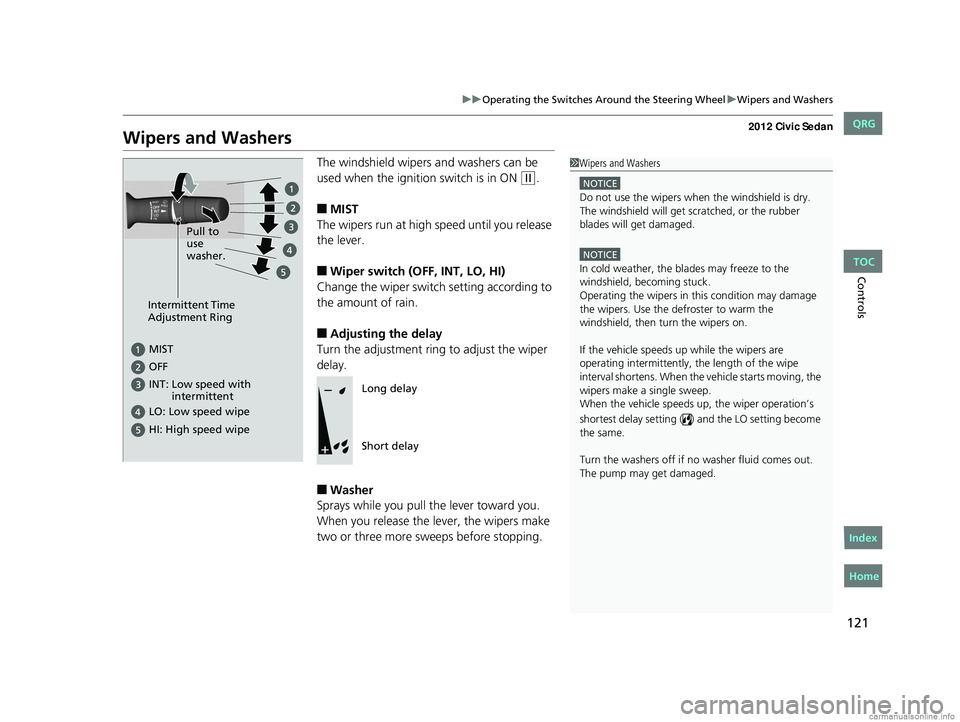
The windshield wipers and washers can be
used when the ignition switch is in ON
(w.
■MIST
The wipers run at high speed until you release
the lever.
■Wiper switch (OFF, INT, LO, HI)
Change the wiper switch setting according to
the amount of rain.
■Adjusting the delay
Turn the adjustment ring to adjust the wiper
delay.
■Washer
Sprays while you pull the lever toward you.
When you release the lever, the wipers make
two or three more sweeps before stopping.
1 Wipers and Washers
NOTICE
Do not use the wipers when the windshield is dry.
The windshield will get sc ratched, or the rubber
blades will get damaged.
NOTICE
In cold weather, the blades may freeze to the
windshield, becoming stuck.
Operating the wipers in th is condition may damage
the wipers. Use the defroster to warm the
windshield, then turn the wipers on.
If the vehicle speeds up while the wipers are
operating intermittently, the length of the wipe
interval shortens. When the vehicle starts moving, the
wipers make a single sweep.
When the vehicle speeds up, the wiper operation’s
shortest delay setting ( ) and the LO setting become
the same.
Turn the washers off if no washer fluid comes out.
The pump may get damaged.
Intermittent Time
Adjustment Ring
MIST
INT: Low speed with
intermittent
OFF
LO: Low speed wipe
HI: High speed wipe
Pull to
use
washer.
Long delay
Short delay
CIVIC 4D-31TR3600.book 121 ページ 2011年2月14日 月曜日 午後2時51分
TOC
Home
QRG
Index
Page 234 of 345
233
Driving
Parking Your Vehicle
When Stopped
1.Always use the parking brake when you park your vehicle.
2. Make sure the parking brake is set firmly, or your vehicle may roll if parked on an
incline.
Parking
1. Depress the brake pedal firmly with the shift lever in (D.
2. Apply the parking brake while holding the brake pedal down.
3. Move the shift lever to
(P.
4. Turn off the engine.
1Parking Your Vehicle
Do not park your vehicle near flammable objects,
such as dry grass, oil, or timber.
Heat from the exhaust can cause a fire.
1 When Stopped
NOTICE
The following can dama ge the transmission:
•Depressing the accelerator and brake pedals
simultaneously.
•Holding the vehicle in place when facing uphill by
depressing the accelerator pedal.
•Moving the shift lever into ( P before the vehicle
stops completely.
Automatic transmission models
1 Parking
Raise the wiper arms when snow is expected.Automatic transmission models
CIVIC 4D-31TR3600.book 233 ページ 2011年2月14日 月曜日 午後2時51分
TOC
Home
QRG
Index


