Page 170 of 345
169
uuAudio System Basic Operation*uPlaying a USB Flash Drive
Features
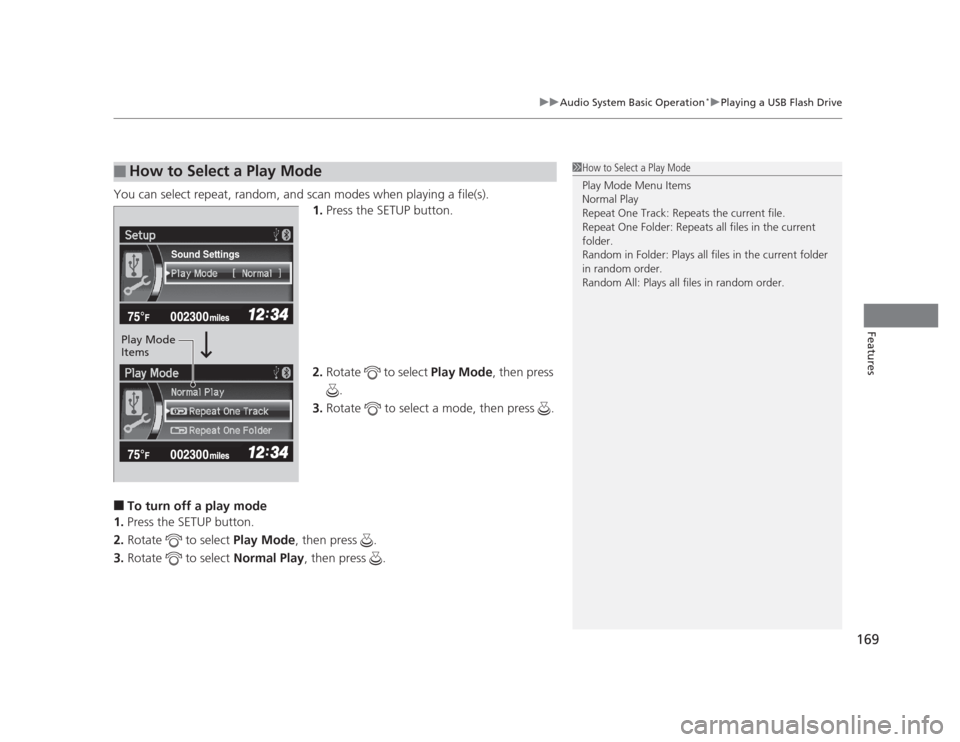
You can select repeat, random,
and scan modes when playing a file(s).
1. Press the SETUP button.
2. Rotate to select Play Mode, then press
.
3. Rotate to select a mode, then press .
■ To turn off a play mode
1. Press the SETUP button.
2. Rotate to select Play Mode, then press .
3. Rotate to select Normal Play, then press .
■How to Select a Play Mode1How to Select a Play Mode Play Mode Menu Items
Normal Play
Repeat One Track: Repeats the current file.
Repeat One Folder: Repeats all files in the current folder.
Random in Folder: Plays all files in the current folder
in random order.
Random All: Plays all files in random order.
Sound Settings
Play Mode Items
Page 174 of 345
173
uuAudio Error Messages*uiPod®
/USB Flash Drive
Features
iPod ®
/USB Flash Drive
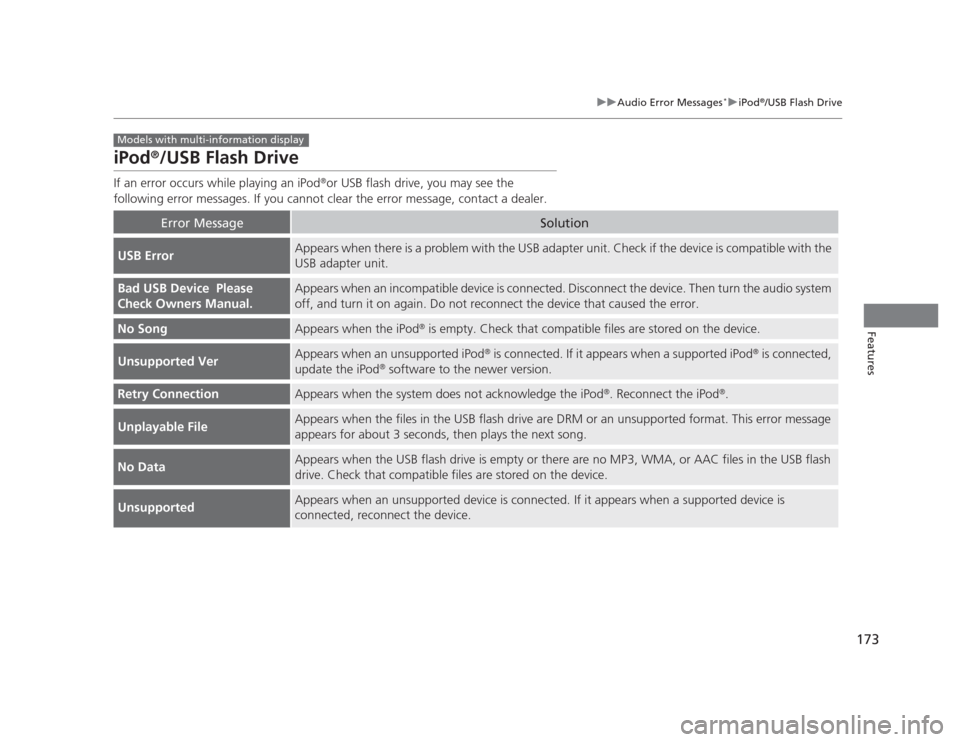
If an error occurs while playing an iPod ®
or USB flash drive, you may see the
following error messages. If you cannot clear the error message, contact a dealer.
Error MessageSolution
USB ErrorAppears when there is a problem with the USB adapter unit. Check if the device is compatible with the USB adapter unit.
Bad USB Device Please
Check Owners Manual.Appears when an incompatible device is connected. Disconnect the device. Then turn the audio system
off, and turn it on again. Do not reconnect the device that caused the error.
No SongAppears when the iPod ®
is empty. Check that compatible files are stored on the device.
Unsupported VerAppears when an unsupported iPod ®
is connected. If it appears when a supported iPod ®
is connected,
update the iPod ®
software to the newer version.
Retry ConnectionAppears when the system does not acknowledge the iPod ®
. Reconnect the iPod ®
.
Unplayable FileAppears when the files in the USB flash drive are DRM or an unsupported format. This error message
appears for about 3 seconds, then plays the next song.
No DataAppears when the USB flash drive is empty or there are no MP3, WMA, or AAC files in the USB flash
drive. Check that compatible files are stored on the device.
UnsupportedAppears when an unsupported device is connected. If it appears when a supported device is
connected, reconnect the device.
Models with multi-information display
Page 177 of 345

176
uuGeneral Information on the Audio System*uCompatible iPod®
and USB Flash Drives
Features
Compatible iPod ®
and USB Flash Drives
• Use a recommended USB flash drive of 256 MB or higher.
• Some digital audio players may not be compatible.
• Some USB flash drives (e.g., a device with security lockout) may not work.
• Some software files may not allow for audio play or text data display.
• Some versions of MP3, WMA, or AAC formats may be unsupported.
■iPod ®
Model Compatibility
Model
iPod classic ®
(80/160G)
iPod classic ®
(120G)
iPod ®
with video (iPod ®
5th generation)
iPod nano ®
iPod nano
®
2nd generation
iPod nano ®
3rd generation
iPod nano ®
4th generation
iPod nano ®
5th generation
iPod touch ®
iPod touch ®
2nd generation
■USB Flash Drives
Models with multi-information display
1iPod ®
Model Compatibility
This system may not work with all software versions
of these devices.
1USB Flash Drives
Files on the USB flash drive are played in their stored
order. This order may be different from the order
displayed on your PC or device.
Page 201 of 345
uuBluetooth®
HandsFreeLink ®*uHFL Menus
200
Features
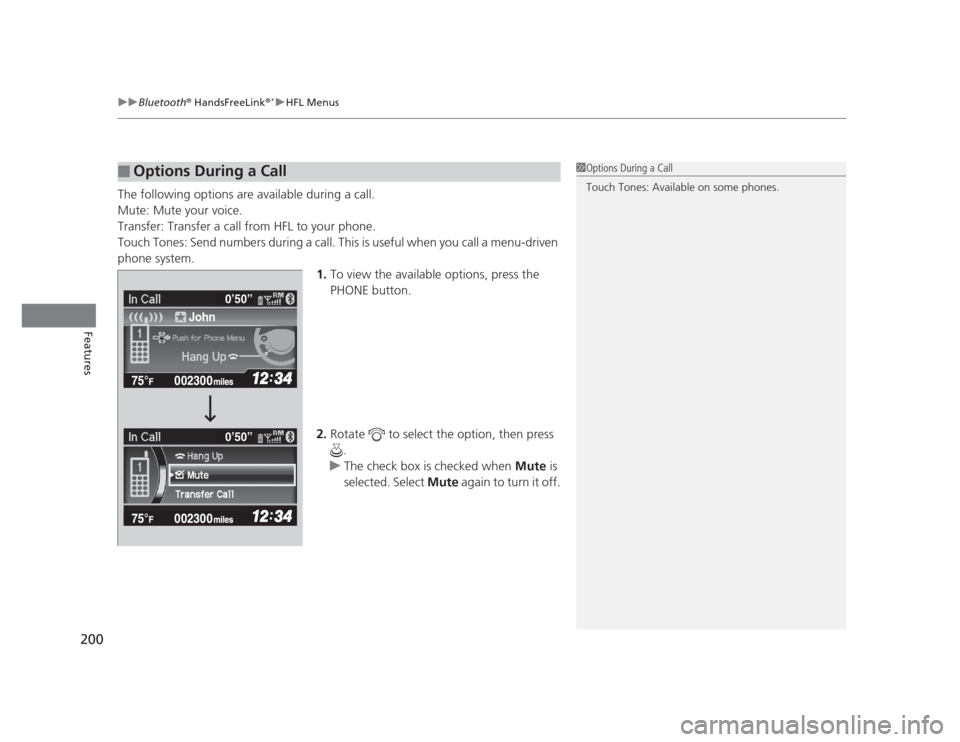
The following options are available during a call.
Mute: Mute your voice.
Transfer: Transfer a call from HFL to your phone.
Touch Tones: Send numbers during a call. This is useful when you call a menu-driven
phone system. 1.To view the available options, press the
PHONE button.
2. Rotate to select the option, then press
.
uThe check box is checked when Mute is
selected. Select Mute again to turn it off.
■Options During a Call1Options During a Call
Touch Tones: Available on some phones.
John 0
Page 205 of 345
204
uuBefore DrivinguDriving Preparation
Driving
•Be sure items placed on the floor behind the front seats cannot roll under the seats.
uThey can interfere with the driver's ability to operate the pedals, the operation
of the seats, or the operation of the sensors under the seats.
• Everyone in the vehicle must fasten their seat belt.
2 Fastening a Seat Belt P. 31
• Make sure that the indicators in the instrument panel come on when you start the
vehicle, and go off soon after.
uAlways have a dealer check the vehicle if a problem is indicated.
2 Indicators P. 66
Page 206 of 345

205
uuBefore DrivinguMaximum Load Limit
Continued
Driving
Maximum Load Limit The maximum load for your vehicle is 850 lbs (385 kg).
See Tire and Loading Information label attached to the driver's doorjamb.
This figure includ es the total weight of all occupants, cargo, and
accessories, and the tongue load if you are towing a trailer.
Steps for Determining Correct Load Limit - (1) Locate the statement "The combined weight of occupants and
cargo should never exceed XXX kg or XXX lbs." on your
vehicle's placard.
(2) Determine the combined weight of the driver and passengers
that will be riding in your vehicle.
(3) Subtract the combined weight of the driver and passengers
from XXX kg or XXX lbs.
(4) The resulting figure equals the ava ilable amount of cargo and
luggage load capacity. For example, if the "XXX" amount
equals 1,400 lbs. and there will be five 150 lb. passengers in
your vehicle, the amount of av ailable cargo and luggage load
capacity is 650 lbs.(1,400 - 750 (5 x 150) = 650 lbs.)
1Maximum Load Limit
Gross Vehicle Weight Rating (GVWR):
The maximum allowable weight of the vehicle, all
occupants, all accessories, all cargo, and the tongue load. 2 Specifications P. 324, 326
Gross Axle Weight Rating (GAWR):
The maximum allowable weight of the vehicle axle. 2 Specifications P. 324, 326
3WARNING
Overloading or improper loading can affect handling and stability
and cause a crash in which you
can be hurt or killed.
Follow all load limits and other loading guidelines in this manual.Label Example
Page 207 of 345
206
uuBefore DrivinguMaximum Load Limit
Driving
(5)Determine the combin ed weight of luggage and cargo being
loaded on the vehicle. That weight may not safely exceed the
available cargo and luggage load capacity calculated in step 4.
(6) If your vehicle will be towing a trailer, load from your trailer will
be transferred to your vehicle. Consult this manual to
determine how this reduces the available cargo and luggage
load capacity of your vehicle.
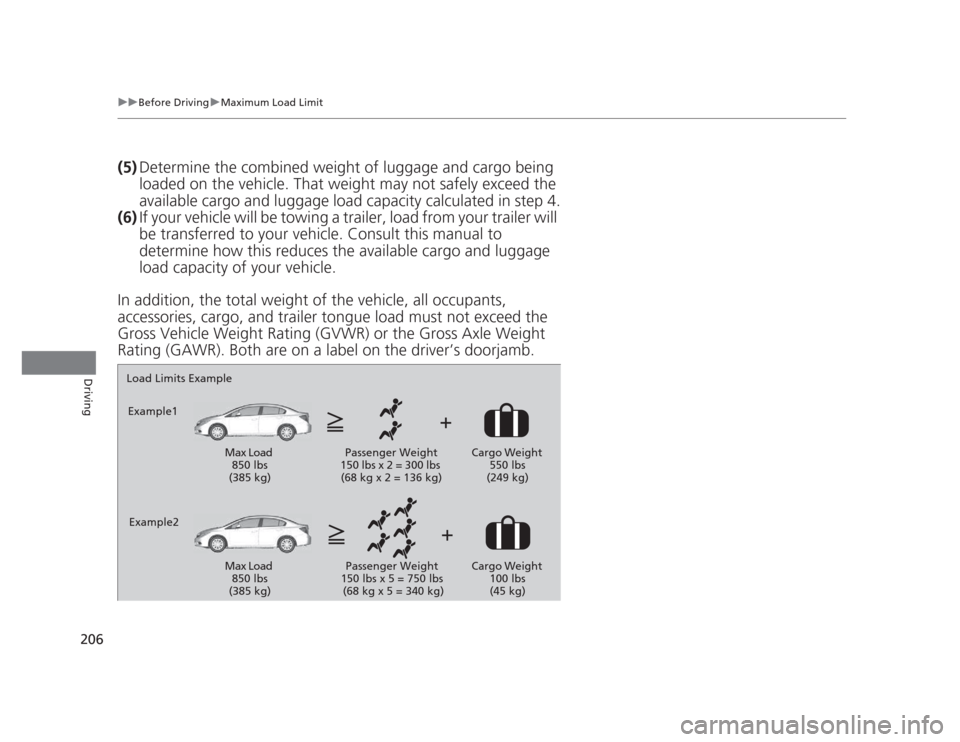
In addition, the total weight of the vehicle, all occupants,
accessories, cargo, and trailer tongue load must not exceed the
Gross Vehicle Weight Rating (GVWR) or the Gross Axle Weight
Rating (GAWR). Both are on a label on the driver’s doorjamb.
Load Limits Example
Example1
Max Load 850 lbs
(385 kg) Passenger Weight
150 lbs x 2 = 300 lbs (68 kg x 2 = 136 kg) Cargo Weight
550 lbs
(249 kg)
Example2 Max Load 850 lbs
(385 kg) Passenger Weight
150 lbs x 5 = 750 lbs
(68 kg x 5 = 340 kg) Cargo Weight
100 lbs (45 kg)
Page 208 of 345
207
Continued
Driving
Towing a Trailer
Your vehicle is not designed to tow a trailer. Attempting to do so can void your
warranties.
Towing Preparation
Your vehicle can tow a trailer if you carefully observe the load limits, use the proper
equipment, and follow the towing guidelines. Check the load limits before driving.
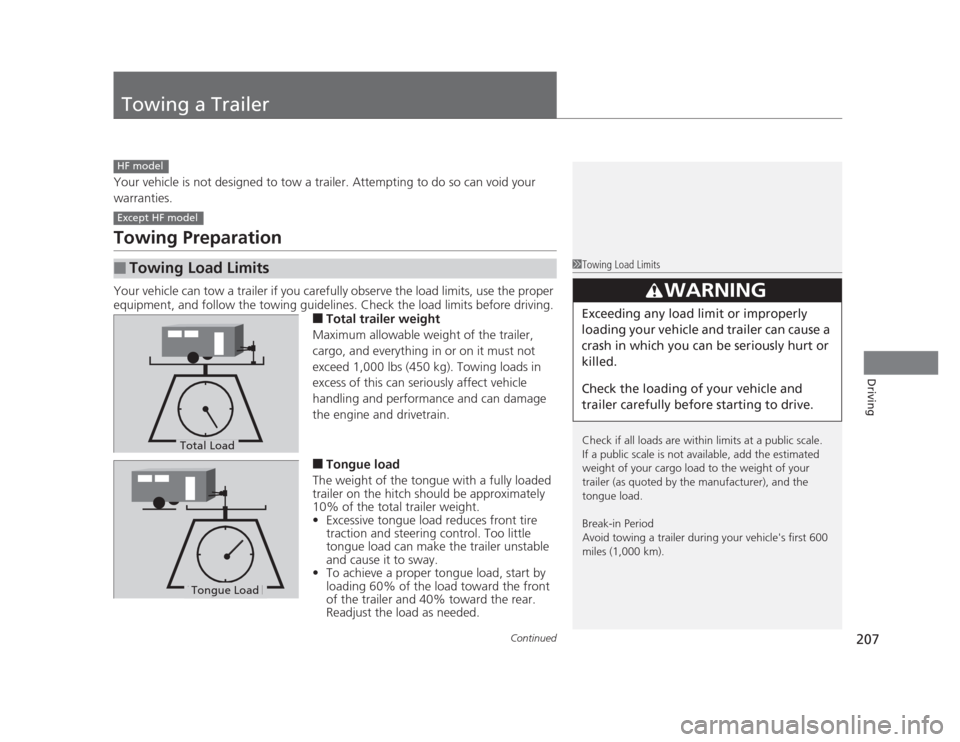
■Total trailer weight
Maximum allowable weight of the trailer,
cargo, and everything in or on it must not
exceed 1,000 lbs (450 kg). Towing loads in
excess of this can seriously affect vehicle
handling and performance and can damage
the engine and drivetrain. ■ Tongue load
The weight of the tongue with a fully loaded
trailer on the hitch should be approximately
10% of the total trailer weight. • Excessive tongue load reduces front tire
traction and steering control. Too little
tongue load can make the trailer unstable
and cause it to sway.
• To achieve a proper tongue load, start by
loading 60% of the load toward the front
of the trailer and 40% toward the rear.
Readjust the load as needed.
■Towing Load Limits
HF model
Except HF model
1Towing Load Limits
Check if all loads are within limits at a public scale.
If a public scale is not available, add the estimated
weight of your cargo load to the weight of your
trailer (as quoted by the manufacturer), and the
tongue load.
Break-in Period
Avoid towing a trailer during your vehicle's first 600
miles (1,000 km).
3WARNING
Exceeding any load limit or improperly
loading your vehicle and trailer can cause a
crash in which you can be seriously hurt or
killed.
Check the loading of your vehicle and
trailer carefully before starting to drive.
Total Load
Tongue LoadTongue Load