Page 135 of 345
134
Controls
Interior Lights/Interior Convenience Items
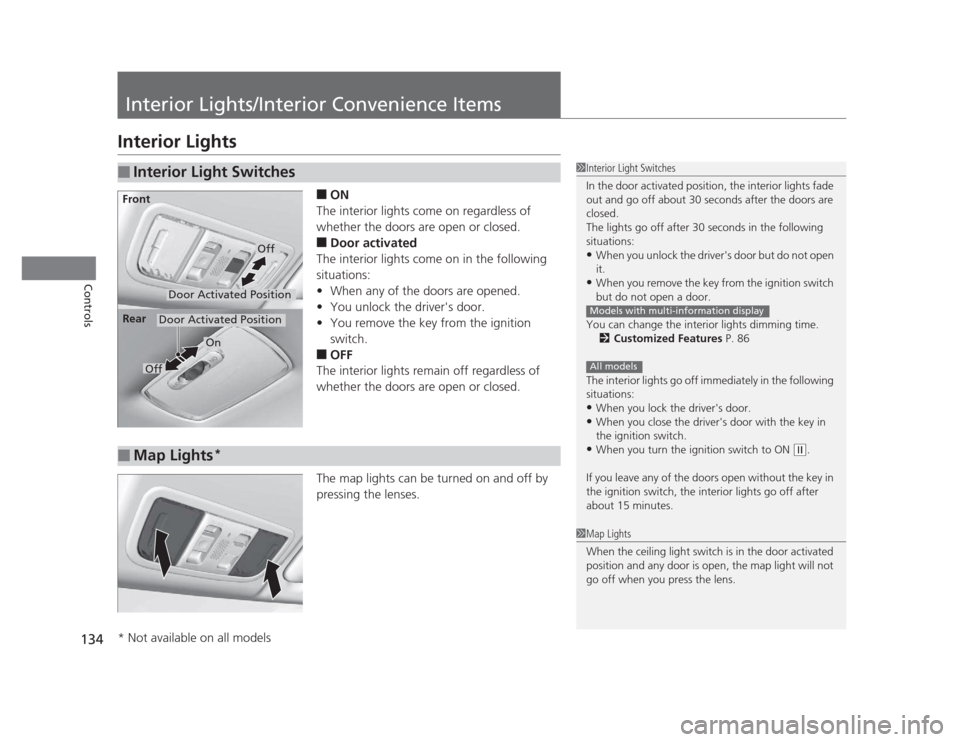
Interior Lights■ON
The interior lights come on regardless of
whether the doors are open or closed. ■ Door activated
The interior lights come on in the following
situations: • When any of the doors are opened.
• You unlock the driver's door.
• You remove the key from the ignition
switch.
■ OFF
The interior lights remain off regardless of
whether the doors are open or closed.
The map lights can be turned on and off by
pressing the lenses.
■Interior Light Switches1Interior Light Switches
In the door activated position, the interior lights fade
out and go off about 30 seconds after the doors are closed.
The lights go off after 30 seconds in the following
situations:• When you unlock the driver's door but do not open it.
• When you remove the key from the ignition switch
but do not open a door.
You can change the interior lights dimming time. 2 Customized Features P. 86
The interior lights go off immediately in the following
situations: • When you lock the driver's door.
• When you close the driver's door with the key in
the ignition switch.
• When you turn the ignition switch to ON
(w .
If you leave any of the doors open without the key in
the ignition switch, the interior lights go off after
about 15 minutes.
Models with multi-information display
All models
Door Activated Position
Off
Front
Door Activated Position
On
Off
Rear
■Map Lights
*
1Map Lights
When the ceiling light switch is in the door activated
position and any door is open, the map light will not
go off when you press the lens.
* Not available on all models
Page 144 of 345

143
Features
This chapter describes how to operate technology features on models without the navigation system.
Audio System *
About Your Audio System ................ 144
USB Adapter Cable *
........................ 145
Auxiliary Input Jack .......................... 145 Audio System Theft Protection *
....... 146
Audio System Basic Operation *
..... 147
Adjusting the Sound ........................ 148
Playing the AM/FM Radio ................. 149
Playing a CD .................................... 151
Models with information display
Audio System Basic Operation *
..... 155
Audio Remote Controls *
.................. 156
Adjusting the Sound ........................ 157
Playing the AM/FM Radio ................. 158
Playing a CD .................................... 161
Playing an iPod ®
............................... 164
Playing a USB Flash Drive ................. 167 Playing Bluetooth ®
Audio................. 170
Models with multi-information displayAudio Error Messages *
CD Player......................................... 172 iPod ®
/USB Flash Drive ...................... 173
General Information on the Audio System *
Recommended CDs ......................... 174
Compatible iPod® and USB Flash Drives .... 176
Bluetooth ®
HandsFreeLink ®*
Using HFL ........................................ 177
HFL Menus ...................................... 179
* Not available on all models
Page 145 of 345

144
Features
Audio System*
About Your Audio System
On models with navigation system, see the Navigation System Manual for operation
of the audio system,
Bluetooth®
HandsFreeLink ®
, and voice commands for these
features.
The audio system features AM/FM radio. It can also play CDs and WMA/MP3 files.
You can operate the audio system from the buttons and switches on the panel.
The audio system features AM/FM radio. It can also play audio CDs, WMA/MP3/AAC files, iPods ®
, USB flash drives, and Bluetooth®
devices *
.
You can operate the audio system from the buttons and switches on the panel, or
the remote controls on the steering wheel.
1About Your Audio System
Video CDs, DVDs, and 3-inch (8-cm) mini CDs are not
supported.
iPod ®
is a registered trademark owned by Apple Inc.
MP3 and AAC are standard audio compression
formats. WMA is an audio compression format
developed by Microsoft Corporation.
Models with information display
Models with multi-information display
Remote Control iPod
®
USB Flash
Drive
* Not available on all models
Page 146 of 345

145
uuAudio System*uUSB Adapter Cable
*
Features
USB Adapter Cable *
1.Unclip the USB connector and loosen the
adapter cable.
2. Install the iPod ®
dock connector or the USB
flash drive to the USB connector.
Auxiliary Input Jack
Use the jack to connect standard audio devices. 1.Open the AUX cover.
2. Connect a standard audio device to the
input jack using a 1/8 inch (3.5 mm) stereo
miniplug.
uThe audio system automatically switches
to the AUX mode.
1USB Adapter Cable •Do not leave the iPod ®
or USB flash drive in the
vehicle. Direct sunlight and high temperatures may damage it.
• Do not use an extension cable with the USB
adapter cable.
• Do not connect the iPod ®
or USB flash drive using a
hub.
• Do not use a device such as a card reader or hard
disk drive, as the device or your files may be damaged.
• We recommend backing up your data before using
the device in your vehicle.
• Displayed messages may vary depending on the
device model and software version.
If the audio system does not recognize the iPod ®
, try
reconnecting it a few times or reboot the device. To
reboot, follow the manufacturer's instructions provided with the iPod ®
or visit www.apple.com/
ipod .
1Auxiliary Input Jack
To switch the mode, press any of the audio mode
buttons. You can return to the AUX mode by
pressing the AUX button.
You cannot use the auxiliary input jack if you replace
the audio system.
State or local laws may limit the circumstances in
which you can launch or control your attached audio device.
* Not available on all models
Page 157 of 345
156
uuAudio System Basic Operation*uAudio Remote Controls
*
Features
Audio Remote Controls *
Allows you to operate the audio system while driving. SOURCE Button
Cycles through the audio modes as follows:
FM1 FM2 AM CD AUX
(Volume) Buttons
Press : Increases the volume.
Press : Decreases the volume.
Buttons
• When listening to the radio
Press : Selects the next preset radio station.
Press : Selects the previous preset radio station.
• When listening to a CD, iPod ®
, USB flash drive, or Bluetooth®
Audio *
Press : Skips to the next song.
Press : Goes back to the beginning of the current or previous song.
1Audio Remote Controls
The CD mode appears only when a CD is loaded.
When in the AUX mode, the following are operable
from the remote controls: •iPod ®
/USB flash drive connected to the USB
adapter cable
• Bluetooth ®
Audio (with some phones only)
Button
SOURCE Button
Button
Button+
Button–
+–
+
–
* Not available on all models
Page 166 of 345
Continued165
uuAudio System Basic Operation*uPlaying an iPod®
Features
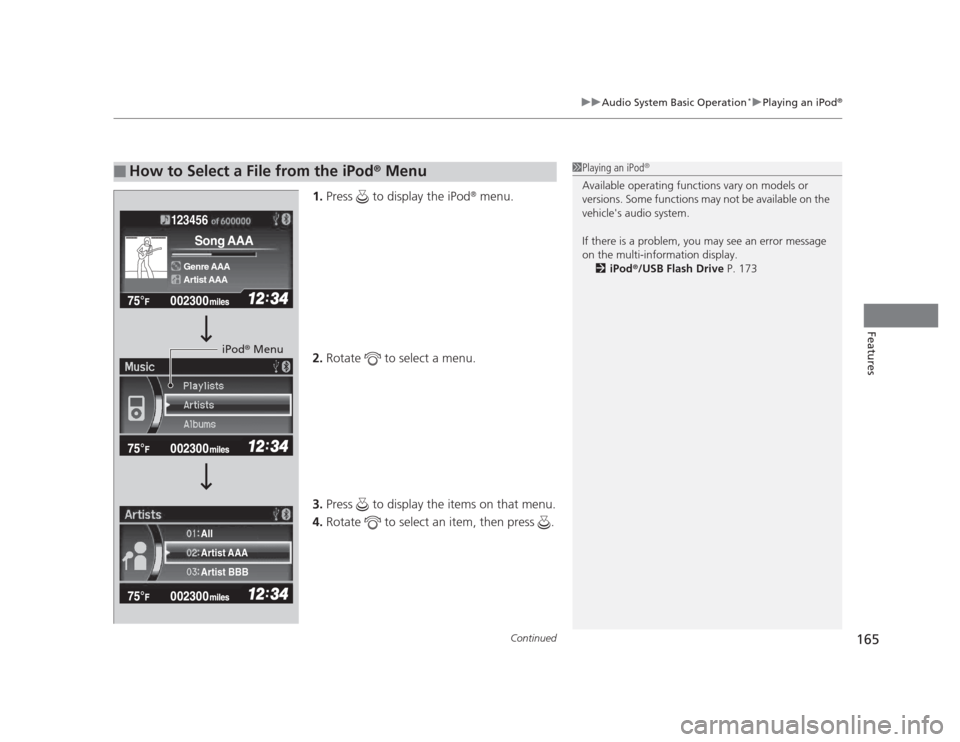
1.
Press to display the iPod ®
menu.
2. Rotate to select a menu.
3. Press to display the items on that menu.
4. Rotate to select an item, then press .
■How to Select a File from the iPod ®
Menu1Playing an iPod ®
Available operating functions vary on models or
versions. Some functions may not be available on the
vehicle's audio system.
If there is a problem, you may see an error message
on the multi-information display. 2 iPod ®
/USB Flash Drive P. 173
123456
Genre AAA
Song AAA
Artist AAA
Artist AAA
Artist BBB
All
iPod
®
Menu
Page 168 of 345
167
uuAudio System Basic Operation*uPlaying a USB Flash Drive
Continued
Features
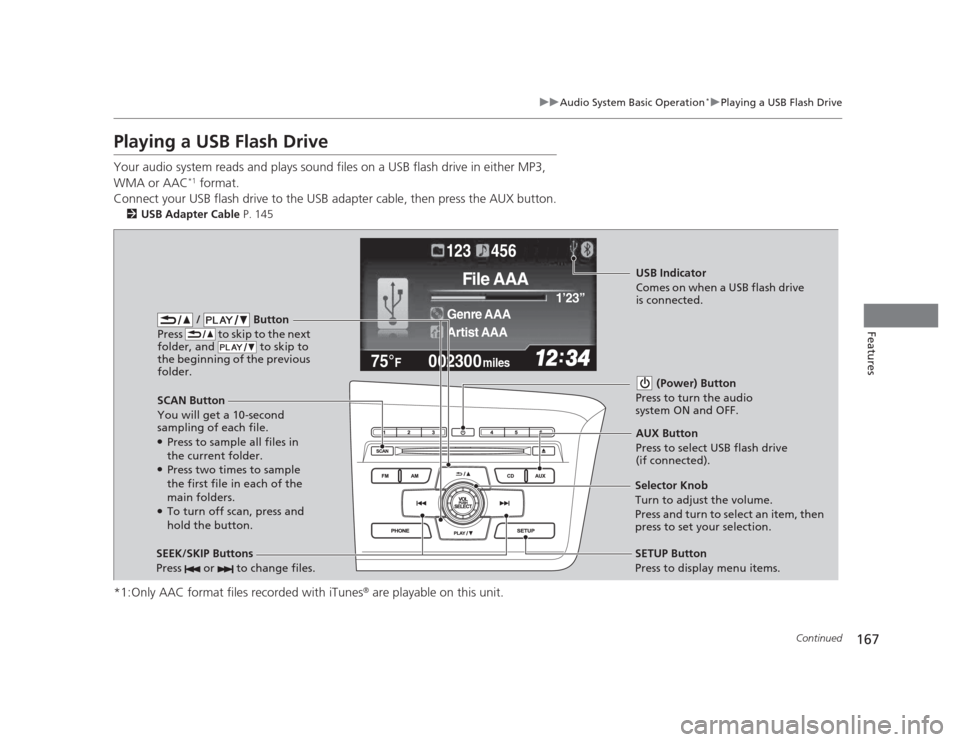
Playing a USB Flash Drive
Your audio system reads and plays sound files on a USB flash drive in either MP3, WMA or AAC*1
format.
Connect your USB flash drive to the USB adapter cable, then press the AUX button. 2 USB Adapter Cable P. 145
*1:Only AAC format files recorded with iTunes ®
are playable on this unit.
002300
75°F miles
Genre AAA 1
Page 169 of 345
uuAudio System Basic Operation*uPlaying a USB Flash Drive
168
Features
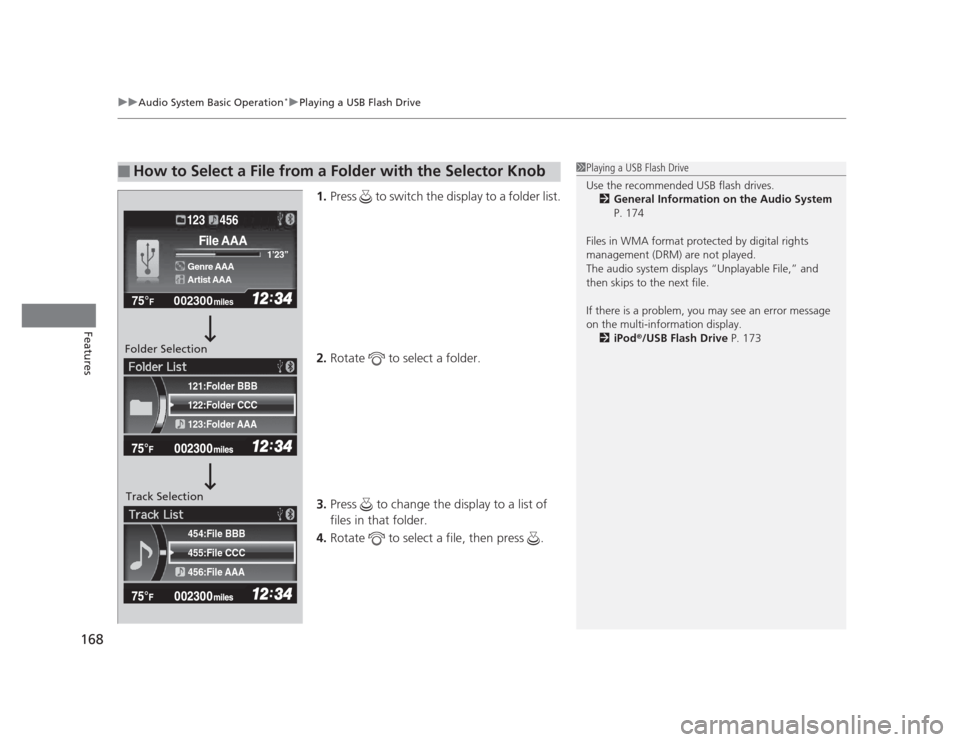
1. Press to switch the display to a folder list.
2. Rotate to select a folder.
3. Press to change the display to a list of files in that folder.
4. Rotate to select a file, then press .
■How to Select a File from a Folder with the Selector Knob1Playing a USB Flash Drive
Use the recommended USB flash drives.
2 General Information on the Audio System
P. 174
Files in WMA format protected by digital rights
management (DRM) are not played.
The audio system displays “Unplayable File,” and
then skips to the next file.
If there is a problem, you may see an error message
on the multi-information display. 2 iPod ®
/USB Flash Drive P. 173
455:File CCC
456:File AAA
454:File BBB
122:Folder CCC
123:Folder AAA
121:Folder BBB
002300
75°F miles
Genre AAA 1