Page 4 of 345
3
Quick Reference Guide
❙Headlights/Turn Signals (P 118)
❙Fog Lights*
(P 120)
❙Wipers/Washers (P 121)
❙Cruise Control Buttons *
(P 220)
❙Km/Mile Change Knob (P 78)
❙CLOCK Knob*
(P 98)
❙MENU Button *
(P 86)
❙ / / / Buttons *
(P 86)+–
❙Navigation System Voice Control Buttons *
() See Navigation System Manual
❙Bluetooth ®
HandsFreeLink ®
System
Voice Control Buttons *
(P 177)
❙ (SEL/RESET) Knob (P 80, 82)
❙SOURCE Button*
(P 86)
❙ (Display/Information) Button *
(P 82)
❙Horn (Press an area around .)
❙Brightness Control (P 122)
* Not available on all models
Page 13 of 345

12
Quick Reference Guide
Heating and Cooling*
System (P 140)
● Rotate the fan control dial to adjust the fan speed and airflow.
● Press the Mode buttons ( / / / ) to select the vents air flows from.
● Rotate the temperature control dial to adjust the temperature.
● Use the button for maximum cool setting.
● Rotate the fan control dial to OFF to turn the system off.
● Press the button to defrost the windshield.
Fan Control Dial
(Rear Window Defogger/ Heated Mirror *
) Button
(Windshield
Defroster) Button
A/C (Air Conditioning) Button *
Air flows from floor and
windshield defroster vents.
Air flows from floor vents.
Air flows from floor and
dashboard vents.
Air flows from dashboard
vents.
Button
Button
Button
*
(Recirculation) Button
Temperature
Control Dial Button
Button
Clock
(P 98)
a Press the CLOCK knob to access the
clock adjustment mode screen.
b Turn the CLOCK knob to adjust the
hours.
c Press the CLOCK knob. The display
switches to minute adjustment.
d Turn the CLOCK knob to adjust the
minutes.
e Press the CLOCK knob to complete clock adjustment.
The navigation system receives signals from
GPS satellites, updating the clock
automatically.
Models without navigation system
Models with navigation system
Page 14 of 345
13
Quick Reference GuideFeatures (P 143)
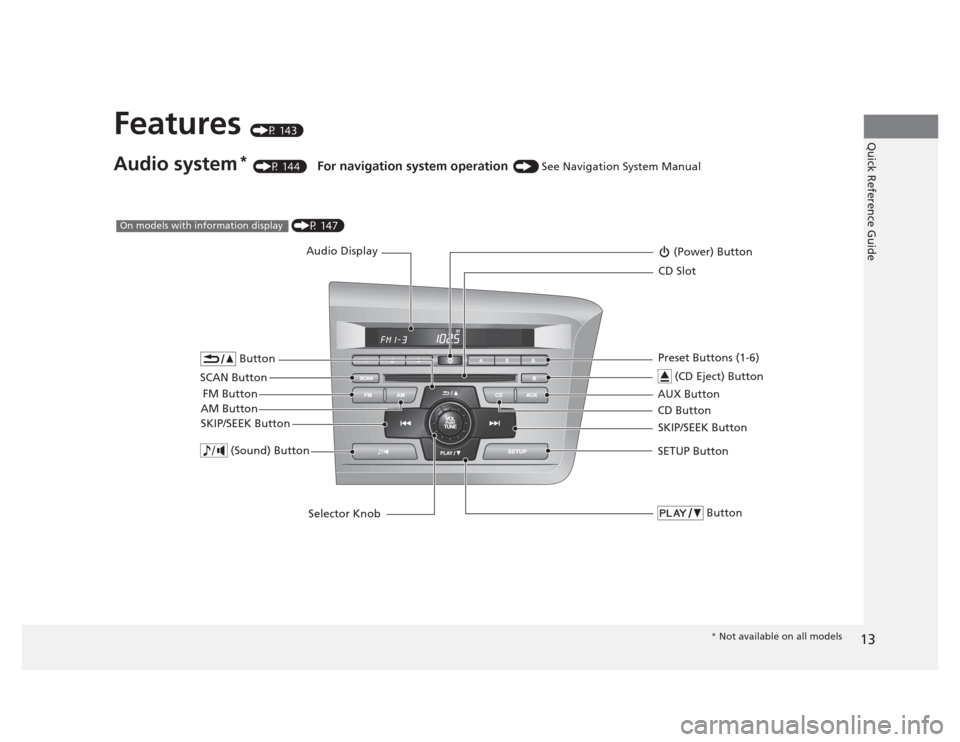
Audio system *
(P 144) For navigation system operation () See Navigation System Manual
Audio Display
AM Button FM Button (Power) Button
CD Button
AUX Button CD Slot
(CD Eject) Button
SCAN Button Preset Buttons (1-6)
SKIP/SEEK Button
Button
SETUP Button
Selector Knob
Button (Sound) Button
SKIP/SEEK Button
(P 147)On models with information display
* Not available on all models
Page 15 of 345
14
Quick Reference Guide
002300
75°F miles
(P 155)On models with multi-information display
Multi-Information Display
AM Button FM Button
SCAN Button
SKIP/SEEK Button
Selector Knob
Button
(Sound)
Button *
(Power)
Button
CD Button
AUX Button CD Slot
(CD Eject)
Button
Preset Buttons (1-6)
Button
SETUP ButtonSKIP/SEEK ButtonPHONE Button
*
●
Audio Remote Controls *
(P 156)
● / Button
Press and release to adjust the volume up/
down.
● SOURCE Button
Press and release to change the audio
mode: FM1/FM2/AM/CD/AUX.
● / Button
Radio: Press and release to change the preset station.
Press and hold to select the next or
previous strong station.
CD/USB device:
Press and release to skip to the
beginning of the next song or
return to the beginning of the
current song.
Press and hold to change a folder.
/ / / Button+–
SOURCE
Button
+–
Page 66 of 345
65
Instrument Panel
This chapter describes the buttons, indicators, and gauges that are used while driving.
Indicators ............................................ 66
Multi-Information Display Warning and
Information Messages *
.................... 76
Gauges and Displays
Gauges .............................................. 78
Information Display *
.......................... 80
Multi-Information Display *
................. 82
* Not available on all models
Page 141 of 345
140
Controls
Heating and Cooling*
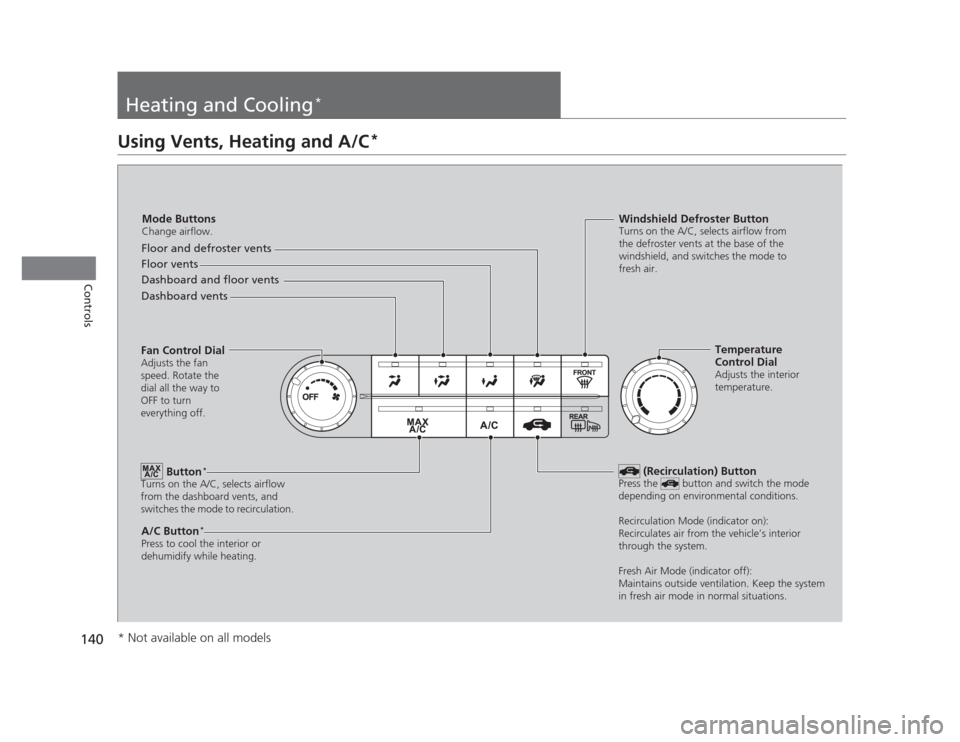
Using Vents, Heating and A/C
*
Mode Buttons
Change airflow.
Floor and defroster vents
Floor vents
Dashboard and floor vents
Dashboard vents
Fan Control Dial Adjusts the fan
speed. Rotate the
dial all the way to
OFF to turn
everything off.
Button *
Turns on the A/C, selects airflow
from the dashboard vents, and
switches the mode to recirculation.
A/C Button *
Press to cool the interior or
dehumidify while heating. Windshield Defroster Button
Turns on the A/C, selects airflow from
the defroster vents at the base of the
windshield, and switches the mode to
fresh air.
Temperature
Control Dial
Adjusts the interior
temperature.
(Recirculation) Button
Press the button and switch the mode
depending on environmental conditions.
Recirculation Mode (indicator on):
Recirculates air from the vehicle’s interior
through the system.
Fresh Air Mode (indicator off):
Maintains outside ventilation. Keep the system
in fresh air mode in normal situations.
* Not available on all models
Page 145 of 345

144
Features
Audio System*
About Your Audio System
On models with navigation system, see the Navigation System Manual for operation
of the audio system,
Bluetooth®
HandsFreeLink ®
, and voice commands for these
features.
The audio system features AM/FM radio. It can also play CDs and WMA/MP3 files.
You can operate the audio system from the buttons and switches on the panel.
The audio system features AM/FM radio. It can also play audio CDs, WMA/MP3/AAC files, iPods ®
, USB flash drives, and Bluetooth®
devices *
.
You can operate the audio system from the buttons and switches on the panel, or
the remote controls on the steering wheel.
1About Your Audio System
Video CDs, DVDs, and 3-inch (8-cm) mini CDs are not
supported.
iPod ®
is a registered trademark owned by Apple Inc.
MP3 and AAC are standard audio compression
formats. WMA is an audio compression format
developed by Microsoft Corporation.
Models with information display
Models with multi-information display
Remote Control iPod
®
USB Flash
Drive
* Not available on all models
Page 146 of 345

145
uuAudio System*uUSB Adapter Cable
*
Features
USB Adapter Cable *
1.Unclip the USB connector and loosen the
adapter cable.
2. Install the iPod ®
dock connector or the USB
flash drive to the USB connector.
Auxiliary Input Jack
Use the jack to connect standard audio devices. 1.Open the AUX cover.
2. Connect a standard audio device to the
input jack using a 1/8 inch (3.5 mm) stereo
miniplug.
uThe audio system automatically switches
to the AUX mode.
1USB Adapter Cable •Do not leave the iPod ®
or USB flash drive in the
vehicle. Direct sunlight and high temperatures may damage it.
• Do not use an extension cable with the USB
adapter cable.
• Do not connect the iPod ®
or USB flash drive using a
hub.
• Do not use a device such as a card reader or hard
disk drive, as the device or your files may be damaged.
• We recommend backing up your data before using
the device in your vehicle.
• Displayed messages may vary depending on the
device model and software version.
If the audio system does not recognize the iPod ®
, try
reconnecting it a few times or reboot the device. To
reboot, follow the manufacturer's instructions provided with the iPod ®
or visit www.apple.com/
ipod .
1Auxiliary Input Jack
To switch the mode, press any of the audio mode
buttons. You can return to the AUX mode by
pressing the AUX button.
You cannot use the auxiliary input jack if you replace
the audio system.
State or local laws may limit the circumstances in
which you can launch or control your attached audio device.
* Not available on all models