2012 HONDA CIVIC buttons
[x] Cancel search: buttonsPage 193 of 345

uuBluetooth®
HandsFreeLink ®*uHFL Menus
192
Features
Up to 15 speed dial numbers can be stored per phone. To store a speed dial number: 1.Press the PHONE button or the button.
2. Rotate to select Phone Setup, then
press .
uRepeat the procedure to select Speed
Dial , then Add New .
3. Rotate to select a place to choose a
number from, then press .
By Phonebook:
uSelect a number from the linked cell
phone’s imported phonebook.
By Call History:
uSelect a number from the call history.
By Phone Number:
uInput the number manually.
4. When the speed dial is successfully stored,
you are asked to create a voice tag for the number. Rotate
to select Yes or No, then press .
5. Using the button, follow the prompts to
say the name for the speed dial entry.
■Speed Dial1Speed Dial
You can use the audio preset buttons during a call to
store a speed dial number:
1. Press and hold the desired audio preset button
during a call.
2. The contact information for the active call will be stored for the corresponding speed dial.
002300
75°F miles
Phone Number
Page 199 of 345

uuBluetooth®
HandsFreeLink ®*uHFL Menus
198
Features
■ To make a call using the call history
Call history is stored by Dialed Calls, Received Calls , and Missed Calls .
1. Press the PHONE button or the button.
2. Rotate to select Call History, then press
.
3. Rotate to select Dialed Calls, Received
Calls , or Missed Calls , then press .
4. Rotate to select a number, then press
.
uDialing starts automatically.
■ To make a call using a speed dial entry
1.Press the PHONE button or the button.
2. Rotate to select Speed Dial, then press
.
3. Rotate to select a number, then press
.
uDialing starts automatically.
1To make a call using the call history
The call history displays the last 20 dialed, received, or
missed calls.
(Appears only when a phone is connected to HFL.)
1To make a call using a speed dial entry
On the Phone screen, the first six speed dials on the
list can be directly selected by pressing the
corresponding audio preset buttons (1-6).
Select More Speed Dial Lists to view another paired
phone’s speed dial list.
Page 223 of 345
uuWhen DrivinguCruise Control*
222
Driving
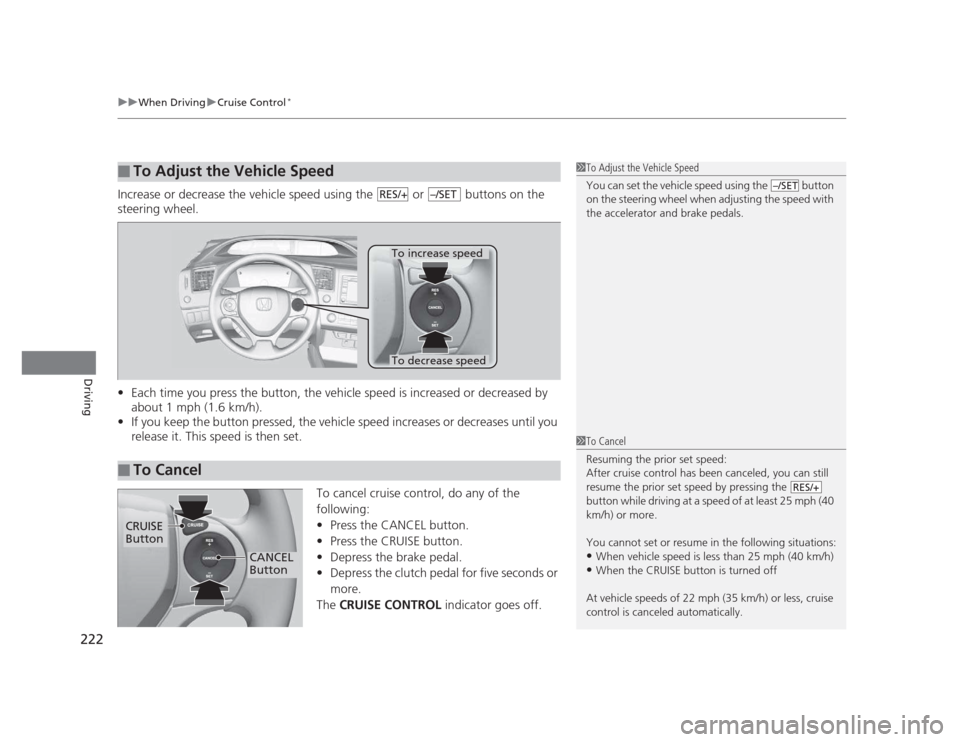
Increase or decrease the vehicle speed using the or buttons on the
steering wheel. • Each time you press the button, the vehicle speed is increased or decreased by
about 1 mph (1.6 km/h).
• If you keep the button pressed, the vehicle speed increases or decreases until you
release it. This speed is then set.
To cancel cruise control, do any of the
following: •Press the CANCEL button.
• Press the CRUISE button.
• Depress the brake pedal.
• Depress the clutch pedal for five seconds or
more.
The CRUISE CONTROL indicator goes off.
■To Adjust the Vehicle Speed1To Adjust the Vehicle Speed
You can set the vehicle speed using the button
on the steering wheel when adjusting the speed with
the accelerator and brake pedals.
–/SETRES/+–/SET
■To Cancel
To decrease speed
To increase speed
1To Cancel
Resuming the prior set speed:
After cruise control has been canceled, you can still
resume the prior set speed by pressing the
button while driving at a speed of at least 25 mph (40
km/h) or more.
You cannot set or resume in the following situations: •When vehicle speed is less than 25 mph (40 km/h)
• When the CRUISE button is turned off
At vehicle speeds of 22 mph (35 km/h) or less, cruise
control is canceled automatically.
RES/+
CRUISE Button
CANCEL
Button
Page 340 of 345

339
INDEX
Electric Power Steering System (EPS)Indicator ........................................... 71, 315
Electronic Stability Control (ESC) ............ 223
Emergency ................................................ 321
Emergency Trunk Opener ....................... 111
Emissions Testing (Readiness Codes) ...... 331
Engine ....................................................... 328
Coolant .................................................. 261
Jump Starting ......................................... 307
Oil .......................................................... 254
Starting................................................... 211
Switch Buzzer ......................................... 117
Engine Coolant ........................................ 261
Adding to the Radiator ........................... 262
Adding to the Reserve Tank .................... 261
High Temperature Indicator ....... ............... 69
Low Temperature Indicator ....................... 74
Overheating ............................................ 311
Engine Oil ................................................. 254
Adding ................................................... 257
Checking ................................................ 255
Displaying Oil Life ........................... 243, 247
Low Oil Pressure Indicator ................. 66, 313
Recommended Engine Oil ....................... 254
EPS (Electric Power Steering
System) .............................................. 71, 315
Exhaust Gas Hazard
(Carbon Monoxide) .................................. 62
Exterior Care (Cleaning) .......................... 294
Exterior Mirrors ........................................ 125 F Features
..................................................... 143
Filters
Dust and Pollen ....................................... 291
Oil ........................................................... 258
Flat Tire ..................................................... 299
Floor Mats ................................................. 293
Fluids Automatic Transmission........................... 263
Brake/Clutch............................................ 266
Engine Coolant........................................ 261
Manual Transmission ............................... 264
Windshield Washer.................................. 267
Fog Light Indicator ..................................... 73
Folding Down the Rear Seats .................. 132
Foot Brake ................................................. 230
Front Airbags (SRS) ..................................... 38
Front Seats ................................................ 126
Adjusting................................................. 126
Fuel ...................................................... 16, 234
Economy ................................................. 237
Gauge ....................................................... 78
Instant Fuel Economy........................... 78, 85
Low Fuel Indicator ..................................... 68
Range.................................................. 81, 84
Recommendation .................................... 234
Refueling ................................................. 234
Fuel Economy ............................................ 237
Fuel Fill Cap ......................................... 16, 236
Message .................................................. 314
Fuel Fill Door ....................................... 16, 235 Fuses
.......................................................... 318
Inspecting and Changing........ ................. 320
Locations......................................... 318, 319
G
Gasoline (Fuel) Economy ................................................. 237
Gauge ....................................................... 78
Information ............................................. 234
Instant Fuel Economy .......................... 78, 85
Low Fuel Indicator ..................................... 68
Refueling................................................. 234
Gauges ........................................................ 78
Gear Shift Lever Positions
Automatic Transmission .......................... 215
Manual Transmission ............................... 218
Glass (care) ................................................ 295
Glove Box .................................................. 135
H
Halogen Bulbs .................................. 268, 272
Handling the Unexpected ........................ 297
HandsFreeLink® (HFL) ............................. 177
Automatic Import of Cellular Phonebook
and Call History ..................................... 191
Automatic Transferring............................ 189
Caller’s ID Information............................. 189
HFL Buttons............................................. 177
HFL Menus .............................................. 179