2012 GMC SIERRA 1500 air condition
[x] Cancel search: air conditionPage 381 of 556
Black plate (105,1)GMC Sierra Owner Manual - 2012 - CRC - 11/15/11
Driving and Operating 9-105
vehicle to an authorized GM dealer
to have the ITBC system diagnosed
and repaired.
If either the CHECK TRAILER
WIRING or SERVICE TRAILER
BRAKE SYSTEM message is
displayed while driving the vehicle,
power is no longer available to
the trailer brakes. When traffic
conditions allow, carefully pull the
vehicle over to the side of the road
and turn the ignition off. Check the
wiring connection to the trailer and
turn the ignition back on. If either of
these messages continues, either
the vehicle or trailer needs service.
An authorized GM dealer may
be able to diagnose and repair
problems with the trailer. However,
any diagnosis and repair of the
trailer is not covered under the
vehicle warranty. Please contact
your trailer dealer for assistance
with trailer repairs and trailer
warranty information.Trailer Sway
Control (TSC)
Non-hybrid vehicles with StabiliTrak
have a Trailer Sway Control (TSC)
feature. If the vehicle is towing a
trailer and the system detects
that the trailer is swaying, the
vehicle brakes are applied without
the driver pressing the brake
pedal. If the vehicle is equipped with
the Integrated Trailer Brake Control
(ITBC) system, StabiliTrak may also
apply the trailer brakes. The TCS/
StabiliTrak warning light will flash on
the instrument panel cluster to notify
the driver to reduce speed. If the
trailer continues to sway, StabiliTrak
will reduce engine torque to help
slow the vehicle. SeeStabiliTrak
®
System on page 9‑55 for more
information.
Adding non‐dealer accessories can
affect the vehicle performance. See
Accessories and Modifications on
page 10‑3 for more information.
Conversions and
Add-Ons
Add-On Electrical
Equipment
Notice:Do not add anything
electrical to the vehicle unless
you check with your dealer first.
Some electrical equipment can
damage the vehicle and the
damage would not be covered
by the vehicle's warranty. Some
add-on electrical equipment can
keep other components from
working as they should.
Add-on equipment can drain the
vehicle's 12‐volt battery, even if the
vehicle is not operating.
The vehicle has an airbag system.
Before attempting to add anything
electrical to the vehicle, see
Servicing the Airbag-Equipped
Vehicle on page 3‑36 andAdding
Equipment to the Airbag-Equipped
Vehicle on page 3‑37.
Page 403 of 556
Black plate (17,1)GMC Sierra Owner Manual - 2012 - CRC - 11/15/11
Vehicle Care 10-17
Engine Air Cleaner/Filter
If the vehicle has a diesel engine,
see“Pickup Models” under“Engine
Air Cleaner/Filter” in the Duramax
®
Diesel Supplement for the correct
inspection and replacement
procedures.
SeeEngine Compartment Overview
on page 10‑6 for the location of the
engine air cleaner/filter.
When to Inspect the Engine Air
Cleaner/Filter
Inspect the air cleaner/filter at the
scheduled maintenance intervals
and replace it at the first oil change
after each 80 000 km (50,000 mi)
interval. See Maintenance Schedule
on page 11‑3 for more information.
If driving on dusty/dirty conditions,
inspect the filter at each engine oil
change.
How to Inspect the Engine Air
Cleaner/Filter
To inspect the air cleaner/filter,
remove the engine air cleaner/filter
from the vehicle by following
Steps 1 through 6. When the
engine air cleaner/filter is removed,
lightly shake it to release loose dust
and dirt. If the engine air cleaner/
filter remains covered with dirt, a
new filter is required. Never use
compressed air to clean the filter. Replacing the Engine Air Cleaner/
Filter
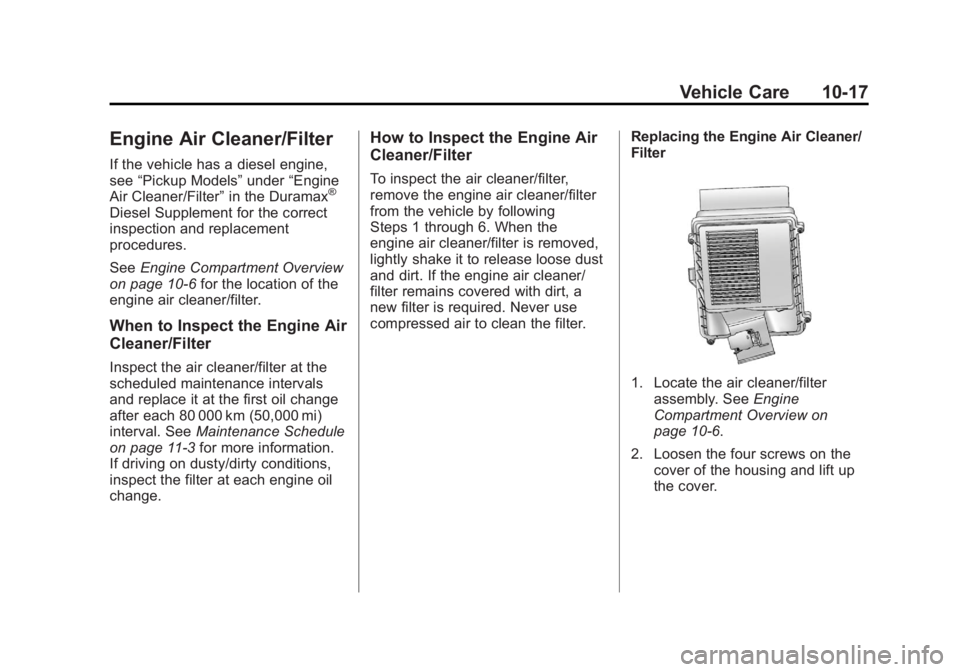
1. Locate the air cleaner/filter
assembly. See Engine
Compartment Overview on
page 10‑6.
2. Loosen the four screws on the cover of the housing and lift up
the cover.
Page 409 of 556
Black plate (23,1)GMC Sierra Owner Manual - 2012 - CRC - 11/15/11
Vehicle Care 10-23
Then check to see if the engine
cooling fans are running. If the
engine is overheating, both fans
should be running. If they are not,
do not continue to run the engine
and have the vehicle serviced.
Notice:Engine damage from
running your engine without
coolant is not covered by the
vehicle warranty. See Overheated
Engine Protection Operating
Mode for information on driving
to a safe place in an emergency.
Notice: If the engine catches fire
while driving with no coolant, the
vehicle can be badly damaged.
The costly repairs would not be
covered by the vehicle warranty.
See Overheated Engine
Protection Operating Mode on
page 10‑24 for information on
driving to a safe place in an
emergency.If Steam is Coming from the
Engine Compartment
{WARNING
Steam from an overheated engine
can burn you badly, even if you
just open the hood. Stay away
from the engine if you see or hear
steam coming from it. Turn it off
and get everyone away from the
vehicle until it cools down. Wait
until there is no sign of steam or
coolant before you open
the hood.
If you keep driving when the
vehicles engine is overheated,
the liquids in it can catch fire. You
or others could be badly burned.
Stop the engine if it overheats,
and get out of the vehicle until the
engine is cool.
(Continued)
WARNING (Continued)
SeeOverheated Engine
Protection Operating Mode on
page 10‑24 for information on
driving to a safe place in an
emergency.
If No Steam is Coming from
the Engine Compartment
The ENGINE OVERHEATED
STOP ENGINE or the ENGINE
OVERHEATED IDLE ENGINE
message, along with a low coolant
condition, can indicate a serious
problem.
If there is an engine overheat
warning, but no steam is seen or
heard, the problem may not be too
serious. Sometimes the engine can
get a little too hot when the vehicle:
.Climbs a long hill on a hot day
.Stops after high-speed driving
Page 410 of 556
Black plate (24,1)GMC Sierra Owner Manual - 2012 - CRC - 11/15/11
10-24 Vehicle Care
.Idles for long periods in traffic
.Tows a trailer; seeTrailer Towing
on page 9‑78.
If the ENGINE OVERHEATED
STOP ENGINE or the ENGINE
OVERHEATED IDLE ENGINE
message appears with no sign of
steam, try this for a minute or so:
1. Turn the air conditioning off.
2. Turn the heater on to the highest temperature and to the highest
fan speed. Open the windows as
necessary.
3. If stopped in a traffic jam, apply the brake, shift to N (Neutral);
otherwise, shift to the highest
gear while driving —D (Drive)
or 3 (Third).
If the temperature overheat gauge
is no longer in the overheat zone or
an overheat warning no longer
displays, the vehicle can be driven.
Continue to drive the vehicle slowly
for about 10 minutes. Keep a safe vehicle distance from the vehicle in
front. If the warning does not come
back on, continue to drive normally.
If the warning continues, pull
over, stop, and park the vehicle
right away.
If there is no sign of steam, idle
the engine for five minutes while
parked. If the warning is still
displayed, turn off the engine
until it cools down. Also, see
“Overheated Engine Protection
Operating Mode”
later in this
section.
Overheated Engine
Protection
Operating Mode
If an overheated engine condition
exists and the ENGINE POWER IS
REDUCED message displays, an
overheat protection mode which
alternates firing groups of cylinders
helps to prevent engine damage.
In this mode, a loss in power and
engine performance will be noticed. This operating mode allows the
vehicle to be driven to a safe
place in an emergency. Driving
extended km (mi) and/or towing a
trailer in the overheat protection
mode should be avoided.
Notice:
After driving in the
overheated engine protection
operating mode, to avoid engine
damage, allow the engine to cool
before attempting any repair.
The engine oil will be severely
degraded. Repair the cause of
coolant loss, change the oil and
reset the oil life system. See
Engine Oil on page 10‑7.
Engine Fan
If the vehicle has a clutched engine
cooling fan, when the clutch is
engaged, the fan spins faster to
provide more air to cool the engine.
In most everyday driving conditions,
the fan is spinning slower and the
clutch is not fully engaged. This
improves fuel economy and reduces
fan noise. Under heavy vehicle
Page 411 of 556
Black plate (25,1)GMC Sierra Owner Manual - 2012 - CRC - 11/15/11
Vehicle Care 10-25
loading, trailer towing, and/or high
outside temperatures, the fan speed
increases as the clutch more fully
engages, so an increase in fan
noise may be heard. This is normal
and should not be mistaken as the
transmission slipping or making
extra shifts. It is merely the cooling
system functioning properly. The fan
will slow down when additional
cooling is not required and the
clutch disengages.
This fan noise may also be heard
when starting the engine. It will go
away as the fan clutch partially
disengages.
If the vehicle has electric cooling
fans, the fans may be heard
spinning at low speed during most
everyday driving. The fans may
turn off if no cooling is required.
Under heavy vehicle loading, trailer
towing, high outside temperatures,
or operation of the air conditioning
system, the fans may change to
high speed and an increase in fan
noise may be heard. This is normal
and indicates that the coolingsystem is functioning properly. The
fans will change to low speed when
additional cooling is no longer
required.
Power Steering Fluid
See
Engine Compartment Overview
on page 10‑6 for reservoir location.
When to Check Power Steering
Fluid
It is not necessary to regularly
check power steering fluid unless
there is a leak suspected in the
system or an unusual noise is
heard. A fluid loss in this system
could indicate a problem. Have the
system inspected and repaired.
How to Check Power Steering
Fluid
Notice:Extremely small amounts
of contamination can cause
steering system damage and
cause it to not work properly. Do
not allow contaminants to contact
the fluid side of the reservoir cap/
dipstick or to enter the reservoir.
To check the power steering fluid:
1. Turn the key off and let the engine compartment cool down.
2. Wipe the cap and the top of the reservoir clean.
3. Unscrew the cap and wipe the dipstick with a clean rag.
4. Replace the cap and completely tighten it.
5. Remove the cap again and look at the fluid level on the dipstick.
The level should be at the FULL
COLD mark. If necessary, add only
enough fluid to bring the level up to
the mark.
Page 413 of 556
Black plate (27,1)GMC Sierra Owner Manual - 2012 - CRC - 11/15/11
Vehicle Care 10-27
Brakes
This vehicle has front disc brakes
and could have rear drum brakes or
rear disc brakes.
Disc brake pads have built-in wear
indicators that make a high-pitched
warning sound when the brake pads
are worn and new pads are needed.
The sound can come and go or be
heard all the time the vehicle is
moving, except when applying the
brake pedal firmly.
{WARNING
The brake wear warning sound
means that soon the brakes will
not work well. That could lead to
a crash. When the brake wear
warning sound is heard, have the
vehicle serviced.
Notice: Continuing to drive with
worn-out brake pads could result
in costly brake repair. Some driving conditions or climates
can cause a brake squeal when the
brakes are first applied or lightly
applied. This does not mean
something is wrong with the brakes.
Properly torqued wheel nuts are
necessary to help prevent brake
pulsation. When tires are rotated,
inspect brake pads for wear and
evenly tighten wheel nuts in the
proper sequence to torque
specifications in
Capacities and
Specifications on page 12‑2.
If the vehicle has rear drum brakes,
they do not have wear indicators,
but if a rear brake rubbing noise is
heard, have the rear brake linings
inspected immediately. Rear brake
drums should be removed and
inspected each time the tires are
removed for rotation or changing.
Drum brakes have an inspection
hole to inspect lining wear during
scheduled maintenance. When the
front brake pads are replaced, have
the rear brakes inspected, too. Brake linings should always be
replaced as complete axle sets.
Brake Pedal Travel
See your dealer if the brake pedal
does not return to normal height,
or if there is a rapid increase in
pedal travel. This could be a sign
that brake service might be
required.
Brake Adjustment
Every time the brakes are applied,
with or without the vehicle moving,
the brakes adjust for wear.
Replacing Brake System Parts
The braking system on a vehicle is
complex. Its many parts have to be
of top quality and work well together
if the vehicle is to have really good
braking. The vehicle was designed
and tested with top-quality brake
parts. When parts of the braking
system are replaced, be sure to get
new, approved replacement parts.
Page 432 of 556
Black plate (46,1)GMC Sierra Owner Manual - 2012 - CRC - 11/15/11
10-46 Vehicle Care
FusesUsage
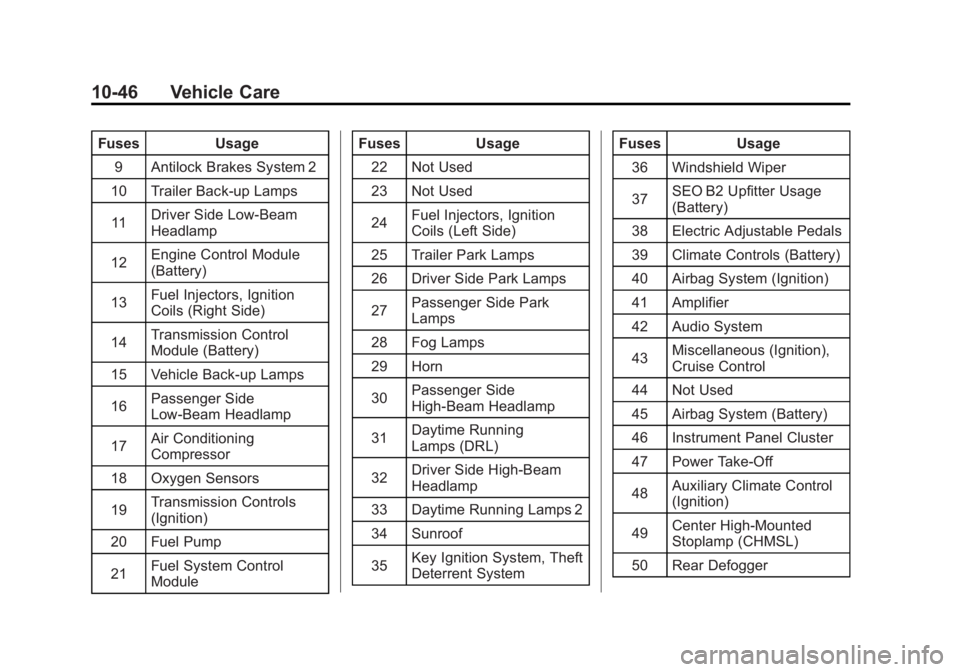
9 Antilock Brakes System 2
10 Trailer Back-up Lamps
11 Driver Side Low-Beam
Headlamp
12 Engine Control Module
(Battery)
13 Fuel Injectors, Ignition
Coils (Right Side)
14 Transmission Control
Module (Battery)
15 Vehicle Back-up Lamps
16 Passenger Side
Low-Beam Headlamp
17 Air Conditioning
Compressor
18 Oxygen Sensors
19 Transmission Controls
(Ignition)
20 Fuel Pump
21 Fuel System Control
Module Fuses
Usage
22 Not Used
23 Not Used
24 Fuel Injectors, Ignition
Coils (Left Side)
25 Trailer Park Lamps
26 Driver Side Park Lamps
27 Passenger Side Park
Lamps
28 Fog Lamps
29 Horn
30 Passenger Side
High-Beam Headlamp
31 Daytime Running
Lamps (DRL)
32 Driver Side High-Beam
Headlamp
33 Daytime Running Lamps 2
34 Sunroof
35 Key Ignition System, Theft
Deterrent System Fuses
Usage
36 Windshield Wiper
37 SEO B2 Upfitter Usage
(Battery)
38 Electric Adjustable Pedals
39 Climate Controls (Battery)
40 Airbag System (Ignition)
41 Amplifier
42 Audio System
43 Miscellaneous (Ignition),
Cruise Control
44 Not Used
45 Airbag System (Battery)
46 Instrument Panel Cluster
47 Power Take-Off
48 Auxiliary Climate Control
(Ignition)
49 Center High-Mounted
Stoplamp (CHMSL)
50 Rear Defogger
Page 433 of 556
Black plate (47,1)GMC Sierra Owner Manual - 2012 - CRC - 11/15/11
Vehicle Care 10-47
FusesUsage
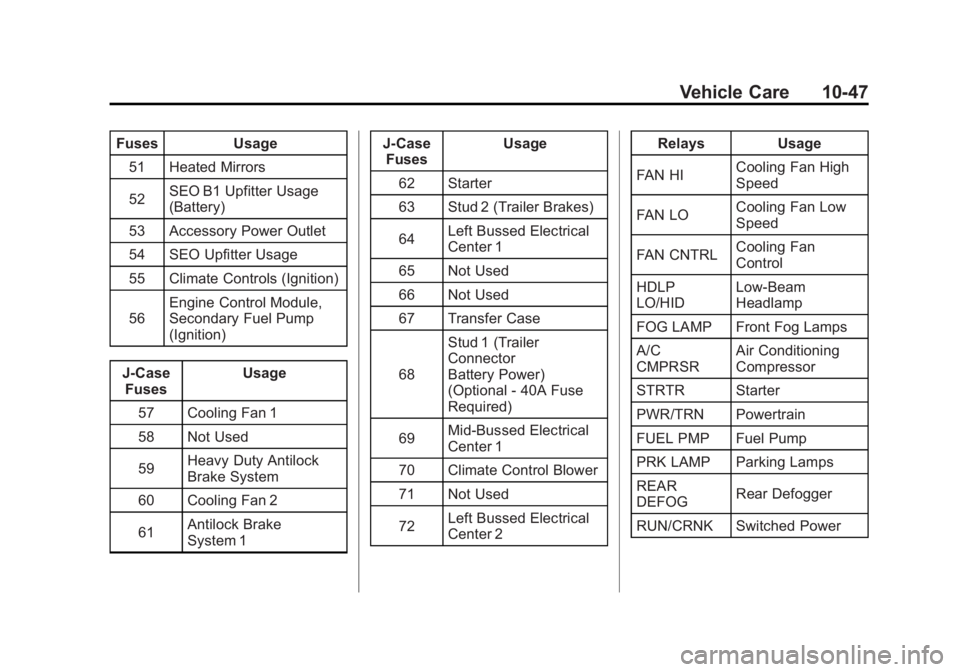
51 Heated Mirrors
52 SEO B1 Upfitter Usage
(Battery)
53 Accessory Power Outlet
54 SEO Upfitter Usage
55 Climate Controls (Ignition)
56 Engine Control Module,
Secondary Fuel Pump
(Ignition)
J-Case Fuses Usage
57 Cooling Fan 1
58 Not Used
59 Heavy Duty Antilock
Brake System
60 Cooling Fan 2
61 Antilock Brake
System 1 J-Case
Fuses Usage
62 Starter
63 Stud 2 (Trailer Brakes)
64 Left Bussed Electrical
Center 1
65 Not Used
66 Not Used
67 Transfer Case
68 Stud 1 (Trailer
Connector
Battery Power)
(Optional - 40A Fuse
Required)
69 Mid-Bussed Electrical
Center 1
70 Climate Control Blower
71 Not Used
72 Left Bussed Electrical
Center 2 Relays
Usage
FAN HI Cooling Fan High
Speed
FAN LO Cooling Fan Low
Speed
FAN CNTRL Cooling Fan
Control
HDLP
LO/HID Low-Beam
Headlamp
FOG LAMP Front Fog Lamps
A/C
CMPRSR Air Conditioning
Compressor
STRTR Starter
PWR/TRN Powertrain
FUEL PMP Fuel Pump
PRK LAMP Parking Lamps
REAR
DEFOG Rear Defogger
RUN/CRNK Switched Power