Page 64 of 556
Black plate (20,1)GMC Sierra Owner Manual - 2012 - CRC - 11/15/11
2-20 Keys, Doors, and Windows
Power Windows
{WARNING
Leaving children in a vehicle with
the keys is dangerous for many
reasons. Children or others could
be badly injured or even killed.
They could operate the power
windows or other controls or even
make the vehicle move. The
windows will function and they
could be seriously injured or killed
if caught in the path of a closing
window. Do not leave keys in a
vehicle with children.
When there are children in the
rear seat use the window lockout
button to prevent unintentional
operation of the windows.
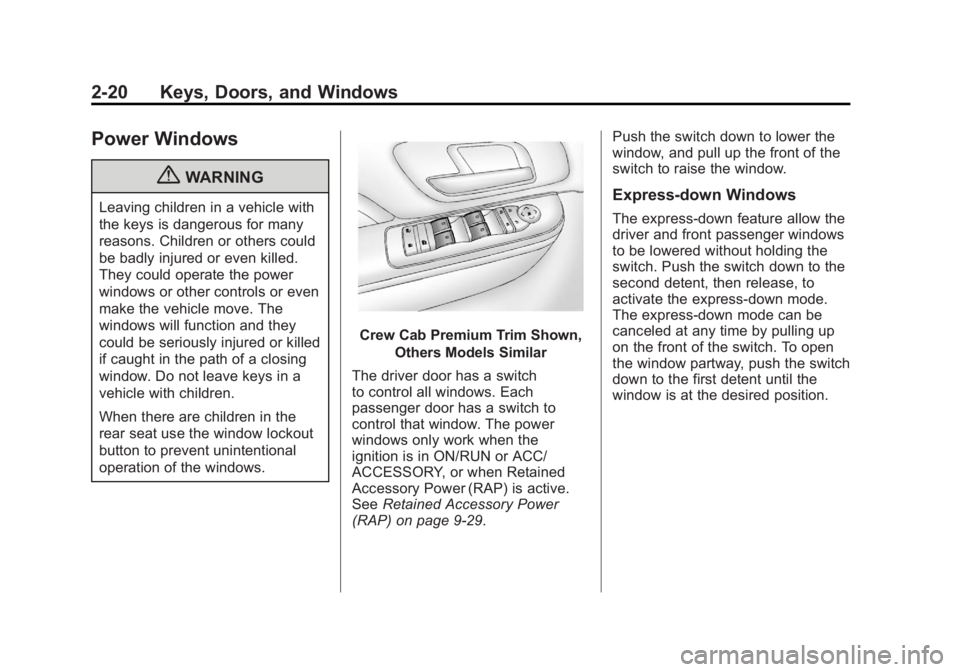
Crew Cab Premium Trim Shown,Others Models Similar
The driver door has a switch
to control all windows. Each
passenger door has a switch to
control that window. The power
windows only work when the
ignition is in ON/RUN or ACC/
ACCESSORY, or when Retained
Accessory Power (RAP) is active.
See Retained Accessory Power
(RAP) on page 9‑29. Push the switch down to lower the
window, and pull up the front of the
switch to raise the window.
Express-down Windows
The express-down feature allow the
driver and front passenger windows
to be lowered without holding the
switch. Push the switch down to the
second detent, then release, to
activate the express-down mode.
The express-down mode can be
canceled at any time by pulling up
on the front of the switch. To open
the window partway, push the switch
down to the first detent until the
window is at the desired position.
Page 65 of 556
Black plate (21,1)GMC Sierra Owner Manual - 2012 - CRC - 11/15/11
Keys, Doors, and Windows 2-21
Window Lockout
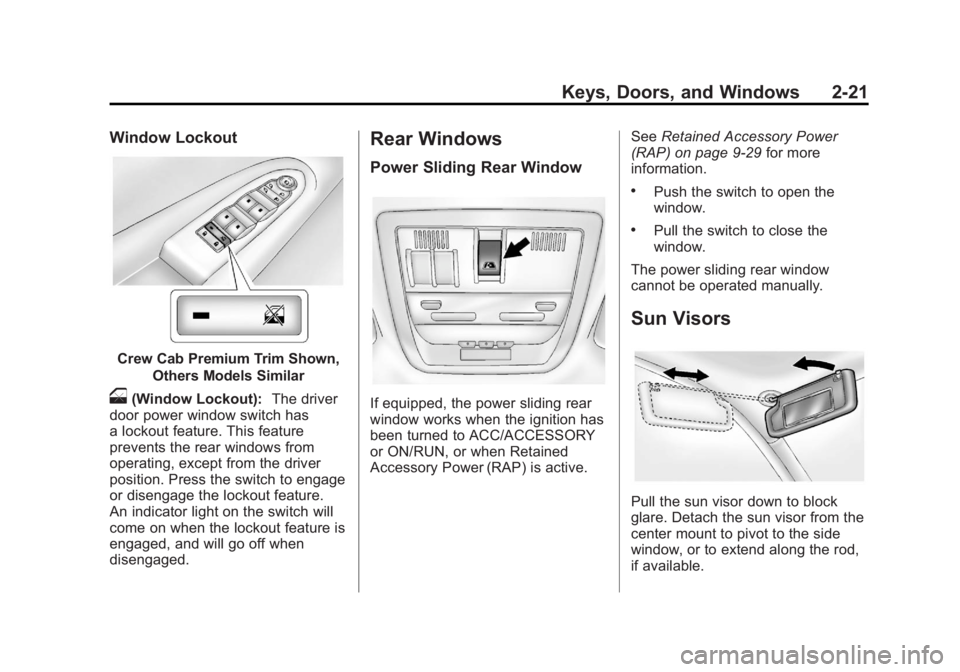
Crew Cab Premium Trim Shown,Others Models Similar
o(Window Lockout): The driver
door power window switch has
a lockout feature. This feature
prevents the rear windows from
operating, except from the driver
position. Press the switch to engage
or disengage the lockout feature.
An indicator light on the switch will
come on when the lockout feature is
engaged, and will go off when
disengaged.
Rear Windows
Power Sliding Rear Window
If equipped, the power sliding rear
window works when the ignition has
been turned to ACC/ACCESSORY
or ON/RUN, or when Retained
Accessory Power (RAP) is active. See
Retained Accessory Power
(RAP) on page 9‑29 for more
information.
.Push the switch to open the
window.
.Pull the switch to close the
window.
The power sliding rear window
cannot be operated manually.
Sun Visors
Pull the sun visor down to block
glare. Detach the sun visor from the
center mount to pivot to the side
window, or to extend along the rod,
if available.
Page 66 of 556
Black plate (22,1)GMC Sierra Owner Manual - 2012 - CRC - 11/15/11
2-22 Keys, Doors, and Windows
Roof
Sunroof (Extended Cab)
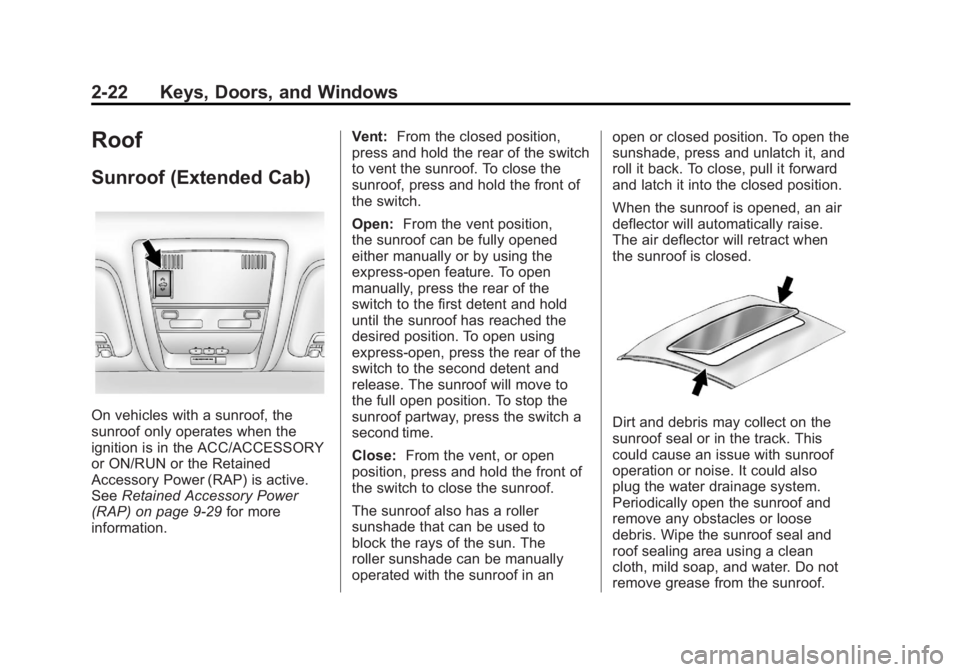
On vehicles with a sunroof, the
sunroof only operates when the
ignition is in the ACC/ACCESSORY
or ON/RUN or the Retained
Accessory Power (RAP) is active.
SeeRetained Accessory Power
(RAP) on page 9‑29 for more
information. Vent:
From the closed position,
press and hold the rear of the switch
to vent the sunroof. To close the
sunroof, press and hold the front of
the switch.
Open: From the vent position,
the sunroof can be fully opened
either manually or by using the
express-open feature. To open
manually, press the rear of the
switch to the first detent and hold
until the sunroof has reached the
desired position. To open using
express-open, press the rear of the
switch to the second detent and
release. The sunroof will move to
the full open position. To stop the
sunroof partway, press the switch a
second time.
Close: From the vent, or open
position, press and hold the front of
the switch to close the sunroof.
The sunroof also has a roller
sunshade that can be used to
block the rays of the sun. The
roller sunshade can be manually
operated with the sunroof in an open or closed position. To open the
sunshade, press and unlatch it, and
roll it back. To close, pull it forward
and latch it into the closed position.
When the sunroof is opened, an air
deflector will automatically raise.
The air deflector will retract when
the sunroof is closed.Dirt and debris may collect on the
sunroof seal or in the track. This
could cause an issue with sunroof
operation or noise. It could also
plug the water drainage system.
Periodically open the sunroof and
remove any obstacles or loose
debris. Wipe the sunroof seal and
roof sealing area using a clean
cloth, mild soap, and water. Do not
remove grease from the sunroof.
Page 67 of 556
Black plate (23,1)GMC Sierra Owner Manual - 2012 - CRC - 11/15/11
Keys, Doors, and Windows 2-23
Sunroof (Crew Cab)
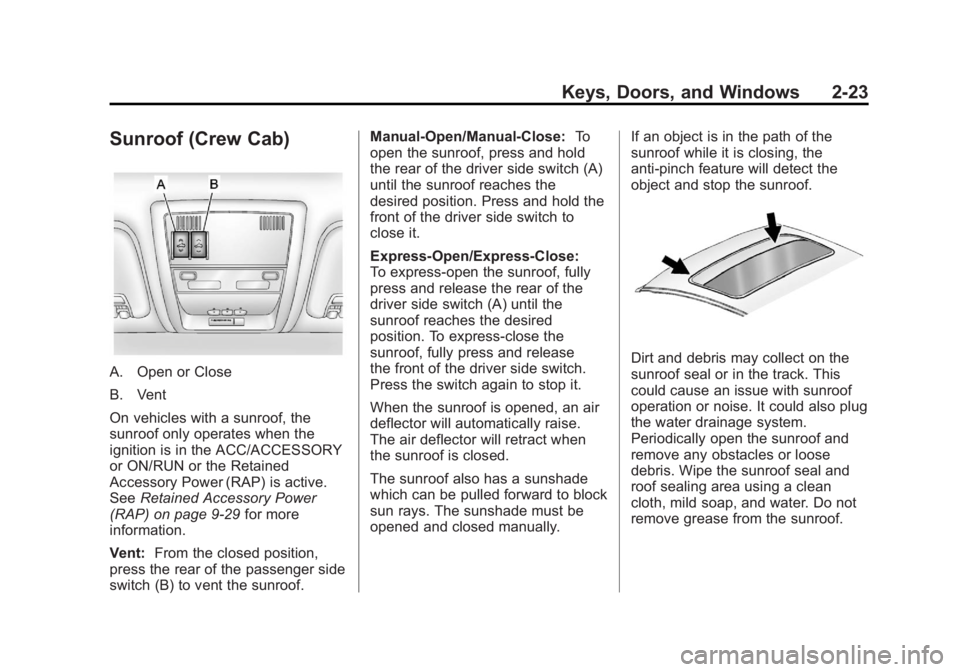
A. Open or Close
B. Vent
On vehicles with a sunroof, the
sunroof only operates when the
ignition is in the ACC/ACCESSORY
or ON/RUN or the Retained
Accessory Power (RAP) is active.
SeeRetained Accessory Power
(RAP) on page 9‑29 for more
information.
Vent: From the closed position,
press the rear of the passenger side
switch (B) to vent the sunroof. Manual-Open/Manual-Close:
To
open the sunroof, press and hold
the rear of the driver side switch (A)
until the sunroof reaches the
desired position. Press and hold the
front of the driver side switch to
close it.
Express-Open/Express-Close:
To express-open the sunroof, fully
press and release the rear of the
driver side switch (A) until the
sunroof reaches the desired
position. To express-close the
sunroof, fully press and release
the front of the driver side switch.
Press the switch again to stop it.
When the sunroof is opened, an air
deflector will automatically raise.
The air deflector will retract when
the sunroof is closed.
The sunroof also has a sunshade
which can be pulled forward to block
sun rays. The sunshade must be
opened and closed manually. If an object is in the path of the
sunroof while it is closing, the
anti-pinch feature will detect the
object and stop the sunroof.Dirt and debris may collect on the
sunroof seal or in the track. This
could cause an issue with sunroof
operation or noise. It could also plug
the water drainage system.
Periodically open the sunroof and
remove any obstacles or loose
debris. Wipe the sunroof seal and
roof sealing area using a clean
cloth, mild soap, and water. Do not
remove grease from the sunroof.
Page 68 of 556
Black plate (24,1)GMC Sierra Owner Manual - 2012 - CRC - 11/15/11
2-24 Keys, Doors, and Windows
2NOTES
Page 76 of 556
Black plate (8,1)GMC Sierra Owner Manual - 2012 - CRC - 11/15/11
3-8 Seats and Restraints
Memory Remote Recall
The memory feature can recall the
driver seat, outside mirrors, and
pedals, if equipped, to stored
positions when entering the vehicle.
To activate, unlock the driver
door with the Remote Keyless
Entry (RKE) transmitter. The driver
seat, outside mirrors, and adjustable
pedals, if equipped, will move to the
memory position associated with
the transmitter used to unlock the
vehicle.
This feature can be turned on or off
using the vehicle personalization
menu. SeeVehicle Personalization
(With DIC Buttons) on page 5‑48.
To stop recall movement, press one
of the power seat controls, memory
buttons, or power mirror buttons,
or the adjustable pedal switch. If something has blocked the driver
seat and/or the adjustable pedals
while recalling a memory position,
the recall may stop. Remove the
obstruction; then press and hold the
appropriate manual control for the
memory item that is not recalling
for two seconds. Try recalling the
memory position again by pressing
the appropriate memory button.
If the memory position is still not
recalling, see your dealer for
service.
Easy Exit Driver Seat
This feature can move the seat
rearward to allow extra room to exit
the vehicle.
B(Easy Exit Driver Seat):
Press
to recall the easy exit seat position.
The vehicle must be in P (Park). If the easy exit seat feature is
programmed on in the vehicle
personalization menu, automatic
seat movement occurs when the
ignition key is removed.
A single beep sounds. The driver
seat moves back approximately
8 cm (3 in). To move the seat back
farther, press
Bagain until the
seat is all the way back.
If something has blocked the driver
seat while recalling the exit position,
the recall may stop. Remove the
obstruction; then press and hold
the power seat control rearward for
two seconds. Try recalling the exit
position again. If the exit position is
still not recalling, see your dealer for
service.
See Vehicle Personalization (With
DIC Buttons) on page 5‑48.
Page 87 of 556
Black plate (19,1)GMC Sierra Owner Manual - 2012 - CRC - 11/15/11
Seats and Restraints 3-19
Safety Belt Use During
Pregnancy
Safety belts work for everyone,
including pregnant women. Like all
occupants, they are more likely to
be seriously injured if they do not
wear safety belts.
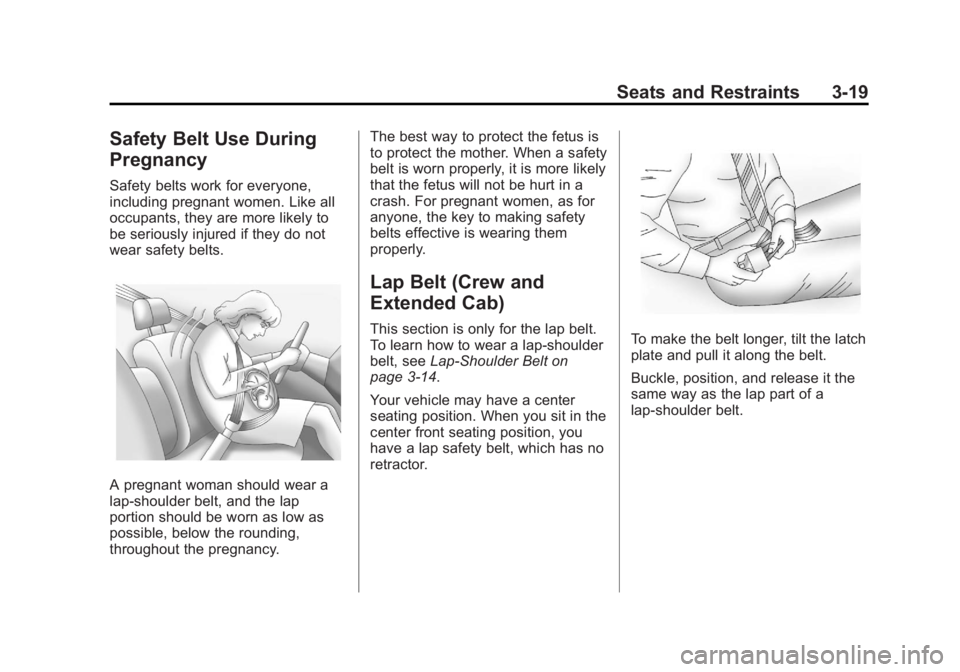
A pregnant woman should wear a
lap-shoulder belt, and the lap
portion should be worn as low as
possible, below the rounding,
throughout the pregnancy.The best way to protect the fetus is
to protect the mother. When a safety
belt is worn properly, it is more likely
that the fetus will not be hurt in a
crash. For pregnant women, as for
anyone, the key to making safety
belts effective is wearing them
properly.
Lap Belt (Crew and
Extended Cab)
This section is only for the lap belt.
To learn how to wear a lap-shoulder
belt, see
Lap-Shoulder Belt on
page 3‑14.
Your vehicle may have a center
seating position. When you sit in the
center front seating position, you
have a lap safety belt, which has no
retractor.To make the belt longer, tilt the latch
plate and pull it along the belt.
Buckle, position, and release it the
same way as the lap part of a
lap-shoulder belt.
Page 99 of 556

Black plate (31,1)GMC Sierra Owner Manual - 2012 - CRC - 11/15/11
Seats and Restraints 3-31
To turn off the right front passenger
airbag, insert the ignition key into
the switch, push in, and move the
switch to the off position.
The word OFF or the off symbol will
come on in the passenger airbag
status indicator located in the
overhead console to let you know
that the right front passenger airbag
is off, after the system check is
completed. The airbag off light will
come on and stay on to let you
know that the right front passenger's
airbag is off. SeeAirbag On-Off
Light on page 5‑19.
{WARNING
If the airbag readiness light
ever comes on and stays on, it
means that something may be
wrong with the airbag system.
For example, the right front
passenger airbag could inflate
even though the airbag on-off
switch is turned off.
(Continued)
WARNING (Continued)
To help avoid injury to yourself or
others, have the vehicle serviced
right away. SeeAirbag Readiness
Light on page 5‑18 for more
information, including important
safety information.
United States
Canada and Mexico
To turn the right front passenger
airbag on again, insert the ignition
key into the switch, push in, and
move the switch to the on position.
The right front passenger frontal
airbag is now enabled (may inflate).
See Airbag On-Off Light on
page 5‑19 for more information.