2012 GMC SIERRA 1500 change wheel
[x] Cancel search: change wheelPage 329 of 556
Black plate (53,1)GMC Sierra Owner Manual - 2012 - CRC - 11/15/11
Driving and Operating 9-53
Brakes
Antilock Brake
System (ABS)
This vehicle has the Antilock
Brake System (ABS), an advanced
electronic braking system that helps
prevent a braking skid.
When the engine is started and the
vehicle begins to drive away, ABS
checks itself. A momentary motor or
clicking noise might be heard while
this test is going on, and it might
even be noticed that the brake
pedal moves a little. This is normal.
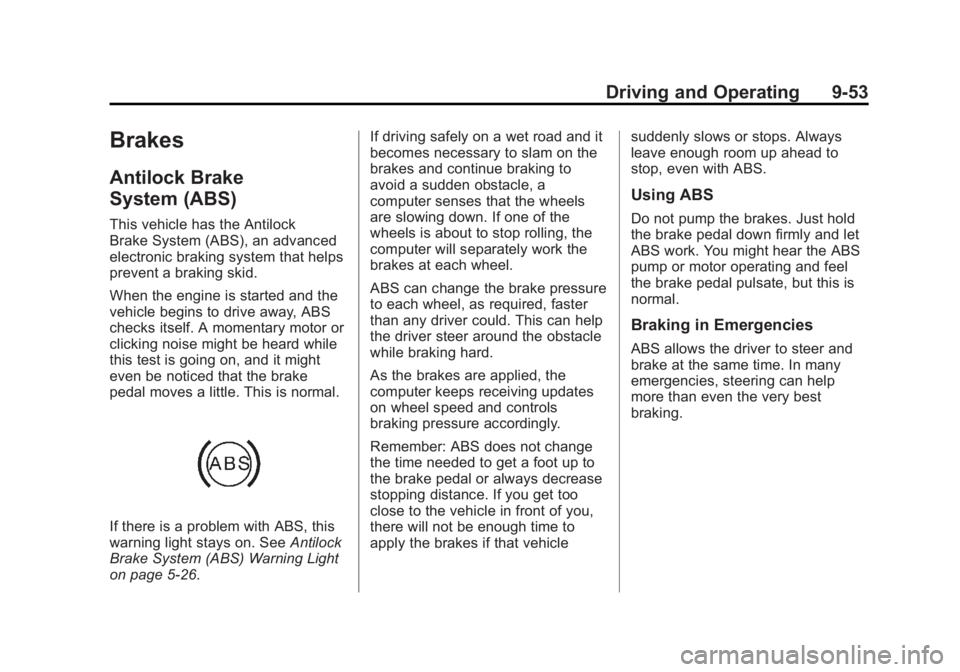
If there is a problem with ABS, this
warning light stays on. SeeAntilock
Brake System (ABS) Warning Light
on page 5‑26. If driving safely on a wet road and it
becomes necessary to slam on the
brakes and continue braking to
avoid a sudden obstacle, a
computer senses that the wheels
are slowing down. If one of the
wheels is about to stop rolling, the
computer will separately work the
brakes at each wheel.
ABS can change the brake pressure
to each wheel, as required, faster
than any driver could. This can help
the driver steer around the obstacle
while braking hard.
As the brakes are applied, the
computer keeps receiving updates
on wheel speed and controls
braking pressure accordingly.
Remember: ABS does not change
the time needed to get a foot up to
the brake pedal or always decrease
stopping distance. If you get too
close to the vehicle in front of you,
there will not be enough time to
apply the brakes if that vehicle
suddenly slows or stops. Always
leave enough room up ahead to
stop, even with ABS.
Using ABS
Do not pump the brakes. Just hold
the brake pedal down firmly and let
ABS work. You might hear the ABS
pump or motor operating and feel
the brake pedal pulsate, but this is
normal.
Braking in Emergencies
ABS allows the driver to steer and
brake at the same time. In many
emergencies, steering can help
more than even the very best
braking.
Page 334 of 556
Black plate (58,1)GMC Sierra Owner Manual - 2012 - CRC - 11/15/11
9-58 Driving and Operating
Non-hybrid vehicles with StabiliTrak
have a Trailer Sway Control (TSC)
feature. SeeTrailer Sway Control
(TSC) on page 9‑105.
Non-hybrid vehicles with StabiliTrak
have a Hill Start Assist (HSA)
feature. See Hill Start Assist (HSA)
on page 9‑54.
Adding non‐dealer accessories can
affect the vehicle's performance.
See Accessories and Modifications
on page 10‑3.
Locking Rear Axle
Vehicles with a locking rear axle can
give more traction on snow, mud,
ice, sand, or gravel. It works like a
standard axle most of the time, but
when traction is low, this feature will
allow the rear wheel with the most
traction to move the vehicle.
Cruise Control
{WARNING
Cruise control can be dangerous
where you cannot drive safely at
a steady speed. So, do not use
the cruise control on winding
roads or in heavy traffic.
Cruise control can be dangerous
on slippery roads. On such roads,
fast changes in tire traction can
cause excessive wheel slip, and
you could lose control. Do not use
cruise control on slippery roads.
For vehicles with cruise control, a
speed of about 40 km/h (25 mph)
or more can be maintained
without keeping your foot on the
accelerator. Cruise control does not
work at speeds below about 40 km/h
(25 mph). When the brakes are applied, cruise
control is turned off.
For vehicles with an Allison or
Hydra‐Matic 6‐speed automatic
transmission, see
“Grade Braking”
under Tow/Haul Mode on page 9‑39
for an explanation of how cruise
control interacts with the Range
Selection Mode, tow/haul and grade
braking systems.
For vehicles with the StabiliTrak
system that begins to limit wheel
spin while you are using cruise
control, the cruise control will
automatically disengage. See
StabiliTrak
®System on page 9‑55.
When road conditions allow the
cruise control to be safely used
again, it can be turned back on.
Page 379 of 556
Black plate (103,1)GMC Sierra Owner Manual - 2012 - CRC - 11/15/11
Driving and Operating 9-103
Trailer Gain Adjustment Procedure
Trailer Gain should be set for a
specific trailering condition and
must be adjusted any time vehicle
loading, trailer loading, or road
surface conditions change.
Setting the Trailer Gain properly is
needed for the best trailer stopping
performance. A trailer that is
over-gained may result in locked
trailer brakes. A trailer that is
under-gained may result in not
enough trailer braking. Both of these
conditions may result in poorer
stopping and stability of the vehicle
and trailer.
Use the following procedure to
correctly adjust Trailer Gain for each
towing condition:
1. Make sure the trailer brakes arein proper working condition.
2. Connect a properly loaded trailer to the vehicle and make all
necessary mechanical and electrical connections. See
Vehicle Load Limits on
page 9‑16
for more information.
3. After the electrical connection is made to a trailer equipped with
electric brakes:
.A TRAILER CONNECTED
message will be briefly
displayed on the DIC.
.The Trailer Brake Display
Page will appear on the
DIC showing TRAILER
GAIN and TRAILER
OUTPUT.
.In the Trailer Output display
on the DIC, “- - - - - -”will
disappear if there is no
error present. Connecting
a trailer without electric
brakes will not clear the
six dashed lines.
4. Adjust the Trailer Gain by using the gain adjustment (+ / -)
buttons on the Trailer Brake
Control Panel. 5. Drive the vehicle with the trailer
attached on a level road surface
representative of the towing
condition and free of traffic at
about 32 to 40 km/h (20 to
25 mph) and fully apply the
Manual Trailer Brake Apply
Lever.
Adjusting trailer gain at speeds
lower than 32 to 40 km/h
(20 to 25 mph) may result in
an incorrect gain setting.
6. Adjust the Trailer Gain to just below the point of trailer wheel
lock-up, indicated by trailer
wheel squeal or tire smoke when
a trailer wheel locks.
Trailer wheel lock-up may not
occur if towing a heavily loaded
trailer. In this case, adjust the
Trailer Gain to the highest
allowable setting for the towing
condition.
Page 380 of 556
Black plate (104,1)GMC Sierra Owner Manual - 2012 - CRC - 11/15/11
9-104 Driving and Operating
7. Re-adjust Trailer Gain any timevehicle loading, trailer loading or
road surface conditions change
or if trailer wheel lock-up is
noticed at any time while towing.
Other ITBC-Related DIC Messages
In addition to displaying TRAILER
GAIN and TRAILER OUTPUT
through the DIC, trailer connection
and ITBC system status are
displayed on the DIC.
TRAILER CONNECTED: This
message will be briefly displayed
when a trailer with electric brakes is
first connected to the vehicle. This
message will automatically turn off
in about 10 seconds. The driver can
also acknowledge this message
before it automatically turns off.
CHECK TRAILER WIRING: This
message will be displayed if:
1. The ITBC system first determines connection to a
trailer with electric brakes and
then the trailer harness becomes
disconnected from the vehicle. If the disconnect occurs while
the vehicle is stationary, this
message will automatically turn
off in about 30 seconds. This
message will also turn off if
the driver acknowledges this
message or if the trailer harness
is re-connected.
If the disconnect occurs while
the vehicle is moving, this
message will continue until
the ignition is turned off. This
message will also turn off if
the driver acknowledges this
message or if the trailer harness
is re-connected.
2. There is an electrical fault in the wiring to the electric trailer
brakes. This message will
continue as long as there is
an electrical fault in the trailer
wiring. This message will
also turn off if the driver
acknowledges this message. To determine if the electrical fault
is on the vehicle side or trailer
side of the trailer wiring harness
connection, do the following:
1. Disconnect the trailer wiring
harness from the vehicle.
2. Turn the ignition off.
3. Wait 10 seconds, then turn the ignition back to RUN.
4. If the CHECK TRAILER WIRING message re-appears, the
electrical fault is on the
vehicle side.
If the CHECK TRAILER WIRING
message only re-appears when
connecting the trailer wiring
harness to the vehicle, the
electrical fault is on the
trailer side.
SERVICE TRAILER BRAKE
SYSTEM: This message will be
displayed when there is a problem
with the ITBC system. If this
message persists over multiple
ignition cycles, there is a problem
with the ITBC system. Take the
Page 453 of 556
Black plate (67,1)GMC Sierra Owner Manual - 2012 - CRC - 11/15/11
Vehicle Care 10-67
Lightly coat the center of the
wheel hub with wheel bearing
grease after a wheel change or
tire rotation to prevent corrosion
or rust build-up. Do not get
grease on the flat wheel
mounting surface or on the
wheel nuts or bolts.
Reset the Tire Pressure Monitor
System (TPMS), if the vehicle
has one. SeeTire Pressure
Monitor Operation on
page 10‑62.
Check that the spare tire, if the
vehicle has one, is stored
properly. Push, pull, and then
try to rotate or turn the tire. If it
moves, tighten the cable. See
“Storing a Flat or Spare Tire and
Tools” underTire Changing on
page 10‑76.Dual Tire Rotation
When the vehicle is new,
or whenever a wheel, wheel
bolt, or wheel nut is replaced,
check the wheel nut torque
after 160, 1 600, and 10 000 km
(100, 1,000, and 6,000 mi) of
driving. For proper torque and
wheel nut tightening information,
see “Removing the Spare Tire and
Tools” underTire Changing on
page 10‑76.
The outer tire on a dual wheel setup
generally wears faster than the
inner tire. Tires last longer and wear
more evenly if they are rotated. See
Tire Inspection on page 10‑65 and
Tire Rotation on page 10‑65. Also
see Maintenance Schedule on
page 11‑3.{WARNING
If the vehicle is operated with a
tire that is underinflated, the tire
can overheat. An overheated tire
can lose air suddenly or catch
fire. You or others could be
injured. Properly inflate all tires,
including the spare.
See Tire Pressure on page 10‑58,
for information on proper tire
inflation.
Page 462 of 556
Black plate (76,1)GMC Sierra Owner Manual - 2012 - CRC - 11/15/11
10-76 Vehicle Care
Turn on the hazard warning
flashers. SeeHazard Warning
Flashers on page 6‑5.
{WARNING
Changing a tire can be
dangerous. The vehicle can slip
off the jack and roll over or fall
causing injury or death. Find a
level place to change the tire. To
help prevent the vehicle from
moving:
1. Set the parking brake firmly.
2. Put an automatic transmission in P (Park) or
a manual transmission in
1 (First) or R (Reverse).
3. For four-wheel-drive vehicles, be sure the
transfer case is in a drive
gear– not in N (Neutral).
4. Turn off the engine and do not restart while the vehicle
is raised.
(Continued)
WARNING (Continued)
5. Do not allow passengers toremain in the vehicle.
6. Place wheel blocks on both sides of the tire at the
opposite corner of the tire
being changed.
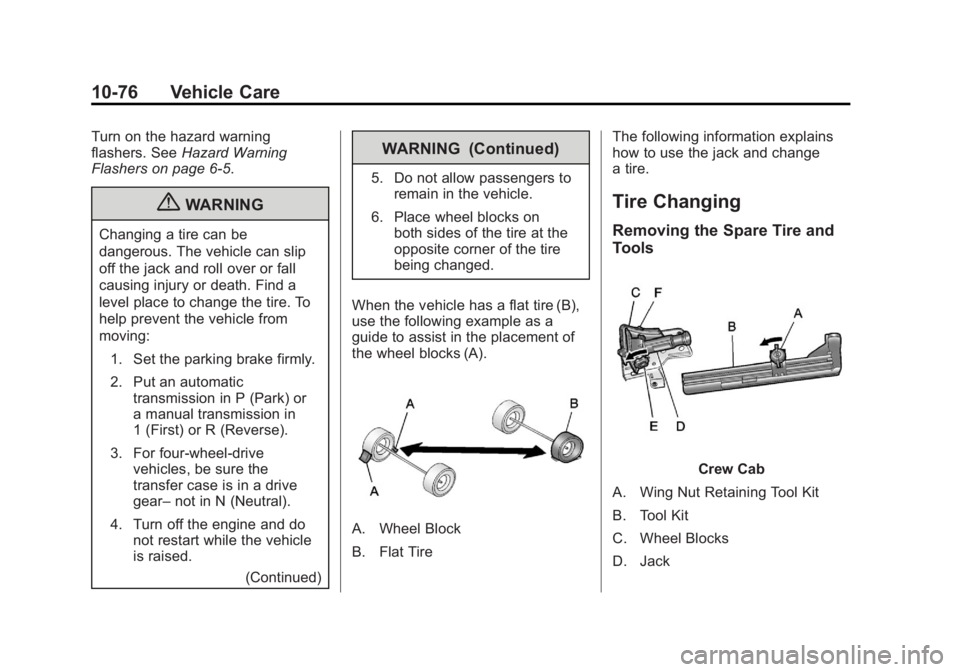
When the vehicle has a flat tire (B),
use the following example as a
guide to assist in the placement of
the wheel blocks (A).
A. Wheel Block
B. Flat Tire The following information explains
how to use the jack and change
a tire.
Tire Changing
Removing the Spare Tire and
Tools
Crew Cab
A. Wing Nut Retaining Tool Kit
B. Tool Kit
C. Wheel Blocks
D. Jack
Page 550 of 556
Black plate (8,1)GMC Sierra Owner Manual - 2012 - CRC - 11/15/11
i-8 INDEX
LightsAirbag On-Off . . . . . . . . . . . . . . . . . 5-19
Airbag Readiness . . . . . . . . . . . . . 5-18
Antilock Brake System
(ABS) Warning . . . . . . . . . . . . . . 5-26
Brake System Warning . . . . . . . 5-25
Charging System . . . . . . . . . . . . . 5-22
Cruise Control . . . . . . . . . . . . . . . . 5-30
Engine Oil Pressure . . . . . . . . . . 5-28
Flash-to-Pass . . . . . . . . . . . . . . . . . . 6-3
Four-Wheel-Drive . . . . . . . . . . . . . 5-26
Front Fog Lamp . . . . . . . . . . . . . . 5-29
High-Beam On . . . . . . . . . . . . . . . . 5-29
High/Low Beam Changer . . . . . . 6-3
Low Fuel Warning . . . . . . . . . . . . 5-28
Safety Belt Reminders . . . . . . . . 5-17
Security . . . . . . . . . . . . . . . . . . . . . . 5-29
StabiliTrak
®OFF . . . . . . . . . . . . . 5-27
Tire Pressure . . . . . . . . . . . . . . . . . 5-27
Tow/Haul Mode . . . . . . . . . . . . . . . 5-26
Traction Control System (TCS)/StabiliTrak
®. . . . . . . . . . 5-27
Locking Rear Axle . . . . . . . . . . . . . 9-58 Locks
Automatic Door . . . . . . . . . . . . . . . . 2-8
Delayed Locking . . . . . . . . . . . . . . . 2-8
Door . . . . . . . . . . . . . . . . . . . . . . . . . . . 2-7
Lockout Protection . . . . . . . . . . . . . 2-9
Power Door . . . . . . . . . . . . . . . . . . . . 2-8
Safety . . . . . . . . . . . . . . . . . . . . . . . . . 2-9
Loss of Control . . . . . . . . . . . . . . . . . 9-5
Low Fuel Warning Light . . . . . . . . 5-28
Lower Anchors and Tethers for Children (LATCH
System) . . . . . . . . . . . . . . . . . . . . . . 3-47
Lumbar Adjustment . . . . . . . . . . . . . 3-4 Front Seats . . . . . . . . . . . . . . . . . . . . 3-4
M
MaintenanceRecords . . . . . . . . . . . . . . . . . . . . .11-16
Maintenance Schedule Recommended Fluidsand Lubricants . . . . . . . . . . . . .11-12
Transfer Case . . . . . . . . . . . . . . . . 9-40
Malfunction Indicator Lamp . . . . 5-22
Manual Mirrors . . . . . . . . . . . . . . . . 2-14 Manual Mode . . . . . . . . . . . . . . . . . . 9-38
Manual Windows . . . . . . . . . . . . . . 2-19
Memory Features . . . . . . . . . . . . . . 1-14
Memory Seats . . . . . . . . . . . . . . . . . . 3-7
Messages
Airbag System . . . . . . . . . . . . . . . . 5-45
Anti-theft Alarm System . . . . . . . 5-45
Battery Voltage andCharging . . . . . . . . . . . . . . . . . . . . 5-39
Brake System . . . . . . . . . . . . . . . . 5-40
Door Ajar . . . . . . . . . . . . . . . . . . . . . 5-40
Engine Cooling System . . . . . . . 5-41
Engine Oil . . . . . . . . . . . . . . . . . . . . 5-42
Engine Power . . . . . . . . . . . . . . . . 5-42
Fuel System . . . . . . . . . . . . . . . . . . 5-43
Key and Lock . . . . . . . . . . . . . . . . . 5-43
Lamp . . . . . . . . . . . . . . . . . . . . . . . . . 5-43
Object Detection System . . . . . 5-43
Ride Control System . . . . . . . . . . 5-44
Starting the Vehicle . . . . . . . . . . . 5-45
Tire . . . . . . . . . . . . . . . . . . . . . . . . . . . 5-45
Transmission . . . . . . . . . . . . . . . . . 5-46
Vehicle . . . . . . . . . . . . . . . . . . . . . . . 5-39
Vehicle Reminder . . . . . . . . . . . . . 5-47
Washer Fluid . . . . . . . . . . . . . . . . . 5-48
Page 554 of 556
Black plate (12,1)GMC Sierra Owner Manual - 2012 - CRC - 11/15/11
i-12 INDEX
Service (cont'd)Parts Identification Label . . . . . 12-1
Publications Ordering
Information . . . . . . . . . . . . . . . . 13-16
Scheduling Appointments . . . 13-12
Servicing the Airbag . . . . . . . . . . . 3-36
Shift Lock Control Function Check, Automatic
Transmission . . . . . . . . . . . . . . . . 10-35
Shifting Into Park . . . . . . . . . . . . . . . . . . . . . . 9-30
Out of Park . . . . . . . . . . . . . . . . . . . 9-32
Signals, Turn and Lane-Change . . . . . . . . . . . . . . . . . 6-5
Snow Plow . . . . . . . . . . . . . . . . . . . 9-106
Specifications and Capacities . . . . . . . . . . . . . . . . . . . . 12-2
Speedometer . . . . . . . . . . . . . . . . . . 5-13
StabiliTrak
OFF Light . . . . . . . . . . . . . . . . . . . . . 5-27
System . . . . . . . . . . . . . . . . . . . . . . . 9-55
Start Assist, Hills . . . . . . . . . . . . . . 9-54
Start Vehicle, Remote . . . . . . . . . . 2-5 Starter Switch Check . . . . . . . . . 10-35
Starting the Engine . . . . . . . . . . . . 9-27
Starting the Vehicle
Messsages . . . . . . . . . . . . . . . . . . . 5-45
Steering . . . . . . . . . . . . . . . . . . . . . . . . 9-4 Fluid, Power . . . . . . . . . . . . . . . . 10-25
Wheel Adjustment . . . . . . . . . . . . . 5-2
Wheel Controls . . . . . . . . . . . . . . . . 5-2
Stoplamps and Back-up Lamps Bulb Replacement . . . . . . . . . . 10-41
Storage Areas
Center Console . . . . . . . . . . . . . . . . 4-2
Glove Box . . . . . . . . . . . . . . . . . . . . . 4-1
Instrument Panel . . . . . . . . . . . . . . 4-1
Stuck Vehicle . . . . . . . . . . . . . . . . . . 9-15
Sun Visors . . . . . . . . . . . . . . . . . . . . . 2-21
Sunroof . . . . . . . . . . . . . . . . . . 2-22, 2-23
Switches Airbag On-Off . . . . . . . . . . . . . . . . . 3-29
Symbols . . . . . . . . . . . . . . . . . . . . . . . . . . iv
System Infotainment . . . . . . . . . . . . . . . . . . . 7-1
Noise Control . . . . . . . . . . . . . . . 10-34T
Tachometer . . . . . . . . . . . . . . . . . . . . 5-13
Tailgate . . . . . . . . . . . . . . . . . . . . . . . . 2-10
Taillamps . . . . . . . . . . . . . . . . . . . . . 10-40Bulb Replacement . . . . . . . . . . 10-41
Text Telephone (TTY) Users . . . 13-6
Theft-Deterrent Systems . . . . . . . 2-13 Immobilizer . . . . . . . . . . . . . . . . . . . 2-12
Throttle, Adjustable . . . . . . . . . . . . 9-25
Time . . . . . . . . . . . . . . . . . . . . . . . . . . . . 5-7
Tires Buying New Tires . . . . . . . . . . . 10-68
Chains . . . . . . . . . . . . . . . . . . . . . . 10-74
Changing . . . . . . . . . . . . . . . . . . . 10-76
Designations . . . . . . . . . . . . . . . 10-54
Different Size . . . . . . . . . . . . . . . 10-70
Dual Rotation . . . . . . . . . . . . . . . 10-67
Full-Size Spare . . . . . . . . . . . . . 10-87
If a Tire Goes Flat . . . . . . . . . . 10-75
Inflation Monitor System . . . . 10-62
Inspection . . . . . . . . . . . . . . . . . . 10-65
Messages . . . . . . . . . . . . . . . . . . . . 5-45
Pressure . . . . . . . . . . . . . . . . . . . . 10-60