2012 GMC CANYON ECO mode
[x] Cancel search: ECO modePage 159 of 404

Black plate (13,1)GMC Canyon Owner Manual - 2012
Infotainment System 7-13
Finding a Program Type (PTY)
Channel
To select and find a PTY:
1. Turn the P-TYPE knob.TYPE and a PTY displays.
2. Turn the P-TYPE knob again, to select a PTY.
3. Once the desired PTY displays, press the SEEK / TYPE button
to select PTY's first station.
4. To go to another station within that PTY, pess the SEEK / TYPE
button twice to display the PTY
and then go to another station.
To cancel the seek, press the
SEEK / TYPE button. This also exits
the program type seek mode and
returns to the last tuned station.
If the radio cannot find the desired
program type, NONE displays and
the radio returns to the last tuned
station.
Finding an XM Channel
BAND: Press to switch between
FM1, FM2, AM, or XM1 or
XM2 (if equipped). The selection
displays.
DISPL (Display): Press to retrieve
four different categories of
information related to the current
song or channel: Artist, Song Title,
Category or PTY, Channel Number/
Channel Name.
qTUNEr: Turn to select XM
Channels.
qSEEKr: Press to go to the
previous or next channel and stay
there.
qSCANr: Press and hold for
more than two seconds, SCAN
displays and the radio beeps once.
The radio goes to a channel, plays
for a few seconds, then goes to the
next channel. Press
qorragain,
to stop scanning presets. To scan preset channels, press and
hold
qorrfor more than
four seconds, PSCN displays and
the radio beeps once. The radio
goes to a preset channel, plays for a
few seconds, then goes to the next
preset channel. Press
qorragain,
to stop scanning presets.
Setting Preset Channels
If the radio has XM, up to
30 stations (6 FM1, 6 FM2, 6 AM,
6 XM1, and 6 XM2) can be
programmed on the six numbered
pushbuttons.
To program either radio:
1. Tune in the desired channel.
2. Press and hold one of the six numbered pushbuttons until the
radio beeps once. When that
numbered pushbutton is pressed
again, the channel that was
stored, returns.
3. Repeat the steps for each pushbutton.
Page 165 of 404

Black plate (19,1)GMC Canyon Owner Manual - 2012
Infotainment System 7-19
Empty Directory or Folder
If a root directory or a folder exists
somewhere in the file structure that
contains only folders/subfolders and
no compressed files directly
beneath them, the player advances
to the next folder in the file structure
that contains compressed audio
files. The empty folder does not
display.
No Folder
When the CD contains only
compressed files, the files are
located under the root folder. The
next and previous folder functions
have no function on a CD that was
recorded without folders or playlists.
When displaying the name of the
folder the radio displays ROOT.
When the CD contains only playlists
and compressed audio files, but no
folders, all files are located under
the root folder. The folder down
and the folder up buttons searchplaylists (Px) first and then go to the
root folder. When the radio displays
the name of the folder, the radio
displays ROOT.
Order of Play
Tracks are played in the following
order:
.Play begins from the first track in
the first playlist and continues
sequentially through all tracks in
each playlist. When the last
track of the last playlist has
played, play continues from the
first track of the first playlist.
.If the CD does not contain any
playlists, then play begins from
the first track under the root
directory. When all tracks from
the root directory have played,
play continues from files
according to their numerical
listing. After playing the last
track from the last folder, play
begins again at the first track of
the first folder or root directory.When play enters a new folder, the
display does not automatically show
the new folder name unless you
have chosen the folder mode as the
default display. See DISPL (display)
later in this section for more
information. The new track
name displays.
File System and Naming
The song name that displays is the
song name that is contained in the
ID3 tag. If the song name is not
present in the ID3 tag, then the
radio displays the file name without
the extension (such as .mp3) as
the track name.
Track names longer than
32 characters or four pages are
shortened. Parts of words on the
last page of text and the extension
of the filename does not display.
Page 166 of 404
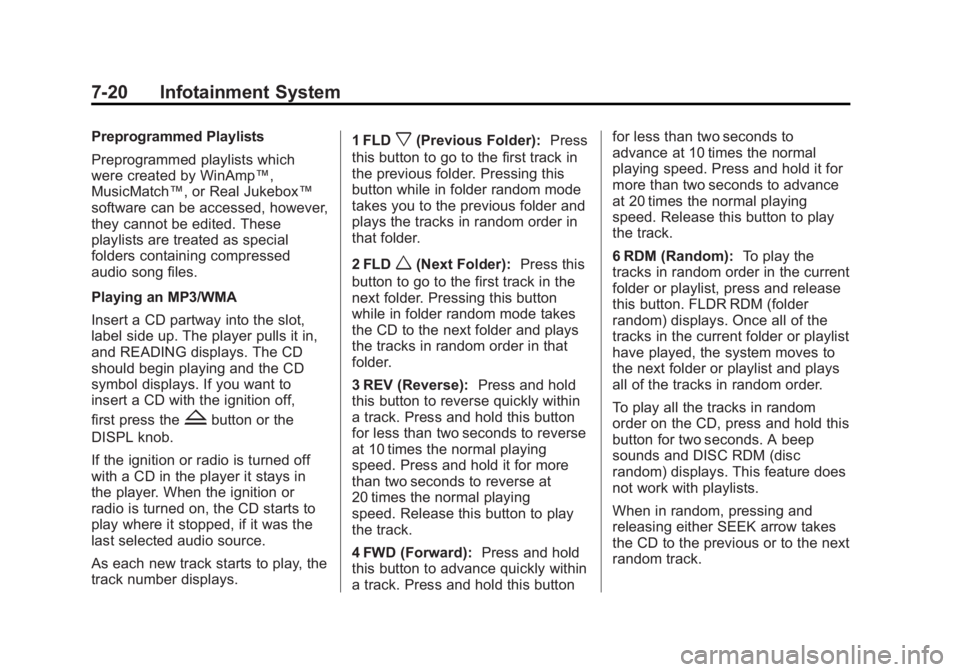
Black plate (20,1)GMC Canyon Owner Manual - 2012
7-20 Infotainment System
Preprogrammed Playlists
Preprogrammed playlists which
were created by WinAmp™,
MusicMatch™, or Real Jukebox™
software can be accessed, however,
they cannot be edited. These
playlists are treated as special
folders containing compressed
audio song files.
Playing an MP3/WMA
Insert a CD partway into the slot,
label side up. The player pulls it in,
and READING displays. The CD
should begin playing and the CD
symbol displays. If you want to
insert a CD with the ignition off,
first press the
Zbutton or the
DISPL knob.
If the ignition or radio is turned off
with a CD in the player it stays in
the player. When the ignition or
radio is turned on, the CD starts to
play where it stopped, if it was the
last selected audio source.
As each new track starts to play, the
track number displays. 1 FLD
x(Previous Folder):
Press
this button to go to the first track in
the previous folder. Pressing this
button while in folder random mode
takes you to the previous folder and
plays the tracks in random order in
that folder.
2 FLD
w(Next Folder): Press this
button to go to the first track in the
next folder. Pressing this button
while in folder random mode takes
the CD to the next folder and plays
the tracks in random order in that
folder.
3 REV (Reverse): Press and hold
this button to reverse quickly within
a track. Press and hold this button
for less than two seconds to reverse
at 10 times the normal playing
speed. Press and hold it for more
than two seconds to reverse at
20 times the normal playing
speed. Release this button to play
the track.
4 FWD (Forward): Press and hold
this button to advance quickly within
a track. Press and hold this button for less than two seconds to
advance at 10 times the normal
playing speed. Press and hold it for
more than two seconds to advance
at 20 times the normal playing
speed. Release this button to play
the track.
6 RDM (Random):
To play the
tracks in random order in the current
folder or playlist, press and release
this button. FLDR RDM (folder
random) displays. Once all of the
tracks in the current folder or playlist
have played, the system moves to
the next folder or playlist and plays
all of the tracks in random order.
To play all the tracks in random
order on the CD, press and hold this
button for two seconds. A beep
sounds and DISC RDM (disc
random) displays. This feature does
not work with playlists.
When in random, pressing and
releasing either SEEK arrow takes
the CD to the previous or to the next
random track.
Page 167 of 404

Black plate (21,1)GMC Canyon Owner Manual - 2012
Infotainment System 7-21
Press and release this button again
to turn off random play. NO RDM (no
random) displays.
qSEEKr:Press the left SEEK
arrow to go to the start of the
previous track. Press the right
SEEK arrow to go to the start of the
next track. Pressing either SEEK
arrow for more than two seconds
searches the previous or next tracks
at two tracks per second. Release
the button to stop searching and to
play the track.
qTUNEr: Turn to reverse or
advance through the tracks in all
folders or playlists. The track
number and file name displays for
each track. Turning this knob while
in random reverses or advances the
tracks in sequential order.
DISPL (Display): Press this knob
to switch between track mode,
folder/playlist mode, and time of day
mode. The display shows only
eight characters, but there can be
up to four pages of text. If there are more than
eight characters in the song,
folder, or playlist name, pressing
this knob within two seconds takes
you to the next page of text. If there
are no other pages to be shown,
pressing this knob within
two seconds takes you to the
next display mode.
.Track mode displays the current
track number and the ID3 tag
song name.
.Folder/playlist mode displays the
current folder or playlist number
and the folder/playlist name.
.Time of day mode displays the
time of day and the ID3 tag
song name.
To change the default on the
display, press the DISPL knob until
you see the desired display, then
press and hold this knob for two
two seconds. The radio produces
one beep and the selected display
is now the default. INFO (Information):
INFO displays
when a current track has ID3 tag
information. Press this button to
display the artist name and album
contained in the tag. INFO
disappears from the display when
the information in the ID3 tag has
finished being read.
BAND: Press this button to listen to
the radio when a CD is playing. The
inactive CD remains inside the radio
for future listening.
CD AUX (Auxiliary): Press this
button to play a CD when listening
to the radio. The CD symbol
illuminates on the display when a
CD is loaded.
Z(Eject): Press this button to
eject a CD. Eject can activate while
either the ignition or radio is off.
CDs can be loaded with the
ignition and radio off if this button
is pressed first.
Page 168 of 404

Black plate (22,1)GMC Canyon Owner Manual - 2012
7-22 Infotainment System
CD Messages
CHECK CD:If this message
displays and/or the CD comes out, it
could be for one of the following
reasons:
.It is very hot. When the
temperature returns to normal,
the CD should play.
.You are driving on a very rough
road. When the road becomes
smoother, the CD should play.
.The CD is dirty, scratched, wet,
or upside down.
.The air is very humid. If so, wait
about an hour and try again.
.The format of the CD might not
be compatible. See “Using an
MP3” later in this section.
.There could have been a
problem while burning the CD.
.The label could be caught in the
CD player.
If the CD is not playing correctly, for
any other reason, try a known
good CD.
If any error occurs repeatedly or
if an error cannot be corrected,
contact your dealer. If the radio
displays an error message, write it
down and provide it to your dealer
when reporting the problem.
Phone
Bluetooth
For vehicles equipped with
Bluetooth capability, the system can
interact with many cell phones,
allowing:
.Placement and receipt of calls in
a hands-free mode.
.Sharing of the cell phone’s
address book or contact list with
the vehicle.
To minimize driver distraction,
before driving, and with the
vehicle parked:
.Become familiar with the
features of the cell phone.
Organize the phone book and
contact lists clearly and delete
duplicate or rarely used entries.
If possible, program speed dial
or other shortcuts.
.Review the controls and
operation of the infotainment
system.
Page 178 of 404

Black plate (2,1)GMC Canyon Owner Manual - 2012
8-2 Climate Controls
If the knob is set on“0”(zero), some
outside air will still enter the vehicle
and will be directed according to the
position of the mode knob.
Air Delivery Mode Control:
Turn the knob clockwise or
counterclockwise to change the
current airflow mode.
Select from the following modes:
H(Vent): Air is directed to the
instrument panel outlets.
\(Bi-Level): Air is divided
between the instrument panel
outlets and floor and side window
outlets. Cooler air is directed to the
upper outlets and warmer air to the
floor outlets.
[(Floor): Air is directed to the
floor outlets. Recirculation cannot
be selected while in floor mode
because this could cause the
interior window to fog.
/(Floor/Defog): This mode
clears the windows of fog or
moisture. Air is directed to the floor,
windshield, and side window outlets.
When this mode is selected, the
system runs the air conditioning
compressor unless the outside
temperature is near freezing or
below. Recirculation is not available
in this mode.
0(Defrost): This mode clears
the windshield of fog or frost more
quickly. Air is directed to the
windshield and side window outlets.
When this mode is selected, the
system runs the air conditioning
compressor unless the outside
temperature is near, or below
freezing. Recirculation is not
available in this mode.
Do not drive the vehicle until all the
windows are clear.
#(Air Conditioning): Press to
turn the air conditioning system on
or off. An indicator light on the
button comes on to show that the air
conditioning is on.
The fan control must be on to use
the air conditioning.
There might be a slight change in
engine performance when the air
conditioning compressor shuts off
and turns on again. This is normal.
The system is designed to make
adjustments to help with fuel
economy while still maintaining the
selected temperature.
The air conditioning system
removes moisture from the air, so a
small amount of water might drip
under the vehicle while idling or
after turning off the engine.
This is normal.
Page 225 of 404

Black plate (45,1)GMC Canyon Owner Manual - 2012
Driving and Operating 9-45
To turn off TCS, press and release
the TCS/StabiliTrak button. The
StabiliTrak Off light comes on in the
instrument panel cluster, and TRAC
OFF comes on the DIC. To turn
TCS back on, press and release the
TCS/StabiliTrak button.
Adding non-dealer/non-retailer
accessories can affect the vehicle
performance. SeeAccessories and
Modifications on page 10‑4.
StabiliTrak®System
The vehicle has an electronic
stability control system called
StabiliTrak. It is an advanced
computer controlled system that
assists the driver with directional
control of the vehicle in difficult
driving conditions. StabiliTrak activates when the
computer senses a discrepancy
between the intended path and the
direction the vehicle is actually
traveling. StabiliTrak selectively
applies braking pressure at any one
of the vehicle's brakes to assist the
driver with keeping the vehicle on
the intended path.
When the vehicle is started and
begins to move, the system
performs several diagnostic checks
to insure there are no problems.
The system may be heard or felt
while it is working. This is normal
and does not mean there is a
problem with the vehicle. The
system should initialize before the
vehicle reaches 32 km/h (20 mph).
In some cases, it may take
approximately two miles of driving
before the system initializes.
If cruise control is being used when
StabiliTrak activates, the cruise
control automatically disengages.
The cruise control can be
re-engaged when road conditions
allow. See
Cruise Control on
page 9‑47.
If there is a problem detected with
StabiliTrak, a SERVICE STAB SYS
message displays on the Driver
Information Center (DIC). See Ride
Control System Messages on
page 5‑26 for more information.
When this message is displayed,
the system is not working. Adjust
your driving accordingly.
StabiliTrak and Traction Control
(TCS) come on automatically
whenever the vehicle is started and
the systems are reset with each
ignition cycle. However, when
the transfer case is placed in
Four-Wheel-Low mode, StabiliTrak
is automatically disabled. See
Four-Wheel Drive on page 10‑30
for more information. It is
recommended to leave the system
on for normal driving conditions, but
Page 239 of 404

Black plate (59,1)GMC Canyon Owner Manual - 2012
Driving and Operating 9-59
Notice:Pulling a trailer
improperly can damage the
vehicle and result in costly
repairs not covered by the
vehicle warranty. To pull a trailer
correctly, follow the advice in this
section and see your dealer for
important information about
towing a trailer with the vehicle.
To identify the trailering capacity of
the vehicle, read the information in
“Weight of the Trailer” that appears
later in this section.
Trailering is different than just
driving the vehicle by itself.
Trailering means changes in
handling, acceleration, braking,
durability and fuel economy.
Successful, safe trailering takes
correct equipment, and it has to
be used properly. The following information has many
time-tested, important trailering tips
and safety rules. Many of these are
important for your safety and that of
your passengers. So please read
this section carefully before pulling
a trailer.
Weight of the Trailer
How heavy can a trailer safely be?
It depends on how the rig is used.
For example, speed, altitude, road
grades, outside temperature and
how much the vehicle is used to pull
a trailer are all important. It can
depend on any special equipment
on the vehicle, and the amount of
tongue weight the vehicle can carry.
See
“Weight of the Trailer Tongue”
later in this section for more
information. Maximum trailer weight is calculated
assuming only the driver is in the
tow vehicle and it has all the
required trailering equipment.
The weight of additional optional
equipment, passengers and cargo in
the tow vehicle must be subtracted
from the maximum trailer weight.
Use the following chart to determine
how much the vehicle can weigh,
based upon the vehicle model
and options.