Page 340 of 468

Black plate (28,1)GMC Acadia/Acadia Denali Owner Manual - 2012
10-28 Vehicle Care
Wiper Blade Replacement
Windshield wiper blades should be
inspected for wear or cracking.
SeeMaintenance Schedule on
page 11‑3 for more information.
Replacement blades come in
different types and are removed in
different ways. To replace the wiper
blade assembly:
1. Pull the windshield wiper arm away from the windshield.
2. Press the button in the middle ofthe wiper arm connector and pull
the wiper blade away from the
arm connector.
3. Install the new wiper blade and make sure the wiper blade locks
into place.
For the proper size and type, see
Maintenance Replacement Parts on
page 11‑13.
Backglass Wiper Blade
To replace the backglass wiper
blade:
1. Pull the wiper blade assembly away from the backglass.
The backglass wiper blade will
not lock in a vertical position so
care should be used when
pulling it away from the vehicle.
2. Rotate the wiper blade assembly, hold the wiper arm in
position, and push the blade
away from the wiper arm.
3. Replace the wiper blade.
4. Return the wiper arm and blade assembly to the rest position on
the glass.
Windshield Replacement
If the vehicle is equipped with the
Head‐Up display (HUD) system and
the windshield needs to be
replaced, get one that is designed
for HUD or the HUD image may
look out of focus.
Headlamp Aiming
Headlamp aim has been preset and
should need no further adjustment.
If the vehicle is damaged in a crash,
the headlamp aim may be affected.
If adjustment to the headlamps is
necessary, see your dealer.
Page 341 of 468
Black plate (29,1)GMC Acadia/Acadia Denali Owner Manual - 2012
Vehicle Care 10-29
Bulb Replacement
For the proper type of replacement
bulbs, seeReplacement Bulbs on
page 10‑29.
For any bulb‐changing procedure
not listed in this section, contact
your dealer.
LED Lighting
This vehicle has several LED lamps.
For replacement of any LED lighting
assembly, contact your dealer.
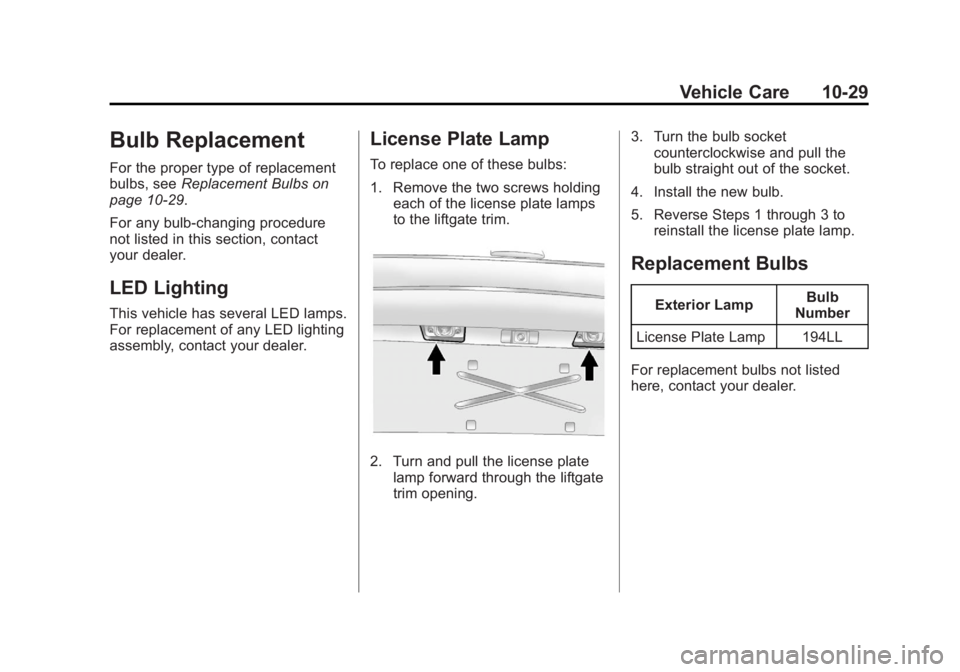
License Plate Lamp
To replace one of these bulbs:
1. Remove the two screws holding each of the license plate lamps
to the liftgate trim.
2. Turn and pull the license plate
lamp forward through the liftgate
trim opening. 3. Turn the bulb socket
counterclockwise and pull the
bulb straight out of the socket.
4. Install the new bulb.
5. Reverse Steps 1 through 3 to reinstall the license plate lamp.
Replacement Bulbs
Exterior Lamp Bulb
Number
License Plate Lamp 194LL
For replacement bulbs not listed
here, contact your dealer.
Page 343 of 468

Black plate (31,1)GMC Acadia/Acadia Denali Owner Manual - 2012
Vehicle Care 10-31
Fuses and Circuit
Breakers
The wiring circuits in your vehicle
are protected from short circuits by
a combination of fuses, circuit
breakers and fusible thermal links.
This greatly reduces the chance of
fires caused by electrical problems.
Look at the silver-colored band
inside the fuse. If the band is broken
or melted, replace the fuse. Be sure
you replace a bad fuse with a new
one of the identical size and rating.
Fuses of the same amperage can
be temporarily borrowed from
another fuse location, if a fuse goes
out. Replace the fuse as soon as
you can.
Engine Compartment
Fuse Block
The underhood fuse block is located
in the engine compartment, on the
passenger side of the vehicle.
Lift the cover for access to the
fuse/relay block.Notice:
Spilling liquid on any
electrical component on the
vehicle may damage it. Always
keep the covers on any electrical
component.
To remove fuses, hold the end of
the fuse between your thumb and
index finger and pull straight out.
Page 344 of 468
Black plate (32,1)GMC Acadia/Acadia Denali Owner Manual - 2012
10-32 Vehicle Care
The vehicle may not be equipped
with all of the fuses, relays, and
features shown.Fuses Usage
A/C CLTCH Air Conditioning
Clutch
ABS MTR Antilock Brake
System (ABS)
Motor
AFS Adaptive Forward
Lighting System
AIRBAG Airbag System
AUX POWER Auxiliary Power
AUX
VAC PUMP Auxiliary
Vacuum Pump
AWD All-Wheel-Drive
System
BATT 1 Battery 1
BATT 2 Battery 2
BATT 3 Battery 3 CIGAR
LIGHTER Cigarette Lighter
ECM Engine Control
Module
Page 346 of 468

Black plate (34,1)GMC Acadia/Acadia Denali Owner Manual - 2012
10-34 Vehicle Care
FusesUsage
STRTR Starter
TCM Transmission
Control Module
TRANS Transmission TRLR
BCK/UP Trailer Back‐up
Lamps
TRLR BRK Trailer Brake TRLR
PRK LAMP Trailer Parking
Lamps
TRLR PWR Trailer Power
WPR/WSW Windshield
Wiper/Washer
Relays Usage
A/C
CMPRSR CLTCH Air Conditioning
Compressor Clutch
AUX
VAC PUMP Auxiliary
Vacuum Pump
CRNK Switched Power Relays
Usage
FAN 1 Cooling Fan 1
FAN 2 Cooling Fan 2
FAN 3 Cooling Fan 3
FOG LAMP Fog Lamps
HI BEAM High‐Beam
Headlamps
HID/LO BEAM High Intensity
Discharge (HID)
Low‐Beam
Headlamps
HORN Horn IGN Ignition Main
LT TRLR
STOP/TRN Trailer Left
Stoplamp and
Turn Signal Lamp
PRK LAMP Parking Lamp
PWR/TRN Powertrain
RR DEFOG Rear Window
Defogger Relays
Usage
RT TRLR
STOP/TRN Trailer Right
Stoplamp and
Turn Signal Lamp
Stop Lamps
(China Only) Stop Lamps
(China Only)
TRLR
BCK/UP Trailer Back-up
Lamps
WPR Windshield Wiper
WPR HI Windshield Wiper
High Speed
Instrument Panel Fuse
Block
The instrument panel fuse block
is located under the instrument
panel on the passenger side of the
vehicle. Pull down on the cover to
access the fuse block.
Page 347 of 468
Black plate (35,1)GMC Acadia/Acadia Denali Owner Manual - 2012
Vehicle Care 10-35
Fuse Side
The vehicle may not be equipped
with all of the fuses, relays, and
features shown. Fuses Usage
AIRBAG Airbag AMP Amplifier
BCK/UP/ STOP Back‐up Lamp/
Stoplamp
BCM Body Control
Module
CNSTR/ VENT Canister Vent
CTSY Courtesy Lamps
DR/LCK Door Locks
DRL Daytime Running
Lamps
DRL 2/
RR Fog GMC HID Only
(If Equipped)/
Rear Fog Lamps
(China Only)
DSPLY Display
FRT/WSW Front Windshield
Washer
HTD/COOL SEAT Heated/Cooling
Seats Fuses Usage
HVAC Heating,
Ventilation, and
Air Conditioning
INADV/
PWR/LED Inadvertent
Power LED
INFOTMNT Infotainment
LT/TRN/SIG Driver Side Turn
Signal
MSM Memory Seat
Module
PDM Power Mirrors,
Liftgate Release
PWR MODE Power Mode
PWR/MIR Power Mirrors RDO Radio
REAR WPR Rear Wiper
RT/TRN/SIG Passenger Side
Turn Signal
SPARE Spare
STR/WHL/ ILLUM Steering Wheel
Illumination
Page 348 of 468
Black plate (36,1)GMC Acadia/Acadia Denali Owner Manual - 2012
10-36 Vehicle Care
Relay SideRelays Usage
LT/PWR/ SEAT Driver Side Power
Seat Relay
RT/PWR/ SEAT Passenger Side
Power Seat Relay
PWR/WNDW Power Windows
Relay
PWR/
COLUMN Power Steering
Column Relay
L/GATE Liftgate Relay
LCK Power Lock Relay
REAR/WSW Rear Window
Washer Relay
UNLCK Power Unlock
Relay
DRL2 Daytime Running
Lamps 2 Relay
(If Equipped) Relays Usage
LT/UNLCK Driver Side Unlock
Relay
DRL Daytime Running
Lamps Relay
(If Equipped)
SPARE Spare
FRT/WSW Front Windshield
Washer Relay
Page 361 of 468

Black plate (49,1)GMC Acadia/Acadia Denali Owner Manual - 2012
Vehicle Care 10-49
TPMS sensor. The malfunction
light and the DIC message should
go off at the next ignition cycle.
The sensors are matched to the
tire/wheel positions, using a TPMS
relearn tool, in the following order:
driver side front tire, passenger side
front tire, passenger side rear tire,
and driver side rear. See your
dealer for service or to purchase a
relearn tool.
There are two minutes to match
the first tire/wheel position, and
five minutes overall to match all
four tire/wheel positions. If it takes
longer, the matching process stops
and must be restarted.
The TPMS sensor matching
process is:
1. Set the parking brake.
2. Turn the ignition to ON/RUNwith the engine off. 3. Press the Remote Keyless Entry
(RKE) transmitter's LOCK and
UNLOCK buttons at the same
time for approximately
five seconds. The horn sounds
twice to signal the receiver is in
relearn mode and TIRE
LEARNING ACTIVE message
displays on the DIC screen.
4. Start with the driver side front tire.
5. Place the relearn tool against the tire sidewall, near the valve
stem. Then press the button to
activate the TPMS sensor.
A horn chirp confirms that the
sensor identification code has
been matched to this tire and
wheel position.
6. Proceed to the passenger side front tire, and repeat the
procedure in Step 5. 7. Proceed to the passenger side
rear tire, and repeat the
procedure in Step 5.
8. Proceed to the driver side rear tire, and repeat the procedure in
Step 5. The horn sounds two
times to indicate the sensor
identification code has been
matched to the driver side rear
tire, and the TPMS sensor
matching process is no longer
active. The TIRE LEARNING
ACTIVE message on the DIC
display screen goes off.
9. Turn the ignition to LOCK/OFF.
10. Set all four tires to the recommended air pressure
level as indicated on the Tire
and Loading Information label.