2012 GMC ACADIA lock
[x] Cancel search: lockPage 228 of 468

Black plate (42,1)GMC Acadia/Acadia Denali Owner Manual - 2012
7-42 Infotainment System
Remote Control
To use the remote control, aim it at
the transmitter window at the rear of
the overhead console and press the
desired button. Direct sunlight or
very bright light could affect the
ability of the RSE transmitter to
receive signals from the remote
control. If the remote control does
not seem to be working, the
batteries might need to be replaced.See
“Battery Replacement” later in
this section. Objects blocking the
line of sight could also affect the
function of the remote control.
If a CD or DVD is in the Radio DVD
slot, the remote control
Obutton
can be used to turn on the video
screen display and start the disc.
The radio can also turn on the video
screen display. See Operation on
page 7‑2 for more information.
Notice: Storing the remote
control in a hot area or in direct
sunlight can damage it, and the
repairs will not be covered by the
warranty. Storage in extreme
cold can weaken the batteries.
Keep the remote control stored in
a cool, dry place. Remote Control Buttons
O(Power):
Press to turn the video
screen on and off.
P(Illumination): Press to turn
the remote control backlight on.
The backlight automatically times
out after seven to 10 seconds if no
other button is pressed while the
backlight is on.
v(Title): Press to return the DVD
to the main menu of the DVD. This
function could vary for each disc.
y(Main Menu): Press to access
the DVD menu. The DVD menu is
different on every DVD. Use the
navigation arrows to move the
cursor around the DVD menu.
After making a selection press the
enter button. This button only
operates when using a DVD.
Page 245 of 468
Black plate (1,1)GMC Acadia/Acadia Denali Owner Manual - 2012
Climate Controls 8-1
Climate Controls
Climate Control Systems
Climate Control Systems . . . . . . 8-1
Dual Automatic ClimateControl System . . . . . . . . . . . . . . 8-4
Rear Climate Control System (Rear Climate
Control Only) . . . . . . . . . . . . . . . 8-10
Rear Climate Control System (Rear Climate with
Rear Seat Audio) . . . . . . . . . . . 8-11
Air Vents
Air Vents . . . . . . . . . . . . . . . . . . . . . 8-12
Maintenance
Passenger CompartmentAir Filter . . . . . . . . . . . . . . . . . . . . 8-13
Climate Control Systems
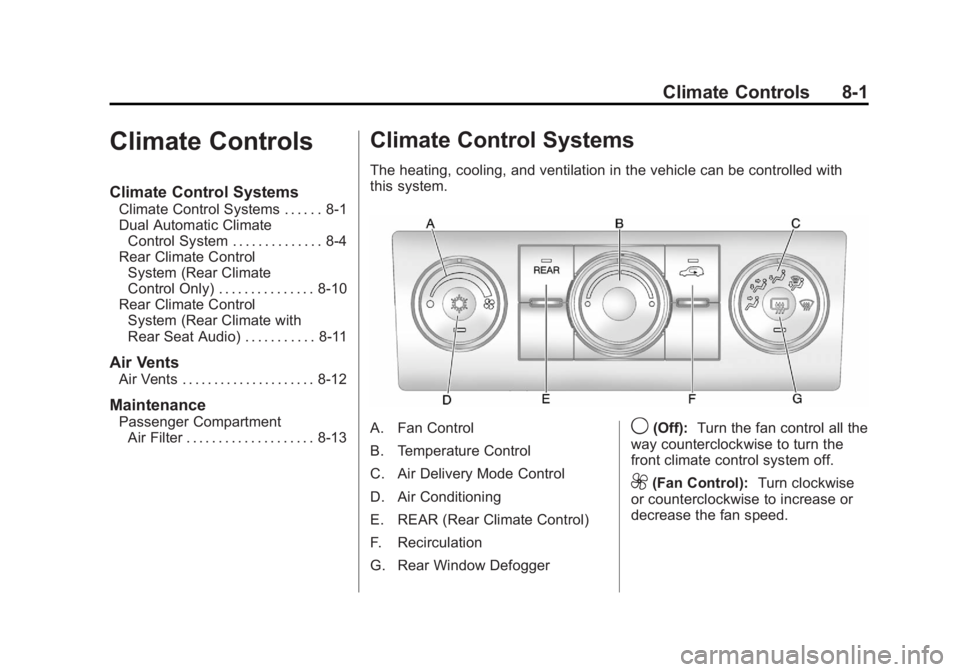
The heating, cooling, and ventilation in the vehicle can be controlled with
this system.
A. Fan Control
B. Temperature Control
C. Air Delivery Mode Control
D. Air Conditioning
E. REAR (Rear Climate Control)
F. Recirculation
G. Rear Window Defogger9(Off): Turn the fan control all the
way counterclockwise to turn the
front climate control system off.
9(Fan Control): Turn clockwise
or counterclockwise to increase or
decrease the fan speed.
Page 246 of 468

Black plate (2,1)GMC Acadia/Acadia Denali Owner Manual - 2012
8-2 Climate Controls
Temperature Control:Turn
clockwise or counterclockwise
to increase or decrease the
temperature of the air flowing
from the system.
Air Delivery Mode Control:
Turn clockwise or counterclockwise
to change the current airflow mode.
By positioning the right knob
between two modes, a combination
of those two modes is selected.
H(Vent): Air is directed to the
instrument panel outlets.
)(Bi-Level): Air is divided
between the instrument panel and
floor outlets. Some air is directed
toward the windshield and side
window outlets. Cooler air is
directed to the upper outlets and
warmer air to the floor outlets.
6(Floor): Air is directed to the
floor outlets, with some of the air
directed to the windshield, side
window, and second row floor outlets. In this mode, the system
automatically selects outside air.
Recirculation cannot be selected
while in floor mode.
-(Defog):
This clears the
windows of fog or moisture. Air is
directed to the windshield, floor
outlets, and side window vents.
When this mode is selected, the
system turns off recirculation and
runs the air conditioning unless the
outside temperature is less than
4°C (40°F). Recirculation cannot be
selected while in the defog mode.
Do not drive the vehicle until all the
windows are clear.
0(Defrost): This clears the
windshield of fog or frost more
quickly. Air is directed to the
windshield and side window vents,
with some to the floor vents. In this
mode, outside air is pulled inside
the vehicle. Recirculation cannot be
selected while in the defrost mode. The air conditioning system runs
automatically in this setting, unless
the outside temperature is less than
4°C (40°F). Do not drive the vehicle
until all windows are clear.
#(Air Conditioning):
Press to
turn the air conditioning system
on or off. An indicator light
comes on when A/C is on.
The air conditioning system does
not operate when the outside
temperature is below 4°C (40°F).
The indicator light flashes three
times and turns off when outside
conditions affect air conditioning
operation. This is normal.
For quicker cool down on hot days:
1. Open the windows to let hot air escape.
2. Select
Hmode.
3. Select
#.
4. Select the coolest temperature.
Page 254 of 468

Black plate (10,1)GMC Acadia/Acadia Denali Owner Manual - 2012
8-10 Climate Controls
Rear Climate Control System (Rear Climate
Control Only)
A. Fan Control
B. Temperature Control
C. Air Delivery Mode Control
For vehicles with the rear climate
control system, the controls are
located on the rear of the center
console. The system can also be
controlled with the front controls.Press the REAR button on the front
climate control system to turn the
rear climate control system on or
off. An indicator comes on when the
rear system is on. The system also
turns on if any of the rear controls
are adjusted.
Mimic Mode:
This mode matches
the rear climate control to the front
climate control settings. It comes on
when REAR is pressed. Independent Mode:
This mode
directs rear seating airflow
according to the settings of the
rear controls. It comes on when
any rear control is adjusted.
Fan Control: Turn clockwise or
counterclockwise to increase or
decrease the fan speed. Turn the
knob to
9to turn the fan off.
Temperature Control: Turn
clockwise or counterclockwise to
increase or decrease the airflow
temperature.
Air Delivery Mode Control:
Turn to the desired mode to change
the airflow direction.
H (Vent): Air is directed through
the overhead outlets.
) (Bi-Level): Air is directed
through the rear floor outlets, as
well as the overhead outlets.
6 (Floor): Air is directed through
the floor outlets. The rear system
floor outlets are located under the
third row seats.
Page 256 of 468

Black plate (12,1)GMC Acadia/Acadia Denali Owner Manual - 2012
8-12 Climate Controls
N(Air Delivery Mode Control):
Press to manually change the
direction of the airflow. Repeatedly
press the button until the desired
mode appears on the display.
H(Vent): Air is directed through
the overhead outlets.
)(Bi-Level): Air is directed
through the rear floor outlets, as
well as the overhead outlets.
6(Floor): Air is directed through
the floor outlets. The rear system
floor outlets are located under the
third row seats.
Air Vents
Use the slider switch in the center of
the outlet, to change the direction of
the airflow. Use the thumbwheel
near the outlet to control the amount
of airflow or to shut off the airflow.
Keep all outlets open whenever
possible for best system
performance.
Operation Tips
.Clear away any ice, snow,
or leaves from the air inlets at
the base of the windshield that
can block the flow of air into the
vehicle.
.Use of non-GM approved hood
deflectors can adversely affect
the performance of the system.
.Keep the path under all seats
clear of objects to help circulate
the air inside the vehicle more
effectively.
.If fogging reoccurs while in
vent or bi-level modes with
mild temperature throughout
the vehicle, turn on the air
conditioner to reduce windshield
fogging.
Page 259 of 468

Black plate (1,1)GMC Acadia/Acadia Denali Owner Manual - 2012
Driving and Operating 9-1
Driving and
Operating
Driving Information
Distracted Driving . . . . . . . . . . . . . 9-2
Defensive Driving . . . . . . . . . . . . . 9-3
Drunk Driving . . . . . . . . . . . . . . . . . 9-3
Control of a Vehicle . . . . . . . . . . . 9-3
Braking . . . . . . . . . . . . . . . . . . . . . . . 9-3
Steering . . . . . . . . . . . . . . . . . . . . . . . 9-4
Off-Road Recovery . . . . . . . . . . . . 9-5
Loss of Control . . . . . . . . . . . . . . . . 9-5
Driving on Wet Roads . . . . . . . . . 9-6
Highway Hypnosis . . . . . . . . . . . . 9-7
Hill and Mountain Roads . . . . . . 9-7
Winter Driving . . . . . . . . . . . . . . . . . 9-8
If the Vehicle Is Stuck . . . . . . . . 9-10
Vehicle Load Limits . . . . . . . . . . 9-10
Starting and Operating
New Vehicle Break-In . . . . . . . . 9-15
Ignition Positions . . . . . . . . . . . . 9-16
Starting the Engine . . . . . . . . . . 9-18
Engine Heater . . . . . . . . . . . . . . . 9-19
Retained AccessoryPower (RAP) . . . . . . . . . . . . . . . 9-20 Shifting Into Park . . . . . . . . . . . . 9-20
Shifting out of Park . . . . . . . . . . 9-21
Parking over Things
That Burn . . . . . . . . . . . . . . . . . . 9-22
Engine Exhaust
Engine Exhaust . . . . . . . . . . . . . . 9-22
Running the Vehicle WhileParked . . . . . . . . . . . . . . . . . . . . . 9-23
Automatic Transmission
Automatic Transmission . . . . . 9-23
Manual Mode . . . . . . . . . . . . . . . . 9-25
Tow/Haul Mode . . . . . . . . . . . . . . 9-26
Drive Systems
All-Wheel Drive . . . . . . . . . . . . . . 9-27
Brakes
Antilock BrakeSystem (ABS) . . . . . . . . . . . . . . 9-27
Parking Brake . . . . . . . . . . . . . . . 9-28
Brake Assist . . . . . . . . . . . . . . . . . 9-29
Hill Start Assist (HSA) . . . . . . . 9-29
Ride Control Systems
StabiliTrak®System . . . . . . . . . 9-30
Cruise Control
Cruise Control . . . . . . . . . . . . . . . 9-32
Object Detection Systems
Ultrasonic Parking Assist . . . . 9-34
Rear Vision Camera (RVC) . . . . . . . . . . . . . 9-35
Fuel
Fuel . . . . . . . . . . . . . . . . . . . . . . . . . 9-40
Recommended Fuel . . . . . . . . . 9-40
Gasoline Specifications(U.S. and Canada Only) . . . . 9-40
California Fuel Requirements . . . . . . . . . . . . . . 9-40
Fuels in Foreign Countries . . . 9-41
Fuel Additives . . . . . . . . . . . . . . . 9-41
Filling the Tank . . . . . . . . . . . . . . 9-42
Filling a Portable Fuel Container . . . . . . . . . . . . . . . . . . . 9-44
Towing
General TowingInformation . . . . . . . . . . . . . . . . . 9-44
Driving Characteristics and Towing Tips . . . . . . . . . . . . . . . . 9-45
Trailer Towing . . . . . . . . . . . . . . . . 9-49
Towing Equipment . . . . . . . . . . . 9-51
Conversions and Add-Ons
Add-On Electrical Equipment . . . . . . . . . . . . . . . . . 9-53
Page 262 of 468

Black plate (4,1)GMC Acadia/Acadia Denali Owner Manual - 2012
9-4 Driving and Operating
If the engine ever stops while the
vehicle is being driven, brake
normally but do not pump the
brakes. Doing so could make the
pedal harder to push down. If the
engine stops, there will be some
power brake assist but it will be
used when the brake is applied.
Once the power assist is used up,
it can take longer to stop and the
brake pedal will be harder to push.
Steering
Hydraulic Power Steering
Your vehicle has hydraulic
power steering. It may require
maintenance. SeePower Steering
Fluid on page 10‑21.
If power steering assist is lost due
to a system malfunction, the vehicle
can be steered, but may require
increased effort.
Variable Effort Steering
Some vehicles have a steering
system that varies the amount of
effort required to steer the vehicle in
relation to the speed of the vehicle.
The amount of steering effort
required is less at slower speeds
to make the vehicle more
maneuverable and easier to park.
At faster speeds, the steering effort
increases to provide a sport-like feel
to the steering. This provides
maximum control and stability.
If the vehicle seems harder to steer
than normal when parking or driving
slowly, there may be a problem with
the system. You will still have power
steering, but steering will be stiffer
than normal at slow speeds.
See your dealer for service.
Curve Tips
.Take curves at a reasonable
speed.
.Reduce speed before entering a
curve.
.Maintain a reasonable steady
speed through the curve.
.Wait until the vehicle is out of
the curve before accelerating
gently into the straightaway.
Steering in Emergencies
.There are some situations when
steering around a problem may
be more effective than braking.
.Holding both sides of the
steering wheel allows you to turn
180 degrees without removing
a hand.
.Antilock Brake System (ABS)
allows steering while braking.
Page 264 of 468
Black plate (6,1)GMC Acadia/Acadia Denali Owner Manual - 2012
9-6 Driving and Operating
.Try to avoid sudden steering,
acceleration, or braking,
including reducing vehicle
speed by shifting to a lower
gear. Any sudden changes
could cause the tires to slide.
Remember: Antilock brakes help
avoid only the braking skid.
Driving on Wet Roads
Rain and wet roads can reduce
vehicle traction and affect your
ability to stop and accelerate.
Always drive slower in these
types of driving conditions and
avoid driving through large
puddles and deep‐standing or
flowing water.
{WARNING
Wet brakes can cause crashes.
They might not work as well in a
quick stop and could cause
pulling to one side. You could
lose control of the vehicle.
After driving through a large
puddle of water or a car/vehicle
wash, lightly apply the brake
pedal until the brakes work
normally.
Flowing or rushing water creates
strong forces. Driving through
flowing water could cause the
vehicle to be carried away. If this
happens, you and other vehicle
occupants could drown. Do not
ignore police warnings and be
very cautious about trying to drive
through flowing water.
Hydroplaning
Hydroplaning is dangerous.
Water can build up under the
vehicle's tires so they actually ride
on the water. This can happen if the
road is wet enough and you are
going fast enough. When the
vehicle is hydroplaning, it has little
or no contact with the road.
There is no hard and fast rule about
hydroplaning. The best advice is to
slow down when the road is wet.
Other Rainy Weather Tips
Besides slowing down, other wet
weather driving tips include:
.Allow extra following distance.
.Pass with caution.
.Keep windshield wiping
equipment in good shape.