2012 GMC ACADIA lock
[x] Cancel search: lockPage 366 of 468

Black plate (54,1)GMC Acadia/Acadia Denali Owner Manual - 2012
10-54 Vehicle Care
Different Size Tires and
Wheels
If wheels or tires are installed that
are a different size than the original
equipment wheels and tires, vehicle
performance, including its braking,
ride and handling characteristics,
stability, and resistance to rollover
may be affected. If the vehicle has
electronic systems such as antilock
brakes, rollover airbags, traction
control, and electronic stability
control, the performance of these
systems can also be affected.
{WARNING
If different sized wheels are used,
there may not be an acceptable
level of performance and safety
if tires not recommended for
those wheels are selected.
This increases the chance of
a crash and serious injury.
Only use GM specific wheel and
tire systems developed for the
vehicle, and have them properly
installed by a GM certified
technician.
See Buying New Tires on
page 10‑52 andAccessories and
Modifications on page 10‑3 for
additional information.
Uniform Tire Quality
Grading
Quality grades can be found
where applicable on the tire
sidewall between tread shoulder
and maximum section width.
For example:
Treadwear 200 Traction AA
Temperature A
The following information relates
to the system developed by the
United States National Highway
Traffic Safety Administration
(NHTSA), which grades tires
by treadwear, traction, and
temperature performance.
This applies only to vehicles
sold in the United States.
The grades are molded on the
sidewalls of most passenger car
tires. The Uniform Tire Quality
Page 371 of 468

Black plate (59,1)GMC Acadia/Acadia Denali Owner Manual - 2012
Vehicle Care 10-59
{WARNING
Changing a tire can be
dangerous. The vehicle can
slip off the jack and roll over or
fall causing injury or death.
Find a level place to change the
tire. To help prevent the vehicle
from moving:1. Set the parking brake firmly.
2. Put an automatic transmission in P (Park) or
a manual transmission in
1 (First) or R (Reverse).
3. Turn off the engine and do not restart while the vehicle
is raised.
(Continued)
WARNING (Continued)
4. Do not allow passengers toremain in the vehicle.
5. Place wheel blocks on both sides of the tire at the
opposite corner of the tire
being changed.
This vehicle may come with a jack
and spare tire or a tire sealant and
compressor kit. To use the jacking
equipment to change a spare tire
safely, follow the instructions below.
Then see Tire Changing on
page 10‑68. To use the tire sealant
and compressor kit, see Tire
Sealant and Compressor Kit on
page 10‑60. When the vehicle has a flat tire (B),
use the following example as a
guide to assist you in the placement
of wheel blocks (A).
A. Wheel Block
B. Flat Tire
The following information explains
how to repair or change a tire.
Page 375 of 468
Black plate (63,1)GMC Acadia/Acadia Denali Owner Manual - 2012
Vehicle Care 10-63
3. Place the kit on the ground.Make sure the tire valve stem is
positioned close to the ground
so the hose will reach it.
4. Remove the valve stem cap from the flat tire by turning it
counterclockwise.
5. Attach the sealant/air hose (F) onto the tire valve stem. Turn it
clockwise until it is tight.
6. Plug the power plug (H) into the accessory power outlet in the
vehicle. Unplug all items from
other accessory power outlets.
See Power Outlets on page 5‑9.
If the vehicle has an accessory
power outlet, do not use the
cigarette lighter.
If the vehicle only has a cigarette
lighter, use the cigarette lighter.
Do not pinch the power plug
cord in the door or window.
7. Start the vehicle. The vehicle must be running while using the
air compressor. 8. Turn the selector switch (A)
counterclockwise to the
Sealant + Air position.
9. Press the on/off button (B) to turn the tire sealant and
compressor kit on.
The compressor will inject
sealant and air into the tire.
The pressure gauge (C) will
initially show a high pressure
while the compressor pushes the
sealant into the tire. Once the
sealant is completely dispersed
into the tire, the pressure will
quickly drop and start to rise
again as the tire inflates with
air only.
10. Inflate the tire to the recommended inflation
pressure using the pressure
gauge (C). The recommended
inflation pressure can be
found on the Tire and Loading
Information label. See Tire
Pressure on page 10‑44. The pressure gauge (C) may
read higher than the actual tire
pressure while the compressor
is on. Turn the compressor off
to get an accurate pressure
reading. The compressor may
be turned on/off until the
correct pressure is reached.
Notice: If the recommended
pressure cannot be reached after
approximately 25 minutes, the
vehicle should not be driven
farther. The tire is too severely
damaged and the tire sealant and
compressor kit cannot inflate the
tire. Remove the power plug from
the accessory power outlet and
unscrew the inflating hose from
the tire valve. See Roadside
Assistance Program (U.S. and
Canada) on page 13‑8 or
Roadside Assistance Program
(Mexico) on page 13‑10.
Page 376 of 468
Black plate (64,1)GMC Acadia/Acadia Denali Owner Manual - 2012
10-64 Vehicle Care
11. Press the on/off button (B) toturn the tire sealant and
compressor kit off.
The tire is not sealed and will
continue to leak air until the
vehicle is driven and the
sealant is distributed in the tire;
therefore, Steps 12 through
18 must be done immediately
after Step 11.
Be careful while handling the
tire sealant and compressor kit
as it could be warm after
usage.
12. Unplug the power plug (H) from the accessory power outlet in
the vehicle.
13. Turn the sealant/air hose (F) counterclockwise to remove it
from the tire valve stem.
14. Replace the tire valve stem cap. 15. Replace the sealant/air
hose (F), and the power
plug (H) back in their original
location.
16. If the flat tire was able to
inflate to the recommended
inflation pressure, remove the
maximum speed label from the
sealant canister (E) and place
it in a highly visible location.
Do not exceed the speed on
this label until the damaged tire
is repaired or replaced.
17. Return the equipment to its original storage location in the
vehicle.
18. Immediately drive the vehicle 8 km (5 mi) to distribute the
sealant in the tire. 19. Stop at a safe location and
check the tire pressure.
Refer to Steps 1 through 11
under “Using the Tire Sealant
and Compressor Kit without
Sealant to Inflate a Tire
(Not Punctured).”
If the tire pressure has fallen
more than 68 kPa (10 psi)
below the recommended
inflation pressure, stop driving
the vehicle. The tire is too
severely damaged and the tire
sealant cannot seal the tire.
See Roadside Assistance
Program (U.S. and Canada) on
page 13‑8 orRoadside
Assistance Program (Mexico)
on page 13‑10.
If the tire pressure has not
dropped more than 68 kPa
(10 psi) from the recommended
inflation pressure, inflate the
tire to the recommended
inflation pressure.
Page 378 of 468
Black plate (66,1)GMC Acadia/Acadia Denali Owner Manual - 2012
10-66 Vehicle Care
If a tire goes flat, avoid further tire
and wheel damage by driving slowly
to a level place. Turn on the hazard
warning flashers. SeeHazard
Warning Flashers on page 6‑4.
See If a Tire Goes Flat on
page 10‑58 for other important
safety warnings.
1. Remove the tire sealant and compressor kit from its storage
location. See Storing the Tire
Sealant and Compressor Kit on
page 10‑68.
2. Unwrap the air only hose (G) and the power plug (H).
3. Place the kit on the ground. Make sure the tire valve stem is
positioned close to the ground
so the hose will reach it.
4. Remove the tire valve stem cap from the flat tire by turning it
counterclockwise.
5. Attach the air only hose (G) onto the tire valve stem by turning it
clockwise until it is tight. 6. Plug the power plug (H) into the
accessory power outlet in the
vehicle. Unplug all items from
other accessory power outlets.
See Power Outlets on page 5‑9.
If the vehicle has an accessory
power outlet, do not use the
cigarette lighter.
If the vehicle only has a cigarette
lighter, use the cigarette lighter.
Do not pinch the power plug
cord in the door or window.
7. Start the vehicle. The vehicle must be running while using the
air compressor.
8. Turn the selector switch (A) clockwise to the Air Only
position.
9. Press the on/off (B) button to turn the compressor on.
The compressor will inflate the
tire with air only. 10. Inflate the tire to the
recommended inflation
pressure using the pressure
gauge (C). The recommended
inflation pressure can be found
on the Tire and Loading
Information label. See Tire
Pressure on page 10‑44.
The pressure gauge (C) may
read higher than the actual tire
pressure while the compressor
is on. Turn the compressor off
to get an accurate reading.
The compressor may be turned
on/off until the correct pressure
is reached.
If you inflate the tire higher
than the recommended
pressure you can adjust the
excess pressure by pressing
the pressure deflation
button (D), if equipped, until the
proper pressure reading is
reached. This option is only
functional when using the air
only hose (G).
Page 379 of 468
Black plate (67,1)GMC Acadia/Acadia Denali Owner Manual - 2012
Vehicle Care 10-67
11. Press the on/off button (B) toturn the tire sealant and
compressor kit off.
Be careful while handling the
tire sealant and compressor kit
as it could be warm after
usage.
12. Unplug the power plug (H) from the accessory power outlet in
the vehicle.
13. Disconnect the air only hose (G) from the tire
valve stem by turning it
counterclockwise, and replace
the tire valve stem cap.
14. Replace the air only hose (G) and the power plug (H) and
cord back in their original
locations.
15. Place the equipment in the original storage location in the
vehicle.
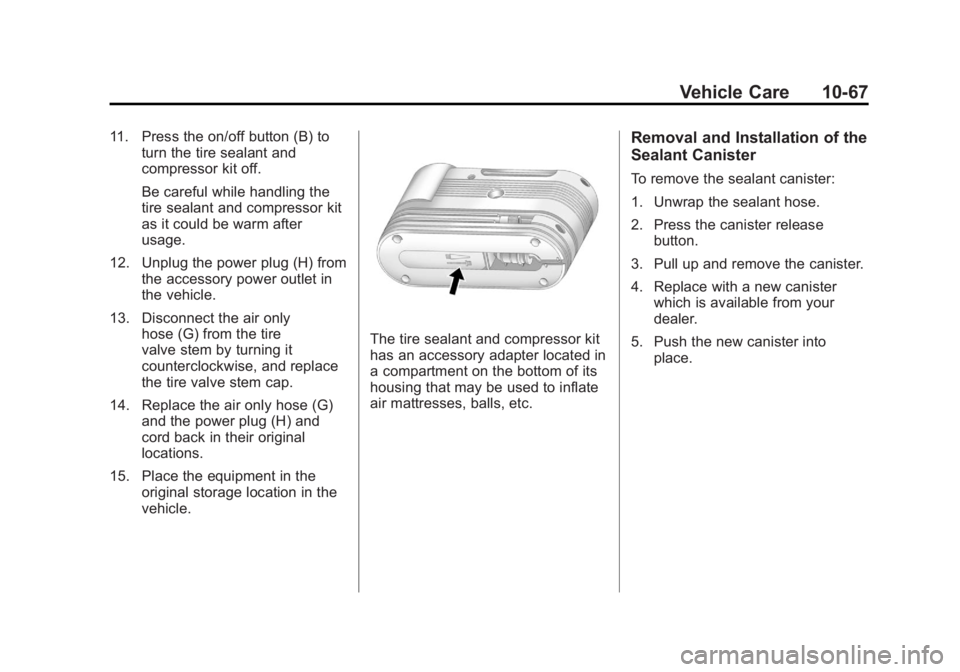
The tire sealant and compressor kit
has an accessory adapter located in
a compartment on the bottom of its
housing that may be used to inflate
air mattresses, balls, etc.
Removal and Installation of the
Sealant Canister
To remove the sealant canister:
1. Unwrap the sealant hose.
2. Press the canister releasebutton.
3. Pull up and remove the canister.
4. Replace with a new canister which is available from your
dealer.
5. Push the new canister into place.
Page 380 of 468
Black plate (68,1)GMC Acadia/Acadia Denali Owner Manual - 2012
10-68 Vehicle Care
Storing the Tire Sealant
and Compressor Kit
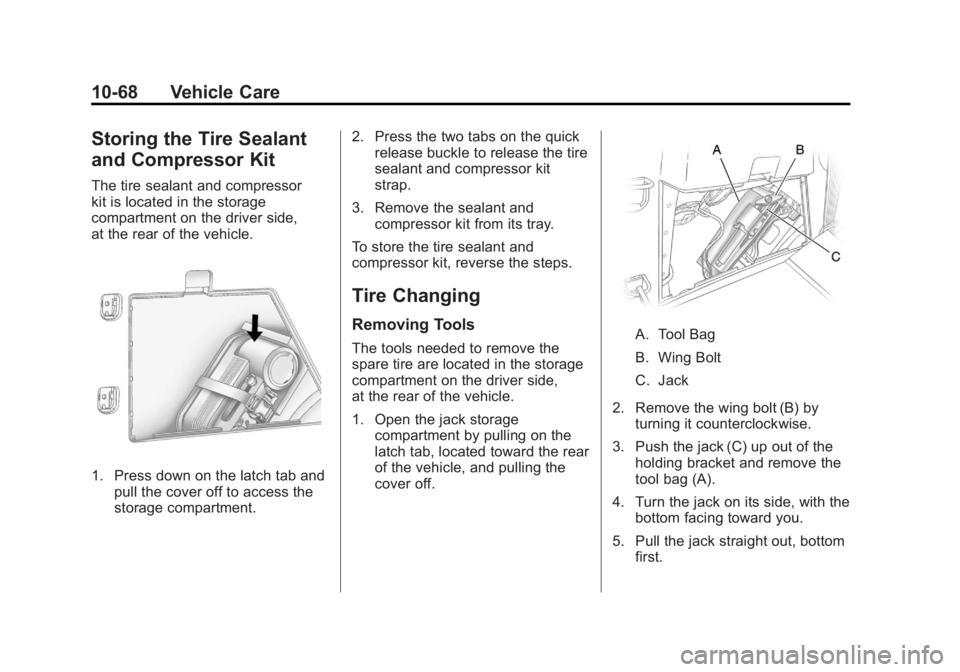
The tire sealant and compressor
kit is located in the storage
compartment on the driver side,
at the rear of the vehicle.
1. Press down on the latch tab andpull the cover off to access the
storage compartment. 2. Press the two tabs on the quick
release buckle to release the tire
sealant and compressor kit
strap.
3. Remove the sealant and compressor kit from its tray.
To store the tire sealant and
compressor kit, reverse the steps.
Tire Changing
Removing Tools
The tools needed to remove the
spare tire are located in the storage
compartment on the driver side,
at the rear of the vehicle.
1. Open the jack storage compartment by pulling on the
latch tab, located toward the rear
of the vehicle, and pulling the
cover off.A. Tool Bag
B. Wing Bolt
C. Jack
2. Remove the wing bolt (B) by turning it counterclockwise.
3. Push the jack (C) up out of the holding bracket and remove the
tool bag (A).
4. Turn the jack on its side, with the bottom facing toward you.
5. Pull the jack straight out, bottom first.
Page 381 of 468
Black plate (69,1)GMC Acadia/Acadia Denali Owner Manual - 2012
Vehicle Care 10-69
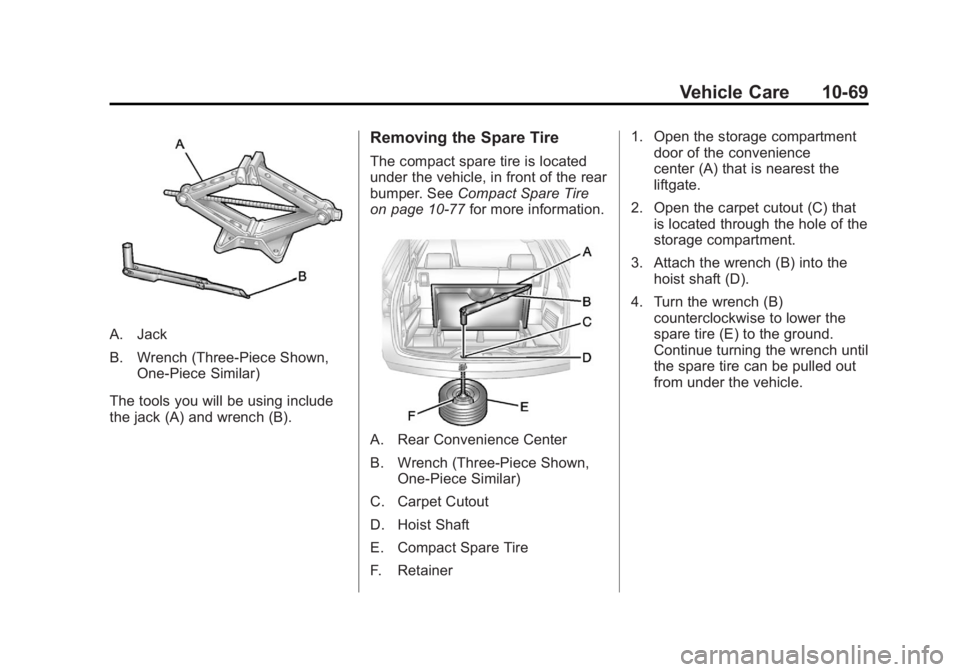
A. Jack
B. Wrench (Three-Piece Shown,One-Piece Similar)
The tools you will be using include
the jack (A) and wrench (B).
Removing the Spare Tire
The compact spare tire is located
under the vehicle, in front of the rear
bumper. See Compact Spare Tire
on page 10‑77 for more information.
A. Rear Convenience Center
B. Wrench (Three-Piece Shown,
One-Piece Similar)
C. Carpet Cutout
D. Hoist Shaft
E. Compact Spare Tire
F. Retainer 1. Open the storage compartment
door of the convenience
center (A) that is nearest the
liftgate.
2. Open the carpet cutout (C) that is located through the hole of the
storage compartment.
3. Attach the wrench (B) into the hoist shaft (D).
4. Turn the wrench (B) counterclockwise to lower the
spare tire (E) to the ground.
Continue turning the wrench until
the spare tire can be pulled out
from under the vehicle.