Page 302 of 454
Note:If your vehicle is equipped with a fully integrated electronic trailer
brake controller (TBC) and a trailer with electric trailer brakes is
connected to your vehicle, the RSS will be disabled. When the vehicle is
shifted into reverse, the message center display will remain in the Rear
Park Aid Off selection. For more information on the TBC, refer to the
Tires, Wheels and Loadingchapter.
Keep the RSS sensors (located on the rear bumper/fascia) free
from snow, ice and large accumulations of dirt (do not clean the
sensors with sharp objects). If the sensors are covered, it will
affect the accuracy of the RSS.
If your vehicle sustains damage to the rear bumper/fascia, leaving
it misaligned or bent, the sensing zone may be altered causing
inaccurate measurement of obstacles or false alarms.
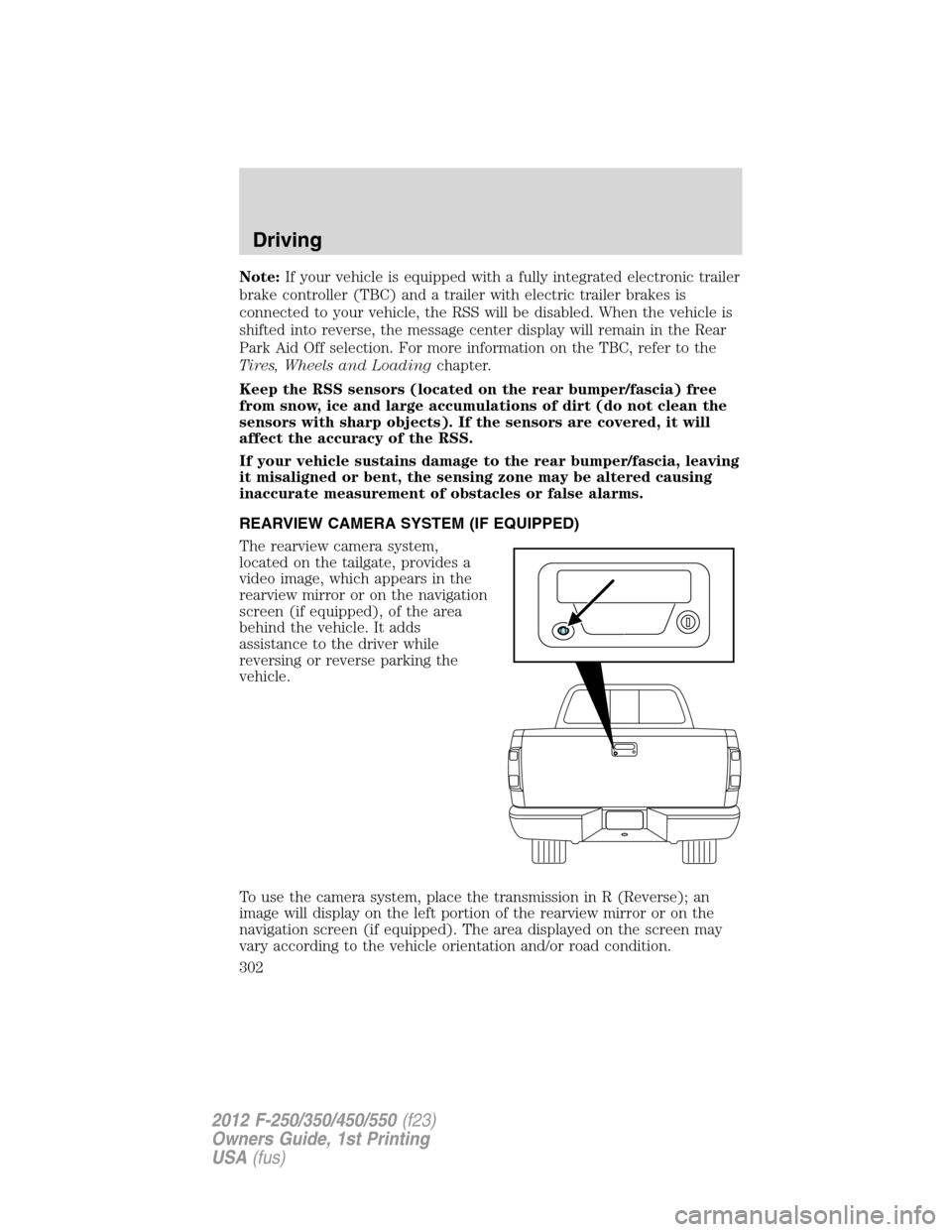
REARVIEW CAMERA SYSTEM (IF EQUIPPED)
The rearview camera system,
located on the tailgate, provides a
video image, which appears in the
rearview mirror or on the navigation
screen (if equipped), of the area
behind the vehicle. It adds
assistance to the driver while
reversing or reverse parking the
vehicle.
To use the camera system, place the transmission in R (Reverse); an
image will display on the left portion of the rearview mirror or on the
navigation screen (if equipped). The area displayed on the screen may
vary according to the vehicle orientation and/or road condition.
Driving
302
2012 F-250/350/450/550(f23)
Owners Guide, 1st Printing
USA(fus)
Page 303 of 454
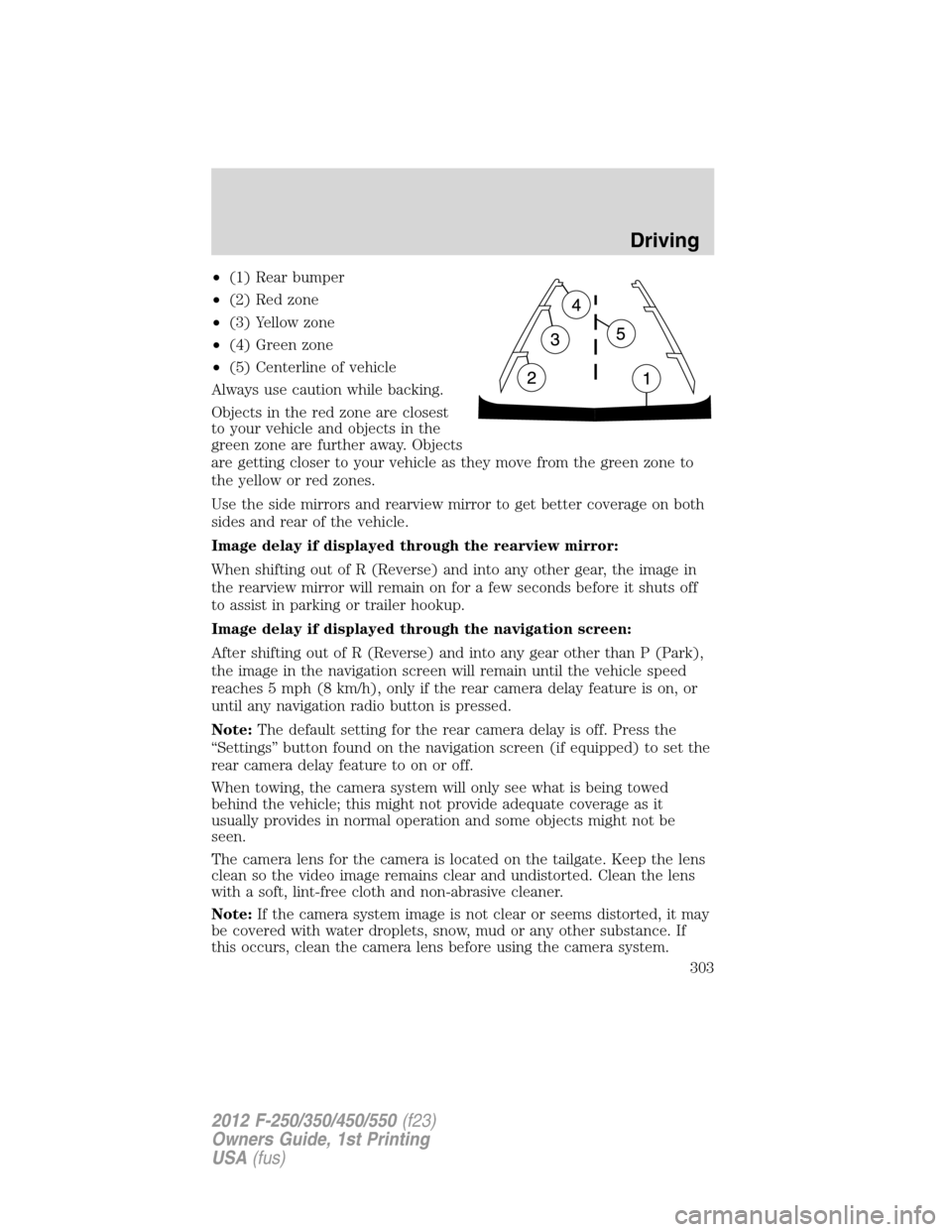
•(1) Rear bumper
•(2) Red zone
•(3) Yellow zone
•(4) Green zone
•(5) Centerline of vehicle
Always use caution while backing.
Objects in the red zone are closest
to your vehicle and objects in the
green zone are further away. Objects
are getting closer to your vehicle as they move from the green zone to
the yellow or red zones.
Use the side mirrors and rearview mirror to get better coverage on both
sides and rear of the vehicle.
Image delay if displayed through the rearview mirror:
When shifting out of R (Reverse) and into any other gear, the image in
the rearview mirror will remain on for a few seconds before it shuts off
to assist in parking or trailer hookup.
Image delay if displayed through the navigation screen:
After shifting out of R (Reverse) and into any gear other than P (Park),
the image in the navigation screen will remain until the vehicle speed
reaches 5 mph (8 km/h), only if the rear camera delay feature is on, or
until any navigation radio button is pressed.
Note:The default setting for the rear camera delay is off. Press the
“Settings” button found on the navigation screen (if equipped) to set the
rear camera delay feature to on or off.
When towing, the camera system will only see what is being towed
behind the vehicle; this might not provide adequate coverage as it
usually provides in normal operation and some objects might not be
seen.
The camera lens for the camera is located on the tailgate. Keep the lens
clean so the video image remains clear and undistorted. Clean the lens
with a soft, lint-free cloth and non-abrasive cleaner.
Note:If the camera system image is not clear or seems distorted, it may
be covered with water droplets, snow, mud or any other substance. If
this occurs, clean the camera lens before using the camera system.
Driving
303
2012 F-250/350/450/550(f23)
Owners Guide, 1st Printing
USA(fus)
Page 304 of 454
WARNING:The camera system is a reverse aid supplement
device that still requires the driver to use it in conjunction with
the rear view mirror and the side mirrors for maximum coverage.
WARNING:Objects that are close to either corner of the
bumper or under the bumper, might not be seen on the screen
due to the limited coverage of the camera system.
WARNING:Back up as slow as possible since higher speeds
might limit your reaction time to stop the vehicle.
WARNING:Do not use the camera system with the tailgate
open.
If the back end of the vehicle is hit or damaged, then check with your
authorized dealer to have your rearview camera system checked for
proper coverage and operation.
Night time and dark area use
At night time or in dark areas, the camera system relies on the reverse
lamp lighting to produce an image. Therefore it is necessary that both
reverse lamps are operating in order to get a clear image in the dark. If
either of the lamps are not operating, stop using the camera system, at
least in the dark, until the lamp(s) are replaced and functioning.
Servicing
•If the image comes on while the vehicle is not in R (Reverse), have
the system inspected by your authorized dealer.
•If the image is not clear, then check if there is anything covering the
lens such as dirt, mud, ice, snow, etc. If the image is still not clear
after cleaning, have your system inspected by your authorized dealer.
FOUR-WHEEL DRIVE (4WD) OPERATION (IF EQUIPPED)
WARNING:For important information regarding safe operation
of this type of vehicle, seePreparing to drive your vehiclein
this chapter.
When four–wheel drive (4WD) is engaged, power is supplied to all four
wheels through a transfer case. 4WD can be selected when additional
driving power is desired.
Driving
304
2012 F-250/350/450/550(f23)
Owners Guide, 1st Printing
USA(fus)
Page 453 of 454
SecuriCode keyless entry
system ........................................152
SecuriLock passive anti-theft
system ................................153–154
Servicing your vehicle ..............374
Setting the clock ...................62, 64
Snowplowing .................7, 319–320
SOS Post Crash Alert ...............193
Spark plugs,
specifications .....................413, 418
Special notice ................................7
ambulance conversions ..............7
diesel-powered vehicles .............6
four-wheel drive vehicles .......321
utility-type vehicles ....................6
Speed control ............................113
Starting a flex fuel vehicle .......272
Starting your vehicle ........269–272
jump starting ..........................351
Steering wheel
controls ....................................115
tilting .......................................101
SYNC�..........................................79
T
Tailgate ......................................127
Tilt steering wheel ....................101
Tire Pressure Monitoring
System (TPMS)
Tires, Wheels and Loading ....240
Tires ...........................222–224, 334
alignment ................................232
care ..........................................228
changing ..................334, 337, 340
checking the pressure ............227
inflating ...................................225label .........................................239
replacing ..................................230
rotating ....................................233
safety practices .......................231
sidewall information ...............234
snow tires and chains ............247
spare tire .................................335
terminology .............................224
tire grades ...............................223
treadwear ........................223, 229
Towing .......................................255
recreational towing .................267
Trailer Brake
Controller-Integrated ..............260
trailer towing ..........................255
wrecker ....................................355
Traction control ........................278
Trailer Brake
Controller-Integrated ................260
Trailer sway control ..................285
Transfer case
fluid checking .........................407
Transmission .............................291
brake-shift interlock (BSI) ....289
fluid, checking and adding
(automatic) .............................404
fluid, refill capacities ..............414
Turn signal ..................................93
U
Universal garage door opener ..120
Upfitter controls .......................117
USB port ......................................72
V
Vehicle Identification Number
(VIN) ..........................................420
Vehicle loading ..........................248
Index
453
2012 F-250/350/450/550(f23)
Owners Guide, 1st Printing
USA(fus)