Page 25 of 406
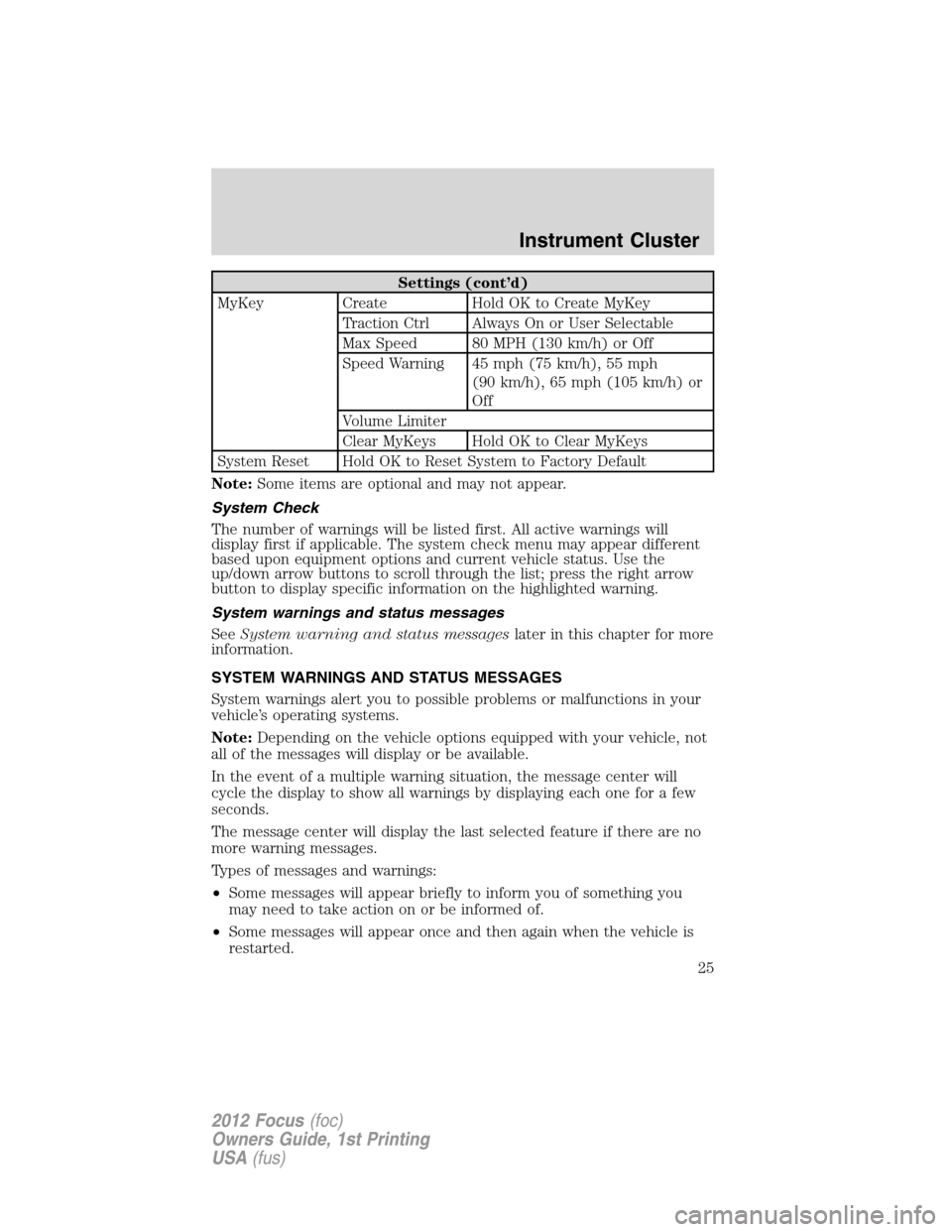
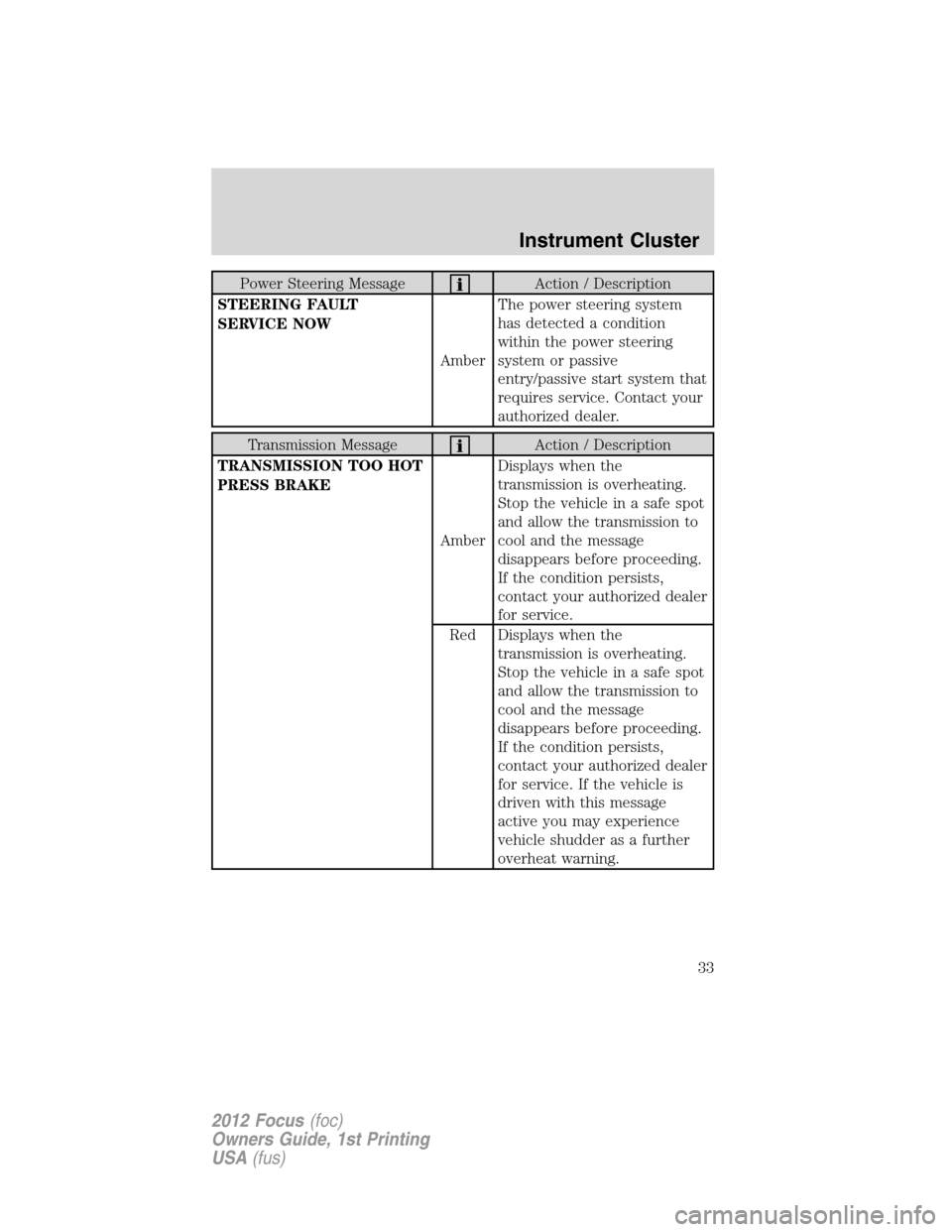
Settings (cont’d)
MyKey Create Hold OK to Create MyKey
Traction Ctrl Always On or User Selectable
Max Speed 80 MPH (130 km/h) or Off
Speed Warning 45 mph (75 km/h), 55 mph
(90 km/h), 65 mph (105 km/h) or
Off
Volume Limiter
Clear MyKeys Hold OK to Clear MyKeys
System Reset Hold OK to Reset System to Factory Default
Note:Some items are optional and may not appear.
System Check
The number of warnings will be listed first. All active warnings will
display first if applicable. The system check menu may appear different
based upon equipment options and current vehicle status. Use the
up/down arrow buttons to scroll through the list; press the right arrow
button to display specific information on the highlighted warning.
System warnings and status messages
SeeSystem warning and status messageslater in this chapter for more
information.
SYSTEM WARNINGS AND STATUS MESSAGES
System warnings alert you to possible problems or malfunctions in your
vehicle’s operating systems.
Note:Depending on the vehicle options equipped with your vehicle, not
all of the messages will display or be available.
In the event of a multiple warning situation, the message center will
cycle the display to show all warnings by displaying each one for a few
seconds.
The message center will display the last selected feature if there are no
more warning messages.
Types of messages and warnings:
•Some messages will appear briefly to inform you of something you
may need to take action on or be informed of.
•Some messages will appear once and then again when the vehicle is
restarted.
Instrument Cluster
25
2012 Focus(foc)
Owners Guide, 1st Printing
USA(fus)
Page 26 of 406
•Some messages will reappear after clearing or being reset if a problem
or condition is still present and needs your attention.
•Some messages can be acknowledged and reset by pressing OK. This
allows you to use the full message center functionality by clearing the
message.
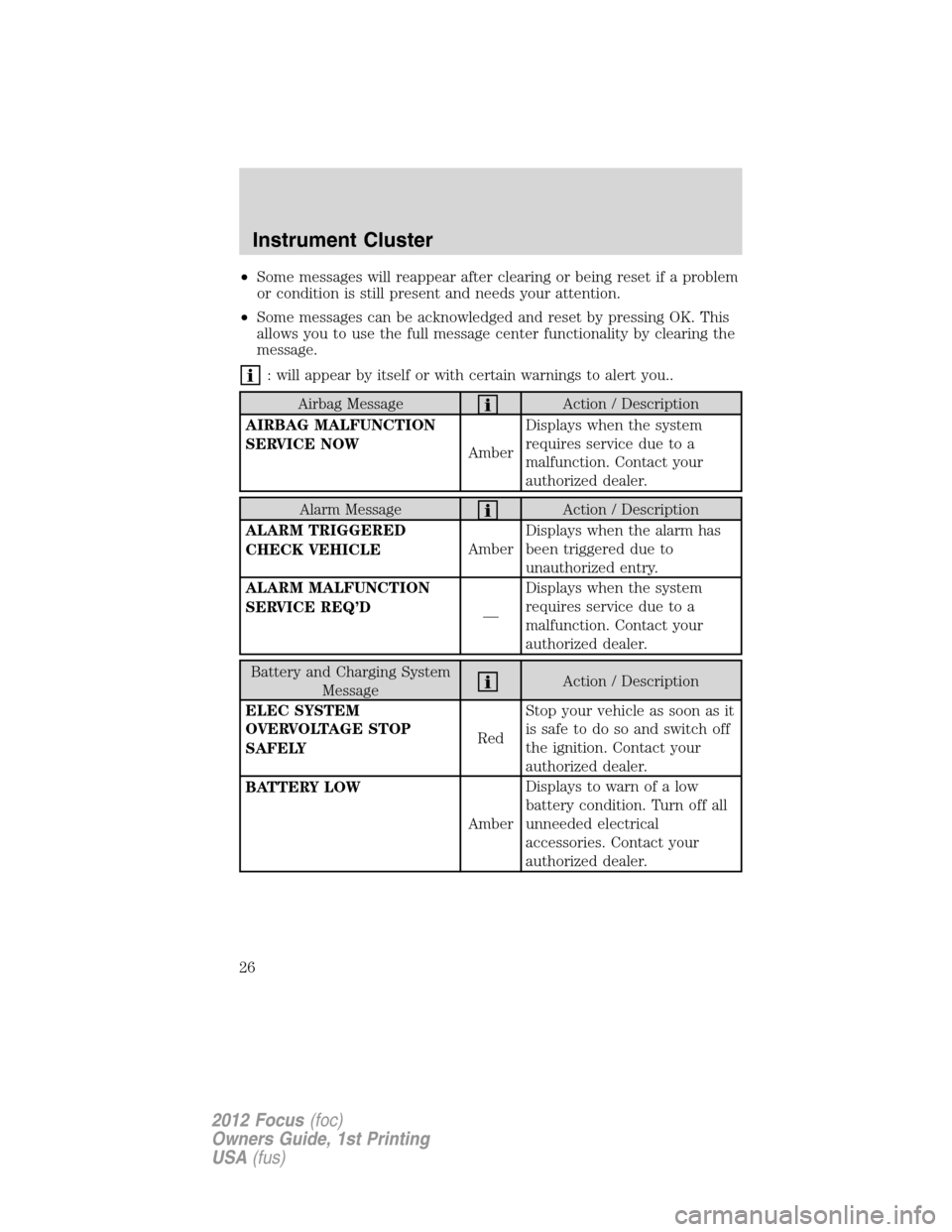
: will appear by itself or with certain warnings to alert you..
Airbag MessageAction / Description
AIRBAG MALFUNCTION
SERVICE NOW
AmberDisplays when the system
requires service due to a
malfunction. Contact your
authorized dealer.
Alarm MessageAction / Description
ALARM TRIGGERED
CHECK VEHICLEAmberDisplays when the alarm has
been triggered due to
unauthorized entry.
ALARM MALFUNCTION
SERVICE REQ’D
—Displays when the system
requires service due to a
malfunction. Contact your
authorized dealer.
Battery and Charging System
MessageAction / Description
ELEC SYSTEM
OVERVOLTAGE STOP
SAFELYRedStop your vehicle as soon as it
issafetodosoandswitchoff
the ignition. Contact your
authorized dealer.
BATTERY LOW
AmberDisplays to warn of a low
battery condition. Turn off all
unneeded electrical
accessories. Contact your
authorized dealer.
Instrument Cluster
26
2012 Focus(foc)
Owners Guide, 1st Printing
USA(fus)
Page 32 of 406
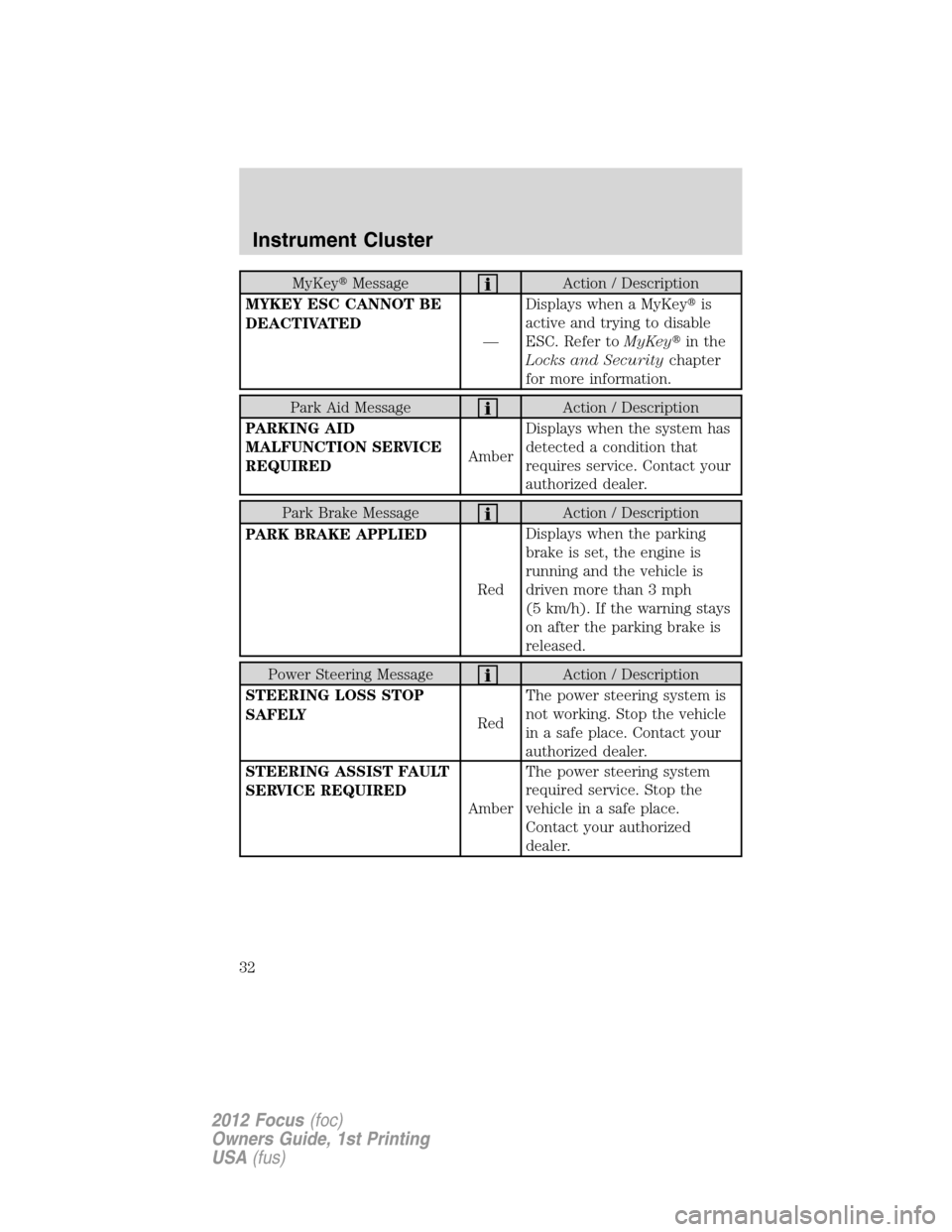
MyKey�MessageAction / Description
MYKEY ESC CANNOT BE
DEACTIVATED
—Displays when a MyKey�is
active and trying to disable
ESC. Refer toMyKey�in the
Locks and Securitychapter
for more information.
Park Aid MessageAction / Description
PARKING AID
MALFUNCTION SERVICE
REQUIREDAmberDisplays when the system has
detected a condition that
requires service. Contact your
authorized dealer.
Park Brake MessageAction / Description
PARK BRAKE APPLIED
RedDisplays when the parking
brake is set, the engine is
running and the vehicle is
driven more than 3 mph
(5 km/h). If the warning stays
on after the parking brake is
released.
Power Steering MessageAction / Description
STEERING LOSS STOP
SAFELY
RedThe power steering system is
not working. Stop the vehicle
in a safe place. Contact your
authorized dealer.
STEERING ASSIST FAULT
SERVICE REQUIRED
AmberThe power steering system
required service. Stop the
vehicle in a safe place.
Contact your authorized
dealer.
Instrument Cluster
32
2012 Focus(foc)
Owners Guide, 1st Printing
USA(fus)
Page 33 of 406
Power Steering MessageAction / Description
STEERING FAULT
SERVICE NOW
AmberThe power steering system
has detected a condition
within the power steering
system or passive
entry/passive start system that
requires service. Contact your
authorized dealer.
Transmission MessageAction / Description
TRANSMISSION TOO HOT
PRESS BRAKE
AmberDisplays when the
transmission is overheating.
Stop the vehicle in a safe spot
and allow the transmission to
cool and the message
disappears before proceeding.
If the condition persists,
contact your authorized dealer
for service.
Red Displays when the
transmission is overheating.
Stop the vehicle in a safe spot
and allow the transmission to
cool and the message
disappears before proceeding.
If the condition persists,
contact your authorized dealer
for service. If the vehicle is
driven with this message
active you may experience
vehicle shudder as a further
overheat warning.
Instrument Cluster
33
2012 Focus(foc)
Owners Guide, 1st Printing
USA(fus)
Page 36 of 406

Tire pressure Monitoring
System (TPMS) MessageAction / Description
LOW TIRE PRESSURE
AmberDisplays when one or more
tires on your vehicle have low
tire pressure. Refer to
Inflating Your Tiresin the
Tires, Wheels and Loading
chapter.
TIRE PRESSURE
MONITOR FAULT
AmberDisplays when the tire
pressure monitoring system is
malfunctioning. If the warning
stays on or continues to come
on, contact your authorized
dealer.
TIRE PRESSURE SENSOR
FAULT
AmberDisplays when a tire pressure
sensor is malfunctioning, or
your spare tire is in use. For
more information on how the
system operates under these
conditions, refer to
Understanding Your Tire
Pressure Monitoring System
(TPMS)in theTires, Wheels
and Loadingchapter. If the
warning stays on or continues
to come on, contact your
authorized dealer.
Traction Control /
AdvanceTrac�MessageAction / Description
TRACTION CONTROL OFF
—Displays when the traction
control system has been
switched off.
Instrument Cluster
36
2012 Focus(foc)
Owners Guide, 1st Printing
USA(fus)
Page 37 of 406

AUDIO SYSTEMS
AM/FM single CD/MP3 system (if equipped)
WARNING:Driving while distracted can result in loss of vehicle
control, accident and injury. Ford strongly recommends that
drivers use extreme caution when using any device or feature that may
take their focus off the road. Your primary responsibility is the safe
operation of the vehicle. We recommend against the use of any
handheld device while driving, encourage the use of voice-operated
systems when possible and that you become aware of applicable state
and local laws that may affect use of electronic devices while driving.
One hour mode:Press the ON/OFF control to operate the system with
the ignition turned off; the system will automatically turn off after one
hour.
Setting the clock:Press the H or M buttons on the outside of the
multifunction to access the clock settings. Once you are in the clock
setting, press the H or M button repeatedly until the desired number
appears. Press OK to confirm and close.
1.OK:Press the arrow buttons to scroll through various menu selections
and press OK to select or un-select your choice.
2.Clock:Press to set the clock. Press
/to select the hour or
minutes. Press
/to increase/decrease the time.
3.INFO:Press to access any available radio or CD information.
1112
3
4
56
10
9
8
7
Entertainment Systems
37
2012 Focus(foc)
Owners Guide, 1st Printing
USA(fus)
Page 40 of 406
Stereo icon:If this icon appears in
your display, it means your system
is in stereo mode.
11.CD:Press to enter CD mode.
(Eject):Press to eject a CD.
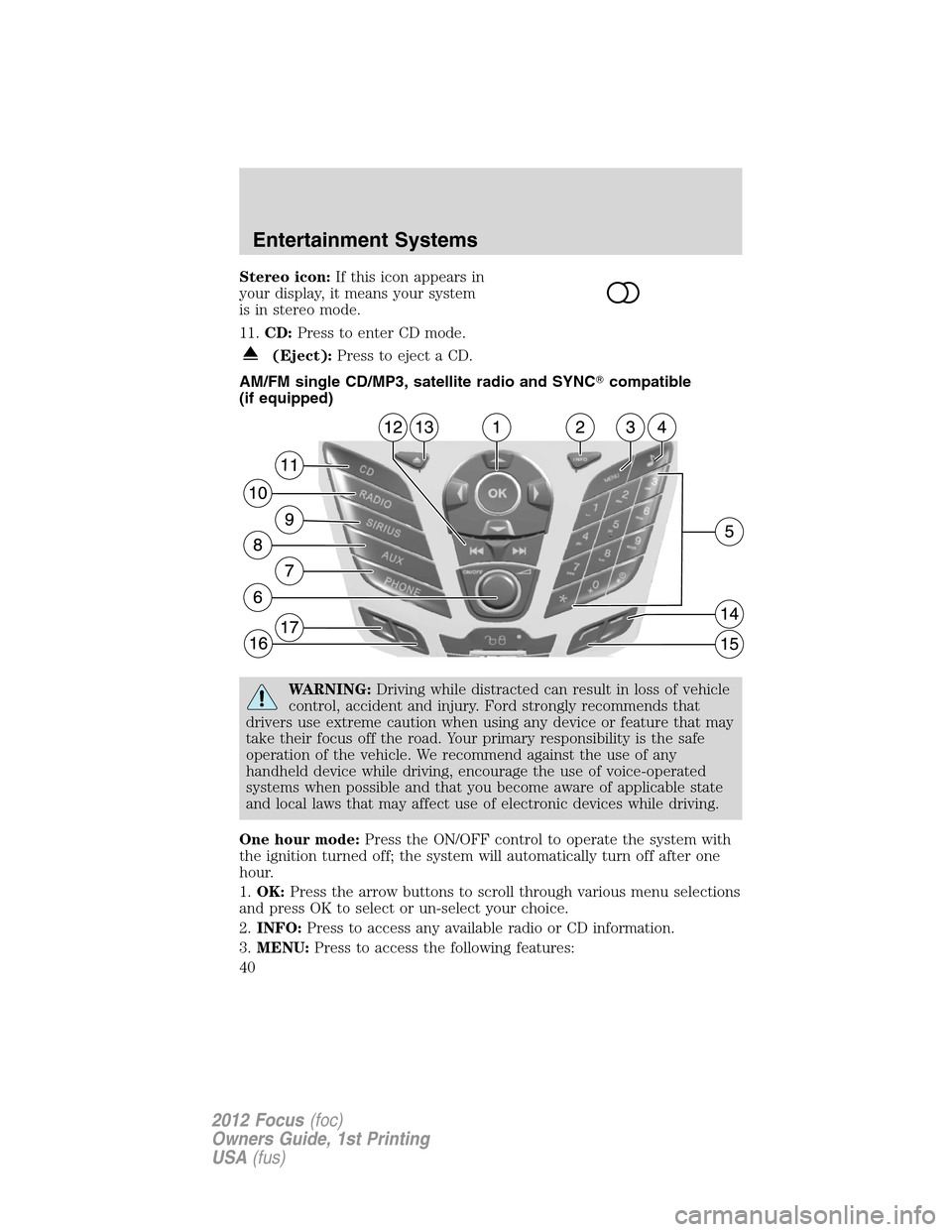
AM/FM single CD/MP3, satellite radio and SYNC�compatible
(if equipped)
WARNING:Driving while distracted can result in loss of vehicle
control, accident and injury. Ford strongly recommends that
drivers use extreme caution when using any device or feature that may
take their focus off the road. Your primary responsibility is the safe
operation of the vehicle. We recommend against the use of any
handheld device while driving, encourage the use of voice-operated
systems when possible and that you become aware of applicable state
and local laws that may affect use of electronic devices while driving.
One hour mode:Press the ON/OFF control to operate the system with
the ignition turned off; the system will automatically turn off after one
hour.
1.OK:Press the arrow buttons to scroll through various menu selections
and press OK to select or un-select your choice.
2.INFO:Press to access any available radio or CD information.
3.MENU:Press to access the following features:
Entertainment Systems
40
2012 Focus(foc)
Owners Guide, 1st Printing
USA(fus)
Page 45 of 406

AM/FM single CD/MP3 SYNC�compatible system (if equipped)
WARNING:Driving while distracted can result in loss of vehicle
control, accident and injury. Ford strongly recommends that
drivers use extreme caution when using any device or feature that may
take their focus off the road. Your primary responsibility is the safe
operation of the vehicle. We recommend against the use of any
handheld device while driving, encourage the use of voice-operated
systems when possible and that you become aware of applicable state
and local laws that may affect use of electronic devices while driving.
One hour mode:Press the ON/OFF control to operate the system with
the ignition turned off; the system will automatically turn off after one
hour.
1.OK:Press the arrow buttons to scroll through various menu selections
and press OK to select or un-select your choice.
2.Clock:Press to set the clock. Press
/to select the hour or
minutes. Press
/to increase/decrease the time.
3.INFO:Press to access any available radio or CD information.
4.Sound menu:Press access Treble, Bass, Fade (if equipped) and
Balance menu options. Use
/to cycle through the various options.
When the desired option is chosen, press
/to increase or
decrease the levels. Press OK to set or MENU to exit.
Entertainment Systems
45
2012 Focus(foc)
Owners Guide, 1st Printing
USA(fus)