Page 1 of 406
Introduction 4
Instrument Cluster 12
Warning lights and chimes 12
Gauges 17
Message center 18
Entertainment Systems 37
AM/FM stereo with CD 37
MyFord Touch™ system 49
Auxiliary input jack (Line in) 50
USB port 51
Satellite radio information 54
SYNC�58
Pairing your phone for the first time 64
Connecting a digital media player to SYNC�88
Climate Controls 115
Manual heating and air conditioning 115
Rear window defroster 121
Lights 122
Headlamps 122
Turn signal control 126
Bulb replacement 128
Driver Controls 134
Windshield wiper/washer control 134
Steering wheel adjustment 135
Power windows 137
Mirrors 139
Speed control 141
Moon roof 144
Table of Contents
1
2012 Focus(foc)
Owners Guide, 1st Printing
USA(fus)
Page 12 of 406

WARNING LIGHTS AND CHIMES
Instrument cluster with standard measure shown; metric similar
Warning lights and gauges can alert you to a vehicle condition that may
become serious enough to cause expensive repairs. A warning light may
illuminate when a problem exists with one of your vehicle’s functions.
Many lights will illuminate when you start your vehicle to make sure they
work. If any light remains on after starting the vehicle, refer to the
respective system warning light for additional information.
Note:Some warning indicators are reconfigurable telltales (RTT). These
indicators display in the message center and function the same as a
warning light but do not display on startup.
Warning and status messages will also display in the message center and
may be accompanied by various warning lights. SeeSystem warning
and status messageslater in this chapter for more information.
Service engine soon:Theservice
engine soonindicator light
illuminates when the ignition is first
turned to the on position to check
the bulb and to indicate whether the vehicle is ready for
Inspection/Maintenance (I/M) testing. Normally, the “service engine soon”
light will stay on until the engine is cranked, then turn itself off if no
malfunctions are present. However, if after 15 seconds the “service
engine soon” light blinks eight times, it means that the vehicle is not
ready for I/M testing. See theReadiness for Inspection/Maintenance
(I/M) testingin theMaintenance and Specificationschapter.
0 20406080
10 0
12 0
14 0
110
1013 0
15 0
10 012 0
14 0
16 0
18 0
0 20 40
306080
200
220
240
5070
90
Instrument Cluster
12
2012 Focus(foc)
Owners Guide, 1st Printing
USA(fus)
Page 16 of 406

Information:The message
indicator illuminates to supplement
some messages. It will be red or
amber depending on the severity of
the message and will remain on until
the cause of the message has been
rectified.
Turn signal:Illuminates when the
left or right turn signal or the
hazard lights are turned on. If the
indicators stay on or flash faster, check for a burned out bulb.
High beams:Illuminates when the
high beam headlamps are turned on.
Headlamps:Illuminates when the
low- beam headlamps are turned on.
Fog lamps (if equipped):
Illuminates when the front fog lamps
are turned on.
Key-in-ignition warning chime:Sounds when the key is left in the
ignition in the off or accessory position and the driver’s door is opened.
Headlamps on warning chime:Sounds when the headlamps or parking
lamps are on, the ignition is off (the key is not in the ignition) and the
driver’s door is opened.
Parking brake on chime:Sounds when the parking brake is left on and
the vehicle is driven. If the warning stays on after the park brake is off,
contact your authorized dealer as soon as possible.
Instrument Cluster
16
2012 Focus(foc)
Owners Guide, 1st Printing
USA(fus)
Page 53 of 406
•Terrain: Hills, mountains, tall buildings, power lines, electric fences,
traffic lights and thunderstorms can interfere with your reception.
•Station overload: When you pass a broadcast tower, a stronger signal
may overtake a weaker one and play while the weak station frequency
is displayed.
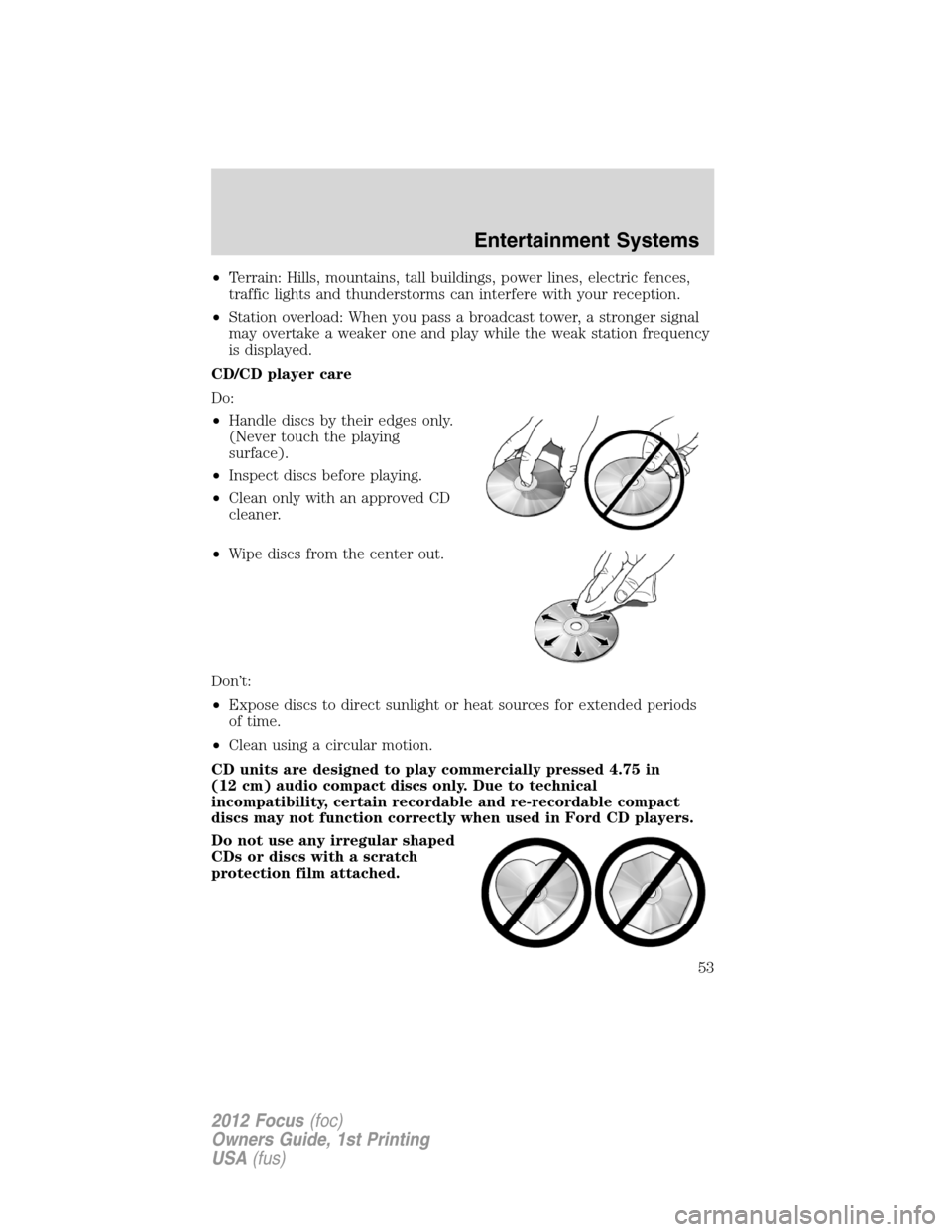
CD/CD player care
Do:
•Handle discs by their edges only.
(Never touch the playing
surface).
•Inspect discs before playing.
•Clean only with an approved CD
cleaner.
•Wipe discs from the center out.
Don’t:
•Expose discs to direct sunlight or heat sources for extended periods
of time.
•Clean using a circular motion.
CD units are designed to play commercially pressed 4.75 in
(12 cm) audio compact discs only. Due to technical
incompatibility, certain recordable and re-recordable compact
discs may not function correctly when used in Ford CD players.
Do not use any irregular shaped
CDs or discs with a scratch
protection film attached.
Entertainment Systems
53
2012 Focus(foc)
Owners Guide, 1st Printing
USA(fus)
Page 122 of 406

HEADLAMP CONTROL
Turns the lamps off.
Turns on the parking
lamps, instrument panel lamps,
license plate lamps and tail lamps.
Turns the headlamps on.
Note:The head lamp indicator will illuminate when the head lamps are
activated.
Autolamp control (if equipped)
The autolamp system provides light
sensitive automatic on-off control of
the exterior lights normally
controlled by the headlamp control.
•To turn autolamps on, rotate the
control to
.
•To turn autolamps off, rotate the
control from the autolamp
position.
Note:If the vehicle is equipped with autolamps, it will have the
headlamps on with windshield wipers feature.If the windshield
wipers are turned on, the exterior lamps will turn on with the headlamp
control in the autolamp position.
Autolamp delay system (if equipped)
If your vehicle is equipped with autolamps, you can set the delay time to
keep the headlights on for up to one minute after the key is turned off.
The autolamp delay settings are adjusted through the message center in
the instrument cluster. The default delay time from the factory is set to
20 seconds.
Note:The headlamps can be activated manually by pulling the high
beam/flash-to-pass lever toward you. The headlamps are deactivated
after 30 seconds or three minutes if any door is open.
A
A
Lights
122
2012 Focus(foc)
Owners Guide, 1st Printing
USA(fus)
Page 123 of 406
Fog lamp control (if equipped)
The fog lamps can be turned on
when the headlamp control is in
the
,,orpositions
and the high beams are not turned
on.
•Press the fog lamp control,
located on the instrument panel,
to activate the fog lamps.
•Press the fog lamp control again
to deactivate the fog lamps.
Note:The fog lamp indicator will illuminate when the fog lamps are
activated.
High beams
•Push the lever toward the
instrument panel to activate.
•Push the lever toward the
instrument panel again or pull the
lever towards you to deactivate.
Flash-to-pass
Pull toward you slightly to activate
and release to deactivate.
Daytime running lamps (DRL) (if equipped)
Turns the headlamps on with a reduced output.
To activate:
•the ignition must be in the on position and
•the headlamp control is in the off or parking lamp position.
Lights
123
2012 Focus(foc)
Owners Guide, 1st Printing
USA(fus)
Page 124 of 406

WARNING:Always remember to turn on your headlamps at
dusk or during inclement weather. The Daytime Running Lamp
(DRL) system does not activate the tail lamps and generally may not
provide adequate lighting during these conditions. Failure to activate
your headlamps under these conditions may result in a collision.
PANEL DIMMER CONTROL
With fog lamps:
Use to adjust the brightness of the
instrument panel and all applicable
lit components in the vehicle during
headlamp and parking lamp
operation.
•Tapthetoporbottomofthe
control to brighten/dim all interior
lit components incrementally, or
•Press and hold the top or bottom
of the control until the desired lighting level is reached.
Note:If the battery is disconnected, discharged, or a new battery is
installed, the dimmer will set the illuminated components to the
maximum setting automatically. This will ensure that your displays are
visible under all lighting conditions. The brightness can then be adjusted
to the users preference.
Without fog lamps:
Use to adjust the brightness of the
instrument panel and all applicable
lit components in the vehicle during
headlamp and parking lamp
operation.
•Tap the right control to brighten
all interior lit components
incrementally, or
•Press and hold the right control
until the desired lighting level is
reached.
Lights
124
2012 Focus(foc)
Owners Guide, 1st Printing
USA(fus)
Page 125 of 406

•Tap the left control to dim all
interior lit components
incrementally, or
•Press and hold the left control
until the desired lighting level is
reached.
Note:If the battery is disconnected, discharged, or a new battery is
installed, the dimmer will set the illuminated components to the
maximum setting automatically. This will ensure that your displays are
visible under all lighting conditions. The brightness can then be adjusted
to the users preference.
AIMING THE HEADLAMPS
The headlamps on your vehicle are properly aimed at the assembly plant.
If your vehicle has been in an accident, the alignment of your headlamps
should be checked by your authorized dealer.
Vertical aim adjustment
1. Park the vehicle directly in front of a wall or screen on a level surface,
approximately 25 feet (7.6 meters) away.
•(1) 8 feet (2.4 meters)
•(2) Center height of lamp to
ground
•(3) 25 feet (7.6 meters)
•(4) Horizontal reference line
2. Measure the height of the
headlamp bulb center from the
ground and mark an 8 foot
(2.4 meter) horizontal reference line
on the vertical wall or screen at this
height.
3. Turn on the low beam headlamps to illuminate the wall or screen and
open the hood.
To see a clearer light pattern for adjusting, you may want to block the
light from one headlamp while adjusting the other.
Lights
125
2012 Focus(foc)
Owners Guide, 1st Printing
USA(fus)

