Page 19 of 406

Trip 1 and 2
Trip odometer — shows the accumulated trip distance. Displayed in
the lower line denoted by a 1: or 2:.
Trip timer — shows the elapsed trip time. This timer will stop when
the vehicle is turned off and will restart when the vehicle is restarted.
Distance to empty — shows the approximate distance the vehicle can
travel before running out of fuel.
Average fuel
economy —
shows the
average
distance
traveled per
unit of fuel
used for a given
trip.Economy Overview— better economy is displayed by
more solid pedals in the flower graphic.
Ford EcoMode
Press OK for
More InfoFord EcoMode Anticipation—
Smooth Driving Saves Fuel
Ford EcoMode Speed
Ford EcoMode Shifting (manual
transmission only) Early Shifting
Saves Fuel
*Ford EcoMode See Manual for
More Tips
Outside air temperature — displays the outside air temperature only if
it not visible in the current view.
Total odometer— shows the vehicle’s total accumulated distance
driven.
*Ford EcoMode operation— this system assists the driver in more
efficient driving by monitoring: shifting, driving speeds and anticipation
of start/stop (traffic conditions). Better economy is displayed by more
solid pedals in the flower graphic; the more efficiently you drive, the
more pedals will be earned. Resetting the average fuel economy value
will reset the EcoMode also.
•Anticipation: adjusting your vehicle’s speed and the distance to other
vehicles without the need for heavy braking or acceleration will
improve fuel economy.
•Speed: higher speeds use more fuel. Reducing your cruising speed on
open roads will improve fuel economy.
•Shifting: early shifting saves fuel and using the proper gear for a given
speed increases fuel economy.
Press and hold OK on the current screen to reset the respective trip,
distance, time and average fuel economy (and EcoMode).
Instrument Cluster
19
2012 Focus(foc)
Owners Guide, 1st Printing
USA(fus)
Page 20 of 406
Note:Some items are optional and may not appear.
Information
MyKey driven (distance driven) (if MyKey is programmed)
MyKey information (number of MyKeys and admin keys programmed)
Settings
Driver Assist Traction Ctrl On or Off
Hill start On or Off
Lighting Rain Light On or Off
Dimming Automatic or Manual
Hdlamp delay Manual or xx Seconds
Display Language Choose your applicable language
Distance Unit Standard or Metric
Temp Units Temperature Fahrenheit (°F) or
Celsius (°C)
Chimes Park Slot (park aid), Information, Warning
Convenience Compass Display On or Off
Calibrate Hold OK to
Calibrate
Zone (1–15) See the diagram
below to determine your magnetic
zone.
Determine which magnetic zone you
are in for your geographic location
by referring to the zone map, if
equipped.
1 2 3
4
5
6 7 8 9 101112 13 14 15
Instrument Cluster
20
2012 Focus(foc)
Owners Guide, 1st Printing
USA(fus)
Page 21 of 406

Settings (cont’d)
MyKey Create Hold OK to Create MyKey
Traction Ctrl Always On or User Selectable
Max Speed 80 MPH (130 km/h) or Off
Speed Warning 45 mph (75 km/h), 55 mph
(90 km/h), 65 mph (105 km/h) or
Off
Volume Limiter
Clear all Hold OK to Clear MyKeys
System Reset Hold OK to Reset System to Factory Default
Note:Some items are optional and may not appear.
System Check
The number of warnings will be listed first. All active warnings will
display first if applicable. The system check menu may appear different
based upon equipment options and current vehicle status. Use the
up/down arrow buttons to scroll through the list; press the right arrow
button to display specific information on the highlighted warning.
System warnings and status messages
SeeSystem warning and status messageslater in this chapter for more
information.
UP-LEVEL MESSAGE CENTER (IF EQUIPPED)
WARNING:Driving while distracted can result in loss of vehicle
control, accident and injury. Ford strongly recommends that
drivers use extreme caution when using any device or feature that may
take their focus off the road. Your primary responsibility is the safe
operation of the vehicle. We recommend against the use of any
handheld device while driving and that you comply with all applicable
laws.
Your vehicle’s message center is capable of monitoring many vehicle
systems and will alert you to potential vehicle problems and various
conditions with informational messages and/or warnings.
The message center is also used to program/configure the different
features of your vehicle. The message center display is located in the
instrument cluster.
Instrument Cluster
21
2012 Focus(foc)
Owners Guide, 1st Printing
USA(fus)
Page 22 of 406
Use the left steering wheel controls
to navigate through the message
center.
Press the up/down arrow buttons to
move up/down through the message
center choices.
Press the left/right arrow buttons to
move left/right through the message
center choices.
Press the OK button to select
highlighted options and confirm
choices/messages.
Main menu
Scroll up/down to highlight one of the options, then press the right arrow
key or OK to enter into that menu option.
Trip 1 and 2
Trip odometer — shows the accumulated trip distance. Displayed in
the lower line denoted by a 1: or 2:.
Trip timer — shows the elapsed trip time. This timer will stop when
the vehicle is turned off and will restart when the vehicle is restarted.
Distance to empty — shows the approximate distance the vehicle can
travel before running out of fuel.
Instrument Cluster
22
2012 Focus(foc)
Owners Guide, 1st Printing
USA(fus)
Page 23 of 406

Trip 1 and 2
Average fuel
economy —
shows the
average distance
traveled per unit
of fuel used for a
given trip.Ford EcoMode
(Better
economy is
displayed by
more solid
pedals in the
flower graphic)Anticipation
Speed
Shifting (manual transmission
only)
OK = More Anticipation
Smooth Driving
Saves Fuel
Speed Current
Score
Early Shifting
Saves Fuel
*Ford EcoMode
See Manual for
More Tips
Outside air temperature — displays the outside air temperature only if
it not visible in the current view.
Total odometer— shows the vehicle’s total accumulated distance
driven.
*Ford EcoMode operation— this system assists the driver in more
efficient driving by monitoring: shifting, driving speeds and anticipation
of start/stop (traffic conditions). Better economy is displayed by more
solid pedals in the flower graphic; the more efficiently you drive, the
more pedals will be earned. Resetting the average fuel economy value
will reset the EcoMode also.
•Anticipation: adjusting your vehicle’s speed and the distance to other
vehicles without the need for heavy braking or acceleration will
improve fuel economy.
•Speed: higher speeds use more fuel. Reducing your cruising speed on
open roads will improve fuel economy.
•Shifting: early shifting saves fuel and using the proper gear for a given
speed increases fuel economy.
Press and hold OK on the current screen to reset the respective trip,
distance, time and average fuel economy (and EcoMode).
Information
MyKey Distance Driven (if MyKey is programmed)
MyKey Information (number of MyKeys and admin keys programmed)
Instrument Cluster
23
2012 Focus(foc)
Owners Guide, 1st Printing
USA(fus)
Page 24 of 406
Note:Some items are optional and may not appear.
Settings
Driver Assist Traction Ctrl On or Off
Hill Start On or Off
Rear Park Aid On or Off
Lighting Rain Light On or Off
Dimming Automatic or Manual
Hdlamp delay Manual or xx Seconds
Display Nav. info Always off, On guidance or
Always on
Language Choose your applicable language
Distance Units Standard or metric
Temp Units Temperature Fahrenheit (°F) or
Celsius (°C)
Chimes Park Slot (park aid), Information, Warning
Convenience Compass Display On or Off
Calibrate Hold OK to
Calibrate
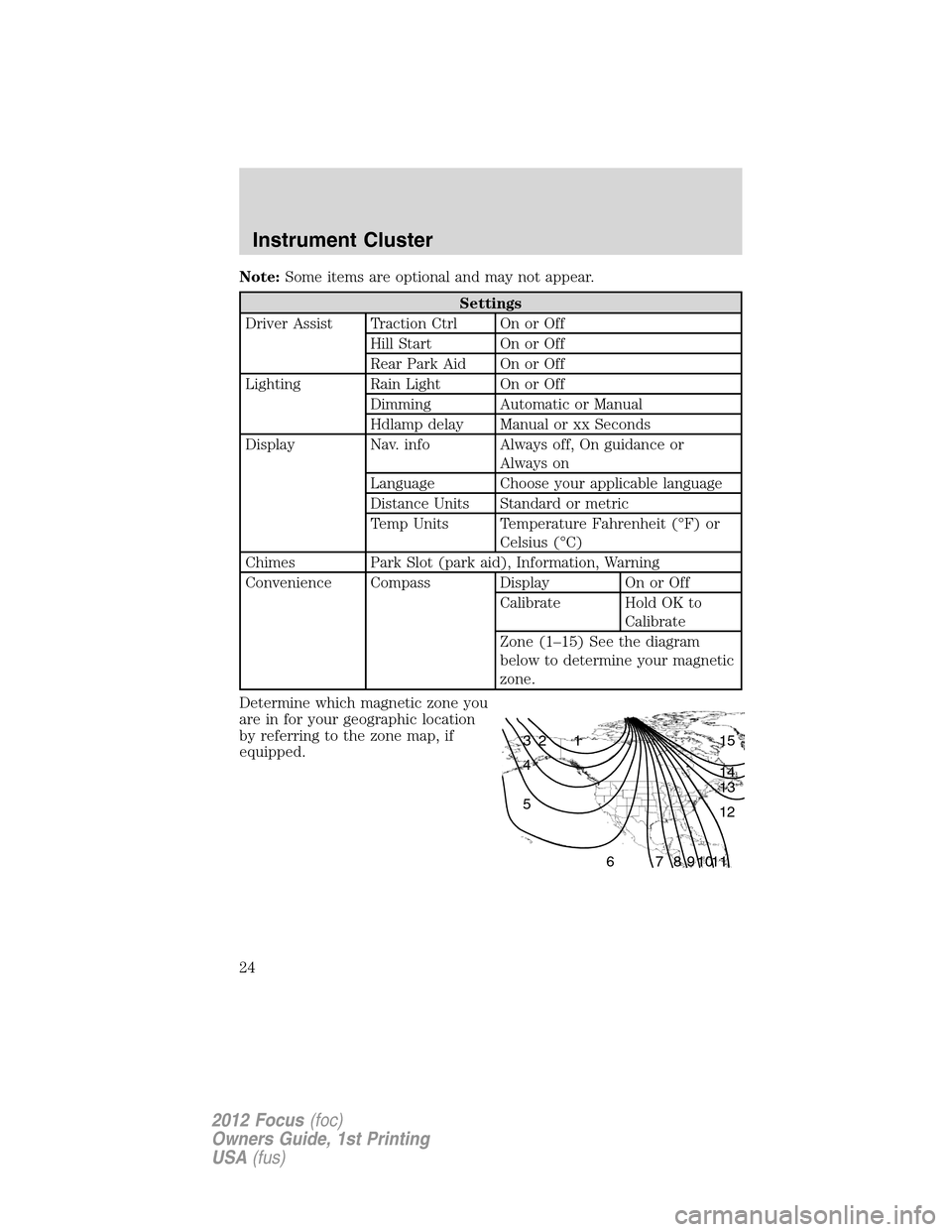
Zone (1–15) See the diagram
below to determine your magnetic
zone.
Determine which magnetic zone you
are in for your geographic location
by referring to the zone map, if
equipped.
1 2 3
4
5
6 7 8 9 101112 13 14 15
Instrument Cluster
24
2012 Focus(foc)
Owners Guide, 1st Printing
USA(fus)
Page 25 of 406
Settings (cont’d)
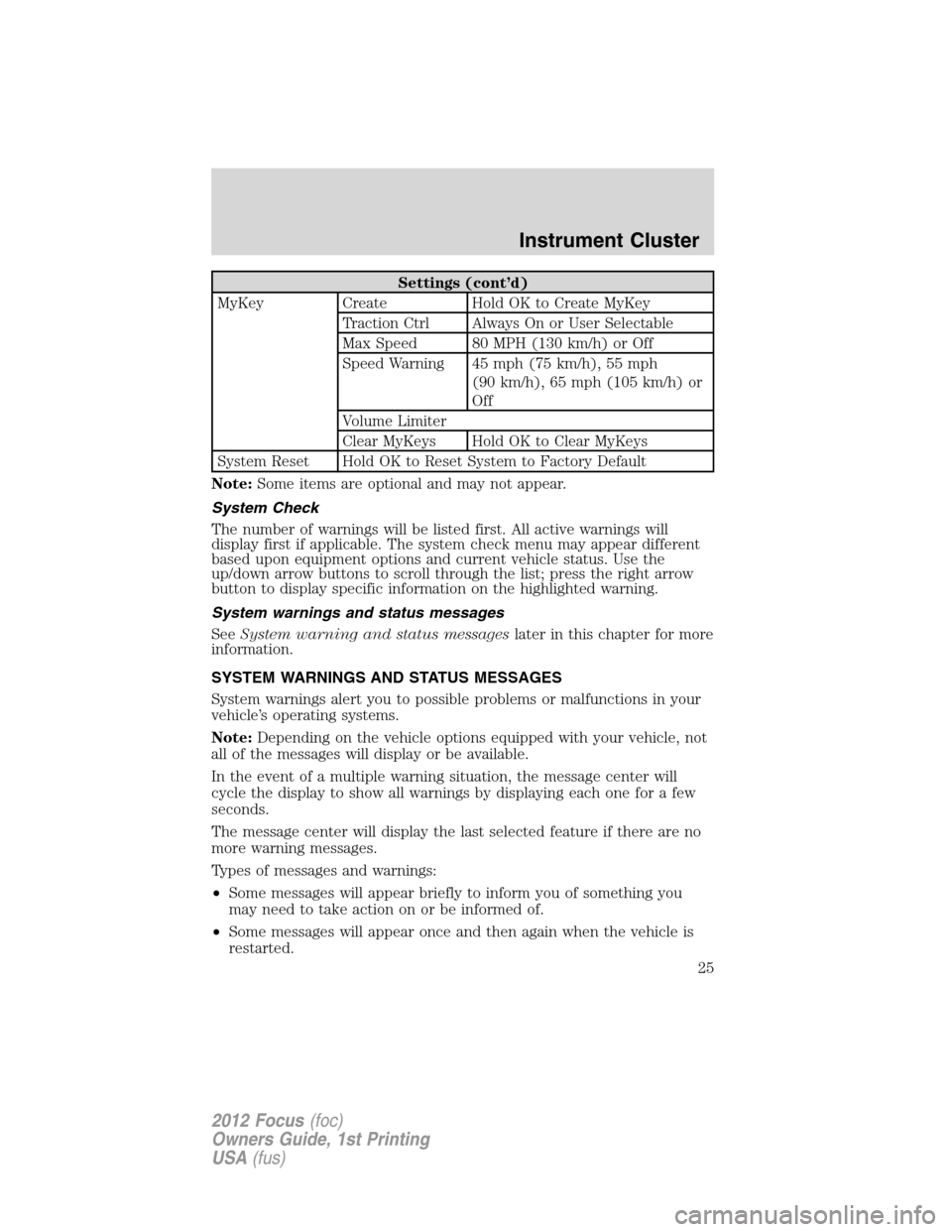
MyKey Create Hold OK to Create MyKey
Traction Ctrl Always On or User Selectable
Max Speed 80 MPH (130 km/h) or Off
Speed Warning 45 mph (75 km/h), 55 mph
(90 km/h), 65 mph (105 km/h) or
Off
Volume Limiter
Clear MyKeys Hold OK to Clear MyKeys
System Reset Hold OK to Reset System to Factory Default
Note:Some items are optional and may not appear.
System Check
The number of warnings will be listed first. All active warnings will
display first if applicable. The system check menu may appear different
based upon equipment options and current vehicle status. Use the
up/down arrow buttons to scroll through the list; press the right arrow
button to display specific information on the highlighted warning.
System warnings and status messages
SeeSystem warning and status messageslater in this chapter for more
information.
SYSTEM WARNINGS AND STATUS MESSAGES
System warnings alert you to possible problems or malfunctions in your
vehicle’s operating systems.
Note:Depending on the vehicle options equipped with your vehicle, not
all of the messages will display or be available.
In the event of a multiple warning situation, the message center will
cycle the display to show all warnings by displaying each one for a few
seconds.
The message center will display the last selected feature if there are no
more warning messages.
Types of messages and warnings:
•Some messages will appear briefly to inform you of something you
may need to take action on or be informed of.
•Some messages will appear once and then again when the vehicle is
restarted.
Instrument Cluster
25
2012 Focus(foc)
Owners Guide, 1st Printing
USA(fus)
Page 26 of 406
•Some messages will reappear after clearing or being reset if a problem
or condition is still present and needs your attention.
•Some messages can be acknowledged and reset by pressing OK. This
allows you to use the full message center functionality by clearing the
message.
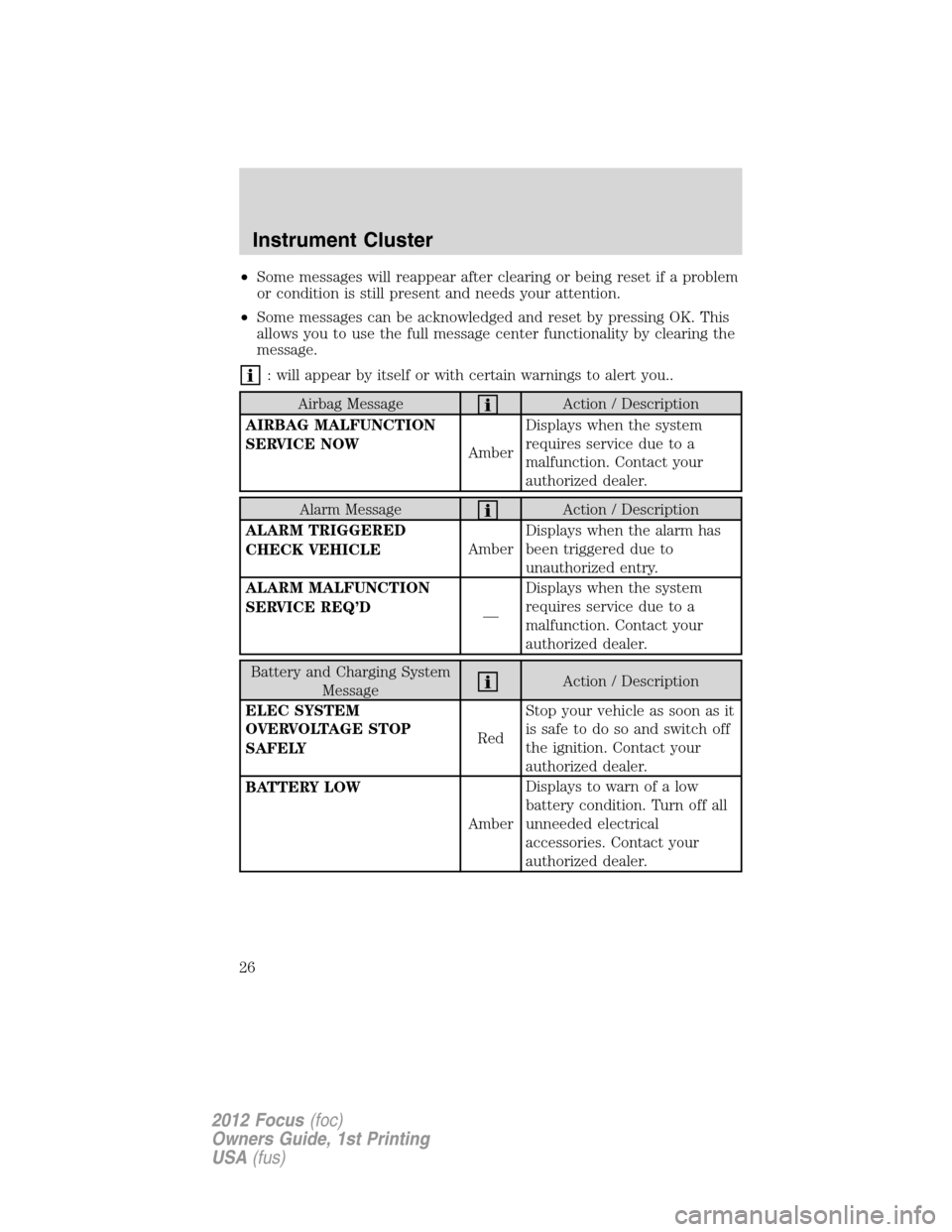
: will appear by itself or with certain warnings to alert you..
Airbag MessageAction / Description
AIRBAG MALFUNCTION
SERVICE NOW
AmberDisplays when the system
requires service due to a
malfunction. Contact your
authorized dealer.
Alarm MessageAction / Description
ALARM TRIGGERED
CHECK VEHICLEAmberDisplays when the alarm has
been triggered due to
unauthorized entry.
ALARM MALFUNCTION
SERVICE REQ’D
—Displays when the system
requires service due to a
malfunction. Contact your
authorized dealer.
Battery and Charging System
MessageAction / Description
ELEC SYSTEM
OVERVOLTAGE STOP
SAFELYRedStop your vehicle as soon as it
issafetodosoandswitchoff
the ignition. Contact your
authorized dealer.
BATTERY LOW
AmberDisplays to warn of a low
battery condition. Turn off all
unneeded electrical
accessories. Contact your
authorized dealer.
Instrument Cluster
26
2012 Focus(foc)
Owners Guide, 1st Printing
USA(fus)