2012 FORD B MAX Seat
[x] Cancel search: SeatPage 130 of 256
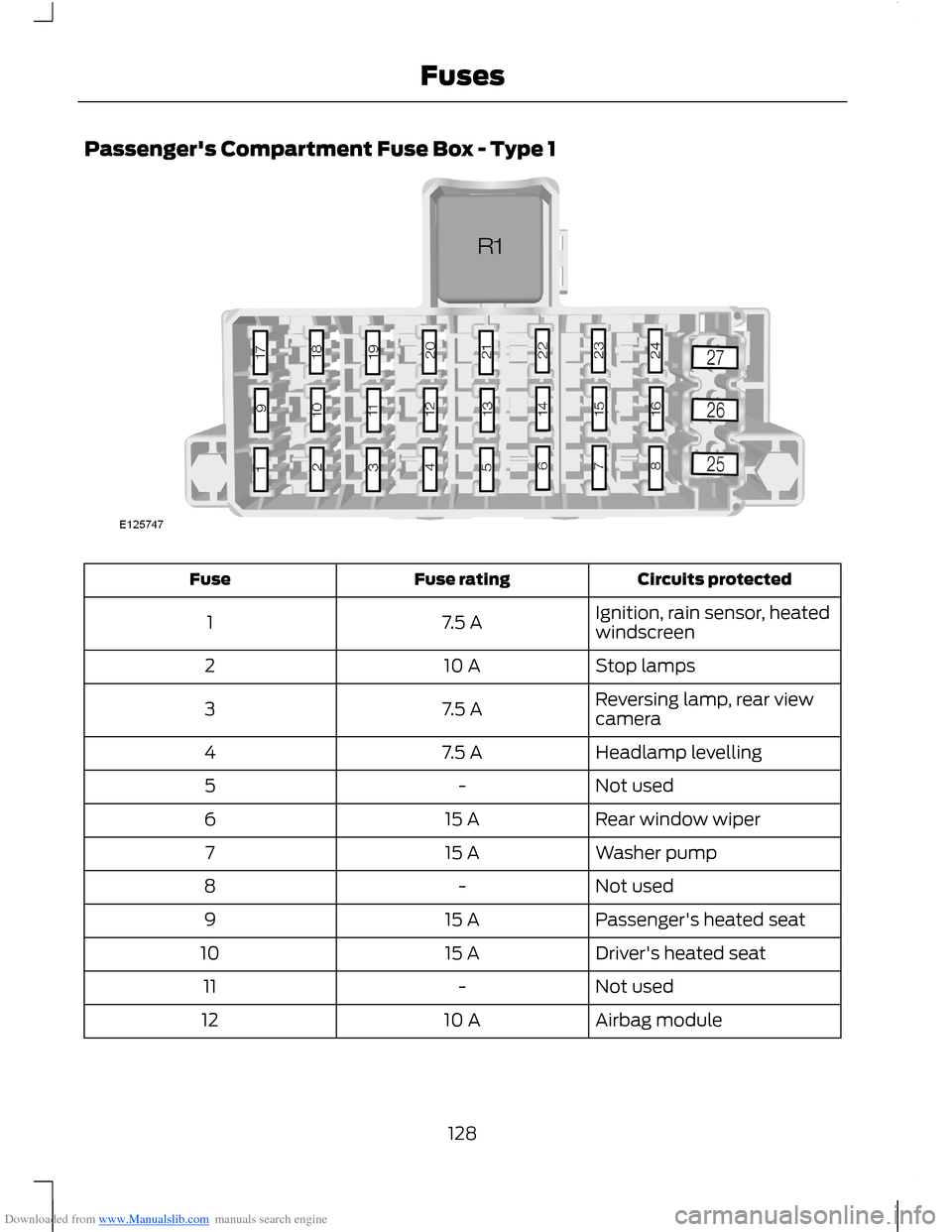
Downloaded from www.Manualslib.com manuals search engine Passenger's Compartment Fuse Box - Type 1
Circuits protectedFuse ratingFuse
Ignition, rain sensor, heatedwindscreen7.5 A1
Stop lamps10 A2
Reversing lamp, rear viewcamera7.5 A3
Headlamp levelling7.5 A4
Not used-5
Rear window wiper15 A6
Washer pump15 A7
Not used-8
Passenger's heated seat15 A9
Driver's heated seat15 A10
Not used-11
Airbag module10 A12
128Fuses
Page 133 of 256

Downloaded from www.Manualslib.com manuals search engine Circuits protectedFuse ratingFuse
Rear window wiper15 A6
Washer pump15 A7
Not used-8
Passenger's heated seat15 A9
Driver's heated seat15 A10
Not used-11
Airbag module10 A12
Ignition, electric powerassisted steering, instrumentcluster, passive anti-theftsystem, anti-lock brakingsystem
10 A13
Powertrain control module,gear selector lever, fuelpump7.5 A14
Audio system, instrumentcluster7.5 A15
Heated windscreen right-hand side7.5 A16
Not used-17
Not used-18
Data link connector10 A19
Trailer module20 A20
Audio system, navigation15 A21
Instrument cluster7.5 A22
Multi functional display,clock, internal scanner,heating vents, air condi-tioning panel
7.5 A23
Sync module10 A24
Not used-25
131Fuses
Page 155 of 256

Downloaded from www.Manualslib.com manuals search engine CLEANING THE EXTERIOR
WARNINGS
If you use a car wash with a waxingcycle, make sure that you remove thewax from the windscreen.
Prior to using a car wash facilitycheck the suitability of it for yourvehicle.
Some car wash installations usewater at high pressure. This coulddamage certain parts of your vehicle.
Remove the aerial before using anautomatic car wash.
Switch the heater blower off toprevent contamination of the freshair filter.
We recommend that you wash your vehiclewith a sponge and lukewarm watercontaining a car shampoo.
Cleaning the Headlamps
WARNINGS
Do not scrape the headlamp lensesor use abrasives, alcoholic solventsor chemical solvents to clean them.
Do not wipe the headlamps whenthey are dry.
Cleaning the Rear Window
WARNING
Do not scrape the inside of the rearwindow or use abrasives or chemicalsolvents to clean it.
Use a clean, lint free cloth or a dampchamois leather to clean the inside of therear window.
Cleaning the Chrome Trim
WARNINGS
Do not use abrasives or chemicalsolvents. Use soapy water.
Do not apply cleaning product to hotsurfaces and do not leave cleaningproduct on chrome surfaces for aperiod of time exceeding that which isrecommended.
Industrial-strength (heavy-duty)cleaners, or cleaning chemicals, maycause damage over a period of time.
Body Paintwork Preservation
WARNINGS
Do not polish your vehicle in strongsunshine.
Do not allow polish to touch plasticsurfaces. It could be difficult toremove.
Do not apply polish to thewindscreen or rear window. Thiscould cause the wipers to becomenoisy and they may not clear the windowproperly.
We recommend that you wax thepaintwork once or twice a year.
CLEANING THE INTERIOR
Seat Belts
WARNINGS
Do not use abrasives, or chemicalsolvents to clean them.
Do not allow moisture to penetratethe seat belt retractor mechanism.
153Vehicle Care
Page 156 of 256

Downloaded from www.Manualslib.com manuals search engine Clean the seat belts with interior cleaneror water applied with a soft sponge. Letthe seat belts dry naturally, away fromartificial heat.
Instrument Cluster Screens, LCDScreens and Radio Screens
WARNING
Do not use abrasives, alcoholicsolvents or chemical solvents toclean them.
Rear Windows
WARNING
Do not use any abrasive materials toclean the interior of the rearwindows.
Note:Do not install stickers or labels to theinterior of the rear windows.
REPAIRING MINOR PAINT
DAMAGE
You should repair paintwork damagecaused by stones from the road or minorscratches as soon as possible. A choice ofproducts are available from an authoriseddealer.
Remove particles such as bird droppings,tree sap, insect deposits, tar spots, roadsalt and industrial fallout before repairingpaint chips.
Always read and follow the manufacturer’sinstructions before using the products.
CLEANING THE ALLOY
WHEELS
Note:Do not apply a cleaning chemical towarm or hot wheel rims and covers.
Note:Industrial-strength (heavy-duty)cleaners, or cleaning chemicals, incombination with brush agitation to removebrake dust and dirt, could wear away theclear coat finish over a period time.
Note:Do not use hydrofluoric acid-basedor high caustic-based wheel cleaners, steelwool, fuels or strong household detergent.
Note:If you intend parking your vehicle foran extended period after cleaning thewheels with a wheel cleaner, drive yourvehicle for a few minutes before doing so.This will reduce the risk of increasedcorrosion of the brake discs, brake pads andlinings.
Note:Some automatic car washes maycause damage to the finish on your wheelrims and covers.
Alloy wheels and wheel covers are coatedwith a clear coat paint finish. To maintaintheir condition we recommend that you:
•Clean them weekly with therecommended wheel and tyre cleaner.
•Use a sponge to remove heavydeposits of dirt and brake dustaccumulation.
•Rinse them thoroughly with apressurised stream of water when youhave completed the cleaning process.
We recommend that you use Ford servicewheel cleaner. Make sure that you readand follow the manufacturer’s instructions.
Using other non-recommended cleaningproducts can result in severe andpermanent cosmetic damage.
154Vehicle Care
Page 170 of 256

Downloaded from www.Manualslib.com manuals search engine VEHICLE IDENTIFICATION
NUMBER
Your vehicle identification number isstamped into the floor panel on theright-hand side, beside the front seat. It isalso shown on the left-hand side of theinstrument panel.
TECHNICAL SPECIFICATIONS
Vehicle dimensions
Dimension in inches (mm)Dimension description
160.5 (4077)Maximum length
81.4 (2067)Overall width including exterior mirrors
63.1 - 63.5 (1604 - 1613)Overall height - EC kerb weight
98.0 (2489)Wheelbase
58.5 - 58.7 (1487 - 1492)Front track
58.1 - 58.3 (1477 - 1482)Rear track
168Capacities and Specifications
Page 188 of 256

Downloaded from www.Manualslib.com manuals search engine Automatic Volume Control
When available, automatic volume controladjusts the volume level to compensatefor engine noise and road speed noise.
1.Press the MENU button and selectAUDIO.
2.Select AVC LEVEL or ADAPTIVEVOL.
3.Use the left or right arrow button toadjust the setting.
4.Press the OK button to confirm yourselection.
5.Press the MENU button to return.
Digital Signal Processing
Digital Signal Processing Occupancy
This feature takes into account thedifferences in distance from the variousspeakers in your vehicle to each seat. Youmust select the correct sitting position forthe audio to be correctly set.
Digital Signal Processing Equaliser
Select the music category that most suitsyour listening preference. The audio outputwill change to enhance the particular styleof music chosen.
Changing the Digital Signal ProcessingSettings
1.Press the MENU button.
2.Select AUDIO or AUDIO SETTINGS.
3.Scroll to the required digital signalprocessing function.
4.Use the up and down arrow buttons toselect the required setting.
5.Press the OK button to confirm yourselection.
6.Press the MENU button to return.
News Broadcasts
Your audio unit may interrupt normalreception to broadcast news bulletins fromstations on the FM waveband, radio datasystem or other enhanced network linkedstations.
The display will indicate there is anincoming announcement, during newsbroadcasts. When the audio unit interruptsfor a news broadcast the preset volumelevel will be the same as trafficannouncements.
1.Press the MENU button.
2.Select AUDIO or AUDIO SETTINGS.
3.Scroll to NEWS and turn on or off withthe OK button.
4.Press the MENU button to return.
Alternative Frequencies
The majority of programs that broadcaston the FM waveband have a programidentification code, it can be recognised byaudio units.
When your vehicle moves from onetransmission area to another with thealternative frequencies tuning switchedon, this function will search for thestrongest station signal.
Under certain conditions, however,alternative frequencies tuning maytemporarily disrupt normal reception.
When selected, the unit continuallyevaluates signal strength and, if a bettersignal becomes available, the unit willswitch to that alternative. It mutes whileit checks a list of alternative frequenciesand if necessary, it will search once acrossthe selected waveband for a genuinealternative frequency.
It will restore radio reception when it findsone or if one is not found, the unit willreturn to the original stored frequency.
186Audio System
Page 199 of 256

Downloaded from www.Manualslib.com manuals search engine Safety Information
WARNING
Driving while distracted can result inloss of vehicle control, collision andinjury. We strongly recommend thatyou use extreme caution when using anydevice that may take your focus off theroad. Your primary responsibility is the safeoperation of your vehicle. We recommendagainst the use of any handheld devicewhile driving, encourage the use ofvoice-operated systems when possibleand that you become aware of applicablecountry and local laws that may affect useof electronic devices while driving.
When using SYNC:
•Do not operate playing devices if thepower cords or cables are broken, splitor damaged. Carefully place cords andcables where they cannot be steppedon or interfere with the operation ofpedals, seats, compartments or safedriving abilities.
•Do not leave playing devices in yourvehicle during extreme conditions as itcould cause them damage. Refer toyour device's user guide for furtherinformation.
•Do not attempt to service or repair thesystem. See an authorised dealer.
Privacy Information
When a mobile phone is connected toSYNC, the system creates a profile withinyour vehicle that is linked to that mobilephone. This profile is created in order tooffer you more mobile features and tooperate more efficiently. Among otherthings, this profile may contain data aboutyour phone book, text messages (read andunread) and call history. Including thehistory of calls when your mobile phonewas not connected to the system. Inaddition, if you connect a media device,the system creates and retains an index ofsupported media content. The system alsorecords a short development log ofapproximately 10 minutes of all recentsystem activity. The log profile and othersystem data may be used to improve thesystem and help diagnose any problemsthat may occur.
The mobile phone profile, media deviceindex, and development log will remain inyour vehicle unless you delete it and aregenerally accessible only in your vehiclewhen the mobile phone or media player isconnected. If you no longer plan to use thesystem or your vehicle, we recommend youperform a master reset to erase all storedinformation.
System data cannot be accessed withoutspecial equipment and access to yourvehicle's SYNC module. We will not accessthe system data for any purpose other thanas described absent consent, a court order,or where required by law enforcement,other government authorities or other thirdparties acting with lawful authority. Otherparties may seek to access the informationindependently of us. For further privacyinformation, see the sections onemergency assistance.
197SYNC
Page 245 of 256

Downloaded from www.Manualslib.com manuals search engine A
A/CSee: Climate Control..........................................68About This Manual...........................................5Protecting the Environment...............................5ABSSee: Brakes............................................................101ABS driving hintsSee: Hints on Driving With Anti-LockBrakes.................................................................101AccessoriesSee: Replacement PartsRecommendation..............................................7Active City Stop...............................................111General Information............................................111Laser Sensor Information.................................112Using Active City Stop.........................................111Adjusting the Steering Wheel...................38Air ConditioningSee: Climate Control..........................................68Air Vents............................................................68Centre Air Vents....................................................68Side Air Vent..........................................................68AlarmSee: Anti-Theft Alarm........................................35Anti-Theft Alarm............................................35Alarm System........................................................35Arming the Alarm.................................................36Disarming the Alarm............................................37Full and Reduced Guard....................................36Triggering the Alarm............................................36Appendices....................................................225At a Glance..........................................................8Front Exterior Overview........................................8Instrument Panel Overview..............................10Rear Exterior Overview........................................13Vehicle Interior Overview.....................................9Audible Warnings and Indicators.............56Automatic Transmission...................................56Headlamps On......................................................56Key Outside Car....................................................56Low Fuel...................................................................57Seat Belt Minder....................................................57Audio Control...................................................38.....................................................................................38Audio System..................................................171General Information............................................171
Audio System Security................................187Audio Troubleshooting...............................195Audio unit - Vehicles With:AM/FM/CD/Bluetooth..............................177Alternative Frequencies....................................181Automatic Volume Control............................180Autostore Control..............................................180News Broadcasts.................................................181Regional Mode......................................................181Sound Button.......................................................179Station Preset Buttons.....................................179Station Tuning Control......................................179Traffic Information Control.............................180Waveband Button..............................................179Audio unit - Vehicles With:AM/FM/CD...................................................172Alternative Frequencies....................................176Automatic Volume Control.............................175Autostore Control...............................................175News Broadcasts................................................176Regional Mode.....................................................176Sound Button.......................................................174Station Preset Buttons......................................174Station Tuning Control......................................174Traffic Information Control..............................175Waveband Button...............................................174Audio unit - Vehicles With: SonyAM/FM/CD...................................................182Alternative Frequencies...................................186Automatic Volume Control............................186Autostore Control...............................................185Digital Signal Processing.................................186News Broadcasts...............................................186Regional Mode.....................................................187Sound Button......................................................184Station Preset Buttons.....................................184Station Tuning Control.....................................184Traffic Information Control.............................185Waveband Button..............................................184Autolamps........................................................43Automatic Climate Control........................70Temperature Control...........................................72
243Index