Page 82 of 358
•To Answer A Call— you can answer an incoming call
by pressing the MAIN/Phone button on the steering
wheel.
•Conference Call — you can call another contact while
you are engaged in a phone conversation (with
Bluetooth� phones supporting this option).
•Call Waiting — while engaged in a phone conversa-
tion, you can receive notification of another incoming
phone call, answer the other incoming phone call, and
switch between two ongoing phone conversations.
(Call waiting is only supported by a subset of compat-
ible mobile phones).
•Refusing Incoming Call Or Ending A Call — you can
refuse an incoming call or end a current call by
pressing the Phone Hang-up button on the steering
wheel. After you place your mobile phone in the car environ-
ment and create a pairing relationship with
BLUE&ME™, you can make phone calls by speaking
keywords or pressing buttons on the steering wheel.
When using the hands-free phone, the audio output of a
phone conversation is heard through your car sound
speakers.
Message Reader
The BLUE&ME™ message reader enables automatic
reading, through the car sound system, of the SMS texts
you receive on your Bluetooth�
wireless technology
mobile phone that are received when the phone is paired
and connected to BLUE&ME™ system. It does not pro-
vide access to messages that were received before you
entered the car and connected with the BLUE&ME™
system. The message reader will also interpret any ab-
breviation and emoticon contained in the SMS text.
80 UNDERSTANDING THE FEATURES OF YOUR VEHICLE
Page 84 of 358
In this way, while you are driving you can play your
favorite personal music collections.
•iPod�Player — see dedicated paragraph under Media
Player Functions.
The media player enables the following operations:
•Digital Audio Playback — you can play all your
digital audio files (.mp3,.wma,.wav,.aac) or play a
customized playlist (.m3u or. wpl format).
•Audio File Selection By Category — you can play all
audio files of a certain category, e.g.: album, artist or
genre.
•Playback Options — while playing tracks you can
select the following options: Play, Stop, Next track,
Previous track, Shuffle and Loop track. NOTE:
•The media player does not support audio files com-
pressed with other formats and DRM (Digital Right
Management) protected audio files. Non-supported
audio files that may be present on the USB device will
be ignored.
•To use the media player, you have to simply connect
(directly or by an extension lead) your USB device to
the car USB port. Turning the ignition key to ON,
BLUE&ME™ will start building your media library. At
the end of this operation you can surf the whole
library and scroll its categories as required using the
buttons on the steering wheel or voice commands.
BLUE&ME™ will then play your selection via the car
sound system.
82 UNDERSTANDING THE FEATURES OF YOUR VEHICLE
Page 94 of 358
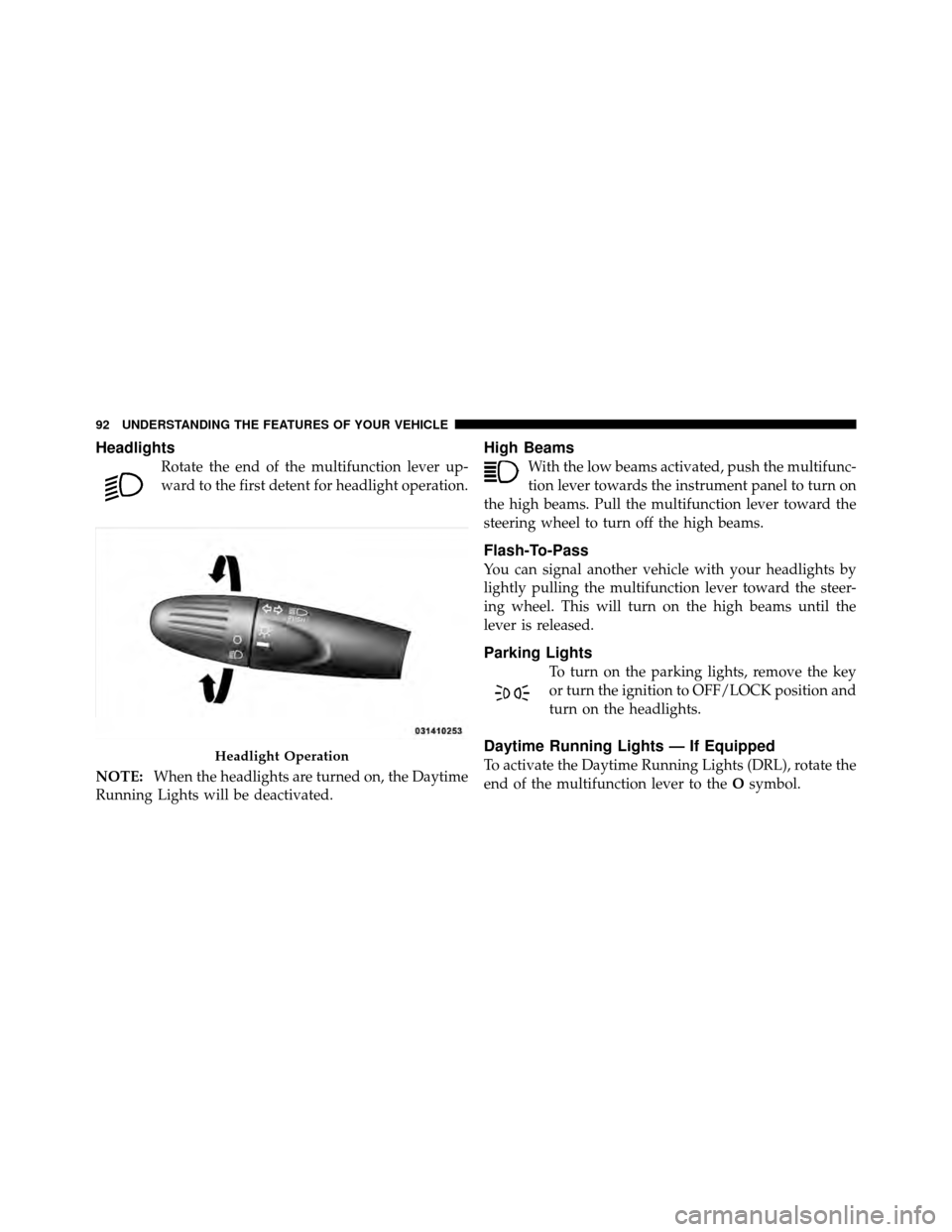
Headlights
Rotate the end of the multifunction lever up-
ward to the first detent for headlight operation.
NOTE: When the headlights are turned on, the Daytime
Running Lights will be deactivated.
High Beams
With the low beams activated, push the multifunc-
tion lever towards the instrument panel to turn on
the high beams. Pull the multifunction lever toward the
steering wheel to turn off the high beams.
Flash-To-Pass
You can signal another vehicle with your headlights by
lightly pulling the multifunction lever toward the steer-
ing wheel. This will turn on the high beams until the
lever is released.
Parking Lights
To turn on the parking lights, remove the key
or turn the ignition to OFF/LOCK position and
turn on the headlights.
Daytime Running Lights — If Equipped
To activate the Daytime Running Lights (DRL), rotate the
end of the multifunction lever to the Osymbol.Headlight Operation
92 UNDERSTANDING THE FEATURES OF YOUR VEHICLE
Page 96 of 358
Lane Change Assist
Tap the lever up or down once, without moving beyond
the detent, and the turn signal (right or left) will flash
three times then automatically turn off.
Follow Me Home/Headlight Delay
When this feature is selected the driver can choose to
have the headlights remain on for a preset period of time.
Activation
Remove the key or turn the ignition to the OFF/LOCK
position, and pull the multifunction lever toward the
steering wheel, within two minutes. Each time the lever
is pulled, the activation of the lights will be extended by
30 seconds. The activation of the lights can be extended to
a maximum of 210 seconds.
Deactivation
Pull the multifunction lever toward the steering wheel
and hold it for more than two seconds.
Interior Lights
The interior light switches are located in the overhead
console. The interior lights can be set to three different
positions (Off/Left Position, Center Position, On/Right
Position).
Using the switch on the left overhead, press the switch to
the right from its center position and the lights are always
on. Press the switch to the left from its center position and
the lights are always off. Leave the switch in the center
position, and the lights are turned on and off when the
doors are opened or closed. The switch on the right side
of the overhead console controls the map or reading
function of the lights. Press the switch to the right to turn
on the right light and press the switch to the left to turn
on the left light.
94 UNDERSTANDING THE FEATURES OF YOUR VEHICLE
Page 97 of 358
CAUTION!
Before getting out of the vehicle be sure that the
switch is in the center position or that the lights are
off to avoid draining the battery.
Interior Light Timing (Center Position)
There are four different modes of operation that can be
activated in this position:
•When one door is opened a 3 minute timer is acti-
vated.
•When the key is removed from the ignition (within
two minutes of the ignition being turned off), a
10 second timer is activated.
•When the doors are unlocked with Key Fob a 10 sec-
ond timer is activated.
•When the doors are locked with the Key Fob the lights
will turn off.
Interior Light Timing (On/Right Position)
•
When all doors are closed a 15 minute timer is
activated.
NOTE: The timer is deactivated when the key is moved
into the ON/RUN position.
3
UNDERSTANDING THE FEATURES OF YOUR VEHICLE 95
Page 111 of 358
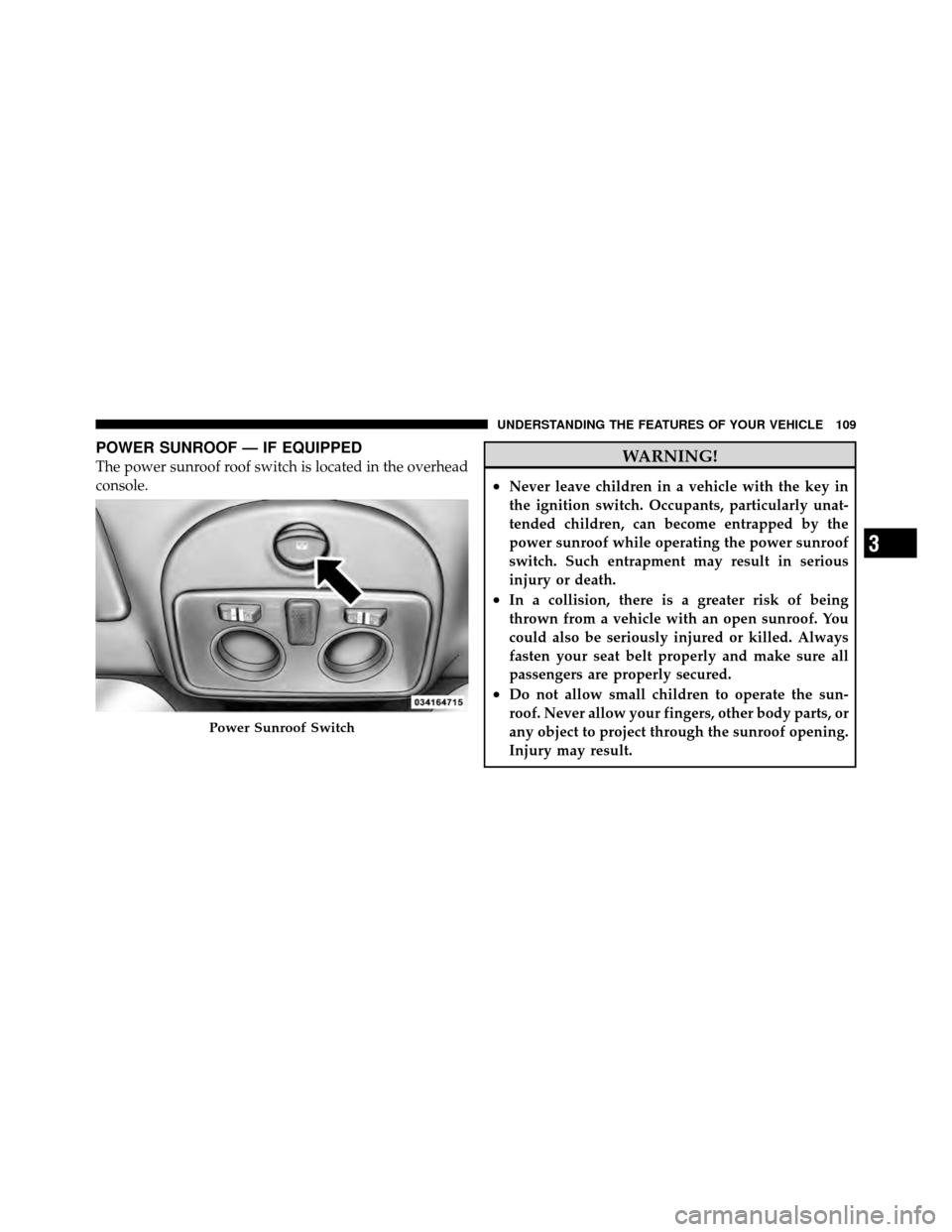
POWER SUNROOF — IF EQUIPPED
The power sunroof roof switch is located in the overhead
console.WARNING!
•Never leave children in a vehicle with the key in
the ignition switch. Occupants, particularly unat-
tended children, can become entrapped by the
power sunroof while operating the power sunroof
switch. Such entrapment may result in serious
injury or death.
•In a collision, there is a greater risk of being
thrown from a vehicle with an open sunroof. You
could also be seriously injured or killed. Always
fasten your seat belt properly and make sure all
passengers are properly secured.
•Do not allow small children to operate the sun-
roof. Never allow your fingers, other body parts, or
any object to project through the sunroof opening.
Injury may result.
Power Sunroof Switch
3
UNDERSTANDING THE FEATURES OF YOUR VEHICLE 109
Page 129 of 358

electrical devices or increase engine speed (if at idle). If
the charging system light remains on, it means that the
vehicle is experiencing a problem with the charging
system. Obtain SERVICE IMMEDIATELY. See an autho-
rized dealer.
If jump starting is required, refer to “Jump Starting
Procedures” in “What To Do In Emergencies”.
13. Power Steering System WarningThis light is used to manage the electrical
warning of the EPS (Power Steering System).
Refer to “Power Steering” in “Starting and
Operating” for further information.
14. Electronic Throttle Control (ETC) Light This light informs you of a problem with the
Electronic Throttle Control (ETC) system. If a
problem is detected, the light will come on
while the engine is running. Cycle the ignition
key when the vehicle has completely stopped and the shift lever is placed in the NEUTRAL position. The light
should turn off. If the light remains lit with the engine
running, your vehicle will usually be drivable; however,
see an authorized dealer for service as soon as possible. If
the light is flashing when the engine is running, imme-
diate service is required and you may experience reduced
performance, an elevated/rough idle or engine stall and
your vehicle may require towing. The light will come on
when the ignition is first turned to ON/RUN and remain
on briefly as a bulb check. If the light does not come on
during starting, have the system checked by an autho-
rized dealer.
15. Tire Pressure Monitoring Telltale Light
Each tire, including the spare (if provided),
should be checked monthly when cold and
inflated to the inflation pressure recommended
by the vehicle manufacturer on the vehicle
placard or tire inflation pressure label. (If your vehicle
has tires of a different size than the size indicated on the
4
UNDERSTANDING YOUR INSTRUMENT PANEL 127
Page 131 of 358

CAUTION!
The TPMS has been optimized for the original
equipment tires and wheels. TPMS pressures and
warning have been established for the tire size
equipped on your vehicle. Undesirable system opera-
tion or sensor damage may result when using re-
placement equipment that is not of the same size,
type, and/or style. Aftermarket wheels can cause
sensor damage. Do not use tire sealant from a can or
balance beads if your vehicle is equipped with a
TPMS, as damage to the sensors may result.
16. Automatic Gearbox Failure This light will illuminate when there is an
automatic transmission fault. 17. Oil Pressure Warning Light
This light indicates low engine oil pressure. The
light should turn on momentarily when the engine
is started. If the light turns on while driving, stop the
vehicle and shut off the engine as soon as possible. A
chime will sound for four minutes when this light turns
on.
Do not operate the vehicle until the cause is corrected.
This light does not indicate how much oil is in the engine.
The engine oil level must be checked under the hood.
18. Malfunction Indicator Light (MIL) The Malfunction Indicator Light (MIL) is part of
an onboard diagnostic system, called OBDII, that
monitors engine and automatic transmission con-
trol systems. The light will illuminate when the key is in
the ON/RUN position before engine start. If the bulb
does not come on when turning the key from OFF/LOCK
to ON/RUN, have the condition checked promptly.
4
UNDERSTANDING YOUR INSTRUMENT PANEL 129