Page 127 of 594
audio system. The Uconnect™ Phone will work the same
as if you dial the number using voice command.
NOTE:Certain brands of mobile phones do not send the
dial ring to the Uconnect™ Phone to play it on the vehicle
audio system, so you will not hear it. Under this situa-
tion, after successfully dialing a number the user may feel
that the call did not go through even though the call is in
progress. Once your call is answered, you will hear the
audio.
Mute/Un-Mute (Mute OFF)
When you mute the Uconnect™ Phone, you will still be
able to hear the conversation coming from the other
party, but the other party will not be able to hear you. In
order to mute the Uconnect™ Phone simply touch the
“Mute” button on the Phone main screen.
Advanced Phone Connectivity
Transfer Call To And From Mobile Phone
The Uconnect™ Phone allows ongoing calls to be trans-
ferred from your mobile phone to the Uconnect™ Phone
without terminating the call. To transfer an ongoing call
from your Uconnect™ Phone paired mobile phone to the
Uconnect™ Phone or vice versa, press the Transfer
button on the Phone main screen.
Connect Or Disconnect Link Between the
Uconnect™ Phone And Mobile Phone
If you would like to connect or disconnect the Bluetooth �
connection between a Uconnect™ Phone paired mobile
phone and the Uconnect™ Phone, follow the instructions
described in your mobile phone User’s Manual.
3
UNDERSTANDING THE FEATURES OF YOUR VEHICLE 125
Page 129 of 594

•Even though international dialing for most number
combinations is supported, some shortcut dialing
number combinations may not be supported.
•In a convertible vehicle, system performance may be
compromised with the convertible top down.
Far End Audio Performance
•
Audio quality is maximized under:
•low-to-medium blower setting,
•low-to-medium vehicle speed,
•low road noise,
•smooth road surface,
•fully closed windows,
•dry weather conditions, and
•operation from the driver’s seat.
•Performance, such as audio clarity, echo, and loudness
to a large degree rely on the phone and network, and
not the Uconnect™ Phone.
•Echo at the far end can sometimes be reduced by
lowering the in-vehicle audio volume.
•In a convertible vehicle, system performance may be
compromised with the convertible top down.
Bluetooth�Communication Link
Mobile phones have been found to lose connection to the
Uconnect™ Phone. When this happens, the connection
can generally be reestablished by switching the phone
OFF/ON. Your cellular phone is recommended to remain
in Bluetooth� ON mode.
Power-Up
After switching the ignition key from OFF to either the
ON or ACC position, or after a language change, you
must wait at least 15 seconds prior to using the system.
3
UNDERSTANDING THE FEATURES OF YOUR VEHICLE 127
Page 131 of 594
NOTE:
•You can replace “John Smith” with any name in your
mobile or favorite phone book. You can also say “Send
a message to John Smith” and the system will ask you
which phone number you want to send a message to
for John Smith.
•You can replace “Mobile” with “Home”, “Work” or
“Other”.
•You can replace “Incoming Calls” with “Outgoing
Calls” or “Missed Calls”.
•Messaging commands only work if the Uconnect
system is equipped with this feature and the mobile
phone supports messaging over Bluetooth.
•You can replace “248 555 1212” with any phone
number supported by your Mobile phone.
•You can replace “4” with any message number shown
on the screen.
•If your phone does not support phonebook download
or call log download over Bluetooth than these com-
mands will return a response that the contact does not
exist in the phonebook.
•Available Voice Commands are shown in bold face and
underlined in the gray shaded boxes.
General Information
This device complies with Part 15 of the FCC rules and
RSS 210 of Industry Canada. Operation is subject to the
following conditions:
•Changes or modifications not expressly approved by
the party responsible for compliance could void the
user’s authority to operate the equipment.
•This device may not cause harmful interference.
•This device must accept any interference received,
including interference that may cause undesired
operation.
3
UNDERSTANDING THE FEATURES OF YOUR VEHICLE 129
Page 133 of 594
•Sending a text message via the touch-screen.
•Listen to Music on your Bluetooth�Device via the
touch-screen.
•Pairing up to 10 phones/audio devices for easy access
to connect to them quickly.
NOTE: Your phone must be capable of SMS messaging
via Bluetooth� for messaging features to work properly.
Your mobile phone’s audio is transmitted through your
vehicle’s audio system; the system will automatically
mute your radio when using the Uconnect™ Phone.
For Uconnect™ customer support, visit the following
websites:
•www.chrysler.com/uconnect
•www.dodge.com/uconnect
•www.jeep.com/uconnect
•or call 1–877–855–8400
Uconnect™ Phone allows you to transfer calls between
the system and your mobile phone as you enter or exit
your vehicle and enables you to mute the system’s
microphone for private conversation.
WARNING!
Any voice commanded system should be used only
in safe driving conditions following local laws and
phone use. All attention should be kept on the
roadway ahead. Failure to do so may result in an
accident causing serious injury or death.
The Uconnect™ Phone is driven through your
Bluetooth� “Hands-Free Profile” mobile phone.
Uconnect™ features Bluetooth� technology - the global
standard that enables different electronic devices to con-
nect to each other without wires or a docking station, so
3
UNDERSTANDING THE FEATURES OF YOUR VEHICLE 131
Page 137 of 594
You can also press theorbuttons when the
system is listening for a command and be returned to the
main or previous menu.
NOTE: Pressing the
orbuttons while the
system is playing is known as “Barging In”, refer to
“Barge In — Overriding Prompts” for further
information.
Pair (Link) Uconnect™ Phone To A Mobile Phone
To begin using your Uconnect™ Phone, you must pair
your compatible Bluetooth� enabled mobile phone.
To complete the pairing process, you will need to refer-
ence your mobile phone Owner’s Manual. The
Uconnect™ website may also provide detailed instruc-
tions for pairing.
NOTE:
•You must have Bluetooth� enabled on your phone to
complete this procedure.
•The vehicle must be in PARK.
1. Press the “Phone” soft-key on the screen to begin.
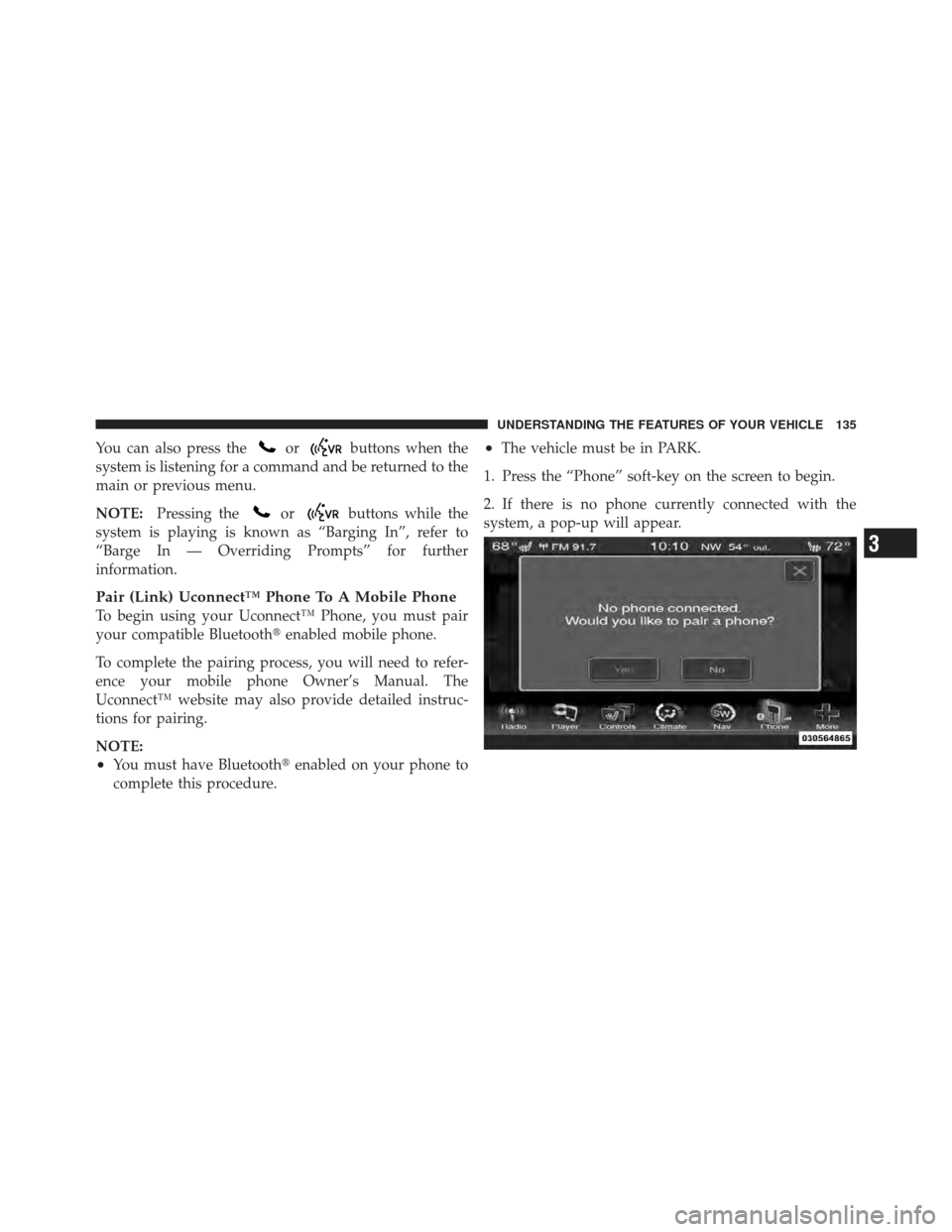
2. If there is no phone currently connected with the
system, a pop-up will appear.
3
UNDERSTANDING THE FEATURES OF YOUR VEHICLE 135
Page 138 of 594
3. Select Yes to begin the pairing process. Then, search
for available devices on your Bluetooth�enabled mobile
phone. When prompted on the phone, enter the name
and PIN shown on the Uconnect Touch™ screen.
•If No is selected, touch the “Settings” soft-key from
the Uconnect™ Phone main screen,
•Touch the “Add Device” soft-key,
•Search for available devices on your Bluetooth�
enabled mobile phone. When prompted on the
phone, enter the name and PIN shown on the
Uconnect Touch™ screen,
•See Step 4 to complete the process.
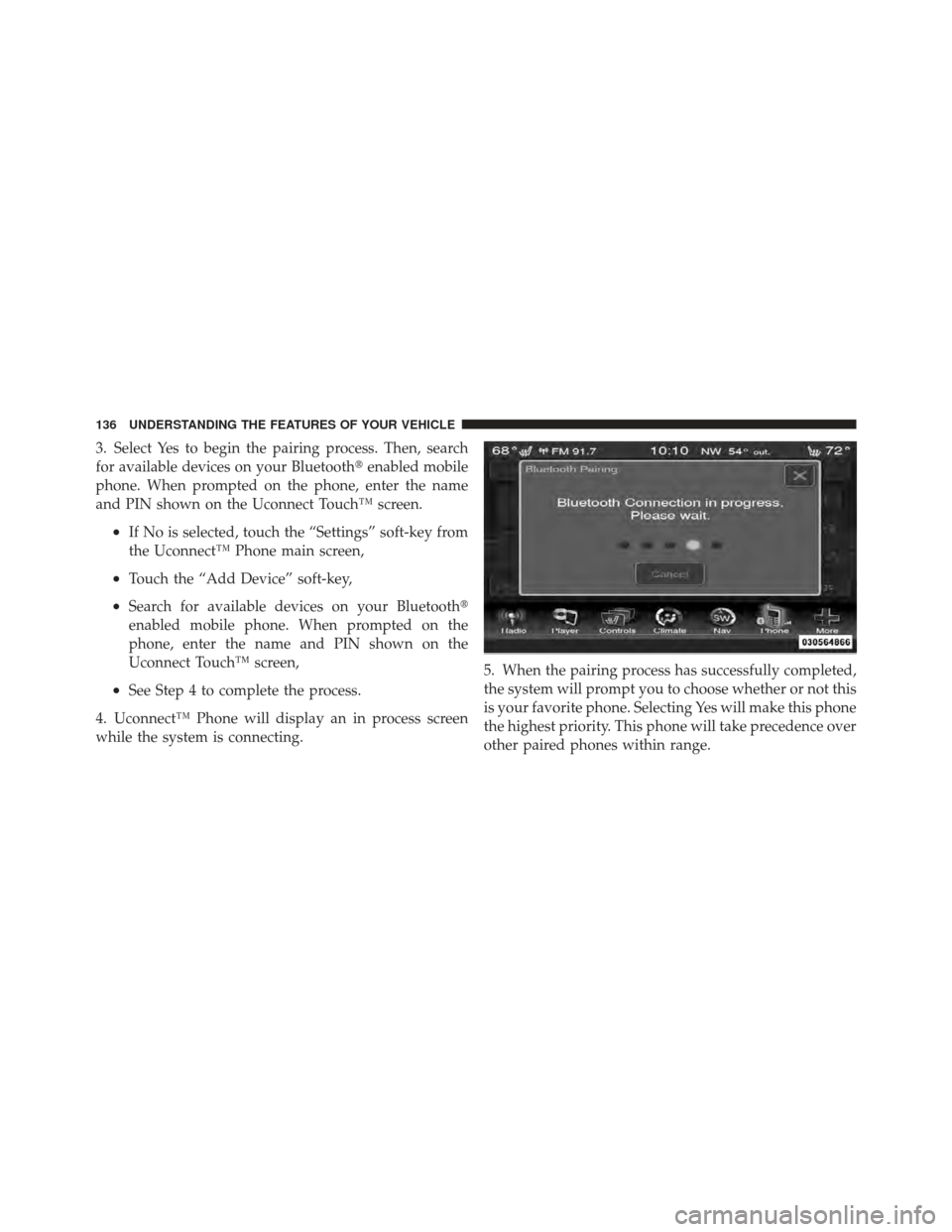
4. Uconnect™ Phone will display an in process screen
while the system is connecting. 5. When the pairing process has successfully completed,
the system will prompt you to choose whether or not this
is your favorite phone. Selecting Yes will make this phone
the highest priority. This phone will take precedence over
other paired phones within range.
136 UNDERSTANDING THE FEATURES OF YOUR VEHICLE
Page 139 of 594
Pair Additional Mobile Phones
•
Touch the “More” soft-key to begin,
•Touch the “Settings” soft-key,
•Next, touch the “Phone/Bluetooth�” soft-key,
•Touch the “Add Device” soft-key,
•Search for available devices on your Bluetooth�en-
abled mobile phone. When prompted on the phone,
enter the name and PIN shown on the Uconnect
Touch™ screen,
•Uconnect™ Phone will display an in process screen
while the system is connecting,
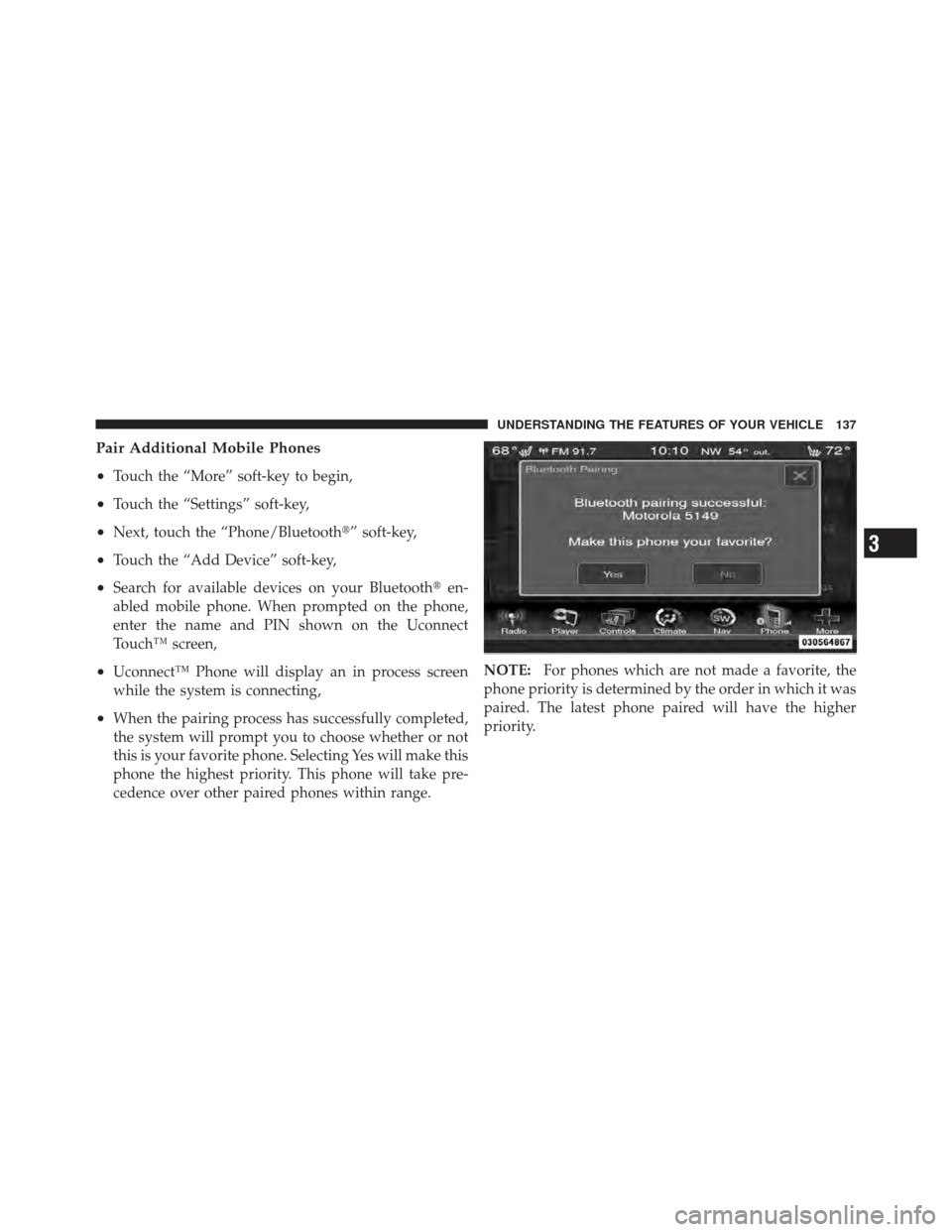
•When the pairing process has successfully completed,
the system will prompt you to choose whether or not
this is your favorite phone. Selecting Yes will make this
phone the highest priority. This phone will take pre-
cedence over other paired phones within range. NOTE:
For phones which are not made a favorite, the
phone priority is determined by the order in which it was
paired. The latest phone paired will have the higher
priority.
3
UNDERSTANDING THE FEATURES OF YOUR VEHICLE 137
Page 140 of 594
You can also use the following VR commands to bring up
the Paired Phone screen from any screen on the radio:
•“Show Paired Phones” or
•“Connect My Phone”
Pair A Bluetooth�Streaming Audio Device
•
Touch the “Player” soft-key to begin,
•Change the Source to Bluetooth�,
•Touch the “Bluetooth�” soft-key,
•Touch the “Add Device” soft-key,
NOTE: If there is no device currently connected with the
system, a pop-up will appear.
•Search for available devices on your Bluetooth� en-
abled audio device. When prompted on the device,
enter the name and PIN shown on the Uconnect
Touch™ screen,
•Uconnect™ Phone will display an in process screen
while the system is connecting,
•When the pairing process has successfully completed,
the system will prompt you to choose whether or not
this is your favorite device. Selecting Yes will make
this device the highest priority. This device will take
precedence over other paired devices within range.
NOTE: For devices which are not made a favorite, the
device priority is determined by the order in which it was
paired. The latest device paired will have the higher
priority.
You can also use the following VR command to bring up
a list of paired audio devices.
•“Show Paired Audio Devices”
138 UNDERSTANDING THE FEATURES OF YOUR VEHICLE