Page 133 of 652
WARNING!
Any voice commanded system should be used only
in safe driving conditions following local laws and
phone use. All attention should be kept on the
roadway ahead. Failure to do so may result in a
collision causing serious injury or death.
Uconnect™ Phone Button The radio or steering wheel controls (if
equipped) will contain the two control buttons
(Uconnect™ Phone
button and Voice Com-
mand
button) that will enable you to
access the system. When you press the button you will
hear the word Uconnect™ followed by a BEEP. The beep
is your signal to give a command. Voice Command Button
Actual button location may vary with the ra-
dio. The individual buttons are described in the
“Operation” section.
The Uconnect™ Phone can be used with any Hands-Free
Profile certified Bluetooth� mobile phone. See the
Uconnect™ website for supported phones. Refer to your
mobile service provider or the phone manufacturer for
details.
The Uconnect™ Phone is fully integrated with the vehi-
cle’s audio system. The volume of the Uconnect™ Phone
can be adjusted either from the radio volume control
knob or from the steering wheel radio control (right
switch), if so equipped.
The radio display will be used for visual prompts from
the Uconnect™ Phone such as “CELL” or caller ID on
certain radios.
3
UNDERSTANDING THE FEATURES OF YOUR VEHICLE 131
Page 288 of 652
▫Locking The Remote Control ............ 378
▫ Replacing The Remote Control Batteries .... 378
▫ Headphones Operation ................ 378
▫ Controls ........................... 379
▫ Replacing The Headphone Batteries ....... 380
▫ Unwired� Stereo Headphone Lifetime
Limited Warranty .................... 380
▫ System Information ................... 382
� Steering Wheel Audio
Controls — If Equipped .................. 395
▫ Radio Operation ..................... 396
▫ CD Player ......................... 396
� CD/DVD Disc Maintenance .............. 397
� Radio Operation And Mobile Phones ....... 397�
Climate Controls ...................... 398
▫ Manual Heating And Air Conditioning
System — If Equipped ................. 398
▫ Rear Manual Climate Control —
If Equipped ........................ 403
▫ Automatic Temperature Control
(ATC) — If Equipped ................. 406
▫ Summer Operation ................... 417
▫ Winter Operation .................... 417
▫ Vacation/Storage .................... 418
▫ Window Fogging .................... 418
▫ Outside Air Intake ................... 418
▫ Operating Tips ...................... 419
▫ A/C Air Filter ...................... 419
286 UNDERSTANDING YOUR INSTRUMENT PANEL
Page 289 of 652
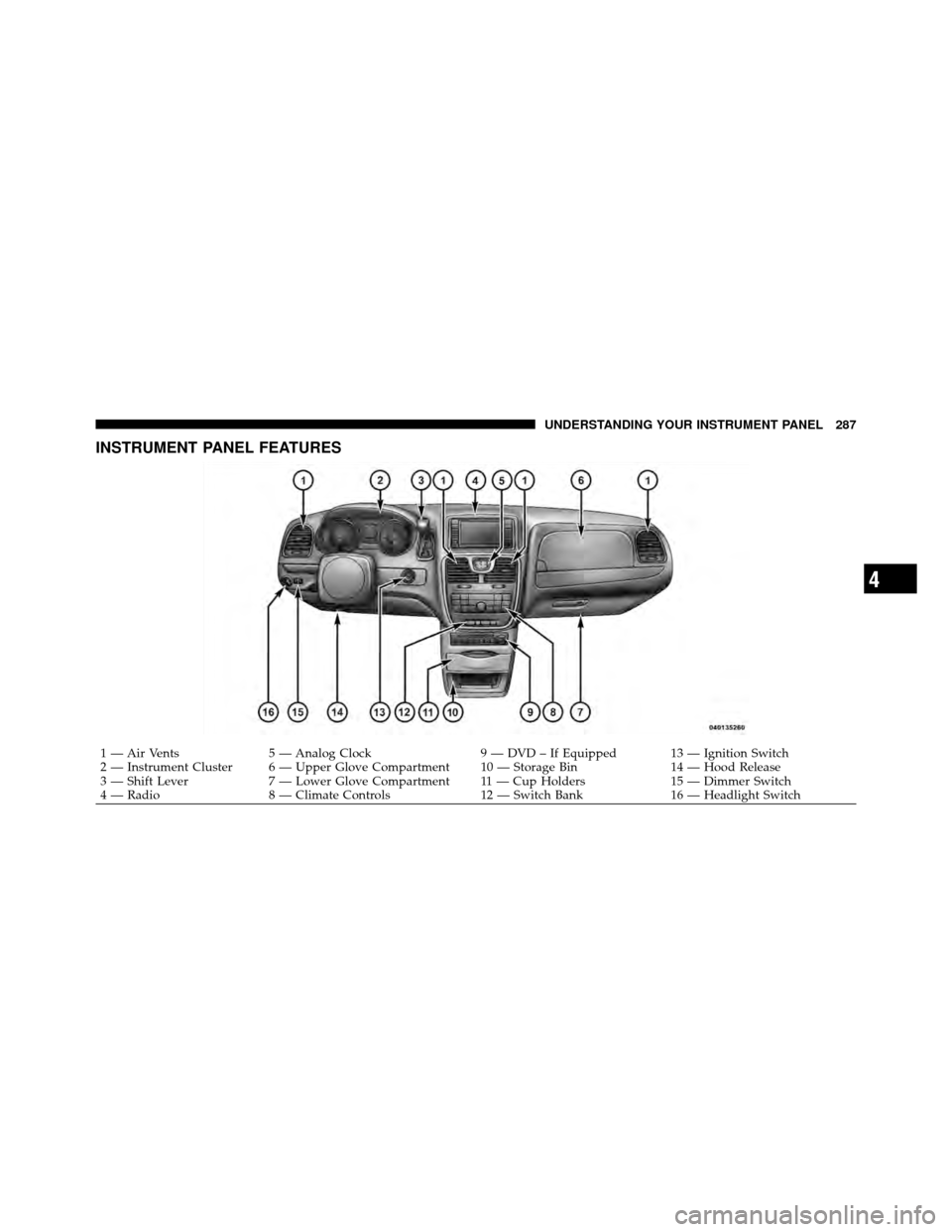
INSTRUMENT PANEL FEATURES
1 — Air Vents5 — Analog Clock 9 — DVD – If Equipped 13 — Ignition Switch
2 — Instrument Cluster 6 — Upper Glove Compartment 10 — Storage Bin 14 — Hood Release
3 — Shift Lever 7 — Lower Glove Compartment 11 — Cup Holders 15 — Dimmer Switch
4 — Radio 8 — Climate Controls 12 — Switch Bank16 — Headlight Switch
4
UNDERSTANDING YOUR INSTRUMENT PANEL 287
Page 364 of 652
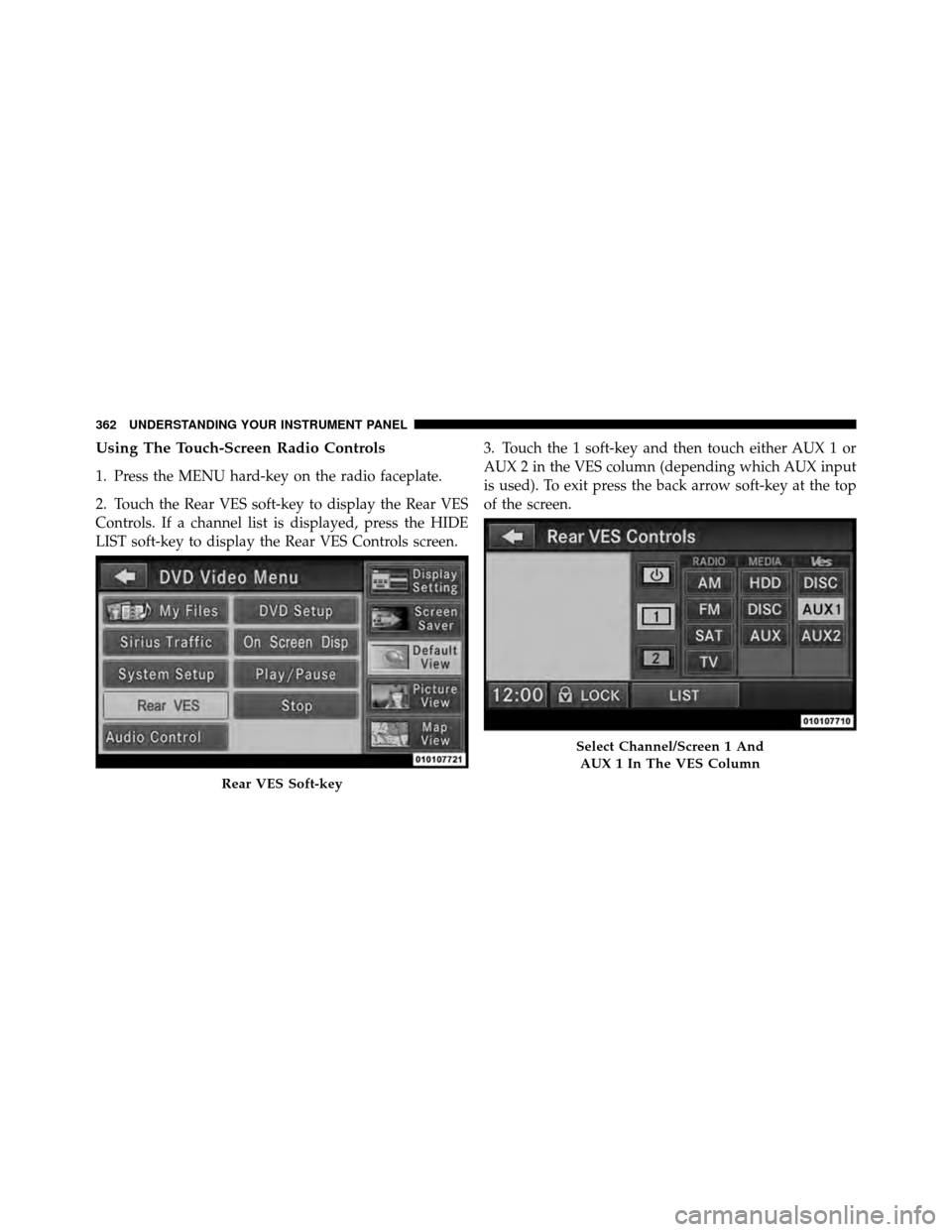
Using The Touch-Screen Radio Controls
1. Press the MENU hard-key on the radio faceplate.
2. Touch the Rear VES soft-key to display the Rear VES
Controls. If a channel list is displayed, press the HIDE
LIST soft-key to display the Rear VES Controls screen.3. Touch the 1 soft-key and then touch either AUX 1 or
AUX 2 in the VES column (depending which AUX input
is used). To exit press the back arrow soft-key at the top
of the screen.
Rear VES Soft-key
Select Channel/Screen 1 And
AUX 1 In The VES Column
362 UNDERSTANDING YOUR INSTRUMENT PANEL
Page 366 of 652
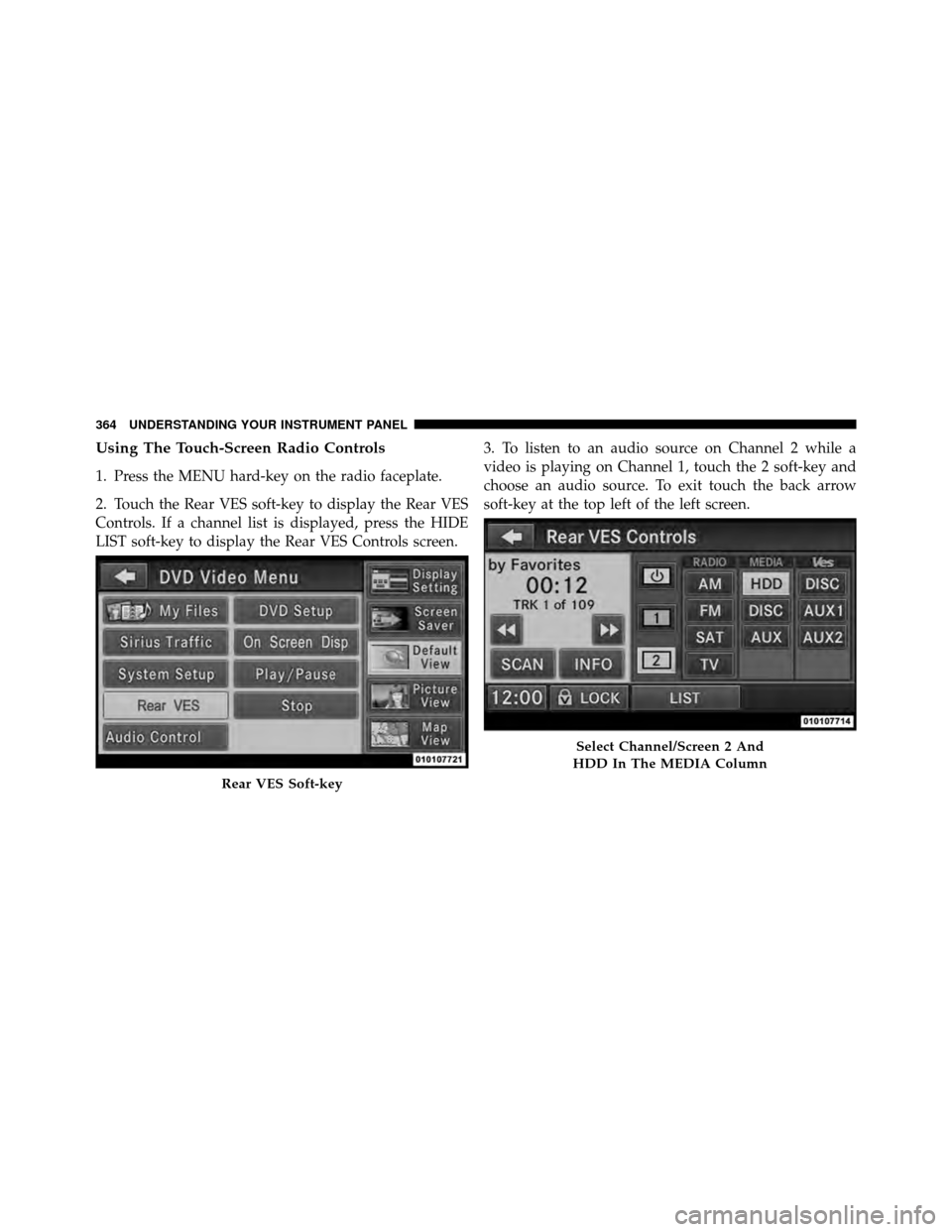
Using The Touch-Screen Radio Controls
1. Press the MENU hard-key on the radio faceplate.
2. Touch the Rear VES soft-key to display the Rear VES
Controls. If a channel list is displayed, press the HIDE
LIST soft-key to display the Rear VES Controls screen.3. To listen to an audio source on Channel 2 while a
video is playing on Channel 1, touch the 2 soft-key and
choose an audio source. To exit touch the back arrow
soft-key at the top left of the left screen.
Rear VES Soft-key
Select Channel/Screen 2 And
HDD In The MEDIA Column
364 UNDERSTANDING YOUR INSTRUMENT PANEL
Page 368 of 652
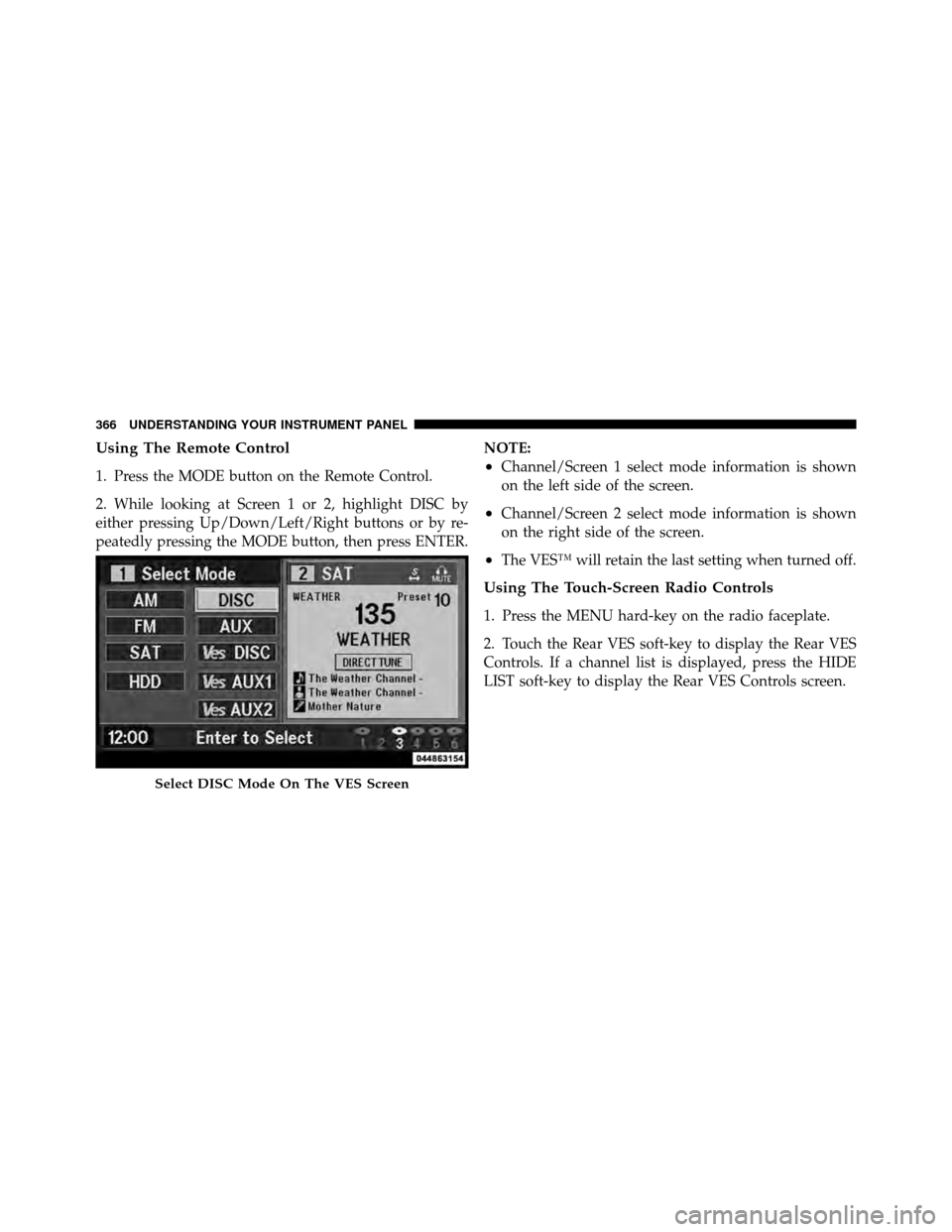
Using The Remote Control
1. Press the MODE button on the Remote Control.
2. While looking at Screen 1 or 2, highlight DISC by
either pressing Up/Down/Left/Right buttons or by re-
peatedly pressing the MODE button, then press ENTER.NOTE:•Channel/Screen 1 select mode information is shown
on the left side of the screen.
•Channel/Screen 2 select mode information is shown
on the right side of the screen.
•The VES™ will retain the last setting when turned off.
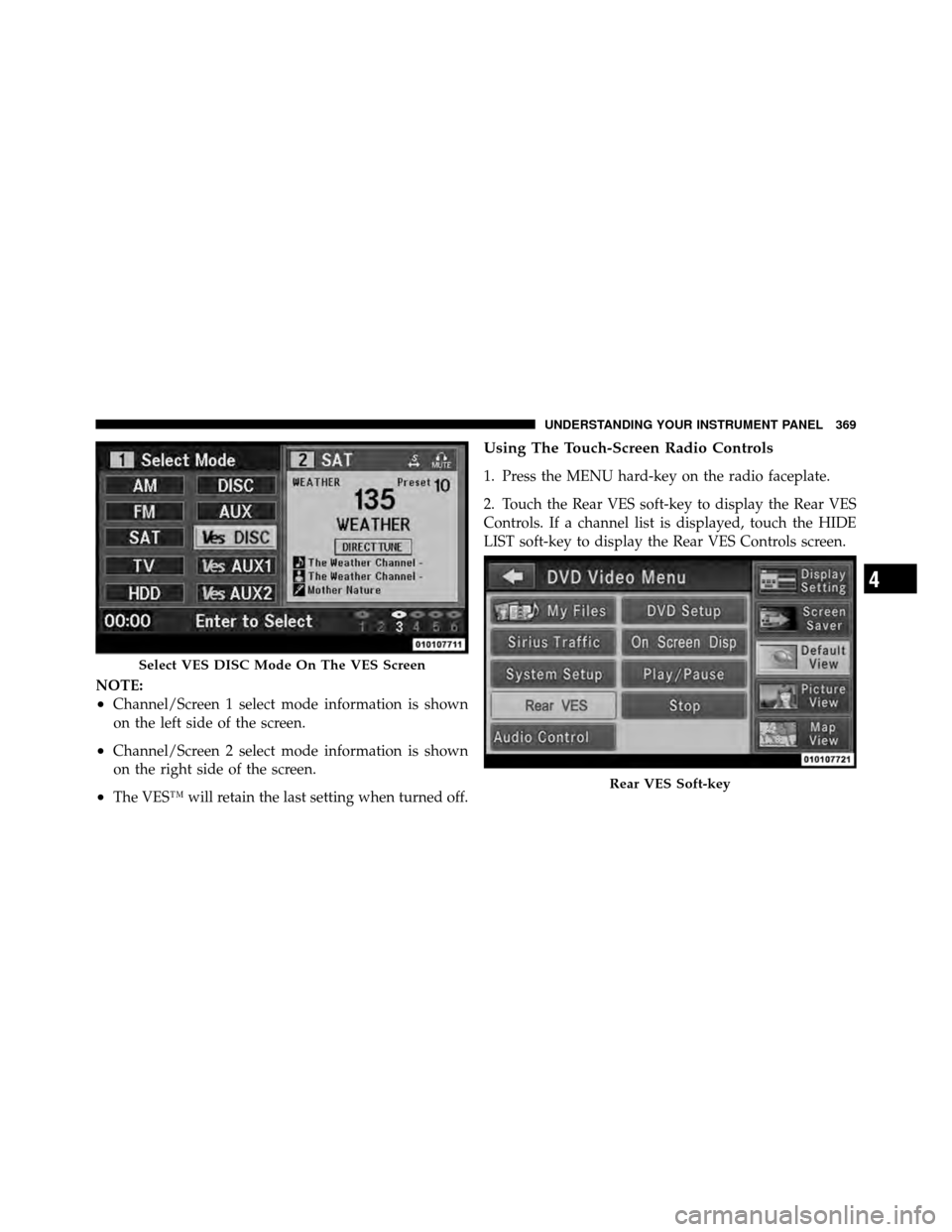
Using The Touch-Screen Radio Controls
1. Press the MENU hard-key on the radio faceplate.
2. Touch the Rear VES soft-key to display the Rear VES
Controls. If a channel list is displayed, press the HIDE
LIST soft-key to display the Rear VES Controls screen.
Select DISC Mode On The VES Screen
366 UNDERSTANDING YOUR INSTRUMENT PANEL
Page 371 of 652
NOTE:
•Channel/Screen 1 select mode information is shown
on the left side of the screen.
•Channel/Screen 2 select mode information is shown
on the right side of the screen.
•The VES™ will retain the last setting when turned off.
Using The Touch-Screen Radio Controls
1. Press the MENU hard-key on the radio faceplate.
2. Touch the Rear VES soft-key to display the Rear VES
Controls. If a channel list is displayed, touch the HIDE
LIST soft-key to display the Rear VES Controls screen.
Select VES DISC Mode On The VES Screen
Rear VES Soft-key
4
UNDERSTANDING YOUR INSTRUMENT PANEL 369
Page 374 of 652
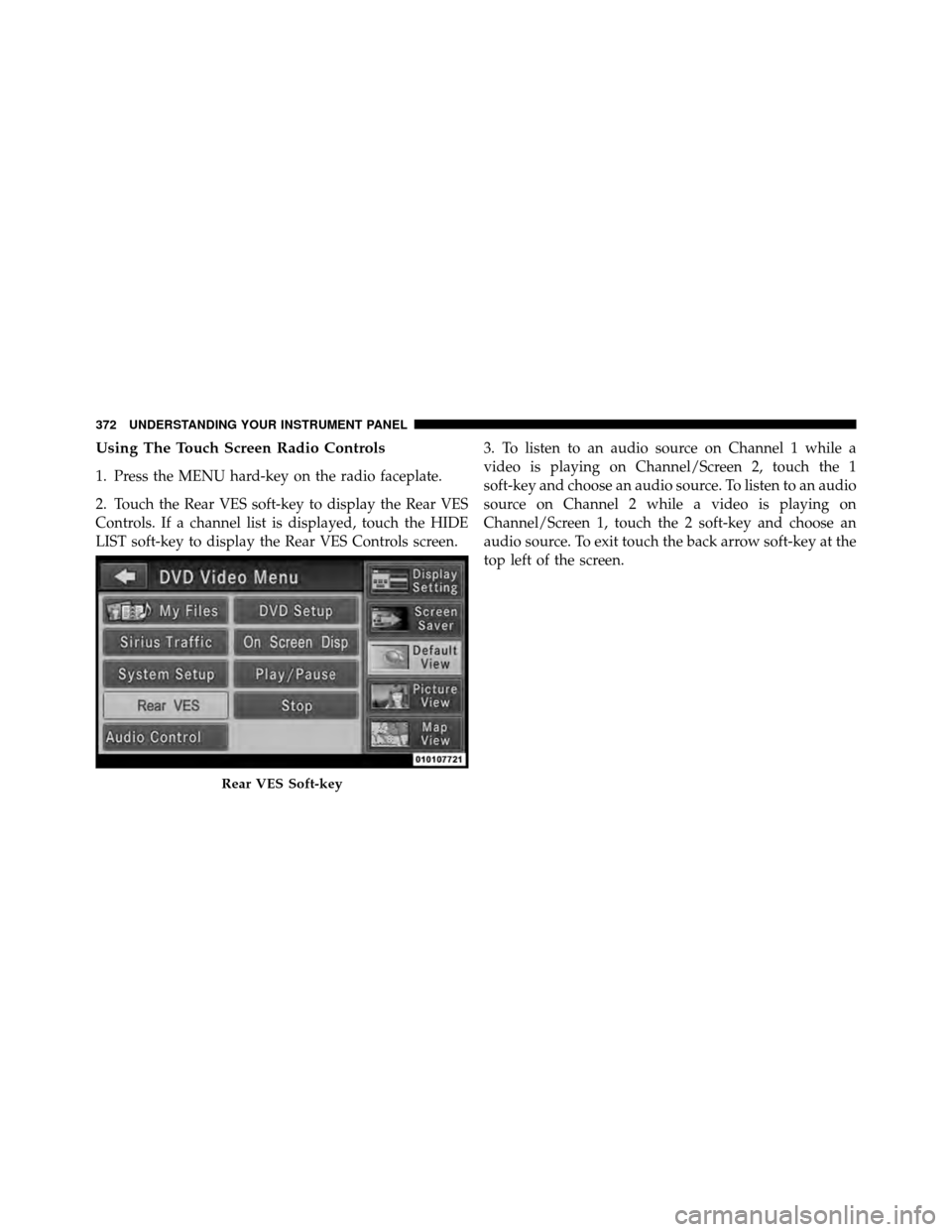
Using The Touch Screen Radio Controls
1. Press the MENU hard-key on the radio faceplate.
2. Touch the Rear VES soft-key to display the Rear VES
Controls. If a channel list is displayed, touch the HIDE
LIST soft-key to display the Rear VES Controls screen.3. To listen to an audio source on Channel 1 while a
video is playing on Channel/Screen 2, touch the 1
soft-key and choose an audio source. To listen to an audio
source on Channel 2 while a video is playing on
Channel/Screen 1, touch the 2 soft-key and choose an
audio source. To exit touch the back arrow soft-key at the
top left of the screen.
Rear VES Soft-key
372 UNDERSTANDING YOUR INSTRUMENT PANEL