Page 69 of 557
•Turn on the interior lights, which remain on as long as
the battery has power, until the ignition key is re-
moved or the ignition switch is changed to OFF using
the Keyless Go Start/Stop button.
•Unlock the doors automatically.
In order to reset the Enhanced Accident Response System
functions after an event, the ignition switch must be
changed from IGN ON to IGN OFF.
If A Deployment Occurs
The Advanced Front Air Bags are designed to deflate
immediately after deployment.
NOTE: Front and/or side air bags will not deploy in all
collisions. This does not mean something is wrong with
the air bag system. If you do have a collision which deploys the air bags, any
or all of the following may occur:
•The nylon air bag material may sometimes cause
abrasions and/or skin reddening to the driver and
front passenger as the air bags deploy and unfold. The
abrasions are similar to friction rope burns or those
you might get sliding along a carpet or gymnasium
floor. They are not caused by contact with chemicals.
They are not permanent and normally heal quickly.
However, if you haven’t healed significantly within a
few days, or if you have any blistering, see your doctor
immediately.
•As the air bags deflate, you may see some smoke-like
particles. The particles are a normal by-product of the
process that generates the non-toxic gas used for air
bag inflation. These airborne particles may irritate the
skin, eyes, nose, or throat. If you have skin or eye
irritation, rinse the area with cool water. For nose or
2
THINGS TO KNOW BEFORE STARTING YOUR VEHICLE 67
Page 79 of 557
Installing The LATCH-Compatible Child Restraint
System
We urge you to follow the manufacturer’s directions
carefully when installing your child restraint. Not all
child restraint systems will be installed as described here.
Again, carefully follow the installation instructions that
are provided with the child restraint system.The rear seat lower anchorages are round bars
located at the rear of the seat cushion where it
meets the seatback and are located just below
the button with the anchorage symbol on the
rear seat, but are not visible. You will easily feel them if
you run your finger along the intersection of the seatback
and seat cushion surfaces. In addition, there are tether strap anchorages
behind each rear seating position located in the
panel between the rear seatback and the rear
window. These tether strap anchorages are
under a plastic cover with this symbol on it.
Many, but not all, restraint systems will be equipped with
separate straps on each side, with each having a hook or
connector for attachment to the lower anchorage and a
means of adjusting the tension in the strap. Forward-
facing toddler restraints and some rear-facing infant
restraints will also be equipped with a tether strap, a
hook for attachment to the tether strap anchorage and a
means of adjusting the tension of the strap.
2
THINGS TO KNOW BEFORE STARTING YOUR VEHICLE 77
Page 80 of 557
You will first loosen the child seat adjusters on the lower
straps and on the tether strap so that you can more easily
attach the hooks or connectors to the vehicle anchorages.
Next, attach the lower hooks or connectors over the top
of the seat cover material. Then, rotate the tether anchor-
age cover directly behind the seat where you are placing
the child restraint and attach the tether strap to the
anchorage, being careful to route the tether strap to
provide the most direct path between the anchor and the
child restraint. Finally, tighten all three straps as you
push the child restraint rearward and downward into the
seat, removing slack in the straps according to the child
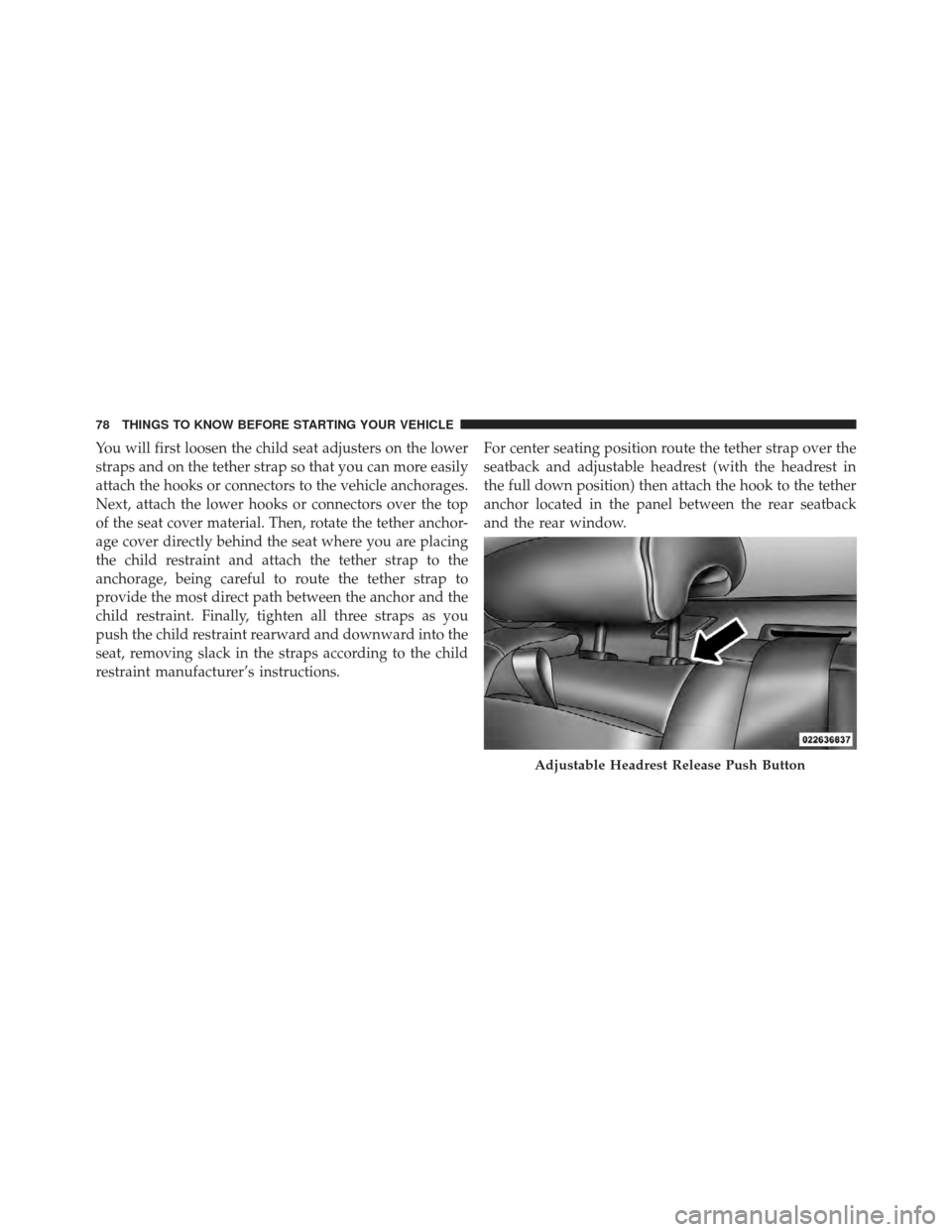
restraint manufacturer’s instructions.For center seating position route the tether strap over the
seatback and adjustable headrest (with the headrest in
the full down position) then attach the hook to the tether
anchor located in the panel between the rear seatback
and the rear window.
Adjustable Headrest Release Push Button
78 THINGS TO KNOW BEFORE STARTING YOUR VEHICLE
Page 99 of 557
Outside Mirrors
To receive maximum benefit, adjust the outside mirror(s)
to center on the adjacent lane of traffic and a slight
overlap of the view obtained from the inside mirror.
NOTE:The passenger side convex outside mirror will
give a much wider view to the rear, and especially of the
lane next to your vehicle.
WARNING!
Vehicles and other objects seen in the passenger side
convex mirror will look smaller and farther away
than they really are. Relying too much on your
passenger side convex mirror could cause you to
collide with another vehicle or other object. Use your
inside mirror when judging the size or distance of a
vehicle seen in the passenger side convex mirror.
Outside Mirrors Folding Feature — If Equipped
Some models have outside mirrors that are hinged. The
hinge allows the mirror to pivot forward and rearward to
resist damage. The hinge has three detent positions: full
forward, full rearward and normal.
Driver’s Automatic Dimming Mirror — If Equipped
The driver’s outside mirror will automatically adjust for
glare from vehicles behind you. This feature is controlled
by the inside automatic dimming mirror and can be
turned on or off by pressing the button at the base of the
inside mirror. The mirror will automatically adjust for
headlight glare when the inside mirror adjusts.
NOTE: This feature is also available on the passenger’s
side when equipped with turn signal and approach
lighting.
3
UNDERSTANDING THE FEATURES OF YOUR VEHICLE 97
Page 101 of 557
Power Mirrors
The power mirror controls are located on the driver’s
door trim panel.The power mirror controls consist of mirror select but-
tons and a four-way mirror control switch. To adjust a
mirror, press either the L (left) or R (right) to select button
the mirror that you want to adjust.
NOTE:
A light in the select button will illuminate
indicating the mirror is activated and can be adjusted.
Using the mirror control switch, press on any of the four
arrows for the direction that you want the mirror to
move.
Power mirror preselected positions can be controlled by
the optional Memory Seat Feature. Refer to “Driver
Memory Seat” in “Understanding The Features Of Your
Vehicle” for further information.
Power Mirror Control
3
UNDERSTANDING THE FEATURES OF YOUR VEHICLE 99
Page 114 of 557
long as your phone is turned on and has been paired to
the vehicle’s Uconnect™ Phone. The Uconnect™ Phone
allows up to ten mobile phones or audio devices to be
linked to the system. Only one linked (or paired) mobile
phone and one audio device can be used with the system
at a time. The system is available in English, Spanish, or
French languages.
Uconnect™ Phone ButtonThe Uconnect™ Phone
Button is used to
get into the phone mode and make calls, show
recent, incoming, outgoing calls, view phone-
book etc., When you press the button you will
hear a BEEP. The beep is your signal to give a command. Uconnect™ Voice Command Button
The Uconnect™ Voice CommandButton
is only used for “barge in” and when you are
already in a call and you want to send Tones or
make another call.
The
button is also used to access the Voice Com-
mands for the Uconnect™ Voice Command features if your
vehicle is equipped. Please see the Uconnect™ Voice Com-
mand section for direction on how to use the
button.
The Uconnect™ Phone is fully integrated with the vehicle’s
audio system. The volume of the Uconnect™ Phone can be
adjusted either from the radio volume control knob or from
the steering wheel radio control (right switch), if so
equipped.
112 UNDERSTANDING THE FEATURES OF YOUR VEHICLE
Page 116 of 557
Natural Speech
Your Uconnect™ Phone Voice system uses a Natural
Language Voice Recognition (VR) engine.
Natural speech allows the user to speak commands in
phrases or complete sentences. The system filters out
certain non-word utterances and sounds such as “ah” and
“eh”. The system handles fill-in words such as “I would
like to”.
The system handles multiple inputs in the same phrase
or sentence such as “make a phone call” and “to Kelly
Smith”. For multiple inputs in the same phrase or sen-
tence, the system identifies the topic or context and
provides the associated follow-up prompt such as “Who
do you want to call?” in the case where a phone call was
requested but the specific name was not recognized.
The system utilizes continuous dialog; when the system
requires more information from the user it will ask a
question to which the user can respond without pressing
the Voice Command
button.
Voice Command Tree
Refer to “Voice Tree” in this section.
Help Command
If you need assistance at any prompt, or if you want to
know your options at any prompt, say “Help” following
the beep.
To activate the Uconnect™ Phone from idle, simply press
the
button and say a command or say “help”.
All Uconnect™ Phone sessions begin with a press of the
button on the radio control head.
Cancel Command
At any prompt, after the beep, you can say “Cancel” and
you will be returned to the main menu.
You can also press the
orbuttons when the
system is listening for a command and be returned to the
main or previous menu.
114 UNDERSTANDING THE FEATURES OF YOUR VEHICLE
Page 117 of 557
NOTE:Pressing theorbuttons while the
system is playing is known as “Barging In”, refer to
“Barge In — Overriding Prompts” for further
information.
Pair (Link) Uconnect™ Phone To A Mobile Phone
To begin using your Uconnect™ Phone, you must pair
your compatible Bluetooth� enabled mobile phone.
To complete the pairing process, you will need to refer-
ence your mobile phone Owner’s Manual. The
Uconnect™ website may also provide detailed instruc-
tions for pairing.
NOTE:
•You must have Bluetooth� enabled on your phone to
complete this procedure.
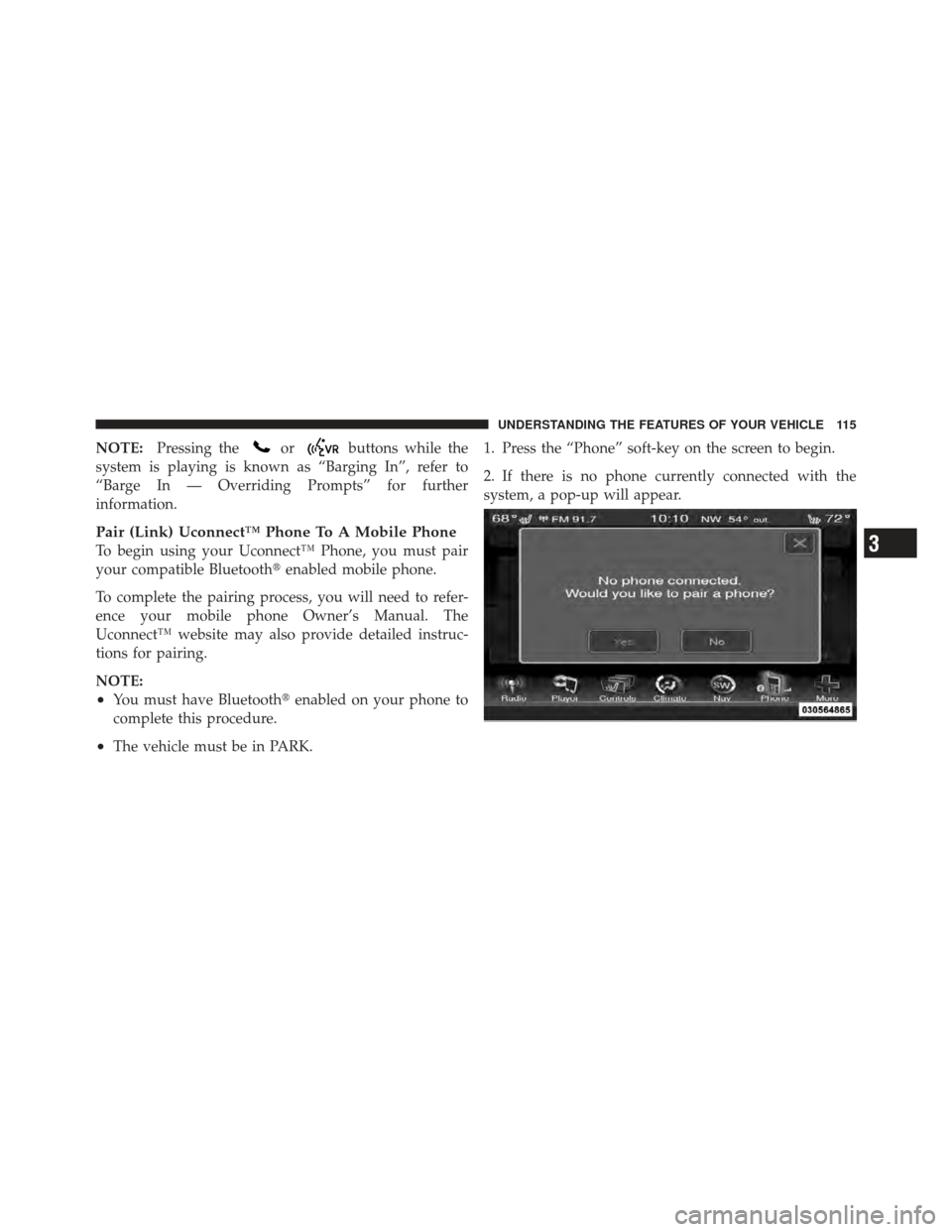
•The vehicle must be in PARK. 1. Press the “Phone” soft-key on the screen to begin.
2. If there is no phone currently connected with the
system, a pop-up will appear.
3
UNDERSTANDING THE FEATURES OF YOUR VEHICLE 115