Page 197 of 576

The switch is located on the front side of the driver’s seat
cushion side shield.
Press the switch forward to move the pedals forward
(toward the front of the vehicle).
Press the switch rearward to move the pedals rearward
(toward the driver).•The pedals can be adjusted with the ignition OFF.
•The pedalscannotbe adjusted when the vehicle is in
REVERSE or when the Electronic Speed Control Sys-
tem is on. The following messages will be displayed
on vehicles equipped with the Electronic Vehicle In-
formation System (EVIC) if the pedals are attempted to
be adjusted when the system is locked out (“Adjust-
able Pedal Disabled — Cruise Control Engaged” or
“Adjustable Pedal Disabled — Vehicle In Reverse”.
NOTE:For vehicles equipped with Driver Memory
Seat, you can use your Remote Keyless Entry (RKE)
transmitter or the memory switch on the driver’s door
trim panel to return the adjustable pedals to pre-
programmed positions. Refer to “Driver Memory Seat”
in “Understanding The Features Of Your Vehicle” for
further information.
Adjustable Pedals Switch
3
UNDERSTANDING THE FEATURES OF YOUR VEHICLE 195
Page 217 of 576

When the condition that deactivated the system is no
longer present, the system will return to the “Adaptive
Cruise Control Off” state and will resume function by
simply reactivating it.
NOTE:Installing a vehicle front-end protector or an
aftermarket grille or modifying the grille is not recom-
mended. Doing so may block the sensor and inhibit ACC
operation.
ACC Unavailable Warning
If the system turns off, and the EVIC displays “Adaptive
Cruise Control (ACC) Unavailable”, there may be a
temporary malfunction that limits ACC functionality.
Although the vehicle is still drivable under normal
conditions, ACC will be temporarily unavailable. If this
occurs, try activating ACC again later, following a key
cycle. If the problem persists, see your authorized dealer.
Service ACC Warning
If the system turns off, and the EVIC displays “ACC/
FCW Unavailable Service Radar Sensor”, it indicates
there is an internal system fault. Although the vehicle is
still drivable under normal conditions, have the system
checked by an authorized dealer.
Adaptive Cruise Control (ACC) Unavailable Warning
3
UNDERSTANDING THE FEATURES OF YOUR VEHICLE 215
Page 226 of 576
FCW Unavailable Warning
If the system turns off, and the EVIC displays “ACC/
FCW Unavailable, Vehicle System Error”, there may be a
temporary malfunction that limits FCW functionality.
Although the vehicle is still drivable under normal
conditions, FCW will be temporarily unavailable. If this
occurs, try activating FCW again later, following a key
cycle. If the problem persists, see your authorized dealer.
Service FCW Warning
If the system turns off, and the EVIC displays “ACC/
FCW Unavailable Service Radar Sensor”, it indicates
there is an internal system fault. Although the vehicle is
still drivable under normal conditions, have the system
checked by an authorized dealer.
ACC/FCW Unavailable, Vehicle System Error Warning
224 UNDERSTANDING THE FEATURES OF YOUR VEHICLE
Page 233 of 576

Front Park Assist Audible Alerts
ParkSense�will turn off the Front Park Assist audible
alert (chime) after approximately 3 seconds when an
obstacle has been detected, the vehicle is stationary, and
brake pedal is applied.
Enabling And Disabling ParkSense�
ParkSense�can be enabled and disabled using the
Uconnect Touch™ System. The available choices are: Off,
Sound Only, or Sound and Display. Refer to “Uconnect
Touch™ Settings” in “Understanding Your Instrument
Panel” for further information.
When the ParkSense�soft-key is pressed to disable the
system, the EVIC will display the “PARK ASSIST SYS-
TEM OFF” message for approximately five seconds.
Refer to “Electronic Vehicle Information Center (EVIC)”
in “Understanding Your Instrument Panel” for further
information. When the shift lever is moved to REVERSE
or to DRIVE (at or below 7 mph [11 km/h]) and thesystem is disabled, the EVIC will display the “PARK
ASSIST SYSTEM OFF” message for approximately five
seconds in REVERSE or for 5 seconds when the vehicle is
in DRIVE.
Service The ParkSense�Park Assist System
When the ParkSense�Park Assist System is malfunction-
ing, the instrument cluster will actuate a single chime,
once per ignition cycle. The instrument cluster will
display the “CLEAN PARK ASSIST” message when any
of the rear or front sensor(s) are blocked by snow, mud, or
ice and the vehicle is shifted into REVERSE or DRIVE.
The instrument cluster will display the “SERVICE PARK
ASSIST” message when any of the rear or front sensors
are damaged and require service. When the shift lever is
moved to REVERSE or DRIVE and the system has
detected a faulted condition, the EVIC will display the
“CLEAN PARK ASSIST”, “SERVICE PARK ASSIST” or
the “SERVICE PARK ASSIST SYSTEM” message for as
long as the vehicle is in REVERSE or DRIVE (at speeds3
UNDERSTANDING THE FEATURES OF YOUR VEHICLE 231
Page 234 of 576
![CHRYSLER 300 2012 2.G Owners Manual less than 7 mph [11 km/h]). Under this condition
ParkSense�will not operate. Refer to “Electronic Vehicle
Information Center (EVIC)” in “Understanding Your
Instrument Panel” for further inform](/manual-img/25/8421/w960_8421-233.png "CHRYSLER 300 2012 2.G Owners Manual less than 7 mph [11 km/h]). Under this condition
ParkSense�will not operate. Refer to “Electronic Vehicle
Information Center (EVIC)” in “Understanding Your
Instrument Panel” for further inform")
less than 7 mph [11 km/h]). Under this condition
ParkSense�will not operate. Refer to “Electronic Vehicle
Information Center (EVIC)” in “Understanding Your
Instrument Panel” for further information.
If “CLEAN PARK ASSIST” appears in the Electronic
Vehicle Information Center (EVIC) make sure the outer
surface and the underside of the rear fascia/bumper
and/or front fascia/bumper is clean and clear of snow,
ice, mud, dirt or other obstruction and then cycle the
ignition. If the message continues to appear see an
authorized dealer.
If “SERVICE PARK ASSIST�or “SERVICE PARK ASSIST
SYSTEM” appears in the EVIC, see an authorized dealer.
Cleaning The ParkSense�System
Clean the ParkSense�sensors with water, car wash soap
and a soft cloth. Do not use rough or hard cloths. Do not
scratch or poke the sensors. Otherwise, you could dam-
age the sensors.
ParkSense�System Usage Precautions
NOTE:
•Ensure that the front and rear bumper are free of snow,
ice, mud, dirt and debris to keep the ParkSense�
system operating properly.
•Jackhammers, large trucks, and other vibrations could
affect the performance of ParkSense�.
•When you turn ParkSense�off, the EVIC will display
“PARK ASSIST SYSTEM OFF.” Furthermore, once you
turn ParkSense�off, it remains off until you turn it on
again, even if you cycle the ignition key.
•When you move the shift lever to the REVERSE or
DRIVE position and ParkSense�is turned off, the
EVIC will display “PARK ASSIST SYSTEM OFF”
message for approximately five seconds in REVERSE
or for 5 seconds when the vehicle is in DRIVE.
232 UNDERSTANDING THE FEATURES OF YOUR VEHICLE
Page 238 of 576
WARNING!
Drivers must be careful when backing up even when
using the ParkView�Rear Back Up Camera. Always
check carefully behind your vehicle, and be sure to
check for pedestrians, animals, other vehicles, ob-
structions, or blind spots before backing up. You are
responsible for the safety of your surroundings and
must continue to pay attention while backing up.
Failure to do so can result in serious injury or death.
CAUTION!
•To avoid vehicle damage, ParkView�should only
be used as a parking aid. The ParkView�camera is
unable to view every obstacle or object in your
drive path.
(Continued)
CAUTION! (Continued)
•To avoid vehicle damage, the vehicle must be
driven slowly when using ParkView�to be able to
stop in time when an obstacle is seen. It is recom-
mended that the driver look frequently over his/
her shoulder when using ParkView�.
NOTE:If snow, ice, mud, or any foreign substance
builds up on the camera lens, clean the lens, rinse with
water, and dry with a soft cloth. Do not cover the lens.
Turning ParkView�On Or Off — With Touch
Screen Radio
1. Turn the Radio on.
2. Press the “More” soft-key.
3. Press the “Settings” soft-key.
4. Press the “Safety & Driving Assistance” soft-key.
5. Press the check box soft key next to “Parkview�
Backup Camera” to enable/disable.
236 UNDERSTANDING THE FEATURES OF YOUR VEHICLE
Page 250 of 576
WARNING!
•Never leave children in a vehicle with the key in
the ignition switch. Occupants, particularly unat-
tended children, can become entrapped by the
power sunroof while operating the power sunroof
switch. Such entrapment may result in serious
injury or death.
•In a collision, there is a greater risk of being
thrown from a vehicle with an open sunroof. You
could also be seriously injured or killed. Always
fasten your seat belt properly and make sure all
passengers are properly secured too.
•Do not allow small children to operate the sun-
roof. Never allow your fingers, other body parts, or
any object to project through the sunroof opening.
Injury may result.
Opening Sunroof — Express
Press the switch rearward and release it within one-half
second and the sunroof will open automatically from any
position. The sunroof will open fully and stop automati-
cally. This is called “Express Open”. During Express
Open operation, any movement of the sunroof switch
will stop the sunroof.
Opening Sunroof — Manual Mode
To open the sunroof, press and hold the switch rearward
to full open. Any release of the switch will stop the
movement and the sunroof will remain in a partially
opened condition until the switch is pushed and held
rearward again.
Closing Sunroof — Express
Press the switch forward and release it within one-half
second and the sunroof will close automatically from any
position. The sunroof will close fully and stop automatically.
This is called “Express Close”. During Express Close opera-
tion, any movement of the switch will stop the sunroof.
248 UNDERSTANDING THE FEATURES OF YOUR VEHICLE
Page 253 of 576
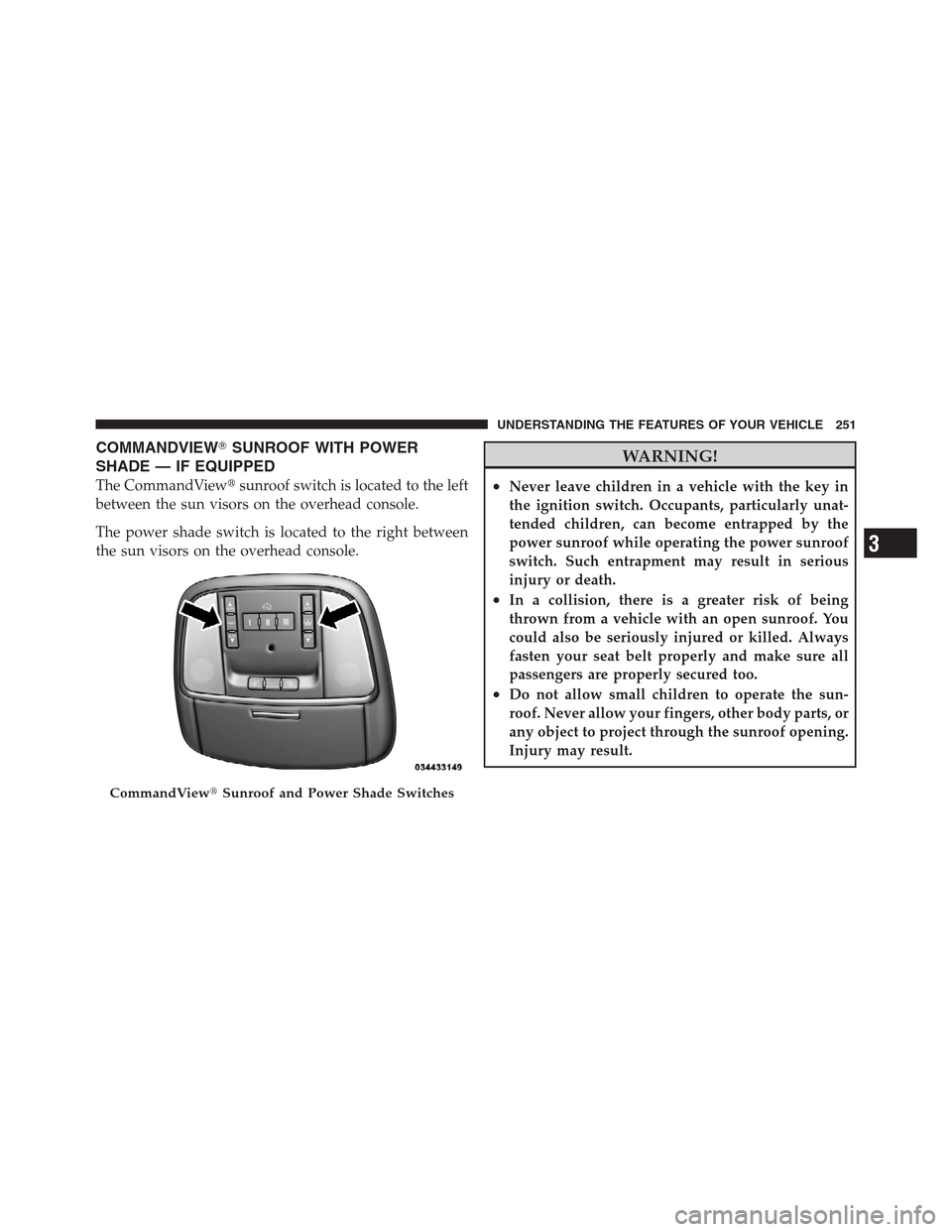
COMMANDVIEW�SUNROOF WITH POWER
SHADE — IF EQUIPPED
The CommandView�sunroof switch is located to the left
between the sun visors on the overhead console.
The power shade switch is located to the right between
the sun visors on the overhead console.
WARNING!
•Never leave children in a vehicle with the key in
the ignition switch. Occupants, particularly unat-
tended children, can become entrapped by the
power sunroof while operating the power sunroof
switch. Such entrapment may result in serious
injury or death.
•In a collision, there is a greater risk of being
thrown from a vehicle with an open sunroof. You
could also be seriously injured or killed. Always
fasten your seat belt properly and make sure all
passengers are properly secured too.
•Do not allow small children to operate the sun-
roof. Never allow your fingers, other body parts, or
any object to project through the sunroof opening.
Injury may result.
CommandView�Sunroof and Power Shade Switches
3
UNDERSTANDING THE FEATURES OF YOUR VEHICLE 251
