Page 77 of 576
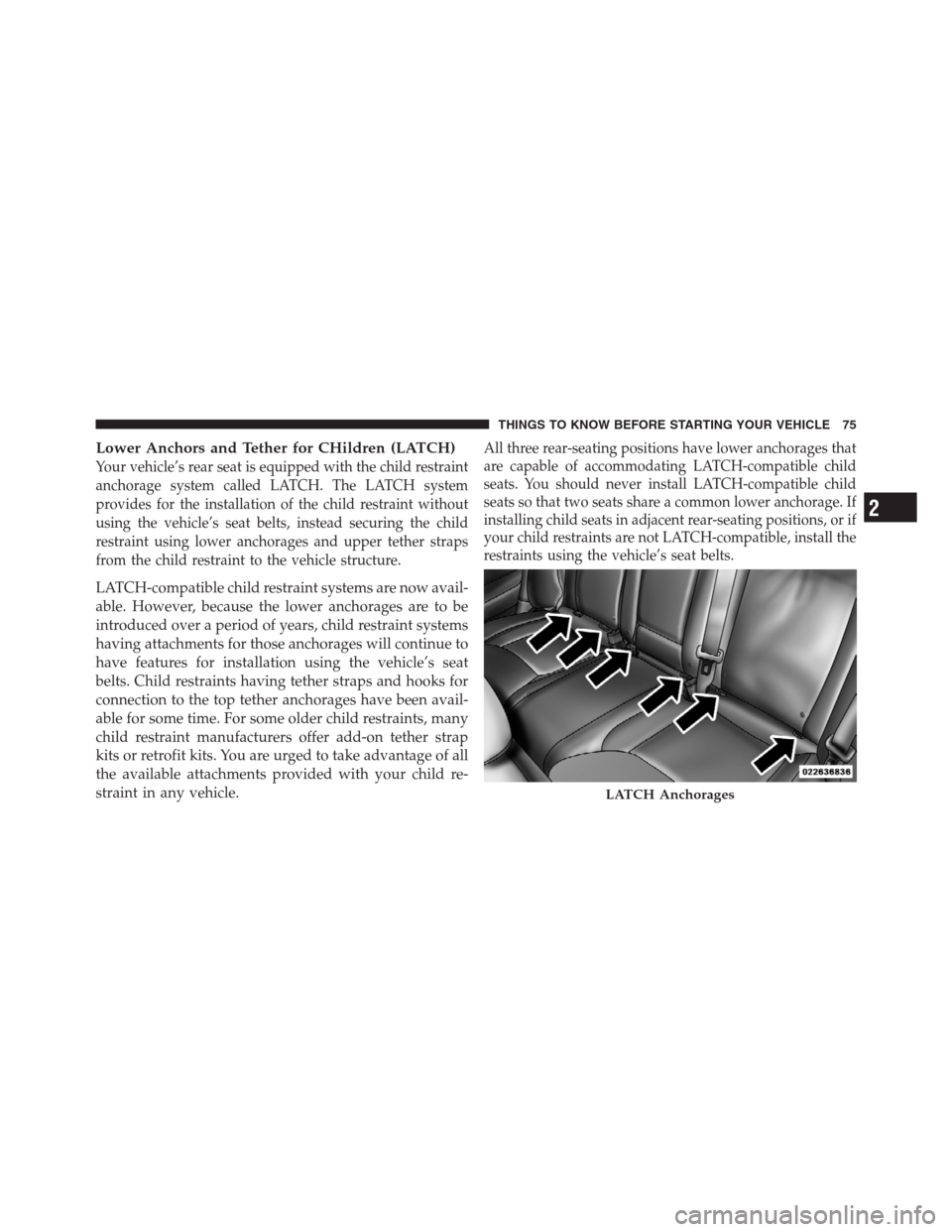
Lower Anchors and Tether for CHildren (LATCH)
Your vehicle’s rear seat is equipped with the child restraint
anchorage system called LATCH. The LATCH system
provides for the installation of the child restraint without
using the vehicle’s seat belts, instead securing the child
restraint using lower anchorages and upper tether straps
from the child restraint to the vehicle structure.
LATCH-compatible child restraint systems are now avail-
able. However, because the lower anchorages are to be
introduced over a period of years, child restraint systems
having attachments for those anchorages will continue to
have features for installation using the vehicle’s seat
belts. Child restraints having tether straps and hooks for
connection to the top tether anchorages have been avail-
able for some time. For some older child restraints, many
child restraint manufacturers offer add-on tether strap
kits or retrofit kits. You are urged to take advantage of all
the available attachments provided with your child re-
straint in any vehicle.
All three rear-seating positions have lower anchorages that
are capable of accommodating LATCH-compatible child
seats. You should never install LATCH-compatible child
seats so that two seats share a common lower anchorage. If
installing child seats in adjacent rear-seating positions, or if
your child restraints are not LATCH-compatible, install the
restraints using the vehicle’s seat belts.
LATCH Anchorages
2
THINGS TO KNOW BEFORE STARTING YOUR VEHICLE 75
Page 80 of 576
WARNING!
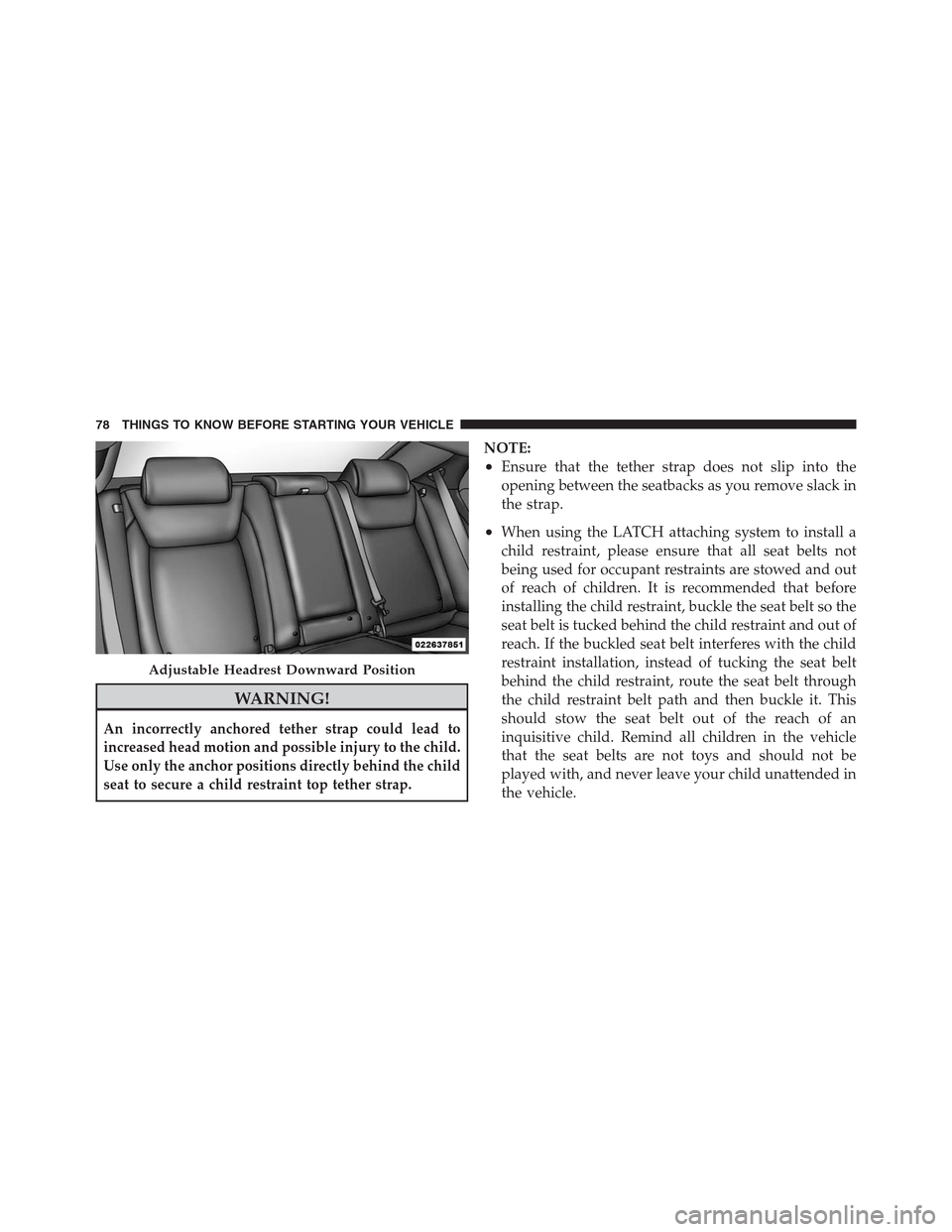
An incorrectly anchored tether strap could lead to
increased head motion and possible injury to the child.
Use only the anchor positions directly behind the child
seat to secure a child restraint top tether strap.
NOTE:
•Ensure that the tether strap does not slip into the
opening between the seatbacks as you remove slack in
the strap.
•When using the LATCH attaching system to install a
child restraint, please ensure that all seat belts not
being used for occupant restraints are stowed and out
of reach of children. It is recommended that before
installing the child restraint, buckle the seat belt so the
seat belt is tucked behind the child restraint and out of
reach. If the buckled seat belt interferes with the child
restraint installation, instead of tucking the seat belt
behind the child restraint, route the seat belt through
the child restraint belt path and then buckle it. This
should stow the seat belt out of the reach of an
inquisitive child. Remind all children in the vehicle
that the seat belts are not toys and should not be
played with, and never leave your child unattended in
the vehicle.
Adjustable Headrest Downward Position
78 THINGS TO KNOW BEFORE STARTING YOUR VEHICLE
Page 81 of 576
WARNING!
Improper installation of a child restraint to the
LATCH anchorages can lead to failure of an infant or
child restraint. The child could be badly injured or
killed. Follow the manufacturer’s directions exactly
when installing an infant or child restraint.
Installing Child Restraints Using The Vehicle Seat
Belts
The seat belts in the passenger seating positions are
equipped with an Automatic Locking Retractor (ALR) to
secure a Child Restraint System (CRS). These types of
seat belts are designed to keep the lap portion of the seat
belt tight around the child restraint so that it is not
necessary to use a locking clip. The ALR will make a
ratcheting noise if you extract the entire belt from the
retractor and then allow the belt to retract into the
retractor. For additional information on ALR, refer to“Automatic Locking Mode”. The chart below defines the
seating positions with an Automatic Locking Retractor
(ALR) or a cinching latch plate.
Driver Center Passenger
CRS Lock CRS Lock CRS Lock
First Row N/A N/A ALR
Second Row ALR ALR ALR
•N/A — Not Applicable
•ALR — Automatic Locking Retractor
1. To install a child restraint with ALR, first, pull enough
of the seat belt webbing from the retractor to route it
through the belt path of the child restraint. Slide the latch
plate into the buckle until you hear a click. Next, extract
all the seat belt webbing out of the retractor and then
allow the belt to retract into the retractor. As the belt
retracts, you will hear a ratcheting sound. This indicates
the safety belt is now in the Automatic Locking mode.
2
THINGS TO KNOW BEFORE STARTING YOUR VEHICLE 79
Page 83 of 576
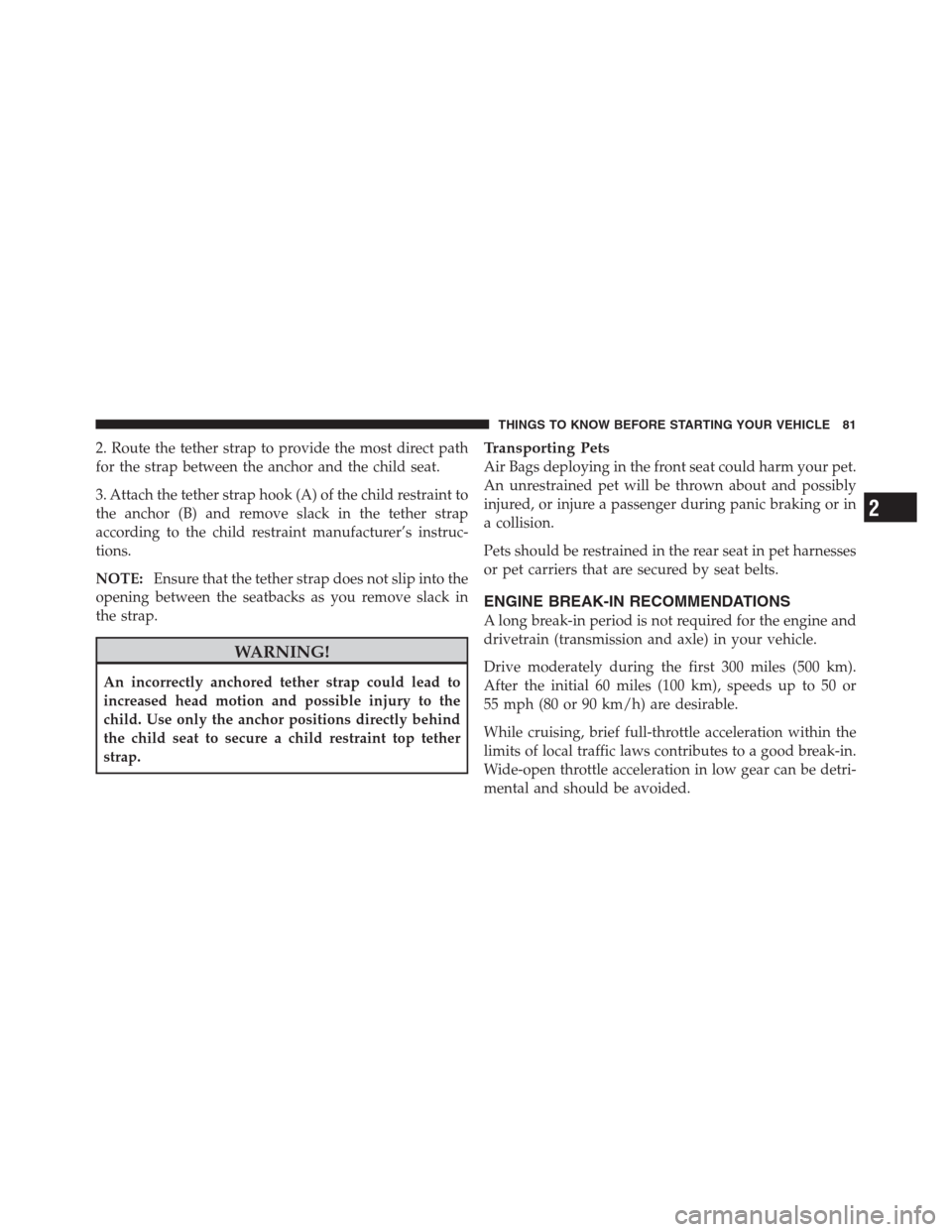
2. Route the tether strap to provide the most direct path
for the strap between the anchor and the child seat.
3. Attach the tether strap hook (A) of the child restraint to
the anchor (B) and remove slack in the tether strap
according to the child restraint manufacturer’s instruc-
tions.
NOTE:Ensure that the tether strap does not slip into the
opening between the seatbacks as you remove slack in
the strap.
WARNING!
An incorrectly anchored tether strap could lead to
increased head motion and possible injury to the
child. Use only the anchor positions directly behind
the child seat to secure a child restraint top tether
strap.
Transporting Pets
Air Bags deploying in the front seat could harm your pet.
An unrestrained pet will be thrown about and possibly
injured, or injure a passenger during panic braking or in
a collision.
Pets should be restrained in the rear seat in pet harnesses
or pet carriers that are secured by seat belts.
ENGINE BREAK-IN RECOMMENDATIONS
A long break-in period is not required for the engine and
drivetrain (transmission and axle) in your vehicle.
Drive moderately during the first 300 miles (500 km).
After the initial 60 miles (100 km), speeds up to 50 or
55 mph (80 or 90 km/h) are desirable.
While cruising, brief full-throttle acceleration within the
limits of local traffic laws contributes to a good break-in.
Wide-open throttle acceleration in low gear can be detri-
mental and should be avoided.
2
THINGS TO KNOW BEFORE STARTING YOUR VEHICLE 81
Page 86 of 576
Safety Checks You Should Make Inside The
Vehicle
Seat Belts
Inspect the belt system periodically, checking for cuts,
frays, and loose parts. Damaged parts must be replaced
immediately. Do not disassemble or modify the system.
Front seat belt assemblies must be replaced after a
collision. Rear seat belt assemblies must be replaced after
a collision if they have been damaged (i.e., bent retractor,
torn webbing, etc.). If there is any question regarding belt
or retractor condition, replace the belt.
Air Bag Warning Light
The light should come on and remain on for four to eight
seconds as a bulb check when the ignition switch is first
turned ON. If the light is not lit during starting, see your
authorized dealer. If the light stays on, flickers, or comes
on while driving, have the system checked by an autho-
rized dealer.
Defroster
Check operation by selecting the defrost mode and place
the blower control on high speed. You should be able to
feel the air directed against the windshield. See your
authorized dealer for service if your defroster is
inoperable.
Floor Mat Safety Information
Always use floor mats designed to fit the footwell of your
vehicle. Use only floor mats that leave the pedal area
unobstructed and that are firmly secured so that they
cannot slip out of position and interfere with the pedals
or impair safe operation of your vehicle in other ways.
WARNING!
Pedals that cannot move freely can cause loss of
vehicle control and increase the risk of serious per-
sonal injury.
(Continued)
84 THINGS TO KNOW BEFORE STARTING YOUR VEHICLE
Page 87 of 576
WARNING! (Continued)
•Always make sure that floor mats are properly
attached to the floor mat fasteners.
•Never place or install floor mats or other floor
coverings in the vehicle that cannot be properly
secured to prevent them from moving and inter-
fering with the pedals or the ability to control the
vehicle.
•Never put floor mats or other floor coverings on
top of already installed floor mats. Additional
floor mats and other coverings will reduce the size
of the pedal area and interfere with the pedals.
•Check mounting of mats on a regular basis. Al-
ways properly reinstall and secure floor mats that
have been removed for cleaning.
(Continued)
WARNING! (Continued)
•Always make sure that objects cannot fall into the
driver footwell while the vehicle is moving. Ob-
jects can become trapped under the brake pedal
and accelerator pedal causing a loss of vehicle
control.
•If required, mounting posts must be properly
installed, if not equipped from the factory.
Failure to properly follow floor mat installation or
mounting can cause interference with the brake
pedal and accelerator pedal operation causing loss
of control of the vehicle.
2
THINGS TO KNOW BEFORE STARTING YOUR VEHICLE 85
Page 94 of 576
▫Canadian/Gate Operator Programming.... 244
▫Using HomeLink�................... 245
▫Security........................... 245
▫Troubleshooting Tips.................. 246
▫General Information.................. 247
�Power Sunroof — If Equipped............ 247
▫Opening Sunroof — Express............ 248
▫Opening Sunroof — Manual Mode........ 248
▫Closing Sunroof — Express............. 248
▫Closing Sunroof — Manual Mode........ 249
▫Pinch Protect Feature................. 249
▫Venting Sunroof — Express............. 249
▫Sunshade Operation.................. 249▫Wind Buffeting...................... 250
▫Sunroof Maintenance................. 250
▫Ignition Off Operation................. 250
�Commandview�Sunroof With Power Shade —
If Equipped.......................... 251
▫Opening Sunroof — Express............ 252
▫Opening Sunroof — Manual Mode........ 252
▫Closing Sunroof — Express............. 252
▫Closing Sunroof — Manual Mode........ 252
▫Opening Power Shade — Express......... 252
▫Opening Power Shade — Manual Mode.... 253
▫Closing Power Shade — Express......... 253
▫Closing Power Shade — Manual Mode..... 253
92 UNDERSTANDING THE FEATURES OF YOUR VEHICLE
Page 145 of 576
If a command is not spoken a second time, the system
will respond with an error and give some direction as
what can be said based on the context you are in. After
three consecutive failures of a spoken command the VR
session with end.
Pressing the Uconnect™ Voice Command
button
while the system is speaking is known as “barging in.”
The system will be interrupted, and after the beep, you
can say a command. This will become helpful once you
start to learn the options.
NOTE:At any time, you can say the words “Cancel” or
“Help”.
These commands are universal and can be used from any
menu. All other commands can be used depending upon
the active application.When using this system, you should speak clearly and at
a normal speaking volume.
The system will best recognize your speech if the win-
dows are closed, and the heater/air conditioning fan is
set to low.
At any point, if the system does not recognize one of your
commands, you will be prompted to repeat it.
To hear available commands, press the Uconnect™ Voice
Command
button and say “Help”. You will hear
available commands for the screen displayed.
3
UNDERSTANDING THE FEATURES OF YOUR VEHICLE 143