Page 67 of 517

•Unlock the doors automatically.
In order to reset the Enhanced Accident Response System
functions after an event, the ignition switch must be
changed from IGN ON to IGN OFF.
If A Deployment Occurs
The Advanced Front Air Bags are designed to deflate
immediately after deployment.
NOTE: Front and/or side air bags will not deploy in all
collisions. This does not mean something is wrong with
the air bag system.
If you do have a collision, which deploys the air bags, any
or all of the following may occur:
•The nylon air bag material may sometimes cause
abrasions and/or skin reddening to the driver and
front passenger as the air bags deploy and unfold. The
abrasions are similar to friction rope burns or those
you might get sliding along a carpet or gymnasium floor. They are not caused by contact with chemicals.
They are not permanent and normally heal quickly.
However, if you haven’t healed significantly within a
few days, or if you have any blistering, see your doctor
immediately.
•As the air bags deflate, you may see some smoke-like
particles. The particles are a normal by-product of the
process that generates the non-toxic gas used for air
bag inflation. These airborne particles may irritate the
skin, eyes, nose, or throat. If you have skin or eye
irritation, rinse the area with cool water. For nose or
throat irritation, move to fresh air. If the irritation
continues, see your doctor. If these particles settle on
your clothing, follow the garment manufacturer’s in-
structions for cleaning.
Do not drive your vehicle after the air bags have de-
ployed. If you are involved in another collision, the air
bags will not be in place to protect you.
2
THINGS TO KNOW BEFORE STARTING YOUR VEHICLE 65
Page 69 of 517

WARNING! (Continued)
•Do not attempt to modify any part of your air bag
system. The air bag may inflate accidentally or
may not function properly if modifications are
made. Take your vehicle to an authorized dealer
for any air bag system service. If your seat includ-
ing your trim cover and cushion needs to be
serviced in any way (including removal or
loosening/tightening of seat attachment bolts),
take the vehicle to your authorized dealer. Only
manufacturer approved seat accessories may be
used. If it is necessary to modify the air bag system
for persons with disabilities, contact your autho-
rized dealer.
Air Bag Warning Light
You will want to have the air bags ready to
inflate for your protection in a collision. The
Air Bag Warning Light monitors the internal
circuits and interconnecting wiring associated
with air bag system electrical components. While the air
bag system is designed to be maintenance free, if any of
the following occurs, have an authorized dealer service
the air bag system immediately.
•The Air Bag Warning Light does not come on during
the four to eight seconds when the ignition switch is
first turned to the ON/RUN position.
•The Air Bag Warning Light remains on after the four to
eight-second interval.
•The Air Bag Warning Light comes on intermittently or
remains on while driving.
2
THINGS TO KNOW BEFORE STARTING YOUR VEHICLE 67
Page 85 of 517

Safety Checks You Should Make Inside The
Vehicle
Seat Belts
Inspect the belt system periodically, checking for cuts,
frays, and loose parts. Damaged parts must be replaced
immediately. Do not disassemble or modify the system.
Front seat belt assemblies must be replaced after a
collision. Rear seat belt assemblies must be replaced after
a collision if they have been damaged (i.e., bent retractor,
torn webbing, etc.). If there is any question regarding belt
or retractor condition, replace the belt.
Air Bag Warning Light
The light should come on and remain on for four to eight
seconds as a bulb check when the ignition switch is first
turned ON. If the light is not lit during starting, see your
authorized dealer. If the light stays on, flickers, or comes
on while driving, have the system checked by an autho-
rized dealer.
Defroster
Check operation by selecting the defrost mode and place
the blower control on high speed. You should be able to
feel the air directed against the windshield. See your
authorized dealer for service if your defroster is
inoperable.
Floor Mat Safety Information
Always use floor mats designed to fit the footwell of your
vehicle. Use only floor mats that leave the pedal area
unobstructed and that are firmly secured so that they
cannot slip out of position and interfere with the pedals
or impair safe operation of your vehicle in other ways.
WARNING!
Pedals that cannot move freely can cause loss of
vehicle control and increase the risk of serious per-
sonal injury.(Continued)
2
THINGS TO KNOW BEFORE STARTING YOUR VEHICLE 83
Page 101 of 517
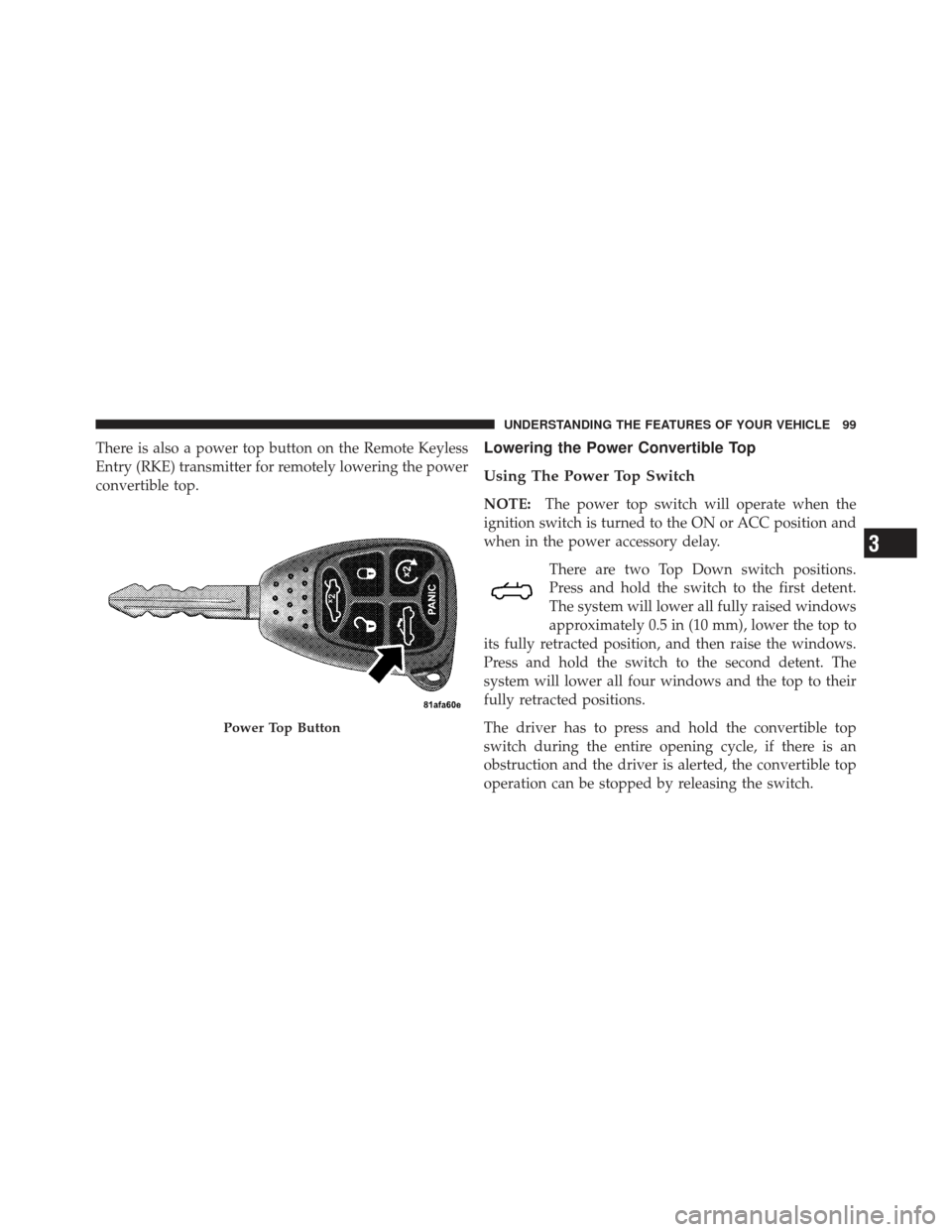
There is also a power top button on the Remote Keyless
Entry (RKE) transmitter for remotely lowering the power
convertible top.Lowering the Power Convertible Top
Using The Power Top Switch
NOTE:The power top switch will operate when the
ignition switch is turned to the ON or ACC position and
when in the power accessory delay.
There are two Top Down switch positions.
Press and hold the switch to the first detent.
The system will lower all fully raised windows
approximately 0.5 in (10 mm), lower the top to
its fully retracted position, and then raise the windows.
Press and hold the switch to the second detent. The
system will lower all four windows and the top to their
fully retracted positions.
The driver has to press and hold the convertible top
switch during the entire opening cycle, if there is an
obstruction and the driver is alerted, the convertible top
operation can be stopped by releasing the switch.
Power Top Button
3
UNDERSTANDING THE FEATURES OF YOUR VEHICLE 99
Page 102 of 517

Using The Remote Keyless Entry Transmitter
NOTE:Steps1–3must be performed within five
seconds.
1. Press and release the UNLOCK button on the RKE
transmitter.
2. Press and release the POWER TOP button
on the RKE transmitter.
3. Press and hold the POWER TOP button until the
Power Top and All Windows Down feature is complete.
Raising The Power Convertible Top
Using The Power Top Switch
NOTE: The power top switch will operate when the
ignition switch is turned to the ON or ACC position and
when in the power accessory delay.
Press and hold the switch in the Top Up
position until the operation of raising the top
and latching it is complete, which is indicated
by the system raising the windows and dis-
playing “TOP DONE” in the odometer or “CONVERT-
IBLE TOP COMPLETE” in the EVIC (if equipped).
Using The Remote Keyless Entry Transmitter
You cannot use the power top button on the RKE
transmitter to raise the power convertible top. You must
use the power top switch inside the vehicle to perform
this operation.
100 UNDERSTANDING THE FEATURES OF YOUR VEHICLE
Page 128 of 517
on hold may not become active automatically. This is cell
phone-dependent. To bring the call back from hold, press
and hold the
button until you hear a single beep.
Redial
•
Press thebutton to begin.
•After the “Ready” prompt and the following beep, say
“Redial”.
•The Uconnect™ Phone will call the last number that
was dialed from your mobile phone.
NOTE: This may not be the last number dialed from the
Uconnect™ Phone.
Call Continuation
Call continuation is the progression of a phone call on the
Uconnect™ Phone after the vehicle ignition key has been
switched to OFF. Call continuation functionality avail-
able on the vehicle can be any one of three types:
•After the ignition key is switched to OFF, a call can
continue on the Uconnect™ Phone either until the call
ends, or until the vehicle battery condition dictates
cessation of the call on the Uconnect™ Phone and
transfer of the call to the mobile phone.
•After the ignition key is switched to OFF, a call can
continue on the Uconnect™ Phone for a certain dura-
tion, after which the call is automatically transferred
from the Uconnect™ Phone to the mobile phone.
•An active call is automatically transferred to the
mobile phone after the ignition key is switched to OFF.
126 UNDERSTANDING THE FEATURES OF YOUR VEHICLE
Page 140 of 517
16. Can this wait?
17. Bye for now
18. When can we meet
19. Send number to call
20. Start without me
Turn SMS Incoming Announcement ON/OFF
Turning the SMS Incoming Announcement OFF will stop
the system from announcing the new incoming mes-
sages.
•Press thebutton.
•After the “Ready” prompt and the following beep, say
“Setup, SMS Incoming Message Announcement,” you
will then be given a choice to change it.
Bluetooth�Communication Link
Mobile phones have been found to lose connection to the
Uconnect™ Phone. When this happens, the connection
can generally be reestablished by switching the phone
off/on. Your mobile phone is recommended to remain in
Bluetooth�ON mode.
Power-Up
After switching the ignition key from OFF to either the
ON or ACC position, or after a language change, you
must wait at least fifteen seconds prior to using the
system.
138 UNDERSTANDING THE FEATURES OF YOUR VEHICLE
Page 164 of 517

Headlights And Parking Lights
Turn the end of the multifunction lever to the first detent
for parking light operation. Turn the end of the lever to
the second detent for headlight operation.
Lights-On Reminder
If the headlights or parking lights are on after the ignition
is turned to the LOCK position, a chime will sound to
alert the driver when the driver’s door is opened.
Automatic Headlights — If Equipped
This system automatically turns the headlights on or off
according to ambient light levels. To turn the system on,
turn the end of the multifunction lever to the AUTO
position. When the system is on, the Headlight Time
Delay feature is also on. This means the headlights will
stay on for up to 90 seconds after you turn the ignition
switch to the LOCK position. To turn the Automatic
System off, turn the end of the multifunction lever out of
the AUTO position.
NOTE:The engine must be running before the head-
lights will turn on in the Automatic mode.
Headlight Switch
162 UNDERSTANDING THE FEATURES OF YOUR VEHICLE