2012 CHEVROLET SILVERADO ECO mode
[x] Cancel search: ECO modePage 61 of 584
Black plate (19,1)Chevrolet Silverado Owner Manual - 2012
Keys, Doors, and Windows 2-19
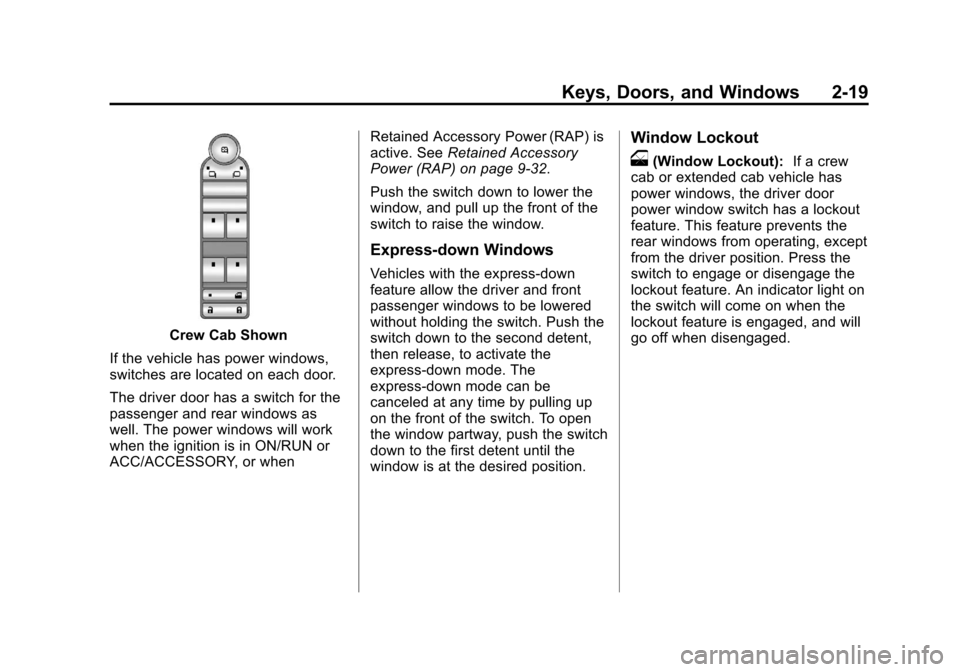
Crew Cab Shown
If the vehicle has power windows,
switches are located on each door.
The driver door has a switch for the
passenger and rear windows as
well. The power windows will work
when the ignition is in ON/RUN or
ACC/ACCESSORY, or when Retained Accessory Power (RAP) is
active. See
Retained Accessory
Power (RAP) on page 9‑32.
Push the switch down to lower the
window, and pull up the front of the
switch to raise the window.
Express-down Windows
Vehicles with the express-down
feature allow the driver and front
passenger windows to be lowered
without holding the switch. Push the
switch down to the second detent,
then release, to activate the
express-down mode. The
express-down mode can be
canceled at any time by pulling up
on the front of the switch. To open
the window partway, push the switch
down to the first detent until the
window is at the desired position.
Window Lockout
o(Window Lockout): If a crew
cab or extended cab vehicle has
power windows, the driver door
power window switch has a lockout
feature. This feature prevents the
rear windows from operating, except
from the driver position. Press the
switch to engage or disengage the
lockout feature. An indicator light on
the switch will come on when the
lockout feature is engaged, and will
go off when disengaged.
Page 90 of 584
Black plate (26,1)Chevrolet Silverado Owner Manual - 2012
3-26 Seats and Restraints
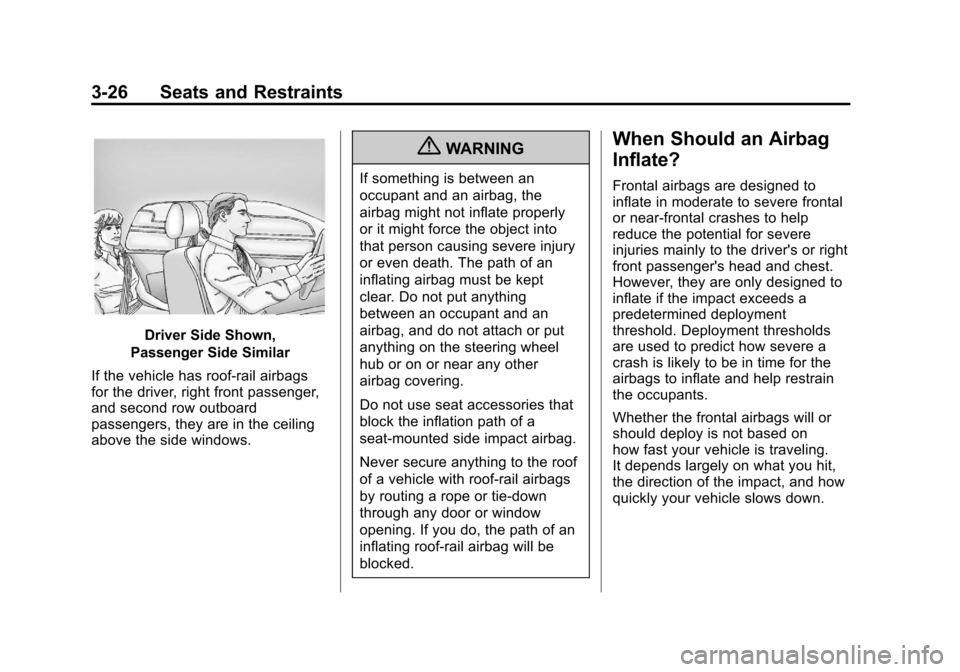
Driver Side Shown,
Passenger Side Similar
If the vehicle has roof-rail airbags
for the driver, right front passenger,
and second row outboard
passengers, they are in the ceiling
above the side windows.
{WARNING
If something is between an
occupant and an airbag, the
airbag might not inflate properly
or it might force the object into
that person causing severe injury
or even death. The path of an
inflating airbag must be kept
clear. Do not put anything
between an occupant and an
airbag, and do not attach or put
anything on the steering wheel
hub or on or near any other
airbag covering.
Do not use seat accessories that
block the inflation path of a
seat-mounted side impact airbag.
Never secure anything to the roof
of a vehicle with roof-rail airbags
by routing a rope or tie‐down
through any door or window
opening. If you do, the path of an
inflating roof-rail airbag will be
blocked.
When Should an Airbag
Inflate?
Frontal airbags are designed to
inflate in moderate to severe frontal
or near-frontal crashes to help
reduce the potential for severe
injuries mainly to the driver's or right
front passenger's head and chest.
However, they are only designed to
inflate if the impact exceeds a
predetermined deployment
threshold. Deployment thresholds
are used to predict how severe a
crash is likely to be in time for the
airbags to inflate and help restrain
the occupants.
Whether the frontal airbags will or
should deploy is not based on
how fast your vehicle is traveling.
It depends largely on what you hit,
the direction of the impact, and how
quickly your vehicle slows down.
Page 94 of 584

Black plate (30,1)Chevrolet Silverado Owner Manual - 2012
3-30 Seats and Restraints
You can lock the doors, turn off the
interior lamps and hazard warning
flashers by using the controls for
those features.
{WARNING
A crash severe enough to inflate
the airbags may have also
damaged important functions in
the vehicle, such as the fuel
system, brake and steering
systems, etc. Even if the vehicle
appears to be drivable after a
moderate crash, there may be
concealed damage that could
make it difficult to safely operate
the vehicle.
Use caution if you should attempt
to restart the engine after a crash
has occurred.
In many crashes severe enough to
inflate the airbag, windshields are
broken by vehicle deformation. Additional windshield breakage may
also occur from the right front
passenger airbag.
.Airbags are designed to inflate
only once. After an airbag
inflates, you will need some new
parts for the airbag system.
If you do not get them, the
airbag system will not be there
to help protect you in another
crash. A new system will include
airbag modules and possibly
other parts. The service manual
for your vehicle covers the need
to replace other parts.
.The vehicle has a crash sensing
and diagnostic module which
records information after a
crash. See
Vehicle Data
Recording and Privacy on
page 13‑19 andEvent Data
Recorders on page 13‑20.
.Let only qualified technicians
work on the airbag systems.
Improper service can mean that
an airbag system will not work
properly. See your dealer for
service.
Airbag On-Off Switch
If one of the switches pictured in the
following illustrations is located in
the glove box, the vehicle has an
airbag on-off switch that you can
use to manually turn on or off the
right front passenger airbag.
United States
Page 120 of 584
Black plate (56,1)Chevrolet Silverado Owner Manual - 2012
3-56 Seats and Restraints
{WARNING
Children can be seriously injured
or strangled if a shoulder belt is
wrapped around their neck and
the safety belt continues to
tighten. Buckle any unused safety
belts behind the child restraint
so children cannot reach them.
Pull the shoulder belt all the way
out of the retractor to set the lock,
if the vehicle has one, after the
child restraint has been installed.Notice:
Do not let the LATCH
attachments rub against the
vehicle’ s safety belts. This may
damage these parts. If necessary,
move buckled safety belts to
avoid rubbing the LATCH
attachments.
Do not fold the empty rear seat
with a safety belt buckled.
This could damage the safety belt
or the seat. Unbuckle and return
the safety belt to its stowed
position, before folding the seat. Regular Cab Models
1. If the child restraint manufacturer
recommends that the top tether
be attached, attach and tighten
the top tether to the top tether
anchor, if your vehicle has one.
Refer to the child restraint
instructions and the following
steps:
1.1. Pull the passenger seatback forward by pulling
the recliner handle upward
to access the top tether
anchor. See Reclining
Seatbacks on page 3‑6 for
additional information.
1.2. Find the top tether anchor.
1.3. Remove the cover to expose the anchor.
Page 122 of 584
Black plate (58,1)Chevrolet Silverado Owner Manual - 2012
3-58 Seats and Restraints
Crew and Extended Cab Models
1. Attach and tighten the lowerattachments to the lower
anchors. If the child restraint
does not have lower
attachments or the desired
seating position does not have
lower anchors, secure the child
restraint with the top tether and
the safety belts. Refer to your
child restraint manufacturer
instructions and the instructions
in this manual.
1.1. Find the lower anchors for the desired seating
position.
1.2. Put the child restraint on the seat.
1.3. Attach and tighten the lower attachments on the
child restraint to the lower
anchors. 2. If the child restraint manufacturer
recommends that the top tether
be attached, attach and tighten
the top tether to the top tether
anchor (loop), if your vehicle has
one. Refer to the child restraint
instructions and the following
steps:
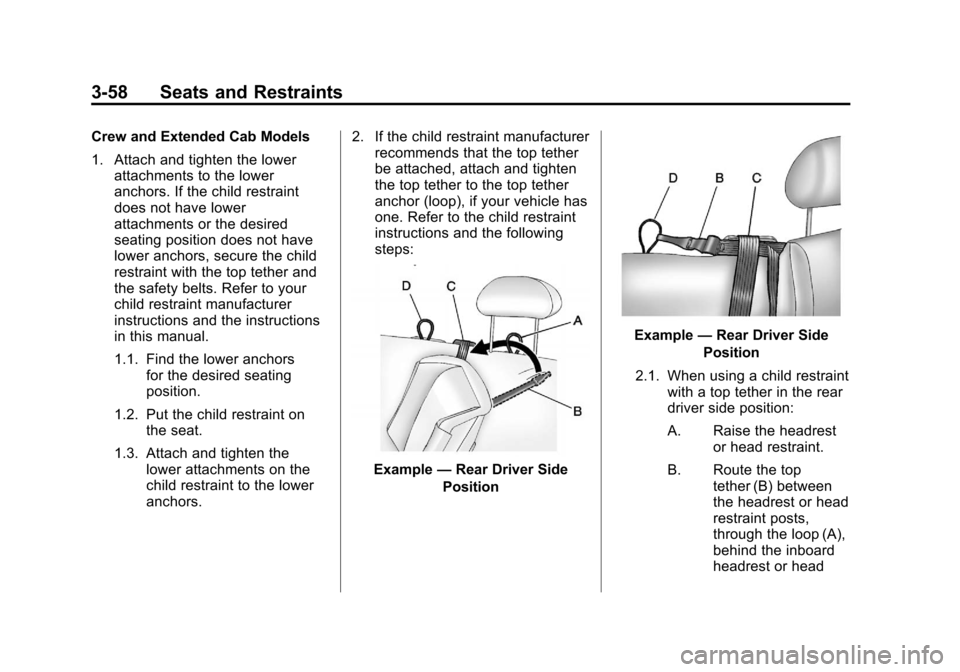
Example —Rear Driver Side
Position
Example —Rear Driver Side
Position
2.1. When using a child restraint with a top tether in the rear
driver side position:
A. Raise the headrest or head restraint.
B. Route the top tether (B) between
the headrest or head
restraint posts,
through the loop (A),
behind the inboard
headrest or head
Page 142 of 584
Black plate (4,1)Chevrolet Silverado Owner Manual - 2012
5-4 Instruments and Controls
Navigating an iPod or USB Device
on the Main Audio Screen
(Vehicles with a Navigation
System)
1. Press and release
worc/x
to select the next or previous
track within the selected
category.
2. Press and hold
worc/xto
move quickly through the tracks.
3. Press and release
¨to move up
one track within the selected
category.
Navigating an iPod or USB Device
on the Music Navigator Screen
(Vehicles with a Navigation
System)
1. Press and release
worc/x
to select the next or previous
track within the selected
category.
2. Press and hold
worc/xto
move quickly through the tracks
within the selected category. 3. Press and release
¨to move up
one track within the selected
category.
b/g(Mute/Push to Talk): Press
to silence the vehicle speakers only.
Press again to turn the sound on.
For vehicles with Bluetooth or
OnStar systems, press and hold for
longer than two seconds to interact
with those systems. See Bluetooth
on page 7‑52 andOnStar Overview
on page 14‑1 for more information.
SRCE (Source/Voice
Recognition): Press to switch
between the radio and CD, and for
equipped vehicles, the DVD, front
auxiliary, and rear auxiliary.
For vehicles with the navigation
system, press and hold this button
for longer than one second to
initiate voice recognition. See “Voice
Recognition” in the Navigation
System manual for more
information.
¨(Seek): Press to go to the
next radio station while in AM,
FM, or XM™.
For vehicles with or without a
navigation system:
Press
¨to go to the next track or
chapter while sourced to the CD or
DVD slot.
Press
¨to select a track or a folder
when navigating folders on an iPod
or USB device.
For vehicles with a navigation
system:
1. Press and hold
¨until a beep is
heard, to place the radio into
SCAN mode. A station will play
for five seconds before moving
to the next station.
2. To stop the SCAN function, press
¨again.
Page 152 of 584
Black plate (14,1)Chevrolet Silverado Owner Manual - 2012
5-14 Instruments and Controls
For vehicles with a DURAMAX®
Diesel engine, see the DURAMAX®
Diesel Supplement for more
information.
For vehicles with a Hybrid, see the
Hybrid Supplement for more
information.
Speedometer
The speedometer shows the
vehicle's speed in either
kilometers per hour (km/h) or
miles per hour (mph).
Odometer
The odometer shows how far the
vehicle has been driven, in either
kilometers or miles.
Engine Hour Meter Display
The Driver Information Center (DIC)
can also display the number of
hours the engine has run. To display
the engine hours, turn the ignition
off, then press and hold the reset
button for at least four seconds.The hour meter displays for up to
30 seconds, or until the ignition is
turned on. See
Driver Information
Center (DIC) on page 5‑32 for more
information.
Trip Odometer
The trip odometer shows how far
the vehicle has been driven since
the trip odometer was last set
to zero.
Press the reset button, located on
the instrument panel cluster next to
the voltmeter, to toggle between the
trip odometer and the regular
odometer. Holding the reset button
for approximately one second while
the trip odometer is displayed will
reset it.
To display the odometer reading
with the ignition off, press the reset
button.
See Driver Information Center (DIC)
on page 5‑32 for more information.
Tachometer
The tachometer displays the engine
speed in revolutions per minute
(rpm). For a description of how
Grade Braking affects vehicle speed
while the Tow/Haul Mode is
activated, see Tow/Haul Mode on
page 9‑43 for more information.
If the vehicle is a hybrid, see the
hybrid supplement for more
information.
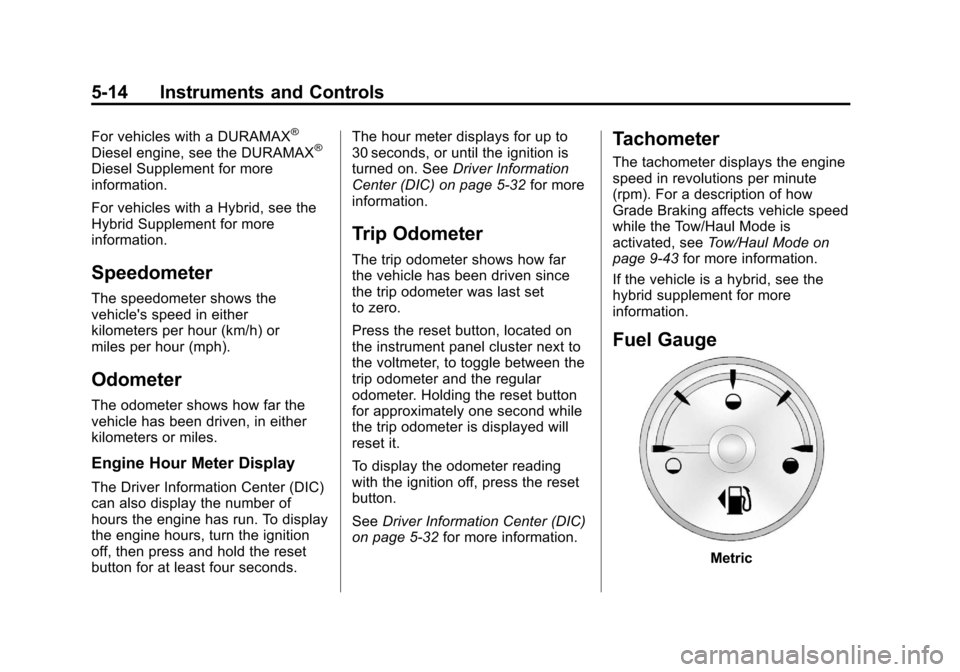
Fuel Gauge
Metric
Page 156 of 584
Black plate (18,1)Chevrolet Silverado Owner Manual - 2012
5-18 Instruments and Controls
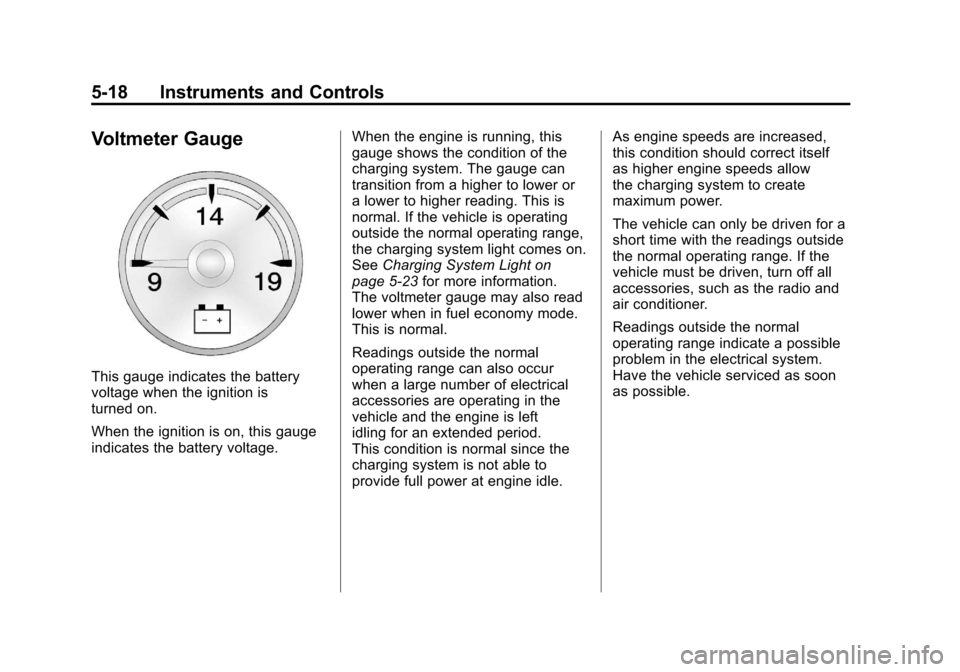
Voltmeter Gauge
This gauge indicates the battery
voltage when the ignition is
turned on.
When the ignition is on, this gauge
indicates the battery voltage.When the engine is running, this
gauge shows the condition of the
charging system. The gauge can
transition from a higher to lower or
a lower to higher reading. This is
normal. If the vehicle is operating
outside the normal operating range,
the charging system light comes on.
See
Charging System Light on
page 5‑23 for more information.
The voltmeter gauge may also read
lower when in fuel economy mode.
This is normal.
Readings outside the normal
operating range can also occur
when a large number of electrical
accessories are operating in the
vehicle and the engine is left
idling for an extended period.
This condition is normal since the
charging system is not able to
provide full power at engine idle. As engine speeds are increased,
this condition should correct itself
as higher engine speeds allow
the charging system to create
maximum power.
The vehicle can only be driven for a
short time with the readings outside
the normal operating range. If the
vehicle must be driven, turn off all
accessories, such as the radio and
air conditioner.
Readings outside the normal
operating range indicate a possible
problem in the electrical system.
Have the vehicle serviced as soon
as possible.