2012 CHEVROLET SILVERADO key
[x] Cancel search: keyPage 233 of 584
Black plate (19,1)Chevrolet Silverado Owner Manual - 2012
Infotainment System 7-19
For the Radio with USB and
Six-Disc CD (MP3):
1. Press the softkey positionedunder the RDM tab until
Randomize All Discs displays to
play tracks from all CDs loaded
in random order.
2. Press the softkey positioned under the RDM tab until Random
Current Disc displays to play
tracks from a single CD in
random order.
3. Press the same softkey again to turn off random play.
MP3‐Supported Files
The Radio with CD (MP3), Radio
with USB and CD (MP3), and Radio
with USB and Six-Disc CD (MP3)
have the capability of playing an
MP3 CD-R or CD-RW disc. Format
Radios that have the capability of
playing MP3s can play .mp3 or
.wma files that were recorded onto a
CD-R or CD-RW disc. The files can
be recorded with the following fixed
bit rates: 32 kbps, 40 kbps, 56 kbps,
64 kbps, 80 kbps, 96 kbps, 112 kbps,
128 kbps, 160 kbps, 192 kbps,
224 kbps, 256 kbps, and 320 kbps or
a variable bit rate.
Compressed Audio or Mixed
Mode Discs
The radio can play discs that
contain both uncompressed CD
audio and MP3 files. If both formats
are on the disc, the radio reads
all MP3 files first, then the
uncompressed CD audio files.
CD‐R‐
or CD‐RW‐Supported File
and Folder Structure
The radio supports:
.Up to 50 folders.
.Up to 8 folders in depth.
.Up to 50 playlists.
.Up to 255 files.
.Playlists with an .m3u or .wpl
extension.
.Files with an .mp3, .wma, or .cda
file extension.
Root Directory
The root directory is treated as a
folder. Files are stored in the root
directory when the disc or storage
device does not contain folders.
Files accessed from the root
directory of a CD display as
F1 ROOT.
Page 234 of 584
Black plate (20,1)Chevrolet Silverado Owner Manual - 2012
7-20 Infotainment System
Empty Folder
Folders that do not contain files are
skipped, and the player advances to
the next folder that contains files.
Order of Play
Compressed audio files are
accessed in the following order:
.Playlists (Px).
.Files stored in the root directory.
.Files stored in folders in the root
directory.
Tracks are played in the following
order:
.Play begins from the first track in
the first playlist and continues
sequentially through all tracks in
each playlist. When the last
track of the last playlist has
played, play continues from the
first track of the first playlist.
.Play begins from the first track
in the first folder and continues
sequentially through all tracks in
each folder. When the last track
of the last folder has played,
play continues from the first
track of the first folder.
File System and Naming
The song name that displays is the
song name that is contained in the
ID3 tag. If the song name is not
present in the ID3 tag, then the
radio displays the file name without
the extension (such as .mp3) as the
track name.
Track names longer than
32 characters or 4 pages are
shortened. The display does not
show parts of words on the last
page of text and the extension of
the file name is not displayed. Preprogrammed Playlists
CDs that have preprogrammed
playlists reated using WinAmp™,
MusicMatch™, or Real Jukebox™
software can be accessed; however,
there is no playlist‐editing capability
using the radio. These playlists are
treated as special folders containing
compressed audio song files.
Playlists that have an .m3u or .pls
file extension and are stored on a
USB device may be supported by
the radio with a USB port.
Playlists can be changed by using
the softkeys below the
S
c
andc Ttabs, thefknob,
the
©SEEK button, or the¨SEEK
button. An MP3 CD-R or CD-RW
that has been recorded without
using file folders can be played.
If a CD-R or CD-RW contains more
than the maximum of 50 folders,
Page 235 of 584
Black plate (21,1)Chevrolet Silverado Owner Manual - 2012
Infotainment System 7-21
15 playlists, and 512 folders and
files, the player allows access and
navigates up to the maximum, but
all items over the maximum are not
accessible.
Playing an MP3
4(Information):Press to display
additional text information related to
the current song. If information is
available, the song title information
displays on the top line of the
display and artist information
displays on the bottom line.
When information is not available,
“NO INFO” displays.
f(Tune):Turn to select MP3s on
the CD currently playing.
©SEEK: Press to go to the start of
the track, if more than 10 seconds
have played. Press and hold or
press multiple times to continue
moving backward through tracks.
¨SEEK: Press to go to the next
track. Press and hold or press
multiple times to continue moving
forward through tracks.
sREV (Reverse): Press and hold
to reverse playback quickly. Sound
is heard at a reduced volume and
the elapsed time of the file displays.
Release
sREV to resume playing.
\FWD (Fast Forward): Press
and hold to advance playback
quickly. Sound is heard at a reduced
volume and the elapsed time of the
file displays. Release
\FWD to
resume playing. The elapsed time of
the file displays.
S c(Previous Folder): Press
the softkey below the
S ctab to
go to the first track in the previous
folder.
c T(Next Folder): Press the
softkey below the
c Ttab to go to
the first track in the next folder. RDM (Random):
Press to listen
to tracks in random, rather than
sequential order. To use random,
do one of the following:
For the Radio with CD (MP3) and
Radio with USB and CD (MP3):
1. Press the softkey positioned
under the RDM tab until Random
Current Disc displays.
2. Press the softkey again to turn off random play.
For the Radio with USB and
Six-Disc CD (MP3):
1. Press the softkey positioned under the RDM tab until
Randomize All Discs displays to
play tracks from all CDs loaded
in random order.
2. Press the softkey positioned under the RDM tab until Random
Current Disc displays to play
tracks from a single CD in
random order.
3. Press the same softkey again to turn off random play.
Page 236 of 584
Black plate (22,1)Chevrolet Silverado Owner Manual - 2012
7-22 Infotainment System
h(Music Navigator):Press the
softkey below the
htab to play
the files in order by artist or album.
The player scans the disc to sort the
files by artist and album ID3 tag
information. It can take several
minutes to scan the disc depending
on the number of files on the disc.
The radio may begin playing while it
is scanning in the background.
When the scan is finished, the disc
begins playing files in order by
artist. The current artist playing is
shown on the second line of the
display. Once all songs by that artist
are played, the player moves to the
next artist in alphabetical order and
begins playing files by that artist.
To listen to files by another artist,
press the softkey located below
either arrow tab. The disc goes to
the next or previous artist in
alphabetical order. Continue
pressing either softkey below the
arrow tab until the desired artist
displays. To change from playback by artist to
playback by album:
1. Press the softkey located below
the Sort By tab.
2. Press one of the softkeys below the Album tab from the sort
screen.
3. Press the softkey below the Back tab to return to the main
music navigator screen.
The album name displays on the
second line between the arrows,
and songs from the current album
begin to play. Once all songs from
that album have played, the player
moves to the next album in
alphabetical order on the CD and
begins playing MP3s from that
album.
To exit music navigator mode, press
the softkey below the Back tab to
return to normal MP3 playback.
CD Player Messages
CHECK DISC: If this message
displays and/or the CD ejects, it
could be for one of the following
reasons:
.It is very hot. When the
temperature returns to normal,
the CD should play.
.The road is very rough.
When the road becomes
smoother, the CD should play.
.The CD is dirty, scratched, wet,
or upside down.
.The air is very humid. If so,
wait about an hour and try again.
.There was a problem while
burning the CD.
.The label is caught in the
CD player.
If the CD is not playing correctly,
for any other reason, try a known
good CD.
Page 240 of 584
Black plate (26,1)Chevrolet Silverado Owner Manual - 2012
7-26 Infotainment System
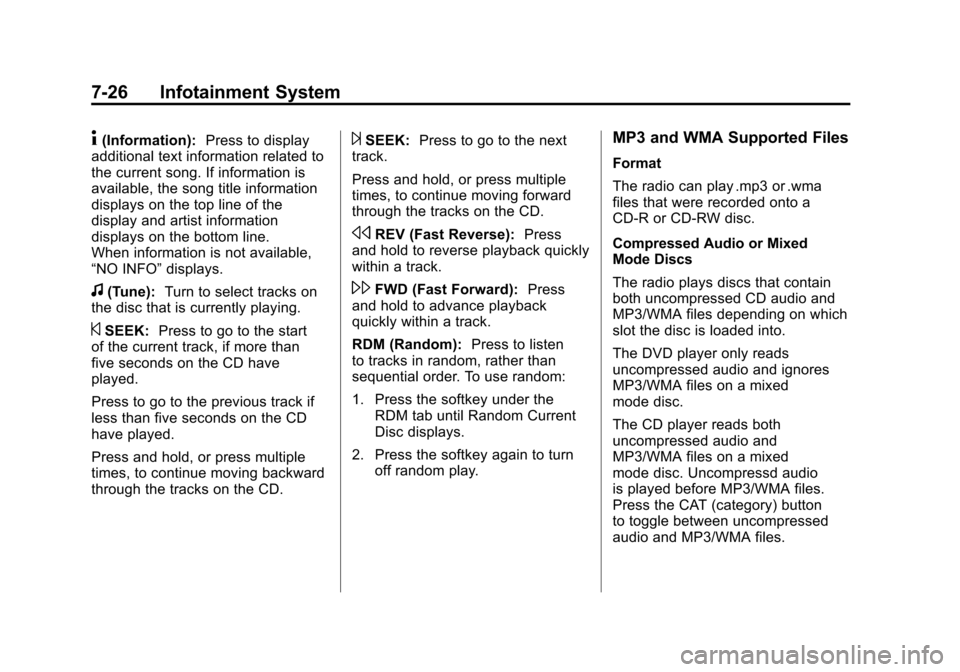
4(Information):Press to display
additional text information related to
the current song. If information is
available, the song title information
displays on the top line of the
display and artist information
displays on the bottom line.
When information is not available,
“NO INFO” displays.
f(Tune):Turn to select tracks on
the disc that is currently playing.
©SEEK: Press to go to the start
of the current track, if more than
five seconds on the CD have
played.
Press to go to the previous track if
less than five seconds on the CD
have played.
Press and hold, or press multiple
times, to continue moving backward
through the tracks on the CD.
¨SEEK: Press to go to the next
track.
Press and hold, or press multiple
times, to continue moving forward
through the tracks on the CD.
sREV (Fast Reverse): Press
and hold to reverse playback quickly
within a track.
\FWD (Fast Forward): Press
and hold to advance playback
quickly within a track.
RDM (Random): Press to listen
to tracks in random, rather than
sequential order. To use random:
1. Press the softkey under the RDM tab until Random Current
Disc displays.
2. Press the softkey again to turn off random play.
MP3 and WMA Supported Files
Format
The radio can play .mp3 or .wma
files that were recorded onto a
CD-R or CD-RW disc.
Compressed Audio or Mixed
Mode Discs
The radio plays discs that contain
both uncompressed CD audio and
MP3/WMA files depending on which
slot the disc is loaded into.
The DVD player only reads
uncompressed audio and ignores
MP3/WMA files on a mixed
mode disc.
The CD player reads both
uncompressed audio and
MP3/WMA files on a mixed
mode disc. Uncompressd audio
is played before MP3/WMA files.
Press the CAT (category) button
to toggle between uncompressed
audio and MP3/WMA files.
Page 243 of 584
Black plate (29,1)Chevrolet Silverado Owner Manual - 2012
Infotainment System 7-29
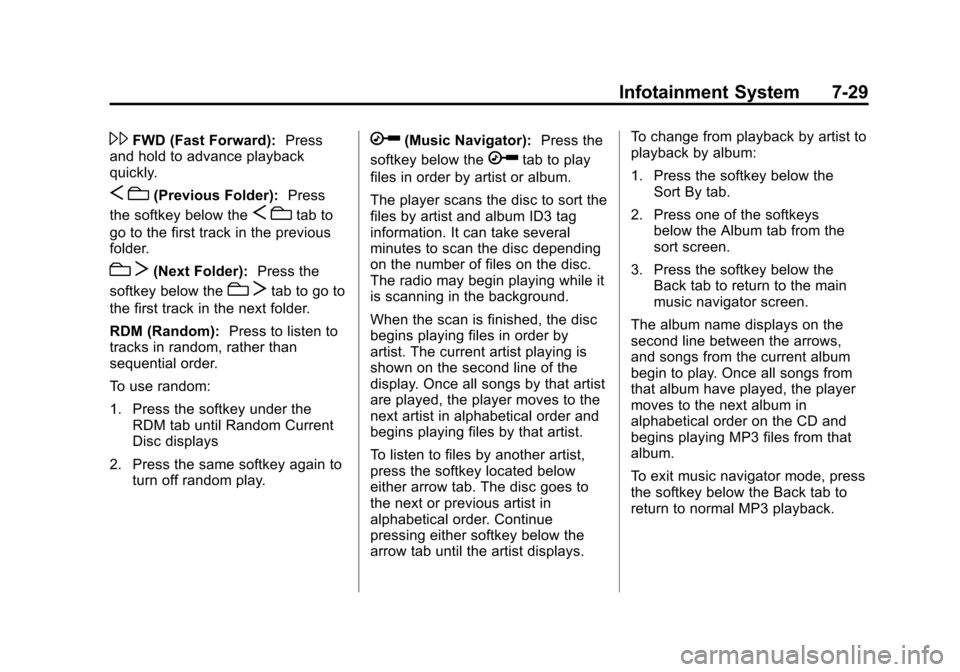
\FWD (Fast Forward):Press
and hold to advance playback
quickly.
S c(Previous Folder): Press
the softkey below the
S ctab to
go to the first track in the previous
folder.
c T(Next Folder): Press the
softkey below the
c Ttab to go to
the first track in the next folder.
RDM (Random): Press to listen to
tracks in random, rather than
sequential order.
To use random:
1. Press the softkey under the RDM tab until Random Current
Disc displays
2. Press the same softkey again to turn off random play.
h(Music Navigator): Press the
softkey below the
htab to play
files in order by artist or album.
The player scans the disc to sort the
files by artist and album ID3 tag
information. It can take several
minutes to scan the disc depending
on the number of files on the disc.
The radio may begin playing while it
is scanning in the background.
When the scan is finished, the disc
begins playing files in order by
artist. The current artist playing is
shown on the second line of the
display. Once all songs by that artist
are played, the player moves to the
next artist in alphabetical order and
begins playing files by that artist.
To listen to files by another artist,
press the softkey located below
either arrow tab. The disc goes to
the next or previous artist in
alphabetical order. Continue
pressing either softkey below the
arrow tab until the artist displays. To change from playback by artist to
playback by album:
1. Press the softkey below the
Sort By tab.
2. Press one of the softkeys below the Album tab from the
sort screen.
3. Press the softkey below the Back tab to return to the main
music navigator screen.
The album name displays on the
second line between the arrows,
and songs from the current album
begin to play. Once all songs from
that album have played, the player
moves to the next album in
alphabetical order on the CD and
begins playing MP3 files from that
album.
To exit music navigator mode, press
the softkey below the Back tab to
return to normal MP3 playback.
Page 244 of 584
Black plate (30,1)Chevrolet Silverado Owner Manual - 2012
7-30 Infotainment System
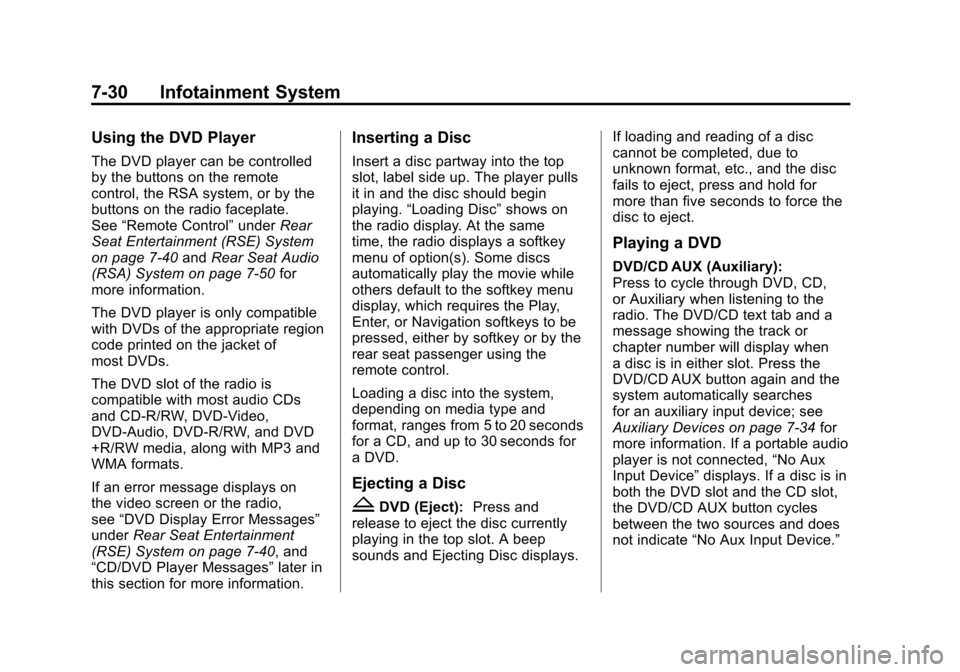
Using the DVD Player
The DVD player can be controlled
by the buttons on the remote
control, the RSA system, or by the
buttons on the radio faceplate.
See“Remote Control” underRear
Seat Entertainment (RSE) System
on page 7‑40 andRear Seat Audio
(RSA) System on page 7‑50 for
more information.
The DVD player is only compatible
with DVDs of the appropriate region
code printed on the jacket of
most DVDs.
The DVD slot of the radio is
compatible with most audio CDs
and CD-R/RW, DVD-Video,
DVD-Audio, DVD-R/RW, and DVD
+R/RW media, along with MP3 and
WMA formats.
If an error message displays on
the video screen or the radio,
see “DVD Display Error Messages”
under Rear Seat Entertainment
(RSE) System on page 7‑40, and
“CD/DVD Player Messages” later in
this section for more information.
Inserting a Disc
Insert a disc partway into the top
slot, label side up. The player pulls
it in and the disc should begin
playing. “Loading Disc” shows on
the radio display. At the same
time, the radio displays a softkey
menu of option(s). Some discs
automatically play the movie while
others default to the softkey menu
display, which requires the Play,
Enter, or Navigation softkeys to be
pressed, either by softkey or by the
rear seat passenger using the
remote control.
Loading a disc into the system,
depending on media type and
format, ranges from 5 to 20 seconds
for a CD, and up to 30 seconds for
a DVD.
Ejecting a Disc
ZDVD (Eject): Press and
release to eject the disc currently
playing in the top slot. A beep
sounds and Ejecting Disc displays. If loading and reading of a disc
cannot be completed, due to
unknown format, etc., and the disc
fails to eject, press and hold for
more than five seconds to force the
disc to eject.
Playing a DVD
DVD/CD AUX (Auxiliary):
Press to cycle through DVD, CD,
or Auxiliary when listening to the
radio. The DVD/CD text tab and a
message showing the track or
chapter number will display when
a disc is in either slot. Press the
DVD/CD AUX button again and the
system automatically searches
for an auxiliary input device; see
Auxiliary Devices on page 7‑34
for
more information. If a portable audio
player is not connected, “No Aux
Input Device” displays. If a disc is in
both the DVD slot and the CD slot,
the DVD/CD AUX button cycles
between the two sources and does
not indicate “No Aux Input Device.”
Page 246 of 584
Black plate (32,1)Chevrolet Silverado Owner Manual - 2012
7-32 Infotainment System
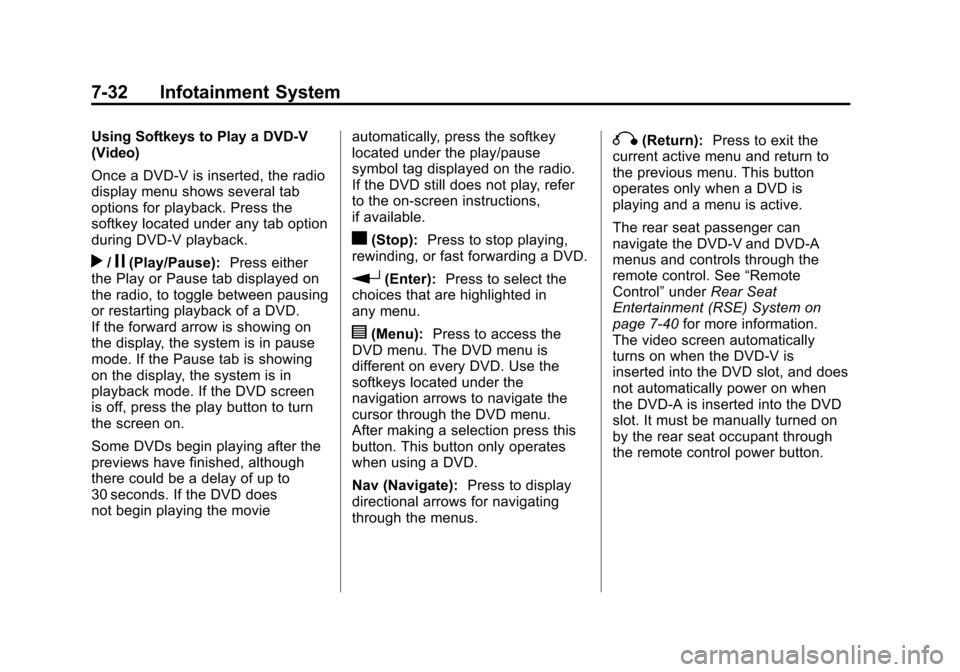
Using Softkeys to Play a DVD-V
(Video)
Once a DVD-V is inserted, the radio
display menu shows several tab
options for playback. Press the
softkey located under any tab option
during DVD-V playback.
r/j(Play/Pause):Press either
the Play or Pause tab displayed on
the radio, to toggle between pausing
or restarting playback of a DVD.
If the forward arrow is showing on
the display, the system is in pause
mode. If the Pause tab is showing
on the display, the system is in
playback mode. If the DVD screen
is off, press the play button to turn
the screen on.
Some DVDs begin playing after the
previews have finished, although
there could be a delay of up to
30 seconds. If the DVD does
not begin playing the movie automatically, press the softkey
located under the play/pause
symbol tag displayed on the radio.
If the DVD still does not play, refer
to the on-screen instructions,
if available.
c(Stop):
Press to stop playing,
rewinding, or fast forwarding a DVD.
r(Enter): Press to select the
choices that are highlighted in
any menu.
y(Menu): Press to access the
DVD menu. The DVD menu is
different on every DVD. Use the
softkeys located under the
navigation arrows to navigate the
cursor through the DVD menu.
After making a selection press this
button. This button only operates
when using a DVD.
Nav (Navigate): Press to display
directional arrows for navigating
through the menus.
q(Return): Press to exit the
current active menu and return to
the previous menu. This button
operates only when a DVD is
playing and a menu is active.
The rear seat passenger can
navigate the DVD-V and DVD-A
menus and controls through the
remote control. See “Remote
Control” underRear Seat
Entertainment (RSE) System on
page 7‑40 for more information.
The video screen automatically
turns on when the DVD-V is
inserted into the DVD slot, and does
not automatically power on when
the DVD-A is inserted into the DVD
slot. It must be manually turned on
by the rear seat occupant through
the remote control power button.