2012 CHEVROLET SILVERADO wheel
[x] Cancel search: wheelPage 352 of 584
Black plate (66,1)Chevrolet Silverado Owner Manual - 2012
9-66 Driving and Operating
Cruise Control
{WARNING
Cruise control can be dangerous
where you cannot drive safely at
a steady speed. So, do not use
the cruise control on winding
roads or in heavy traffic.
Cruise control can be dangerous
on slippery roads. On such roads,
fast changes in tire traction can
cause excessive wheel slip, and
you could lose control. Do not use
cruise control on slippery roads.
For vehicles with cruise control, a
speed of about 40 km/h (25 mph) or
more can be maintained without
keeping your foot on the
accelerator. Cruise control does not
work at speeds below about 40 km/h
(25 mph). When the brakes are applied, cruise
control is turned off.
For vehicles with an Allison or
Hydra‐Matic 6‐speed automatic
transmission, see
“Grade Braking”
under Tow/Haul Mode on page 9‑43
for an explanation of how cruise
control interacts with the Range
Selection Mode, tow/haul and grade
braking systems.
For vehicles with the StabiliTrak
system that begins to limit wheel
spin while you are using cruise
control, the cruise control will
automatically disengage. See
StabiliTrak
®System on page 9‑62.
When road conditions allow the
cruise control to be safely used
again, it can be turned back on.
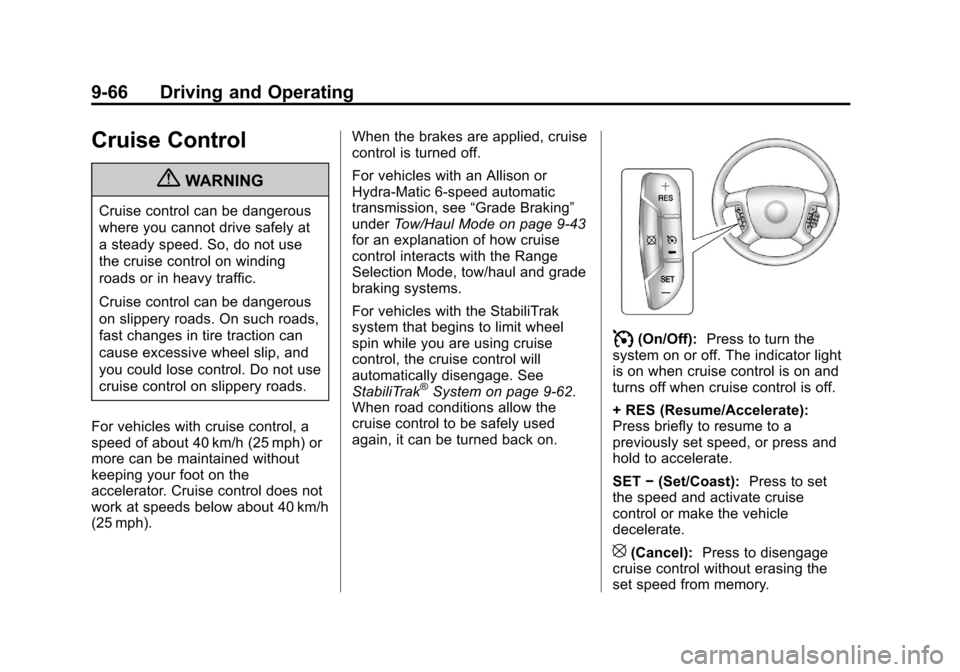
I(On/Off): Press to turn the
system on or off. The indicator light
is on when cruise control is on and
turns off when cruise control is off.
+ RES (Resume/Accelerate):
Press briefly to resume to a
previously set speed, or press and
hold to accelerate.
SET −(Set/Coast): Press to set
the speed and activate cruise
control or make the vehicle
decelerate.
[(Cancel): Press to disengage
cruise control without erasing the
set speed from memory.
Page 353 of 584
Black plate (67,1)Chevrolet Silverado Owner Manual - 2012
Driving and Operating 9-67
Setting Cruise Control
If the cruise button is on when not in
use, it could get bumped and go into
cruise when not desired. Keep the
cruise control switch off when cruise
is not being used.
The cruise control light on the
instrument panel cluster will come
on after the cruise control has been
set to the desired speed.
1. Press
I.
2. Get up to the desired speed.
3. Press the SET− button located
on the steering wheel and
release it.
4. Take your foot off the accelerator. Resuming a Set Speed
If the cruise control is set at a
desired speed and then the brakes
are applied, the cruise control is
disengaged without erasing the set
speed from memory.
Once the vehicle speed reaches
about 40 km/h (25 mph) or more,
press the +RES button on the
steering wheel. The vehicle returns
to the previous set speed and stays
there.
Increasing Speed While Using
Cruise Control
If the cruise control system is
already activated,
.Press and hold the +RES button
on the steering wheel until the
desired speed is reached, then
release it.
.To increase vehicle speed in
small amounts, press the +RES
button. Each time this is done,
the vehicle goes about 1.6 km/h
(1 mph) faster.Reducing Speed While Using
Cruise Control
If the cruise control system is
already activated,
.Press and hold the SET–
button
on the steering wheel until the
desired lower speed is reached,
then release it.
.To slow down in small amounts,
press the SET– button on the
steering wheel briefly. Each time
this is done, the vehicle goes
about 1.6 km/h (1 mph) slower.
Passing Another Vehicle While
Using Cruise Control
Use the accelerator pedal to
increase the vehicle speed.
When you take your foot off the
pedal, the vehicle will slow down
to the previous set cruise speed.
Page 354 of 584

Black plate (68,1)Chevrolet Silverado Owner Manual - 2012
9-68 Driving and Operating
Using Cruise Control on Hills
How well the cruise control works
on hills depends on the vehicle
speed, the load, and the steepness
of the hills. When going up steep
hills, pressing the accelerator pedal
may be necessary to maintain
vehicle speed.
While going downhill:
.Vehicles with a four speed
automatic transmission may
need to have the brakes applied
or the transmission shifted to
a lower gear to keep the
speed down.
.Vehicles with a six speed
automatic transmission have a
Cruise Grade Braking feature
that may automatically shift to a
lower gear to keep the speed
down. It may be necessary to
apply the brake or manually shift
the transmission to a lower
gear. The vehicle may shift to a
higher gear when grade braking
assistance is no longer required.Cruise Grade Braking is not
available while in Range
Selection Mode. This feature is
active when the exhaust brake
is enabled (if equipped). See
"Range Selection Mode" under
Manual Mode on page 9‑42.
When the brakes are manually
applied the cruise control is
disengaged.
Ending Cruise Control
There are three ways to end cruise
control:
.To disengage cruise control;
step lightly on the brake pedal.
.Press[on the steering wheel.
.To turn off the cruise control,
press
Ion the steering wheel.
Erasing Speed Memory
The cruise control set speed is
erased from memory by pressing
Ior if the ignition is turned off.
Object Detection
Systems
Ultrasonic Parking Assist
If available, the Ultrasonic Rear
Parking Assist (URPA) system
assists the driver with parking
and avoiding objects while in
R (Reverse). URPA operates at
speeds less than 8 km/h (5 mph).
The sensors on the rear bumper
detect objects up to 2.5 m (8 ft)
behind the vehicle, and at least
25 cm (10 in) off the ground.
{WARNING
The URPA system does not
detect pedestrians, bicyclists,
animals, or any other objects
located below the bumper or that
are too close or too far from the
vehicle. To prevent injury, death, (Continued)
Page 359 of 584
Black plate (73,1)Chevrolet Silverado Owner Manual - 2012
Driving and Operating 9-73
Guidelines
The RVC system has a guideline
overlay that can help the driver align
the vehicle when backing into a
parking spot.
If the vehicle has dual rear wheels,
this feature will not be available.
To turn the guidelines on or off:
1. Make sure that URPA has notbeen disabled.
2. Shift into P (Park).
3. Press MENU to enter the configure menu options. Turn
the Multifunction knob until the
Display feature is highlighted
and press the Multifunction
knob. Or press the Display
screen button
4. Select the Rear Camera Options screen button. The Rear Camera
Options screen displays.
5. Touch the Guidelines screen button. The screen button will be
highlighted when on.RVC Location
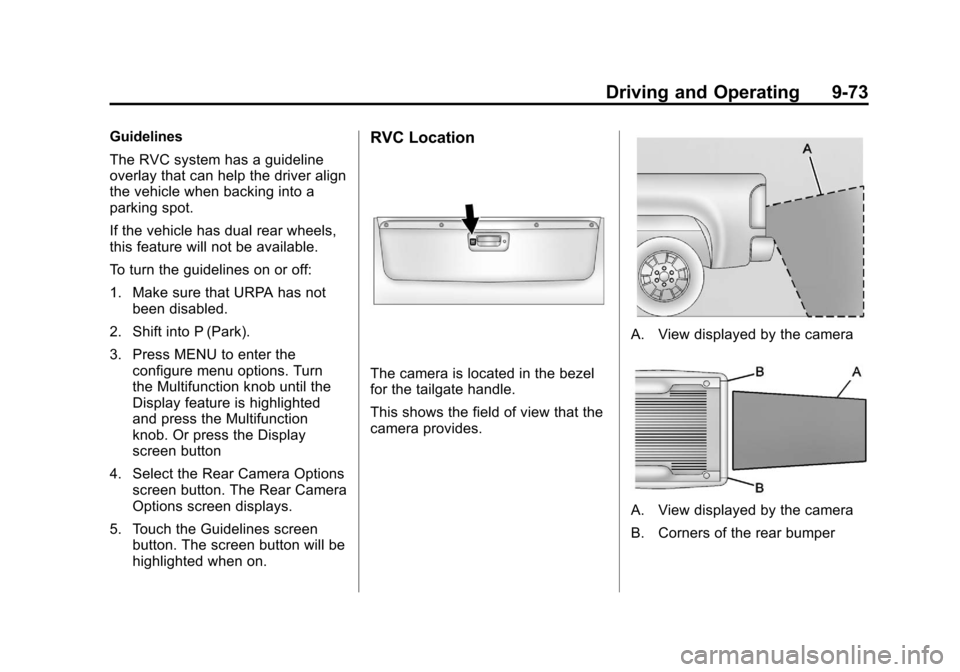
The camera is located in the bezel
for the tailgate handle.
This shows the field of view that the
camera provides.
A. View displayed by the camera
A. View displayed by the camera
B. Corners of the rear bumper
Page 370 of 584
Black plate (84,1)Chevrolet Silverado Owner Manual - 2012
9-84 Driving and Operating
Backing Up
Hold the bottom of the steering
wheel with one hand. To move the
trailer to the left, move that hand to
the left. To move the trailer to the
right, move your hand to the right.
Always back up slowly and,
if possible, have someone
guide you.
Making Turns
Notice:Making very sharp turns
while trailering could cause the
trailer to come in contact with the
vehicle. The vehicle could be
damaged. Avoid making very
sharp turns while trailering.
When turning with a trailer, make
wider turns than normal. Do this
so the trailer will not strike soft
shoulders, curbs, road signs, trees,
or other objects. Avoid jerky or
sudden maneuvers. Signal well in
advance. If the trailer turn signal bulbs burn
out, the arrows on the instrument
panel will still flash for turns. It is
important to check occasionally to
be sure the trailer bulbs are still
working.
Driving on Grades
Reduce speed and shift to a
lower gear
beforestarting down a
long or steep downgrade. If the
transmission is not shifted down,
the brakes might get hot and no
longer work well.
Vehicles can tow in D (Drive).
Shift the transmission to a lower
gear if the transmission shifts too
often under heavy loads and/or hilly
conditions.
The Tow/Haul Mode may be used if
the transmission shifts too often.
See Tow/Haul Mode on page 9‑43.
When towing at high altitude on
steep uphill grades, consider the
following: Engine coolant will boil at
a lower temperature than at normal altitudes. If the engine is turned off
immediately after towing at high
altitude on steep uphill grades, the
vehicle may show signs similar to
engine overheating. To avoid this,
let the engine run while parked,
preferably on level ground, with the
automatic transmission in P (Park)
for a few minutes before turning the
engine off. If the overheat warning
comes on, see
Engine Overheating
on page 10‑23.
Parking on Hills
{WARNING
Parking the vehicle on a hill with
the trailer attached can be
dangerous. If something goes
wrong, the rig could start to move.
People can be injured, and both
the vehicle and the trailer can be
damaged. When possible, always
park the rig on a flat surface.
Page 371 of 584

Black plate (85,1)Chevrolet Silverado Owner Manual - 2012
Driving and Operating 9-85
If parking the rig on a hill:
1. Press the brake pedal, butdo not shift into P (Park) yet.
Turn the wheels into the curb if
facing downhill or into traffic if
facing uphill.
2. Have someone place chocks under the trailer wheels.
3. When the wheel chocks are in place, release the regular brakes
until the chocks absorb the load.
4. Reapply the brake pedal. Then apply the parking brake
and shift into P (Park).
5. If the vehicle is four-wheel-drive, be sure the transfer case is in a
drive gear and not in N (Neutral).
6. Release the brake pedal.{WARNING
It can be dangerous to get out of
the vehicle if the shift lever is not
fully in P (Park) with the parking
brake firmly set. The vehicle
can roll.
If the engine has been left
running, the vehicle can move
suddenly. You or others could be
injured. To be sure the vehicle will
not move, even when on fairly
level ground, use the steps that
follow.
Always put the shift lever fully in
P (Park) with the parking brake
firmly set.
If the transfer case on a
four-wheel-drive vehicle is in
N (Neutral), the vehicle will be
free to roll, even if the shift lever
is in P (Park). Be sure the transfer
case is in a drive gear —not in
N (Neutral).
Leaving After Parking on a Hill
1. Apply and hold the brake pedal.
2. Start the engine.
3. Shift into a gear.
4. Release the parking brake.
5. Let up on the brake pedal.
6. Drive slowly until the trailer is clear of the chocks.
7. Stop and have someone pick up and store the chocks.
Maintenance when Trailer
Towing
The vehicle needs service more
often when pulling a trailer.
See Maintenance Schedule on
page 11‑3. Things that are
especially important in trailer
operation are automatic
transmission fluid, engine oil, axle
lubricant, belts, cooling system, and
brake system. It is a good idea to
inspect these before and during
the trip.
Check periodically to see that all
hitch nuts and bolts are tight.
Page 373 of 584
Black plate (87,1)Chevrolet Silverado Owner Manual - 2012
Driving and Operating 9-87
See“Weight of the Trailer Tongue”
later in this section for more
information.
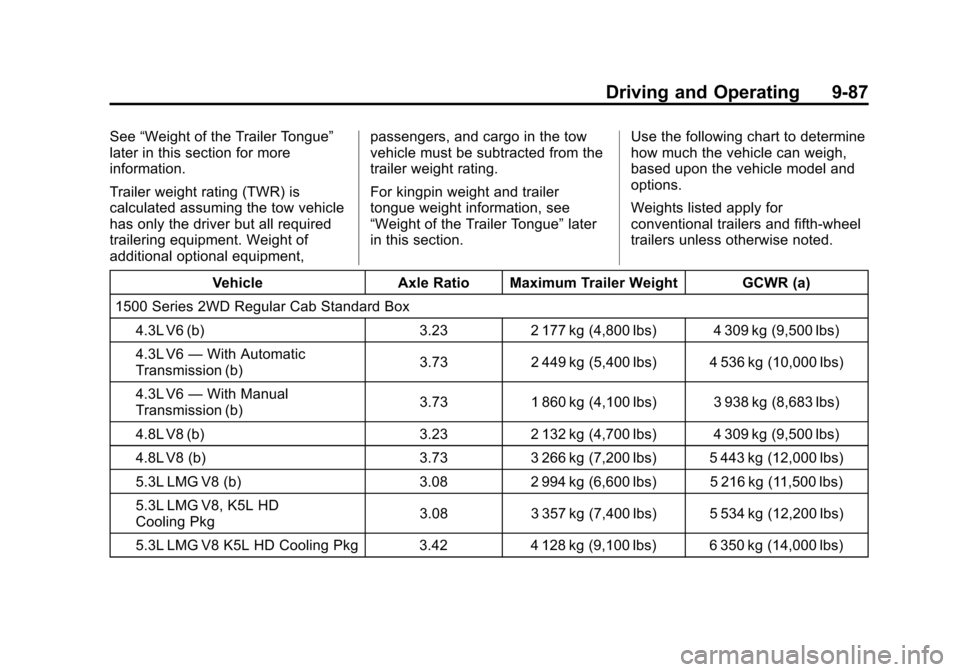
Trailer weight rating (TWR) is
calculated assuming the tow vehicle
has only the driver but all required
trailering equipment. Weight of
additional optional equipment, passengers, and cargo in the tow
vehicle must be subtracted from the
trailer weight rating.
For kingpin weight and trailer
tongue weight information, see
“Weight of the Trailer Tongue”
later
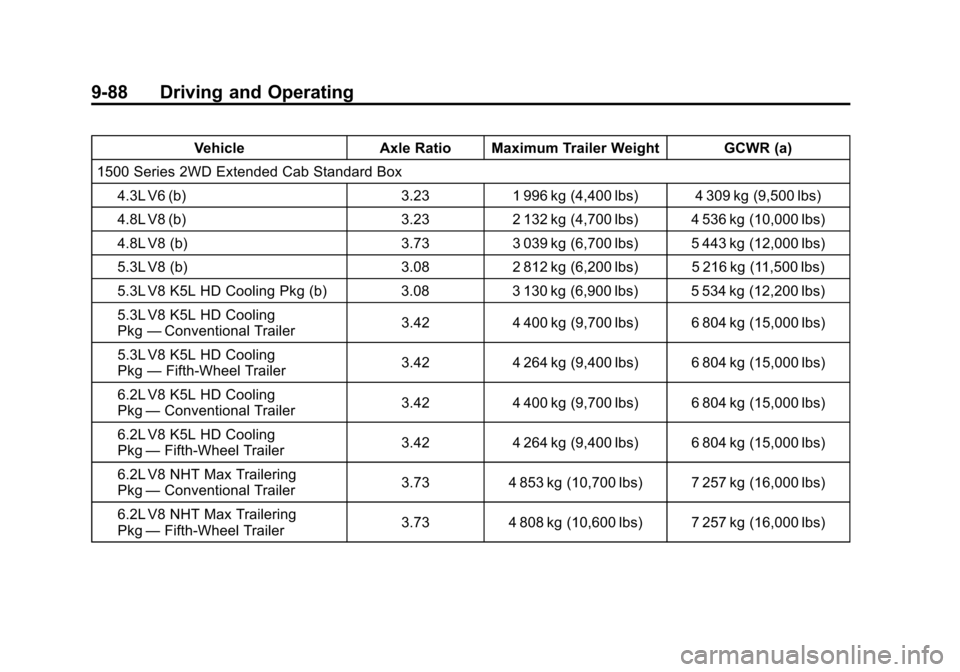
in this section. Use the following chart to determine
how much the vehicle can weigh,
based upon the vehicle model and
options.
Weights listed apply for
conventional trailers and fifth-wheel
trailers unless otherwise noted.
Vehicle Axle Ratio Maximum Trailer Weight GCWR (a)
1500 Series 2WD Regular Cab Standard Box
4.3L V6 (b) 3.23 2 177 kg (4,800 lbs) 4 309 kg (9,500 lbs)
4.3L V6 —With Automatic
Transmission (b) 3.73 2 449 kg (5,400 lbs) 4 536 kg (10,000 lbs)
4.3L V6 —With Manual
Transmission (b) 3.73 1 860 kg (4,100 lbs) 3 938 kg (8,683 lbs)
4.8L V8 (b) 3.23 2 132 kg (4,700 lbs) 4 309 kg (9,500 lbs)
4.8L V8 (b) 3.73 3 266 kg (7,200 lbs) 5 443 kg (12,000 lbs)
5.3L LMG V8 (b) 3.08 2 994 kg (6,600 lbs) 5 216 kg (11,500 lbs)
5.3L LMG V8, K5L HD
Cooling Pkg 3.08 3 357 kg (7,400 lbs) 5 534 kg (12,200 lbs)
5.3L LMG V8 K5L HD Cooling Pkg 3.42 4 128 kg (9,100 lbs) 6 350 kg (14,000 lbs)
Page 374 of 584
Black plate (88,1)Chevrolet Silverado Owner Manual - 2012
9-88 Driving and Operating
VehicleAxle Ratio Maximum Trailer Weight GCWR (a)
1500 Series 2WD Extended Cab Standard Box 4.3L V6 (b) 3.231 996 kg (4,400 lbs) 4 309 kg (9,500 lbs)
4.8L V8 (b) 3.232 132 kg (4,700 lbs) 4 536 kg (10,000 lbs)
4.8L V8 (b) 3.733 039 kg (6,700 lbs) 5 443 kg (12,000 lbs)
5.3L V8 (b) 3.082 812 kg (6,200 lbs) 5 216 kg (11,500 lbs)
5.3L V8 K5L HD Cooling Pkg (b) 3.083 130 kg (6,900 lbs) 5 534 kg (12,200 lbs)
5.3L V8 K5L HD Cooling
Pkg —Conventional Trailer 3.42
4 400 kg (9,700 lbs) 6 804 kg (15,000 lbs)
5.3L V8 K5L HD Cooling
Pkg —Fifth-Wheel Trailer 3.42
4 264 kg (9,400 lbs) 6 804 kg (15,000 lbs)
6.2L V8 K5L HD Cooling
Pkg —Conventional Trailer 3.42
4 400 kg (9,700 lbs) 6 804 kg (15,000 lbs)
6.2L V8 K5L HD Cooling
Pkg —Fifth-Wheel Trailer 3.42
4 264 kg (9,400 lbs) 6 804 kg (15,000 lbs)
6.2L V8 NHT Max Trailering
Pkg —Conventional Trailer 3.73
4 853 kg (10,700 lbs) 7 257 kg (16,000 lbs)
6.2L V8 NHT Max Trailering
Pkg —Fifth-Wheel Trailer 3.73
4 808 kg (10,600 lbs) 7 257 kg (16,000 lbs)