2012 CHEVROLET MALIBU display
[x] Cancel search: displayPage 170 of 398
Black plate (20,1)Chevrolet Malibu Owner Manual - 2012
7-20 Infotainment System
CD Player Messages
CHECK DISC:If an error message
displays and/or the disc comes out,
it could be for one of the following
reasons:
.The CD player is very hot.
When the temperature returns to
normal, the disc should play.
.The road is very rough. When
the road becomes smoother,
the disc should play.
.The disc is dirty, scratched, wet,
or upside down.
.The air is very humid. If so, wait
about an hour and try again.
.A problem may have occurred
while burning the disc.
.The label could be caught in the
CD player.
If the disc is not playing correctly
for any other reason, try a known
good disc. If any error occurs repeatedly or if
an error cannot be corrected,
contact your dealer. If the radio
displays an error message, write it
down and provide it to your dealer
when reporting the problem.
Auxiliary Devices
This vehicle may have a 3.5 mm
(1/8 in) auxiliary input jack and a
USB port, located on the audio
faceplate. Some portable audio
devices such as iPods
®, MP3
players, and USB storage devices
can be connected to the vehicle
using a 3.5 mm (1/8 in) cable or a
USB cable.
Drivers are encouraged to set up
any auxiliary device while the
vehicle is in P (Park). See
Defensive Driving on page 9‑3
for more information on driver
distraction.
Using the 3.5 mm (1/8 in)
Auxiliary Input Jack
The radio system may have a
3.5 mm (1/8 in) auxiliary input jack
located on the lower right or left side
of the faceplate. This is not an audio
output; do not plug the headphone
set into the front auxiliary input jack.
An external audio device such as an
iPod
®, laptop computer, MP3 player,
CD changer, etc. can be connected
to the auxiliary input jack for use as
another audio source.
To use a portable audio player,
connect a 3.5 mm (1/8 in) cable to
the auxiliary input jack. When a
device is connected, press the
CD/AUX button to begin playing
audio from the device over the
vehicle speakers.
O(Power/Volume): Turn to adjust
the volume. Additional volume
adjustments may have to be made
from the portable device if the
volume is too quiet or not loud.
Page 171 of 398
Black plate (21,1)Chevrolet Malibu Owner Manual - 2012
Infotainment System 7-21
BAND:Press to listen to the radio
while a portable audio device is
connected to the auxiliary input.
The portable audio device continues
playing until it is stopped or
turned off.
CD/AUX (CD/Auxiliary): Press to
play a CD while a portable audio
device is connected to the auxiliary
input. Press again and the system
begins playing audio from the
connected portable audio player.
If a portable audio player is not
connected, No Aux Input Device
may display.
Using the USB Port
The radio may have a USB port
located on the lower right side of the
faceplate. Radios that have a USB
port can play .mp3 and .wma files
that are stored on a USB storage
device as well as tracks that are
stored on an iPod
®. USB Supported File and Folder
Structure
The radio supports:
.Up to 700 folders.
.Up to eight folders in depth.
.Up to 65,535 files.
.Folder and file names up to
64 bytes.
.Files with an .mp3 or .wma file
extension.
.AAC files stored on an iPod.
.FAT16
.FAT32
Root Directory
The root directory is treated as a
folder. Files are stored in the root
directory when the disc or storage
device does not contain folders.
Files accessed from the root
directory of a USB device display as
F1 ROOT. Empty Folder
Folders that do not contain files are
skipped, and the player advances to
the next folder that contains files.
File Naming
The song name that displays is the
song name that is contained in the
ID3 tag. If the song name is not
present in the ID3 tag, then the
radio displays the file name without
the file extension as the track name.
Track names longer than
32 characters or four pages are
shortened. The display does not
show parts of words on the last
page of text and the extension of
the filename is not displayed.
Preprogrammed Playlists
Playlists that have an .m3u or .pls
file extension and are stored on a
USB device may be supported by
the radio with a USB port.
Page 172 of 398
Black plate (22,1)Chevrolet Malibu Owner Manual - 2012
7-22 Infotainment System
Order of Play
Tracks are played in the following
order:
.Play begins from the first track in
the first playlist and continues
sequentially through all tracks in
each playlist. When the last
track of the last playlist has
played, play continues from the
first track of the first playlist.
.Play begins from the first track in
the first folder and continues
sequentially through all tracks in
each folder. When the last track
of the last folder has played,
play continues from the first
track of the first folder.
When play enters a new folder, the
display does not automatically show
the new folder name unless the
folder mode has been chosen as
the default display. The new track
name displays.
Connecting a USB Storage
Device or iPod
The radio buttons, knobs and
softkeys are used to control a USB
storage device or an iPod when it is
connected to the USB port.
To connect a USB storage device,
connect the device to the USB port
located on the front of the radio.
To connect an iPod, connect one
end of the USB cable that came
with the iPod to the iPod’s dock
connector and connect the other
end to the USB port located on the
front of the radio. If the vehicle is on
and the USB connection works,
“OK to disconnect” and a GM logo
may appear on the iPod and iPod
appears on the radio's display.
The iPod charges while it is
connected to the USB port if the
ingition is in the ACC/ACCESSORY
or ON/RUN position. When the
ignition is turned OFF, the iPod automatically powers off and will not
charge or draw power from the
vehicle's battery.
Older iPod's that are not supported
can still be used by connecting it to
the 3.5 mm (1/8 in) auxiliary input
jack using a 3.5 mm (1/8 in) cable.
Using a USB Storage Device
or iPod
The buttons and knobs on the
radio and the softkeys below the
radio display are used to control a
USB storage device or an iPod.
Buttons and Knobs
The buttons and knobs on the radio
control the following features.
f(Tune):
Turn to select files.
©SEEK:Press to go to the start of
the track, if more than ten seconds
have played. Press and hold
©SEEK or press it multiple times
to continue moving backward
through tracks.
Page 173 of 398
Black plate (23,1)Chevrolet Malibu Owner Manual - 2012
Infotainment System 7-23
¨SEEK:Press to go to the next
track. Press and hold
¨SEEK or
press it multiple times to continue
moving forward through tracks.
sREV (Reverse): Press and hold
to reverse playback quickly. Sound
is heard at a reduced volume.
Release
sREV to resume playing.
\FWD (Fast Forward): Press
and hold to advance playback
quickly. Sound is heard at a reduced
volume. Release
\FWD to
resume playing.
4(Information): Press to display
additional information about the
selected track.
Softkeys
The five softkeys below the radio
display are used to control functions
that display as tabs.
To use the softkeys, press a softkey
below any tab that is displayed,
or if no tabs are displayed, press the
first or last softkey below the radio
display to display the tabs. The softkeys below the radio display
control the following features.
j(Pause):
Press the softkey
below
jto pause the track.
The tab appears raised when pause
is being used. Press the softkey
below
jagain to resume playback.
Back: Press the softkey below the
back tab to go back to the main
display screen on an iPod, or the
root directory on a USB storage
device.
c(Folder View): Press the
softkey below
cto view the
contents of the current folder on the
USB drive.
To browse and select files:
1. Press the softkey below
c.
2. Turn
fto scroll through the list
of folders. 3. Press
fto select the desired
folder. If there is more then one
folder, repeat Steps 1 and 2 until
the desired folder is reached.
4. Turn
fto scroll through the files
in the selected folder.
5. Press
fto select the desired file
to be played.
To skip through large lists, the five
softkeys can be used to navigate in
the following order:
.First softkey, first item in the list.
.Second softkey, 1% through the
list each time the softkey is
pressed.
.Third softkey, 5% through the list
each time the softkey is pressed.
.Fourth softkey, 10% through the
list each time the softkey is
pressed.
.Fifth softkey, end of the list.
Page 187 of 398
Black plate (5,1)Chevrolet Malibu Owner Manual - 2012
Climate Controls 8-5
Automatic Climate Control System
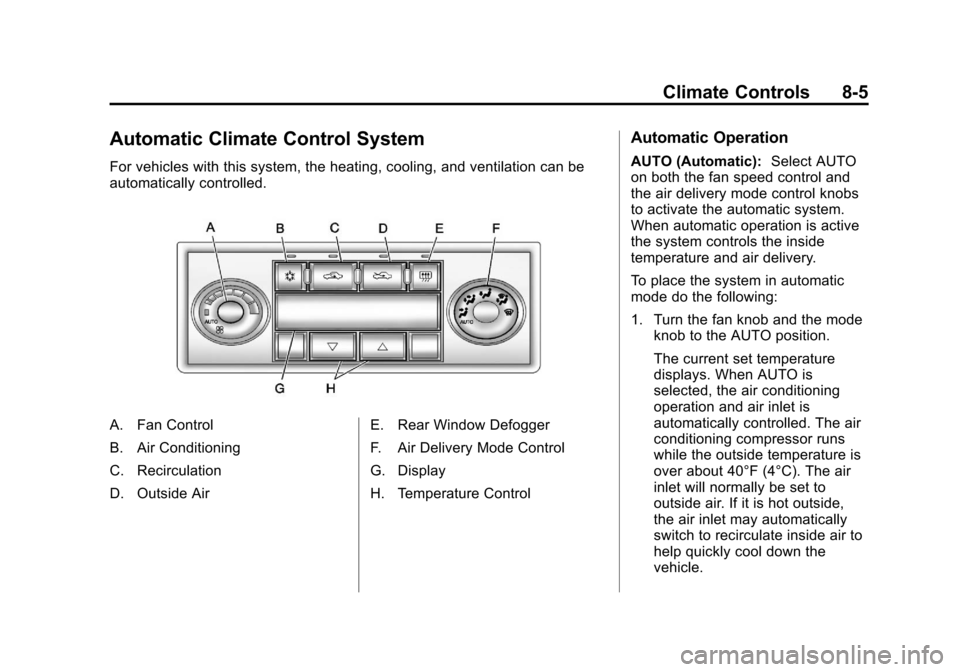
For vehicles with this system, the heating, cooling, and ventilation can be
automatically controlled.
A. Fan Control
B. Air Conditioning
C. Recirculation
D. Outside AirE. Rear Window Defogger
F. Air Delivery Mode Control
G. Display
H. Temperature Control
Automatic Operation
AUTO (Automatic):
Select AUTO
on both the fan speed control and
the air delivery mode control knobs
to activate the automatic system.
When automatic operation is active
the system controls the inside
temperature and air delivery.
To place the system in automatic
mode do the following:
1. Turn the fan knob and the mode knob to the AUTO position.
The current set temperature
displays. When AUTO is
selected, the air conditioning
operation and air inlet is
automatically controlled. The air
conditioning compressor runs
while the outside temperature is
over about 40°F (4°C). The air
inlet will normally be set to
outside air. If it is hot outside,
the air inlet may automatically
switch to recirculate inside air to
help quickly cool down the
vehicle.
Page 191 of 398
Black plate (9,1)Chevrolet Malibu Owner Manual - 2012
Climate Controls 8-9
Remote Start Climate Control
Operation
For vehicles with remote start, when
it is activated the climate control
system heats and cools the inside of
the vehicle using the previous
system settings before the vehicle
was turned off. The climate control
knobs will remain active during a
remote start. However, the climate
control buttons will be inactive until
the ignition is turned on by the key.
If the fan is off, the climate control
system will not operate during
remote start.
With the automatic climate control
system, the climate control displays
“RS”in place of the temperature
to indicate that remote start is
activated. For best performance,
turn both the fan and mode knobs to
AUTO. If the temperature is cold
enough and the mode knob is set to
AUTO, the system begins in defrost
to clear the windows. See Remote
Keyless Entry (RKE) System
Operation on page 2‑3.Air Vents
Use the lever located in the center
of each outlet by moving it either up
and down or side-to-side, to change
the direction and amount of airflow
in the vehicle.
Operation Tips
.Clear away any ice, snow,
or leaves from the air inlets at
the base of the windshield that
may block the flow of air into the
vehicle.
.Do not use non-GM approved
hood deflectors as they could
adversely affect the performance
of the system.
.Keep the path under the front
seats clear of objects to help
circulate the air inside of the
vehicle more effectively.
.When an objectionable odor
outside the vehicle is
encountered, use the
recirculation mode, with the
temperature knob at a
comfortable setting to prevent
the odor from entering the
vehicle through the ventilation
system. This can be helpful
when driving through a long
tunnel with poor ventilation.
However, extended usage of this
mode in cold or cool weather
can cause window fogging.
Page 210 of 398
Black plate (18,1)Chevrolet Malibu Owner Manual - 2012
9-18 Driving and Operating
ACC (ACC/ACCESSORY):This
position lets you use things like the
radio and windshield wipers while
the engine is not running.
R (ON/RUN): This position can be
used to operate the electrical
accessories and to display some
instrument panel warning lights.
The switch will stay in this position
while the engine is running.
This position can also be used for
service and diagnostics, and to
verify the proper operation of the
malfunction indicator lamp as may
be required for emission inspection
purposes. If you leave the key in the
ACC/ACCESSORY or ON/RUN
position with the engine off, the
battery could be drained. You may
not be able to start the vehicle if the
battery is allowed to drain for an
extended period of time.
/
(START): This position starts the
engine. When the engine starts,
release the key. The ignition switch
will return to the ON/RUN position
for driving.
A warning tone will sound when the
driver door is opened, the ignition is
in ACC/ACCESSORY or LOCK/OFF
and the key is in the ignition.Starting the Engine
Move the shift lever to P (Park) or
N (Neutral). The engine will not start
in any other position. To restart the
engine when the vehicle is already
moving, use N (Neutral) only.
Notice: Do not try to shift to
P (Park) if the vehicle is moving.
If you do, you could damage the
transmission. Shift to P (Park)
only when the vehicle is stopped.
Starting Procedure
1. With your foot off the accelerator
pedal, turn the ignition to START.
When the engine starts, let go
of the key. The idle speed will
slow down as the engine
warms. Do not race the engine
immediately after starting it.
Operate the engine and
transmission gently to allow the
oil to warm up and lubricate
all moving parts.
Page 219 of 398
Black plate (27,1)Chevrolet Malibu Owner Manual - 2012
Driving and Operating 9-27
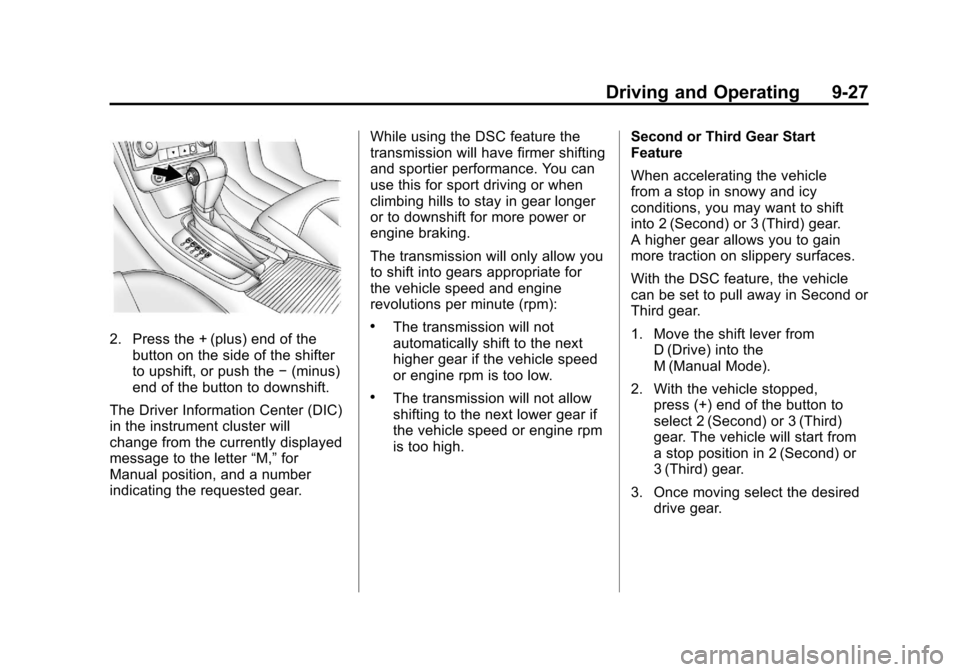
2. Press the + (plus) end of thebutton on the side of the shifter
to upshift, or push the −(minus)
end of the button to downshift.
The Driver Information Center (DIC)
in the instrument cluster will
change from the currently displayed
message to the letter “M,”for
Manual position, and a number
indicating the requested gear. While using the DSC feature the
transmission will have firmer shifting
and sportier performance. You can
use this for sport driving or when
climbing hills to stay in gear longer
or to downshift for more power or
engine braking.
The transmission will only allow you
to shift into gears appropriate for
the vehicle speed and engine
revolutions per minute (rpm):.The transmission will not
automatically shift to the next
higher gear if the vehicle speed
or engine rpm is too low.
.The transmission will not allow
shifting to the next lower gear if
the vehicle speed or engine rpm
is too high.
Second or Third Gear Start
Feature
When accelerating the vehicle
from a stop in snowy and icy
conditions, you may want to shift
into 2 (Second) or 3 (Third) gear.
A higher gear allows you to gain
more traction on slippery surfaces.
With the DSC feature, the vehicle
can be set to pull away in Second or
Third gear.
1. Move the shift lever from
D (Drive) into the
M (Manual Mode).
2. With the vehicle stopped, press (+) end of the button to
select 2 (Second) or 3 (Third)
gear. The vehicle will start from
a stop position in 2 (Second) or
3 (Third) gear.
3. Once moving select the desired drive gear.