2012 CHEVROLET EQUINOX radio
[x] Cancel search: radioPage 200 of 428
Black plate (40,1)Chevrolet Equinox Owner Manual - 2012
7-40 Infotainment System
Linking to a Different Phone
To link to a different phone, the new
phone must be in the vehicle and
available to be connected to the
Bluetooth system before the
process is started.
1. Press the CONFIG button.
2. Select Phone Settings orBluetooth Settings.
3. Select Bluetooth.
4. Select Device List.
5. Select the new phone to link to and follow the on screen
prompts.
If delete is selected, the
highlighted phone will be
deleted.Making a Call Using
Phone Book
For cell phones that support the
phone book feature, the Bluetooth
system can use the contacts stored
on your cell phone to make calls.
See your cell phone's owner's guide
or contact your wireless provider to
find out if this feature is supported
by your phone.
When a cell phone supports the
phone book feature, the Phone
Book and Call Lists menus are
automatically available.
The Phone Book menu allows you
to access the phone book stored in
the cell phone to make a call.
The Call Lists menu allows you to
access the phone numbers from the
Incoming Calls, Outgoing Calls, and
Missed Calls menus on your cell
phone to make a call. To make a call using the Phone
Book menu:
1. Press5or5\?once or twice
(depending on the radio).
2. Select Phone Book.
3. Search through the list by selecting the letter group the
phone book entry begins with,
or press the MENU/SEL button
to scroll through the entire list of
names/numbers in the
phone book.
4. Select the name or number you want to call.
To make a call using the Call
Lists menu:
1. Press
5or5\?once or twice
(depending on the radio).
2. Select Call Lists.
3. Select the Incoming Calls, Outgoing Calls, or Missed
Calls list.
4. Select the name or number you want to call.
Page 201 of 428
Black plate (41,1)Chevrolet Equinox Owner Manual - 2012
Infotainment System 7-41
Making a Call
To make a call:
1. Press
5or5\?once or twice
(depending on the radio).
2. Enter the character sequence. See “Entering a Character
Sequence” inOperation on
page 7‑10 for more information.
3. Select Call to start dialing the number.
Accepting or Declining a Call
When an incoming call is received,
the infotainment system mutes and
a ring tone is heard in the vehicle.
Accepting a Call
Turn the MENU/SEL knob to
“Answer” and press the MENU/SEL
knob to accept the call.
Declining a Call
Turn the MENU/SEL knob to
“Decline” and press the MENU/SEL
knob to decline the call.
Call Waiting
Call waiting must be supported on
the Bluetooth phone and enabled by
the wireless service carrier to work.
Accepting a Call
Turn the MENU/SEL knob to
“Answer” and press the MENU/SEL
knob to accept the call.
Declining a Call
Turn the MENU/SEL knob to
“Decline” and press the MENU/SEL
knob to decline the call.
Switching Between Calls
(Call Waiting Calls Only)
To switch between calls:
1. Turn or press the MENU/ SEL knob.
2. Select Switch Call from the menu.
Conference Calling
Conference calling and three‐way
calling must be supported on the
Bluetooth phone and enabled by the
wireless service carrier to work.
To start a conference while in a
current call:
1. Turn or press the MENU/
SEL knob.
2. Select Enter Number.
3. Enter the character sequence then select Call. See “Entering a
Character Sequence” in
Operation on page 7‑10 for more
information.
4. After the call has been placed, turn or press the MENU/SEL
knob and choose Merge Calls.
5. To add more callers to the conference call, repeat Steps 1
through 4. The number of callers
that can be added is limited by
your wireless service carrier.
Page 218 of 428
Black plate (2,1)Chevrolet Equinox Owner Manual - 2012
9-2 Driving and Operating
Towing
General TowingInformation . . . . . . . . . . . . . . . . . 9-56
Driving Characteristics and Towing Tips . . . . . . . . . . . . . . . . 9-57
Trailer Towing . . . . . . . . . . . . . . . . 9-60
Towing Equipment . . . . . . . . . . . 9-63
Trailer Sway
Control (TSC) . . . . . . . . . . . . . . 9-63
Conversions and Add-Ons
Add-On ElectricalEquipment . . . . . . . . . . . . . . . . . 9-64
Driving Information
Distracted Driving
Distraction comes in many forms
and can take your focus from the
task of driving. Exercise good
judgment and do not let other
activities divert your attention away
from the road. Many local
governments have enacted laws
regarding driver distraction. Become
familiar with the local laws in
your area.
To avoid distracted driving, always
keep your eyes on the road, hands
on the wheel, and mind on the drive.
.Do not use a phone in
demanding driving situations.
Use a hands-free method to
place or receive necessary
phone calls.
.Watch the road. Do not read,
take notes, or look up
information on phones or other
electronic devices.
.Designate a front seat
passenger to handle potential
distractions.
.Become familiar with vehicle
features before driving, such as
programming favorite radio
stations and adjusting climate
control and seat settings.
Program all trip information into
any navigation device prior to
driving.
.Wait until the vehicle is parked
to retrieve items that have fallen
to the floor.
.Stop or park the vehicle to tend
to children.
.Keep pets in an appropriate
carrier or restraint.
.Avoid stressful conversations
while driving, whether with a
passenger or on a cell phone.
Page 261 of 428
Black plate (45,1)Chevrolet Equinox Owner Manual - 2012
Driving and Operating 9-45
Rear Vision
Camera (RVC)
The vehicle may have a Rear Vision
Camera (RVC) system. Read this
entire section before using it.
The RVC can assist the driver when
backing up by displaying a view of
the area behind the vehicle.
{WARNING
The RVC system does not display
pedestrians, bicyclists, animals,
or any other object located
outside the camera's field of view,
below the bumper, or under the
vehicle.
Do not back the vehicle using
only the RVC screen or by using
the screen during longer, higher
speed backing maneuvers,
or where there could be(Continued)
WARNING (Continued)
cross-traffic. Perceived distances
may be different from actual
distances.
Failure to use proper care before
backing may result in injury,
death, or vehicle damage. Always
check before backing by checking
behind and around the vehicle.
An image appears on the radio
screen with the message Check
Surroundings for Safety when the
vehicle is shifted into R (Reverse).
The radio screen goes to the
previous screen after approximately
10 seconds once the vehicle is
shifted out of R (Reverse). To cancel the delay, do one of the
following:.Press a hard key on the
navigation system.
.Shift into P (Park).
.Reach a vehicle speed of
8 km/h (5 mph).
Turning the Rear Vision Camera
System On or Off
To turn the rear vision camera
system on or off:
1. Shift into P (Park).
2. Press the CONFIG button.
3. Select Display.
Page 262 of 428
Black plate (46,1)Chevrolet Equinox Owner Manual - 2012
9-46 Driving and Operating
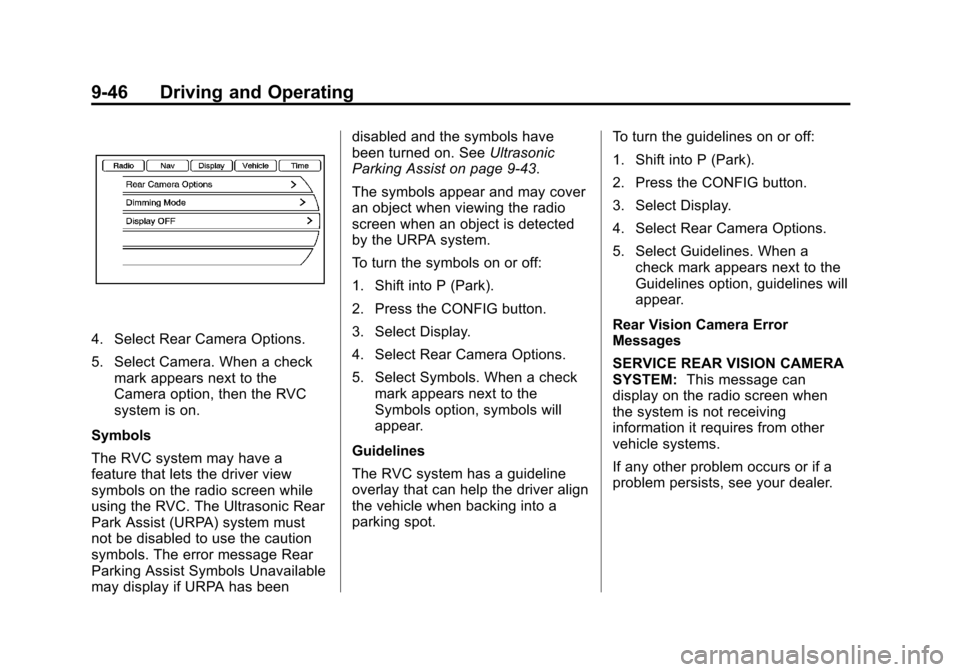
4. Select Rear Camera Options.
5. Select Camera. When a checkmark appears next to the
Camera option, then the RVC
system is on.
Symbols
The RVC system may have a
feature that lets the driver view
symbols on the radio screen while
using the RVC. The Ultrasonic Rear
Park Assist (URPA) system must
not be disabled to use the caution
symbols. The error message Rear
Parking Assist Symbols Unavailable
may display if URPA has been disabled and the symbols have
been turned on. See
Ultrasonic
Parking Assist on page 9‑43.
The symbols appear and may cover
an object when viewing the radio
screen when an object is detected
by the URPA system.
To turn the symbols on or off:
1. Shift into P (Park).
2. Press the CONFIG button.
3. Select Display.
4. Select Rear Camera Options.
5. Select Symbols. When a check mark appears next to the
Symbols option, symbols will
appear.
Guidelines
The RVC system has a guideline
overlay that can help the driver align
the vehicle when backing into a
parking spot. To turn the guidelines on or off:
1. Shift into P (Park).
2. Press the CONFIG button.
3. Select Display.
4. Select Rear Camera Options.
5. Select Guidelines. When a
check mark appears next to the
Guidelines option, guidelines will
appear.
Rear Vision Camera Error
Messages
SERVICE REAR VISION CAMERA
SYSTEM: This message can
display on the radio screen when
the system is not receiving
information it requires from other
vehicle systems.
If any other problem occurs or if a
problem persists, see your dealer.
Page 321 of 428
Black plate (41,1)Chevrolet Equinox Owner Manual - 2012
Vehicle Care 10-41
Mini Fuses Usage1 Steering Wheel
Dimming
2 Spare
3 Spare
4 Body Control
Module 1
5 Infotainment
6 Body Control
Module 7
7 Noise Control
Module
8 Body Control
Module 4
9 Radio
10 Special Equipment
Order Battery
11 Ultrasonic Rear
Parking Assist
Module Mini Fuses Usage
12 Heater, Ventilation
and Air Conditioning
Battery
13 Auxiliary Power
Front
14 Heater, Ventilation
and Air Conditioning
Ignition
15 Display
16 Body Control
Module 5
17 Auxiliary
Power Rear
18 Instrument Panel
Cluster Ignition
19 Personal Device
Interface Module
20 Body Control
Module 6 Mini Fuses Usage
21 Special Equipment
Order Retained
Accessory Power
22 Sensing and
Diagnostic Module
Ignition
23 Spare
24 Spare
25 Transmission Gear
Shift Position
Indicator
26 Spare
27 Spare
28 Spare
30 Body Control
Module 3
31 Amplifier
32 Discrete Logic
Ignition Switch
Page 331 of 428
Black plate (51,1)Chevrolet Equinox Owner Manual - 2012
Vehicle Care 10-51
How to Check
Use a good quality pocket-type
gauge to check tire pressure.
Proper tire inflation cannot be
determined by looking at the tire.
Check the tire inflation pressure
when the tires are cold, meaning
the vehicle has not been driven
for at least three hours or no
more than 1.6 km (1 mi).
Remove the valve cap from the
tire valve stem. Press the tire
gauge firmly onto the valve to
get a pressure measurement.
If the cold tire inflation pressure
matches the recommended
pressure on the Tire and
Loading Information label, no
further adjustment is necessary.If the inflation pressure is low,
add air until the recommended
pressure is reached. If the
inflation pressure is high, press
on the metal stem in the center
of the tire valve to release air.
Recheck the tire pressure with
the tire gauge.
Return the valve caps on the
valve stems to prevent leaks
and keep out dirt and moisture.
Tire Pressure Monitor
System
The Tire Pressure Monitor System
(TPMS) uses radio and sensor
technology to check tire pressure
levels. The TPMS sensors monitor
the air pressure in your tires and
transmit tire pressure readings to a
receiver located in the vehicle. Each tire, including the spare (if
provided), should be checked
monthly when cold and inflated to
the inflation pressure recommended
by the vehicle manufacturer on the
vehicle placard or tire inflation
pressure label. (If your vehicle has
tires of a different size than the size
indicated on the vehicle placard or
tire inflation pressure label, you
should determine the proper tire
inflation pressure for those tires.)
As an added safety feature, your
vehicle has been equipped with a
tire pressure monitoring system
(TPMS) that illuminates a low tire
pressure telltale when one or more
of your tires is significantly under‐
inflated.
Page 332 of 428
Black plate (52,1)Chevrolet Equinox Owner Manual - 2012
10-52 Vehicle Care
Accordingly, when the low tire
pressure telltale illuminates, you
should stop and check your tires as
soon as possible, and inflate them
to the proper pressure. Driving on a
significantly under‐inflated tire
causes the tire to overheat and can
lead to tire failure. Under‐inflation
also reduces fuel efficiency and tire
tread life, and may affect the
vehicle's handling and stopping
ability.
Please note that the TPMS is not a
substitute for proper tire
maintenance, and it is the driver's
responsibility to maintain correct tire
pressure, even if under‐inflation has
not reached the level to trigger
illumination of the TPMS low tire
pressure telltale.Your vehicle has also been
equipped with a TPMS malfunction
indicator to indicate when the
system is not operating properly.
The TPMS malfunction indicator is
combined with the low tire pressure
telltale. When the system detects a
malfunction, the telltale will flash for
approximately one minute and then
remain continuously illuminated.
This sequence will continue upon
subsequent vehicle start‐ups as
long as the malfunction exists.
When the malfunction indicator is
illuminated, the system may not be
able to detect or signal low tire
pressure as intended. TPMS
malfunctions may occur for a variety
of reasons, including the installation
of replacement or alternate tires or
wheels on the vehicle that prevent
the TPMS from functioning properly.Always check the TPMS malfunction
telltale after replacing one or more
tires or wheels on your vehicle to
ensure that the replacement or
alternate tires and wheels allow the
TPMS to continue to function
properly.
See
Tire Pressure Monitor
Operation on page 10‑53 for
additional information.
Federal Communications
Commission (FCC) Rules and
with Industry Canada
Standards
See Radio Frequency Statement on
page 13‑17 for information
regarding Part 15 of the Federal
Communications Commission (FCC)
Rules and with Industry Canada
Standards RSS-GEN/210/220/310.