2012 CHEVROLET CRUZE lock
[x] Cancel search: lockPage 155 of 400
Black plate (3,1)Chevrolet Cruze Owner Manual - 2012
Infotainment System 7-3
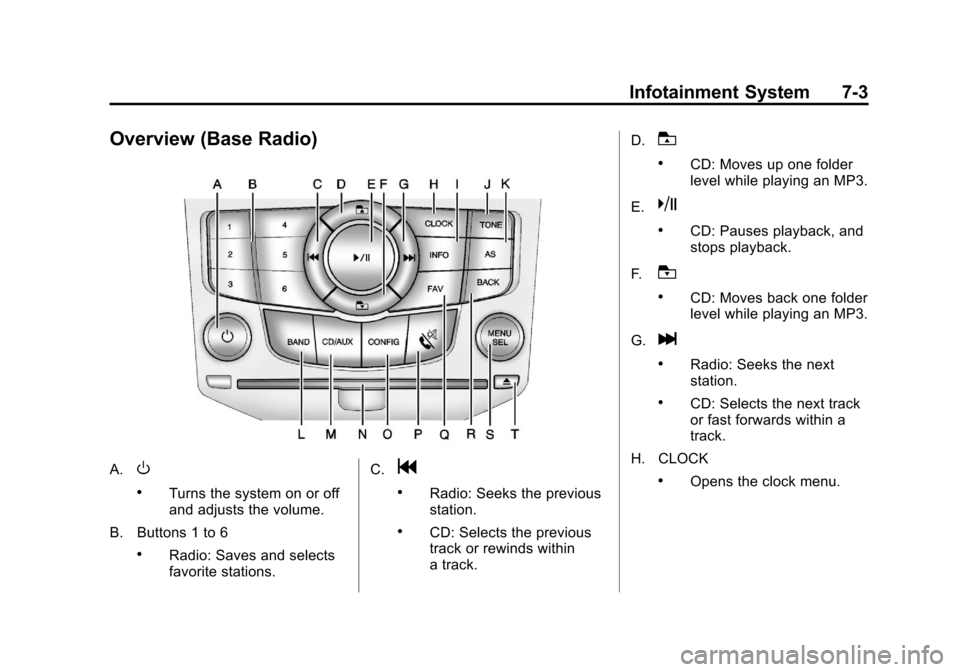
Overview (Base Radio)
A.O
.Turns the system on or off
and adjusts the volume.
B. Buttons 1 to 6
.Radio: Saves and selects
favorite stations. C.
g
.Radio: Seeks the previous
station.
.CD: Selects the previous
track or rewinds within
a track.D.
T
.CD: Moves up one folder
level while playing an MP3.
E.
k
.CD: Pauses playback, and
stops playback.
F.
U
.CD: Moves back one folder
level while playing an MP3.
G.
l
.Radio: Seeks the next
station.
.CD: Selects the next track
or fast forwards within a
track.
H. CLOCK
.Opens the clock menu.
Page 157 of 400
Black plate (5,1)Chevrolet Cruze Owner Manual - 2012
Infotainment System 7-5
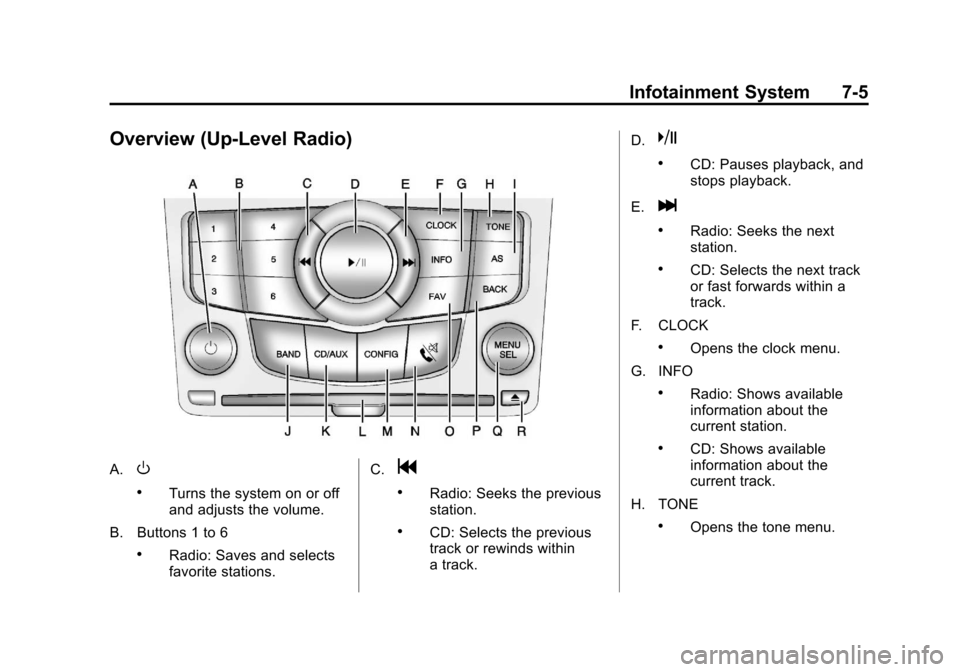
Overview (Up-Level Radio)
A.O
.Turns the system on or off
and adjusts the volume.
B. Buttons 1 to 6
.Radio: Saves and selects
favorite stations. C.
g
.Radio: Seeks the previous
station.
.CD: Selects the previous
track or rewinds within
a track.D.
k
.CD: Pauses playback, and
stops playback.
E.
l
.Radio: Seeks the next
station.
.CD: Selects the next track
or fast forwards within a
track.
F. CLOCK
.Opens the clock menu.
G. INFO
.Radio: Shows available
information about the
current station.
.CD: Shows available
information about the
current track.
H. TONE
.Opens the tone menu.
Page 168 of 400
Black plate (16,1)Chevrolet Cruze Owner Manual - 2012
7-16 Infotainment System
Storing a Channel as a Favorite
To store the channel to a position
in the list, press and hold the
corresponding 1 to 6 button until
the channel can be heard again.
Retrieving Channels
Press the FAV button to open a
favorite page or to change to
another favorite page. Briefly press
one of the 1 to 6 buttons to retrieve
the channel.
XM Messages
XL (Explicit Language
Channels):These channels, or
any others, can be blocked
by request, by calling
1-800-929-2100 in the U.S., and
1-877-438-9677 in Canada.
XM Updating: The encryption code
in the receiver is being updated.
No action is required. This process
should take no longer than
30 seconds. Loading XM:
The audio system is
acquiring and processing audio and
text data. No action is needed. This
message should disappear shortly.
Channel Off Air: This channel is
not currently in service. Tune in to
another channel.
Channel Unauth: This channel is
blocked or cannot be received with
your XM Subscription package.
Channel Unavailable: This
previously assigned channel is no
longer assigned. Tune to another
station.
No Artist Info: The system is
working properly. No artist
information is available at this time
on this channel.
No Title Info: The system is
working properly. No song title
information is available at this time
on this channel.
No CAT Info: The system is
working properly. No category
information is available at this time
on this channel. No Information:
The system is
working properly. No text or
informational messages are
available at this time on this
channel.
No Subscription Please Renew:
XM subscription needs to be
reactivated. Contact XM at
www.xmradio.com or
1-800-929-2100 in the U.S., and
www.xmradio.ca or
1-877-438-9677 in Canada.
No XM Signal: The system is
working properly. The vehicle may
be in a location where the XM signal
is being blocked. When the vehicle
is moved into an open area, the
signal should return.
CAT Not Found: The system is
working properly. There are no
channels available for the selected
category.
XM Radio ID: If tuned to channel 0,
this message alternates with the
XM Radio eight‐digit radio ID label.
This label is needed to activate
the service.
Page 188 of 400
Black plate (36,1)Chevrolet Cruze Owner Manual - 2012
7-36 Infotainment System
Channel blocking is available for
XM Satellite Radio receivers by
notifying XM at:
.USA Customers—Visit
www.xmradio.com or call
1-800-929-2100.
.Canadian Customers —Visit
www.xmradio.ca or call
1-877-438-9677.
It is prohibited to copy, decompile,
disassemble, reverse engineer,
hack, manipulate, or otherwise
make available any technology or
software incorporated in receivers
compatible with the XM™ Satellite
Radio System or that support the
XM website, the Online Service or
any of its content. Furthermore, the
AMBER voice compression software
included in this product is protected
by intellectual property rights
including patent rights, copyrights,
and trade secrets of Digital Voice
Systems, Inc. General Requirements:
1. A License Agreement from XM™
is required for any product that
incorporates XM Technology
and/or for use of any of the
XM marks to be manufactured,
distributed or marketed in the
XM Service Area.
2. For products to be distributed, marketed and/or sold in Canada,
a separate agreement is
required with Canadian Satellite
Radio Inc. (operating as
XM Canada).
Music and video recognition
technology and related data are
provided by Gracenote
®. Gracenote
is the industry standard in music
recognition technology and related content delivery.
For more information, visit
www.gracenote.com.
CD, DVD, Blu-ray Disc, and music
and video-related data from
Gracenote, Inc., copyright © 2000 to
present Gracenote. One or more
patents owned by Gracenote apply
to this product and service. See
the Gracenote website for a
non-exhaustive list of applicable
Gracenote patents. Gracenote and
CDDB, MusicID, Media VOCS, the
Gracenote logo and logotype, and
the
“Powered by Gracenote” logo
are either registered trademarks or
trademarks of Gracenote in the
United States and/or other
countries.
If you require more information
regarding the use of the
Gracenote Service, visit:
www.gracenote.com/corporate.
For the data provided by
Gracenote®Music Recognition
Service, the content is not
necessarily guaranteed 100%.
Page 192 of 400
Black plate (2,1)Chevrolet Cruze Owner Manual - 2012
8-2 Climate Controls
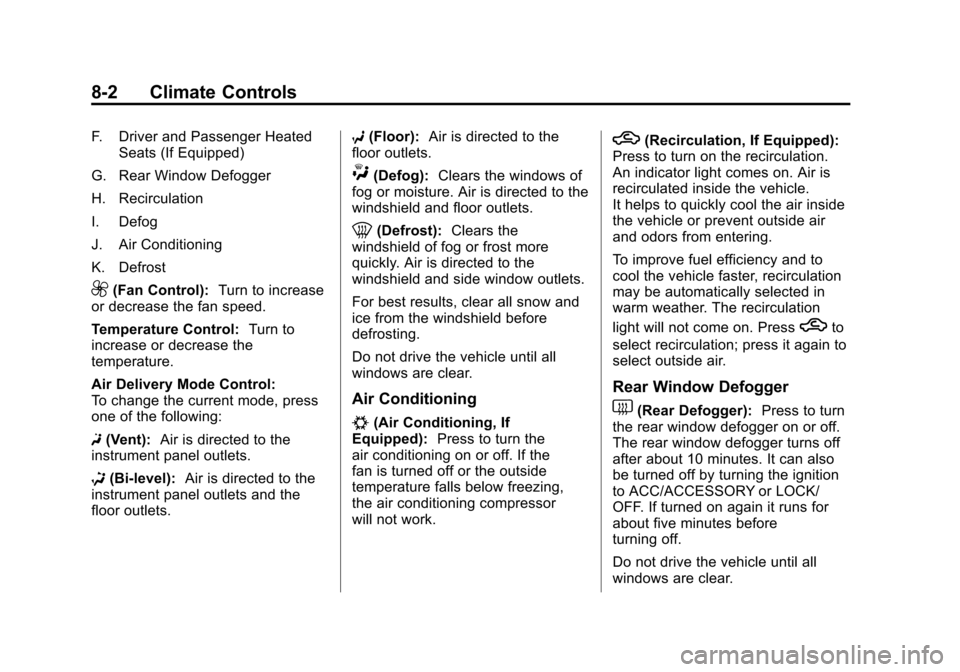
F. Driver and Passenger HeatedSeats (If Equipped)
G. Rear Window Defogger
H. Recirculation
I. Defog
J. Air Conditioning
K. Defrost
9(Fan Control): Turn to increase
or decrease the fan speed.
Temperature Control: Turn to
increase or decrease the
temperature.
Air Delivery Mode Control:
To change the current mode, press
one of the following:
F (Vent): Air is directed to the
instrument panel outlets.
* (Bi-level): Air is directed to the
instrument panel outlets and the
floor outlets. 7
(Floor): Air is directed to the
floor outlets.
W(Defog): Clears the windows of
fog or moisture. Air is directed to the
windshield and floor outlets.
0(Defrost): Clears the
windshield of fog or frost more
quickly. Air is directed to the
windshield and side window outlets.
For best results, clear all snow and
ice from the windshield before
defrosting.
Do not drive the vehicle until all
windows are clear.
Air Conditioning
#(Air Conditioning, If
Equipped): Press to turn the
air conditioning on or off. If the
fan is turned off or the outside
temperature falls below freezing,
the air conditioning compressor
will not work.
h(Recirculation, If Equipped):
Press to turn on the recirculation.
An indicator light comes on. Air is
recirculated inside the vehicle.
It helps to quickly cool the air inside
the vehicle or prevent outside air
and odors from entering.
To improve fuel efficiency and to
cool the vehicle faster, recirculation
may be automatically selected in
warm weather. The recirculation
light will not come on. Press
hto
select recirculation; press it again to
select outside air.
Rear Window Defogger
1(Rear Defogger): Press to turn
the rear window defogger on or off.
The rear window defogger turns off
after about 10 minutes. It can also
be turned off by turning the ignition
to ACC/ACCESSORY or LOCK/
OFF. If turned on again it runs for
about five minutes before
turning off.
Do not drive the vehicle until all
windows are clear.
Page 194 of 400
Black plate (4,1)Chevrolet Cruze Owner Manual - 2012
8-4 Climate Controls
To place the system in automatic
mode do the following:
1. Press AUTO.
2. Set the temperature. Allow thesystem time to stabilize. Then
adjust the temperature as
needed for best comfort.
To improve fuel efficiency and to
cool the vehicle faster, recirculation
may be automatically selected in
warm weather. The recirculation
light will not come on. Press
hto
select recirculation; press it again to
select outside air.
English units can be changed to
metric units through the Driver
Information Center (DIC). See
Vehicle Personalization on
page 5‑34. Manual Operation
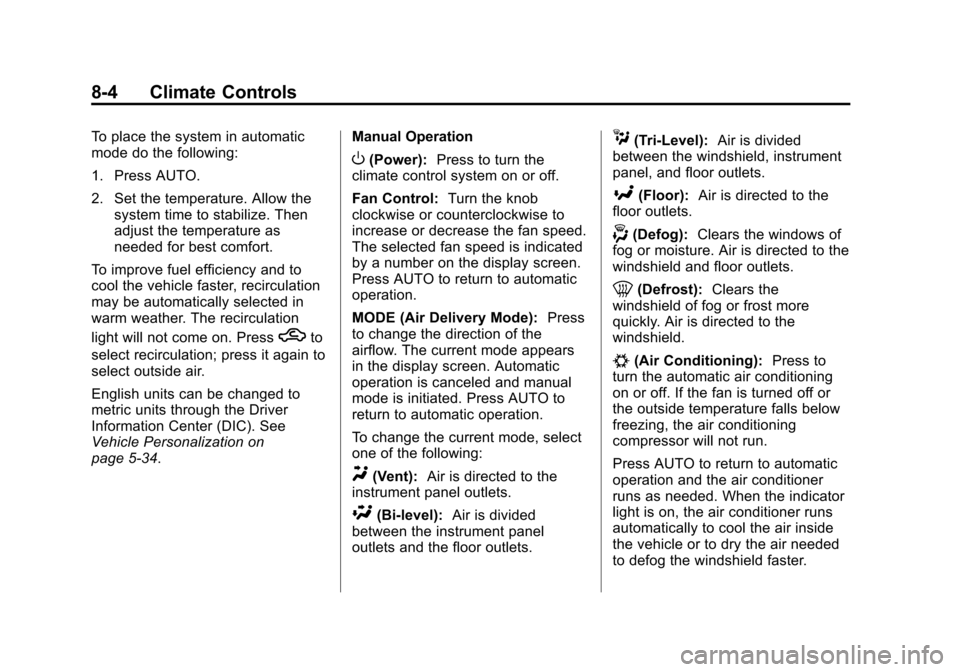
O(Power):
Press to turn the
climate control system on or off.
Fan Control: Turn the knob
clockwise or counterclockwise to
increase or decrease the fan speed.
The selected fan speed is indicated
by a number on the display screen.
Press AUTO to return to automatic
operation.
MODE (Air Delivery Mode): Press
to change the direction of the
airflow. The current mode appears
in the display screen. Automatic
operation is canceled and manual
mode is initiated. Press AUTO to
return to automatic operation.
To change the current mode, select
one of the following:
Y(Vent): Air is directed to the
instrument panel outlets.
\(Bi-level): Air is divided
between the instrument panel
outlets and the floor outlets.
C(Tri‐Level): Air is divided
between the windshield, instrument
panel, and floor outlets.
[(Floor): Air is directed to the
floor outlets.
-(Defog): Clears the windows of
fog or moisture. Air is directed to the
windshield and floor outlets.
0(Defrost): Clears the
windshield of fog or frost more
quickly. Air is directed to the
windshield.
#(Air Conditioning): Press to
turn the automatic air conditioning
on or off. If the fan is turned off or
the outside temperature falls below
freezing, the air conditioning
compressor will not run.
Press AUTO to return to automatic
operation and the air conditioner
runs as needed. When the indicator
light is on, the air conditioner runs
automatically to cool the air inside
the vehicle or to dry the air needed
to defog the windshield faster.
Page 197 of 400
Black plate (7,1)Chevrolet Cruze Owner Manual - 2012
Climate Controls 8-7
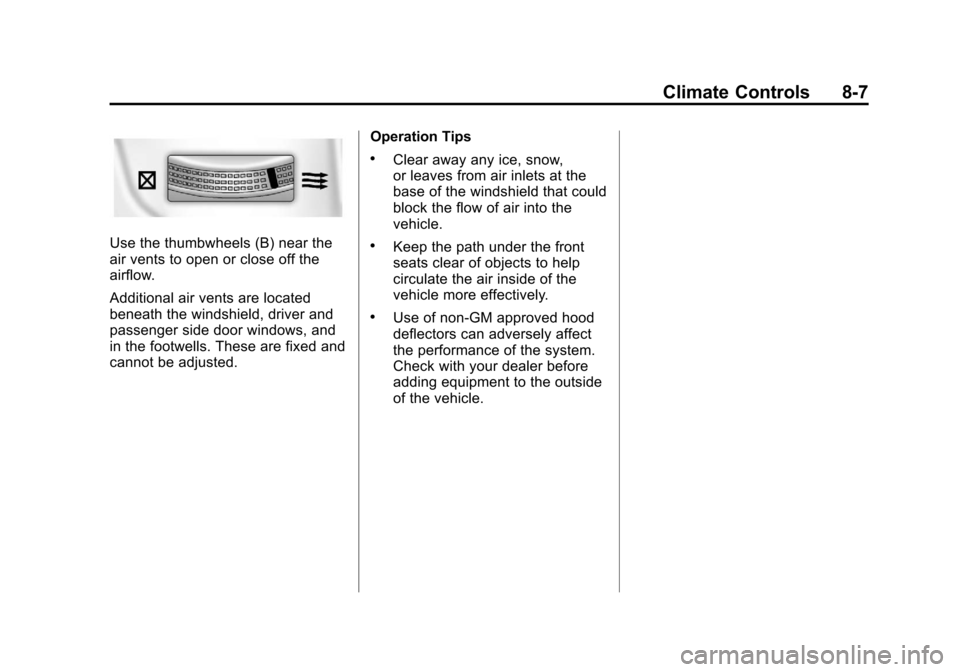
Use the thumbwheels (B) near the
air vents to open or close off the
airflow.
Additional air vents are located
beneath the windshield, driver and
passenger side door windows, and
in the footwells. These are fixed and
cannot be adjusted.Operation Tips
.Clear away any ice, snow,
or leaves from air inlets at the
base of the windshield that could
block the flow of air into the
vehicle.
.Keep the path under the front
seats clear of objects to help
circulate the air inside of the
vehicle more effectively.
.Use of non‐GM approved hood
deflectors can adversely affect
the performance of the system.
Check with your dealer before
adding equipment to the outside
of the vehicle.
Page 199 of 400
Black plate (1,1)Chevrolet Cruze Owner Manual - 2012
Driving and Operating 9-1
Driving and
Operating
Driving Information
Distracted Driving . . . . . . . . . . . . . 9-2
Defensive Driving . . . . . . . . . . . . . 9-3
Drunk Driving . . . . . . . . . . . . . . . . . 9-3
Control of a Vehicle . . . . . . . . . . . 9-4
Braking . . . . . . . . . . . . . . . . . . . . . . . 9-4
Steering . . . . . . . . . . . . . . . . . . . . . . . 9-4
Off-Road Recovery . . . . . . . . . . . . 9-5
Loss of Control . . . . . . . . . . . . . . . . 9-5
Driving on Wet Roads . . . . . . . . . 9-6
Highway Hypnosis . . . . . . . . . . . . 9-7
Hill and Mountain Roads . . . . . . 9-7
Winter Driving . . . . . . . . . . . . . . . . . 9-8
If the Vehicle Is Stuck . . . . . . . . 9-10
Vehicle Load Limits . . . . . . . . . . 9-10
Starting and Operating
New Vehicle Break-In . . . . . . . . 9-15
Ignition Positions(Key Access) . . . . . . . . . . . . . . . 9-15
Ignition Positions (Keyless Access) . . . . . . . . . . . 9-18 Starting the Engine . . . . . . . . . . 9-20
Engine Heater . . . . . . . . . . . . . . . 9-22
Retained Accessory
Power (RAP) . . . . . . . . . . . . . . . 9-23
Shifting Into Park (Automatic
Transmission) . . . . . . . . . . . . . . 9-24
Shifting out of Park . . . . . . . . . . 9-25
Parking . . . . . . . . . . . . . . . . . . . . . . 9-27
Parking over Things That Burn . . . . . . . . . . . . . . . . . . 9-27
Engine Exhaust
Engine Exhaust . . . . . . . . . . . . . . 9-27
Running the Vehicle WhileParked . . . . . . . . . . . . . . . . . . . . . 9-28
Automatic Transmission
Automatic Transmission . . . . . 9-29
Manual Mode . . . . . . . . . . . . . . . . 9-31
Manual Transmission
Manual Transmission . . . . . . . . 9-33
Brakes
Antilock BrakeSystem (ABS) . . . . . . . . . . . . . . 9-35
Parking Brake . . . . . . . . . . . . . . . 9-36
Brake Assist . . . . . . . . . . . . . . . . . 9-36
Ride Control Systems
Traction Control System (TCS) . . . . . . . . . . . . . . 9-37
StabiliTrak
®System . . . . . . . . . 9-38
Cruise Control
Cruise Control . . . . . . . . . . . . . . . 9-40
Object Detection Systems
Ultrasonic Parking Assist . . . . 9-42
Fuel
Fuel . . . . . . . . . . . . . . . . . . . . . . . . . 9-44
Recommended Fuel . . . . . . . . . 9-44
Gasoline Specifications (U.S. and Canada Only) . . . . . . . . . . 9-44
California Fuel Requirements . . . . . . . . . . . . . . 9-45
Fuels in Foreign Countries . . . 9-45
Fuel Additives . . . . . . . . . . . . . . . 9-45
Filling the Tank . . . . . . . . . . . . . . 9-46
Filling a Portable Fuel Container . . . . . . . . . . . . . . . . . . . 9-48