Page 270 of 538

Black plate (86,1)Cadillac Escalade/Escalade ESV Owner Manual - 2012
7-86 Infotainment System
Turning XM NavTraffic On and Off
To turn traffic on or off:
1. Press CONFIG, then pressCONFIG repeatedly until Nav
is selected or press the Nav
screen button.
2. Press the Traffic Options button.
3. Press the Traffic button. This button is highlighted when it is
active.
Selecting Alert for Approaching
Traffic Events enables the
system to show a pop-up screen
that notifies of possible traffic
issues ahead.
When this feature is highlighted,
while traveling on a route,
accidents located on the route
are indicated and can be
avoided. Traffic Icon
The Traffic Icon appears on the
Traffic Tab, next to the word
Traffic, when traffic is found in the
local area.
The Traffic Icon has three different
condition displays. These are:
Condition
Traffic
Status Icon
.No XM
NavTraffic ™
subscription.
.No Traffic is
found in the
local area.
.The Traffic
Feature is
turned off.
Traffic events are
in the area, but
none are on
route.
Traffic events are
on route.
Page 271 of 538
Black plate (87,1)Cadillac Escalade/Escalade ESV Owner Manual - 2012
Infotainment System 7-87
Locations and Information of
Traffic Conditions
The system may take some time to
sort the information. The list of
traffic conditions display in the order
of distance from the vehicle, up to
approximately 125 km (75 mi). With
a route planned, the system defaults
to list traffic events on your route.
Without a route planned, if travelling
on a major interstate, the system
lists events immediately ahead on
the interstate first. Then all other
traffic events follow. Not all traffic
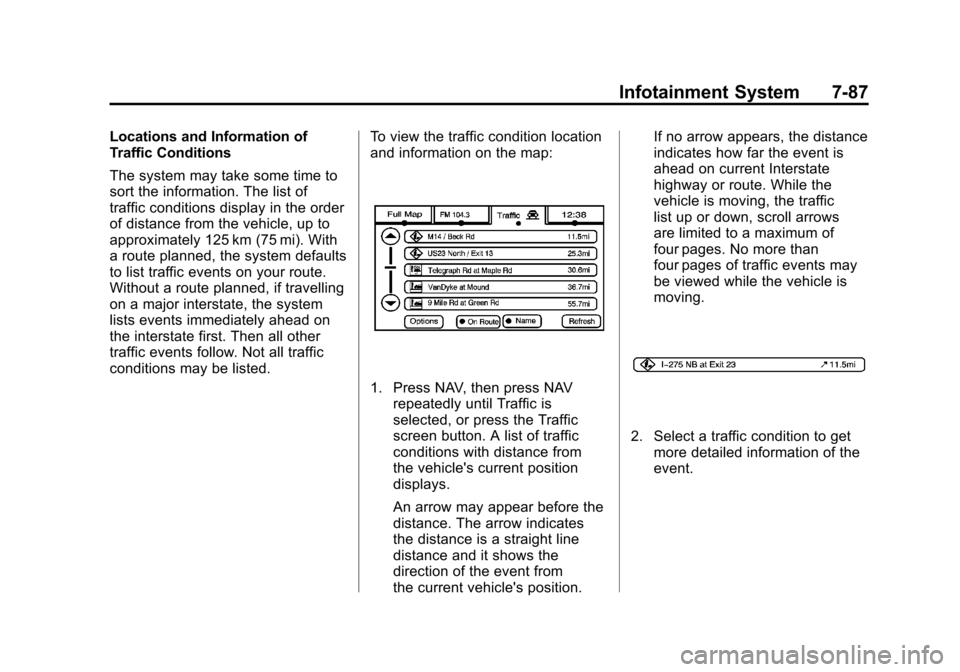
conditions may be listed.To view the traffic condition location
and information on the map:
1. Press NAV, then press NAV
repeatedly until Traffic is
selected, or press the Traffic
screen button. A list of traffic
conditions with distance from
the vehicle's current position
displays.
An arrow may appear before the
distance. The arrow indicates
the distance is a straight line
distance and it shows the
direction of the event from
the current vehicle's position. If no arrow appears, the distance
indicates how far the event is
ahead on current Interstate
highway or route. While the
vehicle is moving, the traffic
list up or down, scroll arrows
are limited to a maximum of
four pages. No more than
four pages of traffic events may
be viewed while the vehicle is
moving.
2. Select a traffic condition to get
more detailed information of the
event.
Page 272 of 538

Black plate (88,1)Cadillac Escalade/Escalade ESV Owner Manual - 2012
7-88 Infotainment System
Options
Press the Options screen button.
A Traffic Options menu displays.
Select the desired traffic related
option.
Traffic:Press to enable or disable
the traffic function.
Show Traffic ICONS: Press to
display traffic icons on the map
screen. This function allows which
traffic information displays.
Traffic Flow Status —This screen
button is used to enable or disable
the green, yellow, red and orange
arrows shown beside the roads and
used to show the traffic flow or
extent of a traffic event.
.Black indicates a closed road
segment
.Red indicates significantly
impaired traffic flow with average
speed of fewer than 40 km/h
(25 mph).
.Yellow indicates slightly impaired
traffic flow with average speed
between 40 km/h (25 mph) and
72 km/h (45 mph).
.Green indicates normal traffic
flow with average speed above
72 km/h (45 mph).
.Orange indicates construction.
Traffic flow data arrows display
on the map when scaled up to
eight miles.
Closed Road, Traffic Delays,
Incidents, and Advisories —These
four screen buttons are used to
select the traffic event ICONS that
appear on the map screens.
Page 273 of 538

Black plate (89,1)Cadillac Escalade/Escalade ESV Owner Manual - 2012
Infotainment System 7-89
Alert for Approaching Traffic
Events:When On, if an
approaching traffic event is within
the alert range, one of two traffic
alert pop-up screens display:
.With no route planned, while
on expressways, Approaching
Traffic Event without Avoid
screen displays.
.With route planned, Traffic Event
on Route screen displays.
If the Alert for Approaching Traffic
Events is Off, the alert pop-up
screen does not display.
On-Route
Select the On Route screen button
to display all events ahead on the
current active route. If no traffic
events have been reported on route,
No Traffic Events Reported On
route displays.
Name
Press the Name screen button to
display traffic events in the order of
distance. The closest event is
shown first.
Refresh
Press the Refresh screen button to
update the screen with all of the
latest traffic events, miles, etc.
Traffic events update approximately
every two minutes. To update the
events immediately, press the
Refresh screen button. Scrolling to Traffic Events on
the Map
While scrolling the map, traffic
condition icons may appear. Traffic
events may appear up to 75 mi
(125 km) from your current position.
To receive information about the
traffic condition, place the cross
hairs over the traffic condition icon.
Page 274 of 538

Black plate (90,1)Cadillac Escalade/Escalade ESV Owner Manual - 2012
7-90 Infotainment System
After pressing the INFO
(information) screen button,
the type of traffic condition, the
street name, and a description of
the traffic condition displays. See
“Scrolling the Map”underMaps on
page 7‑60 for more information.
To display traffic events in another
state or a great distance away,
scroll to the desired area, and
then stop scrolling. Wait for the
traffic to update. It may take up to
two minutes before traffic in this new
area can be received and displayed.
Traffic Event Display Categories
The following are traffic condition
categories and symbols that can
appear on the display:
Category 1, Road Closure:
q(Road Closed): Road and/or
ramps closed.
Category 2, Traffic Delayed:
o(Stopped Traffic): Traffic
stopped, stop and go traffic, delayed
and congested traffic. Category 3, Incidents:
p(Alert):
Object in the roadway,
disabled vehicle, or dangerous road
conditions.
t(Accident): Roadway obstructed
due to accident.
s(Road Works): Delayed traffic
due to construction.
Category 4, Advisories:
j/r(Road Condition): Delayed
or stopped traffic, lane blocked or
closed due to a road condition.
k(Weather): Heavy rain, snow,
or fog weather condition.
m(Parking): Available
parking area.
l(Information): Special event,
general information, or warning. Detailed Traffic Event Screens
Traffic Event Screen
The detailed Traffic Event screens
are used to display additional
details of a traffic event condition.
This screen may display if:
.Scrolling to an event on the map
and then pressing INFO.
.Selecting a traffic event listed on
the Traffic Event List screen.
The Traffic Event screen may
display when approaching a traffic
event.
Page 275 of 538

Black plate (91,1)Cadillac Escalade/Escalade ESV Owner Manual - 2012
Infotainment System 7-91
Back, Map, More, and Avoid
These buttons have common
functions across all three Detailed
Traffic Event screens.
Back:Press to return to the
previous screen.
Map: If available, press to display
the related traffic event on the map.
Map Traffic Event Icon with Back
Screen
More: Press to display more of
the traffic event description, if the
whole event does not fit in the given
display. Avoid:
This button is used to avoid
the location of an event on the
route. If pressed, a new route is
calculated and the related traffic
event is avoided. After the new
route has been calculated, the
navigation system goes to the full
map screen and shows the new
route.
The Avoid button is only available if
the event is on the route ahead.
Traffic Voice Prompts
The traffic voice prompts are part
of the current navigation voice
prompts. If the navigation voice
prompts are turned off, all traffic
prompts are also turned off.
If the voice prompts are on,
whenever an Alert for Approaching
Traffic is displayed, the system
gives the related voice prompt.
The content of the voice prompt
depends on actual traffic event data.
The RPT (Repeat) button is for
navigation traffic maneuvers only.
It is not used to repeat traffic prompts. During a traffic voice
prompt, if RPT is pressed, the
current prompt playback cancels.
Traffic prompts are disabled during
OnStar (if equipped) or Voice
Recognition activity.
XM Weather (If Equipped)
Press the Weather screen button to
display the Current or Extended
Forecast Weather.
The Extended Forecast Weather
screen displays five days of the
forecasted weather at the vehicle’s
current position.
Page 276 of 538

Black plate (92,1)Cadillac Escalade/Escalade ESV Owner Manual - 2012
7-92 Infotainment System
Press the Location button located
near the top leftside of the screen to
change the current location to a new
location from a list of 156 supported
cities. The display will then update
the extended forecast for the new
chosen location.
Press the Current Weather button
located near the bottom leftside of
the Extended Forecast Screen to
display the current weather at the
vehicle’s current position. Weather
alerts will also be displayed in the
Alerts nearby area. These alerts
include Flash Flood Warning,
Flood Warning, Special Marine
Warning, Tornado Warning, and
Thunderstorm Warning.
Alert Notification:Press the Alert
Notification button located at the
bottom rightside of the Current
Weather screen turns on or off
Weather alert pop-ups. The Weather
Alert Pop-up, when turned on, will
appear briefly in any audio source,
providing alert notification during
extreme weather warnings close to
the vehicle’ s current position.
Display
Press CONFIG to enter the
configure menu options, then press
CONFIG repeatedly until Display is
selected or press the Display screen
button.
Display OFF
Press this screen button to turn the
display off. Press any control button
to view the display.
Page 277 of 538

Black plate (93,1)Cadillac Escalade/Escalade ESV Owner Manual - 2012
Infotainment System 7-93
Brightness/Contrast/Mode
Press this screen button to change
the brightness, contrast, and mode
of the display.
](Brightness):Press + or−to
increase or decrease the brightness
of the screen.
_(Contrast): Press + or−to
increase or decrease the contrast of
the screen.
Auto (Automatic): Press so the
system can automatically adjust the
screen background depending on
exterior lighting conditions. Night:
Press to make the map
background darker.
Day: Press to make the map
background brighter.
Rear Vision Camera (If Equipped)
Rear Camera Options: Press to
display options available.
The available options are:
Video: Press to turn on or off.
Symbols: Press to turn on or off.
Guiding Lines: Press to turn on
or off. For more information about the Rear
Vision Camera, see
Rear Vision
Camera (RVC) on page 9‑47 in the
vehicle owner manual.
Rear Display(s)
Press the Rear Display(s) screen
button to allow the choice of
sources for rear display between
front disc, rear aux, or usb,
if connected.