2012 BUICK LACROSSE buttons
[x] Cancel search: buttonsPage 9 of 512

Black plate (3,1)Buick LaCrosse Owner Manual - 2012
In Brief 1-3
A.Exterior Lamp Controls on
page 6‑1.
Fog Lamps on page 6‑5
(If Equipped).
Instrument Panel Illumination
Control on page 6‑5.
Head-Up Display (HUD) on
page 5‑31 (If Equipped).
B. Air Vents on page 8‑10.
C. Turn and Lane‐Change Lever. See Turn and Lane-Change
Signals on page 6‑4.
Driver Information Center
Buttons. See Driver Information
Center (DIC) on page 5‑27.
D. Instrument Cluster on
page 5‑10.
Driver Information Center
Display. See Driver Information
Center (DIC) on page 5‑27.
E. Windshield Wiper/Washer on
page 5‑3.
F. Infotainment Display Screen. G.
Infotainment on page 7‑1.
H. Front Storage on page 4‑1.
I. Data Link Connector (DLC) (Out of View). See Malfunction
Indicator Lamp on page 5‑17.
J. Cruise Control on page 9‑42.
K. Steering Wheel Adjustment on
page 5‑2.
L. Horn on page 5‑3.
M. Steering Wheel Controls on
page 5‑2 (If Equipped).
N. Ignition Positions (Key Access)
on page 9‑18 orIgnition
Positions (Keyless Access) on
page 9‑20.
O. Heated and Ventilated Front
Seats on page 3‑10
(If Equipped).
P. Automatic Climate Control
System on page 8‑1
(If Equipped).
Dual Automatic Climate Control
System on page 8‑5
(If Equipped). Q.
Parking Brake on page 9‑36.
R. Shift Lever Position Indicator. See Automatic Transmission on
page 9‑31.
S. Shift Lever. See Shifting Into
Park on page 9‑27.
T. Traction Control System (TCS)
on page 9‑38.
StabiliTrak
®System on
page 9‑40 (If Equipped).
Ultrasonic Parking Assist on
page 9‑44.
Rear Window Sunshade on
page 2‑21 (If Equipped).
U. Power Door Locks on
page 2‑12.
Hazard Warning Flashers on
page 6‑4.
Passenger Sensing System on
page 3‑29.
Page 14 of 512

Black plate (8,1)Buick LaCrosse Owner Manual - 2012
1-8 In Brief
Memory Features
On vehicles with the memory
feature, the“1”and “2”buttons on
the outboard side of the driver seat
are used to manually save and
recall the driver seat and outside
mirror positions. These manually
stored positions are referred to as
Button Memory positions.
The vehicle will also automatically
save driver seat and outside mirror
positions to the current driver
Remote Keyless Entry (RKE)
transmitter when the ignition is placed in OFF. These automatically
stored positions are referred to as
RKE Memory positions.
Storing Button Memory Positions
To save positions into Button
Memory:
1. Adjust the driver seat, seatback
recliner, and both outside mirrors
to the desired driving positions.
2. Press and hold MEM (Memory) and “1”at the same time until a
beep sounds.
3. Repeat Steps 1 and 2 for a second driver using “2.”
To recall the manually saved Button
Memory positions, press and hold
“1” or“2.” The driver seat and
outside mirrors move to the
positions stored to those buttons
when pressed. Releasing “1”or“2”
before the stored positions are
reached stops the recall.
To automatically recall RKE Memory
positions, unlock the driver door
with the RKE transmitter, and open the driver door. On vehicles with
Keyless Access, opening the driver
door when an RKE transmitter is
present will activate the RKE
Memory recall. If the driver door is
already open, pressing the RKE
transmitter
Kbutton will also
activate the RKE Memory recall.
The driver seat and outside mirrors
will move to the previously saved
RKE Memory positions.
See Memory Seats on page 3‑8 for
more information.
Easy Exit Driver Seat
This feature moves the seat
rearward allowing the driver more
room to exit the vehicle.
To activate, place the ignition in
OFF and open the driver door. If the
driver door is already open, placing
the ignition in OFF will activate the
easy exit driver seat.
This feature is turned on or off using
the vehicle personalization menu.
See Vehicle Personalization on
page 5‑43 for more information.
Page 15 of 512
Black plate (9,1)Buick LaCrosse Owner Manual - 2012
In Brief 1-9
Heated and Ventilated
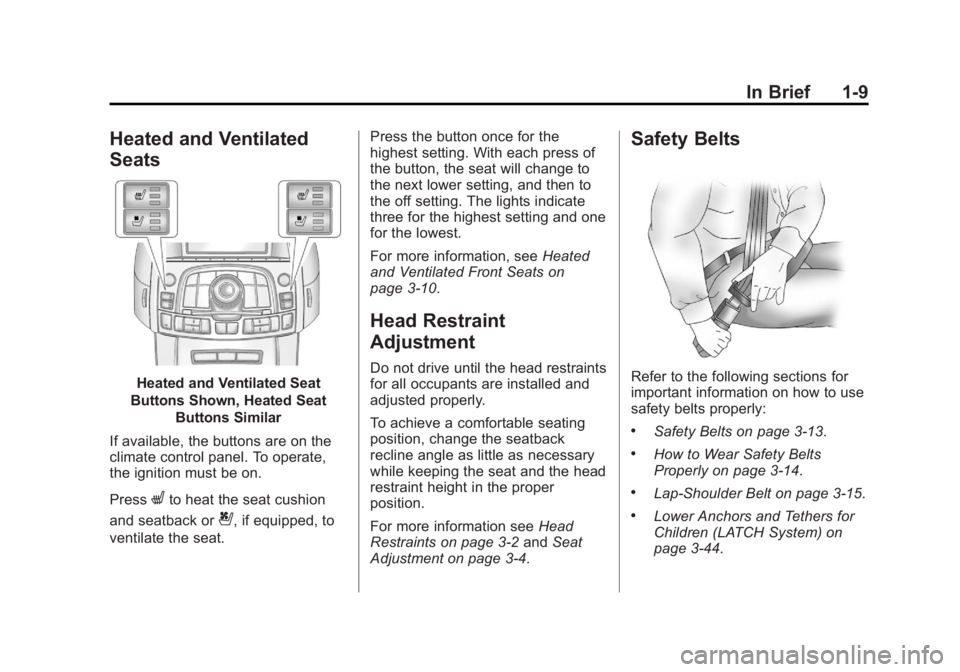
Seats
Heated and Ventilated Seat
Buttons Shown, Heated Seat Buttons Similar
If available, the buttons are on the
climate control panel. To operate,
the ignition must be on.
Press
Lto heat the seat cushion
and seatback or
{, if equipped, to
ventilate the seat. Press the button once for the
highest setting. With each press of
the button, the seat will change to
the next lower setting, and then to
the off setting. The lights indicate
three for the highest setting and one
for the lowest.
For more information, see
Heated
and Ventilated Front Seats on
page 3‑10.
Head Restraint
Adjustment
Do not drive until the head restraints
for all occupants are installed and
adjusted properly.
To achieve a comfortable seating
position, change the seatback
recline angle as little as necessary
while keeping the seat and the head
restraint height in the proper
position.
For more information see Head
Restraints on page 3‑2 andSeat
Adjustment on page 3‑4.
Safety Belts
Refer to the following sections for
important information on how to use
safety belts properly:
.Safety Belts on page 3‑13.
.How to Wear Safety Belts
Properly on page 3‑14.
.Lap-Shoulder Belt on page 3‑15.
.Lower Anchors and Tethers for
Children (LATCH System) on
page 3‑44.
Page 17 of 512
Black plate (11,1)Buick LaCrosse Owner Manual - 2012
In Brief 1-11
Interior
Adjust this mirror for a clear view of
the area behind the vehicle. Hold
the mirror in the center to move it
up, down, or side to side. To reduce
headlamp glare from behind, push
the tab forward for daytime and pull
it for nighttime use.
Vehicles with OnStar
®have three
control buttons at the bottom of the
mirror. See your dealer for more
information on the system and how
to subscribe to OnStar. See OnStar
Overview on page 14‑1.
See Manual Rearview Mirror on
page 2‑18.
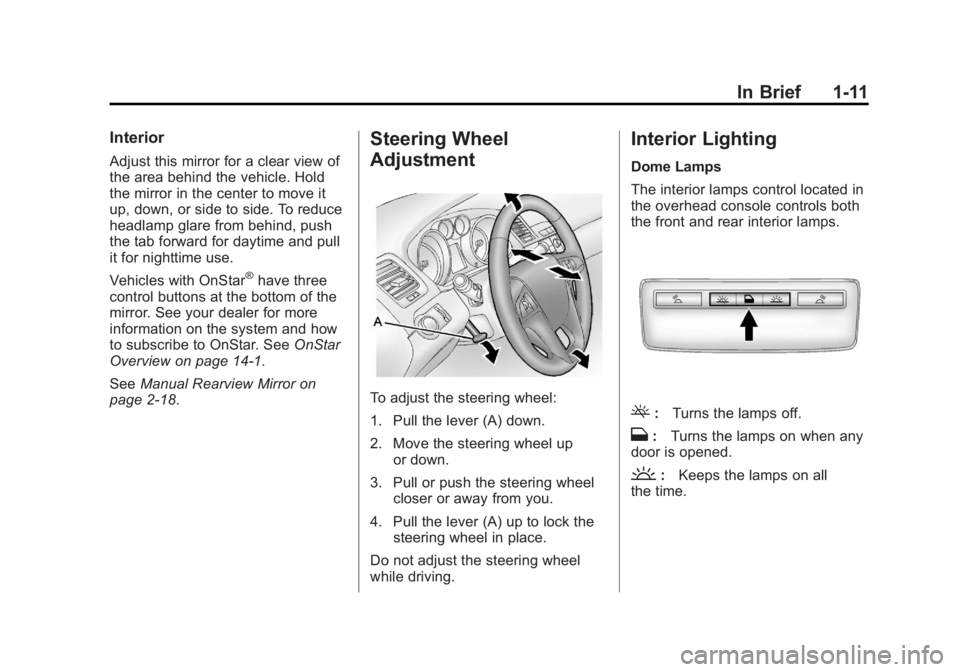
Steering Wheel
Adjustment
To adjust the steering wheel:
1. Pull the lever (A) down.
2. Move the steering wheel up or down.
3. Pull or push the steering wheel closer or away from you.
4. Pull the lever (A) up to lock the steering wheel in place.
Do not adjust the steering wheel
while driving.
Interior Lighting
Dome Lamps
The interior lamps control located in
the overhead console controls both
the front and rear interior lamps.
(: Turns the lamps off.
H:Turns the lamps on when any
door is opened.
': Keeps the lamps on all
the time.
Page 23 of 512
Black plate (17,1)Buick LaCrosse Owner Manual - 2012
In Brief 1-17
Vehicle Features
Radio(s)
VOL/O:Press to turn the system
on and off. Turn to increase or
decrease the volume.
RADIO/BAND or SOURCE: Press
to choose between FM, AM,
or XM™, if equipped.
Menu Knob: Turn to select radio
stations.
g: Press to seek the previous
station or track.
l: Press to seek the next station
or track.
Buttons 1‐6: Press to save and
select favorite stations.
INFO: Press to show available
information about the current station
or track.
See Overview (Radio with CD) on
page 7‑3 orOverview (Radio with
CD/DVD and MEM) on page 7‑5 or
Overview (Radio with CD and Touchscreen) on page 7‑7
for more
information about these and other
radio features.
Storing a Favorite Station
Stations from all bands can be
stored in the favorite lists in any
order. Up to six stations can be
stored in each favorite page and the
number of available favorite pages
can be set.
To store the station to a position in
the list, press the corresponding
numeric button 1 to 6 until a beep is
heard.
See “Storing a Station as a
Favorite” inAM-FM Radio (Radio
with CD/DVD/MEM) on page 7‑18 or
AM-FM Radio (Radio with CD and
Touchscreen) on page 7‑21.
Setting the Clock
See Clock (Radio with CD and
Touchscreen) on page 5‑5 for more
information.
Satellite Radio
Vehicles with an XM™ satellite radio
tuner and a valid XM satellite radio
subscription can receive XM
programming.
XM Satellite Radio Service
XM is a satellite radio service based
in the 48 contiguous United States
and 10 Canadian provinces. XM
satellite radio has a wide variety of
programming and commercial-free
music, coast to coast, and in
digital-quality sound. A fee is
required to receive the XM service.
For more information refer to:
.www.xmradio.com or call
1-800-929-2100 (U.S.).
.www.xmradio.ca or call
1-877-438-9677 (Canada).
For more information, see Satellite
Radio on page 7‑24.
Page 39 of 512

Black plate (5,1)Buick LaCrosse Owner Manual - 2012
Keys, Doors, and Windows 2-5
V(Remote Trunk Release):
Press and hold to unlock the trunk.
7(Vehicle Locator/Panic
Alarm): Press and release one
time to locate the vehicle. The
exterior lamps flash and the horn
chirps.
Press and hold
7for at least
two seconds to sound the panic
alarm. The horn sounds and the
turn signals flash until
7is pressed
again or the vehicle is started.
/(Remote Vehicle Start): For
vehicles with this feature, press to
operate the remote start feature.
See Remote Vehicle Start on
page 2‑9 for additional information.
The buttons on the keys are
disabled when there is a key in the
ignition, if equipped.
Keyless Access Operation
Some vehicles have a keyless
access system that lets you lock
and unlock the doors and access
the trunk without removing the RKE
transmitter from your pocket, purse,
briefcase, etc. The RKE transmitter
should be within 1 m (3 ft) of the
door or trunk being opened.
Keyless Unlocking
With the RKE transmitter within
1 m (3 ft), approach the front door
and pull the handle to unlock and
open the door. If the transmitter is
recognized, the door will unlock
and open.
Entering any door other than the
driver door will always cause all of
the doors to unlock. This is not
customizable.
To customize which doors unlock
when the driver door is opened, see
“Door Unlock Options” under
Vehicle Personalization on
page 5‑43. Lock Sensor
When all doors are closed and the
ignition is off, the vehicle can be
locked by pressing this area on the
door handle. This feature will be
available for several minutes after
the vehicle has been turned off.
Keyless Trunk Opening
Lift up on the touch pad located
above the license plate to open the
trunk if the RKE transmitter is within
range.
Page 42 of 512

Black plate (8,1)Buick LaCrosse Owner Manual - 2012
2-8 Keys, Doors, and Windows
Starting the Vehicle with a Low
Transmitter Battery
If the transmitter battery is weak, the
DIC may display NO REMOTE
DETECTED when you try to start
the vehicle. The REPLACE
BATTERY IN REMOTE KEY
message may also be displayed at
this time.
To start the vehicle:
1. Remove the cupholder from thecenter console storage area.
2. Place the transmitter in the transmitter pocket with the
buttons facing up. 3. With the vehicle in P (Park) or
N (Neutral), press the brake
pedal and the START/STOP
button. See Starting the Engine
on page 9‑22 for additional
information about the vehicle's
keyless ignition with pushbutton
start.
Replace the transmitter battery
as soon as possible.
Battery Replacement
Replace the battery if the REPLACE
BATTERY IN REMOTE KEY
message displays in the DIC. See
“REPLACE BATTERY IN REMOTE
KEY” under Key and Lock
Messages on page 5‑39.
Page 52 of 512
Black plate (18,1)Buick LaCrosse Owner Manual - 2012
2-18 Keys, Doors, and Windows
Heated Mirrors
For vehicles with heated mirrors:
1(Rear Window Defogger):
Press to heat the mirrors.
See “Rear Window Defogger” under
Automatic Climate Control System
on page 8‑1 for more information.
Park Tilt Mirrors
If the vehicle is equipped with
memory mirrors, there is an option
to have the mirrors tilt down, when
in R (Reverse), to more easily see
the ground near the vehicle.
When the vehicle is shifted to
R (Reverse), both the driver and
passenger mirrors will tilt downward.
They will return to their previous
position when the vehicle is shifted
out of R (Reverse), the ignition is
turned to OFF, or the vehicle is left
in R (Reverse) for an extended
period of time.
This feature can be turned on or off.
SeeVehicle Personalization on
page 5‑43.
Interior Mirrors
Manual Rearview Mirror
Adjust the inside rearview mirror for
a clear view of the area behind your
vehicle. To avoid glare of the
headlamps from behind, push the
tab forward for daytime and pull it
for nighttime use.
Vehicles with OnStar have three
control buttons at the bottom of the
mirror. See your dealer for more
information about OnStar and how
to subscribe to it. See OnStar
Overview on page 14‑1.