2012 BUICK LACROSSE buttons
[x] Cancel search: buttonsPage 53 of 512
Black plate (19,1)Buick LaCrosse Owner Manual - 2012
Keys, Doors, and Windows 2-19
Automatic Dimming
Rearview Mirror
On vehicles with an automatic
dimming inside rearview mirror the
automatic dimming reduces the
glare from the headlamps of the
vehicle behind you.
Vehicles with OnStar have three
control buttons located at the
bottom of the mirror. See your
dealer for more information about
OnStar and how to subscribe to it.
SeeOnStar Overview on page 14‑1.
Cleaning the Mirror
Do not spray glass cleaner directly
on the mirror. Use a soft towel
dampened with water.
Windows
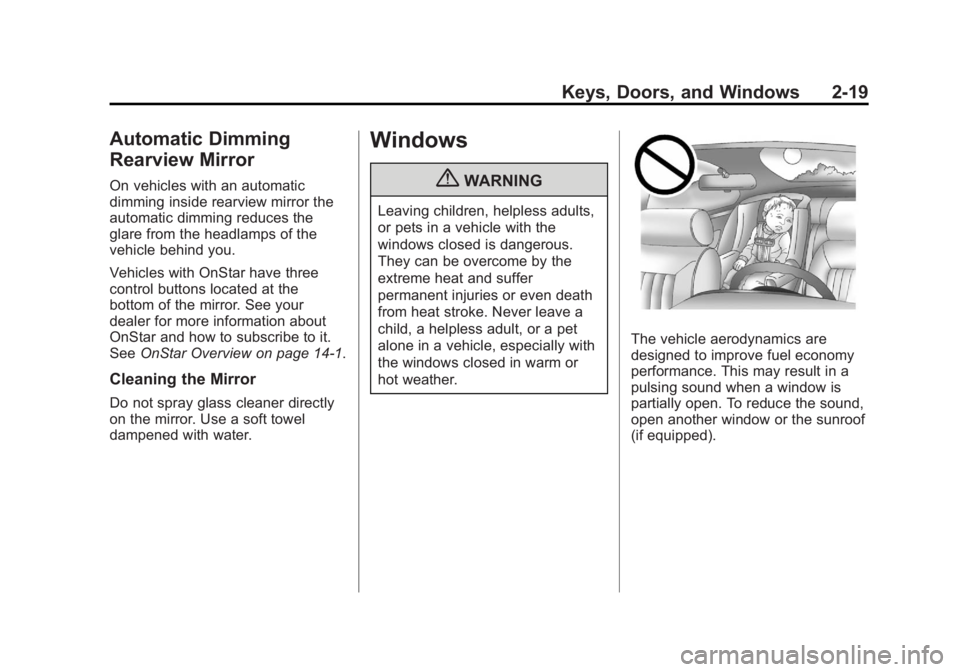
{WARNING
Leaving children, helpless adults,
or pets in a vehicle with the
windows closed is dangerous.
They can be overcome by the
extreme heat and suffer
permanent injuries or even death
from heat stroke. Never leave a
child, a helpless adult, or a pet
alone in a vehicle, especially with
the windows closed in warm or
hot weather.
The vehicle aerodynamics are
designed to improve fuel economy
performance. This may result in a
pulsing sound when a window is
partially open. To reduce the sound,
open another window or the sunroof
(if equipped).
Page 66 of 512

Black plate (8,1)Buick LaCrosse Owner Manual - 2012
3-8 Seats and Restraints
Memory Seats
On vehicles with the memory
feature, the“1”and “2”buttons on
the outboard side of the driver seat
are used to manually save and
recall the driver seat and outside
mirror positions. These manually
stored positions are referred to as
Button Memory positions. The vehicle will also automatically
save driver seat and outside mirror
positions to the current driver
Remote Keyless Entry (RKE)
transmitter when the ignition is
placed in OFF. These automatically
stored positions are referred to as
RKE Memory positions. See
Remote Keyless Entry (RKE)
System Operation on page 2‑4
for
more information.
Storing Button Memory Positions
To save positions into Button
Memory:
1. Adjust the driver seat, seatback recliner, and both outside mirrors
to the desired driving positions.
2. Press and hold MEM (Memory) and “1”at the same time until a
beep sounds.
3. Repeat Steps 1 and 2 for a second driver using “2.”Recalling Button Memory
Positions
To recall the manually saved Button
Memory positions, press and hold
“1”
or“2.” The driver seat and
outside mirrors move to the
positions stored to those buttons
when pressed. Releasing “1”or“2”
before the stored positions are
reached stops the recall.
If something has blocked the driver
seat while recalling a memory
position, the recall may stop.
Remove the obstruction; then press
and hold the appropriate manual
control for the memory item that is
not recalling for two seconds. Try
recalling the memory position again
by pressing the appropriate memory
button. If the memory position is still
not recalling, see your dealer for
service.
Page 67 of 512

Black plate (9,1)Buick LaCrosse Owner Manual - 2012
Seats and Restraints 3-9
Recalling RKE Memory Positions
(Memory Remote Recall)
The Memory Remote Recall feature
can recall the driver seat and
outside mirrors to previously stored
RKE Memory positions when
entering the vehicle.
Every time the ignition is placed in
OFF, the positions of the driver seat
and outside mirrors are
automatically stored to the RKE
transmitter that was used to start
the vehicle. These positions are
called RKE Memory positions and
may be different than the previously
mentioned Button Memory positions
saved to the“1”or“2” buttons. To
automatically recall RKE Memory
positions, unlock the driver door
with the RKE transmitter, and open
the driver door. On vehicles with
Keyless Access, opening the driver
door when an RKE transmitter is
present will activate the RKE
Memory recall. If the driver door is
already open, pressing the RKE
transmitter Kbutton will also
activate the RKE Memory recall. The driver seat and outside mirrors
will move to the previously saved
RKE Memory positions.
This feature is turned on or off using
the vehicle personalization menu.
See
Vehicle Personalization on
page 5‑43 for more information.
To stop recall movement, press one
of the memory, power mirror,
or power seat controls.
If something has blocked the driver
seat while recalling a memory
position, the recall may stop.
Remove the obstruction; then press
and hold the appropriate manual
control for the memory item that is
not recalling for two seconds. Try
recalling the memory position again
by opening the driver door and
pressing the RKE transmitter K
button. If the memory position is still
not recalling, see your dealer for
service. Easy Exit Driver Seat
This feature moves the seat
rearward allowing the driver more
room to exit the vehicle.
To activate, place the ignition in
OFF and open the driver door. If the
driver door is already open, placing
the ignition in OFF will activate the
easy exit driver seat.
This feature is turned on or off using
the vehicle personalization menu.
See
Vehicle Personalization on
page 5‑43 for more information.
To stop recall movement, press one
of the memory or power seat
controls.
If something has blocked the driver
seat while recalling the exit position,
the recall may stop. Remove the
obstruction; then press and hold the
power seat control rearward for
two seconds. Try recalling the exit
position again. If the exit position is
still not recalling, see your dealer for
service.
Page 68 of 512

Black plate (10,1)Buick LaCrosse Owner Manual - 2012
3-10 Seats and Restraints
Heated and Ventilated
Front Seats
{WARNING
If you cannot feel temperature
change or pain to the skin, the
seat heater may cause burns
even at low temperatures. To
reduce the risk of burns, people
with such a condition should use
care when using the seat heater,
especially for long periods of
time. Do not place anything on
the seat that insulates against
heat, such as a blanket, cushion,
cover, or similar item. This may
cause the seat heater to
overheat. An overheated seat
heater may cause a burn or may
damage the seat.
Heated and Ventilated Seat
Buttons Shown, Heated Seat Buttons Similar
If available, the buttons are on the
climate control panel. To operate,
the ignition must be on. Press
Lto heat the seat cushion
and seatback or
{, if equipped, to
ventilate the seat.
Press the button once for the
highest setting. With each press of
the button, the seat will change to
the next lower setting, and then to
the off setting. The lights indicate
three for the highest setting and one
for the lowest.
The passenger seat may take
longer to heat up.
Page 109 of 512
Black plate (51,1)Buick LaCrosse Owner Manual - 2012
Seats and Restraints 3-51
Head Restraint Removal and
Reinstallation
The rear outboard head restraints
can be removed if they interfere with
the proper installation of the child
restraint.
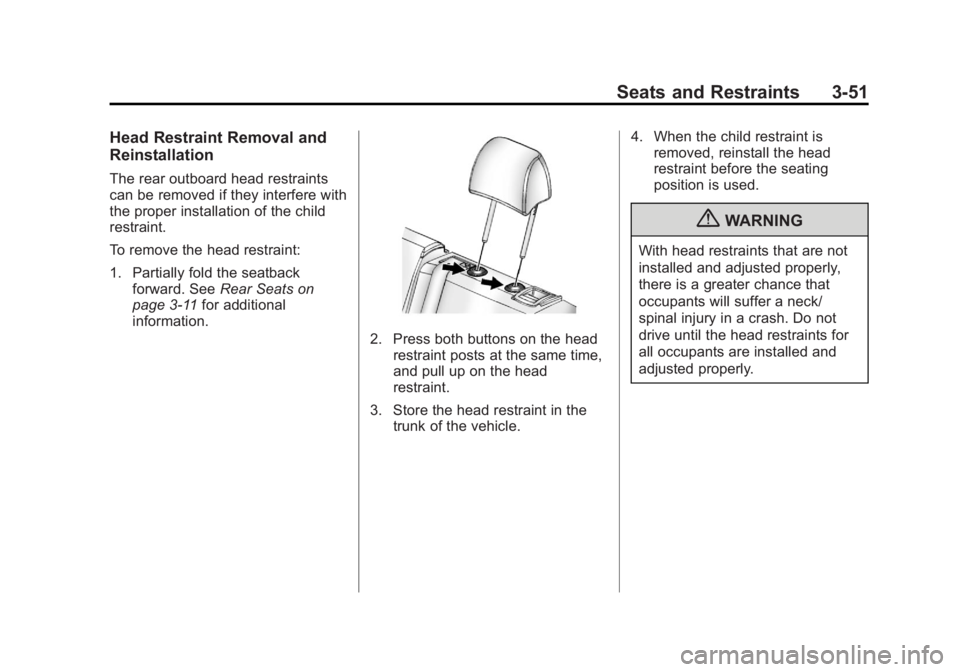
To remove the head restraint:
1. Partially fold the seatbackforward. See Rear Seats on
page 3‑11 for additional
information.
2. Press both buttons on the head restraint posts at the same time,
and pull up on the head
restraint.
3. Store the head restraint in the trunk of the vehicle. 4. When the child restraint is
removed, reinstall the head
restraint before the seating
position is used.
{WARNING
With head restraints that are not
installed and adjusted properly,
there is a greater chance that
occupants will suffer a neck/
spinal injury in a crash. Do not
drive until the head restraints for
all occupants are installed and
adjusted properly.
Page 125 of 512

Black plate (7,1)Buick LaCrosse Owner Manual - 2012
Instruments and Controls 5-7
Setting the Time and Date
(Radio with CD and
Touchscreen)
To set the time:
1. Press the CONFIG button toenter the menu options. Turn the
Menuknob to scroll through the
available setup features. Press
the SELECT knob or press the
Time screen button to display
other options within that feature.
2. Press + or −to decrease or
increase the Hours and Minutes
displayed on the clock. 12/24 HR Format:
Press the 12 HR
screen button for standard time;
press the 24 HR screen button for
military time.
Day + or Day −:Press the Day +
or Day −display buttons to increase
or decrease the day.
Display: Press Display to turn the
display of the time on the screen on
or off.
Power Outlets
The accessory power outlets can be
used to plug in electrical equipment,
such as a cell phone or MP3 player.
There are two accessory power
outlets. One is located under the
armrest inside the center console
storage and the other is on the rear
of the center floor console.
The outlet is powered when the
ignition is in ON/RUN or ACC/
ACCESSORY, or until the driver
door is opened within 10 minutes of
turning off the vehicle. See Retained
Accessory Power (RAP) on
page 9‑27.
Open the protective cover to use the
accessory power outlet.
Page 146 of 512

Black plate (28,1)Buick LaCrosse Owner Manual - 2012
5-28 Instruments and Controls
DIC Operation and Displays
The DIC has different displays
which can be accessed by using the
DIC buttons on the turn signal lever
to the left of the steering wheel. The
DIC displays trip, fuel, vehicle
system information, and warning
messages if a system problem is
detected.
The bottom of the DIC display
shows what position the shift lever
is in, the odometer, and the direction
the vehicle is driving.
In cold weather the DIC display may
change slowly. This is normal and
will move more quickly as the
vehicle's interior temperature rises.DIC Buttons
A.
SET/CLR: Press to set or clear
the menu item when it is
displayed.
B.
w/x(Thumbwheel): Use to
scroll through the items in each
menu. A small marker will move
across the bottom of the page
as you scroll through the items.
This shows where each page is
in the menu.
C. MENU: Press to get to the Trip/
Fuel Menu and the Vehicle
Information Menu.
Trip/Fuel Menu Items
Press MENU on the turn signal
lever until Trip/Fuel Information
Menu is displayed. Use
w/xto
scroll through the following menu
items:
.Digital Speedometer
.Trip 1
.Trip 2
.Power Flow Gauge
(eAssist Only)
.Fuel Range
.Average Fuel Economy/
Instantaneous Fuel Economy
.Average Vehicle Speed
.Timer
.Navigation
Page 162 of 512

Black plate (44,1)Buick LaCrosse Owner Manual - 2012
5-44 Instruments and Controls
Press SELECT to confirm the
selection. Press
/BACK to move to
the last menu.
Air Quality Sensor
This will allow you to select whether
the system will operate at high or
low sensitivity. Only vehicles with
the dual zone climate control will
have this option.
Press SELECT when Air Quality
Sensor is highlighted to open the
menu. Turn the Menu knob to
highlight High or Low. Press
SELECT to confirm the selection.
Press
/BACK to move to the
last menu.
Auto Heated Seats
If equipped and turned on, this
feature will automatically activate
heated seats at the level required by
the interior temperature. The auto
heated seats can be turned off by
using the heated seat buttons on
the climate control panel. Press SELECT when Auto Heated
Seats is highlighted to open the
menu. Turn the Menu knob to
highlight On or Off. Press SELECT
to confirm the selection. Press
/BACK to move to the last menu.
Air Conditioning Mode
This allows selection of automatic
start of the air conditioning upon
vehicle start. Selecting On indicates
the air conditioning will be on when
the vehicle is started. Selecting Off
turns the air conditioning off each
time the vehicle is started. Last
Setting will resume the last setting
when the vehicle was shut off.
Press SELECT when Air
Conditioning Mode is highlighted to
open the menu. Turn the Menu knob
to highlight Off, On, or Last Setting.
Press SELECT to confirm the
selection. Press
/BACK to move to
the last menu. Remote Start Auto Heated Seats
If equipped and turned on, this
feature will turn the heated seats on
when using remote start on
cold days.
Press SELECT when Remote Start
Auto Heated Seats is highlighted.
Turn the Menu knob to select On or
Off. Press SELECT to confirm the
selection. Press
/BACK to move to
the last menu.
Remote Start Cooled Seats
If equipped and turned on, this
feature will turn the cooled seats on
when using remote start on
warm days.
Press SELECT when Remote Start
Cooled Seats is highlighted. Turn
the Menu knob to select On or Off.
Press SELECT to confirm the
selection. Press
/BACK to move to
the last menu.