2012 BUICK LACROSSE wheel
[x] Cancel search: wheelPage 92 of 512

Black plate (34,1)Buick LaCrosse Owner Manual - 2012
3-34 Seats and Restraints
Adding Equipment to the
Airbag-Equipped Vehicle
Adding accessories that change the
vehicle's frame, bumper system,
height, front end or side sheet
metal, may keep the airbag system
from working properly. The
operation of the airbag system can
also be affected by changing or
moving any parts of the front seats,
safety belts, the airbag sensing and
diagnostic module, steering wheel,
instrument panel, roof-rail airbag
modules, ceiling headliner or pillar
garnish trim, front sensors, side
impact sensors, or airbag wiring.
Your dealer and the service manual
have information about the location
of the airbag sensors, sensing and
diagnostic module, and airbag
wiring.In addition, the vehicle has a
passenger sensing system for the
front outboard passenger position,
which includes sensors that are part
of the passenger seat. The
passenger sensing system may not
operate properly if the original seat
trim is replaced with non-GM
covers, upholstery or trim, or with
GM covers, upholstery or trim
designed for a different vehicle. Any
object, such as an aftermarket seat
heater or a comfort enhancing pad
or device, installed under or on top
of the seat fabric, could also
interfere with the operation of the
passenger sensing system. This
could either prevent proper
deployment of the passenger
airbag(s) or prevent the passenger
sensing system from properly
turning off the passenger airbag(s).
See
Passenger Sensing System on
page 3‑29. If your vehicle needs to be modified
because you have a disability and
you have questions about whether
the modifications will affect the
vehicle's airbag system, or if you
have questions about whether the
airbag system will be affected if the
vehicle is modified for any other
reason, call Customer Assistance.
See
Customer Assistance Offices
(U.S. and Canada) on page 13‑5 or
Customer Assistance Offices
(Mexico) on page 13‑5.
Page 119 of 512

Black plate (1,1)Buick LaCrosse Owner Manual - 2012
Instruments and Controls 5-1
Instruments and
Controls
Controls
Steering Wheel Adjustment . . . 5-2
Steering Wheel Controls . . . . . . 5-2
Heated Steering Wheel . . . . . . . 5-3
Horn . . . . . . . . . . . . . . . . . . . . . . . . . . 5-3
Windshield Wiper/Washer . . . . . 5-3
Compass . . . . . . . . . . . . . . . . . . . . . 5-5
Clock (Radio with CD andTouchscreen) . . . . . . . . . . . . . . . . 5-5
Power Outlets . . . . . . . . . . . . . . . . . 5-7
Warning Lights, Gauges, and
Indicators
Warning Lights, Gauges, and Indicators . . . . . . . . . . . . . . . . . . . . 5-9
Instrument Cluster . . . . . . . . . . . 5-10
Speedometer . . . . . . . . . . . . . . . . 5-12
Odometer . . . . . . . . . . . . . . . . . . . . 5-12
Tachometer . . . . . . . . . . . . . . . . . . 5-12
Fuel Gauge . . . . . . . . . . . . . . . . . . 5-12
Driver Efficiency Gauge . . . . . . 5-13
Engine Coolant Temperature Gauge . . . . . . . . . . . . . . . . . . . . . . 5-14
Safety Belt Reminders . . . . . . . 5-15 Airbag Readiness Light . . . . . . 5-16
Passenger Airbag Status
Indicator . . . . . . . . . . . . . . . . . . . . 5-16
Charging System Light . . . . . . 5-17
Malfunction Indicator Lamp . . . . . . . . . . . . . 5-17
Brake System Warning Light . . . . . . . . . . . . . . . . . . . . . . . 5-20
Electric Parking Brake Light . . . . . . . . . . . . . . . . . . . . . . . 5-21
Antilock Brake System (ABS) Warning Light . . . . . . . . . . . . . . 5-21
Traction Off Light . . . . . . . . . . . . 5-22
StabiliTrak
®OFF Light . . . . . . . 5-22
Traction Control System (TCS)/StabiliTrak
®Light . . . . 5-23
Engine Coolant Temperature Warning Light . . . . . . . . . . . . . . 5-24
Tire Pressure Light . . . . . . . . . . 5-24
Engine Oil Pressure Light . . . . 5-25
Low Fuel Warning Light . . . . . . 5-25
Security Light . . . . . . . . . . . . . . . . 5-26
High-Beam On Light . . . . . . . . . 5-26
Front Fog Lamp Light . . . . . . . . 5-26
Lamps On Reminder . . . . . . . . . 5-26
Cruise Control Light . . . . . . . . . 5-27
Door Ajar Light . . . . . . . . . . . . . . 5-27
Information Displays
Driver Information Center (DIC) . . . . . . . . . . . . . . . 5-27
Head-Up Display (HUD) . . . . . 5-31
Vehicle Messages
Vehicle Messages . . . . . . . . . . . 5-35
Battery Voltage and Charging Messages . . . . . . . . . . . . . . . . . . 5-35
Brake System Messages . . . . 5-36
Compass Messages . . . . . . . . . 5-36
Cruise Control Messages . . . . 5-36
Door Ajar Messages . . . . . . . . . 5-37
Engine Cooling System Messages . . . . . . . . . . . . . . . . . . 5-37
Engine Oil Messages . . . . . . . . 5-38
Engine Power Messages . . . . 5-38
Fuel System Messages . . . . . . 5-39
Key and Lock Messages . . . . . 5-39
Lamp Messages . . . . . . . . . . . . . 5-39
Object Detection System Messages . . . . . . . . . . . . . . . . . . 5-39
Ride Control System Messages . . . . . . . . . . . . . . . . . . 5-40
Anti-theft Alarm System Messages . . . . . . . . . . . . . . . . . . 5-41
Starting the Vehicle Messages . . . . . . . . . . . . . . . . . . 5-41
Page 120 of 512
Black plate (2,1)Buick LaCrosse Owner Manual - 2012
5-2 Instruments and Controls
Tire Messages . . . . . . . . . . . . . . . 5-41
Transmission Messages . . . . . 5-42
Window Messages . . . . . . . . . . . 5-42
Vehicle Personalization
Vehicle Personalization . . . . . . 5-43
Universal Remote System
Universal Remote System . . . 5-49
Universal Remote SystemProgramming . . . . . . . . . . . . . . . 5-49
Universal Remote System Operation . . . . . . . . . . . . . . . . . . 5-52
Controls
Steering Wheel
Adjustment
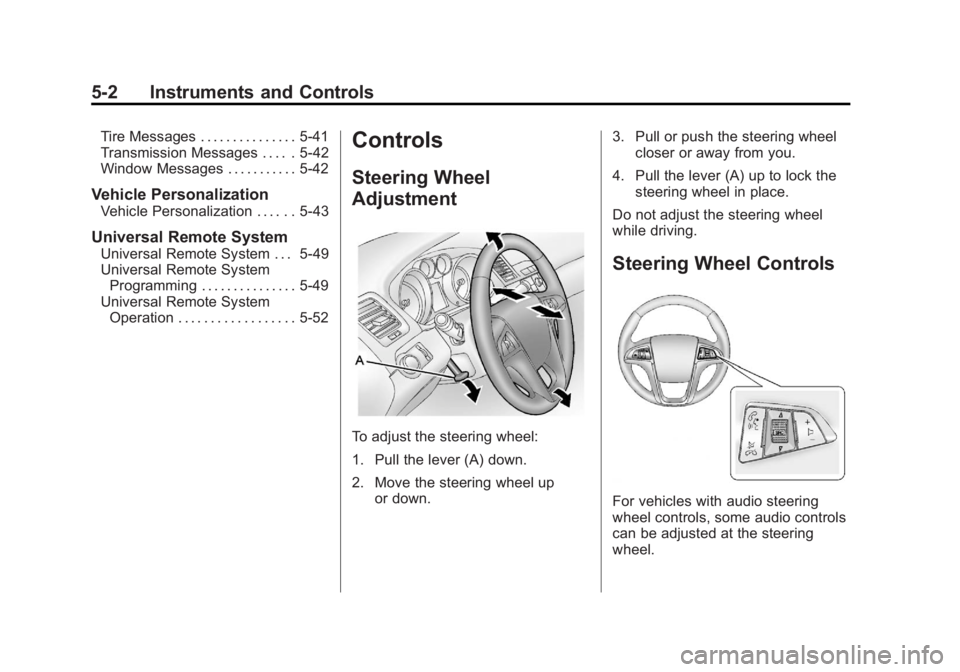
To adjust the steering wheel:
1. Pull the lever (A) down.
2. Move the steering wheel up
or down. 3. Pull or push the steering wheel
closer or away from you.
4. Pull the lever (A) up to lock the steering wheel in place.
Do not adjust the steering wheel
while driving.
Steering Wheel Controls
For vehicles with audio steering
wheel controls, some audio controls
can be adjusted at the steering
wheel.
Page 121 of 512

Black plate (3,1)Buick LaCrosse Owner Manual - 2012
Instruments and Controls 5-3
b/g(Push to Talk):For vehicles
with a Bluetooth®, OnStar,
or navigation system, press to
interact with those systems. See
Bluetooth (Overview) on page 7‑57
or Bluetooth (Infotainment Controls)
on page 7‑59 orBluetooth (Voice
Recognition) on page 7‑63 or
Bluetooth (UHP Mexico Only) on
page 7‑69, OnStar Overview on
page 14‑1, or the navigation manual
for more information.
$/i(Mute/End Call): Press to
silence the vehicle speakers only.
Press again to turn the sound on.
For vehicles with OnStar or
Bluetooth systems, press to reject
an incoming call, or end a
current call.
_SRC^(Thumbwheel Control):
Turn to select an audio source.
Press
_or^to select the next or
previous favorite radio station, CD,
or MP3 track. +
x−
(Volume): Press + to
increase the volume. Press −to
decrease the volume.
Heated Steering Wheel
For vehicles with a heated steering
wheel, the button for this feature is
located on the climate control
system.
(: Press to turn the heated
steering wheel on or off. A light on
the button displays when the feature
is turned on.
The steering wheel takes about
three minutes to start heating.
Horn
Pressaon the steering wheel
pad to sound the horn.
Windshield Wiper/Washer
The windshield wiper lever is on the
right side of the steering column.
With the ignition in ACC/
ACCESSORY or ON/RUN, move
the windshield wiper lever to select
the wiper speed.
2: Use for fast wipes.
1: Use for slow wipes.
Page 137 of 512

Black plate (19,1)Buick LaCrosse Owner Manual - 2012
Instruments and Controls 5-19
The following may correct an
emissions system malfunction:
.Check that the fuel cap is fully
installed. SeeFilling the Tank on
page 9‑55. The diagnostic
system can determine if the fuel
cap has been left off or
improperly installed. A loose or
missing fuel cap allows fuel to
evaporate into the atmosphere.
A few driving trips with the cap
properly installed should turn the
light off.
.Check that good quality fuel is
used. Poor fuel quality causes
the engine not to run as
efficiently as designed and may
cause stalling after start-up,
stalling when the vehicle is
changed into gear, misfiring,
hesitation on acceleration,
or stumbling on acceleration.
These conditions might go away
once the engine is warmed up. If one or more of these conditions
occurs, change the fuel brand used.
It will require at least one full tank of
the proper fuel to turn the light off.
See
Recommended Fuel on
page 9‑53.
If none of the above have made the
light turn off, your dealer can check
the vehicle. The dealer has the
proper test equipment and
diagnostic tools to fix any
mechanical or electrical problems
that might have developed.Emissions Inspection and
Maintenance Programs
Some local governments may have
programs to inspect the on-vehicle
emission control equipment. For the
inspection, the emission system test
equipment is connected to the
vehicle’s Data Link
Connector (DLC).
The DLC is under the instrument
panel next to the steering wheel.
See your dealer if assistance is
needed.
The vehicle may not pass
inspection if:
.The malfunction indicator lamp is
on while the vehicle is running.
The vehicle is in ON/RUN for
keyed access, or service only
mode for keyless access and the
malfunction indicator lamp does
not come on. See your dealer for
assistance in verifying proper
operation of the malfunction
indicator lamp.
Page 140 of 512
Black plate (22,1)Buick LaCrosse Owner Manual - 2012
5-22 Instruments and Controls
If the ABS light is the only light on,
the vehicle has regular brakes, but
the antilock brakes are not
functioning.
If both the ABS and the brake
system warning light are on, the
vehicle's antilock brakes are not
functioning and there is a problem
with the regular brakes. See your
dealer for service.
SeeBrake System Warning Light on
page 5‑20.
See Brake System Messages on
page 5‑36 for all brake related DIC
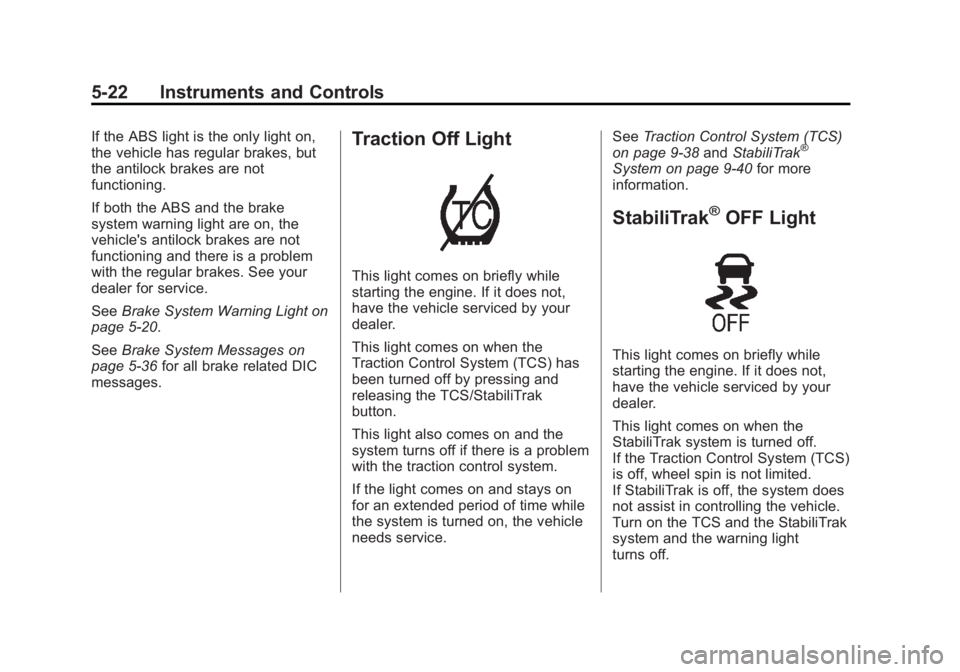
messages.Traction Off Light
This light comes on briefly while
starting the engine. If it does not,
have the vehicle serviced by your
dealer.
This light comes on when the
Traction Control System (TCS) has
been turned off by pressing and
releasing the TCS/StabiliTrak
button.
This light also comes on and the
system turns off if there is a problem
with the traction control system.
If the light comes on and stays on
for an extended period of time while
the system is turned on, the vehicle
needs service. See
Traction Control System (TCS)
on page 9‑38 andStabiliTrak
®
System on page 9‑40 for more
information.
StabiliTrak®OFF Light
This light comes on briefly while
starting the engine. If it does not,
have the vehicle serviced by your
dealer.
This light comes on when the
StabiliTrak system is turned off.
If the Traction Control System (TCS)
is off, wheel spin is not limited.
If StabiliTrak is off, the system does
not assist in controlling the vehicle.
Turn on the TCS and the StabiliTrak
system and the warning light
turns off.
Page 141 of 512

Black plate (23,1)Buick LaCrosse Owner Manual - 2012
Instruments and Controls 5-23
SeeTraction Control System (TCS)
on page 9‑38 andStabiliTrak®
System on page 9‑40 for more
information.
Traction Control System
(TCS)/StabiliTrak®Light
The Traction Control System (TCS)/
StabiliTrak light comes on briefly
when the engine is started.
If the light does not come on, have
the vehicle serviced by the dealer.
If the system is working normally,
the indicator light turns off. If the light is on while certain DIC
messages display, this indicates
that the TCS and StabiliTrak
systems are not working or are
disabled.
If the light is on and not flashing, the
TCS and potentially the StabiliTrak
system have been disabled. Check
the DIC messages to determine
which feature(s) is no longer
functioning and whether it is
because of the driver turning off the
feature(s), or because the system is
not working properly and the vehicle
requires service.
If the TCS is disabled, wheel spin is
not limited. If the StabiliTrak system
is disabled, the system does not aid
in maintaining directional control of
the vehicle.
If the indicator/warning light is on
and flashing, the TCS or the
StabiliTrak system is actively
working. Check the DIC messages
for details to determine which
system is working. If a message
appears in the DIC, the system may
be limiting wheel spin and aiding in
maintaining directional control of the
vehicle.
See
StabiliTrak
®System on
page 9‑40 andTraction Control
System (TCS) on page 9‑38 for
more information.
See Ride Control System Messages
on page 5‑40 for more information
on the messages associated with
this light.
For vehicles with an uplevel cluster,
this light comes on in the Driver
information Center (DIC).
Page 146 of 512

Black plate (28,1)Buick LaCrosse Owner Manual - 2012
5-28 Instruments and Controls
DIC Operation and Displays
The DIC has different displays
which can be accessed by using the
DIC buttons on the turn signal lever
to the left of the steering wheel. The
DIC displays trip, fuel, vehicle
system information, and warning
messages if a system problem is
detected.
The bottom of the DIC display
shows what position the shift lever
is in, the odometer, and the direction
the vehicle is driving.
In cold weather the DIC display may
change slowly. This is normal and
will move more quickly as the
vehicle's interior temperature rises.DIC Buttons
A.
SET/CLR: Press to set or clear
the menu item when it is
displayed.
B.
w/x(Thumbwheel): Use to
scroll through the items in each
menu. A small marker will move
across the bottom of the page
as you scroll through the items.
This shows where each page is
in the menu.
C. MENU: Press to get to the Trip/
Fuel Menu and the Vehicle
Information Menu.
Trip/Fuel Menu Items
Press MENU on the turn signal
lever until Trip/Fuel Information
Menu is displayed. Use
w/xto
scroll through the following menu
items:
.Digital Speedometer
.Trip 1
.Trip 2
.Power Flow Gauge
(eAssist Only)
.Fuel Range
.Average Fuel Economy/
Instantaneous Fuel Economy
.Average Vehicle Speed
.Timer
.Navigation