2012 BUICK LACROSSE wheel
[x] Cancel search: wheelPage 151 of 512

Black plate (33,1)Buick LaCrosse Owner Manual - 2012
Instruments and Controls 5-33
When the HUD is on, the
speedometer reading is continually
displayed. The current radio station
or CD track number will display for a
short period of time after the radio
or CD track status changes. This
happens whenever radio information
is changed. The speedometer size
is reduced when radio, CD
information, warnings,
or turn-by-turn navigation
information are displayed on
the HUD.
The HUD control is located to the
left of the steering wheel.To adjust the HUD image so that
items are properly displayed, do the
following:
1. Adjust the driver seat to a
comfortable position.
2. Start the engine.
3. Adjust the HUD controls.
Use the following settings to adjust
the HUD.
OFF: To turn HUD off, turn the HUD
dimming knob fully counterclockwise
until the HUD display turns off.
Brightness: Turn the dimming knob
clockwise or counterclockwise to
brighten or dim the display.
«(Up) orª(Down): Press the
up or down arrows to center the
HUD image in your view. The HUD
image can only be adjusted up and
down, not side to side. PAGE:
Press to select the display
formats. Release the PAGE button
when the format number with the
desired display is shown on the
HUD. If vehicle messages are
displayed, pressing PAGE may clear
the message.
The three formats are as follows:
English Shown, Metric Similar
Format One: This display gives the
speedometer reading (in English or
metric units), turn signal indication,
high‐beam indication, transmission
positions, outside air temperature,
and compass heading.
Page 158 of 512

Black plate (40,1)Buick LaCrosse Owner Manual - 2012
5-40 Instruments and Controls
SERVICE BLIND ZONE ALERT
SYSTEM
If this message appears, both SBZA
displays will remain on indicating
there is a problem with the SBZA
system. If these displays remain on
after continued driving, the system
needs service. Take the vehicle to
your dealer.
SIDE BLIND ZONE ALERT
SYSTEM OFF
This message indicates that the
driver has turned the system off.
SIDE BLIND ZONE SYS.
UNAVAILABLE
This message indicates that the
SBZA system is disabled because
the sensor is blocked and cannot
detect vehicles in the blind zone.
The sensor may be blocked by mud,
dirt, snow, ice, or slush. This
message may also activate during
heavy rain or due to road spray. The
vehicle does not need service. For
cleaning, seeExterior Care on
page 10‑102.
Ride Control System
Messages
ALL WHEEL DRIVE OFF
This message displays when the
All-Wheel Drive (AWD) System has
been turned off. See All-Wheel
Drive on page 9‑34.
SERVICE ALL WHEEL DRIVE
SYSTEM
This message displays when there
is a problem with the All-Wheel
Drive (AWD) System. See your
dealer for service.
SERVICE REAR AXLE
This message displays when there
is a problem with the All-Wheel
Drive (AWD) System. See your
dealer for service.
SERVICE TRACTION
CONTROL
This message displays when there
is a problem with the Traction
Control System (TCS). When this
message is displayed, the system
will not limit wheel spin. Adjust your
driving accordingly. See your dealer
for service.
SERVICE STABILITRAK
This message displays if there is a
problem with the StabiliTrak system.
If this message appears, try to reset
the system. Stop; turn off the engine
for at least 15 seconds; then start
the engine again. If this message
still comes on, it means there is a
problem. See your dealer for
service. The vehicle is safe to drive,
however, you do not have the
benefit of StabiliTrak, so reduce
your speed and drive accordingly.
Page 163 of 512

Black plate (45,1)Buick LaCrosse Owner Manual - 2012
Instruments and Controls 5-45
Auto Defog
This will allow you to turn the auto
defog on or off. Only vehicles with
the dual zone climate control will
have this option.
Press SELECT when Auto Defog is
highlighted to open the menu. Turn
the Menu knob to highlight On or
Off. Press SELECT to confirm the
selection. Press
/BACK to move to
the last menu.
Auto Rear Defog
If equipped, this will allow you to
turn the auto rear defog on or off.
This feature will automatically turn
on the rear defogger when it is cold
outside.
Press SELECT when Auto Rear
Defog is highlighted to open the
menu. Turn the Menu knob to
highlight On or Off. Press SELECT
to confirm the selection. Press
/BACK to move to the last menu.
Comfort and Convenience
Select the Comfort and
Convenience menu and the
following will be displayed:
.Chime Volume
.Driver Seat Easy Exit
.Park Tilt Mirrors
Chime Volume
This allows selection of the chime
volume level.
Press SELECT when Chime Volume
is highlighted. Turn the Menu knob
to select Normal or High. Press
SELECT to confirm the selection.
Press
/BACK to move to the
last menu.
Driver Seat Easy Exit
When on, this feature will move the
driver seat rearward upon turning
the ignition off and opening the
driver door. This may be performed
to make it easier to exit the vehicle. See
“Easy Exit Driver Seat” under
Power Seat Adjustment on page 3‑5
for more information.
This allows you to turn the easy exit
seat feature on or off.
Press SELECT when Driver Seat
Easy Exit is highlighted. Turn the
Menu knob to select On or Off.
Press SELECT to confirm the
selection. Press
/BACK to move to
the last menu.
Park Tilt Mirrors
When on, both the driver and
passenger mirrors will tilt downward
when the vehicle is shifted to
R (Reverse) to improve visibility of
the ground near the rear wheels.
They will return to their previous
driving position when the vehicle is
shifted out of R (Reverse), the
ignition is turned to OFF, or the
vehicle is left in R (Reverse). See
Park Tilt Mirrors on page 2‑18 for
more information.
Page 173 of 512
Black plate (1,1)Buick LaCrosse Owner Manual - 2012
Lighting 6-1
Lighting
Exterior Lighting
Exterior Lamp Controls . . . . . . . . 6-1
Exterior Lamps OffReminder . . . . . . . . . . . . . . . . . . . . 6-2
Headlamp High/Low-Beam Changer . . . . . . . . . . . . . . . . . . . . . 6-2
Flash-to-Pass . . . . . . . . . . . . . . . . . 6-2
Daytime Running Lamps (DRL) . . . . . . . . . . . . . . . . 6-2
Automatic Headlamp System . . . . . . . . . . . . . . . . . . . . . . 6-3
Adaptive Forward Lighting (AFL) . . . . . . . . . . . . . . . 6-3
Hazard Warning Flashers . . . . . 6-4
Turn and Lane-Change Signals . . . . . . . . . . . . . . . . . . . . . . 6-4
Fog Lamps . . . . . . . . . . . . . . . . . . . . 6-5
Interior Lighting
Instrument Panel Illumination Control . . . . . . . . . . . . . . . . . . . . . . 6-5
Dome Lamps . . . . . . . . . . . . . . . . . 6-6
Reading Lamps . . . . . . . . . . . . . . . 6-6
Sun Visor Lamps . . . . . . . . . . . . . . 6-6
Lighting Features
Entry Lighting . . . . . . . . . . . . . . . . . 6-7
Exit Lighting . . . . . . . . . . . . . . . . . . . 6-7
Battery Load Management . . . . 6-7
Battery Power Protection . . . . . . 6-8
Exterior Lighting
Exterior Lamp Controls
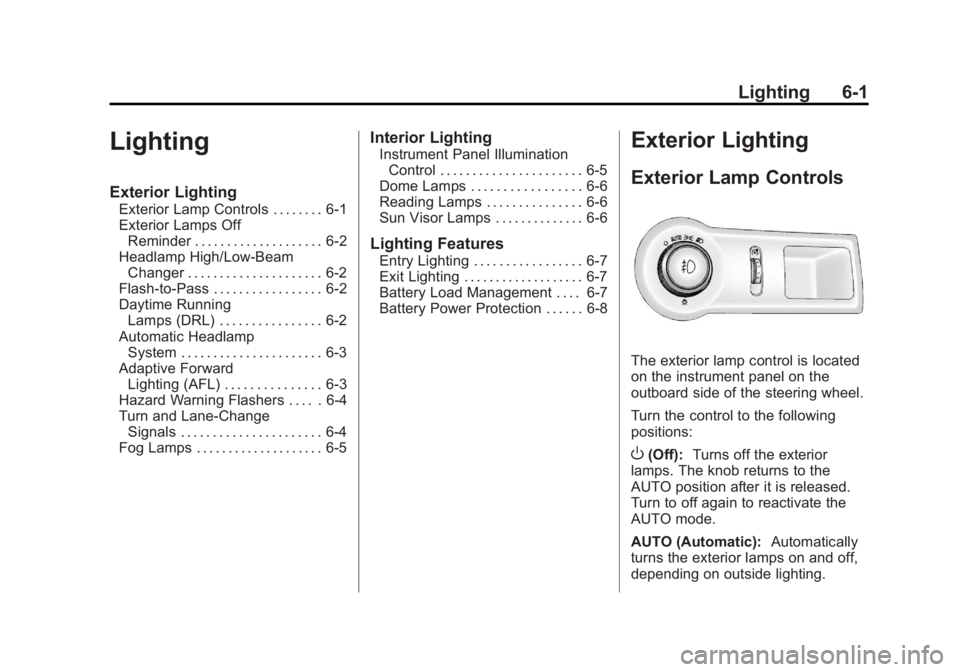
The exterior lamp control is located
on the instrument panel on the
outboard side of the steering wheel.
Turn the control to the following
positions:
O(Off): Turns off the exterior
lamps. The knob returns to the
AUTO position after it is released.
Turn to off again to reactivate the
AUTO mode.
AUTO (Automatic): Automatically
turns the exterior lamps on and off,
depending on outside lighting.
Page 177 of 512
Black plate (5,1)Buick LaCrosse Owner Manual - 2012
Lighting 6-5
Fog Lamps
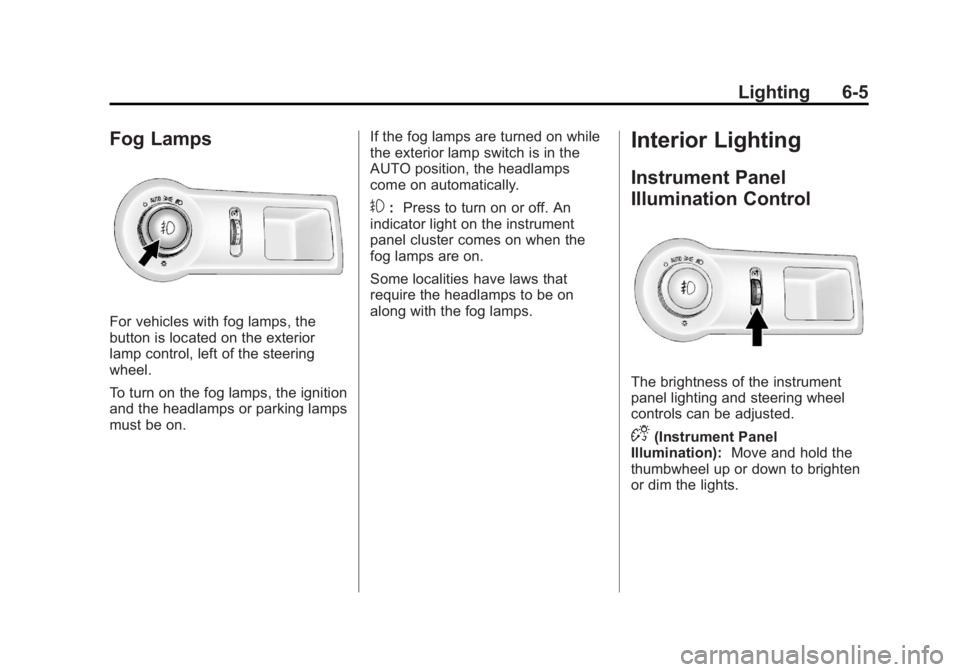
For vehicles with fog lamps, the
button is located on the exterior
lamp control, left of the steering
wheel.
To turn on the fog lamps, the ignition
and the headlamps or parking lamps
must be on.If the fog lamps are turned on while
the exterior lamp switch is in the
AUTO position, the headlamps
come on automatically.
#:
Press to turn on or off. An
indicator light on the instrument
panel cluster comes on when the
fog lamps are on.
Some localities have laws that
require the headlamps to be on
along with the fog lamps.
Interior Lighting
Instrument Panel
Illumination Control
The brightness of the instrument
panel lighting and steering wheel
controls can be adjusted.
D(Instrument Panel
Illumination): Move and hold the
thumbwheel up or down to brighten
or dim the lights.
Page 193 of 512
Black plate (13,1)Buick LaCrosse Owner Manual - 2012
Infotainment System 7-13
Display Settings
Press the Config button on the
Home Page or the CONFIG button
on the faceplate, then select Display
Settings from the list.
The following options may display:
Dimming Mode:Press to change
the screen background. The
Automatic setting adjusts the
screen background automatically
depending on the exterior lighting
conditions.
To change the overall brightness
setting for the display, use the
vehicle interior lighting instrument
panel illumination control.
Languages
The vehicle supports English,
French (Canadian), and Spanish.
The default language is English.
To change the display language,
see Vehicle Personalization on
page 5‑43 for more information.
English and Metric Unit
Conversion
To change the display units between
English and metric units, see Driver
Information Center (DIC) on
page 5‑27 for more information.
Cleaning the Display
Notice:Using abrasive cleaners
when cleaning glass surfaces
could scratch the glass. Use only
a soft cloth and do not spray
cleaner directly on the system as
it could affect the mechanical
parts.
Do not wipe the panel with a hard
cloth or use a volatile liquid such as
paint thinner; it could scratch the
surface or erase the characters on
the buttons.
Operation
Controls
The infotainment system is operated
by using the pushbuttons,
multifunction knobs, menus shown
on the display, and steering wheel
controls, if equipped.
Turning the System On or Off
VOL/O(Volume/Power): Press to
turn the system on and off.
Automatic Switch‐Off
If the infotainment system has been
turned on after the ignition is turned
off, the system will turn off
automatically after 10 minutes.
Page 201 of 512

Black plate (21,1)Buick LaCrosse Owner Manual - 2012
Infotainment System 7-21
To resume playback from the
current pause point, press
kagain.
The radio is no longer live, but
played from the time shift buffer.
A status bar displays below the
station number.
Press and hold
lorgto fast
forward or rewind through the time
shift buffer. Hold
luntil the end of
the recorded buffer resumes live
playback.
Press and release
lorgto jump
forward or back 30 seconds in the
time shift buffer.
When the radio station is changed,
the buffer is cleared and
automatically restarted for the
current station. Content from a
previously tuned station is no longer
available.
The time shift feature is not
available while recording or with
other sources of playback. Pausing AM/FM with the Vehicle
Turned Off
If AM/FM is paused when the
vehicle is turned off, the radio
continues to buffer the current radio
station for up to 20 minutes. If the
vehicle is turned back on within
20 minutes, the radio resumes
playback from the paused point.
AM-FM Radio (Radio with
CD and Touchscreen)
Playing the Radio
For vehicles equipped with the
MyLink or IntelliLink infotainment
system, see the separate MyLink/
IntelliLink Features and Functions
Guide for more information.
Audio Source
VOL/
O(Volume/Power):
1. Press to turn the radio on or off.
2. Turn to increase or decrease the volume of the active source
(i.e., current audio source, active
navigation voice guidance,
or traffic prompts).
The steering wheel controls can
also be used to adjust the volume.
See “Steering Wheel Controls” in
the vehicle owner manual for more
information.
To access the radio main page,
press the SOURCE button on the
faceplate, the Now Playing screen
button, or one of the audio screen
buttons on the Home Page.
While on the audio main page,
press the Source button repeatedly
to display and cycle through the
available sources (AM, FM, and XM
(if equipped), CD, USB/iPod,
and AUX).
Page 228 of 512
Black plate (48,1)Buick LaCrosse Owner Manual - 2012
7-48 Infotainment System
Before Driving
The RSE is for rear seat
passengers only. The driver cannot
safely view the video screen while
driving.
In severe or extreme weather
conditions, the RSE system may not
work until the temperature is within
the operating range. The operating
range is above−20°C (−4°F) and
below 60°C (140°F). If the
temperature is outside of this range,
heat or cool the vehicle until it is
within the operating range.
Global Off
Depending on the infotainment
system, the RSE system may have
a Global Off feature. The Global Off
feature disables all RSE system
features. Press and hold the radio
power button for more than
three seconds for Global Off to disable the RSE features. On some
infotainment systems, the Global Off
feature can be turned off by
performing one of the following:
.Press and hold the radio power
button for more than
three seconds.
.Insert or eject any disc.
.Insert a DVD video disc.
.Press the remote control power
button.
.Press the MEM/DVD/AUX button
or
kwhen a DVD video disc is
in the player.
.Press the SRC button on the
steering wheel when a DVD
video disc is in the player.
.Cycle the ignition.
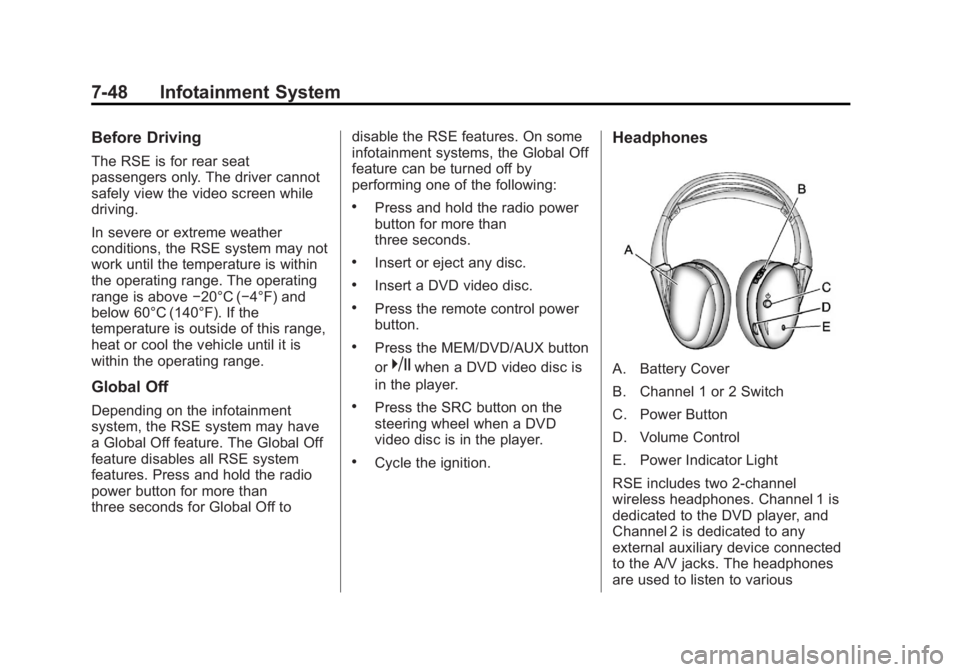
Headphones
A. Battery Cover
B. Channel 1 or 2 Switch
C. Power Button
D. Volume Control
E. Power Indicator Light
RSE includes two 2-channel
wireless headphones. Channel 1 is
dedicated to the DVD player, and
Channel 2 is dedicated to any
external auxiliary device connected
to the A/V jacks. The headphones
are used to listen to various