2012 BMW Z4 SDRIVE35I battery
[x] Cancel search: batteryPage 94 of 220

Press any button except the rear window de‐
froster to reactivate the automatic climate con‐
trol.
Residual heat
The heat stored in the engine is used to heat the
interior.
This function can be switched on
using the right-hand button under
the following conditions:▷Up to 15 minutes after switching off the en‐
gine.▷When the engine is warm.▷With sufficient battery voltage.▷At an external temperature under 77 ℉/
25 ℃.
The middle LED is lit when the function is on.
Automatic recirculated air mode/
recirculated air mode
Switch on the desired operating
mode by pressing this button re‐
peatedly:
▷LED off: outside air flows in
continuously.▷Left LED on, automatic recirculated air con‐
trol: a sensor detects pollutants in the out‐
side air. If necessary, the system blocks the
supply of outside air and recirculates the in‐
side air. As soon as the concentration of pol‐
lutants in the outside air has decreased suf‐
ficiently, the system automatically switches
back to outside air supply.▷Right LED on, recirculated air mode: the
supply of outside air into the vehicle is per‐
manently blocked. The system then recir‐
culates the air currently within the vehicle.
Only use recirculated air mode for a limited
period
If condensation starts to form on the inside win‐
dow surfaces during operation in the recircu‐
lated air mode, you should switch it off while also
increasing the air flow rate as required. The re‐
circulated air mode should not be used for an
extended period of time, as the air quality inside
the vehicle deteriorates steadily.◀
Defrosting and defogging windows Quickly removes ice and conden‐
sation from the windshield and
front side windows.
For this purpose, also switch on the cooling
function.
Rear window defroster The defroster switches off auto‐
matically after a certain time or
when the hardtop is opened.
Ventilation1Use the lever to change the direction of the
air flow2Use the thumbwheels to smoothly open and
close the air vents3Thumbwheel for adjusting the amount of
cool air from the vents to the upper body
area. This can be used to adjust the air tem‐
perature for the upper body area.
Ventilation for cooling
Adjust the vents to direct the flow of cool air in
your direction, for instance if the interior has be‐
come too warm.
Seite 94ControlsClimate94
Online Edition for Part no. 01 40 2 609 184 - 09 11 500
Page 100 of 220
The setting is automatically saved after approx.
10 seconds.
Connecting electrical devices
Note Do not connect the charger to the socket
Do not connect the battery charger to the
socket installed in the vehicle at the factory as
this could damage the vehicle.◀
Sockets
In your BMW, when the engine is running or the
ignition is switched on, you can use electrical
devices such as a hand lamp, car vacuum
cleaner, etc., as long as one of the following
sockets is available. The total load of all sockets
must not exceed 140 Watt at 12 V. Avoid dam‐
aging the sockets by attempting to insert plugs
of unsuitable shape or size.
Cigarette lighter socket
Access to socket: remove the lighter from the
socket.
Under the center armrest
External audio device, refer to page 103.
In the passenger footwell
A socket is located on the left below the glove
compartment.
Trunk
Depending on your vehicle's equipment, the fol‐
lowing storage spaces can be found in the cargo
area:▷Rubber band for securing light objects▷Storage compartment.
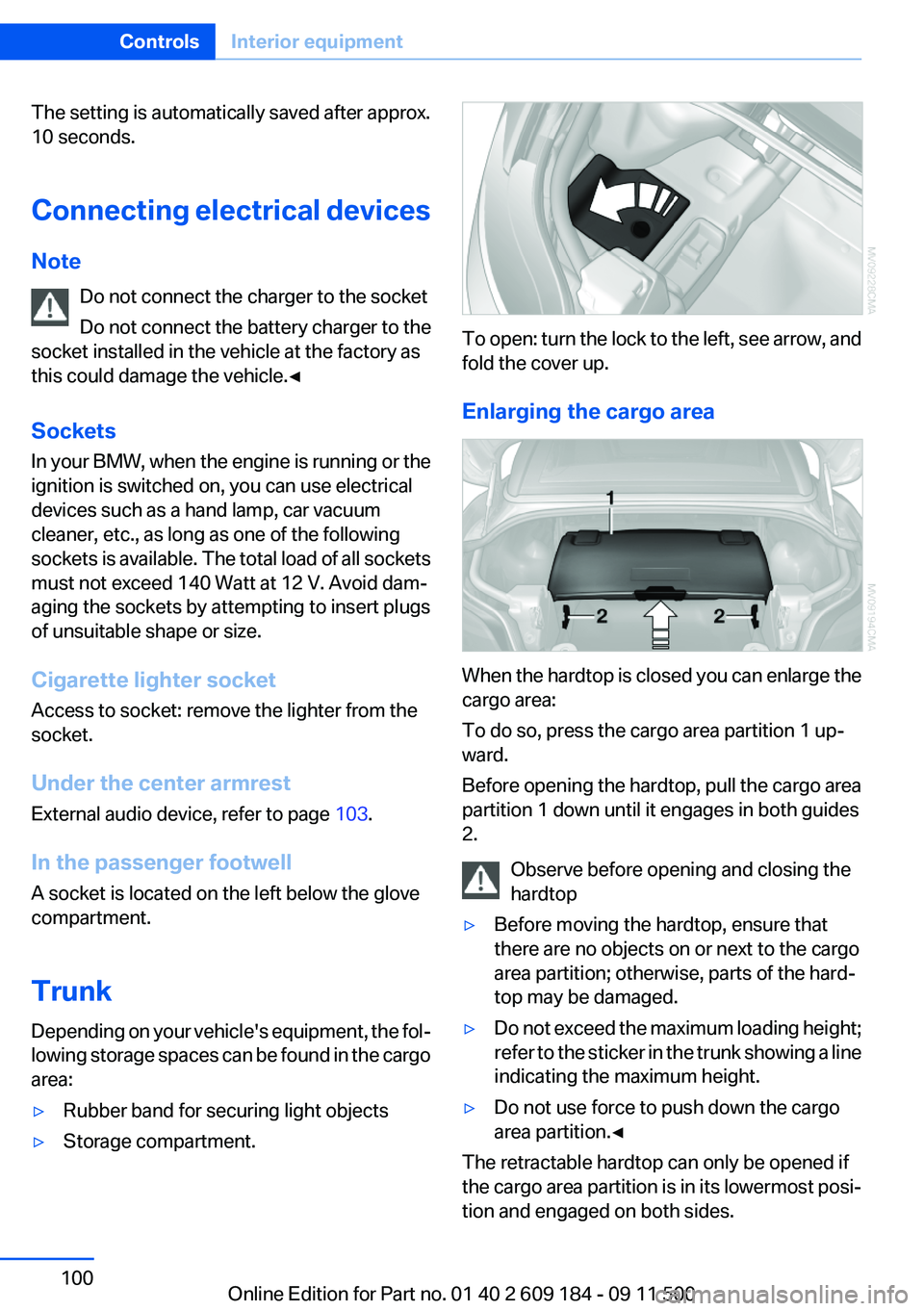
To open: turn the lock to the left, see arrow, and
fold the cover up.
Enlarging the cargo area
When the hardtop is closed you can enlarge the
cargo area:
To do so, press the cargo area partition 1 up‐
ward.
Before opening the hardtop, pull the cargo area
partition 1 down until it engages in both guides
2.
Observe before opening and closing the
hardtop
▷Before moving the hardtop, ensure that
there are no objects on or next to the cargo
area partition; otherwise, parts of the hard‐
top may be damaged.▷Do not exceed the maximum loading height;
refer to the sticker in the trunk showing a line
indicating the maximum height.▷Do not use force to push down the cargo
area partition.◀
The retractable hardtop can only be opened if
the cargo area partition is in its lowermost posi‐
tion and engaged on both sides.
Seite 100ControlsInterior equipment100
Online Edition for Part no. 01 40 2 609 184 - 09 11 500
Page 118 of 220
approx. 20 minutes. To listen to the radio, switch
it back on.
To spare the battery, ensure that the radio is
switched off when you leave the vehicle.
Adjusting the volume
Turn the left knob. The setting is stored for the
remote control currently in use.
When a call is placed using the hands-free sys‐
tem, the audio sources are muted.
Speed-dependent volume and volumes
of PDC signal tone and gong▷"PDC" : volume of the PDC signal tone com‐
pared to the audio sources.▷"GONG": volume of the gong compared to
the audio sources.▷"S-VOL": speed-dependent volume con‐
trol.
Set the audio sources to a high volume to be able
to adjust the volume of the signal tones more
easily.
1. Press the button.2. Select the symbol if necessary.3.Select the desired volume setting.4.Set the desired volume and press the right
knob.
Volume of external audio devices
An external audio device such as an MP3 player
can be connected via the AUX-IN port in the
center armrest and the audio tracks can be
played over the car's loudspeaker system.
The volume of the external audio device can be
adjusted to the car radio.
1. Press the button.2."AUX"3."Vol-AUX"4.Set the desired volume and press the right
knob.Tone settings▷"BASS": depth adjustment.▷"TREBLE": treble adjustment.▷"FADER": front/rear volume distribution.▷"BAL": left/right volume distribution.▷"DOLBY": spatial acoustics effect.▷"EQSET": equalizer setting.
Setting the treble, bass, and volume
distribution
1. Press the button.2.Highlight the desired tone setting and press
the right knob.3.Create the desired setting and press the
right knob.
Switching on the spatial acoustics
effect
1. Press the button.2. Select the symbol if necessary.3."DOLBY"
Equalizer
1."EQSET"2.Press the button of the desired frequency
range.3.Create the settings and press the right knob.
Resetting the equalizer
1. Press the button.2.Turn the right knob.3."EQSET"4."RESET"
Resetting the tone settings
The tone settings are reset to medium values.
1. Press the button.
Seite 118EntertainmentProfessional Radio118
Online Edition for Part no. 01 40 2 609 184 - 09 11 500
Page 134 of 220
TelephoneVehicle equipment
This chapter describes all series equipment as
well as country-specific and special equipment
offered for this model series.Therefore, it also
describes equipment that may not be found in
your vehicle, for instance due to the selected
special equipment or the country version. This
also applies to safety-related functions and sys‐
tems.
At a glance
Note
Equipment version with the full preparation
package mobile phone or a hands-free system.
The concept
Mobile phones can be connected with the vehi‐
cle via Bluetooth.
After these devices are paired once, they are
recognized automatically when the ignition is
switched on as soon as they are in the vehicle
and can then be operated via the radio, the but‐
tons on the steering wheel, and via voice acti‐
vation.
After a suitable mobile phone is paired with the
vehicle once, you can operate the mobile phone
via the radio, the buttons on the steering wheel,
and via voice activation.
Bluetooth® is a registered trademark of Blue‐
tooth® SIG, Inc.
Using the mobile phone while driving
Make entries only when traffic and road
conditions allow. Do not hold the mobile phone
in your hand while you are driving; use the
hands-free system instead. If you do not ob‐
serve this precaution, you can endanger the ve‐
hicle occupants and other road users.◀Snap-in adapter
The snap-in adapter is used to:▷Hold the mobile phone.▷Recharge the battery.▷Connect the mobile phone to an outside an‐
tenna of the vehicle.
This provides for better network reception
and consistent sound quality.
Avoid operating a mobile phone that has been
detected by the vehicle on the keypad of the
mobile phone, as this may lead to malfunctions.
Approved mobile phones
Details on which mobile phones and external
devices with a Bluetooth interface are sup‐
ported by the mobile phone preparation pack‐
age can be obtained at www.bmwusa.com/blue‐
tooth.
Notes
At high temperatures, the charging function of
the mobile phone may be limited and functions
may not be executed.
Playing music from the mobile phone
Depending on your mobile phone and the vehi‐
cle equipment, you can play the music data of
the mobile phone in the vehicle.
Seite 134CommunicationTelephone134
Online Edition for Part no. 01 40 2 609 184 - 09 11 500
Page 137 of 220
▷The phone book entries of the telephone
stored on the SIM card or mobile phone are
transmitted to the vehicle after detection,
depending on the mobile phone.▷Four mobile phones can be paired.▷Specific settings may be necessary in some
mobile phones, e.g., authorization or a se‐
cure connection; refer to the mobile phone
operating instructions.
Connecting a particular mobile phone
If more than one mobile phone is detected by the
vehicle, the first mobile phone on the list is con‐
nected. A different detected mobile phone may
be connected with the vehicle.
The mobile phone is connected with the ve‐
hicle.
A different mobile phone can be connected by
selecting it.
1.Switch on the radio ready state or the igni‐
tion.2. Press the button.3."PHONE"4."BT"5.Turn the right knob until the mobile phone
to be connected is displayed.6."PRIO"
Press the button repeatedly until the desired
position is reached.
Unpairing the mobile phone
1.Switch on the radio ready state or the igni‐
tion.2. Press the button.3."PHONE"4."BT"5.Turn the right knob until the mobile phone
to be unpaired is displayed.6."DELETE"7."YES"
What to do if...
Information on suitable mobile phones, refer to
page 134.
The mobile phone could not be paired or con‐
nected.
▷Is Bluetooth activated in the vehicle and on
the mobile phone? Activate Bluetooth on
the vehicle and on the mobile phone.▷Do the Bluetooth passkeys on the mobile
phone and the vehicle match? Enter the
same passkey on the mobile phone and on
the radio.▷Did it take longer than 30 seconds to enter
the passkey? Repeat the pairing procedure.▷Are too many Bluetooth devices connected
to the mobile phone or vehicle? Delete con‐
nections with other devices if necessary.▷Is the mobile phone in power-save mode or
does it have only a limited remaining battery
life? Charge the mobile phone in the snap-
in adapter or via the charging cable.▷Depending on the mobile phone, it is possi‐
ble that only one mobile phone can be con‐
nected to the vehicle. Unpair the connected
mobile phone from the vehicle and pair and
connect only one mobile phone.
The mobile phone no longer reacts?
▷Switch the mobile phone off and on again.▷Is the ambient temperature too high or low?
Do not expose the mobile phone to extreme
environmental conditions.
No phone book entries or only some phone book
entries are displayed, or they are incomplete.
▷Transmission of the phone book entries is
not yet complete.▷It is possible that only the phone book en‐
tries of the mobile phone or the SIM card are
transmitted.Seite 137TelephoneCommunication137
Online Edition for Part no. 01 40 2 609 184 - 09 11 500
Page 144 of 220
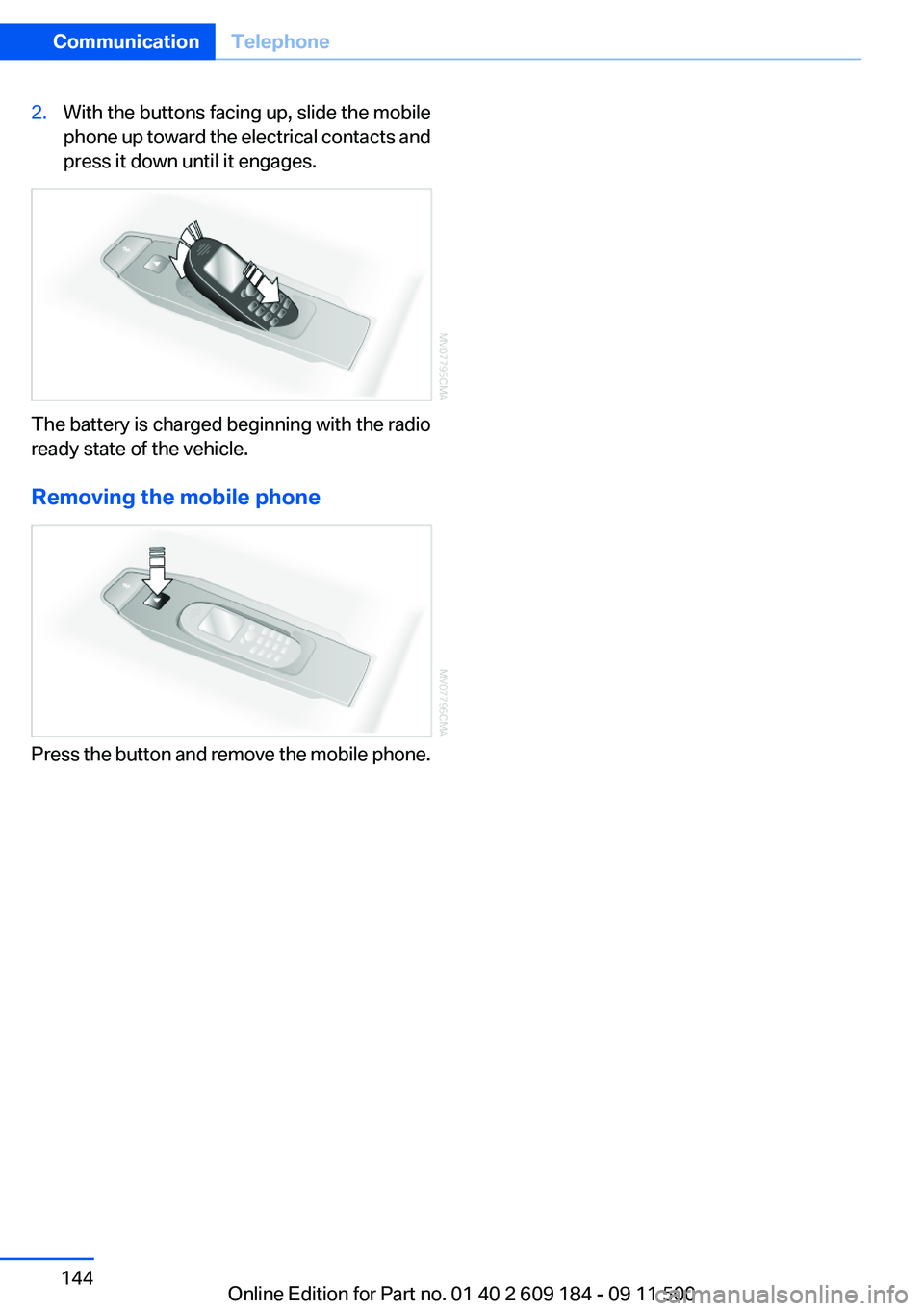
2.With the buttons facing up, slide the mobile
phone up toward the electrical contacts and
press it down until it engages.
The battery is charged beginning with the radio
ready state of the vehicle.
Removing the mobile phone
Press the button and remove the mobile phone.
Seite 144CommunicationTelephone144
Online Edition for Part no. 01 40 2 609 184 - 09 11 500
Page 174 of 220
No spare tire is available in the case of a flat tire.
The tools for changing wheels are available as
accessories from your service center.
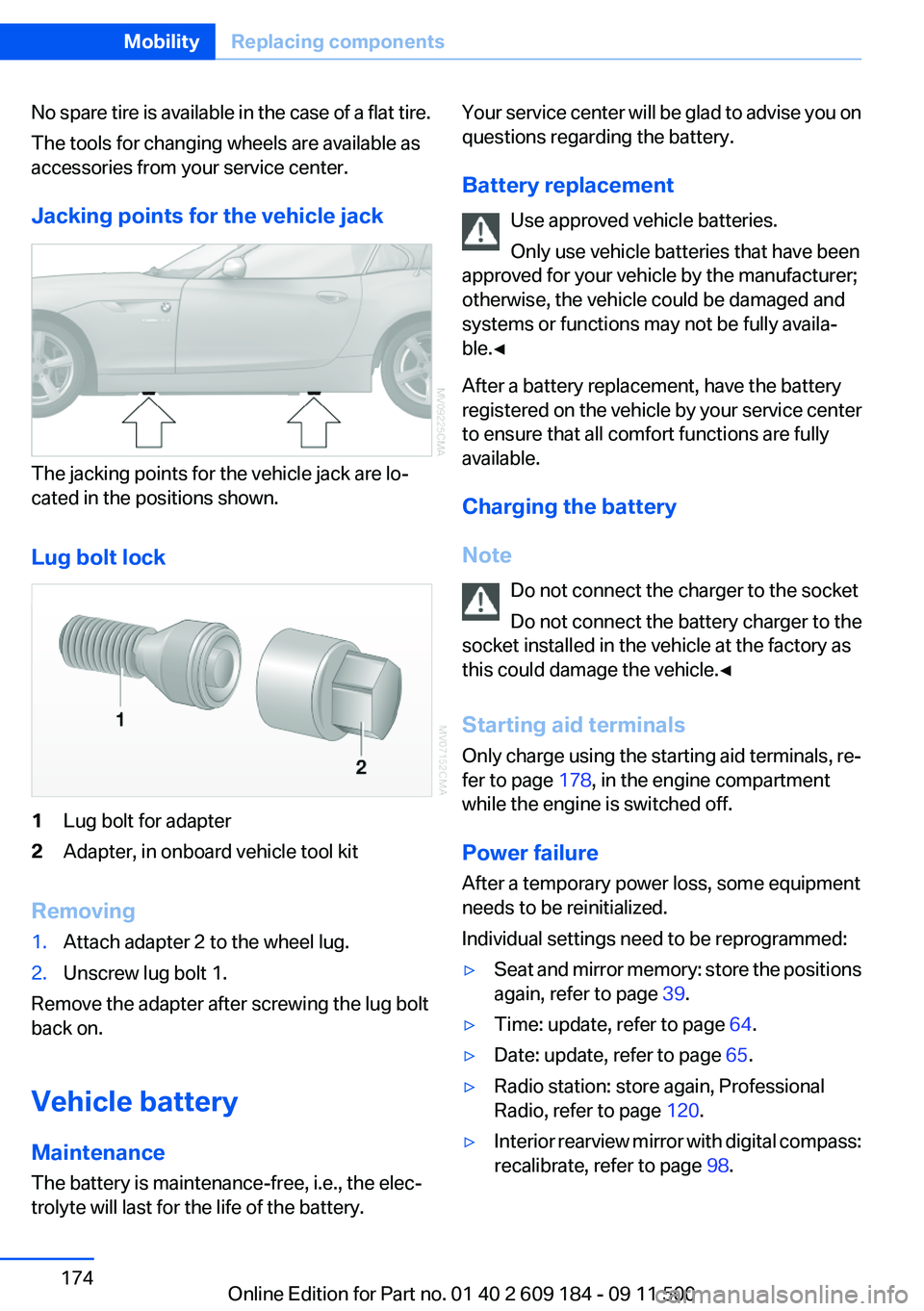
Jacking points for the vehicle jack
The jacking points for the vehicle jack are lo‐
cated in the positions shown.
Lug bolt lock
1Lug bolt for adapter2Adapter, in onboard vehicle tool kit
Removing
1.Attach adapter 2 to the wheel lug.2.Unscrew lug bolt 1.
Remove the adapter after screwing the lug bolt
back on.
Vehicle battery
Maintenance
The battery is maintenance-free, i.e., the elec‐
trolyte will last for the life of the battery.
Your service center will be glad to advise you on
questions regarding the battery.
Battery replacement Use approved vehicle batteries.
Only use vehicle batteries that have been
approved for your vehicle by the manufacturer;
otherwise, the vehicle could be damaged and
systems or functions may not be fully availa‐
ble.◀
After a battery replacement, have the battery
registered on the vehicle by your service center
to ensure that all comfort functions are fully
available.
Charging the battery
Note Do not connect the charger to the socket
Do not connect the battery charger to the
socket installed in the vehicle at the factory as
this could damage the vehicle.◀
Starting aid terminals
Only charge using the starting aid terminals, re‐
fer to page 178, in the engine compartment
while the engine is switched off.
Power failure
After a temporary power loss, some equipment
needs to be reinitialized.
Individual settings need to be reprogrammed:▷Seat and mirror memory: store the positions
again, refer to page 39.▷Time: update, refer to page 64.▷Date: update, refer to page 65.▷Radio station: store again, Professional
Radio, refer to page 120.▷Interior rearview mirror with digital compass:
recalibrate, refer to page 98.Seite 174MobilityReplacing components174
Online Edition for Part no. 01 40 2 609 184 - 09 11 500
Page 175 of 220

Disposing of old batteriesHave old batteries disposed of by your
service center or bring them to a recy‐
cling center.
Maintain the battery in an upright position for
transport and storage. Secure the battery so
that it does not tip over during transport.
Fuses
Notes Replacing fuses
Never attempt to repair a blown fuse and
do not replace a defective fuse with a substitute
of another color or amperage rating; this could
lead to a circuit overload, ultimately resulting in
a fire in the vehicle.◀
A pair of plastic tweezers is found on the current
distributor.
See the inside of the cover for information on
fuse assignment.
Below the glove box1.Remove the screws 1 using the screwdriver
from the onboard vehicle tool kit.2.Remove cover 2, unwinding the cable to the
footwell lamp if necessary.3.Release the shiny fastener 3.4.Fold the current distributor 4 downward and
pull forward.
The cover is reinstalled in reverse order.
Seite 175Replacing componentsMobility175
Online Edition for Part no. 01 40 2 609 184 - 09 11 500