2012 BMW Z4 SDRIVE35I battery
[x] Cancel search: batteryPage 177 of 220
After the Emergency Request arrives at the
BMW Assist Response Center, the BMW
Assist Response Center contacts you and
takes further steps to help you.
Even if you are unable to respond, the BMW
Assist Response Center can take further
steps to help you under certain circumstan‐
ces.
For this purpose, data that are used to de‐
termine the necessary rescue measures,
such as the current position of the vehicle if
it can be established, are transmitted to the
BMW Assist Response Center.▷If the LED is flashing but the BMW Assist
Response Center cannot be heard on the
hands-free system, the hands-free system
may be malfunctioning. However, the BMW
Assist Response Center may still be able to
hear you.
Initiating an Emergency Request
automatically
Under certain conditions, an Emergency Re‐
quest is automatically initiated immediately after
a severe accident. Automatic Collision Notifica‐
tion is not affected by pressing the SOS button.
Warning triangle
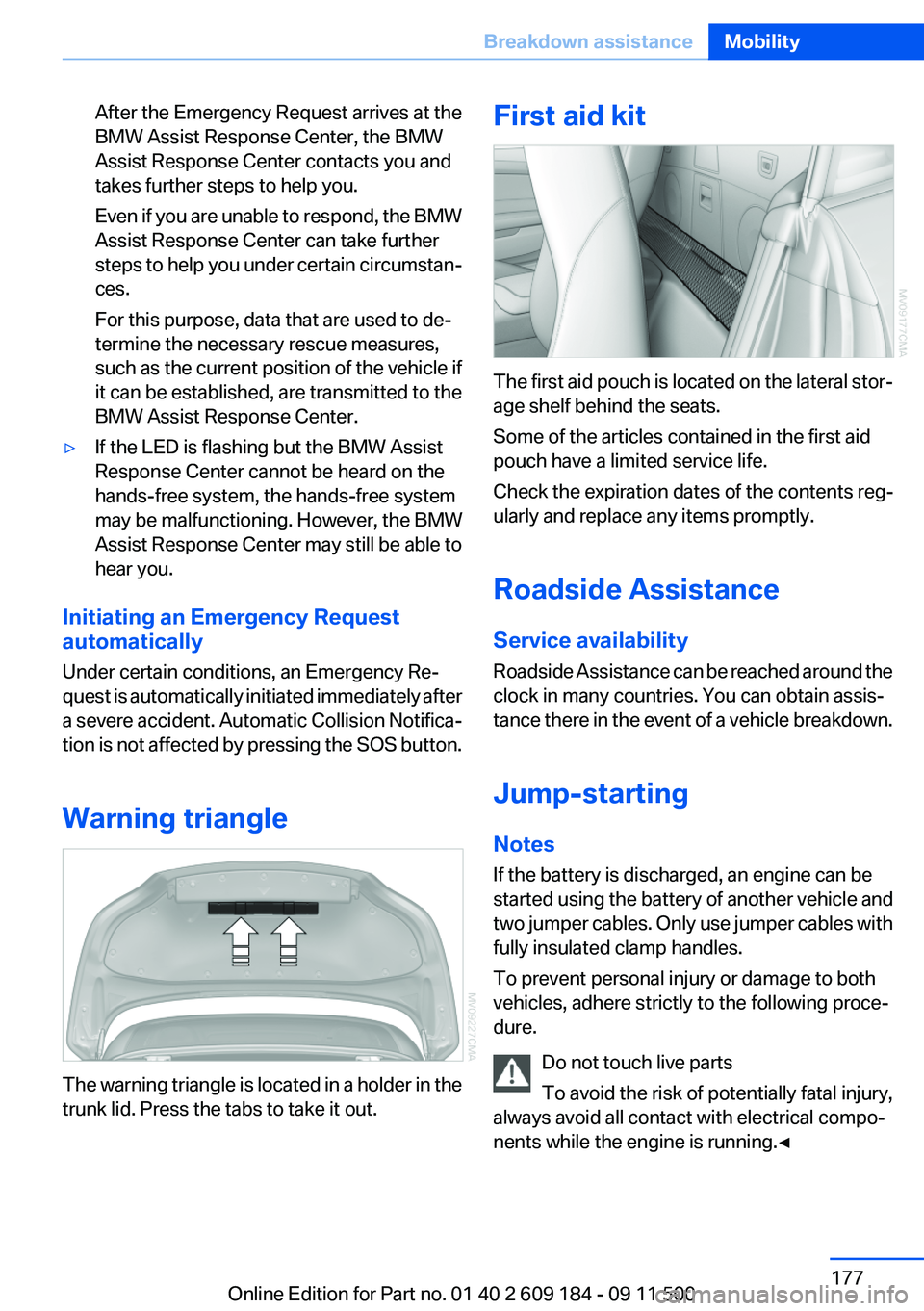
The warning triangle is located in a holder in the
trunk lid. Press the tabs to take it out.
First aid kit
The first aid pouch is located on the lateral stor‐
age shelf behind the seats.
Some of the articles contained in the first aid
pouch have a limited service life.
Check the expiration dates of the contents reg‐
ularly and replace any items promptly.
Roadside Assistance
Service availability
Roadside Assistance can be reached around the
clock in many countries. You can obtain assis‐
tance there in the event of a vehicle breakdown.
Jump-starting
Notes
If the battery is discharged, an engine can be
started using the battery of another vehicle and
two jumper cables. Only use jumper cables with
fully insulated clamp handles.
To prevent personal injury or damage to both
vehicles, adhere strictly to the following proce‐
dure.
Do not touch live parts
To avoid the risk of potentially fatal injury,
always avoid all contact with electrical compo‐
nents while the engine is running.◀
Seite 177Breakdown assistanceMobility177
Online Edition for Part no. 01 40 2 609 184 - 09 11 500
Page 178 of 220
Preparation1.Check that the battery of the other vehicle
has a voltage of 12 V. This information can
be found on the battery.2.Switch off the engine of the assisting vehi‐
cle.3.Switch off any electronic systems/power
consumers in both vehicles.
Bodywork contact between vehicles
Make sure that there is no contact be‐
tween the bodywork of the two vehicles;
otherwise, there is the danger of short cir‐
cuits.◀
Starting aid terminals
Connecting order
Connect the jumper cables in the correct
order; otherwise, there is the danger of injury
from sparking.◀
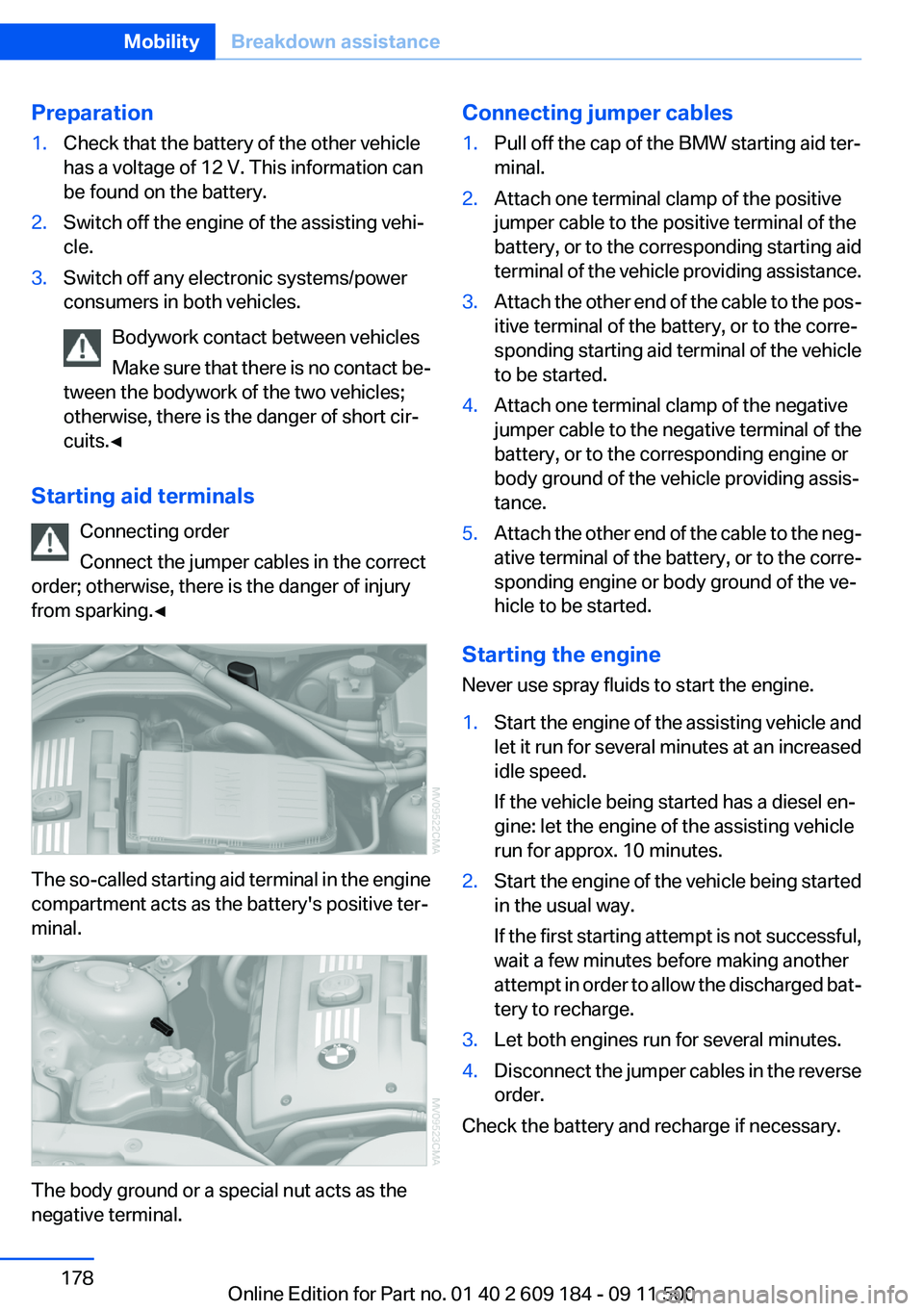
The so-called starting aid terminal in the engine
compartment acts as the battery's positive ter‐
minal.
The body ground or a special nut acts as the
negative terminal.
Connecting jumper cables1.Pull off the cap of the BMW starting aid ter‐
minal.2.Attach one terminal clamp of the positive
jumper cable to the positive terminal of the
battery, or to the corresponding starting aid
terminal of the vehicle providing assistance.3.Attach the other end of the cable to the pos‐
itive terminal of the battery, or to the corre‐
sponding starting aid terminal of the vehicle
to be started.4.Attach one terminal clamp of the negative
jumper cable to the negative terminal of the
battery, or to the corresponding engine or
body ground of the vehicle providing assis‐
tance.5.Attach the other end of the cable to the neg‐
ative terminal of the battery, or to the corre‐
sponding engine or body ground of the ve‐
hicle to be started.
Starting the engine
Never use spray fluids to start the engine.
1.Start the engine of the assisting vehicle and
let it run for several minutes at an increased
idle speed.
If the vehicle being started has a diesel en‐
gine: let the engine of the assisting vehicle
run for approx. 10 minutes.2.Start the engine of the vehicle being started
in the usual way.
If the first starting attempt is not successful,
wait a few minutes before making another
attempt in order to allow the discharged bat‐
tery to recharge.3.Let both engines run for several minutes.4.Disconnect the jumper cables in the reverse
order.
Check the battery and recharge if necessary.
Seite 178MobilityBreakdown assistance178
Online Edition for Part no. 01 40 2 609 184 - 09 11 500
Page 189 of 220

12CauseHow to respondThe cargo area partition is not in the lower‐
most position.Press down the cargo area parti‐
tion until it engages on both
sides.Roof activation only possible while vehicle is
stationary.The vehicle is not level; roof activation is not
possible.Move the vehicle to a level sur‐
face.The trunk lid is open.The fuel cap is missing or loose.Make sure that the fuel cap is
correctly positioned and close it
until it clicks audibly. Do not jam
the strap between the fuel cap
and the vehicle.The windshield washer fluid level is too low.Add washer fluid as soon as pos‐
sible, refer to page 52.Lights up in red:Service is due.Arrange a service appointment.
Check the service requirements,
refer to page 65.Lights up in yellow:The engine will start the next time the Start/
Stop button is touched, possibly without the
brake or clutch being depressedThe remote control is malfunctioning or, in
cars with Comfort Access, was not detected.The engine cannot be started.
Have the remote control
checked, if necessary.The battery in the remote control is dis‐
charged.Use the remote control for a lon‐
ger journey or, in cars with Com‐
fort Access, replace the battery.The belt tensioners and/or airbag system has
failed.Have the system checked imme‐
diately.Seite 189Indicator/warning lampsMobility189
Online Edition for Part no. 01 40 2 609 184 - 09 11 500
Page 191 of 220
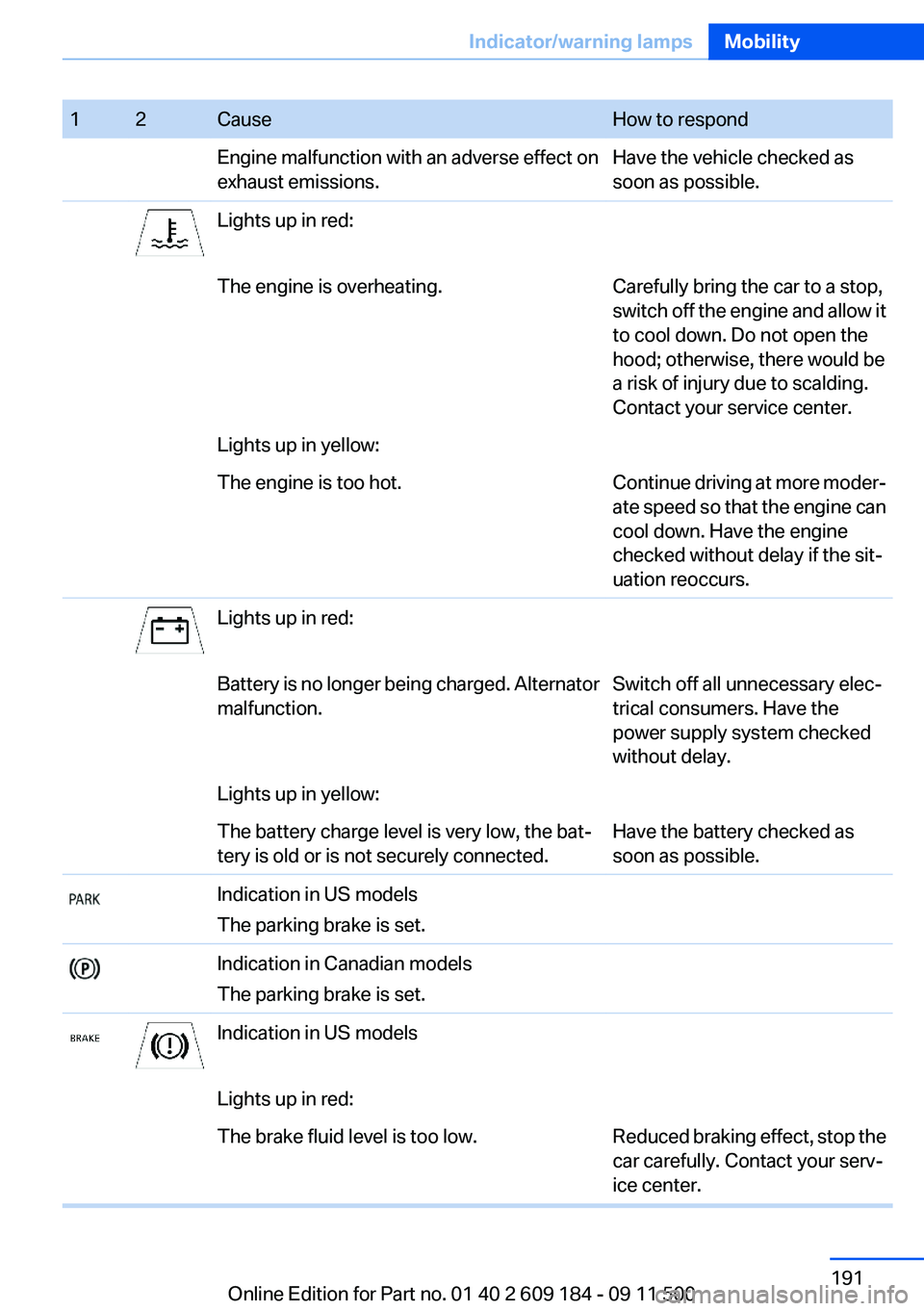
12CauseHow to respondEngine malfunction with an adverse effect on
exhaust emissions.Have the vehicle checked as
soon as possible.Lights up in red:The engine is overheating.Carefully bring the car to a stop,
switch off the engine and allow it
to cool down. Do not open the
hood; otherwise, there would be
a risk of injury due to scalding.
Contact your service center.Lights up in yellow:The engine is too hot.Continue driving at more moder‐
ate speed so that the engine can
cool down. Have the engine
checked without delay if the sit‐
uation reoccurs.Lights up in red:Battery is no longer being charged. Alternator
malfunction.Switch off all unnecessary elec‐
trical consumers. Have the
power supply system checked
without delay.Lights up in yellow:The battery charge level is very low, the bat‐
tery is old or is not securely connected.Have the battery checked as
soon as possible.Indication in US models
The parking brake is set.Indication in Canadian models
The parking brake is set.Indication in US modelsLights up in red:The brake fluid level is too low.Reduced braking effect, stop the
car carefully. Contact your serv‐
ice center.Seite 191Indicator/warning lampsMobility191
Online Edition for Part no. 01 40 2 609 184 - 09 11 500
Page 209 of 220
Band-aids, refer to First aidkit 177
Bar, refer to Towing meth‐ ods 180
Battery– Disposal 30, 175– Power failure 174– Remote control 20– Replacement in the remote
control 30– Replacement, vehicle bat‐
tery 174– Vehicle 174
Before entering the car
wash 182
Being towed 179
Belts, refer to Safety belts 38
Belt tensioners, refer to Safety belts 38
Beverage holder, refer to Cu‐ pholder 105
Blower, refer to Air flow rate 90, 93
BMW Assist 145
BMW Assist, refer to Connec‐ tedDrive 145
BMW EfficientDynamics, refer to Saving fuel 112
BMW homepage 6
BMW Internet page 6
BMW Maintenance Sys‐ tem 168
Bottle holder, refer to Cu‐ pholder 105
Brake assistant, refer to Dy‐ namic Brake Control 81
Brake discs, breaking in 108
Brake force display 80
Brake force distribution, elec‐ tronic 81
Brake lamps
– Brake force display 80– Bulb replacement 172, 173
Brake lights, adaptive 80
Brake pads, breaking in 108
Brakes
– ABS 81Braking– Notes 109– Parking brake 49
Braking safely 109
Breakdown assistance 177
Breaking in 108
Bulbs, replacing, refer to Lamps and bulbs 170
Button for starting the engine, refer to Start/Stop button 45
Buttons on the steering wheel 12
Bypassing, see Starting aid 177
C
California Proposition 65 Warning 7
Camera, care 185
Can holder, refer to Cu‐ pholder 105
Capacities
– Cargo area, refer to
Weights 204– Fuel tank, refer to Filling ca‐
pacities 206
Car battery 174
Car care products 183
Care 182
Care, displays 185
Care, vehicle 183
Cargo 110
Cargo area
– Capacity 204– Lamp, refer to Interior
lamps 72– Opening from the inside 27– Opening from the out‐
side 27
Cargo, securing 101
Cargo straps, securing cargo 112
Car key, refer to Integrated key/remote control 20
Carpet, care 184
Car phone– Installation location, refer to
Center armrest 103
Car vacuum cleaner, connect‐
ing, refer to Connecting elec‐
trical devices 100
Car wash 182
Car wash
– With Comfort Access 29
Catalytic converter, refer to
Hot exhaust system 109
CBS Condition Based Serv‐ ice 168
CD/DVD changer 124
CD/DVD notes 126
Cell phone, installation loca‐ tion, refer to Center arm‐
rest 103
Center armrest 103
Center brake lamp
– Bulb replacement 173
Center console, refer to
Around the center con‐
sole 15
Central locking
– Comfort Access 28– From the inside 26– Setting the unlocking char‐
acteristics 22
Central locking system
– From the outside 21– Principle 21
Changes, technical, refer to
Safety 6
Changing wheels/tires 161
Chassis number, refer to En‐ gine compartment 163
Check Control 66
Children, transporting safely 43
Child restraint fixing sys‐ tem 43
Child seats, refer to Transport‐ ing children safely 43
Chrome parts, care 184
Circulation of air, refer to Re‐ circulated air mode 90, 94
Seite 209Everything from A to ZReference209
Online Edition for Part no. 01 40 2 609 184 - 09 11 500
Page 210 of 220
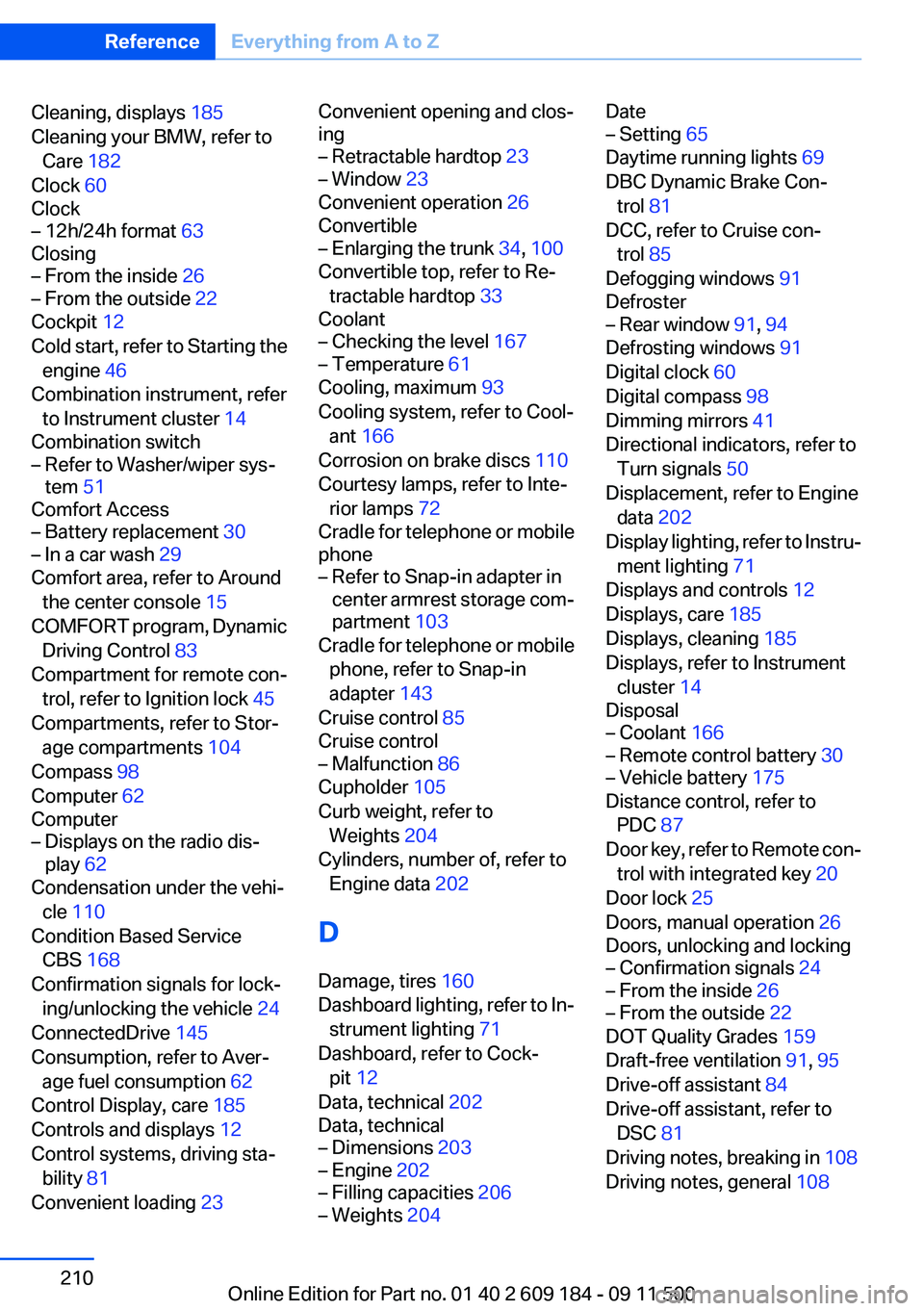
Cleaning, displays 185
Cleaning your BMW, refer to Care 182
Clock 60
Clock– 12h/24h format 63
Closing
– From the inside 26– From the outside 22
Cockpit 12
Cold start, refer to Starting the engine 46
Combination instrument, refer to Instrument cluster 14
Combination switch
– Refer to Washer/wiper sys‐
tem 51
Comfort Access
– Battery replacement 30– In a car wash 29
Comfort area, refer to Around
the center console 15
COMFORT program, Dynamic Driving Control 83
Compartment for remote con‐ trol, refer to Ignition lock 45
Compartments, refer to Stor‐ age compartments 104
Compass 98
Computer 62
Computer
– Displays on the radio dis‐
play 62
Condensation under the vehi‐
cle 110
Condition Based Service CBS 168
Confirmation signals for lock‐ ing/unlocking the vehicle 24
ConnectedDrive 145
Consumption, refer to Aver‐ age fuel consumption 62
Control Display, care 185
Controls and displays 12
Control systems, driving sta‐ bility 81
Convenient loading 23
Convenient opening and clos‐
ing– Retractable hardtop 23– Window 23
Convenient operation 26
Convertible
– Enlarging the trunk 34, 100
Convertible top, refer to Re‐
tractable hardtop 33
Coolant
– Checking the level 167– Temperature 61
Cooling, maximum 93
Cooling system, refer to Cool‐ ant 166
Corrosion on brake discs 110
Courtesy lamps, refer to Inte‐ rior lamps 72
Cradle for telephone or mobile
phone
– Refer to Snap-in adapter in
center armrest storage com‐
partment 103
Cradle for telephone or mobile
phone, refer to Snap-in
adapter 143
Cruise control 85
Cruise control
– Malfunction 86
Cupholder 105
Curb weight, refer to Weights 204
Cylinders, number of, refer to Engine data 202
D
Damage, tires 160
Dashboard lighting, refer to In‐ strument lighting 71
Dashboard, refer to Cock‐ pit 12
Data, technical 202
Data, technical
– Dimensions 203– Engine 202– Filling capacities 206– Weights 204Date– Setting 65
Daytime running lights 69
DBC Dynamic Brake Con‐ trol 81
DCC, refer to Cruise con‐ trol 85
Defogging windows 91
Defroster
– Rear window 91, 94
Defrosting windows 91
Digital clock 60
Digital compass 98
Dimming mirrors 41
Directional indicators, refer to Turn signals 50
Displacement, refer to Engine data 202
Display lighting, refer to Instru‐ ment lighting 71
Displays and controls 12
Displays, care 185
Displays, cleaning 185
Displays, refer to Instrument
cluster 14
Disposal
– Coolant 166– Remote control battery 30– Vehicle battery 175
Distance control, refer to
PDC 87
Door key, refer to Remote con‐ trol with integrated key 20
Door lock 25
Doors, manual operation 26
Doors, unlocking and locking
– Confirmation signals 24– From the inside 26– From the outside 22
DOT Quality Grades 159
Draft-free ventilation 91, 95
Drive-off assistant 84
Drive-off assistant, refer to DSC 81
Driving notes, breaking in 108
Driving notes, general 108
Seite 210ReferenceEverything from A to Z210
Online Edition for Part no. 01 40 2 609 184 - 09 11 500
Page 215 of 220

Refueling 152
Remaining range, refer to Range 62
Remote control– Battery replacement 30– Comfort Access 28– Garage door opener 96– Malfunction 25, 29– Removing from the ignition
lock 45– Trunk lid 23– Universal 96
Replacement fuses, refer to
Spare fuses 175
Replacement remote con‐ trol 20
Replacing wheels/tires 161
Reporting safety defects 8
Reservoir for washer fluid 52
Restraining systems
– Refer to Safety belts 38
Restraint system
– For children 43
Retaining straps, securing
cargo 112
Retractable hardtop
– Convenient opening and
closing 23– Opening and closing 34– Remote control 23
Retreaded tires 161
Reverse gear
– 7-gear automatic transmis‐
sion 56– 8-gear automatic transmis‐
sion 53– Manual transmission 52
Roadside parking lamps 70
Roadworthiness test 65
Roof load capacity 204
Roof, refer to Retractable hardtop 33
Rope, refer to Tow-starting and towing 180
RPM, refer to Engine data 202
RSC Runflat System Compo‐
nent, refer to Run-flat
tires 161
Rubber components, care 184
Run-flat tires 161
Run-flat tires– Tire inflation pressure 155
Running lights, refer to Parking
lamps/low beams 68
S
Safety 6
Safety-belt height adjust‐ ment 39
Safety belts 38
Safety belts
– Damage 39– Indicator/warning lamp 39– Reminder 39
Safety belts, care 184
Safety systems
– Airbags 73– Safety belts 38
Safety tires 161
Saving fuel 112
Screw thread for tow fit‐ ting 179
Seat adjustment, electric 37
Seat adjustment, mechani‐ cal 36
Seat and mirror memory 39
Seat and mirror memory, re‐ trieving automatically 24
Seat Belt Reminder, refer to Safety belt reminder 39
Seat belts
– Refer to Safety belts 38
Seat heating 38
Seats
– Adjusting 36– Adjusting electrically 37– Heating 38– Memory, refer to Seat and
mirror memory 39– Storing the setting, refer to
Seat and mirror memory 39Sensors, care 185
Service and warranty 7
Service requirements, CBS Condition Based Serv‐
ice 168
Service requirements, dis‐ play 65
Service, Roadside Assis‐ tance 177
Servotronic 84
Settings– Clock, 12h/24h format 63
Settings and information 62
Settings, configuring, refer to Personal Profile 20
Shift paddles on steering
wheel
– 7-gear automatic transmis‐
sion 57– 8-gear automatic transmis‐
sion 54
Side airbags 73
Side windows, refer to Win‐ dows 31
Signal horn, refer to Horn 12
Sitting safely 36
Ski bag, refer to Through- loading opening with
integrated transport bag 101
Slot for remote control 45
Snap-in adapter, mobile phone 143
Snap-in adapter, refer to Cen‐ ter armrest storage compart‐
ment 103
Socket, OBD Onboard Diag‐ nostics 169
Socket, refer to Connecting electrical devices 100
SOS, refer to Emergency Re‐ quest, initiating 176
Spare fuses 175
Special equipment, series equipment 6
Specified oil types 166
Speed, average 62
Speedometer 14
Seite 215Everything from A to ZReference215
Online Edition for Part no. 01 40 2 609 184 - 09 11 500
Page 217 of 220

Transmission positions– 7-gear automatic transmis‐
sion 55– 8-gear automatic transmis‐
sion 53
Transporting children
safely 43
Tread depth, tires 160
Tread, tires 160
Trip-distance counter, refer to Trip odometer 60
Triple turn signal activa‐ tion 50
Trip odometer 60
Trunk
– Comfort Access 29
Trunk lid
– Comfort Access 29– Emergency unlocking 28– Opening from the inside 27– Opening from the out‐
side 27– Remote control 23
Turning circle, refer to Dimen‐
sions 203
Turn signal
– Indicator/warning lamp 14
Turn signals 50
Turn signals
– Bulb replacement, front 172– Triple turn signal activa‐
tion 50
U
Uniform Tire Quality Grading/ UTQG 159
Unintentional alarms 31
Units
– Average fuel consump‐
tion 63– Temperature 63
Universal Garage Door
Opener 96
Universal remote control 96
Unlocking– From the inside 27– From the outside 22– Hood 164– Setting the unlocking char‐
acteristics 22– Trunk lid 29– Without remote control, refer
to Comfort Access 28
Updates made after the edito‐
rial deadline 6
Upholstery care 183
USB audio interface 128
V
Vacuum cleaner, connecting, refer to Connecting electrical
devices 100
Vehicle
– Battery replacement 174– Breaking in 108– Cargo 204– Dimensions, refer to Dimen‐
sions 203– Identification number, refer
to Engine compartment 163– Weight 204
Vehicle care 183
Vehicle care, refer to Care 182
Vehicle equipment 6
Vehicle jack 174
Vehicle paint 183
Vehicle storage 185
Vehicle, switching off 46
Vehicle wash 182
Ventilation
– Draft-free 91, 95– Refer to Climate control 89
Vents, refer to Air vents 89
Voice activation, mobile phone 141
W
Warning and indicator lamps 15
Warning messages, refer to
Check Control 66
Warning triangle 177
Washer/wiper system 51
Washing, vehicle 182
Water on roads 109
Wear indicator in tire 160
Welcome lamps 68
Wheelbase, refer to Dimen‐ sions 203
Wheel change 173
Wheels and tires 155
Wheels, changing 161
Wheels, Flat Tire Monitor FTM 75
Width, refer to Dimen‐ sions 203
Wind deflector 34
Window, convenient opening and closing 23
Windows, defrosting and de‐
fogging– Automatic climate con‐
trol 94
Windows, defrosting and re‐
moving condensation
– Air conditioner 91
Windows, pinch protection 32
Windshield
– Cleaning 51– Defrosting and defogging, air
conditioner 91– Defrosting and defogging,
automatic climate con‐
trol 94
Windshield, defrosting, refer
to Defrosting windows 91
Windshield wash 51
Windshield wash
– Filling capacity, reser‐
voir 206– Nozzles 52– Washer fluid 52
Windshield washer fluid 52
Windshield wiper blades, changing 170
Windshield wiper, refer to Washer/wiper system 51
Seite 217Everything from A to ZReference217
Online Edition for Part no. 01 40 2 609 184 - 09 11 500