2012 BMW X6 M tire
[x] Cancel search: tirePage 5 of 317

Contents
The fastest way to find information on a partic‐
ular topic or item is by using the index, refer to
page
302.
Using this Owner's Manual
6 Notes
At a glance
12 Cockpit
18 iDrive
24 Voice activation system
Controls
28 Opening and closing
45 Adjusting
56 Transporting children safely
61 Driving
71 Displays
81 Lamps
86 Safety
96 Driving stability control systems
102 Driving comfort
119 Climate
127 Interior equipment
134 Storage compartments
Driving tips
142 Things to remember when driving
Navigation
152 Navigation system
153 Destination entry
161 Destination guidance
168 What to do if...
Entertainment
172 Tone
174 Radio
181 CD/multimedia
200 DVD system in rear Communication
216
Telephone
227 Office
235 Contacts
237 ConnectedDrive
Mobility
246 Refueling
248 Fuel
252 Wheels and tires
263 Engine compartment
268 Maintenance
270 Replacing components
280 Breakdown assistance
285 Care
Reference
290 Technical data
295 Short commands for voice activation
system
302 Everything from A to Z
Seite 5
Online Edition for Part no. 01 40 2 606 735 - 03 11 500 Reference Mobility Communication Entertainment Navigation Driving tips Controls At a glance
Page 6 of 317
Notes
Using this Owner's Manual
The fastest way to find information on a partic‐
ular topic is by using the index.
An initial overview of the vehicle is provided in
the first chapter.
Additional sources of information
Should you have any questions, your service
center will be glad to advise you at any time.
Information on BMW, e.g., on technology, is
available on the Internet: bmwusa.com.
Symbols
Indicates precautions that must be followed
precisely in order to avoid the possibility of per‐
sonal injury and serious damage to the vehicle.
◄ Marks the end of a specific item of informa‐
tion.
* Indicates special equipment, country-specific
equipment and optional accessories, as well as
equipment and functions not yet available at the
time of printing.
"..." Identifies Control Display texts used to se‐
lect individual functions.
›...‹ Verbal instructions to use with the voice ac‐
tivation system.
››...‹‹ Identifies the answers generated by the
voice activation system. Refers to measures that can be taken to help
protect the environment.
Symbols on vehicle components Indicates that you should consult the rele‐
vant section of this Owner's Manual for infor‐
mation on a particular part or assembly. Your individual vehicle
You
have decided in favor of a vehicle with indi‐
vidualized equipment and features.
This Owner's Manual describes the entire array
of options and equipment available for a specific
model.
As a result, the manual may contain accessories
and equipment that you may not have specified
for your own vehicle.
All options and special equipment are marked
with an asterisk*.
For options and equipment not described in this
Owner's Manual, please refer to the Supple‐
mentary Owner's Manuals.
Status of this Owner's Manual
at time of printing
The manufacturer of your vehicle pursues a pol‐
icy of constant development that is conceived
to ensure that our vehicles continue to embody
the highest quality and safety standards. In rare
cases, therefore, the features described in this
Owner's Manual may differ from those in your
vehicle.
Updates made after the editorial
deadline
Any updates made after the editorial deadline for
the Owner's Manuals are located in the appen‐
dix of the printed quick reference for the vehicle.
For your own safety
Maintenance and repairs
Advanced technology, e.g., the use of modern
materials and high-performance electronics, re‐
quires suitable maintenance and repair meth‐
ods.
Seite 6
6 Online Edition for Part no. 01 40 2 606 735 - 03 11 500Notes
Page 13 of 317

Turn signal 66
High beams, head‐
lamp flasher 83
High-beam Assistant* 83
Roadside parking lamps* 83
Computer 73
Settings and information about the
vehicle 71
7 BMW X6: shifting up or down with automatic
transmission 69
8 Instrument cluster 14
9 Steering column stalk, right Windshield wipers 67
Rain sensor
67 BMW X5: rear window wip‐
ers 68
10 Start/stop the engine and switch
the ignition on/off 61
11 Ignition lock 61
12 Steering wheel buttons, right Change the radio station
Stopping a traffic announcement
Select a music track
Scrolling through the redial list
Next entertainment source Recirculated-air mode 122
Steering wheel heating* 55
Lane departure warning* 93
13 Horn, the entire surface
14 15
Cruise control lever Cruise control*
108 Active cruise control*
102
16 Steering wheel buttons, left Telephone* 216
Volume
Activate/deactivate the voice acti‐
vation system* 24
17 Releasing the hood 264
Seite 13
13Online Edition for Part no. 01 40 2 606 735 - 03 11 500
Reference Mobility Communication Entertainment Navigation Driving tips Controls
At a glance
Page 30 of 317

▷
In cars with Comfort Access*, via the door
handles.
The following takes place simultaneously when
locking/unlocking the vehicle via the remote
control:
▷ The welcome lamps, interior lamps and
courtesy lamps* are switched on and off.
▷ The alarm system* is armed or disarmed,
refer to page 39.
Operating from the inside
Via the button for the central locking system, re‐
fer to page 33.
If the vehicle is locked from the inside, the fuel
filler flap remains unlocked.
If an accident of a certain severity occurs, the
central locking system unlocks automatically.
The hazard warning system and interior lamps
come on.
Opening and closing: from the
outside
Using the remote control
General information
Take the remote control with you
People or animals left unattended in a
parked vehicle can lock the doors from the in‐
side. Always take the remote control with you
when leaving the vehicle so that the vehicle can
then be opened from the outside.◀
Unlocking Press the button. The vehicle is unlocked.
You can set how the vehicle is to be unlocked.
The
setting is stored for the remote control cur‐
rently in use.
1. "Settings"
2. "Door locks" 3.
"Unlock button:" 4.
Select the desired function:
▷"All doors" The entire vehicle is unlocked.
▷ "Driver's door only" Only the driver's door and the fuel
filler flap are unlocked. Pressing again
unlocks the entire vehicle.
Convenient opening Press and hold the button on the remote
control.
The
windows and the glass sunroof*/panoramic
glass sunroof* open.
Locking Press the button on the remote control.
Locking from the outside
Do
not lock the vehicle from the outside if
there are people in it, as the vehicle cannot be
unlocked from inside without special knowl‐
edge.◀
Switching on the interior lamps,
courtesy lamps*, and welcome lamps Press
the button on the remote control
with the vehicle locked.
You can also use this function to locate your ve‐
hicle in parking garages, etc.
Panic mode*
You can trigger the alarm system if you find
yourself in a dangerous situation. Seite 30
30 Online Edition for Part no. 01 40 2 606 735 - 03 11 500
Opening and closing
Page 49 of 317
Active seat ventilation* and
seat heating
*
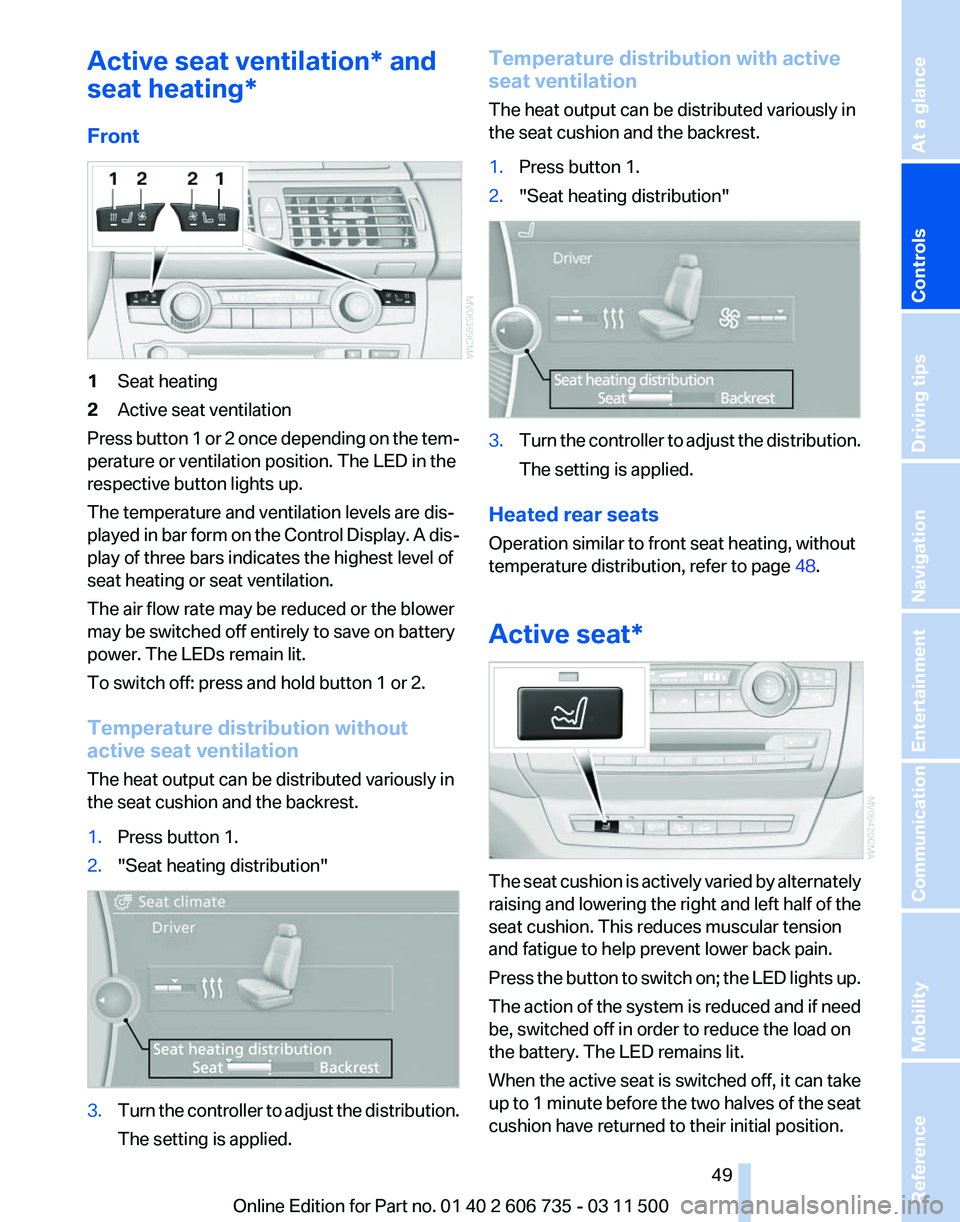
Front 1
Seat heating
2 Active seat ventilation
Press button 1 or 2 once depending on the tem‐
perature or ventilation position. The LED in the
respective button lights up.
The temperature and ventilation levels are dis‐
played
in bar form on the Control Display. A dis‐
play of three bars indicates the highest level of
seat heating or seat ventilation.
The air flow rate may be reduced or the blower
may be switched off entirely to save on battery
power. The LEDs remain lit.
To switch off: press and hold button 1 or 2.
Temperature distribution without
active seat ventilation
The heat output can be distributed variously in
the seat cushion and the backrest.
1. Press button 1.
2. "Seat heating distribution" 3.
Turn the controller to adjust the distribution.
The setting is applied. Temperature distribution with active
seat ventilation
The heat output can be distributed variously in
the seat cushion and the backrest.
1.
Press button 1.
2. "Seat heating distribution" 3.
Turn the controller to adjust the distribution.
The setting is applied.
Heated rear seats
Operation similar to front seat heating, without
temperature distribution, refer to page 48.
Active seat* The seat cushion is actively varied by alternately
raising
and lowering the right and left half of the
seat cushion. This reduces muscular tension
and fatigue to help prevent lower back pain.
Press the button to switch on; the LED lights up.
The action of the system is reduced and if need
be, switched off in order to reduce the load on
the battery. The LED remains lit.
When the active seat is switched off, it can take
up to 1 minute before the two halves of the seat
cushion have returned to their initial position.
Seite 49
49Online Edition for Part no. 01 40 2 606 735 - 03 11 500
Reference Mobility Communication Entertainment Navigation Driving tips
Controls At a glance
Page 88 of 317

Depending on the vehicle's equipment, the ar‐
rangement of the switches and indicator lamps
may differ somewhat.
The indicator lamp for the front passenger air‐
bags indicates the operating state of the front
passenger airbags.
The lamp indicates whether the airbags are ac‐
tivated or deactivated.
▷
The indicator lamp lights up when a child in
a child restraint fixing system intended for
the purpose is properly detected on the
seat. The airbags on the front passenger
side are not activated.
▷ The indicator lamp does not light up when,
for example, a correctly seated person of
sufficient size is detected on the seat. The
airbags on the front passenger side are ac‐
tivated.
▷ The indicator lamp does not light up when
the seat is empty. However, the airbags on
the front passenger side are not activated.
The system generally detects children seated in
a child seat, especially in the child seats that
were required by NHTSA when the vehicle was
manufactured.
After installing a child seat, make
sure that the indicator lamp for the front pas‐
senger airbags lights up. This indicates that the
child seat has been detected and the front pas‐
senger airbags are not activated.
Operational readiness of airbag system In the radio ready state and beyond, refer to
page
61, the warning lamp comes on briefly to
indicate that the entire airbag system and the
belt tensioners are operational. Airbag system malfunction
▷
Warning lamp does not light up in the radio
ready state.
▷ Warning lamp remains permanently on.
Have the airbag system checked without
delay if there is a malfunction
In the event of a malfunction in the airbag sys‐
tem, have it checked without delay; otherwise,
there
is the risk that the system will not function
as intended even if a sufficiently severe accident
occurs.◀
FTM Flat Tire Monitor*
The concept
The system does not measure the actual infla‐
tion pressure in the tires.
It detects a pressure loss in a tire by comparing
the rotational speeds of the individual wheels
while moving.
In the event of a pressure loss, the diameter and
therefore the rotational speed of the corre‐
sponding wheel change. This is detected and
reported as a flat tire.
Functional requirements
The system must have been initialized when the
tire inflation pressure was correct; otherwise,
reliable signaling of a flat tire is not ensured. In‐
itialize the system after each correction of the
tire inflation pressure and after every tire or
wheel change.
System limits
Sudden tire damage
Sudden serious tire damage caused by
external influences cannot be indicated in ad‐
vance.◀
A natural, even pressure loss in all four tires can‐
not be detected. Therefore, check the tire infla‐
tion pressure regularly.
The system could be delayed or malfunction in
the following situations: Seite 88
88 Online Edition for Part no. 01 40 2 606 735 - 03 11 500Safety
Page 89 of 317

▷
When the system has not been initialized.
▷ When driving on a snowy or slippery road
surface.
▷ Sporty driving style: slip in the drive wheels,
high lateral acceleration.
▷ When driving with snow chains*.
When driving with a compact wheel*, the Flat
Tire Monitor is unable to function.
Status display
The current status of the Flat Tire Monitor can
be displayed on the Control Display, e.g.,
whether or not the FTM is active.
1. "Vehicle Info"
2. "Vehicle status"
3. "Flat Tire Monitor"
The status is displayed.
Initialization
The
initialization process adopts the set inflation
tire pressures as reference values for the detec‐
tion of a flat tire. Initialization is started by con‐
firming the inflation pressures.
Do not initialize the system when driving with
snow chains* or with a compact wheel*.
1. "Vehicle Info"
2. "Vehicle status"
3. "Reset"
4. Start the engine - do not drive away.
5. Start the initialization with "Reset".
6. Drive away.
The initialization is completed while driving,
which can be interrupted at any time.
The initialization automatically continues when
driving resumes.
Indication of a flat tire The warning lamp lights up red. A
message appears on the Control Dis‐
play. In addition, a signal sounds.
There is a flat tire or a major loss in tire inflation
pressure. Reduce your speed and stop cautiously. Avoid
sudden braking and steering maneuvers.
When a flat tire is indicated, DSC Dynamic Sta‐
bility Control is switched on if necessary.
Actions in the event of a flat tire
Run-flat tires
You
can continue driving with a damaged tire at
speeds up to 50 mph/80 km/h.
Do not continue driving without run-flat
tires
If the vehicle is not equipped with run-flat tires
as provided at the factory, do not continue driv‐
ing. Continuing to drive could cause severe ac‐
cidents.◀
Continued driving with a flat tire
If continuing to drive with a damaged tire:
1. Avoid sudden braking and steering maneu‐
vers.
2. Do not exceed a speed of 50 mph/80 km/h.
If the defective tire continues to lose pres‐
sure, its position will be indicated to you on
the Control Display.
3. At the next opportunity, check the inflation
pressure in all four tires.
If the tire inflation pressure in all four tires is
correct, the Flat Tire Monitor may not have
been initialized. In this case, initialize the
system.
Possible driving distance with complete loss of
tire inflation pressure:
▷ With a light load:
1 to 2 people without luggage:
Approx. 155 miles/200 km.
▷ With a medium load:
2
persons, cargo area full, or 4 persons with‐
out luggage:
Approx. 94 miles/150 km.
▷ With a full load:
4 or more persons, cargo area full: Seite 89
89Online Edition for Part no. 01 40 2 606 735 - 03 11 500
Reference Mobility Communication Entertainment Navigation Driving tips
Controls At a glance
Page 90 of 317
Approx. 30 miles/50 km.
The possible driving distance after a loss of tire
inflation pressure depends on the cargo load
and the driving style and conditions.
When the vehicle is driven with a damaged tire,
its handling characteristics change, e.g., re‐
duced lane stability during braking, a longer
braking distance, and altered self-steering
properties. Adjust your driving style accord‐
ingly. Avoid abrupt steering maneuvers or driv‐
ing over obstacles, e. g., curbs, potholes, etc.
Because
the possible driving distance depends
on how the vehicle is used during the trip, the
actual distance may be smaller or greater de‐
pending on the driving speed, road conditions,
external temperature, cargo load, etc.
Continued driving with a flat tire
Drive moderately and do not exceed a
speed of 50 mph/80 km/h.
A loss of tire inflation pressure results in a
change in the handling characteristics, e.g., re‐
duced lane stability during braking, a longer
braking distance and altered self-steering prop‐
erties.◀
Final tire failure
Vibrations or loud noises while driving can
indicate the final failure of the tire. Reduce speed
and stop; otherwise, pieces of the tire could
come loose and cause an accident. Do not con‐
tinue driving, and contact your service center.◀
Tire Pressure Monitor TPM*
The concept
The tire inflation pressure is measured in the
four mounted tires. The system notifies you if
there is a significant loss of pressure in one or
more tires.
Functional requirements
The system must have been reset while the in‐
flation pressure was correct; otherwise, reliable
signaling of a flat tire is not ensured. Always use wheels with TPM electronics to en‐
sure that the system will operate properly.
Reset the system after each correction of the
tire inflation pressure and after every tire or
wheel change.
System limits
Sudden tire damage
Sudden serious tire damage caused by
external influences cannot be indicated in ad‐
vance.◀
The system does not operate correctly if it has
not been reset. For example, a flat tire may be
indicated despite correct tire inflation pres‐
sures.
The
system is inactive and cannot indicate a flat
tire:
▷ If a wheel without TPM electronics is
mounted, e.g.,
compact wheel*.
▷ When the TPM is disturbed by other sys‐
tems or devices with the same radio fre‐
quency.
Status display
1. "Vehicle Info"
2. "Vehicle status"
3. "TPM"
The status is displayed.
Status
indicator on the Control Display
The tire and system status is indicated by the
color of the tires.
A change in the tire inflation pressure during
driving is taken into account.
A correction is only necessary if this is indicated
by the TPM
Wheels, green
The tire inflation pressure is equal to the target
state.
One wheel is yellow
A flat tire or major drop in inflation pressure in
the indicated tire. Seite 90
90 Online Edition for Part no. 01 40 2 606 735 - 03 11 500
Safety