2012 BMW X6 M park
[x] Cancel search: parkPage 106 of 317

vention. The system applies the brakes until you
actively assume control.
Radar sensor
Position
The radar sensor is integrated in the bumper.
Dirty or covered sensor
A
dirty or covered sensor may hinder the detec‐
tion of vehicles.
▷ If necessary, clean the radar sensor. Re‐
move layers of snow and ice carefully.
▷ Do not cover the view field of the radar sen‐
sor.
Malfunction
The
system cannot be activated if the radar sen‐
sor is not aligned correctly. Misalignment may
be caused by damage incurred during parking,
for example.
For US owners only
The transmitter and receiver units comply with
part 15 of the FCC/Federal Communication
Commission regulations. Operation is governed
by the following:
FCC ID:
▷ OAYARS3-A
Compliance statement:
This device complies with part 15 of the FCC
Rules. Operation is subject to the following two
conditions:
▷ This device may not cause harmful interfer‐
ence, and ▷
This device must accept any interference
received, including interference that may
cause undesired operation.
Any unauthorized modifications or changes to
these devices could void the user's authority to
operate this equipment.
System limits
Speed range
Best results are achieved when using the sys‐
tem on well-developed roads and highways.
The desired speed can be selected between
20 mph/30 km/h and 110 mph/180 km/h.
The
system can also be activated when station‐
ary.
Comply with the legal speed limit in every situa‐
tion when using the system.
Detection range The detection capacity of the system and the
automatic braking capacity are limited. Two-
wheeled vehicles driving ahead of you for in‐
stance might not be detected.
Limited detection capacity
Because of the limits to the detection ca‐
pacity,
you should be alert at all times so that you
can intervene actively, if necessary; otherwise,
there is the danger of an accident occurring.◀
Deceleration
The system does not decelerate when a sta‐
tionary obstacle is located in the same lane, e.g.,
a vehicle at a red traffic light or at the end of traffic
congestion.
The system also does not respond to: Seite 106
106 Online Edition for Part no. 01 40 2 606 735 - 03 11 500
Driving comfort
Page 110 of 317

▷
Green: the system is active.
▷ Orange: the system is interrupted.
2 Selected desired speed appears briefly
If the display --- mph or --- km/h appears briefly,
conditions may not be adequate to operate the
system.
Call up Check Control messages, refer to
page 77.
Malfunction The
warning lamp comes on when the
system has failed.
A message appears on the Control
Display. More information, refer to page 76.
Park Distance Control PDC*
The concept
In addition to the PDC Park Distance Control, the
backup camera*, refer to page 112, can be
switched on.
PDC supports you when parking. A slow ap‐
proach to an object in front of or behind your ve‐
hicle is announced by:
▷ Signal tones.
▷ Visual display.
Measurement
Measurements
are made by ultrasound sensors
in the bumpers.
The range is approx. 6 ft/2 m.
An acoustic warning is first given:
▷ By the front* sensors and two rear corner
sensors at approx. 24 in/60 cm.
▷ By the rear middle sensors at approx. 5 ft/
1.50 m.
System limits Check the traffic situation as well
PDC cannot serve as a substitute for the
driver's personal judgment of the traffic situa‐
tion.
Check the traffic situation around the vehi‐ cle with your own eyes. Otherwise, an accident
could result from road users or objects located
outside of the PDC detection range.
Loud
noises from outside and inside the vehicle
may prevent you from hearing the PDC's signal
tone.◀
Avoid driving quickly with PDC
Avoid approaching an object quickly.
Avoid driving away quickly while PDC is not yet
active.
For technical reasons, the system may other‐
wise be too late in issuing a warning.◀
Limits of ultrasonic measurement
The detection of objects can reach the physical
limits of ultrasonic measurement, for instance:
▷ With tow bars and trailer hitches.
▷ With thin or wedge-shaped objects.
▷ With low objects.
▷ With objects with corners and sharp edges.
Low objects already displayed, e.g., curbs, can
move
into the blind area of the sensors before or
after a continuous tone sounds.
High, protruding objects such as ledges may not
be detected.
False warnings
PDC may issue a warning under the following
conditions even though there is no obstacle
within the detection range:
▷ In heavy rain.
▷ When sensors are very dirty or covered in
ice.
▷ When sensors are covered in snow.
▷ On rough road surfaces.
▷ In large buildings with right angles and
smooth
walls, e.g., in underground garages.
▷ In heavy exhaust.
▷ Due to other ultrasound sources, e.g.,
sweeping machines, high pressure steam
cleaners or neon lights. Seite 110
110 Online Edition for Part no. 01 40 2 606 735 - 03 11 500
Driving comfort
Page 112 of 317

The image of the rear view camera is displayed.
The
setting is stored for the remote control cur‐
rently in use.
Malfunction A Check Control message, refer to page
76, is
displayed in the instrument cluster.
The areas in front of and behind the vehicle ap‐
pear
in shaded form on the Control Display. PDC
has failed. Have the system checked.
To ensure full operability:
▷ Keep the sensors clean and free of ice.
▷ When using high-pressure washers, do not
spray
the sensors for long periods and main‐
tain a distance of at least 12 in/30 cm.
Surround View*
The concept
Surround
View encompasses the following sys‐
tems:
▷ Backup camera*, refer to page 112.
▷ Top View*, refer to page 114.
▷ Side View*, refer to page 116.
It provides assistance when parking and ma‐
neuvering and at blind driveways and intersec‐
tions.
Backup camera*
The concept
The
rear view camera assists you when parking
and maneuvering in reverse. To accomplish this, the region behind your vehicle is shown on the
Control Display.
System limits
Check the traffic situation as well
Check the traffic situation around the ve‐
hicle
with your own eyes. Otherwise, an accident
could result from road users or objects located
outside the picture area of the backup camera.◀
Detection of objects
High, protruding objects such as ledges
may not be detected by the backup camera.◀
Switching on automatically
With the engine running or the ignition switched
on, shift the selector lever into position R.
The image of the rear view camera is displayed
when the system has been switched on using
iDrive.
Switching off automatically
The system switches off and the LED goes out:
▷ After approx. 33 ft/10 m when driving for‐
ward.
▷ After approx. 9 mph/15 km/h when driving
forward.
Switch on the system again if necessary.
Switching on/off manually Press the button.
▷
On: the LED lights up.
▷ Off: the LED goes out.
If PDC is displayed, switch on the backup cam‐
era via the iDrive, refer to page 111. Seite 112
112 Online Edition for Part no. 01 40 2 606 735 - 03 11 500
Driving comfort
Page 113 of 317
Assistance functions
Functional requirement
▷
Rear view camera is switched on.
▷ Tailgate is completely closed.
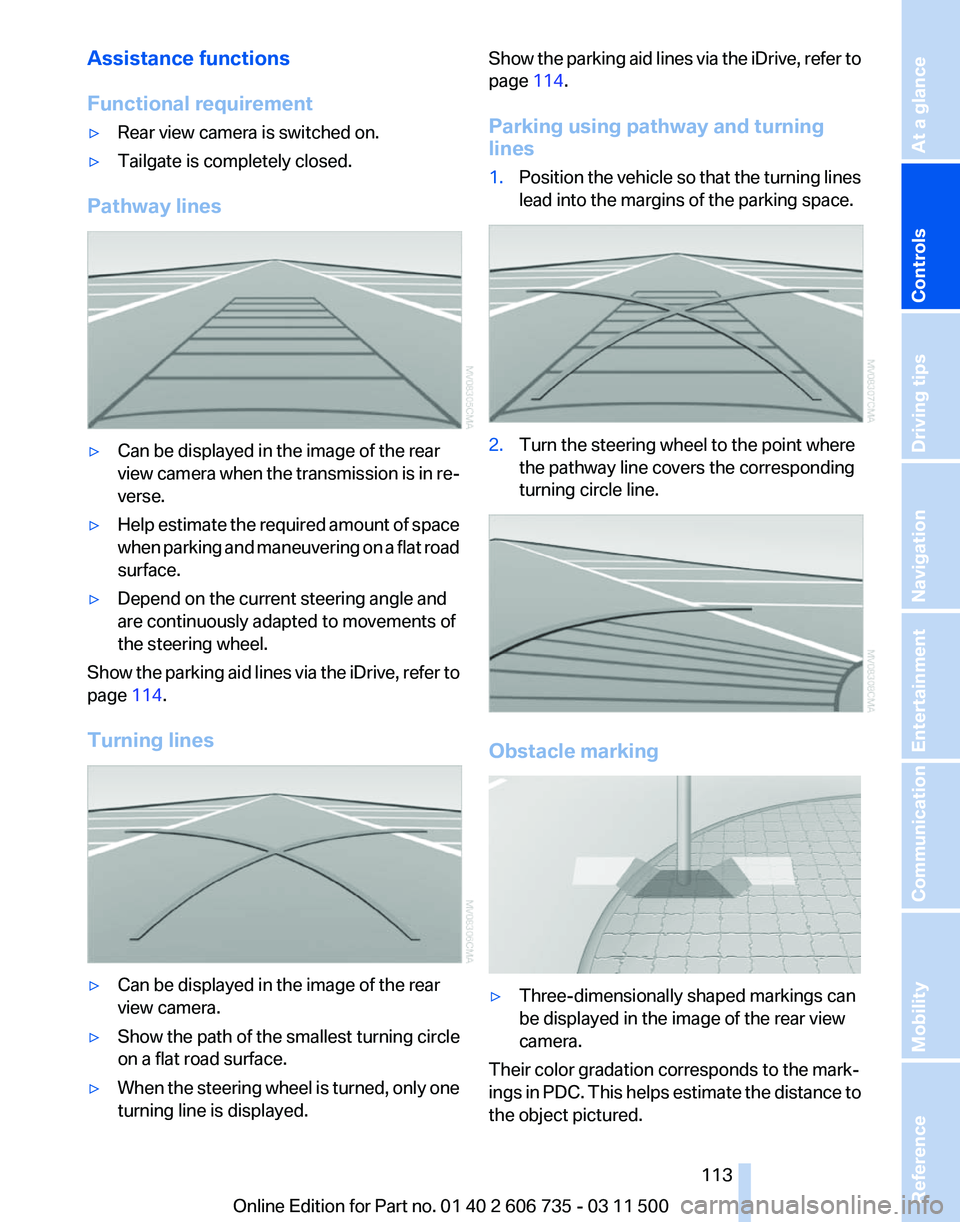
Pathway lines ▷
Can be displayed in the image of the rear
view
camera when the transmission is in re‐
verse.
▷ Help estimate the required amount of space
when
parking and maneuvering on a flat road
surface.
▷ Depend on the current steering angle and
are continuously adapted to movements of
the steering wheel.
Show the parking aid lines via the iDrive, refer to
page 114.
Turning lines ▷
Can be displayed in the image of the rear
view camera.
▷ Show the path of the smallest turning circle
on a flat road surface.
▷ When the steering wheel is turned, only one
turning line is displayed. Show the parking aid lines via the iDrive, refer to
page
114.
Parking using pathway and turning
lines
1. Position the vehicle so that the turning lines
lead into the margins of the parking space. 2.
Turn the steering wheel to the point where
the pathway line covers the corresponding
turning circle line. Obstacle marking
▷
Three-dimensionally shaped markings can
be displayed in the image of the rear view
camera.
Their color gradation corresponds to the mark‐
ings
in PDC. This helps estimate the distance to
the object pictured.
Seite 113
113Online Edition for Part no. 01 40 2 606 735 - 03 11 500
Reference Mobility Communication Entertainment Navigation Driving tips
Controls At a glance
Page 114 of 317
Show the obstacle marking via the iDrive, refer
to page
114.
Activating assistance functions
Several
assistance functions can be active at the
same time.
Showing the parking aid lines "Parking aid lines"
Pathway and turning lines are displayed.
Showing the obstacle marking "Obstacle marking"
Three-dimensionally-shaped markings are dis‐
played.
Image on the Control Display
Switching on the rear view camera
using iDrive
With PDC activated: "Rear view camera"
The
image of the rear view camera is displayed.
The setting is stored for the remote control cur‐
rently in use.
Brightness
With the rear view camera switched on:
1. Select the symbol.
2. Turn the controller until the desired setting
is reached and press the controller.
Contrast
With the rear view camera switched on:
1. Select the symbol.
2. Turn the controller until the desired setting
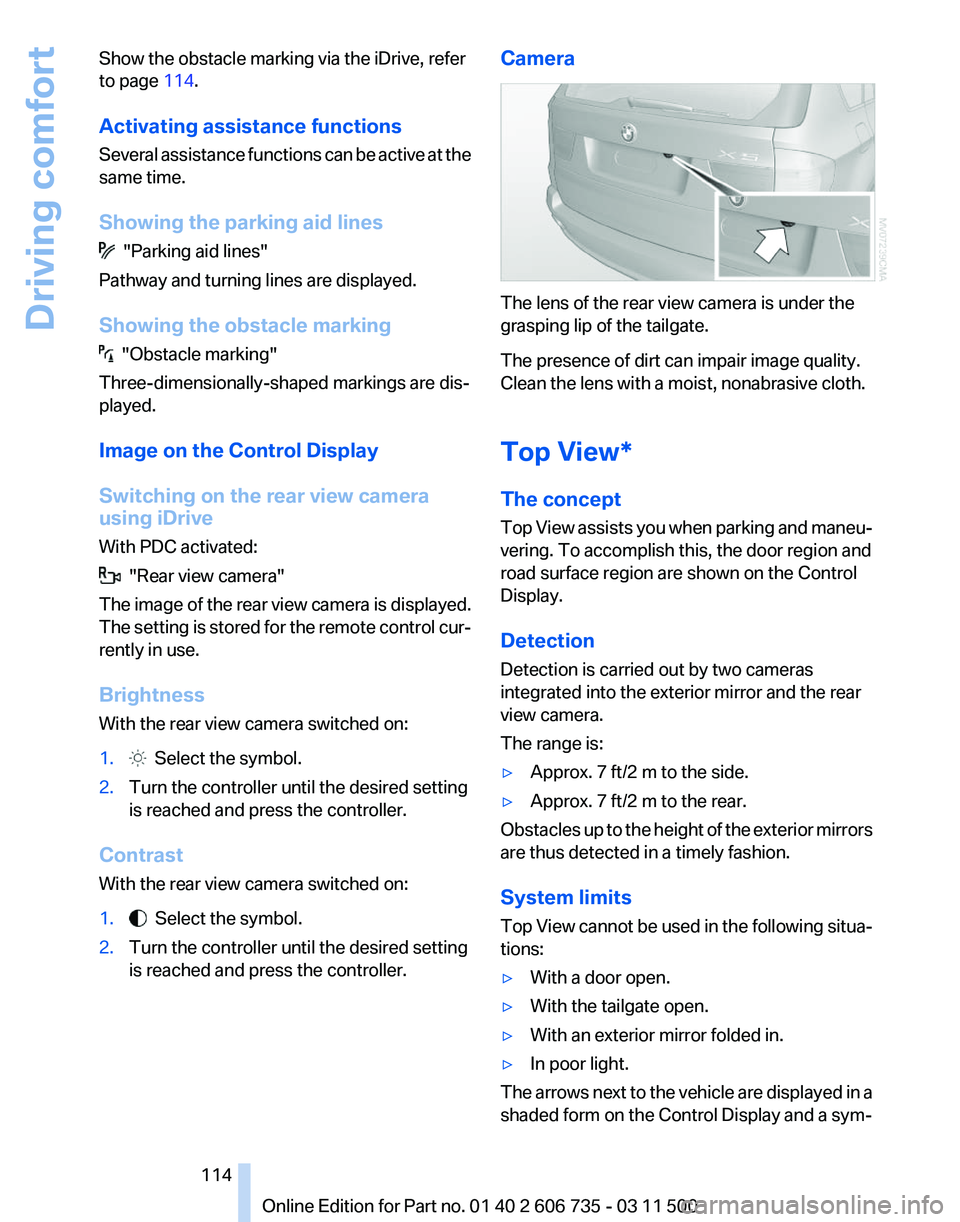
is reached and press the controller. Camera The lens of the rear view camera is under the
grasping lip of the tailgate.
The presence of dirt can impair image quality.
Clean the lens with a moist, nonabrasive cloth.
Top View*
The concept
Top
View assists you when parking and maneu‐
vering. To accomplish this, the door region and
road surface region are shown on the Control
Display.
Detection
Detection is carried out by two cameras
integrated into the exterior mirror and the rear
view camera.
The range is:
▷ Approx. 7 ft/2 m to the side.
▷ Approx. 7 ft/2 m to the rear.
Obstacles up to the height of the exterior mirrors
are thus detected in a timely fashion.
System limits
Top
View cannot be used in the following situa‐
tions:
▷ With a door open.
▷ With the tailgate open.
▷ With an exterior mirror folded in.
▷ In poor light.
The arrows next to the vehicle are displayed in a
shaded form on the Control Display and a sym‐
Seite 114
114 Online Edition for Part no. 01 40 2 606 735 - 03 11 500
Driving comfort
Page 116 of 317
Displaying turning lines and pathway
lines
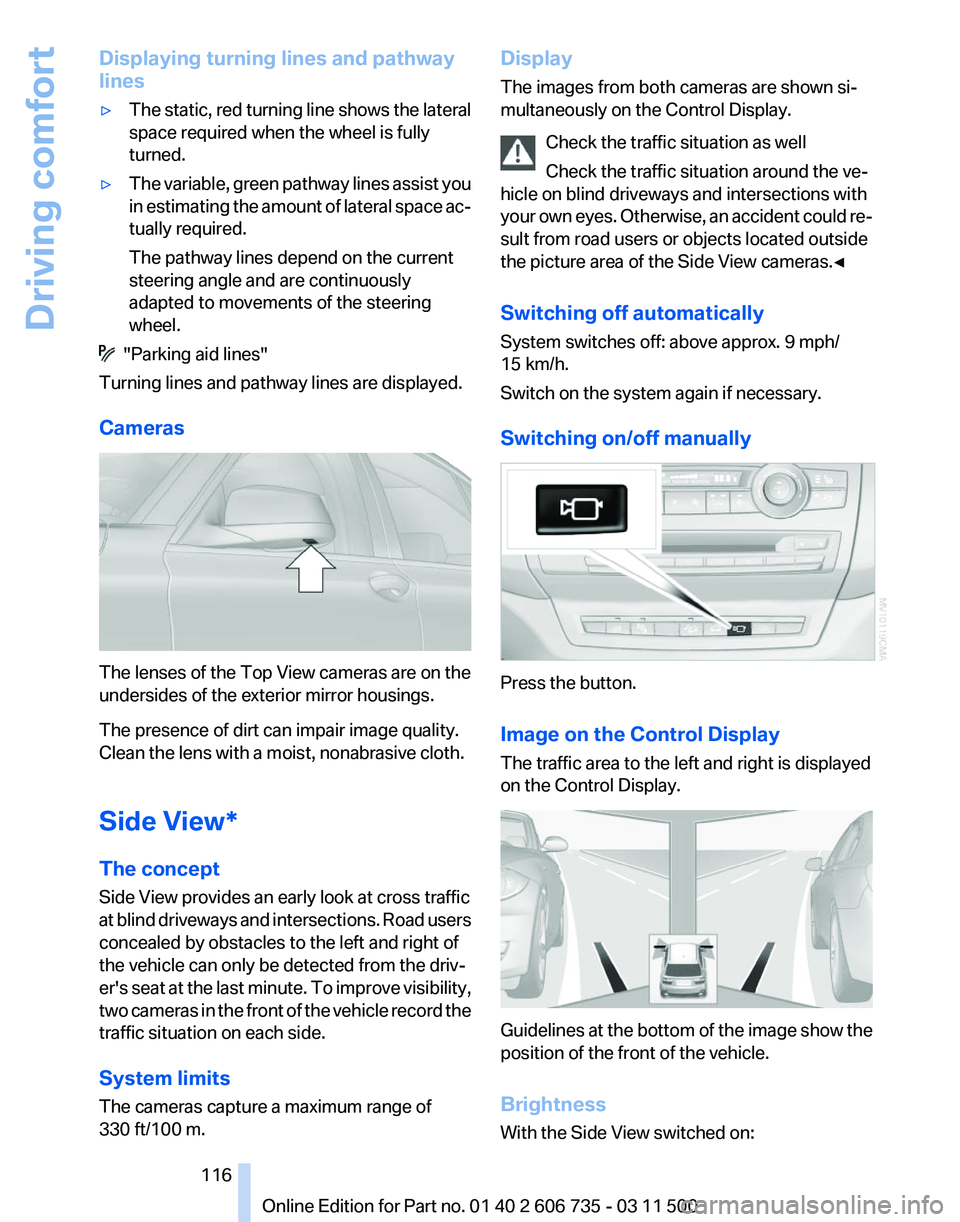
▷
The static, red turning line shows the lateral
space required when the wheel is fully
turned.
▷ The variable, green pathway lines assist you
in
estimating the amount of lateral space ac‐
tually required.
The pathway lines depend on the current
steering angle and are continuously
adapted to movements of the steering
wheel. "Parking aid lines"
Turning lines and pathway lines are displayed.
Cameras The lenses of the Top View cameras are on the
undersides of the exterior mirror housings.
The presence of dirt can impair image quality.
Clean the lens with a moist, nonabrasive cloth.
Side View*
The concept
Side View provides an early look at cross traffic
at
blind driveways and intersections. Road users
concealed by obstacles to the left and right of
the vehicle can only be detected from the driv‐
er's seat at the last minute. To improve visibility,
two cameras in the front of the vehicle record the
traffic situation on each side.
System limits
The cameras capture a maximum range of
330 ft/100 m. Display
The images from both cameras are shown si‐
multaneously on the Control Display.
Check the traffic situation as well
Check the traffic situation around the ve‐
hicle on blind driveways and intersections with
your
own eyes. Otherwise, an accident could re‐
sult from road users or objects located outside
the picture area of the Side View cameras.◀
Switching off automatically
System switches off: above approx. 9 mph/
15 km/h.
Switch on the system again if necessary.
Switching on/off manually Press the button.
Image on the Control Display
The traffic area to the left and right is displayed
on the Control Display.
Guidelines at the bottom of the image show the
position of the front of the vehicle.
Brightness
With the Side View switched on: Seite 116
116 Online Edition for Part no. 01 40 2 606 735 - 03 11 500
Driving comfort
Page 125 of 317
AUTO program
The AUTO program automatically
sets the air distribution toward the
upper body and in the footwell, as
well as the air flow rate. It also
adapts your instructions for the
temperature to outside influences throughout
the year.
Temperature
Set the desired temperature indi‐
vidually on the left and right side.
The automatic climate control achieves this
temperature
as quickly as possible regardless of
the season, using maximum cooling or heating
power if necessary, and then maintains it.
When switching between different temperature
settings in rapid succession, the automatic cli‐
mate control does not have sufficient time to
adjust the set temperature.
Air volume, manual
The air flow rate can be varied by press‐
ing on the corresponding side. The au‐
tomatic mode for the air flow rate can be
switched on again using the AUTO button.
Switching off rear automatic climate
control
With the blower at its lowest setting,
press the left side of the button to
switch off the automatic climate control.
The automatic climate control can also be
switched off with iDrive. To switch on the auto‐
matic climate control again, the system must
first be reactivated, refer to Activating/deacti‐
vating.
The system is switched on again by pressing
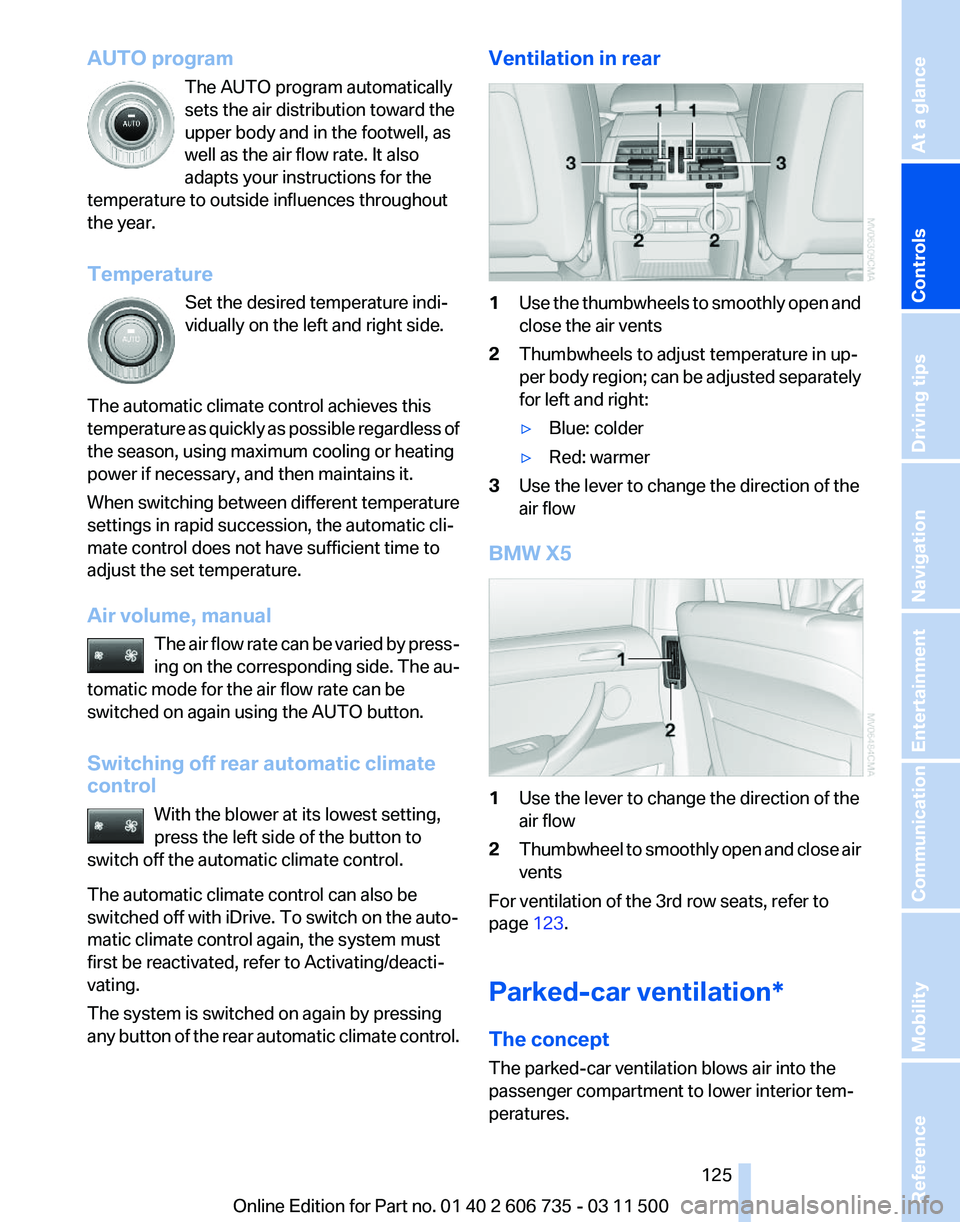
any button of the rear automatic climate control. Ventilation in rear
1
Use the thumbwheels to smoothly open and
close the air vents
2 Thumbwheels to adjust temperature in up‐
per
body region; can be adjusted separately
for left and right:
▷ Blue: colder
▷ Red: warmer
3 Use the lever to change the direction of the
air flow
BMW X5 1
Use the lever to change the direction of the
air flow
2 Thumbwheel to smoothly open and close air
vents
For ventilation of the 3rd row seats, refer to
page 123.
Parked-car ventilation*
The concept
The parked-car ventilation blows air into the
passenger compartment to lower interior tem‐
peratures.
Seite 125
125Online Edition for Part no. 01 40 2 606 735 - 03 11 500
Reference Mobility Communication Entertainment Navigation Driving tips
Controls At a glance
Page 126 of 317
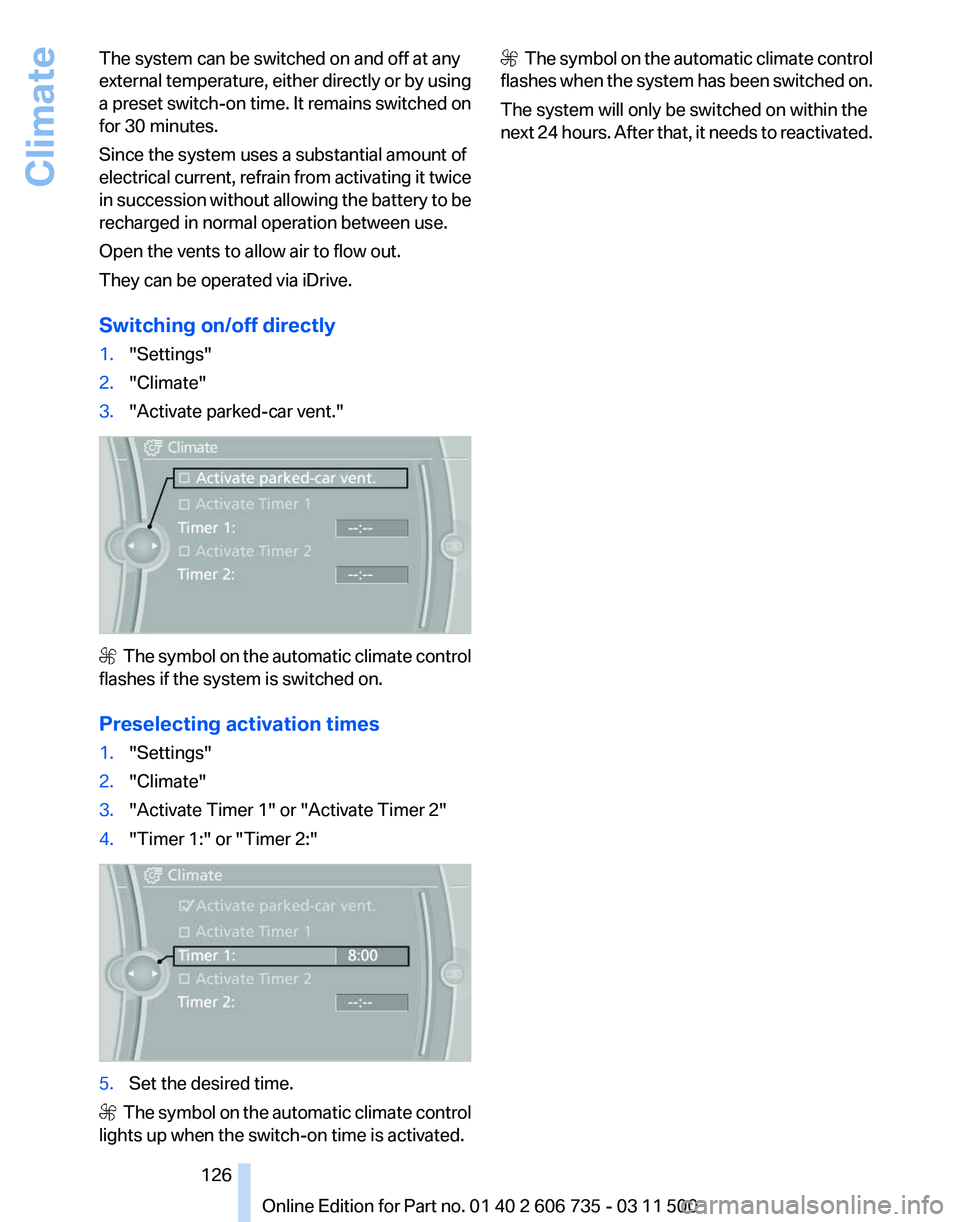
The system can be switched on and off at any
external
temperature, either directly or by using
a preset switch-on time. It remains switched on
for 30 minutes.
Since the system uses a substantial amount of
electrical current, refrain from activating it twice
in succession without allowing the battery to be
recharged in normal operation between use.
Open the vents to allow air to flow out.
They can be operated via iDrive.
Switching on/off directly
1. "Settings"
2. "Climate"
3. "Activate parked-car vent." The symbol on the automatic climate control
flashes if the system is switched on.
Preselecting activation times
1. "Settings"
2. "Climate"
3. "Activate Timer 1" or "Activate Timer 2"
4. "Timer 1:" or "Timer 2:" 5.
Set the desired time. The symbol on the automatic climate control
lights up when the switch-on time is activated. The symbol on the automatic climate control
flashes when the system has been switched on.
The system will only be switched on within the
next 24 hours. After that, it needs to reactivated.
Seite 126
126 Online Edition for Part no. 01 40 2 606 735 - 03 11 500
Climate