2012 BMW X6 M park
[x] Cancel search: parkPage 73 of 317

Fuel gauge
The vehicle inclination may cause the display to
vary.
Notes on refueling, refer to page
246.
Reserve
After the reserve range is reached:
▷ A message is briefly displayed on the Con‐
trol Display.
▷ The remaining range is shown on the com‐
puter.
▷ When a dynamic driving style is used, such
as when corners are taken rapidly, engine
functions are not ensured.
The message appears continuously below a
range of approx. 30 miles/50 km.
Refuel promptly
At the latest, refuel when the range drops
below 30 miles/50 km; otherwise, engine func‐
tions
are not ensured and damage may occur.◀ Computer
Displaying information on the
instrument panel
Press the computer button on the turn signal
lever.
Information is displayed in the instrument clus‐
ter.
Overview of the information
Repeatedly
pressing the button on the turn sig‐
nal lever displays the information on the instru‐
ment cluster in the following order:
▷ Range.
▷ Average speed*.
▷ Average fuel consumption.
To set the corresponding units of measure, refer
to page 80.
Information in detail
Range
Displays the estimated cruising range available
with the remaining fuel.
It is calculated based on your driving style over
the last 18 miles/30 km.
Average speed
Periods in which the vehicle is parked with the
engine
stopped do not enter into the calculation.
With the trip computer, refer to page 74, you
can have the average speed displayed for an ad‐
ditional distance.
To reset the average speed: press the button on
the turn indicator lever for approx. 2 seconds.
Seite 73
73Online Edition for Part no. 01 40 2 606 735 - 03 11 500
Reference Mobility Communication Entertainment Navigation Driving tips
Controls At a glance
Page 81 of 317

Lamps
At a glance
0
Lamps off and daytime running lights*
1 Parking lamps and daytime running lights*
2 Low-beam headlamps and welcome lamps
3 Automatic headlamp control*, daytime run‐
ning lights*, welcome lamps,
adaptive light
control* and High-beam Assistant*
Parking lamps/low beams,
headlamp control*
Parking lamps
Switch position : the vehicle lamps light
up on all sides, e.g., for parking.
Do not use the parking lamps for extended pe‐
riods; otherwise, the battery may become dis‐
charged
and it would then be impossible to start
the engine.
When parking, it is preferable to switch on the
one-sided roadside parking lamps, refer to
page 83.
When the driver's door is opened with the igni‐
tion switched off: the exterior lighting is auto‐
matically switched off when the light switch is in
position 0, 2 or 3.
Switch on the parking lamps if necessary, switch
position 1.
Low beams
Switch position with the ignition switched
on: the low beams light up. Welcome lamps
When parking the vehicle, leave the switch in
position or : the parking and interior
lamps light up briefly when the vehicle is un‐
locked.
Activating/deactivating the welcome
lamps
1. "Settings"
2. "Lighting"
3. "Welcome light" The setting is stored for the remote control cur‐
rently in use.
Headlamp courtesy delay feature
The
low beams stay lit for a short while after the
ignition is switched off, if the lamps are switched
off and the headlamp flasher is switched on.
Setting the duration
1. "Settings"
2. "Lighting"
Seite 81
81Online Edition for Part no. 01 40 2 606 735 - 03 11 500
Reference Mobility Communication Entertainment Navigation Driving tips
Controls At a glance
Page 82 of 317

3.
"Pathway light.: s" 4.
Set the duration.
The setting is stored for the remote control cur‐
rently in use.
Automatic headlamp control
*
Switch position : the low beams are switched
on and off automatically, e.g., in tunnels, in twi‐
light or if there is precipitation. The LED next to
the symbol lights up.
A blue sky with the sun low on the horizon can
cause the lights to be switched on.
The low beams remain switched on independ‐
ent
of the ambient lighting conditions when you
switch on the front fog lamps*.
Personal responsibility
The automatic headlamp control cannot
serve as a substitute for your personal judgment
in determining when the lamps should be
switched on in response to ambient lighting
conditions.
For example, the sensors are unable to detect
fog or hazy weather. To avoid safety risks, you
should always switch on the lamps manually un‐
der these conditions.◀
Daytime running lights
The daytime running lights light up in posi‐
tion 0, and . After the ignition is
switched off, the parking lamps light up in posi‐
tion .
Activating/deactivating
1. "Settings"
2. "Lighting" 3.
"Daytime running lamps" The setting is stored for the remote control cur‐
rently in use.
Adaptive light control*
The concept
Adaptive light control is a variable headlamp
control system that enables dynamic illumina‐
tion of the road surface.
Depending on the steering angle and other pa‐
rameters, the light from the headlamp follows
the course of the road.
In
sharp curves, e.g. serpentines, or during turn‐
ing, up to a certain speed one of the two front
fog lamps* is switched on as a turning lamp. This
provides improved illumination of the area inside
the curve.
Controls
Activating
Switch position with the ignition switched
on.
The turning lamps are automatically switched
on depending on the steering angle or the use
of turn signals.
Standstill function*:
to avoid blinding oncoming
traffic, the Adaptive Light Control directs light
towards the front passenger side when the ve‐
hicle is at a standstill.
When driving in reverse, both turning lamps are
active.
Seite 82
82 Online Edition for Part no. 01 40 2 606 735 - 03 11 500
Lamps
Page 83 of 317

Malfunction
A message is displayed.
Adaptive light control is malfunctioning or has
failed.
Have the system checked as soon as pos‐
sible.
High beams/roadside parking
lamps 1
High beams
2 Headlamp flasher
3 Roadside parking lamps*
Left and right roadside parking lamps*
The vehicle can be illuminated on one side.
Switching on
After parking the vehicle, press the lever up or
down beyond the resistance point for ap‐
prox. 2 seconds, arrow 3.
The roadside parking lamps drain the battery.
Therefore,
do not leave them on for unduly long
periods of time; otherwise, the battery might not
have enough power to start the engine.
Switching off
Briefly press the lever in the opposite direction
to the pressure point, arrow 3.
High-beam Assistant*
The concept
When the lights are switched on, this system
automatically switches the high beams on and
off. The procedure is controlled by a sensor on the front of the interior rearview mirror. The as‐
sistant ensures that the high beams are
switched on whenever the traffic situation al‐
lows. The driver can intervene at any time and
switch the high beams on and off as usual.
Activating the High-beam Assistant
1.
Turn the light switch to .
2. With the low beams switched on, briefly
push
the turn indicator lever in the direction
of the high beam. The indicator lamp in the instrument
cluster lights up. The high beams are
switched on and off automatically.
The system responds to light from oncoming
traffic
and traffic driving ahead of you, and to ad‐
equate illumination, e.g., in towns and cities.
Switching the high beams on and off
manually ▷
High beams on, arrow 1.
▷ High beams off/headlamp flasher, arrow 2.
To reactivate the High-beam Assistant, briefly
push the turn indicator lever toward the high
beams. Seite 83
83Online Edition for Part no. 01 40 2 606 735 - 03 11 500
Reference Mobility Communication Entertainment Navigation Driving tips
Controls At a glance
Page 84 of 317
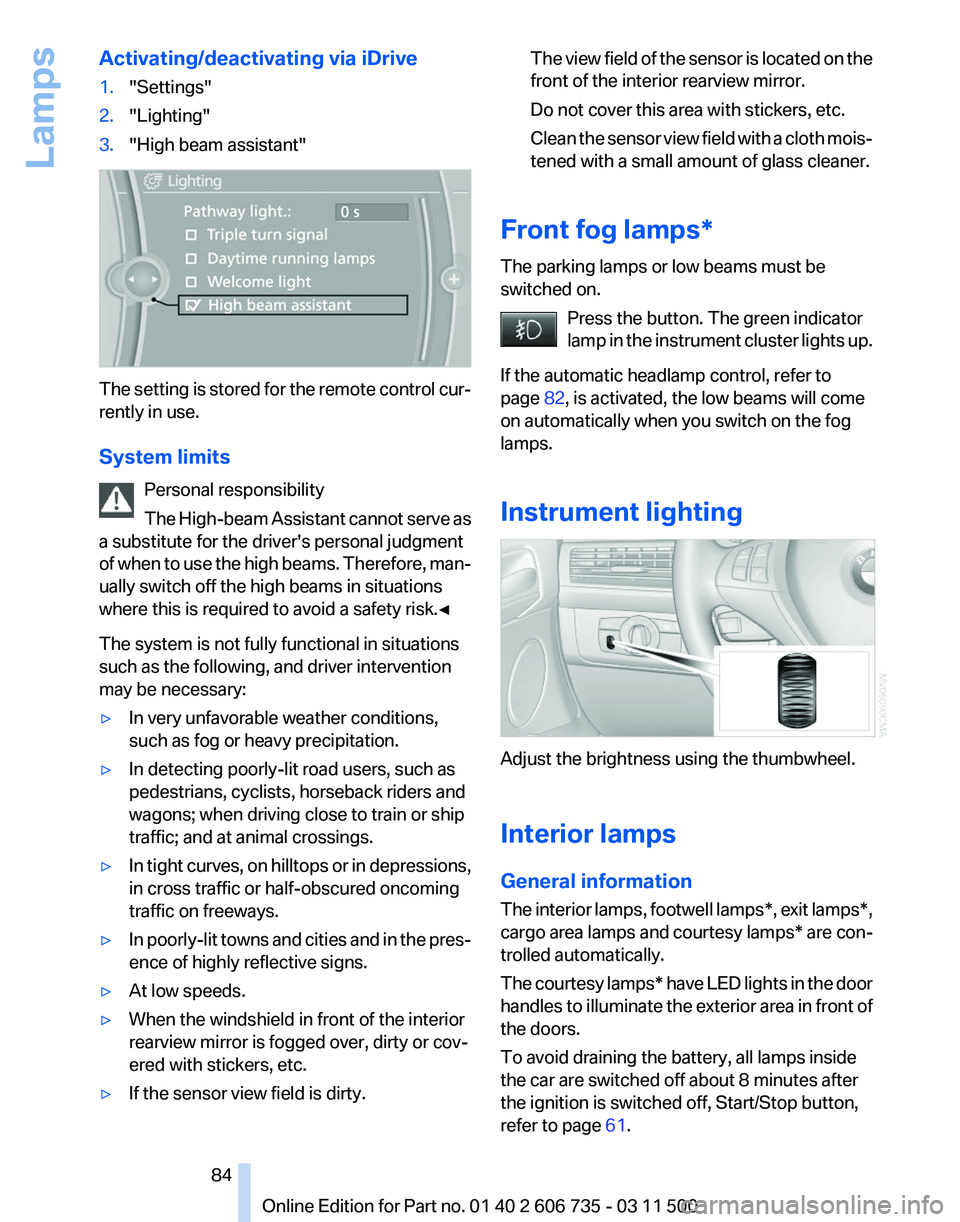
Activating/deactivating via iDrive
1.
"Settings"
2. "Lighting"
3. "High beam assistant" The setting is stored for the remote control cur‐
rently in use.
System limits
Personal responsibility
The
High-beam Assistant cannot serve as
a substitute for the driver's personal judgment
of when to use the high beams. Therefore, man‐
ually switch off the high beams in situations
where this is required to avoid a safety risk.◀
The system is not fully functional in situations
such as the following, and driver intervention
may be necessary:
▷ In very unfavorable weather conditions,
such as fog or heavy precipitation.
▷ In detecting poorly-lit road users, such as
pedestrians, cyclists, horseback riders and
wagons; when driving close to train or ship
traffic; and at animal crossings.
▷ In tight curves, on hilltops or in depressions,
in cross traffic or half-obscured oncoming
traffic on freeways.
▷ In poorly-lit towns and cities and in the pres‐
ence of highly reflective signs.
▷ At low speeds.
▷ When the windshield in front of the interior
rearview mirror is fogged over, dirty or cov‐
ered with stickers, etc.
▷ If the sensor view field is dirty. The view field of the sensor is located on the
front of the interior rearview mirror.
Do not cover this area with stickers, etc.
Clean
the sensor view field with a cloth mois‐
tened with a small amount of glass cleaner.
Front fog lamps*
The parking lamps or low beams must be
switched on. Press the button. The green indicator
lamp
in the instrument cluster lights up.
If the automatic headlamp control, refer to
page 82, is activated, the low beams will come
on automatically when you switch on the fog
lamps.
Instrument lighting Adjust the brightness using the thumbwheel.
Interior lamps
General information
The
interior lamps, footwell lamps*, exit lamps*,
cargo area lamps and courtesy lamps* are con‐
trolled automatically.
The courtesy lamps* have LED lights in the door
handles to illuminate the exterior area in front of
the doors.
To avoid draining the battery, all lamps inside
the car are switched off about 8 minutes after
the ignition is switched off, Start/Stop button,
refer to page 61. Seite 84
84 Online Edition for Part no. 01 40 2 606 735 - 03 11 500
Lamps
Page 100 of 317

Chassis and suspension tuning
Two chassis and suspension tunings are avail‐
able for selection.
▷
Normal:
The comfortable basic setting offers opti‐
mum comfort when traveling.
▷ Sport:
The sporty basic setting offers increased
driving agility.
Selecting chassis and suspension
tuning Press the button.
The system switches between the two chassis
and suspension tuning settings.
▷
Sport:
The
LED in the button lights up and SPORT
is displayed in the instrument panel.
▷ Normal:
The LED in the button goes out.
The selection of the chassis and suspension
tuning setting is stored for the remote control
currently in use.
Drive-off assistant
This
system supports driving away on gradients.
The parking brake is not required.
1. Hold the vehicle in place with the foot brake.
2. Release the foot brake and drive away with‐
out delay.
Depending on the vehicle load, the vehicle may
roll back slightly. Driving off without delay
After
releasing the foot brake, start driving
without delay, since the drive-off assistant will
not hold the vehicle in place for more than ap‐
prox. 2 seconds and the vehicle will begin rolling
back.◀
Self-leveling suspension*
The concept
The self-leveling suspension on the rear axle
assures a continuous ground clearance.
To do so, the height of the vehicle is measured
by sensors at both rear wheels.
If the actual height deviates from the defined
height, such as due to cargo in the vehicle, this
difference is compensated very quickly. In ad‐
dition, spring motions resulting from cornering
or irregularities in the road surface are reduced
to a minimum.
The system works automatically.
Malfunctions
Malfunctions are displayed via Check Control,
refer to page 76.
Active steering*
The concept
The active steering actively varies the steering
angle of the front wheels in relation to the steer‐
ing wheel movements. In addition, it also varies
the steering force required for steering depend‐
ing on the vehicle's speed.
When you are driving in the low speed range, for
instance in a town or when parking, the steering
angle increases, i.e., steering becomes very di‐
rect. In the higher speed range, on the other
hand, the steering angle is reduced more and
more. This improves the handling of your vehicle
over the entire speed range.
In critical situations, the system can make tar‐
geted corrections to the steering angle provided Seite 100
100 Online Edition for Part no. 01 40 2 606 735 - 03 11 500
Driving stability control systems
Page 103 of 317
As with conventional cruise control systems, ac‐
tive cruise control in no way reduces or substi‐
tutes for the driver's own personal experience,
responsibility, alertness and awareness in ad‐
justing speed, braking or otherwise controlling
the vehicle. The driver should decide when to
use the system on the basis of road, traffic, vis‐
ibility, and weather conditions. Active cruise
control is intended for use on highway-type
roadways where traffic is moving relatively
smoothly as well as in slow-moving traffic con‐
gestion.
Do not use the system in city driving; in
complex driving situations; heavy traffic such as
during rush hour; on curvy, winding roads, slip‐
pery roads or roads with sharp curves such as
highway off-ramps; during inclement weather
such as snow, strong rain or fog; or when enter‐
ing interchanges, service/parking areas or toll
booths. It is also important to regulate your ve‐
hicle's speed and distance setting within appli‐
cable legal limits. Always be ready to take action
or apply the brakes if necessary, especially when
the system is actively following a vehicle in front
of you. Otherwise, driving conditions can result
which lead to a violation of the law or elevated
risk of an accident.
The minimum initial activation speed is
20 mph/ 30 km/h, and the maximum speed is
110 mph/ 180 km/h. The system can also be ac‐
tivated while the vehicle is stationary, refer to
page 105.
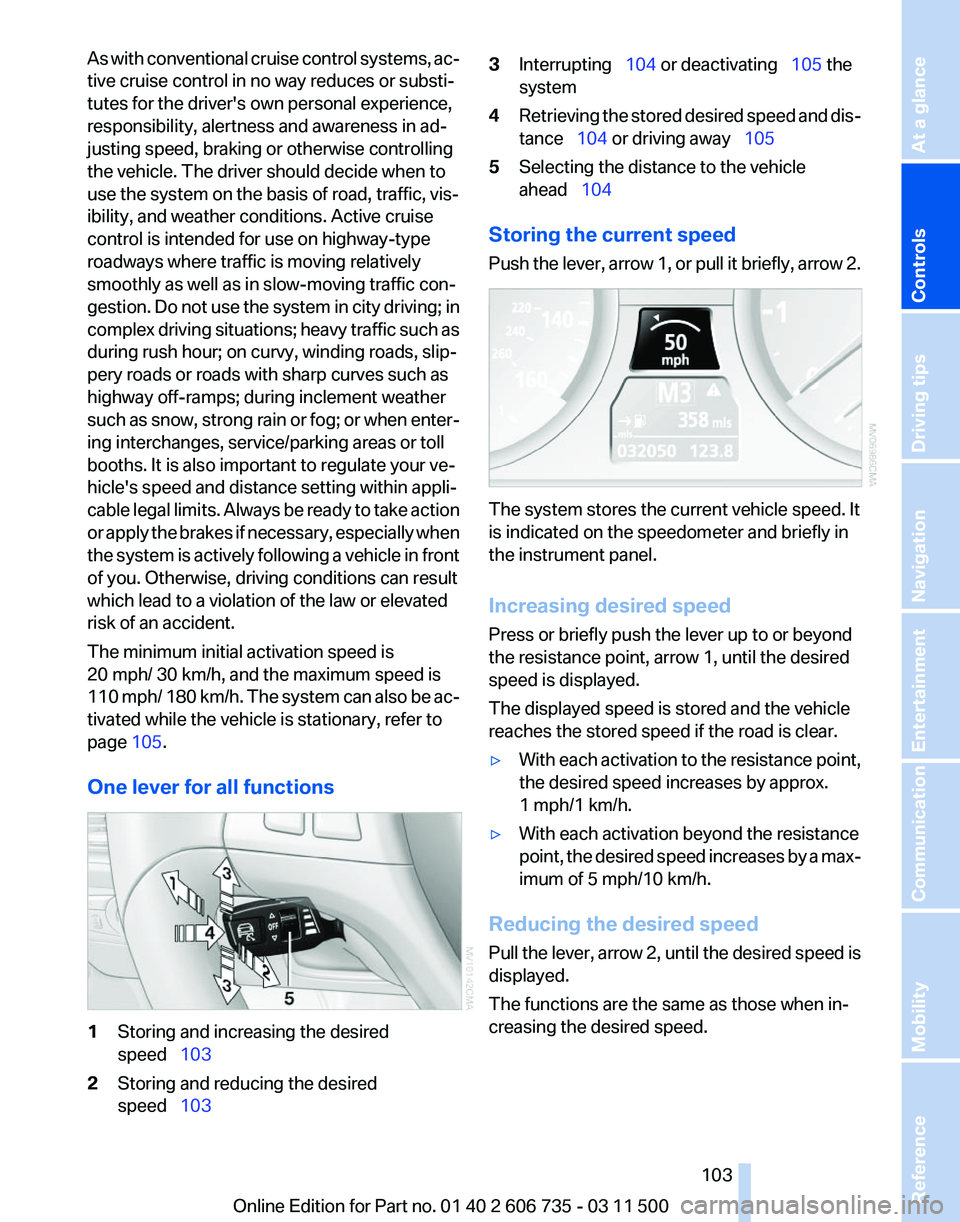
One lever for all functions 1
Storing and increasing the desired
speed 103
2 Storing and reducing the desired
speed 103 3
Interrupting 104 or deactivating 105 the
system
4 Retrieving the stored desired speed and dis‐
tance 104 or driving away 105
5 Selecting the distance to the vehicle
ahead 104
Storing the current speed
Push
the lever, arrow 1, or pull it briefly, arrow 2. The system stores the current vehicle speed. It
is indicated on the speedometer and briefly in
the instrument panel.
Increasing desired speed
Press or briefly push the lever up to or beyond
the resistance point, arrow 1, until the desired
speed is displayed.
The displayed speed is stored and the vehicle
reaches the stored speed if the road is clear.
▷
With each activation to the resistance point,
the desired speed increases by approx.
1 mph/1 km/h.
▷ With each activation beyond the resistance
point,
the desired speed increases by a max‐
imum of 5 mph/10 km/h.
Reducing the desired speed
Pull
the lever, arrow 2, until the desired speed is
displayed.
The functions are the same as those when in‐
creasing the desired speed.
Seite 103
103Online Edition for Part no. 01 40 2 606 735 - 03 11 500
Reference Mobility Communication Entertainment Navigation Driving tips
Controls At a glance
Page 105 of 317
While standing
Before leaving the vehicle
Before
leaving the vehicle with the engine
running, engage position P of the automatic
transmission and apply the parking brake. Oth‐
erwise, the vehicle may begin to roll.◀
If a vehicle detected ahead of you slows to a halt
and your vehicle is also brought to a halt by the
system:
▷ If the vehicle ahead of you drives away, your
vehicle
accelerates automatically as long as
mark 1 for the desired speed in the speed‐
ometer is green.
▷ If the vehicle ahead of you drives away when
mark 1 is orange, depress the accelerator
briefly or press button 4.Rolling bars in the
distance indicator 3 mean that the vehicle
ahead of you has driven away.
If you are standing behind a vehicle with your
brake
pedal depressed and the system is deac‐
tivated or interrupted:
1. Select the desired speed using the lever, ar‐
row
1 or arrow 2, or press button 4 to retrieve
a stored speed.
2. Release the brake pedal.
3. When the vehicle ahead of you drives away,
press
on the accelerator briefly or press but‐
ton 4.
Deactivating the system
▷ When driving, press the lever up or down
twice.
▷ When stationary, do the same while de‐
pressing the brake pedal.
▷ Switch off the ignition.
The displays go out, and the stored desired
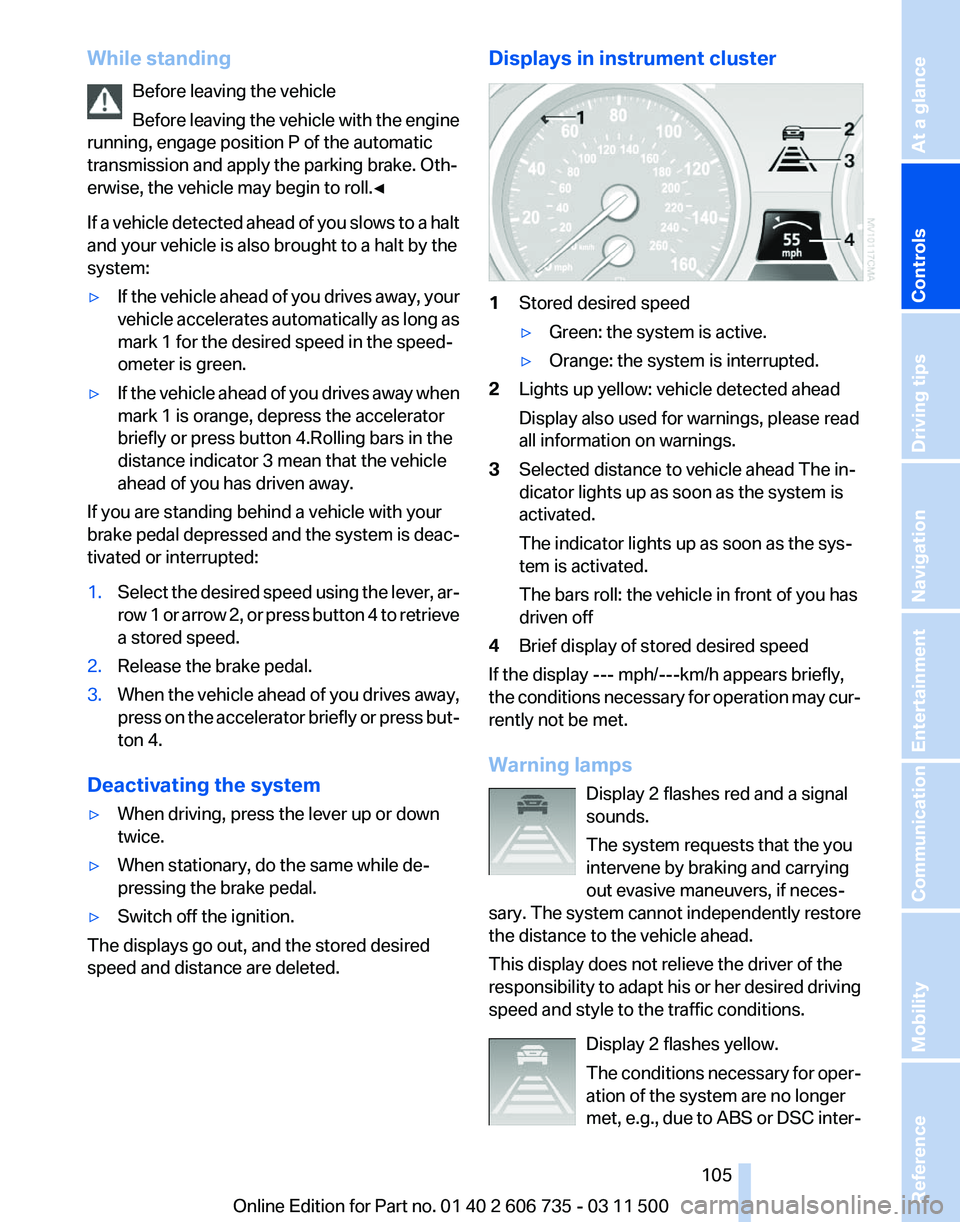
speed and distance are deleted. Displays in instrument cluster
1
Stored desired speed
▷Green: the system is active.
▷ Orange: the system is interrupted.
2 Lights up yellow: vehicle detected ahead
Display also used for warnings, please read
all information on warnings.
3 Selected distance to vehicle ahead The in‐
dicator lights up as soon as the system is
activated.
The indicator lights up as soon as the sys‐
tem is activated.
The bars roll: the vehicle in front of you has
driven off
4 Brief display of stored desired speed
If the display --- mph/---km/h appears briefly,
the conditions necessary for operation may cur‐
rently not be met.
Warning lamps
Display 2 flashes red and a signal
sounds.
The system requests that the you
intervene by braking and carrying
out evasive maneuvers, if neces‐
sary. The system cannot independently restore
the distance to the vehicle ahead.
This display does not relieve the driver of the
responsibility to adapt his or her desired driving
speed and style to the traffic conditions.
Display 2 flashes yellow.
The conditions necessary for oper‐
ation of the system are no longer
met, e.g., due to ABS or DSC inter‐ Seite 105
105Online Edition for Part no. 01 40 2 606 735 - 03 11 500
Reference Mobility Communication Entertainment Navigation Driving tips
Controls At a glance