2012 BMW M3 CONVERTIBLE ignition
[x] Cancel search: ignitionPage 164 of 255

163
Te l e p h o n e
Communications
3.
If needed, press and hold the but-
ton on the right or left side to enter special
characters.
Displaying call duration
To display the duration during a call:
Press the button.
Hands-free system
General information
Calls being conducted using the hands-free
system can be continued using the mobile
phone and vice versa.
From the mobile phone to the
hands-free system
Calls that have been in itiated from outside the
Bluetooth range of the vehicle can be continued
using the hands-free system if the ignition is
switched on.
Depending on the mobile phone, the call is
automatically switched to hands-free mode.
If the switch does not occur automatically, then
follow the instructions th at appear on the dis-
play of the mobile phon e, also refer to the
owner's manual for the mobile phone.
From hands-free system to mobile
phone
Calls being conducted using the hands-free
system can also be continued using the mobile
phone if so desired, depending on the mobile
phone.
At this point, follow the instructions that appear
on the display of the mobile phone, also refer to
the owner's manual for the mobile phone.
Operation by voice
The concept
The mobile phone can be operated without
removing your hand from the steering wheel. In
many cases, the entry process is supported by
means of announcements or questions.
Symbols in the Owner's Manual
Voice commands
Activating voice activation system
1. Press the button on the steering wheel.
2. Say the command.
Deactivating voice activation system
Press the button on the steering wheel
or
Possible commands
Having possible commands read aloud
The system understands default commands
that must be spoken word for word.
Possible commands are read aloud.
Digits from zero to nine are recognized.
Each digit can be spoken individually or com-
bined into a sequence to accelerate the entry
process.
Using alternative commands
There are often a number of commands to run a
function, e.g.:
{ ...} Say the specified commands word for
word.
{{ ...}} Indicates responses of the voice acti-
vation system.
{ Cancel }.
{ Help }.
{ Dial name } or {Name }.
Online Edition for Part no. 01 40 2 609 312 - \251 08/11 BMW AG
Page 166 of 255

165
Te l e p h o n e
Communications
Deleting an entry from the voice phone
book
You can delete any entry from the voice phone
book.
Deleting all entries from the voice
phone book
Adjusting volume
Turn the knob on the le
ft during the announce-
ment.
> The volume remains the same, even if the
volume of other audio sources is changed.
> The volume is stored for the remote control
currently in use.
BMW phone numbers
It is possible to store phone numbers for several
BMW services without having BMW Assist acti-
vated. As soon as BMW Assist is activated, the
services of BMW Assist are available, refer to
page 167. >
"Road Assist": BMW Group Mobile Service,
if you require assistance in the event of a
breakdown.
> "Service": your BMW center, for example
when you wish to schedule a service
appointment.
> "Customer Relations": Customer Relations,
for information about your vehicle.
Displaying phone numbers
1.Switch on radio readiness or ignition.
2. Press the button.
3. Press the button.
4. Turn the knob on the right until the desired
phone number is displayed.
Snap-in adapter
General information
Detailed information on snap-in adapters that
compatibly support mobile phone functions can
be found at your BMW center.
Notes
At high temperatures, the charging function of
the mobile phone may be limited and some
functions may no longer be carried out.
When using the mobile phone via the vehicle,
follow the instructions given in the owner's
manual for the mobile phone.
1.
{Delete name }.
2. Say the name when prompted by the
system.
3. Confirm request: {Yes }
1. {Delete phonebook }.
The dialog for deleting phone book is
opened.
2. Confirm request: {Yes }
3. Confirm request again: {Yes }
Online Edition for Part no. 01 40 2 609 312 - \251 08/11 BMW AG
Page 169 of 255

168
CommunicationsConnectedDrive
>In addition, the optional Convenience Plan
offers Concierge service and information on
route planning, the traffic situation and
weather. Using Critical Calling, a limited
number of calls can be made via the BMW
Assist Response Center, for example if the
mobile phone is not available or discharged.
Press the SOS butto n to contact the
BMW Assist Response Center.
BMW TeleServices
General information
TeleServices supports communication with
your BMW center.
> Data on the vehicle's service requirements
can be sent directly to the BMW center. In
this way, the BMW center can plan its work
in advance. This shortens the duration of
the service appointment.
> In the event of a breakdown, data on the
vehicle's condition can be sent directly to
Roadside Assistance. It may be possible to
correct some malfunctions immediately.
> The service varies by country.
> Connection may incur charges.
> Services may be restricted abroad.
Requirements
>Vehicle is equipped with the preparation for
mobile phone Business.
> BMW Assist is activated.
If BMW Assist is not activated, then a
mobile phone that is recommended by
BMW for TeleServices an d is configured for
mobile data communication must be con-
nected to the vehicle.
> SIM card is enabled for toll-free service
phone numbers.
> Wireless receptio n is available.
> Ignition switched on.
Using BMW TeleServices
BMW TeleService is gene rally activated in the
vehicle.
If TeleService is not activated, it is still possible
to establish a voice contact to the BMW Group
Mobile Service.
For additional uses or to deactivate the ser-
vices, consult your BMW center or contact Cus-
tomer Relations.
Activating or updating BMW
TeleService or BMW Assist
BMW TeleService or BMW Assist must be acti-
vated before their se rvices can be used.
1. Switch on radio readiness or ignition.
2. Press the button.
3.
Press the button.
4.
Press the button.
5.
Press the button.
6.
Press the button.
BMW TeleService and where appropriate
BMW Assist are activated and the data
exchange with BMW Service begins. The
activation process take s a few minutes. The
respective status appears on the display.
Concierge service
The Concierge service of BMW Assist will
inform you, for example, about upcoming
events, filling station, or hotels and supplies you
with their phone numbers and addresses. Many
hotels can be booked di rectly through the BMW
Assist Concierge service. Use of the Concierge
service requires an additi onal activation by the
BMW Assist Response Center.
Online Edition for Part no. 01 40 2 609 312 - \251 08/11 BMW AG
Page 170 of 255

169
ConnectedDrive
Communications
Starting the Concierge service
1.
Switch on radio readiness or ignition.
2. Press the button.
3.
Press the button.
4.
Press the button.
5. Press the knob on the right to call the con-
cierge service.
Reading message
The message has not been read yet.
Dialing transmitted phone number
1.Select concierge and press the knob.
2. Select phone number and press the knob.
Deleting message
1.Select message and press the knob.
2.
Press the button.
Roadside Assistance
BMW Roadside Assistance can be contacted if
assistance is needed in the event of a break-
down. In a vehicle with TeleService, assistance
is first offered through the TeleService Diagno-
sis and then if necessary, through the TeleSer-
vice Help.
1.Switch on radio readiness or ignition.
2. Press the button.
3.
Press the button.
4.
Press the button.
Vehicle data that are required for the diag-
nosis by the BMW TeleService are trans-
mitted. The contact with BMW Roadside
Assistance is established. BMW Roadside
Assistance performs in-depth diagnosis of
the vehicle. 5.
After completion of each help task
by BMW Roadside Assistance, press the
button.
Automatic Service
Notification
The data regarding the maintenance status of
your vehicle or legally mandated inspections of
the vehicle are automati cally transmitted prior
to a service due date.
Manual Service Notification
1. Switch on radio readiness or ignition.
2. Press the button.
3.
Press the button.
4.
Press the button.
The data relevant for th e service are transmit-
ted. The service will co ntact you to arrange a
service appointment.
Customer Relations
Contact Customer Relations for information on
all aspects of your vehicle.
1. Switch on radio readiness or ignition.
2. Press the button.
3.
Press the button.
4. Press the button.
Online Edition for Part no. 01 40 2 609 312 - \251 08/11 BMW AG
Page 171 of 255

170
CommunicationsConnectedDrive
My Info
With this service, text messages associated
with phone numbers can be sent via the BMW
Assist Internet portal and displayed in the vehi-
cle.
1. Switch on radio read iness or ignition.
2. Press the button.
3.
Press the button.
4. Press the button.
The messages sent are automatically dis-
played.
5. To display an existing message:
Select message and press the knob.
It is possible to display a maximum of ten mes-
sages. If additional messages are received,
existing messages are automatically deleted.
Reading message
The message has not been read yet.
Dialing transmi tted phone number
If you have received a message with a phone
number, you can forward it to your phone and
dial the phone number.
1.Select message and press the knob.
2. Press the button.
Deleting message
1.Select message and press the knob.
2.
Press the button.
Service status
Displaying services
1.Switch on radio readiness or ignition.
2. Press the button.
3.
Press the button.
4.
Press the button.
5.
Press the button.
6. Turn the knob on the right to display the
activated services.
Displaying vehicle data
With BMW TeleService or BMW Assist acti-
vated, you can have the vehicle identification
number of your vehicle displayed.
1. Switch on radio readiness or ignition.
2. Press the button.
3.
Press the button.
4.
Press the button.
5.
Press the button.
The BMW Assist profile of the vehicle is dis-
played.
Online Edition for Part no. 01 40 2 609 312 - \251 08/11 BMW AG
Page 205 of 255

204
MobilityCare
Care
Vehicle equipment
In this chapter, all pr oduction, country, and
optional equipment that is offered in the model
range is described. For this reason, descrip-
tions will be given of some equipment that may
not be available in a vehi cle, for example due to
the special options or national-market version
selected. This also app lies to safety related
functions and systems.
Care products
Regular cleaning and care contributes signifi-
cantly to the value re tention of your BMW.
BMW recommends cleaning and caring for your
vehicle with products that are approved by
BMW for this purpose.
Your BMW center will be happy to advise you on
the products and services available for cleaning
and caring for your BMW.
Original BMW CareProducts have been
material-tested, laboratory-checked and
proven in the field, and offer optimal care and
protection for your vehicle. <
Do not use cleaners that contain alcohol
or solvents as these may result in dam-
age.<
Cleaning agents can contain substances
that are dangerous or hazardous to your
health. Therefore, follow the warning and safety
instructions on the packaging. When cleaning
inside the vehicle, always open the doors or
windows of the vehicle. In enclosed areas, pro-
vide for sufficient ventilation. Only use products
designed for cleaning vehicles. <
Exterior care
Washing the vehicle
Especially during the winter months,
ensure that the vehicle is washed more
frequently. Heavy soiling an d road salt can lead
to vehicle damage. <
After washing the vehicle, apply the
brakes briefly to dry them; otherwise,
water can reduce braking efficiency over the
short term and the brake discs can corrode. <
Automatic car washes
Give preference to car washes that use cloth or
soft brushes in order to avoid paint damage.
Do not use high-pressure car washes;
otherwise, water may drip into the vehicle
around the windows. <
Before driving into a car wash, ensure that it is
suitable for your BMW. Check the following:
> Dimensions of your vehicle, refer to
page 235.
> If necessary: fold in the exterior mirrors,
refer to page 50.
> Maximum permissible tire width.
Avoid car washes with guide rail heights
over 4 in/10 cm; otherwise, there is the
danger of damaging chassis parts. <
Preparations before driv ing into an automatic
car wash:
> Unscrew the rod antenna.
> Deactivate the rain sensor to prevent
undesired wiper operation.
> Remove additional add-on parts, e.g. spoil-
ers or phone antennas, if they could be
damaged.
> Leave the remote control in the ignition
lock.
Online Edition for Part no. 01 40 2 609 312 - \251 08/11 BMW AG
Page 206 of 255

205
Care
Mobility
Automatic transmission
Before driving into an
automatic car wash, per-
form the following steps to ensure that the vehi-
cle can roll:
1. Insert the remote cont rol into the ignition
lock, even with Comfort Access.
2. Move the selector lever to position N.
3. Release the parking brake.
4. Switch off the engine.
5. Leave the remote control in the ignition lock
so that the vehicle can roll.
Sport automatic transmission with
double clutch
Before driving into an automatic car wash, per-
form the following steps to ensure that the vehi-
cle can roll:
1. Insert the remote cont rol into the ignition
lock, even with Comfort Access.
2. Engage transmission position N.
3. Release the parking brake.
4. Switch off the engine.
5. Leave the remote control in the ignition lock
so that the vehicle can roll.
The transmission is switched into position P:
> Automatically after approx. 30 minutes
> If you remove the infrared remote control
from the ignition lock
Steam jets/high-pressure washers
When using steam jets or high-pressure
washers, make sure to maintain sufficient
distance from the vehicle and do not exceed a
temperature of 140 7/60 6.
Insufficient clearance or excessive pressure or
temperature can lead to component damage or
water penetration. Follow the operating instruc-
tions of the high-pressure washer. <
When using high-pressure washers, do
not spray the sensors, e.g. of the Park
Distance Control, for an extended period and maintain a distance of at least 1 ft/30 cm from
them.
<
Manual car wash
When washing the vehicle by hand, use large
quantities of water an d car shampoo if neces-
sary. Clean the vehicle with a sponge or wash-
ing brush, applying light pressure only.
Before cleaning the windshield, deacti-
vate the rain sensor or switch off the igni-
tion to prevent unintentional activation of the
wipers. <
Observe local regulations pertaining to
washing vehicles by hand. <
Headlamps
Do not rub them dry and do not use abrasive or
corrosive cleaning agents.
Loosen dirt, e.g. insects, with shampoo or
insect remover and wash away with copious
quantities of water.
Thaw ice with a windshield deicer and do not
use an ice scraper.
Windows
Clean the inside and outside surfaces of the
windows and the mirrors with window cleaner.
Do not clean the mirrors with cleaners
containing quartz. <
Convertible: retractable hardtop
Proceed as you would in a normal car wash.
When you open a wet hardtop, water
drops may run into the cargo area. If nec-
essary, remove items from the cargo area
beforehand to avoid water stains or soiling. <
Paintwork care
Regular care contributes to value retention and
protects the paintwork against the long-term
effects of damaging substances.
Region-specific environmental influences can
damage the vehicle paintwork. Therefore, it is
Online Edition for Part no. 01 40 2 609 312 - \251 08/11 BMW AG
Page 210 of 255
209
Replacing components
Mobility
When working on electrical systems,
always begin by switching off the con-
sumer in question; otherwise, short-circuits
could result. To avoid possible injury or equip-
ment damage when replacing bulbs, observe
any instructions provided by the bulb manufac-
turer. <
For care of the headla mps, please follow the
instructions in the ch apter entitled 'Care'.
To replace lamps not described here,
please contact your BMW center. <
Light-emitting diodes LED
Light-emitting diodes installed behind translu-
cent lenses serve as the light source for many of
the controls, displays, and equipment in your
vehicle. These light-emitting diodes, which
operate using a concept similar to that applied
in conventional lasers, are officially designated
as Class 1 light-emitting diodes.
Do not remove the co vers or expose the
eyes directly to the unfiltered light source
for several hours; otherw ise, this could cause
irritation of the retina. <
Headlight lenses
In cool or humid weather, condensation may
form on the interior of outside lamps. The con-
densation will disappear after a short time when
driving with the headlamps switched on. The
headlamp glasses do not need to be changed.
If the headlamps do not defrost despite driving
with the headlamps switch ed on, and additional
moisture builds up, for example water droplets
in the lamps, have them checked by your BMW
center.
Xenon lamps
These bulbs have a very lo ng service life and are
highly unlikely to fail. If a xenon lamp fails never-
theless, switch on the fog lamps and continue
the journey with great ca re, provided that local
legislation does not prohibit this. Have all work on the xenon lamp system,
including bulb replacements, performed
only by your BMW center . Due to high voltage,
there is a risk of fatal injury if work on the xenon
lamps is carried out improperly. <
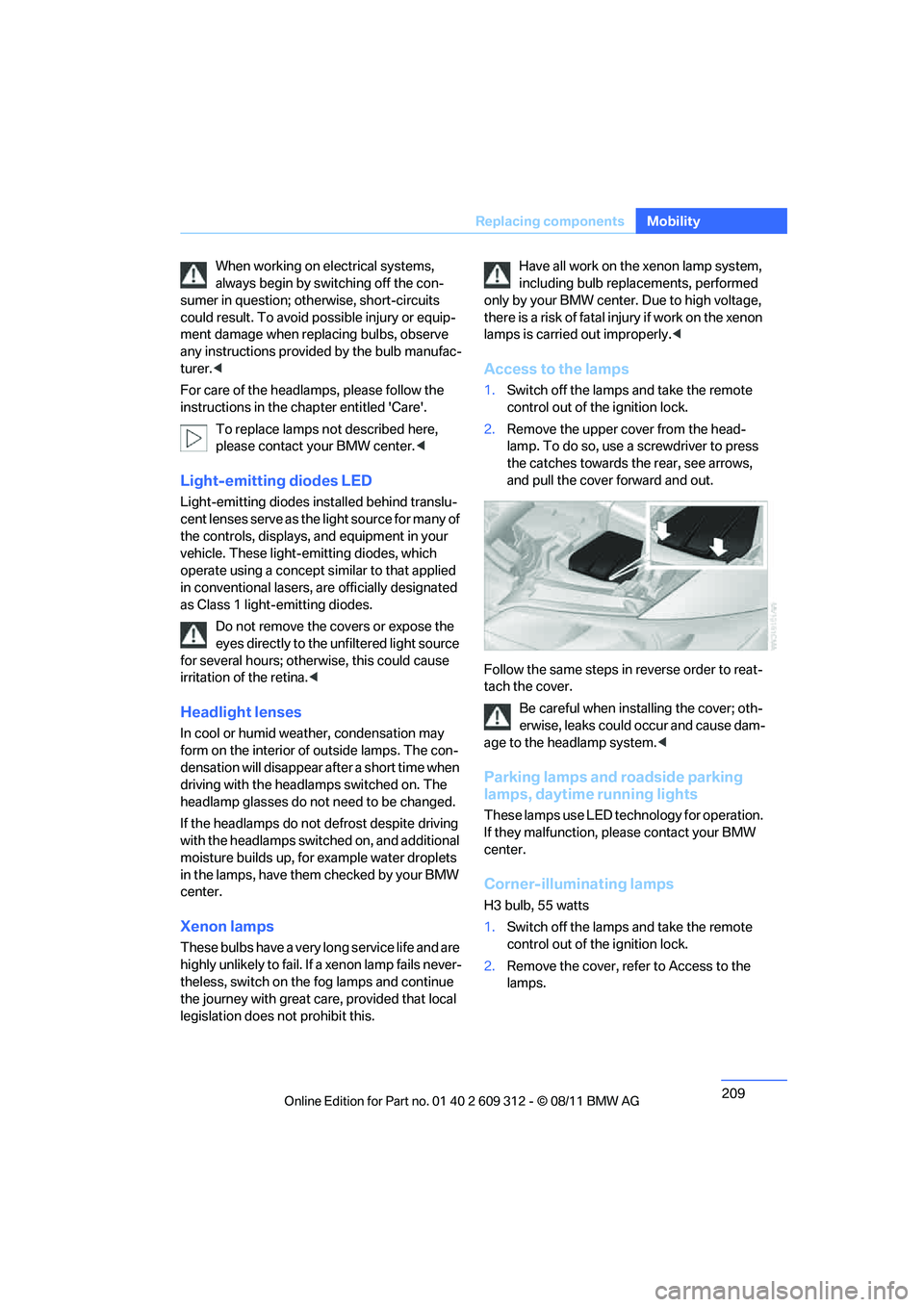
Access to the lamps
1.Switch off the lamps and take the remote
control out of the ignition lock.
2. Remove the upper co ver from the head-
lamp. To do so, use a screwdriver to press
the catches towards the rear, see arrows,
and pull the cover forward and out.
Follow the same steps in reverse order to reat-
tach the cover. Be careful when inst alling the cover; oth-
erwise, leaks could occur and cause dam-
age to the headlamp system.<
Parking lamps and roadside parking
lamps, daytime running lights
These lamps use LED technology for operation.
If they malfunction, please contact your BMW
center.
Corner-illuminating lamps
H3 bulb, 55 watts
1. Switch off the lamps and take the remote
control out of the ignition lock.
2. Remove the cover, re fer to Access to the
lamps.
Online Edition for Part no. 01 40 2 609 312 - \251 08/11 BMW AG